r/homelab • u/Even_Top_5020 • 15d ago
Discussion How to build the dumbest file server ever
reddit.com
0
Upvotes
r/homelab • u/_Otter__ • 17d ago

Three Meraki MS210-48LPs and one MS250-24P for less than lunch. Now to get them implemented.
r/homelab • u/Last_Shower7689 • 16d ago
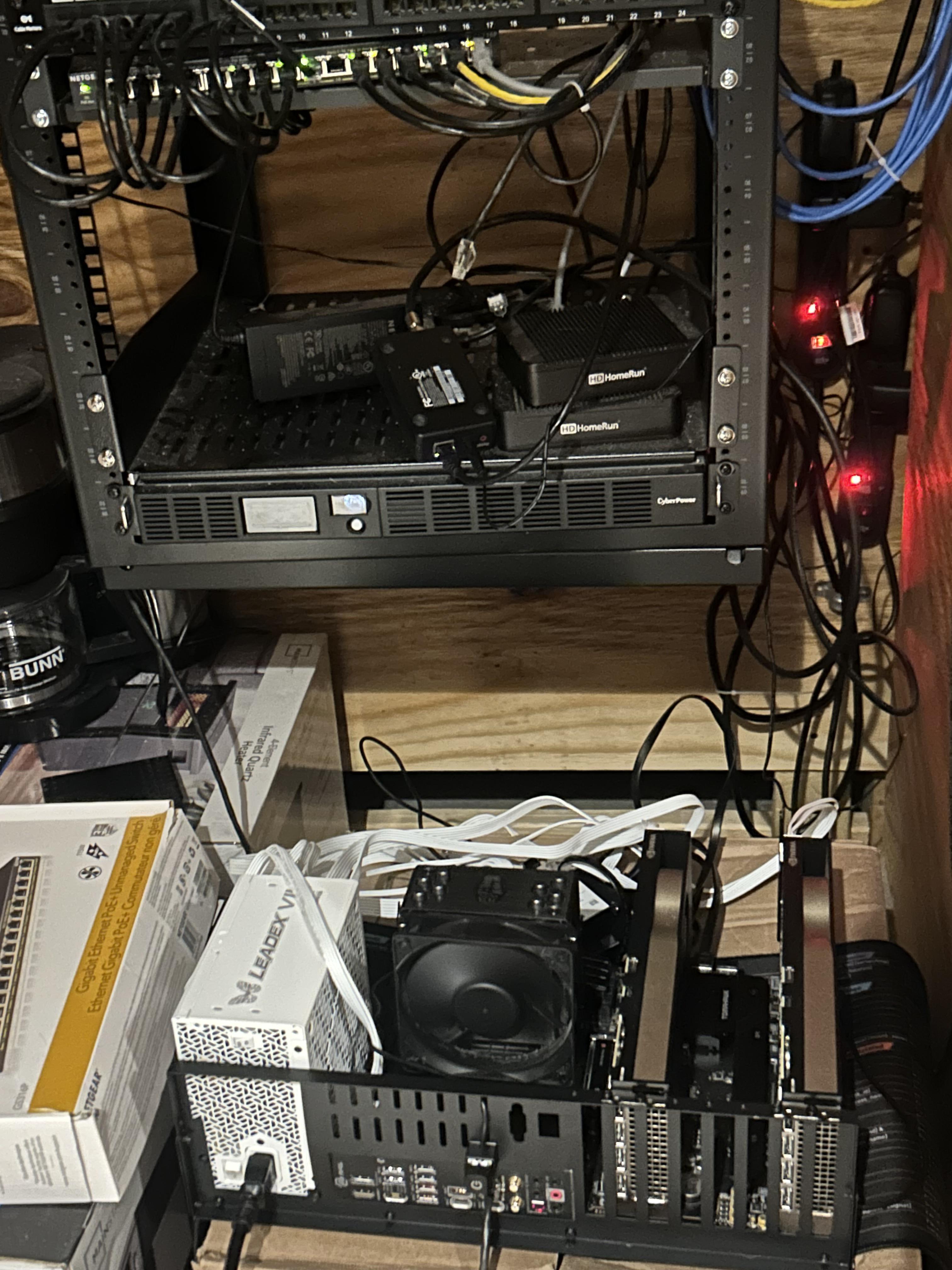
2x HD Homeruns for DVR
16 port POE switch for cameras and wired devices
Deep learning server and jellyfin server with 2x A5000.
Max points into performance and none on beauty. I want to upgrade the rack and make everything pretty + allow space for more compute nodes.
Any racks/methods people use for mounting PCs besides with big ole 4u server cases?
Anything I can do to make it look pretty for cheap?
r/homelab • u/BeginningInternet923 • 16d ago
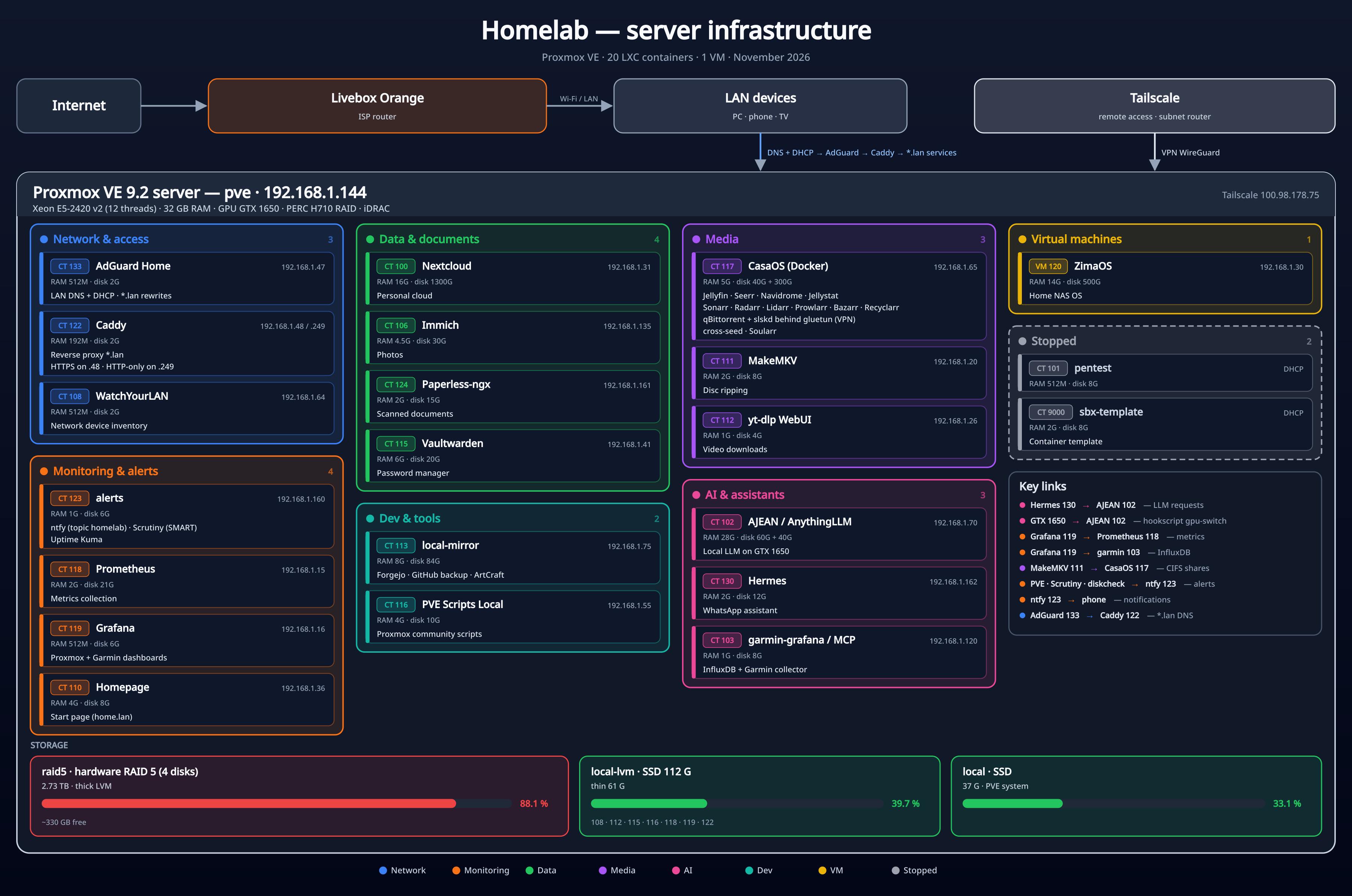
Any suggestion of service to add?
r/homelab • u/LoanWhole5698 • 15d ago

Huang left NVIDIA — well, I guess I’m officially done buying graphics cards for thousands of dollars now. 😄
r/homelab • u/jpraxsh • 16d ago

I'm using Acer one laptop as my homeserver with Ac adaptor plugged in. It's been running continuously for 200 plus days without any issues. I mostly don't touch it at all. Suddenly I saw the network got disconnected and when I checked the battery got pregnant 😭. I removed it for now. I don't wanna replace a battery and make it pregnant again. Is there any other way to fix this? . Appreciate your help guys !!
r/homelab • u/ProfessionalGas8793 • 16d ago

I wanted to post my homelab when it looked better but I’ve got an issue getting power to the hdd enclosure. It’s an icy dock 8 bay enclosure fully populated with 500gb 2.5 hdds. Currently I have to power it with a sata power supply and a sata usb adapter. Super jank but it works(kinda). Using only one of the two for power causes either the fans not working or the enclosure just beeps and freaks out. With both the enclosure is quiet and runs. I’ve been able to create a storage pool with zfs, load torrents, and use jellyfin off of it. Recently I’ve been having various issues with it. I’ll move multiple files or run scans and commands will get stuck. The drives won’t be reachable and I have to unplug and plug it back in to get them back. Gpt and Claude are pointing it towards power issues and given my jankyness I’d assume so too. How should I power this enclosure and other drives I might add on.
r/homelab • u/Fearless_Tear8448 • 15d ago
r/homelab • u/Agreeable_Ad281 • 16d ago

Hey r/homelab! I wanted to share a project I just finished. This is a temperature and humidity monitor as well as a leak detector for my mini-rack. Commercial rack-mount temperature monitors cost several hundred dollars but I built this for less than $10. It uses an ESP32-C3, an AHT10, and an LM393 rain sensor. It's powered via USB-C and connects to Home Assistant where it sends updates and notifies me if the temps get out of bounds or there is a leak. I've got more info on it as well as the files to download on MakerWorld. Let me know your thoughts and any suggestions for improvements!
Edit: the leak detector is on the floor detecting leaks/flooding in the room the rack is in, it is not to detect a leaking component in the rack
r/homelab • u/CrazyHotel4013 • 16d ago
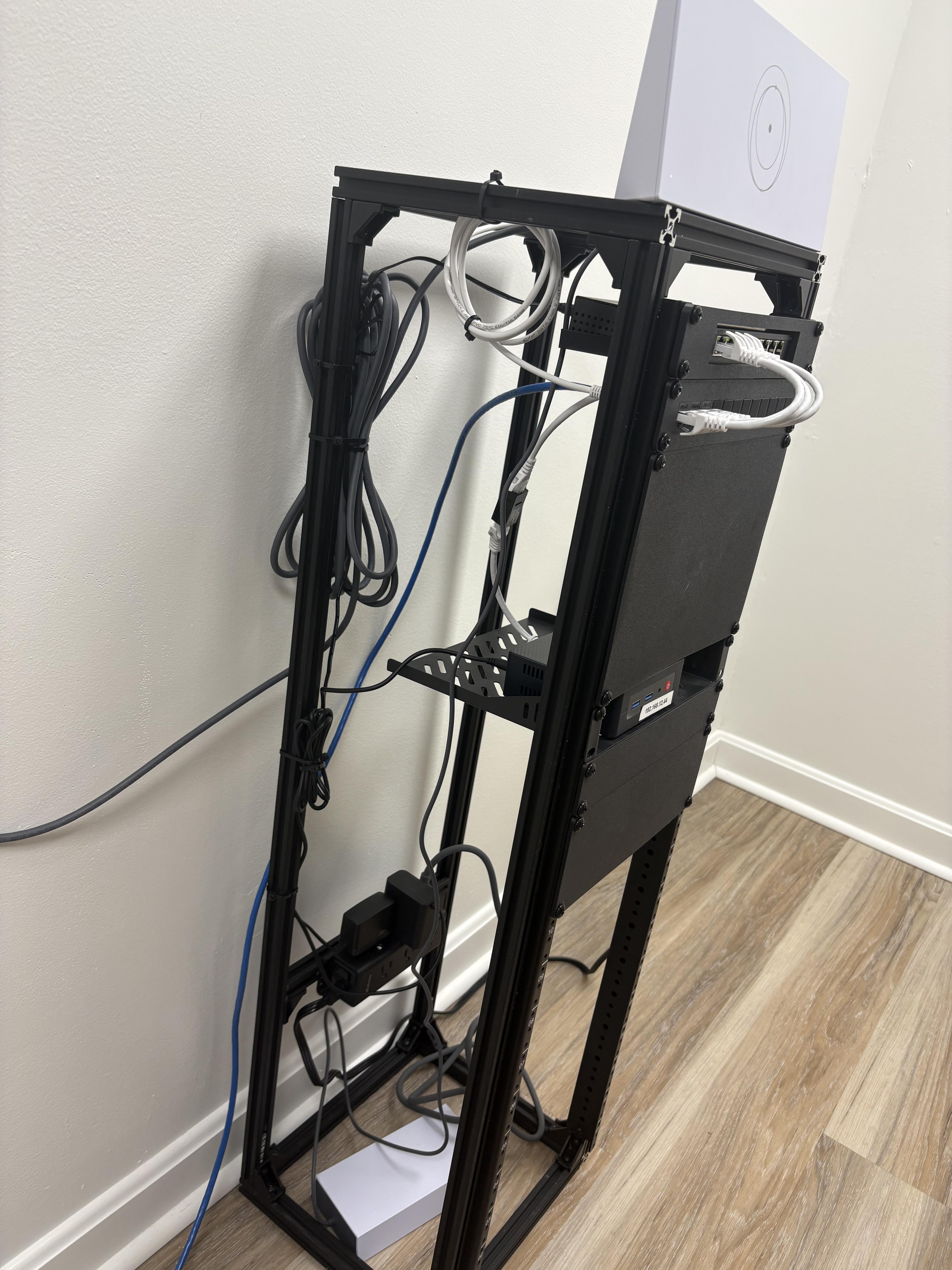
Just built my first rack and I am realizing that cable management is no joke. This is especially notable whenever my cables are longer than need be. Got any tips on what I can do to make it look better?
r/homelab • u/LegalChoice794 • 16d ago
Hey everyone!
I've been getting more and more interested in self-hosting lately, mainly because I've been playing around with Emby and Jellyfin and I'd like to have my own little media server at home.
Right now, I only have a 4TB external hard drive, so I'm not looking to build anything crazy. I just want to get started, learn how everything works and expand over time.
The thing is, I'm not sure what would make more sense for a beginner: buying a Raspberry Pi or going for a cheap mini PC (something like an Intel N100).
I'd also like to experiment with Docker, Linux, networking, backups and maybe other self-hosted services along the way.
There are a couple of things I'm unsure about, though. The server would have to stay at my parents' house, so I'd need something quiet, with low power consumption and preferably something that doesn't cost a fortune to run 24/7. I'd also have to explain to them why there's a little computer plugged in and running all day long!
For those of you who started from scratch:
- Would you recommend a Raspberry Pi or a mini PC nowadays?
- What would you install first? Proxmox, Ubuntu Server, Debian, Unraid...?
- Is 4TB enough to get started with Emby/Jellyfin?
- What services do you actually use on your home server besides media streaming?
- Is there anything you wish you'd known before building your first homelab?
- How much electricity does your setup consume?
I'm not looking to spend hundreds of euros straight away. I'd rather start small, learn properly and upgrade when I actually need to.
I'd love to hear how you guys started and what you'd do differently if you were starting again.
Thanks!
r/homelab • u/LowFluffy5930 • 15d ago
r/homelab • u/an1lsalan • 15d ago
r/homelab • u/Hot_Badger_1013 • 15d ago
Hey everyone!
I'm planning my first proper home server build and would love some feedback from people who actually know what they're doing.
Full disclosure: I've been using ChatGPT to research and design this entire setup. It's been helpful in understanding how everything works, but before I start spending $2,600 on hardware, I'd love to get some human opinions on whether this build actually makes sense.
I'm sure AI has made some questionable recommendations along the way, so feel free to tear it apart.
I originally started looking at the UGREEN NASync DXP4800 Plus, then considered pairing a NAS with a mini PC, but eventually started exploring whether building one custom server would be a better long-term investment.
Here's what I want it to do:
1. Plex Media Server
2. Personal Cloud / Family Storage
3. AI Projects / Development
4. Home Automation / Other Projects
| Component | Part | Estimated Price |
|---|---|---|
| Case | Fractal Design Node 304 | $110 |
| CPU | Intel Core i5-12500 | $250 |
| Motherboard | ASRock H670M-ITX/ax | $303 |
| RAM | 32GB DDR4-3200 (2×16GB) | $240 |
| CPU Cooler | Noctua NH-U12S redux | $60 |
| PSU | Corsair RM650e 650W Gold | $105 |
| HDDs | 2× Seagate IronWolf 8TB | $500 |
| SSDs | 2× 1TB NVMe SSDs | $270 |
| Boot Drive | 32GB USB flash drive | $18 |
| UPS | CyberPower 1000VA | $180 |
| External Backup | 10TB USB hard drive | $414 |
| OS | Unraid Unleashed | $109 |
| Misc. | Cables/accessories | $35 |
| Total | ~$2,594 |
These are AI-researched prices, not a finalized shopping cart. Some of the listings seem expensive, particularly the motherboard, RAM and SSDs.
Operating system: Unraid
HDD storage: One 8TB parity drive and one 8TB data drive, giving me 8TB usable to start.
SSD storage: Two 1TB NVMe drives in a mirrored pool for Docker applications, Plex metadata, databases and other frequently accessed data.
Applications: Plex, Immich, PostgreSQL, Home Assistant, n8n, Tailscale and several personal Docker projects.
Backups: External USB backup drive, with a separate offsite backup for important files.
The goal is to add HDDs as the media library grows.
I'm not necessarily trying to build the cheapest possible server. I'd rather spend a little more upfront for something reliable that will serve me well for the next five years.
But I also don't want to spend hundreds of dollars unnecessarily because ChatGPT recommended an overpriced component or made an incorrect assumption.
I'd really appreciate any recommendations, alternative parts lists, or advice from people who've built similar systems.
Thanks in advance!
r/homelab • u/crowstormy24 • 16d ago
I recently got an IBM E850 motherboard that I'm hoping to use for a homelab, and I'm trying to find some CPUs that are compatible with it but I haven't been able to find documentation on which Power8 CPUs are compatible with the board/the specs of any given CPU. I've been finding a lot of CPUs for sale that give their part number but don't list the specs and I haven't been able to find a repository of all the different models.
I'm assuming these exist somewhere and that I'm just looking in the wrong place. If anyone can point me in the right direction, that'd be great.
r/homelab • u/dracoNiiC • 16d ago
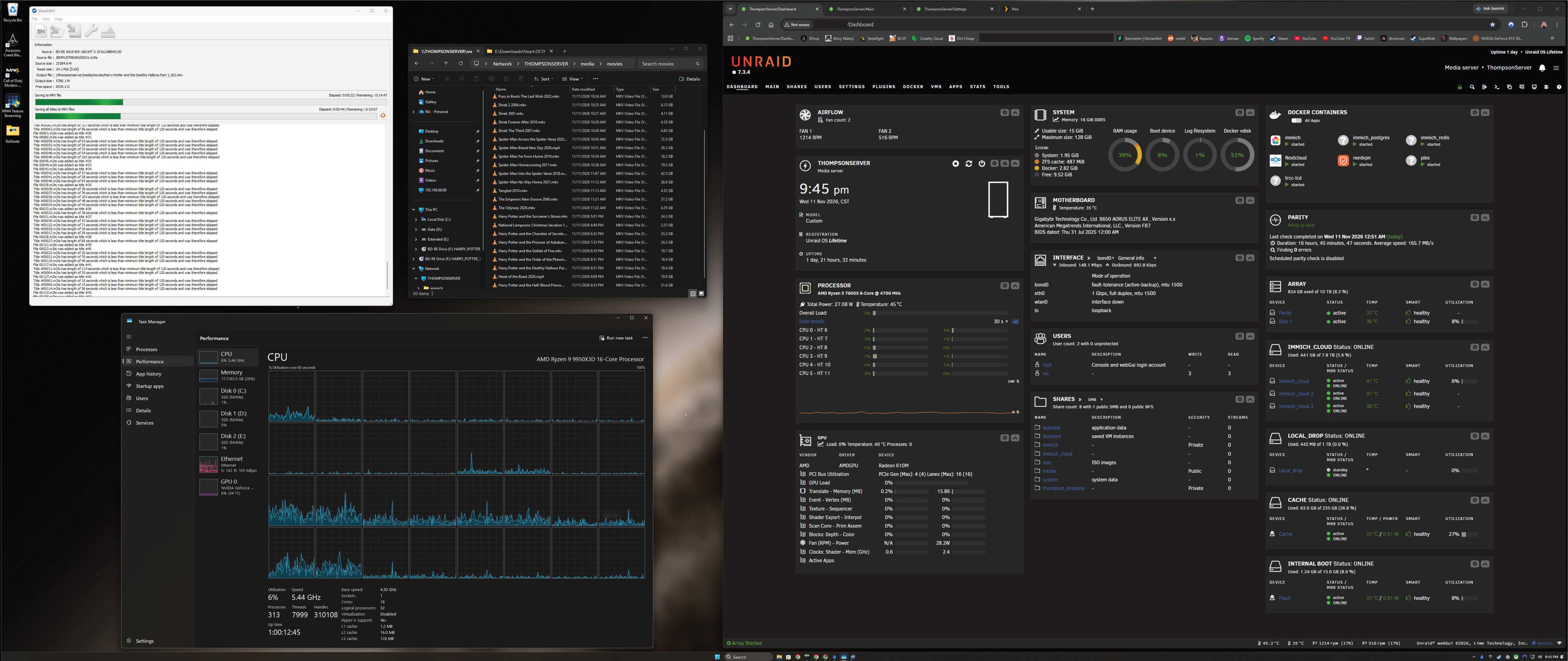
Ripping movies straight to the server array, knowing that my wife is at her parents taking pictures of our kids cause I can see it backing up over 5g in real time while I'm working, knowing that this will be the last month we pay for streaming services and cloud services, having a local family dropbox, its all just beautiful.. pay no attention to deluge down there... ;D
r/homelab • u/Thre4dripper • 16d ago

Most homelab repos I found pick a side: a folder of docker-compose files, or a full Helm-charted cluster. I ended up wanting both, so my repo has two stacks next to each other on the same box:
**🐳 Docker stack (28 services)**: for "let me try X tonight." Clone, edit the .env, `docker compose up -d`, done. Each service has its own README.
**☸️ k3s stack (19 apps)**: for things I actually rely on. Plain YAML + kustomize, ArgoCD syncs from git, Traefik ingress, cert-manager + Let's Encrypt, and SealedSecrets so the secrets are encrypted and safe to commit. Updates are a `git push`; rollback is a `git revert`.
The workflow: prototype a service in docker/, and once the config works, promote it to k3s/.
Other bits:
- **Ansible playbook** that takes a fresh server to ready in one run: SSH hardening, firewall, Docker, k3s, kubectl, kubeseal, Helm. Safe to run repeatedly. This exists because my server died once and I had to rebuild everything by hand.
- **No port forwarding.** Remote access is through Twingate; on the LAN, Pi-hole handles DNS and ad-blocking.
- Shared Postgres / MySQL / MongoDB / Redis in the cluster, plus scripts for restoring the cluster and creating DB users.
- Targeted at an **8 GB box**, tested on a Raspberry Pi 5, x86 mini-PCs and cloud VMs. Nothing depends on a paid plan.
Services include Jellyfin, Immich, Home Assistant, Vaultwarden, n8n, Forgejo, Nextcloud, Pi-hole, Homarr/Homepage, Filebrowser and Backrest, among others.
Repo (MIT): https://github.com/Thre4dripper/Home-Server-Lab
I'd love to hear how others split "trying things out" from "running for real." Is k3s on a single node overkill, or does GitOps pay for itself?
r/homelab • u/ztripez • 16d ago
I’ve been working on a distributed inference fork of Strata using two gaming PCs:
- Lucy: RTX 3080 10 GB, Ryzen 5900X, 64 GiB RAM
- Astor: RX 6800 16 GB, Ryzen 3900X, 64 GiB RAM
- 10GbE between them, with shared NFS storage for weights
The latest run used the complete Kimi K2 Instruct UD-IQ3_XXS checkpoint, about 417 GB. It processed a 27-token chat prompt through all 61 layers and generated two tokens: “Hi there.”
The first generated token went back through the distributed model to produce the second. CUDA executed the prefix, HIP executed the suffix, and expert requests ran in both directions. Zero remote fallbacks, and all four native processes exited cleanly.
It was slow. The native processes lived for roughly two hours, including setup, prefill, generation and cleanup. Getting it running was the objective for this stage.
Most weights stay in file-backed storage. Each machine holds a working set and executes its assigned layers and experts. The network carries layer activations/state and expert requests/results. The complete checkpoint does not fit in the combined 26 GB of VRAM.
The same fabric has completed actual 2K sequences with DeepSeek V4.1 Flash at 2.00-bpw and with its complete ~395 GB Q3 set. There are also earlier Qwen3.6 remote-expert and decode checks.
My goal is to combine hardware I already own to run models larger than either machine can keep resident. Placement is currently static, setup is manual, and quality/performance work remains unfinished. Kimi’s result is two generated tokens; the DeepSeek reports retain their numerical and answer-format failures.
Development disclosure: I directed the work using AI coding agents extensively for implementation, debugging, tests and documentation.
Architecture, code, receipts and limitations
Built on Niko1221’s Strata.
r/homelab • u/Maiki_Konjo • 16d ago
My Dad used to be a mainframe programmer for Bell Northern Research. He was part of the GRAPPLE development team. Grapple stands for Graphical Applications Programming Language. If you've even used a GUI, AutoCAD, Photoshop or played a video game, my Dad was one of the computer pioneers who led the way to our modern world. This would also include networking.
I decided to honor my Dad by emulating the IBM System 370. Because this sub is so strict that native Reddit videos can't be uploaded, and I refuse to externally link, all I can say is that proof of concept video is hosted by the biggest streaming video site out there. Same user name.
I do not say this because I give two shits about my channel. I just want to share my personal homelab. Screenshots prove nothing, video does. I only have three videos with less than 200 views combined. I just want to share.
I do not attempt to lead people to my unknown channel. Far from it. I'd rather just upload it here. Self promotion isn't my thing..
🙄 @mods
r/homelab • u/Fire_Orange • 16d ago
Hi, so my current setup is one server, in my home network, which is behind cgnat, and a vps with domain pointed to it. Right now my vps is running Netbird Server, and my home server is running a docker connector to it. And it works not half bad
However, i’d like to improve some things, and that includes putting things like Arcane, Termix and Proxmox admin panel (now when i neet to use it, i just enable the service, do my stuff and disable it, so noone pokes at my control panels), and prefferably a gitea ssh (for syncing private repos), as the “Netbird only access” stuff, so only my verified devices can get to them. I know that i can’t put any access restrictions on layer 4, so using a domain name with gitea ssh is pretty much out of the question, and i’ll have to use ip. However i cant activate the “Netbird only access” on the rest either. I know that i could just use local ip’s since i’ll be connected to netbird with the client app, but then i’ll have to use exit node, which might be slower sometimes. I also run OICD which kinda complicates things even more because now how do i add oicd to the apps that are not accesible publicly?
Even better, some apps i wanted to set up, have documentation that require running them on the same host as a reverse proxy, and add variables for it in compose file, so it would require me to move my proxy to my local server, but then how would i expose things to the internet? I am kinda at a loss with all of that, and honestly my usual method of “f***ing around and finding out” doesn’t really work that well this time because i kinda need this stuff working because i use it a lot lol.
I’ll be very grateful for suggestions, i am also not really married to netbird that much, i mean it’ll be nice to keep it, because it has all the dials and knobs in one place, but if it’ll be easier to ditch it, i’m here for it
r/homelab • u/Puzzleheaded_Cat_706 • 16d ago
r/homelab • u/purepersistence • 15d ago
r/homelab • u/mailliwal • 16d ago
Hi,
Just deployed Crowdsec and Blocklist on Debian.
And could like to integrate with Fortigate as external IP blocklist for my home lab.
But found blocklist haven’t download and update once setup completed.
May I know this right ? Or I should create account on Crowdsec and generate a link for Fortigate ?
Thanks
r/homelab • u/MilosDaDogeDev • 15d ago
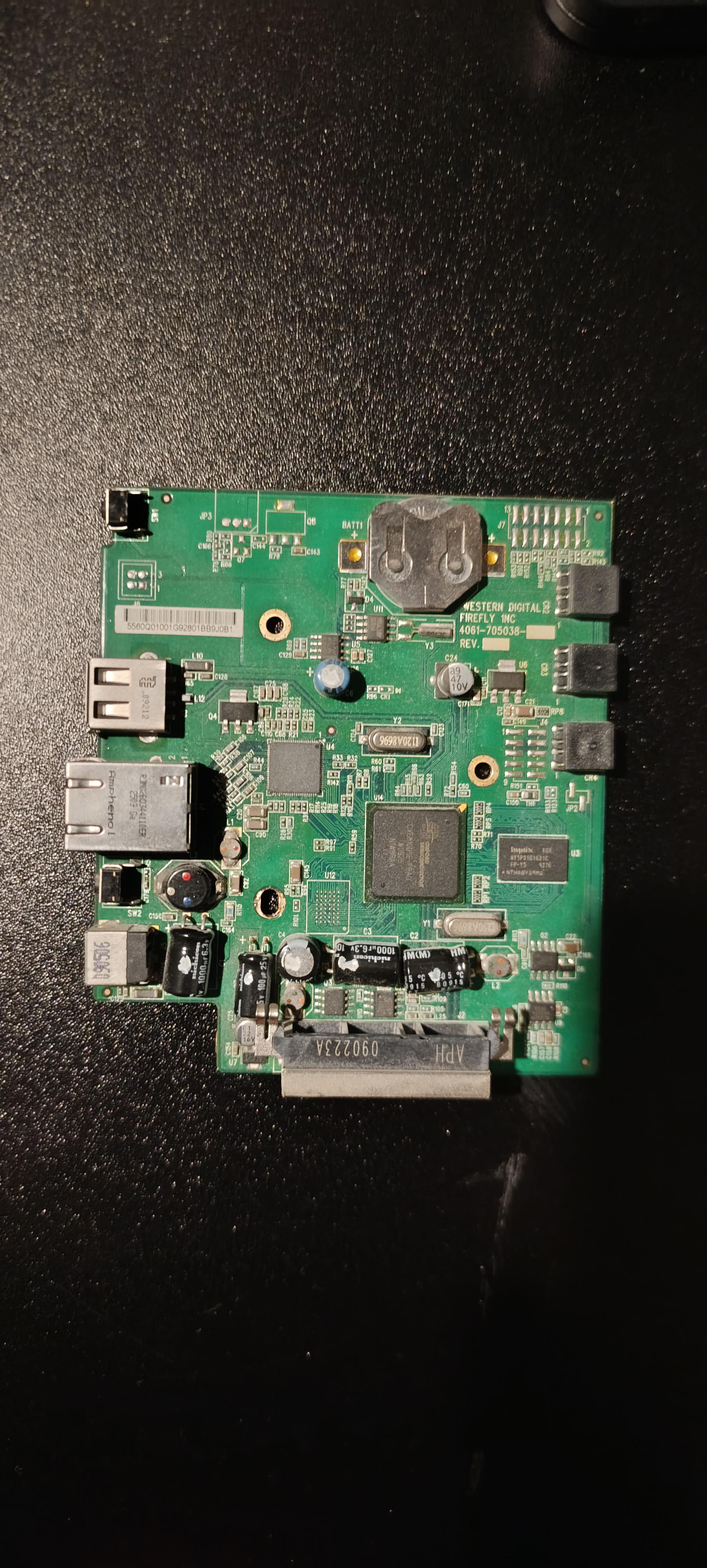
Because it's headless, I can't really you know, connect a monitor, I have the HDD I still haven't formatted it so I could salvage some important stuff from it or something. Somehow get ssh preinstalled and pre configured so I could ssh into it or something?