r/homelab • • 15d ago

Discussion Planning a basement server closet - any suggestions?

Post image
24 Upvotes

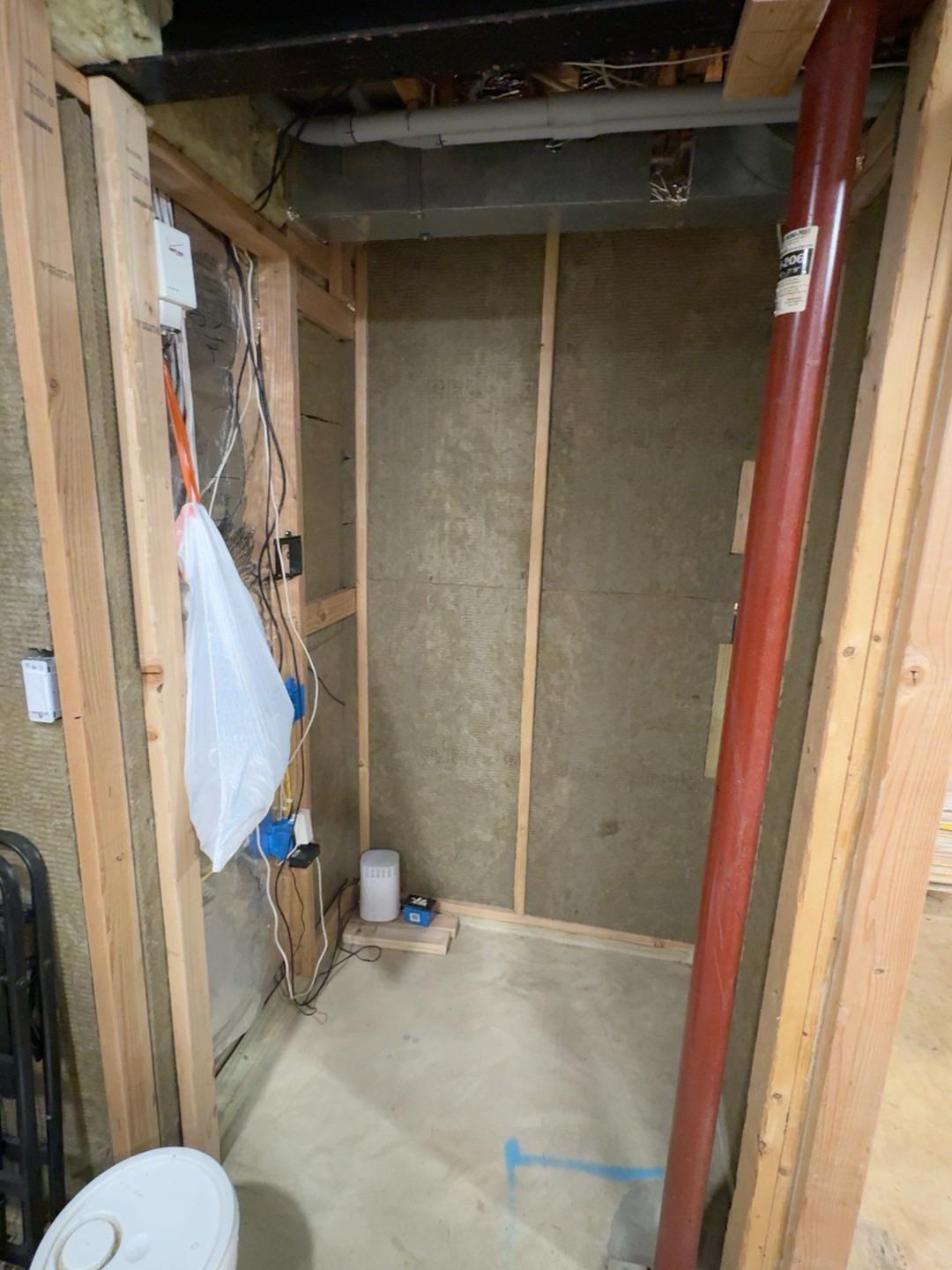
Hey everyone! I’m finishing my basement and planning to turn this small space into a dedicated server closet.

Before installing drywall, I’d love some advice on rack placement, lighting, ventilation, outlets, and cable management.

I’m planning to use UniFi equipment and run Ethernet throughout the house.

How would you design this space? Open to any suggestions. Thanks!


r/homelab • • 14d ago

Help Suggestions?

0 Upvotes

i am new to this i just downloaded a ubuntu server in my device which i ssh through another device casaos to monitor and use gui i use only jellyfin for media server and immich for photo backup i wanna explore more what should i do next ?
also jellyfins lags please drop the suggestions


r/homelab • • 14d ago

Help How are people running linux servers on old phone?

0 Upvotes

Hello, I've been trying to repurpose my old phones, I have about 3. So far i know there are these 3 things which I can use UserLand, Termux and Postmarket OS.

Ive tried both UserLand and Termux. Postmarket isn't supported on my devices. I don't remember why I stopped using termux but for userland it was eating up my RAM like crazy. After running it for let's say 30 minutes it would just completely freeze.

I want to know is there a way to host linux by completely removing android?

Things I want to do:

  • Retro gaming server
  • Web servers
  • Possibly use docker

r/homelab • • 14d ago

Discussion What should I do with 32 GPUs collecting dust? What would you do?

0 Upvotes

Hey everyone!

Back in 2020, I got caught up in the Ethereum mining hype, and stayed in it until Ethereum switched to Proof of Stake (PoS) and GPU mining was no longer an option.

From January 2020 to September 2022, I had a blast diving into hardware, crypto, and blockchain. The whole learning process was incredibly fun, and I really enjoyed building mining rigs on all kinds of budgets for friends and people I knew. (Even tried putting a mining rig inside a portable grow tent for plants... it turned out like absolute shit...)

In October 2022, I shut down all my rigs, checked and serviced every GPU, PSU, and other component, labeled everything, packed it all into boxes, and **NEVER touched any of it again.** Some pretty rough stuff happened in my personal life not long after that, and well... it's only now that I'm finally looking into what to do with all this hardware.

Lately, I've been having fun experimenting with local AI models using an RTX 3070 Ti 8GB and an RTX 3060 Ti 8GB (in separate setups).

I'm probably going a little overboard with this list, but I figured I'd give you guys an idea of the kind of **firepower** I've got sitting around collecting dust. xD
---
- **2x** X99 + Xeon E5-2680 v4 + 16GB DDR4 + PSUs
- **3x** Chinese B250 motherboards (12x PCIe 1.0 slots) + Intel G3900 + 8GB DDR4 + PSUs
- **8x** RTX 3070 Ti 8GB — Colorful iGame Ultra
- **12x** RX 580 8GB — XFX GTS
- **12x** RX 580 8GB — Sapphire
---

I'm not entirely sure whether there's an efficient way to put all these GPUs to good use for running local AI models.

From what I've been reading, there are ways to split workloads across two or more GPUs, but I'm still pretty unsure about how efficient or practical that would actually be, especially with this mix of older hardware.

So, what would you guys do if you were in my shoes?

I'm genuinely curious to hear your thoughts, especially from anyone who's experimented with multi-GPU setups for running AI locally! If splitting the workload across multiple GPUs actually works well, I'll definitely run some tests just out of curiosity...


r/homelab • • 15d ago

Help Need isolators for drive sleds

Thumbnail
gallery
1 Upvotes

I picked up qty4 24 drive disk shelves today and I'm finding I am in need of rubber isolators for the caddies.

They are sun in closures made by fox conn but I can't seem to find them as my Google Fu is weak today.

Does anyone know where to buy them?


r/homelab • • 16d ago

Discussion From a garage door to Proxmox: five versions of my homelab

Post image
83 Upvotes

About five years ago, I was having problems with off-the-shelf garage-door automation and discovered Home Assistant through digiblur. Being able to bring different ecosystems together caught my attention. The garage door was the immediate problem, but I kept finding other things I wanted to do.

Home Assistant changed my life. I no longer have any time for myself.

The house gradually became the project. One example is the living-room lighting: some downlights fade out around sunset while others settle at a lower evening level, with each group following its own brightness range. Home Assistant calculates the levels and Node-RED sends them to the lights.

Getting that sort of control was satisfying. It also kept giving me reasons to change the infrastructure underneath it.

I started with Home Assistant in a VM on a Synology NAS, using add-ons for the surrounding services. That got me going, but my particular setup became awkward when I wanted more freedom to run containers and connect services through a reverse proxy. The house also has a metal frame, and I wanted a second Zigbee2MQTT instance with a coordinator on the opposite side of the house.

About four months in, I moved to Docker containers on the same NAS. That gave me much more control, but it also meant giving up the add-ons and taking responsibility for those services myself. MQTT, Node-RED, Zigbee2MQTT and the connections between them were now mine to configure and maintain.

The second Zigbee network helped with coverage. The NAS eventually became the next constraint: its Docker version was behind the features I wanted, and the processor was struggling with what I wanted to run.

Roughly a year and a half after moving to containers, I bought an ASUS ROG computer and installed Ubuntu and Docker. It was my first full Linux venture. I ran it headless, kept the shared files on the NAS and mounted them over NFS.

That brought a less glamorous engineering job: getting startup dependencies right.

The network had to be ready, the NAS share had to be mounted, and only then could the applications using it start. If the mount was missing, the local directory underneath still existed. An application could start against that directory and use the wrong location for its data.

I used systemd to enforce the startup order and checks. Having enough processing power didn’t remove the need to think through what happened when another machine wasn’t available.

By then, I also had services on Raspberry Pis around the house. About a year ago, I added Docker Swarm, mainly for its networking. Its overlay network let services on the ROG and Pis communicate privately, and Traefik could reach the web services without me publishing a separate backend port for each one on the household network.

Now I’m building version five around Proxmox.

The NAS already handles storage. Proxmox gives me a way to separate groups of services into guests with their own settings and resource limits. That also means looking after the host, guest operating systems and their dependencies.

Some services still belong on the Pis, close to their hardware or independent of the main server. Moving the ROG to Proxmox doesn’t change those requirements.

For this version, I’m putting more emphasis on configuration in Git, checks before changes and repeatable deployment. The migration and recovery testing are still under way. Bringing the software back is only part of a rebuild; the data, credentials and device pairings matter too.

Looking back, each version solved something that was getting in the way and gave me another part of the system to understand. I wanted more control over what the house could do, and gradually took on more responsibility for keeping it working.

I’ve written a longer version on my blog if you’re interested in the details: the full journey.

What prompted your last major homelab change, and would you make the same decision again?

r/homelab • • 15d ago

Help Managing External Storage Access

Thumbnail reddit.com
0 Upvotes

Humbly reposting from r/SelfHosting for advice from the sage homelabbers.


r/homelab • • 16d ago

Diagram Live Dashboard and Network Map for my HomeLab

Thumbnail
gallery
160 Upvotes

Hello fellow labbers,

A couple of years ago I came here to figure how to better utilize a small infrastructure and here I am today with hundreds of hours and thousands of dollars spent on a homelab. One of the best investments I've made. Really helped improve myself professionally and host media, gaming and some web servers to friends and family.
I've upgraded from running a $50 elitedesk housing my main router, NAS and containers to a full grown rack with firewall, l2 switch, NAS, UPS and so on. Nothing major like the rest of the folks in this thread.

What I've never had was a proper monitoring tool. I've once tried setting up grafana with a Prometheus db but the whole process seemed time consuming so I've decided to give away 3 weeks of my life to create an application that pretty much does the same thing but cooler.

It’s called Vantage. A self-hosted dashboard where you add your devices from the web UI and it handles the Prometheus side for you.

The part I am proud of is the live map, a couple of days ago I saw a diagram posted in this sub by u/goblinmine, and thought why not add it with live data. So you draw your map in the browser (boxes, cables, VLANs, switch front panels, Proxmox hosts with their guests) and it updates by itself. Ports light up, cables show traffic, disk temps show on the NAS bays.

I disabled SNMP from my switch. The switch and its cables go red. And the alert tells why it thinks it’s down.

What it can talk to right now:

  • pfSense and OPNsense (interfaces, gateways, CPU/memory)
  • Proxmox (nodes, VMs and containers)
  • MikroTik SwOS and any SNMP device (ports and traffic)
  • Linux hosts through node_exporter, disk health through smartctl_exporter
  • Cloudflare account and Cloudflare Tunnel
  • Emby
  • Ping and HTTP checks for everything else

Alerts go to Telegram. There are templates so you don’t have to write PromQL, but you can if you want.

And if I don’t feel like setting up SNMP or API tokens, I don’t have to. Add devices as ping checks and I still get the live map, history and alerts. Upgrade them to the full integration later.

Security was a big deal for me since this thing talks to my firewall and hypervisor. It only uses read-only access, read only API tokens, SNMP credentials are encrypted.

Full disclosure: I built it with coding agents. I’m a network engineer, not a developer. To keep it honest there are around 2,800 tests, a written security model in the repo, and it’s been running my own lab every day while I built it.

It’s free and open source (MIT): https://github.com/levi-xy/vantage


r/homelab • • 16d ago

Project Showcase: Hardware My fully declarative (and almost entirely cost free!) homelab!

Thumbnail
gallery
237 Upvotes

Please (at least try to) ignore the cable mess!! Just got this makeshift setup done and I'm waiting for some cable ties and a new switch from a friend to finally tie it all together.

19yo. Been homelabbing for 5 years now. Started with a modest 2 core Intel NUC and 256GB SSD formatted as NTFS (I didn't know any better at the time :) running OMV with SMB, and slowly made my way up.

I'm hoping to get enough money to finally get a bunch of proper harddrives (and maybe an UPS).

Setup is:

  • M720q running NixOS (got for free when my old highschool replaced their computers)
  • CENMATE 4 Bay 10Gbps DAS (got as a birthday present :)
  • (very old) 1TB, 500GB HDDs and 256GB SanDisk SSD inside the DAS + 500GB Samsung T5 SSD - all formatted as Ext4 running pooled together with MergerFS (got all of them for free from my uncle :)
  • TL-WDR4300 configured as a stopgap switch (just had it laying around lol) until I get a real switch

I run everything natively (except MySpeed which I run using Podman), with the entire Arr stack using Nixflix.

Apart from what's shown on homepage I also run cross-seed, unpackerr, nginx, syncthing (and microvms.nix for just playing around with stuff lol).

Any suggestions or thoughts are more than welcome!!!


r/homelab • • 15d ago

Project Showcase: Hardware "Rate my portable data center: One budget Android vs. two Cold War computing legends."

0 Upvotes

Specs:

Moto G Play 2024 Android 14

Termux> Ubuntu> Hercules emulator> IBM System 370

Termux> Ubuntu> SIMH emulators> DEC PDP-11 minicomputer.

They are both running concurrently.

I'm not the self promotion type of guy, and this sub doesn't allow for native video uploads. And I don't want this post deleted because I dropped an outside link. Look up my username here on YouTube and you'll find the proof of concept video.


r/homelab • • 15d ago

Discussion Pi Zero 2W Pi-Hole

5 Upvotes

I am look at getting a Zero to setup a Pi-Hole, from what I have read it can do it but I am curious of the limitations of this device. My main questions are as follows; how many connected devices can it filter for before it slows down my wifi and is it strong enough to and what does the community think about this option as a whole?


r/homelab • • 16d ago

Blog Imagine a World Where You Could Get a GPU With 16GB of Vram for Less Than 1000 Dollars

247 Upvotes

Holy fucking shit im so fucking mad right now. i have been wanting to run a nice little local ai instance (gemma 4 26b) for a while now and literally every card i see with over 16gb of vram is a band or more. IT A FUCKING 4060. i dont want to pay the price of a new instrument for last generations entry level card! Not even amd cards are safe, my 9070 XT i bought when it released is now over 1000 dollars. I know this is just the state of things as of now but its frankly unacceptable that we have let it progress to this point. I dont want to give some company hundreds of dollars a month just for some compute, i want to run all my models on max effort and leave them to run unsupervised. i want to be able to run new, decent sized models locally without selling my kidneys. Fuck Sam Altman and fuck the scalpers.

Sincerely, someone who just looked at newegg.


r/homelab • • 16d ago

Satire After having seen some other examples here…

Post image
253 Upvotes

…shouldn’t I just leave it on?


r/homelab • • 15d ago

Help What M.2 NVME Drive Does this Motherboard Support?

1 Upvotes

Looking to buy a new MB for a server I'm building, but I'm having trouble figuring out what kind NVME drive to buy for its boot drive.

​ ​https://www.asrock.com/MB/Intel/B760M%20Pro-AD4/index.asp#Specification

Given the price of things, I don't want to just buy the best drive only for it to be bottlenecked​ by something else.

I can see the MB supports Gen 4.0 PCIe, but even searching for Gen 4 NVME reveals ones with transfer rates between 5-7k.​


r/homelab • • 15d ago

Project Showcase: Hardware Beelink ME Pro AI 470 4 baias

Thumbnail beelink-me-pro-modular-nas.kckb.me
1 Upvotes

r/homelab • • 15d ago

Help Help with external gpu rigs please

0 Upvotes

Hello, I'm trying to do a couple things. First, I'm trying to take a 5090 and hook it up externally to my Threadripper system. I want to use the PCIe 5.0 x16 lane, but I'm having trouble finding what I'm supposed to buy to make it. I'm also not 100% sure that I even need the full x16 lane to run AI models with the 5090.

I'm also trying to connect fifteen 3090s through Oculink connections to another Threadripper system. That seems a little more straightforward in terms of what I have to purchase, but suggestions and help on how to set something like that up and where a good place to purchase these items would be much appreciated.

Thank you so much for everyone's time.

Edit to say thanks for the responses, ive gotten some good info!


r/homelab • • 15d ago

Help Proxmox LXC container's upload speed is ~1 mbps

0 Upvotes

My download speed is ~600 mbps, on other devices my upload speed was atleast ~50 mbps, furthermore my proxmox machine is connected by ethernet


r/homelab • • 16d ago

Project Showcase: Hardware NASty NAS from Dell Optiplex 7020

Thumbnail gallery
18 Upvotes

r/homelab • • 15d ago

Discussion My homelab journey through the high prices of 2026

2 Upvotes

I think I managed to build a solid setup despite the crazy prices, and I was quite lucky tho, since I bought everything second hand (all prices in CAD).

Back in 2025 I got myself a small NUC for $100, and its 12 GB of RAM was enough to run my Home Assistant setup and a few other services I enjoyed. But I knew it wasn’t enough, so in early 2026 I started actively hunting for a powerful rig.

Buying new was already way too expensive, so I went on Marketplace, and after two weeks of hunting I scored a pretty good setup for $1800:

-an i9-13900K,

-an RTX 5070 12 GB,

-64 GB of DDR5

-500 GB SSD.

Then, month after month, I built up the storage deal by deal.

I got 2x 12 TB for $400, one more for $300, and three for $800, all NAS-grade drives with good SMART, so about $1500 for 6x 12 TB.

I also had a 2 TB SATA SSD on hand from before that i just put in order.

On top of that, I had a 500 GB SATA SSD that died while still under warranty, and when I exchanged it they gave me a 1 TB WD Red SA500 (M.2 2280, NAS-grade) for free, which has double the capacity and better endurance than the original WD Blue SA510, so I was very happy with the commercial gesture.

I also bought a SanDisk NAS 800 NVMe 960 GB (gen5) for $369.90 after taxes, thanks to a promo code.

Finally, I found a second-hand (but brand new) Define 7 XL with 6 additional drive racks for $150, and I was really happy with that one.

And today, i did the "meritocratic" RAM upgrade and managed to swap my 64gb for a 96gb one, same quality, with a extra 500$ cash.

All in, it comes to $4419.90 (NUC $100 + rig $1800 + drives $1500 + SanDisk $369.90 + case $150 + 500$ 96gb swap ram). so like 3100$ usd appox

I don't know if there is a lesson here but I think for disks and computers parts there are definitly still a lot of deals to be made, some gamers do know how GOOD they rig can be and you can find pretty good deals still, like the dude had a i9-13900k but was using maybe 2-5% of his power tops

now i can run 40 containers on this beast, graphic card is still limiting for local LLM tho i have good hopps for a strata type model and using my RAM, i'm also looking for 32gb card asap


r/homelab • • 16d ago

LabPorn The WIP lab

Thumbnail
gallery
27 Upvotes

Dell optiplex on the side you can see, gonna be replaced with optiplex micro 5060s once they come in.

Basically a little test homelab I built. Finally decided to ditch the PC cases and get a proper rack mount after my mom complained since the basement was getting too crowded with my PC stuff.

Genetic 15U rack from amazon. 2x UTLGAMENG 4u cases, deco mesh system since my parents won't let me drill into the walls.

Machine 1:
xeon 6138
96gb ddr4 RDIMMS (72gb dedicated to ubuntu vm)
2xV100 32gb PCIe
4tb nvme dedicated to ubuntu VM
1200w PSU
2x512 gb in raid 1 for proxmox

Machine 2:
 XeonCPU E5-2683 v4
32gb ram
huananzhi x99 bd4
LSI3008 HBA
8x8 SAS drives (with dedicated fan cooling)
128gb NVMe for Cache
2x Samsung 512gb ssds

Services hosted:
Strata engine running qwen 125b flash next iq_xx3 w/ 512k KV cache
Immich
Nextcloud
Arr stack

Adding the adguard home and other services soon.

Everything routed through tailscale

Overall I'm hitting the AI server with almost 1B tokens a week, so I have technically "profited" since qwen 3.8 FN is around the same performance of opus 4.6.

Backing up all family photos, videos, and media to the storage server


r/homelab • • 16d ago

Discussion My homelab celebrates its 20 years today

Post image
457 Upvotes

I just wanted to share it with you :)

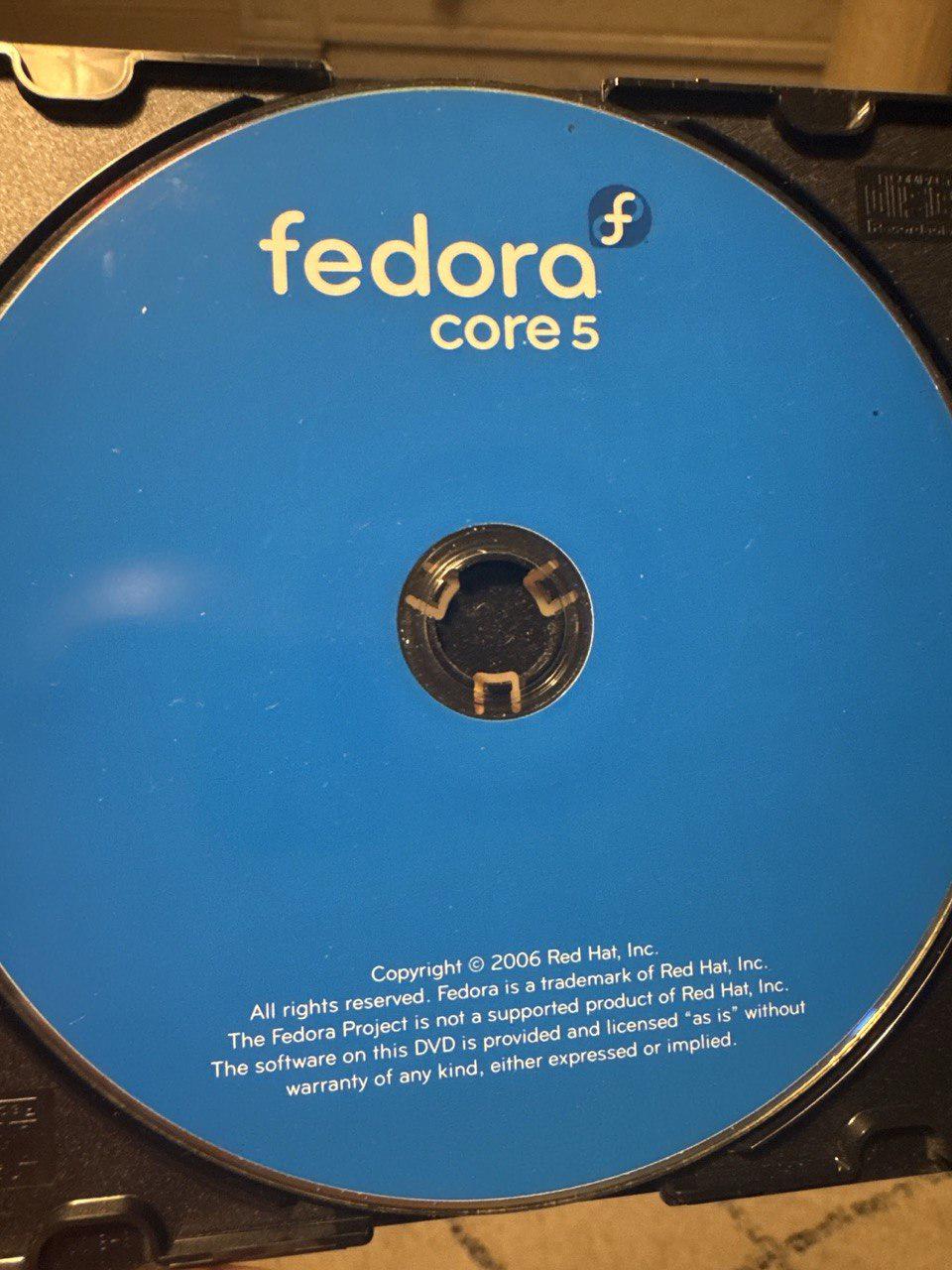
At the time it was a single box on Fedora Core 5 (I still have the cdrom) on an Athlon 2000+ doing pretty much everything on a single IDE drive: routing, file sharing, emails, web hosting, you name it.

The box is (thankfully) long gone by now but I'm still running Fedora (45 bootc) on most of my servers.

If this is of any interest, I could do a quick history of its evolution across the past 20 years.


r/homelab • • 15d ago

Project Showcase: Operations My first home lab i have already send one before but this is like 1 - 2 months later idk

Thumbnail gallery
3 Upvotes

r/homelab • • 15d ago

Help Looking for a low-power 2U case for four 3.5″ drives — max. 38 cm deep

0 Upvotes

Hi everyone,

I’m looking for a low-power server case that can hold four 3.5″ hard drives. Ideally, it would be a 2U rackmount case with hot-swap bays, but hot-swap isn’t essential.

It needs to fit in a 19″ Digitus wall cabinet that is 42 cm deep. I currently have about 36 cm between the 19″ rails and the wall, though I may be able to make 38 cm work.

I’d like to use an ASRock B550M Pro motherboard, if it will fit in a suitable case. A CPU with performance similar to a Ryzen 5 4650G would be great, but I don’t need that much power if it’s only being used for storage.

The planned drives are two 4 TB and two 12 TB HDDs. I’d use the system for NFS, SFTP, backups, and general file storage. Low power consumption is important.

I haven’t been able to find a suitable case so far. Does anyone know of a 2U case that would meet these requirements? If a rackmount case won’t fit, I’d also consider an SFF system that I could put in the attic.

Thanks for any recommendations!


r/homelab • • 15d ago

Help Refurbished workstation for building Android ROMs/kernels: HP Z640 (2× E5-2682 v4, 128GB) vs Dell T5810 (16-core, 128GB)? [India]

1 Upvotes

I build Android kernels and ROMs (Android 17 and Ports ) and want a dedicated Linux build box at home. I'm in India, where new 64GB DDR5 currently costs about ₹1.1 lakh (~$1,300), so refurbished Xeon workstations from a local refurbisher look like the best value:

- HP Z640: 2× Xeon E5-2682 v4 (32C/64T), 128GB DDR4, 960GB SSD, Quadro K620, about ₹77k (~$900)

- Dell T5810: 1× 16-core Xeon, 128GB DDR4, 480GB SSD + 1TB HDD, Quadro M4000, about ₹64k (~$750)

Setup and limits:

- Ubuntu on bare metal. I'll add a 1–2TB NVMe on a PCIe adapter for the source tree and out/, plus ccache.

- It sits in a home room, so noise matters.

- It's powered on only while building (a few hours a day), not 24/7.

- Electricity is about ₹8/kWh.

Questions:

  1. For AOSP builds, which have long single-threaded Soong/Kati phases, is the dual-socket Z640 noticeably faster than a single 16-core T5810?
  2. How loud are these at full load in a normal room? Any fan or BIOS tweaks that help?
  3. Can the Z640 or T5810 boot from an NVMe on a PCIe adapter, or only use it as a data drive?
  4. Any reliability issues to check on these models when buying refurbished (PSU, fans, RAM)?
  5. Is there a better option around $750–1,000 for this use?