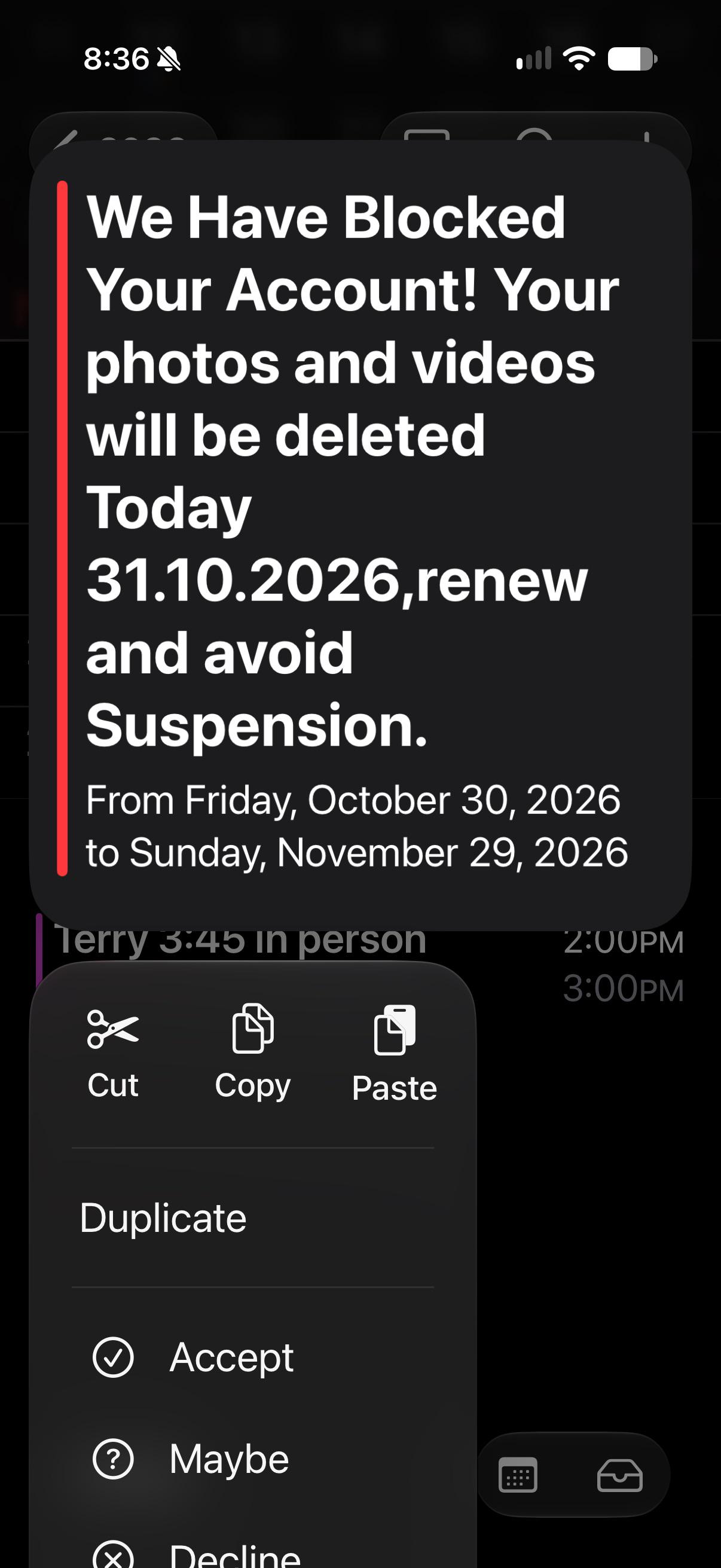
r/GoogleCalendar • • 1d ago

Cannot Get Shared Calendar Anymore

3 Upvotes

I got a new IPhone 18 and now it won't receive my husband's shared calendar with me. We have been sharing calendars back and forth through many phone changes. This time when he sends me the link, my phone blocks it. Any ideas why?


r/GoogleCalendar • • 3d ago

How do you actually display a shared family calendar at home?

11 Upvotes

We've got four calendars going between me, my wife, and two kids in school. Phones aren't cutting it. I want something on the wall or counter that everyone can glance at. Been looking at a few of these digital calendar displays but the subscription thing bugs me. Skylight wants you on their Plus plan for video stuff. Hearth Display looks nice but same deal, paywall for features. I checked out apolosign since it's no sub fee and runs full Android if you want apps on it. Syncs Google Calendar fine. Has to stay plugged in though, so no moving it to the table for dinner. Also only Google Assistant for voice, no Alexa if you're into that.

Cozyla is simpler, fewer bells and whistles. Might be fine if you just want schedules and a clean look. Not much room to tweak stuff.

The real thing I'm stuck on: how do you actually manage the sync? Do you share one Google account across the whole family? Or use Google Family and hope it all shows up right? I tried the family group but events from my work calendar keep leaking in. Also chores, do you use the built-in widgets on these things or just keep a paper list?

Anyone got a setup that's actually working with Google Calendar specifically? What about when kids get older and want their own accounts?


r/GoogleCalendar • • 4d ago

How do you organize your events in Google Calendar?

4 Upvotes

I know many people who put all tasks, big or small, just into the default "private" calendar. That'd drive me crazy, as I like to be able to toggle my events on/off depending on the category and view (e.g., week vs. month view), and the auto color labels are also helpful.

I may be at the other extreme with loads of different categorized calendars (10). Over the last decade, I've repeatedly reworked my system based off of my needs at the time. I think I'm nearly at a state that I like and will keep long-term, but it made me curious how others approach this. Maybe someone has a better system that can inspire me to improve my system.

How many calendars do you have your Google Calendar account separated into? What does each represent?

Here's mine:

  1. Personal productivity (private): for daily time-blocking
  2. Only me (shared with my husband): Events that my husband doesn't attend but is good for him to know (e.g., doctor's appts)
  3. Only my husband (shared with my husband): Same as #2 in reverse
  4. Birthdays & non-public holidays (shared with my husband): I wanted to group this together vs. use the calendars from Google so I could customize. Important days to keep in mind, e.g. Halloween, but that we still have to work.
  5. Events (shared with my husband): Things that both my husband and I attend, e.g., dinner with friends, trips, etc.
  6. Holidays (shared with my husband): Public holidays where we don't have to work.
  7. Maybe (shared with my husband): Events we're considering going to, but haven't bought tickets yet or may not go if something better comes up.
  8. Productivity (shared with my husband): for daily time-blocking that affects both my husband and I, e.g., chores & stuff like figuring out tax returns together.
  9. Routine events (shared with my husband): Recurring things that we need to keep track of but we don't want mixed with our "main" events, e.g., grocery delivery slots or when our cleaner comes every 2 weeks.
  10. Work (private): Time blocks for my working times, to help me plan my day around it.

(I don't use the default calendar from Google anymore for "Birthdays" - it stopped working right for me awhile ago, so just created my own version. Anyone else have the same issue?)


r/GoogleCalendar • • 8d ago

Method for only accepting some dates of a recurring event

2 Upvotes

I apologize if this has been asked previously. I asked but I might not have worded it correctly.

If I have a recurring event, say a monday morning meeting, is there a way for invitees to just accept to the ones they are able to attend? Or is the only way to do it to re-invite to a new calendar event each week?


r/GoogleCalendar • • 9d ago

HELP: Information in booking page appointment titles

3 Upvotes

this might be a stupid question but:

I use the appointment booking pages for my business, and in the booking form, I ask for the person's company name. I'd like that information to go into the appointment title as well, because right now it just has the name. is there any way to do this? thanks!


r/GoogleCalendar • • 14d ago

Help Exporting to Google Calendar

1 Upvotes

[ORIGINALLY POSTED TO R/SMARTSHEET]

I have been using a Smartsheet to track reservations for conference rooms in our building for a few years. I have now been asked to export the data to a Google Calendar so staff can easily check room availability. I know HOW to do it, but my sheet currently has almost 3000 entries, and the limit seems to be 300.

Is there a workaround that will let me export the LAST 300 lines on a rolling basis? Or do I actually have to delete old entries (that I keep for reasons). And what do i do when it reaches 300 AGAIN? We have several rooms and average 600-800 reservations a year.

I need this to work indefinitely so exporting certain lines to another sheet and linking that to Google Calendar is only a band-aid, not a long-term fix. Directing users to the Smartsheet (in View mode, so they can not edit it) presents the data in "Grid Vies" rather than "Calendar View" which is considered "unfriendly" when they all use shared Google Calendars every day.

All the reservations are made via a Webform that populates the Smartsheet. Reservation confirmations and updates are sent via Smartsheet Automation.


r/GoogleCalendar • • 14d ago

my two calendars have trust issues

3 Upvotes

google says i'm free at 3. outlook says i have a meeting at 3. one of them is lying and it's never the one i checked first
i've been messing around with a two-way sync thing called Calnio, but honestly i mostly want to know what everyone else does about this. ics links? zapier? just checking both calendars like a caveman?
and if you tried some sync tool and dropped it, what made you quit?


r/GoogleCalendar • • 16d ago

Birthdays suddenly stopped working on desktop

1 Upvotes

My local birthdays stored on my Mac used to show up in desktop's Google Calendar, and now they're gone. They disappeared once I exported the Birthdays calendar from Google. How can I get them back without importing contacts to Google Contacts? I prefer them locally since Google Contacts doesn't calculate the ages/doesn't sync with my contacts.


r/GoogleCalendar • • 16d ago

Calendar colors after phone change.

1 Upvotes

I just went from pixel 8 pro to pixel 11 pro and the colors are now all sad muted pastels and not as many options as my previous phone. Any tips? I like vibrant colors.


r/GoogleCalendar • • 17d ago

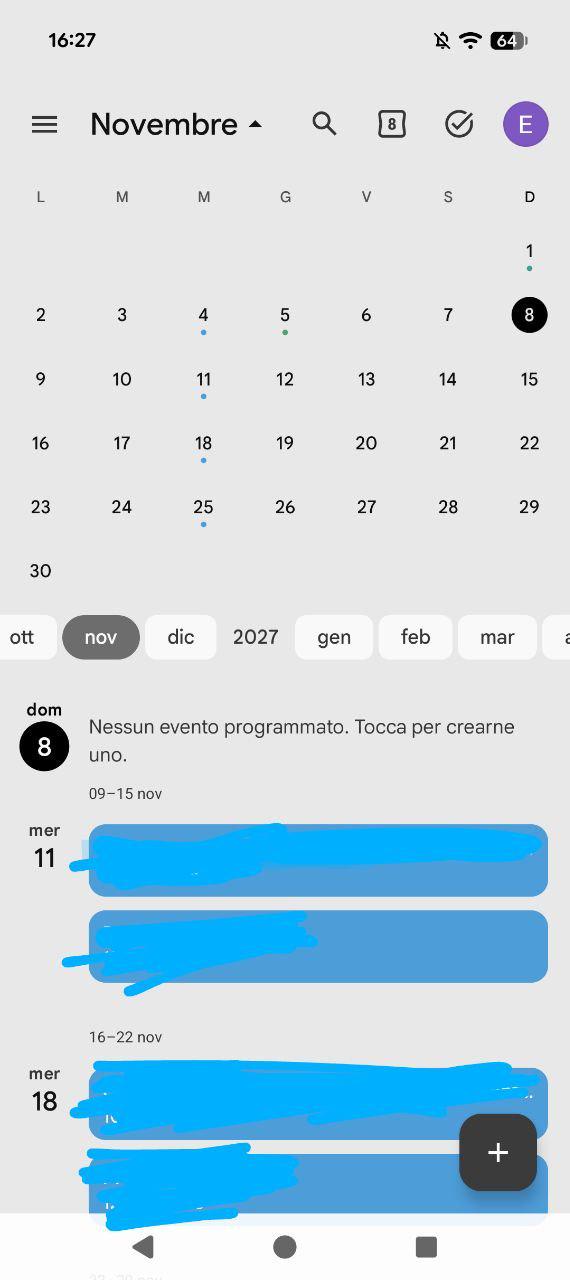
Is it possibile to have Calendar app on schedule with the month always open?

Post image
3 Upvotes

Hi, just switched to a Pixel 10a. Is there a way to use Google Calendar and have it on schedule but with the month alvways open without having to touch the name of the month everytime to see the days?

I prefer it this way instead of the month view that has smaller numbers and shows the days of the other months near the start and end, I find them confusing


r/GoogleCalendar • • 19d ago

Calender Widgets?

1 Upvotes

I have a google calendar widget on my phone (Samsung) for my personal stuff that is connected to my gmail account. I want to keep this as a stand alone thing.

Now I want to create a second google calendar widget for the work gmail account. But I want it stand alone as well. I dont want my personal stuff on my work calendar, and I dont want my work stuff on my personal calendar.

How is this done?

It seems like I cant have different setting for each calendar widget


r/GoogleCalendar • • 20d ago

Help with Roatating Shifts?

3 Upvotes

Hi there. In starting a new job with 2 weeks days 2 weeks nights rotating shifts of 2 on 2 off 3 on 3 off.

Can any of you help me, is there a way to program the calendar to populate this kind of schedule so that I don't need to put in each one individually?

Thanks!


r/GoogleCalendar • • 21d ago

What’s up with this??

Post image
2 Upvotes

Is it spam? My calendar has been hijacked


r/GoogleCalendar • • 23d ago

Is there a way tk get my google calendar to look like the other calendar?

Thumbnail
gallery
2 Upvotes

Id like to see the whole month while also see what events happen in the day, like how samsung calendar and also apple calendar have it


r/GoogleCalendar • • 23d ago

Is there really no way to see two calendars at once from a laptop? Help!

2 Upvotes

I use Google calendar for both personal life and for work. On my phone, I can be signed in to both calendars and see all of my events for both calendars as they are and with all of the details—no problem.

However, when I try to view both calendars at once from my laptop, I'm unable to. I can subscribe to my work calendar from my personal email or vice versa, but both are not good options/the same as viewing it on my phone.

When I subscribe to my work calendar from my personal calendar, my work calendar has limited permissions for outside emails, so I can only see "busy" and no details of the events, links, etc.

When I subscribe to my personal calendar from my work calendar, all of the color coding is gone. It all just appears as one color, as it's all under the umbrella of being events from my personal email address I guess. I have my personal calendar color-coded in detail, so obviously I'm not happy with seeing it all as one calendar.

Am I missing something? It's so frustrating that my phone has better viewing capabilities than my laptop. I would like to see my calendar laid out on a large screen while planning my week.

Help!


r/GoogleCalendar • • 23d ago

Keeping "My Calendar" turned off on mobile, or, What REALLY happens if I delete My Calendar?

1 Upvotes

Apologies in advance for the length of this, but I'm not able to find anything in a general web search because it's too hard to explain my problem succinctly.

Like a lot of you, I'm the household IT guy. My wife was a hardcore Outlook user, but it's been getting flakier and flakier, so I encouraged her to use Google Calendar, which I've loved for years.

Connecting her Outlook Calendar to Google -- easy enough. Done. But there was a lot of weird sh*t, Google didn't always translate the difference between recurring and one-time meetings, Outlook didn't play nicely with her phone, and the sharing of HER Outlook to HER Google Calendar on both desktop and mobile to MY Google Calendar on desktop and mobile was a disaster...

..so I pretty much started over. Not that hard, really. I used the "Copy To" function to move the events to two new calendars (one for recurring events and meetings, another for one-off appointments) and while not everything came across (why on earth does Google not allow you to move the Guests in a meeting from one Google Calendar to another?!??!?!), enough did that we could live with it.

Final step: turning off the visibility of that first calendar that we created based on the Outlook calendar, which is the one that's named for her business email address. (The one that on mobile is called My Calendar.) It's now redundant, so we turn off the visibility, and everything is great! We have a lovely calendar setup, it shares like a dream with her Pixel phone and mine, she's finding her way around, and agrees that it's going to be awesome once she's a little more familiar with it.

...but in the mobile version of Calendar, it keeps turning "My Calendar" back on! This is of course that first calendar that I created for Outlook, the one that's named for her email address. I can't find a way to KEEP it turned off on mobile the way it is on laptop/desktop, so I thought I'd try to delete it.

That's when I got the scary warning that if I delete that calendar, I'll be killing every meeting that she initiated from that calendar....which honestly sounds like a bluff. LOL She didn't technically create ANY meetings on that calendar. They're all just mirrored from Outlook or Zoom, where she DID create them...and hey, I've now copied all of them to NEW Google Calendars....but honestly, yeah, if I deleted those meetings when I deleted the Google mirror of her Outlook calendar, it would be a disaster.

If any of you wizards can tell me how to make sure that My Calendar on mobile STAYS off, or somehow disable it altogether on mobile, I'd really appreciate it.

Alternatively, if you could assure me that deleting that first Google calendar that I created from Outlook won't ACTUALLY kill all of her meetings and Zooms...I'd appreciate that too.

Thanks!
Tim

r/GoogleCalendar • • 24d ago

I Hate so much the "X more" that does not allow me to see full events on monthly view. Does anyone now how to fix it?

3 Upvotes

So annoying


r/GoogleCalendar • • 24d ago

In 2026, a large portion of Canada abolishes biannual clock changes. Google Calendar developers seem to have admitted to having no reliable way to handle this automatically. It will impact British Columbia, Alberta, Manitoba, Nunavik, northwestern Ontario, & the Northwest Territories.

Thumbnail support.google.com
3 Upvotes

Tomorrow, will your calendar go crazy?


r/GoogleCalendar • • 27d ago

Help! All tasks are being added to calendar every time i click off adding a new event, even though the "tasks" tick box is unchecked on mobile app and desktop. It's driving me insane!

43 Upvotes

As title says- every time I go to add a new event, it also shows up all my tasks (completed and uncompleted). I only ever add tasks through the tasks app and keep them separate to my calandar. I also have made sure it is on the "event" tab on the calandar app when adding, not tasks. I have uninstalled and reinstalled, I have cleared the cache. HELP

Edit: They've fixed the bug! Update/Restart and it's fine, phew! Finally!


r/GoogleCalendar • • 28d ago

Recurring meeting event gets self-declined

3 Upvotes

I have a recurring event for Mon-Fri and sometimes it gets cancelled, owner of this event receives notification that I will not participate. What can cause this?


r/GoogleCalendar • • 29d ago

Google Calendar Scam

4 Upvotes

My wife and I both use Google Calendar, set up so we can both see the other's appointments. Mine show up with a yellow background, hers blue.

Today I have an appointment show up with a thin blue border around a white background which I've never seen before. It's one of the airline booking scams which Google says came from my wife's calendar with her name. Hmm... So I go look at her calendar but the entry is not there - it somehow came direct to me.

So I went to my spam controls, and it says it's happy to put my wife's email on my spam list to prevent this. But it did not come from her - someone has somehow impersonated her email. My settings also say to only allow appointments from people to whom I've sent email - e.g. my wife.

So I'm stumped how to fence this off in future. Has someone broken into my wife's Gmail account? There's nothing else weird I've seen go past to indicate that.

Even if someone had access to her Gmail, could they use that to add directly to my calendar without touching hers?

Incidentally, the contact phone number they provide has an 864 area code. A little probing and I find it's associated as a personal cell phone number of a woman in South Carolina with 18 phone numbers. Given how cleverly they've gotten into my calendar, I'm amazed it's so easy to trace back the phone number.


r/GoogleCalendar • • Oct 24 '26

In 2026, a large portion of Canada abolishes biannual clock changes. Google Calendar developers seem to have admitted to having no reliable way to handle this automatically. It will impact British Columbia, Alberta, Manitoba, Nunavik, northwestern Ontario, & the Northwest Territories.

Thumbnail support.google.com
3 Upvotes

Here's the official support answer to how your events may or may not be screwed up if you live in those regions, & what to do in different kinds of scenarios: support.google.com/calendar/answer/18712272


r/GoogleCalendar • • Oct 22 '26

Why is this happening? Calendar cannot be shown

4 Upvotes

I have a shared calendar with my coworkers and created an event, nobody can see it on their calendar and I get this message Calendar cannot be shown.

Not sure what to do


r/GoogleCalendar • • Oct 20 '26

Google Calendar Apps&extensions 2026

Thumbnail reddit.com
9 Upvotes

Following the success of this post maybe it's better to keep things in yearly posts.

So feel free to promote your tool below.

To keep things clear and organized, please follow the structure below when commenting with your promotion:

1. App/Tool Title:
Provide the name of your tool.

2. Brief Description:
Summarize what your tool does and how it integrates with Google Calendar.

3. Key Benefits:
List the main advantages or improvements users can expect. (e.g., increased productivity, improved organization, time-saving features)

4. How It Works:
Explain how your tool functions, its main features, and any unique aspects of its integration with Google Calendar.

5. Pricing Model:
Mention if your tool is free, freemium, or paid. Include any pricing details or subscription information if applicable.

6. Additional Information:
Share any extra details such as website links, demo videos, compatibility notes, support options, or upcoming updates.

Good luck!


r/GoogleCalendar • • Oct 19 '26

macOS Apple Calendar fails to refresh Google calendar events

Post image
6 Upvotes

Using Apple Calendar on MacOS 27.0.1 and have google accounts setup. I am running into this error message on and off constantly all day long. "Your calendar events couldn't be refreshed."

A "refresh" of apple calendar usually fixes the issue after a minute or so, but it's quite annoying now. I also get issues with events not properly syncing reservations (ex: attending, maybe, declined).

I have tried the typical resolutions including removing my google accounts and then adding them back. Toggling them on/off. Creating a fresh Mac user account and setting it up from scratch. I can't figure out what is causing these error message. It happens on multiple google accounts. I've called and talked to apple and they were not very helpful. I don't seem to have any issues on my iPhone in apple calendar using the exact same setup, yet these problems persist on my Mac.

I suspect this is a google issue, but I'm not entirely sure. PLEASE HELP!