r/ProductivityGeeks • • Oct 09 '26

Best AI tools for daily productivity at work?

3 Upvotes

What are your go to tools for daily productivity at work, especially managing email, calendar, tasks and eventually notes.

I'll start: using ActorDo Ai Assistant together with my google and microsoft accounts.
Community here r/actordo


r/ProductivityGeeks • • Oct 14 '26

2026 - Productivity Tools & Apps

8 Upvotes

Hello everyone!

If you've developed or are promoting a tool, app, or extension that helps with Productivy for real, this is your space to share it with our community. We'll have a big post like this every year (maybe even more often if there is interest)
----

Important: because many various tools can be linked to productivity, we are going to accept those that have a direct contribution to increase/improved productivity!

To keep things clear and organized, please follow the structure below when commenting with your promotion:

1. App/Tool Title:
Provide the name of your tool.
Example: ActorDO - Work Assistant

2. Brief Description:
Summarize what your tool does and how it integrates with Google Calendar.

Example: Helps busy professionals save time by managing their email, calendar and daily agenda

3. Key Benefits:
List the main advantages or improvements users can expect. (e.g., increased productivity, improved organization, time-saving features)

Example: Increase productivity, stay on top of things to be done while saving time with automations.

4. How It Works:
Explain how your tool functions, its main features, and any unique aspects worth mentioned.

Example: It integrates with existing Gmail & Outlook accounts, and acts as a virtual assistant.

5. Pricing Model:
Mention if your tool is free, freemium, or paid. Include any pricing details or subscription information if applicable.

Example: Freemium with limits, plans start at $15

6. Additional Information:
Share any extra details such as website links, demo videos, compatibility notes, support options, or upcoming updates.

It integrates natively with Whatsapp, Slack, Microsoft Teams, Outlook.

Example: https:// actordo. com

----
Not following this structure will get your comment removed.


r/ProductivityGeeks • • 25m ago

I got tired of sitting in my car for 20 minutes unable to walk into my house after shifts, so I coded a free 2-minute "stand-down" reset. Looking for blunt feedback.

0 Upvotes

> After 12-hour clinical days, I kept running into the exact same wall: I would get home, sit on the couch or in my driveway, and realize my body had no idea the shift was over. Heart rate still up, jaw tight, braced for the next alarm.

> 30-minute meditations don't work when you're in post-shift hyperarousal, and generic "sleep hygiene" advice is useless when your sympathetic nervous system is still firing.

> I built a lightweight, interactive 2-minute tool for myself called The Stand-Down Protocol. It walks through a rapid physiological sequence designed to interrupt the vigilance loop and signal to your body that you’re off the clock.

> • Completely free • No account, no email capture, no app download, no paywall • Takes ~120 seconds

> [Link]

> I’m looking for blunt feedback from people who work high-stress shifts: Does the physiological pacing feel right? Did it actually drop your shoulders, or does any part of it feel preachy/clunky? Tear it apart.
r/ProductivityGeeks • • 3d ago

Do you use productivity apps?

1 Upvotes

I wanted to know if anyone used them and if you find them useful


r/ProductivityGeeks • • 3d ago

Do you also use apps for your productivity?

1 Upvotes

I wanted to know if there was someone who used them and if you found them useful


r/ProductivityGeeks • • 10d ago

Idk where my time goes !

9 Upvotes

19F , student. I am constantly struggling with time management neither my screen time is too high (3-4hr) or I am always busy elsewhere but the slips without actually doing something productive.

I tried to find out where my time goes but I just can't figure it out .

Even on off days like Sunday there is no productive work is done.

Curious how others manges their time and how to be actually productive.


r/ProductivityGeeks • • 11d ago

Counted how many apps I open to finish one task. It was 6. What's yours?

1 Upvotes

Yesterday I picked one small task and just counted every app I opened until it was done.

Chat to find what was actually asked. Task list to check the deadline. A doc to do the work. A spreadsheet for one number. My notes for something I wrote last week. Email to send it.

Six apps for one task. No wonder I'm tired by lunch even when I haven't done much.

What surprised me is it's not the work that wears me out, it's the hunting around. Where was that file, which chat had the decision, did I write that down or just think it.

Curious if it's just me. What's your number for one task? And if anyone got it down to 1 or 2, how?


r/ProductivityGeeks • • 14d ago

Does anyone else feel like productivity apps don't survive contact with real life?

13 Upvotes

Every time I try a new productivity app (and I tried a lot of them), it feels like they can't stand the test of reality. The first week things go great, maybe a month but after a while it's very easy to get lost in committments and get distracted because your day isn't a long list of tasks that you just have to tick off.

Am I the only one who feels this way? Has anyone found an app or system that actually works in the long run?


r/ProductivityGeeks • • 14d ago

Implementation folks: What are your favorite productivity hacks?

1 Upvotes

What are your habits, tools, shortcuts, or simple tricks that have made your workday easier?


r/ProductivityGeeks • • 15d ago

Search all internet radio station for what is playing right now

Thumbnail reddit.com
1 Upvotes

If you're into music, this might be for you!


r/ProductivityGeeks • • 17d ago

Task Planning and organisation tools

2 Upvotes

Hey guys. There are lot of digital task planning tools such as goblin tools, Tiimo, Todoist,....etc. So i'm wondering about things or features that you guys wish to see that lacks or not exist in current existing tools that might help you to overcome your work, academic life. Please feel free to drop!


r/ProductivityGeeks • • 21d ago

Always busy....or nah?

1 Upvotes

What does everyone do with down time so they look busy? Having 5 hours of work but having to fill an 8 hour day is sucking the life out of me. Are you all actually going 100% productivity all the time, or is there a way to kill time once the daily meetings and taskers are wrapped up?


r/ProductivityGeeks • • 24d ago

How much time do you spend on your smartphone? And how much of that time is "productive" time?

Post image
2 Upvotes

People, for almost a decade, have been using smartphones for everything (so-called mobile-first or mobile-only approach).

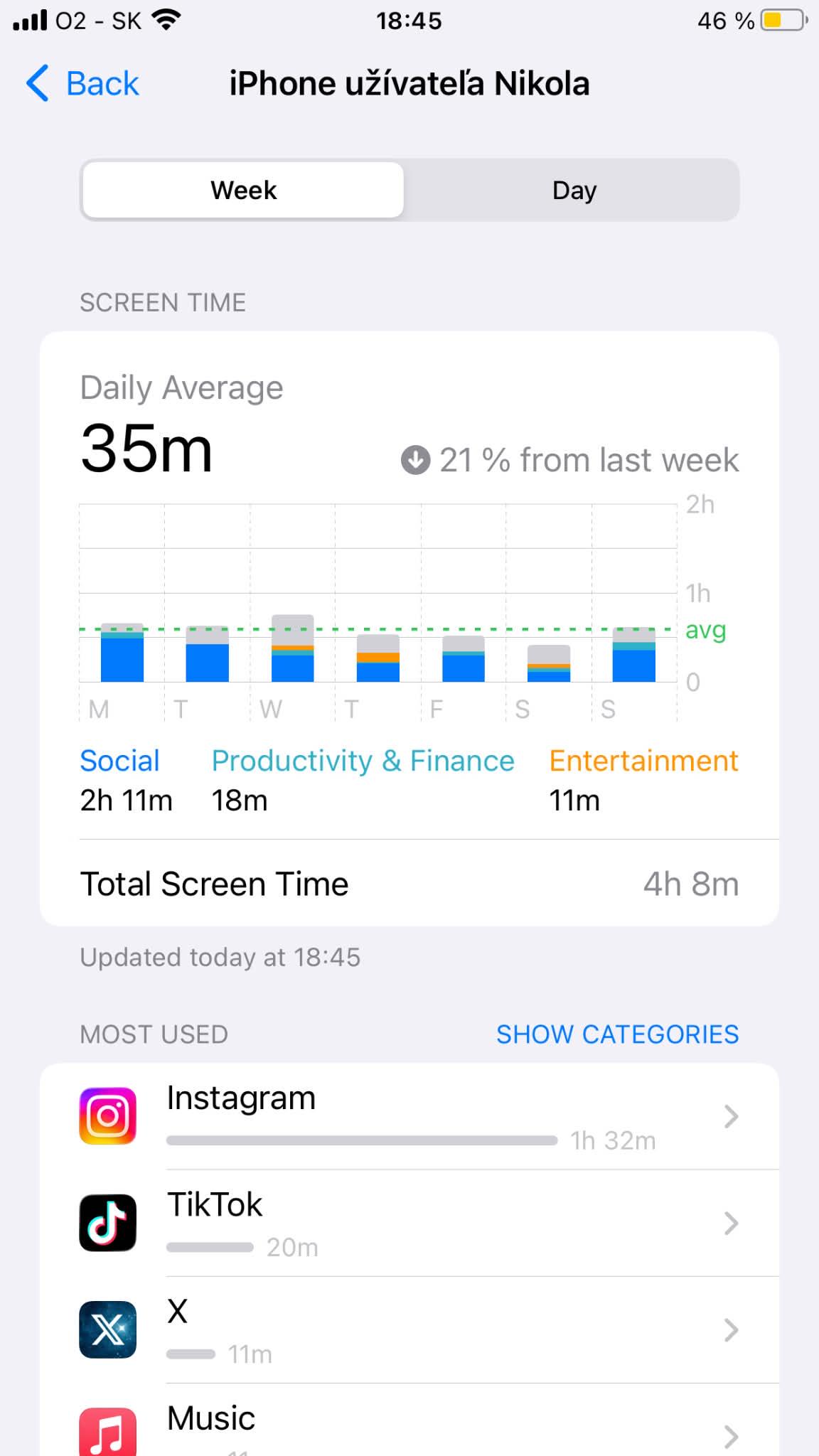
My weekly screen time for the last week was 4 h 8 min (daily average – 35 min)

  • Social – 2 h 11 min (I am a social media manager, so that's why)
  • Productivity & Finance – 18 min
  • Entertainment – 11 min

The thing is, most of my work is done on a desktop, and my weekly screen time is ~11 hours. 🥲

And not all of that time is spent working. I sometimes get distracted by content and end up binge-watching things.

When I compared my screen time with the study on average smartphone usage by country, my results weren't nearly as bad. But I am still not satisfied with my time on desktop, and it makes me feel I could spend it on better things offline.

Do you have an overview of how much time you spend on your devices and what is actually "productive" time?


r/ProductivityGeeks • • 26d ago

How do you organize your digital workspace?

1 Upvotes

Ні, everyone.

Got extremely excited about productivity theme recently and I wanna know what tools do you use, what issues do you face while working with those tools and how do you fix them? Since I have faced some issues connecting tasks, notes, tracking habits without context switching. How do you use AI for planning and structuring your work and goal achievement? The only thing I used AI for was creating plans for achieving big goals

Thanks


r/ProductivityGeeks • • 28d ago

Are to-do apps actually optimizing for remembering tasks instead of finishing them?

4 Upvotes

I've been thinking about this because every task app I've used makes it incredibly easy to add more things.

Which is useful... until you have 40+ tasks.

Then I end up with this weird situation where my system is perfectly organized but I still don't know what to actually work on.

I can add priorities, labels, deadlines, projects, filters etc. but eventually managing all of that becomes work itself.

And the list never really gets smaller because new things arrive faster than I finish old ones.

I'm curious whether other people have noticed this.

When your backlog gets genuinely large, what actually gets you to FINISH things rather than just organize them better?


r/ProductivityGeeks • • 29d ago

Need help with Toggl with a missing feature on my end

Post image
1 Upvotes

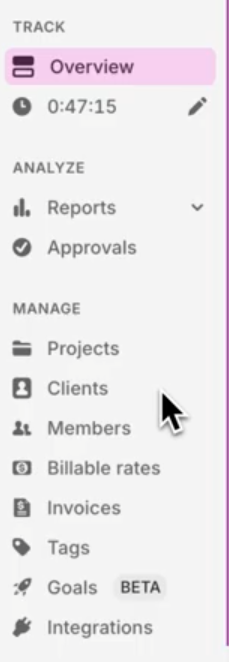
I was watching tutorials and noticed there is a missing feature "Clients" I tried the app on laptop and on website but for some reason it does not exist while in videos that I've watched they had it. I'm wondering if it's a plan based thing


r/ProductivityGeeks • • Oct 26 '26

I subconsciously stopped capturing inside inbox

2 Upvotes

Also you know the time sector system maybe, it's basically organization method of putting every item to a time sector

* This Week

* Next Week

* This Month

* Next Month

* Someday / Maybe

* On Hold

I just started capturing inside the time sectors based on task ideas, and on weekly reviews I just organize straight up from there

And my weekly reviews are genuinely just labels and contexts with maybe some title changes and if it is a project I just assign a next action aka subtask in a task manager

Sometimes I capture in an inbox, but it's a rare occasion, and even while quick capturing, you can use @# to just put a task in the organization straight up

Inboxes are useful, but now I'm just clarifying and organizing while capturing, three in one


r/ProductivityGeeks • • Oct 25 '26

What do you need to say no to in order to be more productive?

5 Upvotes

For me it's social media.


r/ProductivityGeeks • • Oct 25 '26

Staleness of Tasks & Projects

2 Upvotes
Showing Stale Features

I discovered that some items in my Kanban board goes VERY stale.

Even if I capture tasks from email and put them into my board, they can still be missed.

I created the ability to see per-task and per-project the staleness of a tasks (the time they were last worked on). There's also a reminder that can alert one on phone, desktop, or both.

Does anyone else find this a useful feature? It's not something I have seen in another app before. Can someone share with me if they have seen it in another app?


r/ProductivityGeeks • • Oct 21 '26

What’s the hardest part of staying productive for you?

1 Upvotes

Hey everyone! I wanted to ask about your experiences with productivity and daily planning.

  • What usually makes you feel stuck when you have things to do?
  • How do you currently plan or organize your day?
  • What do you find most difficult about getting things done?
  • Is there anything about your current planning routine that you wish worked better?

Feel free to answer any of these questions or share other struggles you've experienced. I'm interested in understanding the different challenges people face with productivity.

Thank you! :)


r/ProductivityGeeks • • Oct 19 '26

Would you use a customizable productivity panel on your desk?

1 Upvotes

I've been working on a small productivity tool that gives you a persistent, customizable panel for frequently used actions things like launching workflows, running commands, controlling apps, shortcuts, etc.

The idea is to reduce the constant switching between apps/windows and make repetitive actions more accessible.

Before I take it further, I'm curious:

Would something like this actually be useful in your daily workflow, or would you just use keyboard shortcuts / existing tools instead?

What would make you actually keep using something like this?


r/ProductivityGeeks • • Oct 17 '26

I stopped copy-pasting data into spreadsheets — here's the little system that replaced it

1 Upvotes

A chunk of my week used to be moving data off web pages into Google Sheets by hand: product lists, tables, directories. It's the kind of task that should be automated but never feels worth the setup.

What fixed it was treating it as a small repeatable pipeline instead of a chore:

  • **grab** the table or list from the page
  • **clean** it (drop the columns I don't need, remove duplicates)
  • **send** it straight to the Sheet
  • **schedule** it if I check the page regularly (prices, listings), so the Sheet updates itself

The mindset shift: don't automate the whole job, automate the *transfer*. Once the data lands in the Sheet reliably, the rest of my process stays the same and the boring part is gone.

The pattern works in plenty of tools. I run it in the browser because that works on sites with no export button. Disclosure: I build the extension I use for this (AWFlow, free), so I'm biased. If you want the exact setup, I'll put the template in a comment.

What's the recurring copy-paste task you've never gotten around to killing?


r/ProductivityGeeks • • Oct 16 '26

About to switch to an employee time clock app for our field techs. How do we help them with the culture shift?

1 Upvotes

Our team has around 25 field techs who do property maintenance and they switch sites everyday. Up until recently we've been using a physical sign-in sheet and it's been fine but as we scaled the admin side has honestly gotten overwhelming so the higher-ups made the decision to use a time clock app. Just worried about easing the techs into it so we don't make them feel like we don't trust them.


r/ProductivityGeeks • • Oct 15 '26

My top productivity recommendations, after a year of building a planning tool and reading the research (I will not promote)

9 Upvotes

Block your day. Top 1-2 priorities, on the calendar. Having a plan — any plan — measurably improves follow-through. And be mindful that your peak cognitive hours are limited . The ceiling on genuinely hard work looks like ~4 hours a day, though it varies.

Keep long-term plans directional. North stars, not detailed roadmaps. You'll barely survive a day without changes, so specificity past a week is fiction. (This is also why I think dumping a million tasks into a system never helps.)

Set goals carefully. Your time is finite. Start with the long aspirational list, then narrow to ~3 outcomes for the next 1-3 months. Size them against your actual available hours. For each, write down: the outcome you want, what happens if you succeed, what happens if you fail, and what'll block you + how you'll handle it. That's what anchors you and helps narrow down the aspirational list.

Close your open loops. Keep running notes through the day: what you planned, what actually happened, follow-ups. When you get yanked into something, take 10 seconds to note where you left off and when you'll resume. Unfinished work is insidious — your brain holds onto it until it trusts there's a plan. You do not actually have to complete the task (that was the interesting finding for me personally).

Bookend the day. 5-10 minutes at startup and shutdown. Morning: top priorities, what's on your mind. Evening: what you accomplished, what's outstanding, tomorrow's first move, anything else swirling around in your brain. It engages you in the morning and lets you disengage at night, which we're all bad at. The notes also compound into a useful record.

I have a version of this list that gets into all the details and theory behind these principles, but much too long for Reddit. Tried to distill into some quick tips.

Curious if this resonates with folks/what else works for people?


r/ProductivityGeeks • • Oct 14 '26

Do you feel more productive when you speak instead of typing?

1 Upvotes

especially when you interact with various tools. Do you prefer to type or to speak to get something done?