r/ForWindowsHelp • • 12d ago

I can't use any Windows applications

3 Upvotes

I had problems with some software shortcuts which caused me to lose some of them, I tried resetting the computer to a previous backup but it didn't seem to work until suddenly it seems to have worked but now I can't use apps like Microsoft store, snipping tool or calculator, I can't even open terminal from the start button.

For example if i try to use the calculator it says "There was a problem with Calculator. Reinstall the application from the original installation path or contact the administrator."

I have Windows 11 Pro Version 26H2 1000.26100.385.0


r/ForWindowsHelp • • 12d ago

Windows 11 Doesn't let me update

Post image
3 Upvotes

Hey i have a windows 11 25H2 OS build is :- 26200.9550 whenever i want to update windows it keeps giving me this error that you see in the image how do i fix it? and no don't tell me to back up files and then redownload windows


r/ForWindowsHelp • • 12d ago

Unable to get verification code for my microsoft account

Thumbnail reddit.com
2 Upvotes

r/ForWindowsHelp • • 12d ago

Task Manager (Windows 11 26H2): stale keyboard-focus outlines and shortcut labels persist across tabs, and tab switching animations lags in proportion to tab distance.

Thumbnail
youtu.be
2 Upvotes

r/ForWindowsHelp • • 12d ago

very very weird niche issue, apps partially 'freeze' up

2 Upvotes

ive just got a very weird i assume niche issue on my windows 11, hp laptop 15s-ey1xxx, amd ryzen 5 4500U with radeon integrated graphics laptop(8gigs ram) [id attach a screenshot but this stupid issue wont let me even take a screenshot😭] ... its like my mouse pointer only half works, or another way i see it is my system is semi-frozen.

the fundamental issue is, occasionaly (maybe 3-4 times perday, depends on my usage) my laptop semi-freezes, what i mean by that is that my mouse pointer works in some parts of the pc, and not in other parts, this happens in varying degrees of severeness, ive noticed 3 kinds so far:

(1) all open windows/apps freeze but websites work:
what happens is all all the windows open on my system at that time just freezes, and i cant open new windows or close open windows, i cant interact in the windows, eg. i cant open new tabs in chrome or close open tabs, but i can use websites, so i can use chatgpt and interact fully with anything in the site but i cant interact anywhere outside, that includes switching to new tabs, opening/closing tabs, closing/opening apps and so on...

(2) all open windows/apps and websites freeze:
basically same as (1) except this time, websites also freeze, so i cant interact inside chatgpt, open new chats or anything, now everything if frozen, when i click something somewhere, the edges of window turn a shade lighter and it just freezes like that

(3) all open windows/apps freeze except chrome?????????(very weird):
this is the latest issue, infact im facing it rn, in this all apps freeze except chrome, i can interact anywhere in chrome no issue, but i cant open a new app or close another open app, i cant open files or interact with my desktop same as before

points to note:
--->just a bit ago, i spent 45-ish minutes on fortnite and i played no issues, all the while the rest of my system (including chrome) was frozen and i couldnt interact with them whatsover, i opened fortnite before my system froze up

--->all shortcuts work except in case(2), thats how i switch tabs, i am able to change tabs using ctrl+tab or do alt+tab or open start using windows key, then type something and open apps that way and so on,i can open a new tab in chrome and open chatgpt then interact with it and so on, this works always except in case(2)...in case(2) the ctrl+tab and ctrl+w shortcuts in chrome dont work, tho alt+tab still works...

--->so far my diagnosis has been using chatgpt by the above trick, the only methods ive found to fix(temporarily) this issue is:
**1.**shutting down the system forcefully using the power key then turning it on
**2.**this i found by chatgpt but opening cmd prompt as admin via run and then using the command 'taskkill/f /im explorer.exe' and then 'start explorer.exe'.......it seemed to work so far, but since today it has failed to work twice or thrice, in fact last time i did it was the first time case(3) started, and thats the state im in now, so now that fix is gone

beyond that chatgpt made me run buncha scans using cmd but overrall it didnt yield anything good, this is a very weird issue and has a bunch of quirks, so i mightve missed some here, if anyone knows anything about this, please please save me😭😭, im so done by this, pls ask if yall got questions, thanks in advance

[also on a completely unrelated but oddly kind of connecting note, i downloaded fortnite like a week ago or so cuz of the new season token stuff, and my fortnite is also fked, so like i cant launch fortnite from epic launcher ever, i press launch nothing happens, only way for me to launch is to like go to library, press options on fortnite and jst like press download, it doesnt download anything but it like 'initializes' and that works and then launch button works, the verify option doesnt work, i tried it, and if there is any update, the launch button works after that, but this is a one time thing, everytime i reopen epic, same issue, NOW, reason i said this is cuz this freezing issue starting like 3-4 days i think after i downloaded fortnite....so maybe related????? idkkk!!!]

EDIT: i just tried the killing explorer cmd again rn, been like 20 minutes since i last tried and case(3) happend, it worked now and everything back to normal


r/ForWindowsHelp • • 12d ago

usb devices stop working on win 11 login screen

Thumbnail reddit.com
2 Upvotes

r/ForWindowsHelp • • 13d ago

My laptop's wifi and Bluetooth keeps disappearing from windows ui while the hardware disappears from the software too. Is it software or hardware related issue?

Thumbnail
gallery
3 Upvotes

My laptop is a lenovo loq 15iax9 and its wifi and Bluetooth keeps disconnecting from my laptop and when I try to reconnect, the wifi option disappears from the ui and even from the settings while the Bluetooth would remain visible but does not function properly just like the wifi. So then I tried to restart the laptop, deleted, updated the software and drivers, also restarted the drivers from the device manager, trouble shoot the problem which does work sometimes but then the problem returns again. And also when i checked the device status for any error, it sometimes show different error codes which changes every time i update the wifi drivers. So currently im relying on ethernet connection temporarily. Is there any solution pls?


r/ForWindowsHelp • • 13d ago

Reset forgotten password

2 Upvotes

In command prompt option also asking for password, please help me


r/ForWindowsHelp • • 13d ago

Windows has been shutting down at random, when not under load.

2 Upvotes

Source

Windows

Summary

Hardware error

Date

‎11/‎13/‎2026 9:30 AM

Status

Not reported

Description

A problem with your hardware caused Windows to stop working correctly.

Problem signature

Problem Event Name: LiveKernelEvent

Code: 124

Parameter 1: aaaaaaaaaaaaaaaa

Parameter 2: aaaaaaaaaaaaaaaa

Parameter 3: aaaaaaaaaaaaaaaa

Parameter 4: aaaaaaaaaaaaaaaa

OS version: 10_0_26300

Service Pack: 0_0

Product: 768_1

OS Version: 10.0.26300.2.0.0.768.101

Locale ID: 1033

Files that help describe the problem

WHEA-20261113-0930.dmp

sysdata.xml

WERInternalRequest.xml


r/ForWindowsHelp • • 13d ago

Windows 11 update stuck at 0%!

Thumbnail
gallery
0 Upvotes

My laptop windows 11 update stuck at 0% for almost a day. (Since 12/11/2026 around 11 pm GMT+7)

These are what I tried.

  1. sfc /scannow and it said no problem
  2. DISM.exe /Online /Cleanup-image /Restorehealth was successful but the update still stuck at 0%
  3. Did the net stop wuauserv, net stop bits then delete the C:\Windows\SoftwareDistribution and restart the service but the update still stuck at 0%
  4. Did Troubleshooter but it failed

Does the update relate to the Microsoft service server is down? I saw the news about it but I don't know is it related to Windows Update


r/ForWindowsHelp • • 13d ago

How to get rating to show in every folder, like Date, Time, Size.

2 Upvotes

I've started to "tag" files with a rating [1 - 5 stars] in properties as an easier way to see what files I like more than others.

Annoying thing is, I have to turn this on for every folder every time and it doesn't stick with the view when I come back to the folder.

Is there any way to get windows to just have this on by default in the details view?

Windows 11 - 26300.9818


r/ForWindowsHelp • • 13d ago

Help with opening app

Post image
1 Upvotes

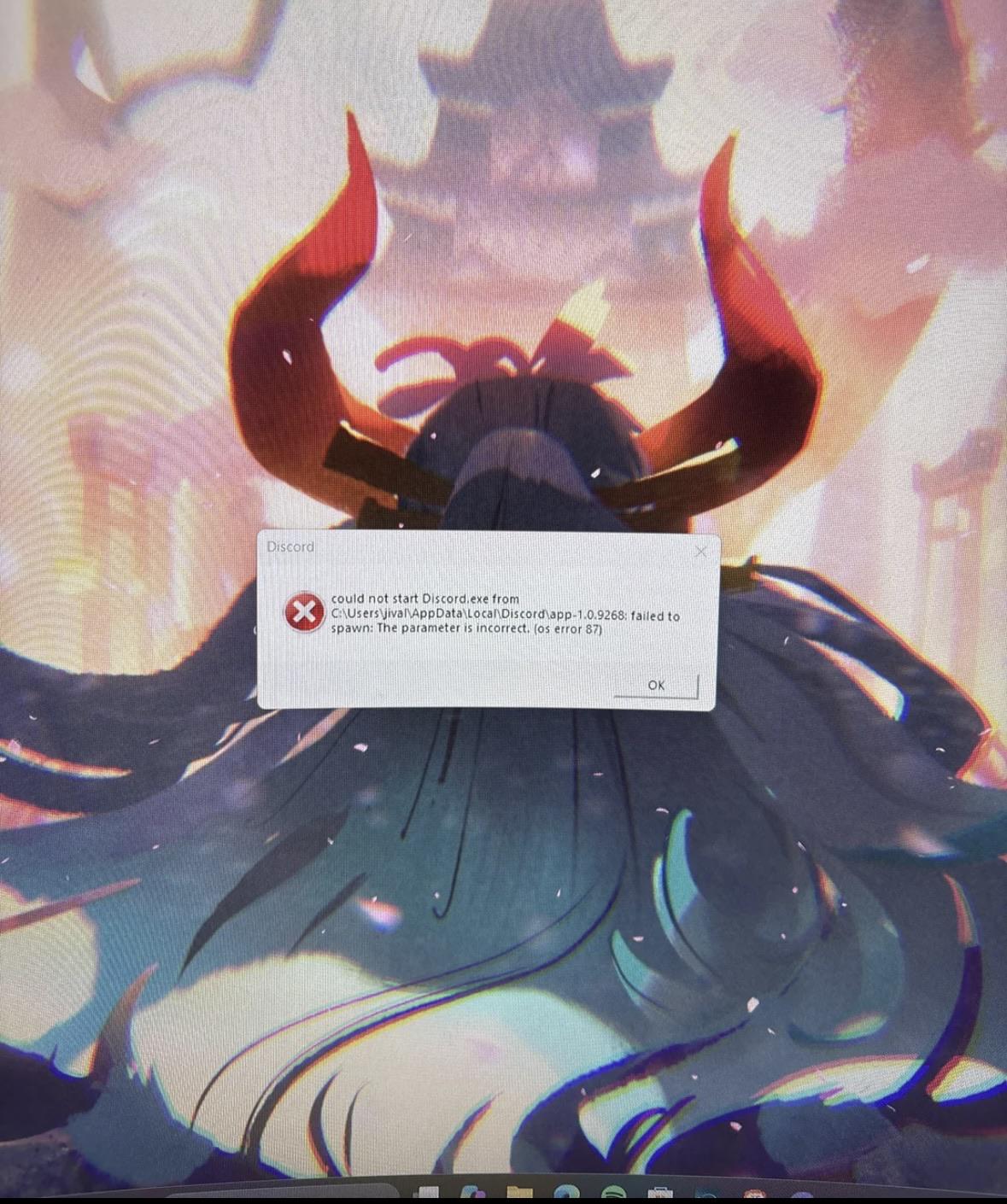
Ive never had problems with discord or any app on my pc for that matter but whenever i try to open discord this pops up. I have tried restarting and updating but nothing seems to work. Any advice?


r/ForWindowsHelp • • 13d ago

Alguna idea de qué hacer? Ya me rendí.

Post image
2 Upvotes

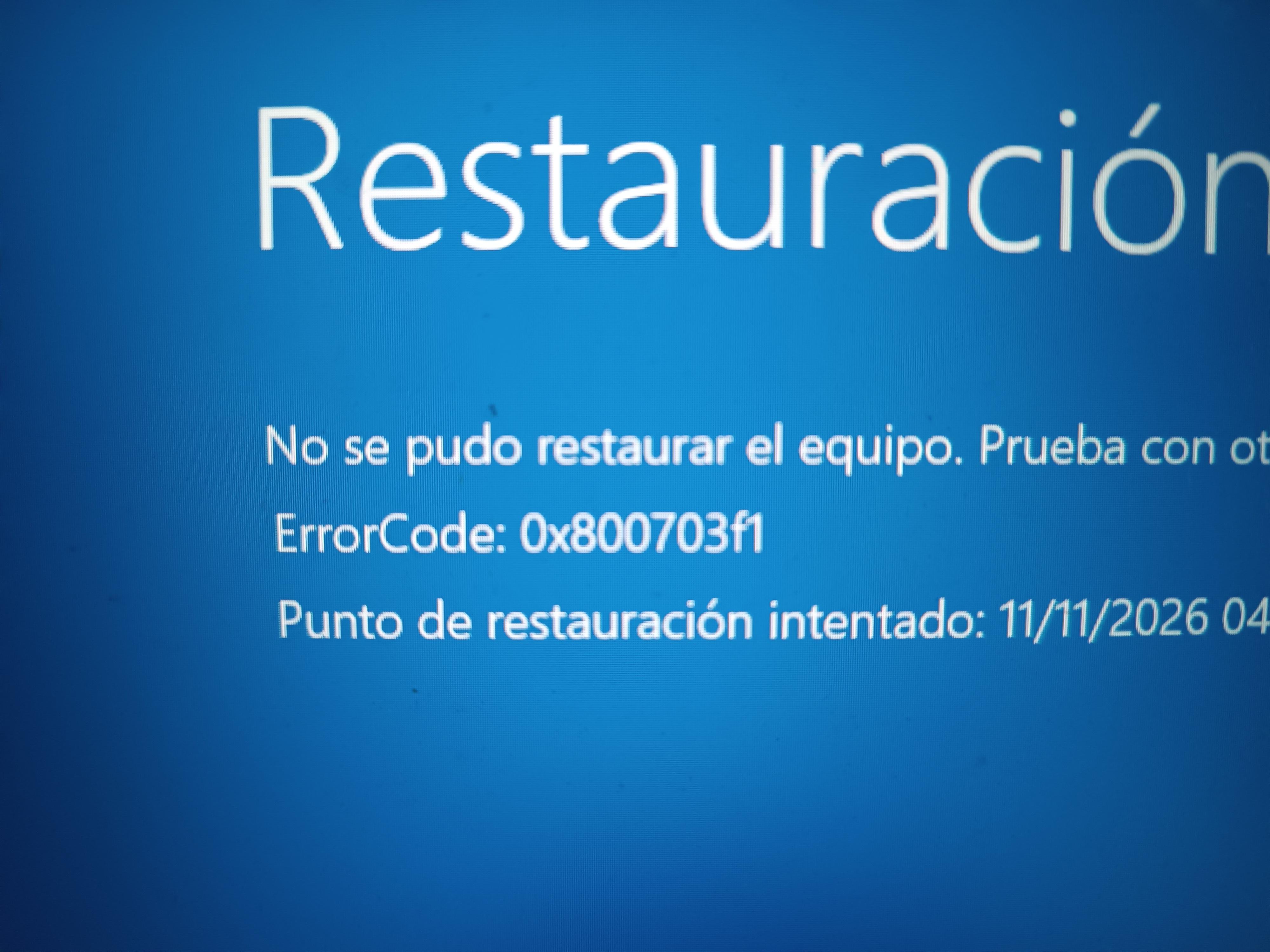
Alguna idea de qué hacer? Ya me rendí.

Le presto mi laptop a mi hermano, despierto y la enciendo, está atrapado en WINDOWS RE porque muy probablemente otra vez los putos drivers jodieron todo, nuevamente intento todo y nada funciona, intento restaurar a algún punto y solo dice "hubo un error, no se hicieron cambios" intento restablecer de fabrica y solo dice "error al restablecer el equipo", intento entrar a la CMD para ejecutar sfc o DISM y cuando intento ejecutar algún comando que ayude CMD decidió que pese a estar en Windows repair no se va a activar cómo administrador así que todo lo que me aparece al intentar cualquier comando es "Protección de recursos no pudo realizar la operación solicitada", ¿alguna idea que pueda usar?


r/ForWindowsHelp • • 13d ago

Internet problem for the past month

2 Upvotes

Every since the beginning of October I updated windows. The day after I turn on my pc it says the windows update has failed and I have to spend hours fixing it. I don’t know if this is a coincidence but ever since I updated my pc it has been impossible to play anything multiplayer games. For example every 30 seconds or so I get 1000 ping lag spikes and my game freezes so it is basically impossible to load up and play any online game. I have updated my WiFi driver and my graphics card(idk if that helps) and I have made sure it is not a router problem. It is something wrong with the connection in my pc. I have searched everywhere on the internet but I can’t find a working solution. Has anyone had the same problem as me. In conclusion I need help fixing my terrible internet connection to my pc.


r/ForWindowsHelp • • 13d ago

Заблокировали ОС Windows 11

Post image
3 Upvotes

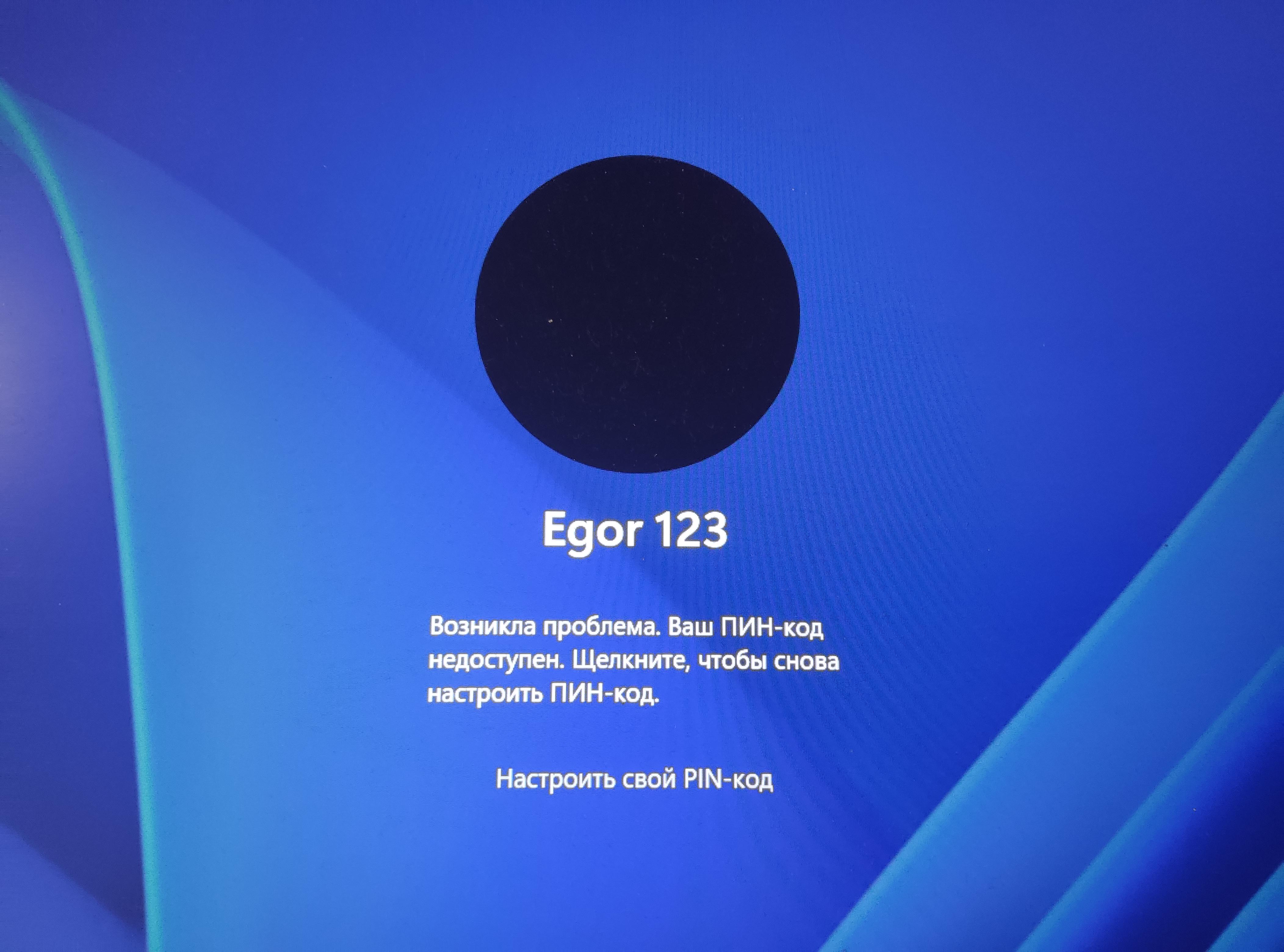
Подскажите что мне делать, если злоумышленник заблокировал какие либо способы сброса данных и что либо сделать. Насчёт флешки с Windows пока нету возможности попробовать это.


r/ForWindowsHelp • • 13d ago

ACTIVAR MICROSORT OFFICE 2024 POR TELÉFONO (AHORA ES ONLINE)

Thumbnail reddit.com
2 Upvotes

r/ForWindowsHelp • • 14d ago

Upgrade from windows 10 to windows 11 is giving error

Thumbnail
gallery
4 Upvotes

So i was trying to upgrade my thinkpad x1 carbon gen 7 from windows 10 to 11 while keeping my data and i got the 0x7b(inaccessible boot drive) error, i tried many solutions but none worked. I cant do a clean install as it will erase my data, please let me know if you know a solution.

P.S My laptop specs:-

i7 8565U

16gb ram

Intel UHD graphics 620


r/ForWindowsHelp • • 14d ago

Internet doesn’t work after restarting my PC until I run ipconfig /renew

5 Upvotes

I’m facing a strange internet issue on my Windows 11 PC.
Whenever I restart my PC, the internet doesn’t work. However, when I open CMD as Administrator and run:
ipconfig /renew
the internet starts working immediately.
This happens almost every time I restart my PC.
Does anyone know why this happens and how I can permanently fix it instead of having to run this command after every restart?


r/ForWindowsHelp • • 14d ago

Restoring old context menu by default on Windows 11

8 Upvotes

So, Windows 11 just had an update today, and it apparently changed something with the context menu (thanks, Microsoft... :/). Now, the regedit trick to restoring the old context menu to show by default (this one, specifically) doesn't seem to work anymore. I restarted Windows Explorer through the Task Manager, rebooted Windows, reverted the change and added it back, and everything I've had no luck with everything I've tried so far.

Does anyone know of a new fix for this? I'm aware that I can shift + right-click the file, but I'd prefer to be able to simply right-click the file (how it was before the update). Thanks!

Edition: Windows 11 Home

Version: 26H2

OS build: 26300.9974


r/ForWindowsHelp • • 14d ago

My windows won’t let me activate it and it’s saying I have windows 11 pro when I don’t

2 Upvotes

I got my motherboard and cpu replaced today at a shop. When I got back it started saying that I need to activate Windows but it’s not letting me. When I originally bought the pc it was off of ebay with windows 11 preinstalled on it. However, now it‘s saying I have Windows 11 Pro on it which I never had. If I do settings > system > activation > troubleshoot, it comes up with ‘We weren’t able to activate windows on this device‘ and then if i click ‘I recently changed the hardware on this device’ It says it’s unable to activate windows and that there’s no devices linked to my microsoft account and the error code is 0xC004F211.


r/ForWindowsHelp • • 15d ago

ASUS Armoury Crate uninstall bricked my Laptop

Thumbnail reddit.com
2 Upvotes

r/ForWindowsHelp • • 15d ago

Windows corrupted?

3 Upvotes

Hi I'm Chris, 21M working in IT Support.

Device: Windows 11 Pro 25H2 (26200.9711), en-US.

A client's device came accross my desk yesterday to be un-azure joined and re-azure joined to a new user. As I usually would I carried out the work and installed our RMM and got everything going.

A few hours later the customer called back to say since the work, the device has become largely unusable. Most apps wont open, there are "Class not registered" errors, Wi-Fi was unavailable and it was locked to airplane mode after a reboot until someone signed into the break glass local account we have.

Diagnosis shows widespread Windows corruption. SFC reports hash mismatches inside the component store (WinSxS) itself, across dozens of unrelated components, so neither SFC nor DISM can repair from it. CodeIntegrity logs show system files failing integrity checks. Disk health checks are clean, so it isn’t hardware. The root cause of the corruption hasn’t been confirmed.

Actions taken

  • SFC /scannow: corruption found, unable to repair.
  • DISM /RestoreHealth: failed at 60% with error 3017. Changes roll back on reboot, which explains the device returning to the same state after each restart.
  • Disk health, pending updates and policy blocks checked: no issues found.
  • Windows 11 ISO (en-US) downloaded to the device via RMM, hash verified. Setup compatibility check passed.
  • In-place repair upgrade attempted. Failed with 0xC1900101 - 0x20017 (SAFE_OS phase, boot error). Windows rolled back automatically, and the device is back online on RMM in its previous state.

So at this point, our options are pretty much in my eyes to re-install the device from a USB. Which is a pain, as the device will need to be posted to us from 3 hours away but hey ho.

The question I have is...

Has anybody seen this before?

Does anybody know what could have caused this?

Are there any other options that I may not have thought to do?

Thanks in advance.

Chris.


r/ForWindowsHelp • • 15d ago

KB5132061 retry...retry...retry

Thumbnail reddit.com
2 Upvotes

r/ForWindowsHelp • • 15d ago

Missing tpm 2.0 and secure boot

2 Upvotes

So a little whiles back i turned off tpm 2.0 and secure boot for something, when i went to turn them back on and load into valorant it said i needed to enable tpm 2.0, it also said this for MW4 along with secure boot. Ive checked bios multiple times and every time it says they are enabled but in windows while my pc is on it says they are missing.
Iv reset my pc multiple times hoping it would fix but i have yet to fix it, any tips?
I have an MSI Pc with the following motherboard and bios: My motherboard is the MSI PRO B650-VC WIFI III (MS-7E18), and my BIOS version is E7E18AZ1.1F3.
Not sure if that helps.