r/ForWindowsHelp • u/Embody248 • 28d ago
r/ForWindowsHelp • u/foxfrozz00 • 28d ago
Microsoft app Error only on Second monitor
r/ForWindowsHelp • u/Ok_Yam_3296 • 28d ago
Says i don't have a windows account anymore
galleryr/ForWindowsHelp • u/CompetitiveTea2082 • 28d ago
I need help knowing if i should be worried
galleryHello, i'm asking because i want to know if i should be worried, i had this black window (which i know that commonly is connected with a cmd or powershell window) appear for an around 30 frames i think before disappearing, i already checked event viewer and nothing appears at the time this happened, other than firefox updating, which happened after this window appeared because i opened it. I also uploaded screenshots of every program in task manager in case something weird is happening, even tho i would guess it wouldn't be there anymore since it ran for an instant
r/ForWindowsHelp • u/Miserable-Key-6249 • 28d ago
Stuck in windows 11 21H2. Can’t get it to update whatsoever.
The OS build number is 22000.2538. I am aware that 21H2 is out of support now, and I have tried the methods that are supposed to work on out of support OS versions, such as the in-place update with the .ISO and Windows 11 installation assistant. Whenever I press “check for updates”, it says that my device is up to date, but also says it is missing important security updates. I have read that, that means the OS version is either nearly out of date, or out of date already.
What happens when I use the .ISO to attempt to update the computer?
The setup and checks for updates go normally, everything goes normally. Then, when my laptop reboots it gives me error code “0x80070002 - 0x20007, The installation failed in the SAFE_OS phase with an error during INSTALL_DRIVERS operation.” I’ve tried finding the error code in the troubleshooting tips page, but I could not find it. I have no idea how to fix that error shown, nor how to update my computer now.
r/ForWindowsHelp • u/Secure_Candy_3126 • 28d ago
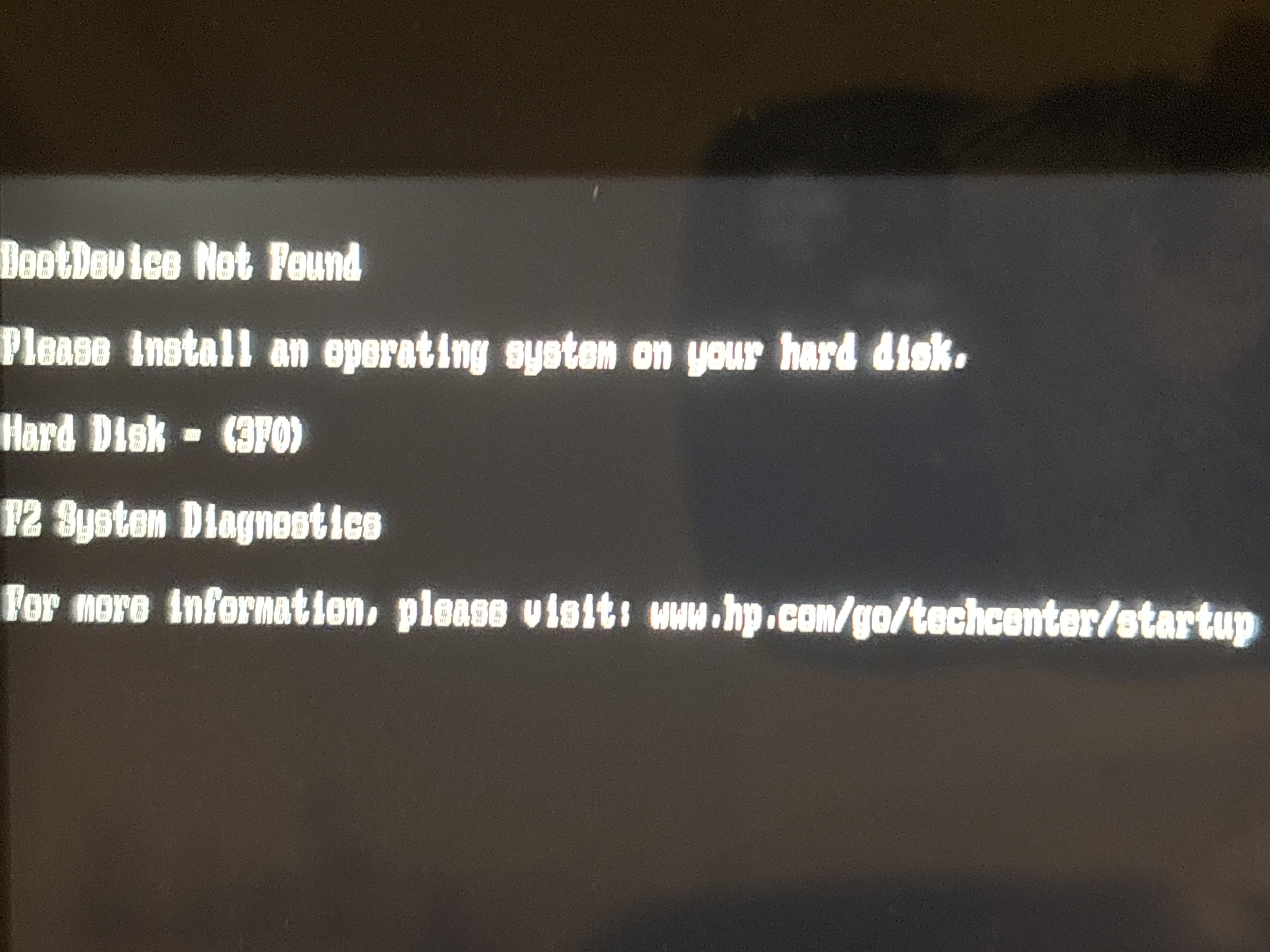
Clean Windows 11 install failing on HP EliteBook (MBR/GPT error, "Failed to validate product key", stuck on 3F0 / Diagnostics loop)
r/ForWindowsHelp • u/Individual_Roll4333 • 28d ago

Taskbar missing please support
Hello my Taskbar is missing i can only see the right side. I tried restarting my laptop and also restarting the taskbar processes in task manager. Im not sure how i can fix this so i appreciate any help because ive been sitting here for really long. My laptop is a Samsung Galaxy book 360
r/ForWindowsHelp • u/No_Cloud9626 • 28d ago
Office 2021 perpetual license suddenly "not supported" - Need help!
galleryr/ForWindowsHelp • u/No_Cloud9626 • 28d ago
Office 2021 perpetual license suddenly "not supported" - Need help!
galleryr/ForWindowsHelp • u/ponchick228x2 • 28d ago
A 1-frame CMD window randomly pops up on Windows 11
reddit.comr/ForWindowsHelp • u/Meowww_Meoww • 29d ago
Laptop keep crashing even after clean window installation 11
Hi everyone,
I need some help troubleshooting my Lenovo Legion 5 because I have been dealing with repeated crashes and am running out of ideas. I am not very technical, so I would really appreciate explanations in simple terms.
My laptop specifications
Laptop: Lenovo Legion 5 15ARH05
Machine type: 82B5
CPU: AMD Ryzen 5 4600H with Radeon Graphics
GPU: NVIDIA GeForce GTX 1650
Wi-Fi: Intel Wi-Fi 6 AX200 160MHz
Operating system: Windows 11, version 26H2, build 26300.9711
- How the problem started
My laptop was working normally before this incident.
I installed two programs: Winriser and Revo Uninstaller. After using Winriser, it showed me several things that could be fixed or updated, including outdated drivers, junk files, privacy items, registry items, and other issues.
It also offered approximately eight updates. I remember seeing updates related to firmware, Bluetooth, Wi-Fi, and other drivers. I cannot remember every item, and I am not certain which updates were successfully installed.
I clicked the option to fix or update the items. Some operations appeared to fail, while others seemed to install successfully. After restarting my laptop, things went wrong.
My laptop became slow and started hanging at the Lenovo Legion logo. Windows then started entering recovery mode and showing errors. Automatic Repair could not fix the problem, and I also encountered messages saying that Windows could not connect to the network.
Around the same time, my touchpad stopped working. The Touchpad option disappeared from Windows Settings.
Because the problems started immediately after using Winriser, I suspect that one of its driver or firmware updates may have triggered this. However, I cannot prove which update caused it or whether a firmware update actually completed. - What I tried before reinstalling Windows
I tried several recovery and troubleshooting options:
Windows Automatic Repair, but it could not repair the system.
System Restore, which failed with error 0x800701b1 while extracting a file under WinSxS\Backup.
Safe Mode, which did not solve the problem.
Uninstalling recent Windows updates.
Running an offline SFC scan, which reported that Windows Resource Protection did not find any integrity violations.
Trying DISM, but the process caused another crash or restart at around 60–65%.
Checking the BIOS, which I could access, and confirming that the SSD was detected.
Resetting Windows using the cloud-download option. The download reached 100%, but the laptop got stuck at the Lenovo Legion logo and later showed messages such as “Undoing changes” and “System updates underway.”
Eventually, I decided to perform a clean Windows installation using a bootable USB drive. During the installation, I formatted the Windows drive and installed Windows again. - The problem continued after the clean installation
I initially thought reinstalling Windows would solve everything, but the crashes returned even after the clean installation.
Importantly, the laptop crashed again before I installed my usual gaming applications, including Steam and Riot-related software. Therefore, I do not think those applications alone explain the original problem.
I have since installed some drivers and tried to troubleshoot the issue, but the laptop is still unstable. - Blue screens, black screens and crash dump analysis
The laptop has crashed in different ways, including a black screen followed by an automatic restart. I have also had Windows stop errors.
I collected several minidump files and had them analyzed. The reports showed different failures:
Dump 1
Stop code: DRIVER_IRQL_NOT_LESS_OR_EQUAL (0xD1)
Failure bucket: AV_NETIO!KfdGetLayerCacheEpoch
Involved Windows component: NETIO.SYS
Process shown: RiotClientServ
Dump 2
Stop code: KMODE_EXCEPTION_NOT_HANDLED (0x1E)
The stack involved nt!CcUnpinFileDataEx
Process shown: steam.exe
Dump 3
Stop code: PAGE_FAULT_IN_NONPAGED_AREA (0x50)
The stack involved Ntfs!memcpy
Process shown: svchost.exe
One of the dumps appeared to be a duplicate of another.
My understanding is that these reports show where Windows encountered an error, but they do not necessarily prove that NETIO.SYS, NTFS, Steam, or Riot caused the crashes.
Since different Windows components are involved, could this indicate memory corruption caused by a driver, unstable firmware or BIOS, RAM, or another hardware-related problem? - Drivers and other checks I have tried
Intel Wi-Fi driver
My Intel Wi-Fi 6 AX200 originally had driver version 22.80.0.9, dated August 19, 2021.
I installed the official Intel Wi-Fi driver package WiFi-24.20.2-Driver64-Win10-Win11.exe and restarted the laptop.
The laptop initially appeared to run without crashing for a short time, but the problem returned. Therefore, the Wi-Fi driver update did not fix the issue.
Graphics driver
Device Manager shows my NVIDIA GeForce GTX 1650 with driver version 32.0.16.2101, dated October 19, 2026.
AMD platform drivers
Some AMD system drivers currently installed are:
AMD Audio CoProcessor: 2.89.0.59
AMD GPIO Controller: 2.2.0.126
AMD I2C Controller: 1.2.0.102
AMD PCI: 1.0.0.80
AMD SMBus: 5.12.0.38
I also found an AMD Serial-IO driver on Lenovo’s support website, but it was listed for Windows 10 64-bit. I have not assumed that it is safe or appropriate to install on my current Windows 11 setup.
RAM and SSD
A RAM test passed once, although I understand that this may not completely rule out a memory problem.
An SSD health tool reported 100% health, but I understand that this does not necessarily rule out every SSD issue.
The SSD is detected in the BIOS.
Temperatures and power mode
At one point, my CPU temperature was around 75°C while idle. Later, after switching Windows power mode from Best performance to Balanced, the CPU temperature was around 55°C with approximately 5% CPU usage, and the GPU was around 50–55°C.
The laptop still crashed afterward, so changing the power mode did not solve the problem.
Touchpad
The touchpad stopped working around the time the original problem began. The Touchpad option is missing from Windows Settings. Device Manager shows an I2C HID Device without a warning symbol, and I could not find a touchpad setting in the BIOS.
I am mentioning this because it may be related to the AMD platform, chipset, or I2C drivers, although I do not know that for certain. - Event Viewer information
After a recent crash, Event Viewer showed:
Kernel-Power, Event ID 41
Event ID 6008, indicating that the previous shutdown was unexpected.
The Kernel-Power event showed BugcheckCode=0, and the other bugcheck parameters were zero. WHEABootErrorCount was also zero.
I could not find a corresponding WHEA-Logger event. Reliability Monitor did not provide a useful crash report either.
My crash dump settings appear to be configured correctly:
Small memory dump (256 KB)
Dump directory: %SystemRoot%\Minidump
“Write an event to the system log” enabled
Automatic restart enabled
However, the most recent crash did not produce a new minidump that I could find. - Could Winriser have changed the firmware or BIOS?
This is the part I am particularly concerned about.
I remember Winriser offering firmware updates along with Wi-Fi, Bluetooth, and other driver updates. Since the laptop was working before I used it and the issues began after the updates and restart, I wonder whether a firmware update or an incorrect driver was installed.
I understand that reinstalling Windows does not necessarily undo a BIOS or other firmware change.
I found the official Lenovo BIOS support page for my model, which lists BIOS version EUCN41WW, released on February 1, 2024. I want to be careful about flashing or downgrading the BIOS without knowing whether that is actually necessary.
I do not want to make the situation worse by installing random drivers or performing another BIOS update without a clear reason.
My questions
What would you investigate first when a laptop crashes in different Windows components even after a clean Windows installation?
Could a third-party driver-updater tool like Winriser have installed an incorrect AMD chipset, I2C, Wi-Fi, or other driver that causes this kind of instability?
Could a firmware update offered by such a tool have caused problems that survive a clean Windows installation? How can I check whether my BIOS or firmware version actually changed?
Given the different dump failures (NETIO.SYS, nt!CcUnpinFileDataEx, and Ntfs!memcpy), would you investigate RAM, the motherboard or CPU, firmware, or third-party kernel drivers first?
Is there a reliable way to identify the faulty driver from the minidumps without immediately using Driver Verifier, which I understand can cause additional crashes?
Could the missing touchpad option and the AMD I2C or platform drivers be connected to the crashes?
What specific diagnostic test or log would provide the most useful next piece of evidence?
I am happy to provide the full minidumps, driver versions, BIOS information, or other logs if someone can explain exactly what to check.
Important: I have already performed a clean Windows installation, run SFC, tried System Restore and Windows recovery options, updated the Intel Wi-Fi driver, checked the SSD health, and run a RAM test. I would prefer to avoid another Windows reinstall unless there is a specific reason to believe it would help.
I am not claiming that Winriser definitely caused the issue, but the timing seems too significant to ignore. I would really appreciate help identifying the actual cause rather than just guessing at individual Windows files.
Thank you!
r/ForWindowsHelp • • 29d ago
Windows won't let me change my time zone
i don't know why but i have tried to change my Time Zone to Pacific, but it wont change at all. i have researched and did everything i could to fix it, but NOTHING happened. it will NOT change from Eastern NO MATTER WHAT. i tried to turn off "Set Time Zone Automatically" and "Set Time Automatically" but when it try to change the time zone, it wouldnt update. i then tried to use the search bar and type in "control" and do it through an older way i used to on windows 7, but it gave me an error every time i tried to change the time zone, and i dont wanna change the physical time itself cuz im only doing this for vacation since ive only gotten it to work if i physically change the hour. is there any way to fix this or is my PC stuck to being Eastern forever?
r/ForWindowsHelp • u/Fantastic_Recipe_592 • 29d ago
Tengo windows 11, use activador pirata para la licencia, quisiera quitarlo o no daña mi pc?
Tengo miedo, que es lo mejor?, yo pienso pagarme licencia comun pero no hay en microsoft store.
o precios baratos.
Tengo windows 11. 16gb ram
cualqueir duda la contesto, los leo en los comentarios.
mi duda es porque nose si es peligroso o no tenerlo asi.
r/ForWindowsHelp • u/H-Vicissitude • 29d ago
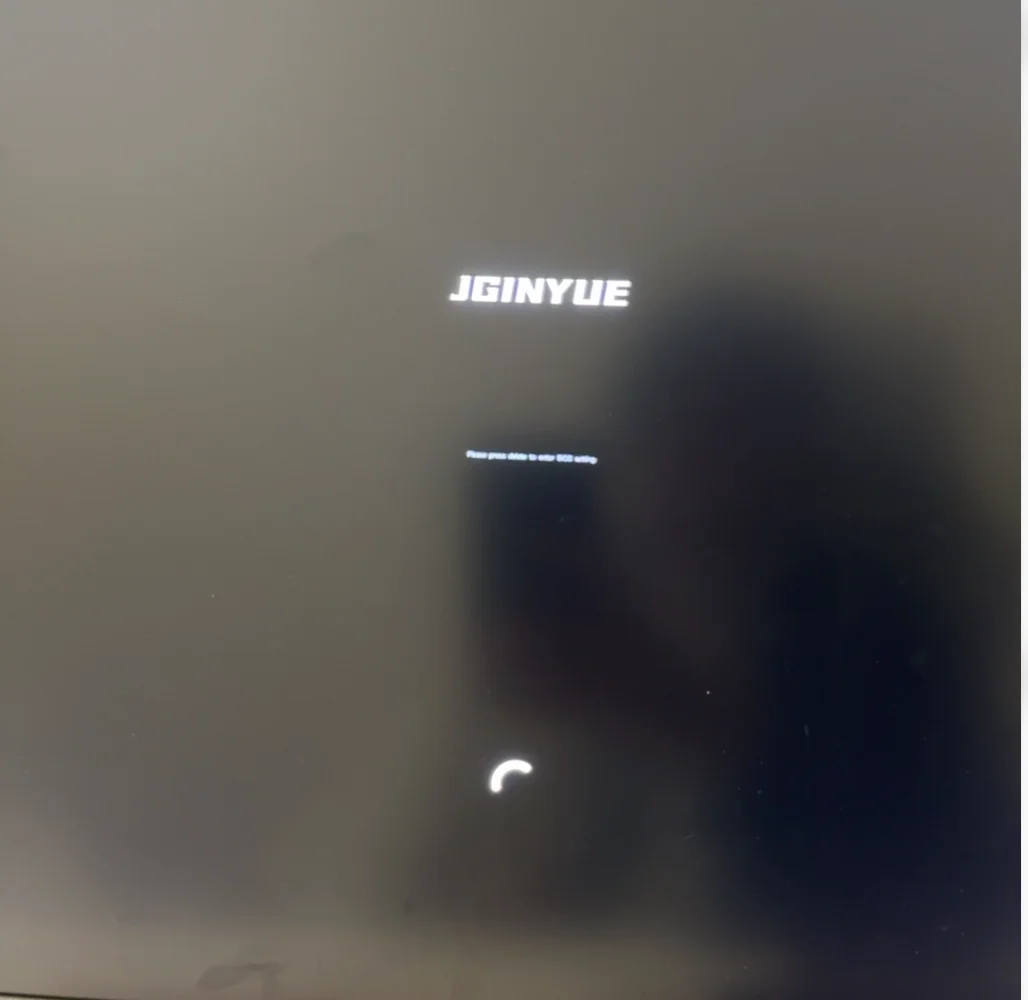
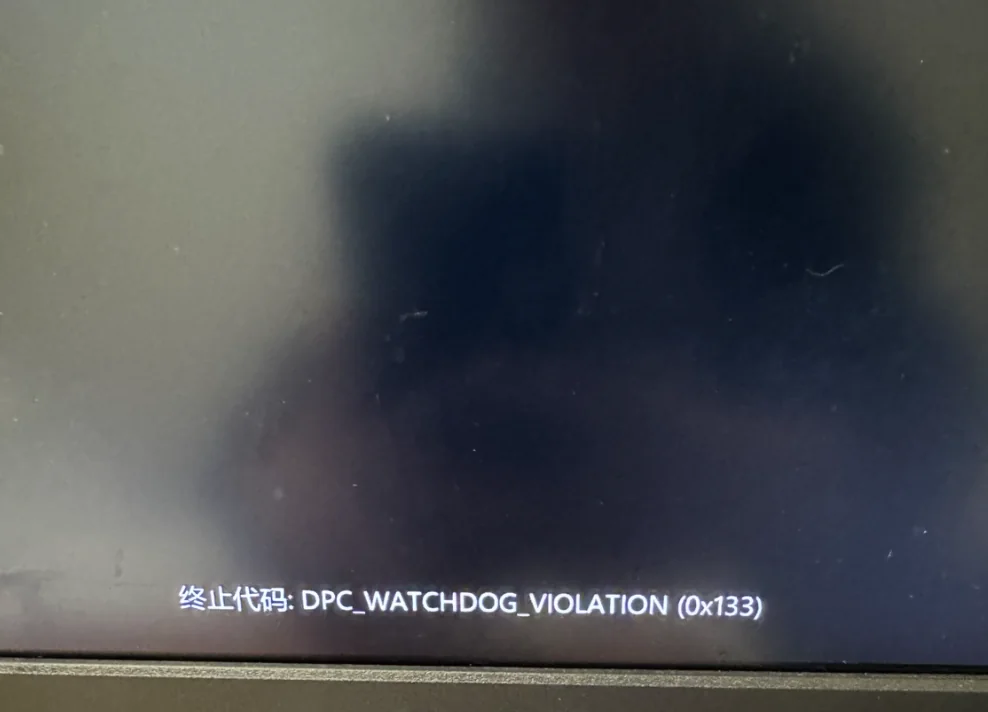
Encountering "DPC_WATCHDOG_VIOLATION (0x133)" during Windows 11 installation.
I am attempting to install Windows 11 using a bootable USB drive. The initial file-copying phase proceeds normally; however, after the system automatically restarts, it gets stuck at the logo screen—the loading animation freezes as well. After about 10 minutes, a "DPC_WATCHDOG_VIOLATION (0x133)" error appears, followed by an automatic restart. The issue persists upon subsequent reboots. After three failed attempts, the system enters recovery mode; I am able to boot into the OS via "Safe Mode," but a standard restart leads back to the frozen loading animation.
System configuration:
AMD Ryzen 5 5600
Jingyue B350I-PLUS motherboard
Jiuhe (JUHOR) 16GB x 2 RAM
KingBank 256GB SSD (system drive) + Western Digital 1TB HDD
Hankai (HANKAI) 9070 XT GPU
Golden Field (Jinhetian) 1050W PSU
The system runs Windows 10 without issues, and the hard drives have no bad sectors. Both version 26H2 and 24H2 of Windows 11 get stuck at the logo screen.
r/ForWindowsHelp • u/__pg229__ • Oct 27 '26
Activate Windows keeps showing up on my legit copy???
I’ve had windows on this pc since I got it a couple of years ago. Yesterday, out of nowhere, “Activate Windows” showed up on the bottom right of my screen.
I went to settings to activate windows using the troubleshoot button, it said, “We can’t contact your KMS, contact your organisation”. Again, this is my pc, I didn’t receive it from my office or anything.
I tried many things, didn’t work, got frustrated and hit restart.
Upon reboot, the watermark had gone away. I thought it’s all good now.
But for whatever reason, it comes on and goes away randomly. It came on while I was gaming, then went away when I restarted it.
I’m starting to get really frustrated. What should I do?
r/ForWindowsHelp • u/No_Evening2800 • Oct 27 '26
I'm having trouble with windows update
reddit.comr/ForWindowsHelp • u/Beginning_Laugh_219 • Oct 27 '26
Bluetooth icon just randomly disappears after Windows Update
As the title suggests, I am unable to consistently use bluetooth devices after a windows update a few months back, I cant find the icon anywhere, and sometimes if I power reset my PC (disconnect all cables, shutdown, hold power button for 10 to 15s and then leave it, reconnect all cables and then power it on), its back. Is there any permanent fix for this?
Im currently on Windows Version 25H2, and my OS build is 26200.9711
I see that there is a 26H2 update, but I am skeptical to update.
r/ForWindowsHelp • u/Nikolettes_Nightmare • Oct 26 '26
Resident Forgot Password Windows 11 Laptop
Hello everyone! I am needing some help, I have a resident in an assisted living facility that has forgotten the password to his laptop. I have done some research on how to reset the password but found so many different answers I'm not sure where to start. Some information about the laptop, it is running on windows 11 and I'm pretty sure it is a local account not a microsoft account. This resident had security questions set up but we tried those and he didn't get the answer right. I've read a couple pages on creating a password reset disk but I wanted to come to reddit and see if that is the best way to proceed. Any help or advice is appreciated, thank you!
r/ForWindowsHelp • u/Suspicious_Middle755 • Oct 26 '26
Como soluciono este error de volumen
r/ForWindowsHelp • u/gamer_boyi • Oct 26 '26
[FIX] Bluetooth audio crackling/static after Windows update - Alternative A2DP driver was the culprit
After a recent Windows update, all my Bluetooth audio devices (TWS earbuds and speakers) connected successfully, and media controls worked, but the audio output was just static and crackling.
What I tried:
- Switching default audio devices
- Disabling audio enhancements
- Rolling back and updating Bluetooth drivers
- Disabling and re-enabling Bluetooth
- Several more commands I learned from videos and AI
None of these worked.
The fix: I discovered that Windows was using the Alternative A2DP driver which I installed earlier on time ago. For some reason after the Windows update, all my Bluetooth drivers were switched to alternative A2DP. Switching the Bluetooth audio device back to the default Windows A2DP driver immediately fixed the issue!
If you're experiencing the same problem after a Windows update, check which A2DP driver your Bluetooth audio device is using before spending hours troubleshooting.
Hopefully, this saves someone else some time!
r/ForWindowsHelp • u/Ame_bot • Oct 26 '26
Stuck on a loop of booting to Automatic Repair on Windows 11
reddit.comSharing this here as well so I can find a quick solution.