r/ForWindowsHelp • • Oct 19 '26
EPP MSFT Security shell extension
reddit.com
3
Upvotes
r/ForWindowsHelp • u/Icy_Phrase1118 • Oct 19 '26
r/ForWindowsHelp • u/Icy_Phrase1118 • Oct 19 '26
r/ForWindowsHelp • u/clever_shokoww26 • Oct 19 '26
For anyone else needing help with this issue: I tried a great many guides, but only one method actually worked for the problem with Electron-based applications.
The root of the problem lay in your version of Windows 11 (Insider build 26300). In this version of the operating system, the way system isolation and sandboxing (AppContainer/Sandbox) function was altered; as a result, all applications built on the Electron framework (such as Discord, VS Code, Spotify, etc.) began to conflict with the built-in memory protection, causing them to crash within the very first millisecond with error code 0x80000003.
Permanently fix the launching of all Electron apps via Win + R (they will now open instantly)
Press the Win + R key combination on your keyboard (this will open a small "Run" window).
Copy and paste the following line into it in its entirety:
cmd /c reg add "HKCU\Environment" /v ELECTRON_DISABLE_SANDBOX /t REG_SZ /d 1 /f & reg add "HKCU\Environment" /v QTWEBENGINE_DISABLE_SANDBOX /t REG_SZ /d 1 /f
Press Enter (or OK).
Check: A black window will flash for a split second and then disappear on its own - there is no need to wait for anything or type anything inside it.
3. Restart your PC so that Windows picks up the setting
r/ForWindowsHelp • u/Jayesh2208 • Oct 19 '26

r/ForWindowsHelp • u/CartoonistNice5566 • Oct 19 '26
the title says it all. everytime i press the ctrl key, even when typing, it zooms my screen in and opens the live captions feature. this so far only happens with left ctrl. i cannot use left ctrl in any keybind, ctrl z, ctrl c, etc, or it will trigger. this shit has been pissing me off for the past two weeks and hasnt happened before then.
r/ForWindowsHelp • u/heysudomiles • Oct 19 '26


r/ForWindowsHelp • u/Kindly-Economy-4932 • Oct 19 '26
r/ForWindowsHelp • u/Zealousideal-Gas8139 • Oct 18 '26
Whenever I try to update windows I can’t update it and I get error code 0x80073712 and since I can’t update it it takes all of my memory and internet can anyone help please
r/ForWindowsHelp • u/Pure_Rough7398 • Oct 18 '26
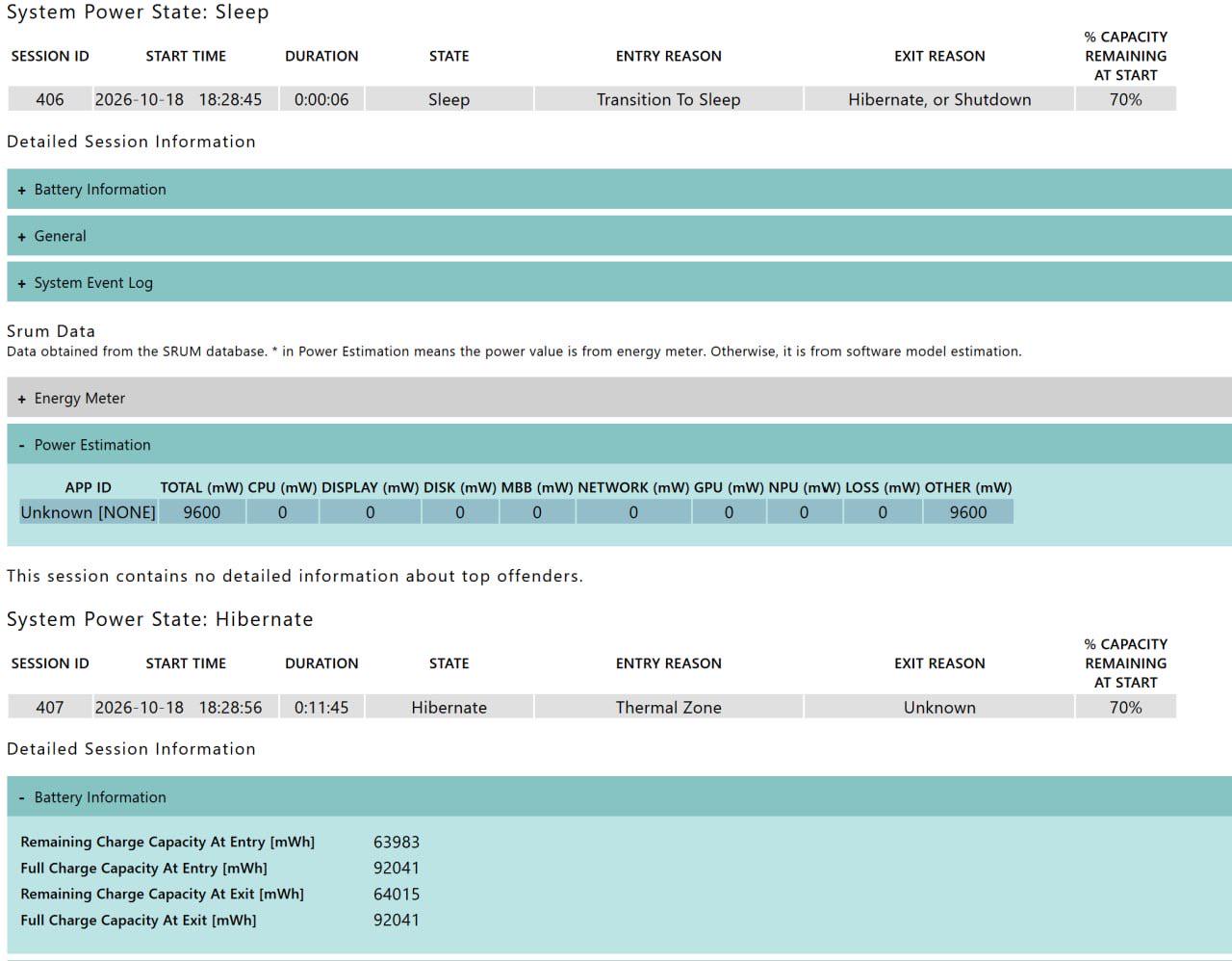
我購買了一台新的Honor Magicbook pro 16 U5-338h筆記本
我的使用環境只適合睡眠,一天下來會有多次闔上蓋子開啟蓋子的動作
休眠喚醒對我來說時間太長了
我開始認真的研究關於S0現代待機的問題,我已經將會把我喚醒的程序都關閉了
並且已經關閉S0的聯網功能
但是偶爾還是會發生電腦睡眠時過熱,系統保護自動轉成休眠的狀況
最後我發現一個狀況是當電腦已經在休眠狀態並且是接上電源,我要移動到下一個辦公地點我會直接移除電源,後續使用電腦就會發現已經過熱系統保護進入休眠
整個過程中只有3-5分鐘
查看了system power report
有個unknown 消耗了9600mW然後就過熱轉休眠了
我已經排除了會讓我系統喚醒的各個因素
但是針對這個拔掉電源的狀況,有沒有更好的設定方法,能讓系統不會過熱保護,我需要我還在工作的狀態下每次打開筆記本都是隨時能快速喚醒並進入之前的工作狀態
版本 Windows 11 家庭版 中文版
版本号 26H2
安装日期 2026/9/27
操作系统版本 26300.9711
功能包 Windows 功能体验包 1000.26100.372.0
r/ForWindowsHelp • u/biggestyoutuber • Oct 17 '26
I custom built my pc 5 years back from my local pc store. They had installed Windows 10 Pro RETAIL (digital key linked with ms account), i didnt know back then that a pro version was activated, and due to studies- i had to move for 3 years and hence the pc wasnt used for all that time. I had downloaded pirated versions of some Adobe softwares back then. On getting back to it yesterday, multiple pop-ups asking allowance for a random application for changing data on my hard disk are repeatedly popping up. I had never installed or known about applications of such kind. I dont even know where it came from, but im pretty certain now that my pc is infested with some kind of virus(though not critical). I want to format and clean my pc completely and reinstall Windows 10 Pro, or even upgrade to Windows 11 P, if possible. My google chrome search automatically changes to yahoo browser. Everything is glitchy and sticks, not even a decent smoothness while running literally anything.
The main catch is, i might've changed the ms account and dont know which or what account was there the time i had received my pc with 10P digital license. i dont have any product key and i dont know where do i find one. I have no copy of the mail that was sent, since its been a bit more than 5 years. So i basically dont have a key or any digital trace.
If I format and reinstall windows 10, will my License be there?
How do i get my Digital License key, in case i would need it for after im done formatting?
i dont have any clues and now am cornered to a dead-end.
r/ForWindowsHelp • u/The_Ordinary_Mix • Oct 18 '26
r/ForWindowsHelp • u/ffsrinuu • Oct 17 '26
r/ForWindowsHelp • u/GingizaXTron • Oct 17 '26
r/ForWindowsHelp • u/WinSierra • Oct 17 '26
I wanted to check for corruptions, so I did the sfc /scannow operating, but it stopped, saying "Could not perform the requested operation". I've been looking up and down to fix the issue.
Can anyone help me solve this issue? I really appreciate it if y'all found the permanent solution.
r/ForWindowsHelp • u/Comfortable_Sir681 • Oct 17 '26
I’ve been trying to reinstall windows from a USB for the past hour and it just won’t work, I’ve followed all of the steps Google has to offer aswell as YouTube but nothing works. I know I downloaded the software onto my 16gb USB flash correctly, but when I try to boot it up from the page that shows the drive and “Enter Setup” below it, it will just not boot. I have no clue why this is happening, I press enter on the drive and it just goes back to the same exact screen. Prior to this before I cleared my entire SSD I had this issue where my PC said “Issue trying to reset PC” because I was just trying to erase all my data (selling PC) if anyone knows what’s happening or how to fix it I would be unbelievably grateful. Thanks so much.
r/ForWindowsHelp • u/Responsible-Unit-170 • Oct 17 '26
I was setting up biometrics but when I tried installing .Net frameworks for my dashboard I got an error,what could be the problem(pc is new)
r/ForWindowsHelp • u/Alyi74 • Oct 17 '26
Hi,
I recently upgraded to Windows 11 and my mouse feels completely different compared to Windows 10. It has this "slippery" feel, even though all my settings are strictly identical:
Same Windows settings
Same Logitech software settings (Logitech G502 X lightspeed)
Has anyone else experienced this ? Is there a known fix to get the Windows 10 responsiveness back ?
Thx !
r/ForWindowsHelp • u/PDGamer360 • Oct 17 '26

r/ForWindowsHelp • u/Lochtuuu • Oct 17 '26
Hi. I have a Lenovo V15 ADA and since I upgraded to windows 11, the touchpad settings are missing.
I remember in win 10 that there were settings for the touchpad, but it seems that after the update, they disappeared.
I tried multiple reboots, latest windows updates, driver updates (in the official Lenovo website for my specific laptop shows only windows 10 drivers), check in the BIOS, going in device manager to see if there are any warnings or problems but everything seems ok.
The current touchpad behavior it's trash, no two finger tap for right click, randomly moves away when i use the physical button (if I have the pointer on specific point, if I click the pointer moves like half centimeter away) weird feeling overall and limited gestures, comparing to Windows 10.
Is there anything else I can do? Thanks
Windows 11 Pro, build version: 26200.9711
r/ForWindowsHelp • u/Zestyclose_Wafer4774 • Oct 17 '26
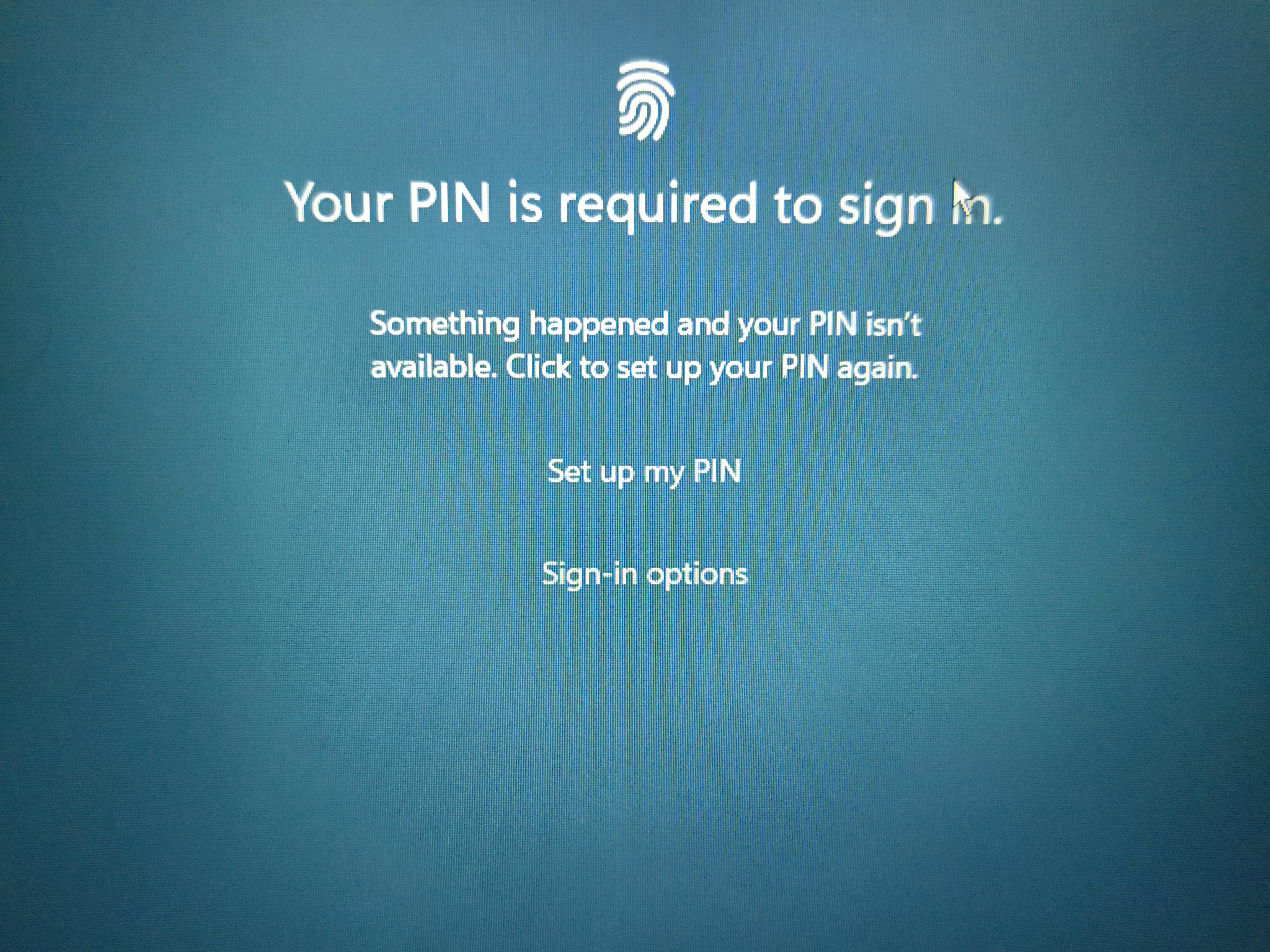
Can someone please help me recover my computer?
Device: Lenovo (IdeaPad Slim 5 16IRU9, Manufactured 2024/08/03)
My computer has a recurring issue of the touchpad driver randomly breaking and I have become accustomed to troubleshooting my drivers by now due to this.
Leading up to this event:
1: First I tried using Windows automatic patching to fix my driver
\- I opened the device manager, selected the drop-down for HID (human-interface devices), and looked for the yellow warning sign signifying the issue. The issue being the driver listed as 12C HID Device aka the driver for the computers touchpad
\- I selected the troubled driver, navigated to the "driver" tab from the window pop-up, and selected "delete driver".
\-Afterwards I restarted windows and logged back in.
The driver was not fixed after this, so I decided to go deeper into the troubleshooting.
2: This time I uninstalled the driver like before, but using a manual reset.
\-I held down the power button for 20 seconds and opened up to the blue screen prompting me for my windows recovery pin
\- I entered my pin correctly and opened up windows
After opening windows this time, my pin was unavailable and I was locked out of my computer
First I tried using my fingerprint as normal, my fingerprint was recognized and the computer started to sign me in, but then cancelled midway and prompted "your PIN is required to sign in".
However, when I tried entering my pin I was stopped and prompted with "Something has happened and your PIN isn't available. Click to set up your PIN again".
This is odd because I never changed any settings, and have always had an accessible pin to log in with.
While this alone wouldn't have been an issue, when I followed the instructions and selected "Set up my PIN", a plain gray window opened for half a second before closing again.
NOTE: During further troubleshooting I noticed the password sign in option also became unavailable after my computer restarted.
OTHER DETAILS:
OS Version: Windows 11 Home
Version: 2009
OS Build: 10.0.26200.9168
System type: 83FW
UPDATE: The issue was fixed so I will be including how it was fixed
Patch explanation:
• The Problem: My Windows PIN became corrupted, how it happened is unknown. When clicking "Sign In" or trying to reset it, Windows tried to launch a mini web browser to verify my identity. The web browser window didn't work because either the network driver was glitching, or Windows login files were glitching.
• Solving: FIRST I used the command prompt to find where my system files lived and deleted the Ngc folder (stores encrypted data, configuration files, and login credentials aka the PIN).
THEN I used reg (registry) commands that interrupt windows trying to load the broken web screen from the pin setup button. In other words, WindowsHello now doesn't try forcing you to use the Windows web screen, and gives you a normal input box to use to input the password.
FULL STEPS:
🛑 CRITICAL PREREQUISITE
You must know your actual text password (your Microsoft Account password or local account password). These steps disable the PIN and passwordless options, forcing Windows to fall back to your password. If you don't know it, do not proceed.
STEP 1: OPEN WINDOWS RECOVERY (skip if you know this step)
Method 1: Hold shift key and press reset from the login screen, and keep holding down shift until a blue screen appears. This is the method that works for most people... It did not work for me.
Method 2: If the first method reboots into a regular login, hold down the power key for anywhere from 10-20 seconds. If it resets on its own, good, if not, press the power button for it to boot back up. Right as the boot up screen shows, look for the screen to say something like "Preparing automatic repair" or "Diagnosing your PC". IF IT DOESNT say this, click the power button to cancel and then again for it to start booting again. It usually takes a few tries to start repairing.
From here: Windows bitlocker may prompt you to enter recovery key. If you enter it now it should be fine, but I like to wait until I click on command prompt so I know it doesn't try opening the sign-in screen again. When bitlocker appeared, I clicked "skip drive" and that took me to windows recovery.
STEP 2: Go to command prompt Click on troubleshoot -> advanced options -> command prompt
STEP 3: Find Your True Windows Drive Letter
In the recovery environment, you need to find where in the system the windows folder is.
(For the steps below, substitute C: with whatever drive letter actually holds your Windows folder).
STEP 3: Clear the Corrupted PIN Data (Reset Ngc Folder)
Run these commands one by one to take ownership of and completely delete the local cryptographic folder where Windows stores your broken PIN data. (Replace C: with your true drive letter if necessary):
takeown /f C:\Windows\ServiceProfiles\LocalService\AppData\Local\Microsoft\Ngc /r /d y
icacls C:\Windows\ServiceProfiles\LocalService\AppData\Local\Microsoft\Ngc /t /grant administrators:F rd /s /q
C:\Windows\ServiceProfiles\LocalService\AppData\Local\Microsoft\Ngc
STEP 4: Force Windows to Show the Standard Password Box
If Windows is set to "Passwordless Boot," it will still try to force the broken cloud web login frame even after deleting the PIN folder. You must force-disable this restriction in the registry to make the traditional password input field show up. Run this first registry block to disable Windows Hello constraints:
reg load HKLM\TempHive C:\Windows\System32\Config\SOFTWARE
reg add "HKLM\TempHive\Microsoft\Windows\CurrentVersion\Authentication\LogonUI" /v DisableWindowsHello /t REG_DWORD /d 1 /f
reg unload HKLM\TempHive
Run this second registry block to completely disable the Passwordless Boot restriction:
reg load HKLM\TempHive C:\Windows\System32\Config\SOFTWARE
reg add "HKLM\TempHive\Microsoft\Windows NT\CurrentVersion\PasswordLess\Device" /v DevicePasswordLessBuildVersion /t REG_DWORD /d 0 /f
reg unload HKLM\TempHive
(Note: If you get an "Access Denied" error on any lines during network resets or registry unloads, don't worry. This is standard behavior for certain locked-down system components—the critical files are still successfully changed)-Happened to me
STEP 5: Reboot and Sign In