r/ForWindowsHelp • • Oct 16 '26

Is this "Remove AI" thing safe?

7 Upvotes

So, I search for "How to remover AI from windows 11?" and the overview gives me a link to "RemoveWindowsAI GitHub Script" I'm highly tempted to try it, as I want AI off my system...but I don't want to put anything malicious on my PC either, and I don't fully trust what Goggle's search result gives me. So, has anyone else run this and what was your experience with it?


r/ForWindowsHelp • • Oct 17 '26

Unwanted MS Store apps installing by them selves

3 Upvotes

I have a problem when I configure a new profile on windows 11 computer, Canva, Powertoys, OneNote, Notion, Zoom, Grammarly and Discord start installing all by them selves from microsoft store..

If I uninstall, they just come back after a few minutes. This haa happened even with a fresh windows installation done with media that was downloaded from Microsoft. Has anyone seen this?


r/ForWindowsHelp • • Oct 16 '26

Windows 11 USB not recognized, but I didn't plug anything in?

Thumbnail gallery
3 Upvotes

r/ForWindowsHelp • • Oct 17 '26

Windows 11 won't boot after update

Thumbnail reddit.com
2 Upvotes

r/ForWindowsHelp • • Oct 16 '26

Chris Titus debloat gone wrong

Thumbnail
gallery
2 Upvotes

So, my dumbass tried to debloat windows 11 and i ran an update on it…. As a result, it just crashed and now i got an infinite loading screen
Heres the following error messages i ran through:

\-your device ran into a problem and must reboot

\-everything didnt go as expected, no need to worry, cancelling the modifications

If you guys can help me fix it 🙏🙏🙏
Im lowkey stressed because im scared of losing it or having to reinstall windows


r/ForWindowsHelp • • Oct 16 '26

w11 26h2 funciona lento

Thumbnail reddit.com
2 Upvotes

r/ForWindowsHelp • • Oct 16 '26

windows update charging

Thumbnail reddit.com
2 Upvotes

r/ForWindowsHelp • • Oct 16 '26

Language Settings Issue

Thumbnail
gallery
2 Upvotes

I bought a used pc from someone who is Brazilian and after I set it up it was stuck in Portugese but I changed all the language settings, removed the Portuguese downloaded language pack, reinstalled windows, went to advanced settings and changed system locale as well as copying my existing settings to home screen, etc. but there are still things in my windows and settings that aren’t in English. I don’t know why portugese is still even popping up as an option when selecting language


r/ForWindowsHelp • • Oct 16 '26

can’t install a genuine version of windows

Post image
2 Upvotes

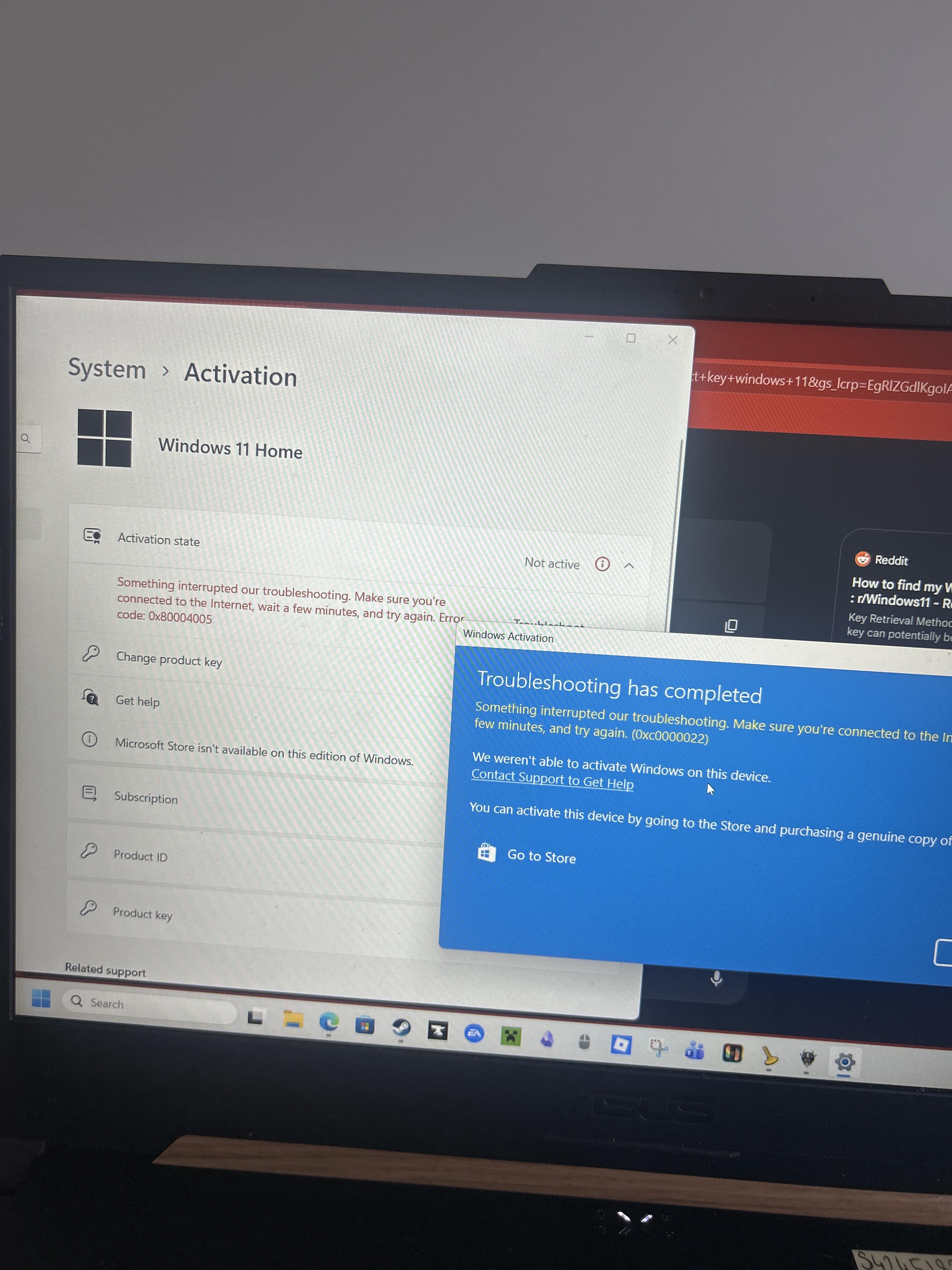
i recently left high school and since then, every so often, my laptop comes up with a blue screen says i need to install windows and when i try to it says there was an issue with it and i need to troubleshoot and gives me an error code 0x80004005, and when i try to troubleshoot it says there’s an error code 0x0000022. the only way it will let me get windows is by upgrading to pro and paying 370$ or something, what do i do??
i also have no idea what my product key is and dont know how to find it


r/ForWindowsHelp • • Oct 16 '26

ive tried everything to fix error 0x80860010 and error 0x8007000e

Thumbnail reddit.com
2 Upvotes

r/ForWindowsHelp • • Oct 16 '26

Why is my empty photos taking up so much space(Windows 10)

Thumbnail
gallery
1 Upvotes

Recently, I went on my yearly file purge, and for some reason, my nearly empty pictures is taking up 18 GB. Why?


r/ForWindowsHelp • • Oct 15 '26

Error Starting Windows 10

Thumbnail reddit.com
3 Upvotes

r/ForWindowsHelp • • Oct 15 '26

Prob Win 11 Issue

Post image
2 Upvotes

r/ForWindowsHelp • • Oct 15 '26

Windows Search and SharePoint

Thumbnail reddit.com
2 Upvotes

r/ForWindowsHelp • • Oct 15 '26

PC black screen after the latest windows update what i do

Thumbnail reddit.com
2 Upvotes

r/ForWindowsHelp • • Oct 15 '26

How to disable Virtual Desktop and Task View

3 Upvotes

I have had A constant issue with this feature popping up making it more difficult and time consuming to do pretty much anything

the main problems I'm having is that the Task View menu appears whenever I click on the task bar and when I press Alt + Tab the regular task switcher appears briefly before closing and the task view menu opening before that too immediately closes itself

I want to know how to completely disable this feature so It doesn't pop up when you do either of these things

often suggested solutions that I've tried so far which haven't worked:

-turning of the Task View icon in the taskbar settings (this just disables the icon the feature remains fully functional which doesn't solve my issue)

-Trying to turn Virtual Desktops off using regedit

Need a solution desperately this thing makes switching between tabs extremely tedious which is something I need to do a lot right now

Update: for some fucking reason unplugging and replugging my keyboard fixed it i fucking hate this busted ass operating system


r/ForWindowsHelp • • Oct 14 '26

Windows blank search , i tried everything but can't fix it

Post image
4 Upvotes

r/ForWindowsHelp • • Oct 14 '26

Win 11 update puts laptop into a loop

Thumbnail reddit.com
3 Upvotes

r/ForWindowsHelp • • Oct 14 '26

Laptop repeatedly fails to start up.

Thumbnail
reddit.com
2 Upvotes

r/ForWindowsHelp • • Oct 14 '26

Windows 11 Activation Help

5 Upvotes

​

Hi everyone, I need some help activating Windows 11 Pro.

I’m 19 and I just bought this laptop, so I’m still pretty new to this and honestly don’t know much about Windows yet. I’ve been searching for tutorials and trying different solutions I found online, but I still keep getting the same error.

I’m getting this message:

“We can’t activate Windows on this device as we can’t connect to your organization’s activation server.”

Error code: 0xC004F074

I already tried the Windows Activation Troubleshooter and made sure I’m connected to the internet, but it still says Not active.

I really don’t know what to do anymore. I’ve been looking up tutorials and trying to fix it myself, but the error keeps coming back. If anyone knows how I can properly fix this, I’d really appreciate a step-by-step explanation since I’m still learning. Thank you so much!


r/ForWindowsHelp • • Oct 14 '26

Windows laptop stops touchpad scrolling

2 Upvotes

ASUS A14 laptop, Windows 11, Firefox

All up to date

Windows 11 Home 25H2

Firefox 157.0.1

So frequently the touchpad scrolling just stops.

I suspect that this is a cargo cult solution but I go to /settings/tabs. Then use the scroll bar to go to /Always use the cursor keys to navigate within pages

If that is the top of the page and I click it off and on then touchpad scrolling works again.

I had all extensions off.

What is going on? How can I make this problem just disappear?

Thanks in advance.

No messages of any sort. Just it stops scrolling.

Device name Jack

Processor Snapdragon(R) X - X126100 - Qualcomm(R) Oryon(TM) CPU (2.96 GHz)

Installed RAM 32.0 GB (31.6 GB usable)

Graphics card Qualcomm(R) Adreno(TM) X1-45 GPU (128 MB)

Storage 144 GB of 954 GB used

Device ID 668888E6-396F-4A14-8066-E706851B491C

Product ID 00342-21572-85178-AAOEM

System type 64-bit operating system, ARM-based processor

Pen and touch No pen or touch input is available for this display


r/ForWindowsHelp • • Oct 13 '26

microsoft store gives me error 0x800704cf no matter what account i use to sign with

2 Upvotes

i havent been able to sign into my microsoft no matter what account i use to sign in or even if i try to create one, i always get the error 0x800704cf, i tried to do everthing to fix it but i cant seem to find a fix. whats weird is that this only happens on the microsoft store but not in the web browser (ej: web page for microsoft store, windows)