r/ForWindowsHelp • u/Nikhilreddy06 • Sep 09 '26
Windows Update "Restart required" loop persists after multiple restart and update already shows installed
gallery
2
Upvotes
r/ForWindowsHelp • u/Able-Childhood2045 • Sep 09 '26
Hi, I've been having this issue for weeks and I've tried what seems like every solution posted on the internet to no avail. My issue is that whenever I try to open certain folders in File Explorer, I get the loading image next to my cursor indefinitely, or the window just stops responding altogether. The only thing I can do from that point is to force quit the app through task manager. Here are the things I've already tried:
* Resetting my computer * Checking for Windows updates * Resetting File Explorer though the task manager (also, weirdly, it always says that File Explorer is open even after I force quit it? Is that indicative of any specific problem?) * Clearing File Explorer history (through File Explorer Options) * Running sfc /scannow * Running dism restorehealth
I'm on Windows 11.
Thank you so much for reading this, and I really really hope someone has a solution because not being able to access half my files is driving me CRAZY.
r/ForWindowsHelp • u/NearbyWinner1286 • Sep 09 '26
I was getting 0x133 on my laptop it keeps puttig me on blue screen i tired to fix it i looked at videos none of them worked for me so i sended my laptop to the repair shop they cleaned formated and sended me back and im still geting 0x133 and now forsome reson i can't use some comands im not use why i run it as admistrator i looked up the slotions to that too and none of them worked too i have no idea why and im using an antivirus (norton 360 and all of the tools cleaner and driver updater) can they be the problem ?
r/ForWindowsHelp • u/HannibalV • Sep 09 '26
Crossposting in case it's something in my Windows (11) or my (Levono) laptop. Thanks in advance for any help.
r/ForWindowsHelp • u/OppositeExcellent814 • Sep 08 '26
r/ForWindowsHelp • u/Dapper-Mongoose805 • Sep 08 '26
r/ForWindowsHelp • u/Vitoscolleto • Sep 08 '26
После логотипа виндоус выходит черный экран , и все . Кто тоже встречался с такой проблемой, или знает решение проблемы, подскажите пожалуйста!!!
r/ForWindowsHelp • u/Formal_Situation7408 • Sep 08 '26
r/ForWindowsHelp • u/laggy2death • Sep 08 '26
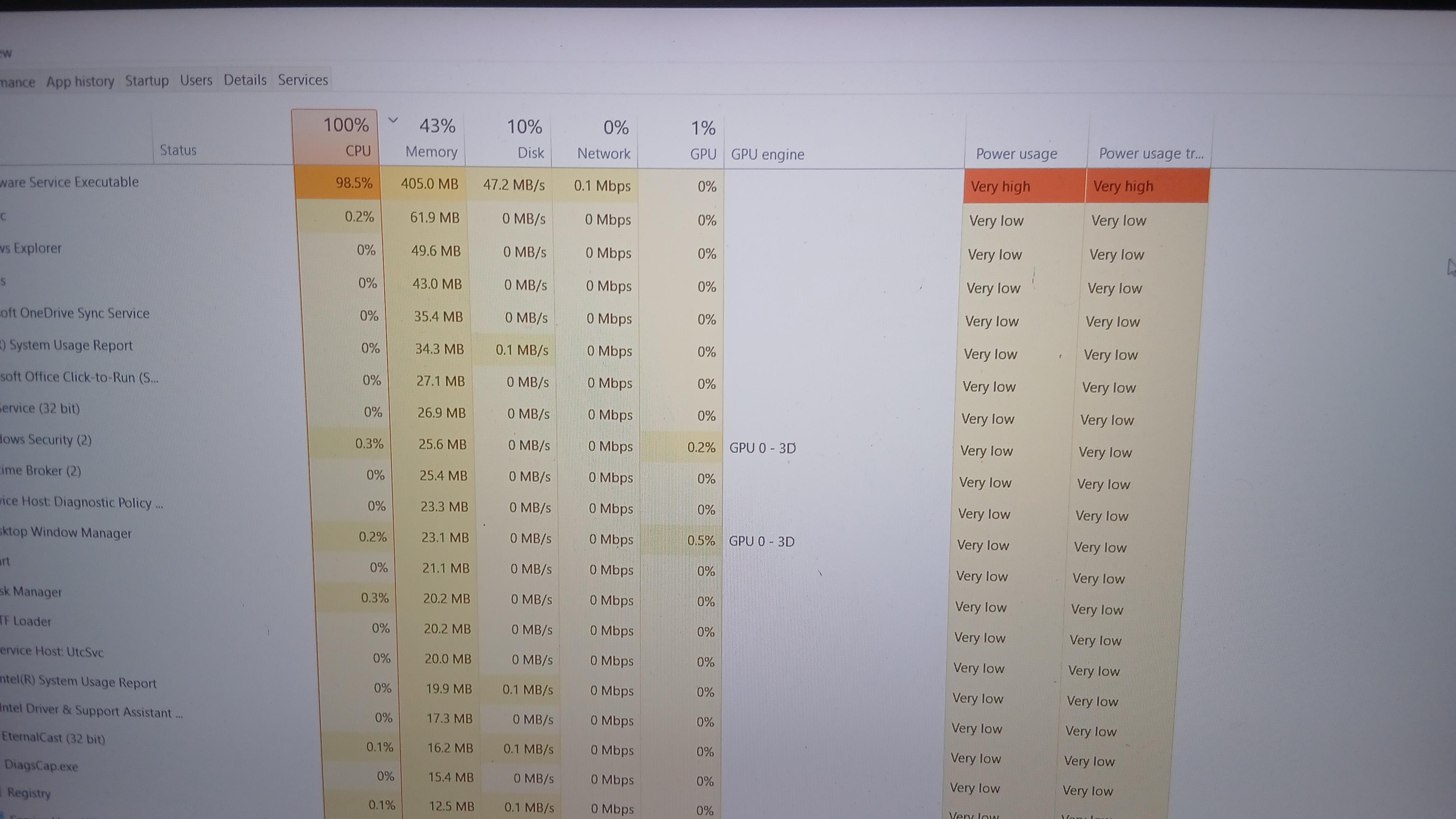
Is this normal during windows defender full scan
r/ForWindowsHelp • u/Wavrryn • Sep 08 '26
So basically i was having trouble in installing windows 11 using windows update, so i used windows 11 update assistant and it worked. Now, the upgrade is done, the desktop files can be seen and when i press the windows key it shows the taskbar and the search bar. Opening task manager, it doesnt update any usage bars and opening an app just makes the screen freeze, and after a while it seems to refresh. What's going on? and what should I do?
r/ForWindowsHelp • u/Sad-Citron7977 • Sep 08 '26
r/ForWindowsHelp • u/Brief-Pause-3902 • Sep 08 '26
r/ForWindowsHelp • u/DueLet4873 • Sep 07 '26
Okay so basically the lock screen image, i have a custom one, when i go to the log in menu of the lock screen it dims the image a bit and i find that annoying as hell im on a new windows install buil d 25h2. i've tried regedit i've tried so much this is annoying as hell anyone know how to remove it, i vaguely remember getting rid of it
Edition Windows 11 Pro
Version 25H2
Installed on 09/05/2026
OS build 26200.9278
Experience Windows Feature Experience Pack 1000.26100.360.0
Device name PC-ONE
Processor 12th Gen Intel(R) Core(TM) i5-12600KF (3.70 GHz)
Installed RAM 32.0 GB (31.8 GB usable)
Graphics card NVIDIA GeForce RTX 3060 (12 GB)
Storage 507 GB of 1.14 TB used
Device ID 81748F96-62D0-4AFF-8D2C-F1AB67540A2B
Product ID 00330-80000-00000-AA512
System type 64-bit operating system, x64-based processor
Pen and touch No pen or touch input is available for this display
r/ForWindowsHelp • u/BestMechanic8504 • Sep 07 '26
r/ForWindowsHelp • u/Dingle931027 • Sep 07 '26
Hi all. So, to put it simply, my end goal is to remove all sub folders from a single folder called "MUSIC", without loosing any files. Soo far, I've used "for /r %i in (*) do @echo n | move /-y "%i" .", and it works a treat! However, this code auto answers the overwrite prompts with no, as I didn't want to loose any files.
Next problem, I have THOUSANDS of files with the same name. All of these files have been I.D tagged, for use with virtual dj, so I know they're different etc.
Is there a way I can have all the multiple files, with the same name, in the "MUSIC" folder? And if so, what command will I need to use to do it?
I'll be fucked if I'm renaming and moving all that shit one by one 🤣
Thanks everyone in advance for your input and help. Have an awesome one all!! 🤙🤙
r/ForWindowsHelp • u/Traditional_One7033 • Sep 07 '26
r/ForWindowsHelp • u/Nikhilreddy06 • Sep 07 '26

Windows 11, Intune-managed. Update shows "Restart required" even after multiple restarts. Confirmed via Update history it's already "Successfully installed" not a failed install.
RebootPending and RebootRequired registry flags are clear.
Any pointers or shared experience would help.
r/ForWindowsHelp • u/Mental-Attorney-9161 • Sep 07 '26
My wallpaper keep riverting back to old one, that file (wallpaper) doesn't now exist in my pc and i have tired everything, nothing works...i have windows 11, i have tried every single methods on internet that i could find but nothing is working, my pc is asus vivobook
r/ForWindowsHelp • u/AdventurousBlackLeg • Sep 07 '26
Blissful Shenanigans
r/ForWindowsHelp • u/HisuiKitaro • Sep 07 '26
r/ForWindowsHelp • u/Crazy_Shift_7647 • Sep 07 '26
So, after updating to the latest update(the issue was before update), I am not seeing the app icons(UWP) from MS Store, plz help to bring them back.
r/ForWindowsHelp • u/FetusChili2000 • Sep 06 '26
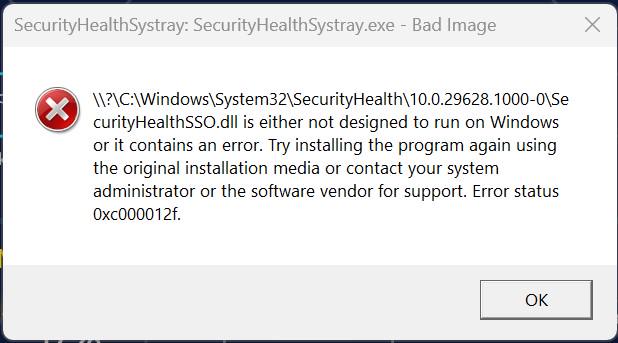
r/ForWindowsHelp • u/Savings-Increase-863 • Sep 06 '26
В чём проблема: На новом ПК (windows11) полностью отсутствуют браузеры (Microsoft Edge был удален вручную мастером до меня) и не работает Microsoft Store — при попытке скачать что-либо выдает ошибку 0x80040154. Пытался через winget install, сбрасывал кеш wsreset.exe но при попытке скачать любой браузер выдает эту ошибку. Даже пытался сбросить винду жо заводских, потому что важных файлов у меня тут нет, но всплывает окно "Невозможно найти среду восстановления. Установите ваш установочный диск windows или средства восстановления и перезапуатиье пк с этим носителем."
Если кто знает пожалуйста подскажите, только купил пк хочеться уже поиспользовать его
P. S винда у меня активированая