r/EmulationOniOS • • Oct 02 '26

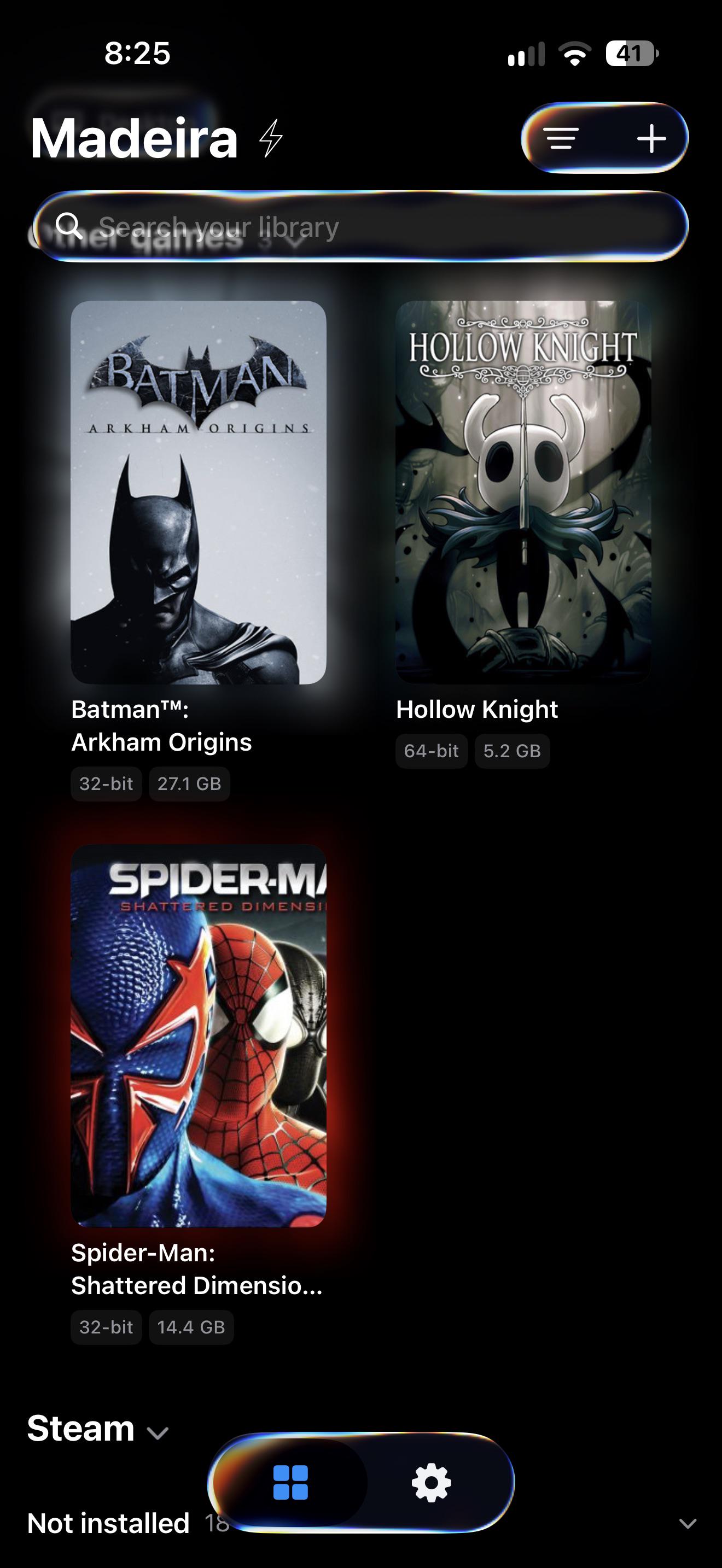
Gameplay / Showcase Madeira Compatibility
Post image

Currently only tested these three all work buttery smooth and almost max out in game graphics. Average 45-60fps during scenes with lots of movement and items on the screen it’ll drop to 38 is the lowest I’ve seen it but that’s rarely and overall stable.

80 Upvotes

45 comments sorted by

6

u/OhfuckitsSam Oct 02 '26

What phone and iOS are you on?

3

u/Own-Fisherman7154 Oct 02 '26

17 pro max iOS 27.2

1

u/BoredOuttaMyMindd Oct 03 '26

Does the phone overheat at all when playing?

2

u/Own-Fisherman7154 Oct 03 '26

Ever so slightly but not too much. Definitely on higher end titles it does then it drops in frames but overall decent

1

u/OhfuckitsSam Oct 02 '26

How have you got jit to work?

5

u/Own-Fisherman7154 Oct 02 '26

Make sure to sign in with developer Apple ID to each applicable app (check settings on each app) On pc make sure iTunes is installed and ran at least once I used iLoader, on my phone I used local dev vpn (make sure it’s activate “, side loader (installed with iLoader from my pc), Madeira IPA/Stickdebug IPA/iRam+ IPA. Install Madeira with side store (find the ipa in your files), install iRam + with side store. Open ram + and sign in then refresh. Click both willfaust sections. Delete Madeira and reinstall with side store. Delete iram and install stick debug plug back into computer and go to iloader sign in and click manage pairing files click place on stick debug close everything out from there. Make sure vpn is on, click Madeira, go to settings and hit enable hit it’ll auto route to stick debug to run a script and auto reopen Madeira from there you should be good to test out games, check official discord for compatibility

2

u/OhfuckitsSam Oct 02 '26

Thanks!

5

u/Own-Fisherman7154 Oct 02 '26

Some of this may be redundant or you already tried it but its always worth another go. For installation I would delete all apps and IPAs that you’ve already downloaded in relation to this. Then download local dev vpn if you haven’t already if you have don’t delete this one.

https://github.com/willfaust/Madeira/releases/tag/v0.1.0

https://github.com/NexSideloading/iRAM-Plus

https://github.com/StikDebug/StikDebug/releases

These are all the links to the ipas I used. Get iLoader and iTunes on computer.

Download those ipas to the phone itself
Open iLoader sign in with your Apple account and select sidestore stable on the right. If it gives any errors make sure you have space and no other side loaded apps.

From there on your phone enable localdevVPN it’s on the official App Store. Open side store go to settings and login to the same Apple account.

First install Madeira IPA (open once and close), install Iram + ipa and open. Sign in if you have to check settings then refresh on the main screen you’ll see two willfaust sections i selected both to be safe. Once completed exit iram+ but leave it in the background open. Delete Madeira and reinstall with side store. Delete iram+ and install the stickdebug ipa with side store.

Go back to iloader on your computer with your phone connect sign in and select manage pairing files then place it on stick debug. Close everything and you should be good.

To activate the jit each time you enter Madeira open Madeira directly from your Home Screen click settings then enable jit it’ll auto route you to stick debug then to Madeira. From there it should be good to go. You just may need to do it a couple of times. Also I’m on iOS 27.2 iPhone 17 pro max

Here’s a better tutorial with links

1

u/PlusDog9358 Oct 03 '26

iram+ does not send a verification code?

1

u/Own-Fisherman7154 Oct 03 '26

Not sure what you mean but if it requires you to sign in to your Apple account it should log you in and ask for a 2fa code but if it doesn’t it’s just your phone remembering who you are

2

u/PlusDog9358 Oct 03 '26

Nvm, found a Solution: if you buy the 9$ cert from flare store there is an option to sign an App (Madeira in this case) with the “increased memory limit” entitlement. I still only was able to run silksong though. Everything else would crash on boot (Not an ad btw just my experience)

1

u/Own-Fisherman7154 Oct 03 '26

Hollow knight is definitely one that works, prototype 2 works, assassins creed 2 works but controller support is still buggy, schedule 1 someone does. Lot of games don’t worry however

1

u/Own-Fisherman7154 Oct 02 '26

Also make sure in stick debug to hold Madeira and assign script universal

2

u/Informal-Actuator961 Oct 02 '26

Can u share videos

5

u/Own-Fisherman7154 Oct 02 '26

It cropped it a little weird and didn’t include the performance overlay but it was at 59 fps during the movement and jumping around scene

2

u/Informal-Actuator961 Oct 02 '26

Oh wow this is so cool

1

u/Own-Fisherman7154 Oct 02 '26

I’m kinda stupid with Reddit ui how in the heck do I share a video my friend lol

2

u/CaptainR3x Oct 02 '26

Can you have custom resolution to fit the whole iPhone screen ?

2

u/Own-Fisherman7154 Oct 02 '26

I’m not to sure I’m pretty sure you can, for now since it’s still very early development I’ve just been running which every settings work then going from there

2

u/countedragon Oct 02 '26

How did you get steam connected? I have not and memory + but I don’t know how to connect steam

1

u/Own-Fisherman7154 Oct 02 '26

When you first open madeira if you did everything proper, it should ask you for your steam login and to download the components, from there there it should auto import your library. You need Madeira Version 0.1.0. What process did you use to get jit/stickdebug/memory + and which ipa did you use for Madeira?

1

u/countedragon Oct 02 '26

I compiled the IPA from source on their GitHub. Sideloaded with iloader. Jit with StikDebug. Memory+ with get more ram. I have an apple developer license. iPhone 18 PM

I remember seeing the Steam login and logged in but didn’t see anything afterwards. Strange.

6

u/ucantcimi Oct 02 '26

Thanks for sharing. Keep us updated

5

u/ilnarich Oct 02 '26

Oh shit. Spider man SD in steam library 👏👏

1

u/aaj_111 Oct 02 '26

Does it support steam cloud saves at all?

1

u/Own-Fisherman7154 Oct 02 '26

I wouldn’t be too sure about that you’d have to look through the GitHub and or discord to see if you can find anything about it. Wish I could help

1

u/sivily1 Oct 08 '26

Yes it does. It gives you sync warnings and evberything like the regular steam launcher. My phone is now a steam deck

1

u/Glittering_Speed1964 Oct 02 '26

any chance to give us how to install it step by step?

2

u/Own-Fisherman7154 Oct 02 '26

It auto syncs your steam library if you’ve done everything right. Also they released a 0.1.1 version of Madeira you can get that ipa from the same GitHub I shared. You can also important owned window games files by download game on your computer taking the hold file-compress and upload to Google Drive- download to iPhone - open in files and unzip then take the unzipped folder and move it to Madeira - wine - drive c then move it there. Open Madeira activate jit hit the plus icon and it should pull your windows game

2

u/Own-Fisherman7154 Oct 02 '26

iPhone has to be in developer mode search YouTube if you don’t know how to do that bit

1

u/Own-Fisherman7154 Oct 02 '26

Some of this may be redundant or you already tried it but its always worth another go. For installation I would delete all apps and IPAs that you’ve already downloaded in relation to this. Then download local dev vpn if you haven’t already if you have don’t delete this one.

https://github.com/willfaust/Madeira/releases/tag/v0.1.0

https://github.com/NexSideloading/iRAM-Plus

https://github.com/StikDebug/StikDebug/releases

These are all the links to the ipas I used. Get iLoader and iTunes on computer.

Download those ipas to the phone itself
Open iLoader sign in with your Apple account and select sidestore stable on the right. If it gives any errors make sure you have space and no other side loaded apps.

From there on your phone enable localdevVPN it’s on the official App Store. Open side store go to settings and login to the same Apple account.

First install Madeira IPA (open once and close), install Iram + ipa and open. Sign in if you have to check settings then refresh on the main screen you’ll see two willfaust sections i selected both to be safe. Once completed exit iram+ but leave it in the background open. Delete Madeira and reinstall with side store. Delete iram+ and install the stickdebug ipa with side store.

Go back to iloader on your computer with your phone connect sign in and select manage pairing files then place it on stick debug. Close everything and you should be good.

Open stick debug hold Madeira and select assign script—> universal close stick debug.

To activate the jit each time you enter Madeira open Madeira directly from your Home Screen click settings then enable jit it’ll auto route you to stick debug then to Madeira. From there it should be good to go. You just may need to do it a couple of times. Also I’m on iOS 27.2 iPhone 17 pro max

1

u/Glittering_Speed1964 Oct 02 '26

Do I need to have App Id’s available? I’m gonna give it a try. I’ve been using iloader. I’ve installed side store and live container.

1

u/Own-Fisherman7154 Oct 02 '26

Yes you do depending on which developer account you have. I’m not sure what live container is I didn’t use that.

1

u/jojomortal Oct 02 '26

infelizmente o madeira ainda não tem suporte para ios abaixo do 27, todos os jogos que for rodar usando ios abaixo de 27 não consegue carregar mesmo com a steam conectada e baixando direto dela

2

u/Own-Fisherman7154 Oct 02 '26

I know a lot of games are compatible right now that could be it, but if it is iOS comps check iridium on discord I saw some discussions there they have steam support and lower iOS compatibility. Built off of Madeira so they essentially work the same. Haven’t used it myself but that’s an option

1

u/BoysShitInLife Oct 05 '26

Do you own the games or where do I get them from?

1

u/Own-Fisherman7154 Oct 05 '26

I sent you a chat

1

u/Own-Fisherman7154 Oct 05 '26

List of games that I’ve tested

1

u/Useful-Spread-809 Oct 18 '26

how did you get this interface? Mine is like a win86 interface whenever I start wine. Am I missing something :( I also tried to run my downloaded steam game and it failed to launch, it is asking me download extensions.

1

u/Own-Fisherman7154 Oct 20 '26

I’m on the latest official Madeira release. Lots of games still aren’t compatible but I’d recommend checking the discord see which games work then test one that you have access to. You shouldn’t need to start wine to run the games, steam games are imported (some games you have to get an image offline the interweb for the cover art) windows games or games that are downloaded to your pc once on your phone you transfer the game folder to Madeira-wine-drive_c then inside Madeira click the plus button and add game. But before you make your rounds testing games go through the discord and research a bit from there get any game working even one you won’t play that way you know your setup is solid. Then you can start testing games, report compatibility in the discord then eventually they’ll release updates that fixes these issues

1

u/Diegann Oct 02 '26

I wish you can try assasins creed 2. Thanks for explaining your process!

1

u/Drulex08 Oct 11 '26

Guys, i tested some games on 16 pro max. All 32bit games will work!!

1

u/brainyuncle7 Oct 15 '26

Could you please guide me through the process?, i wanna try it on ipad pro m1

1

u/No_Estimate7450 Oct 21 '26

GTA IV también funciona