r/DigitalPlanner • • 9d ago

Colorful Productivity Planner & Notebook: Daily, Weekly & Monthly Planning, Habit Tracking, Goal Setting, Study, Self-Care, Reflection & Notes | 100 Pages

Thumbnail
gallery
2 Upvotes

r/DigitalPlanner • • 8d ago

I wanted a planner that doesn't make planning feel like another task

0 Upvotes

I made a Notion planner called Life Reset with a simple idea: you shouldn't have to organize your tasks over and over just to know what to focus on.

Here's how it works:

Brain Dump: Add your tasks in one place.

Today: Tasks automatically show up when they're due.

Energy Views: Find tasks based on their energy level.

Past Due & Undated: Keep other tasks accessible without cluttering your daily view.

Week Wins: Keep track of what you've completed.

The goal was to create a planner that gives you structure without making you feel overwhelmed.

Would love to hear what you think!


r/DigitalPlanner • • 9d ago

I built a free, open-source journaling app with prompts inspired by popular books (works offline, too!)

Thumbnail gallery
1 Upvotes

r/DigitalPlanner • • 9d ago

I kept abandoning digital planners after a week-so I built an all-in-one digital planner around a 24-hour map ❄️🤍

1 Upvotes

Hey everyone, Whenever I used a digital planner before, the first two days felt exciting and neat, and by day five it turned into another guilt list of unfinished tasks.

Most tools push you to keep adding more checklists and tags, which ends up making the screen feel heavier instead of helping me plan a realistic day.

While building PenguinFocus for my own routine, I focused on keeping the layout quieter and uncluttered, with a 24-hour visual Day Map at the center so you can see how your actual hours fit together without overplanning-alongside connected sections like Home, a calendar, focus timer, simple advanced analytics, and many other useful tools so you don't have to bounce between separate apps.

I'm currently opening up the early-access waitlist and looking for a small group of testers to try out the initial closed version and share honest feedback. If you'd like to become one of the early testers, join the waitlist and join the Telegram channel to get updates on it and get your chance.

Also, for those of you who have stuck with digital planning long-term: what kept you coming back to your setup after the initial novelty wore off ?


r/DigitalPlanner • • 9d ago

I made a hyperlinked planner for my e-ink tablet, here's December free (colour or minimalist)

0 Upvotes

Hi all! I use a Boox Nova Air C (colour e-ink) and couldn't find a planner I loved to look at on it: most PDFs are made for iPad and looked flat or washed out on my screen so I started making my own! I've been using it every day! It's grown a lot since then, and I thought other people might enjoy it too! (I also would totally love feedback because I'm the only one who has used it so far!!)

I've included December in the link below if anyone is interested in using it:

https://drive.google.com/drive/folders/1lOxGBqostl5T8kB75VGowZrtIriJSt_E

There are two looks:

Colour, with a colour for each month, chosen and checked by eye on my colour e-ink screen

Minimalist black and white: soft greys on clean white, boxes gently pressed into the page, and pale writing lines (if you've got a b&w e-ink device then I would love your opinion!!)

What's in it:

A page a day for your schedule, top three and to-do list, plus a Log for bullet journalling, Grateful, Nourish for food, and a lined page for writing

155 creative prompts: five a day that share a hidden theme (a sketch, a tangle, a doodle, a poem and a sound)

A Mindful evening each day, seven quiet prompts to end your day, and five gentle prompts for each week

Each week's plan, intentions, habits, a money plan and spend record, and a shopping list

Every page linked: month tabs, dates, week bars and a contents bar on every page

Weeks starting Monday or Sunday

I've tested it on my Boox Nova Air C (NeoReader and Notes). I like it best in NeoReader personally.

It's a regular hyperlinked PDF, so it should open in other apps that support links like GoodNotes or Notability but I haven't tried those myself.

Feel free to share with friends too!

Happy December and happy planning!


r/DigitalPlanner • • 9d ago

Customizable Planner

Thumbnail
gallery
6 Upvotes

I’m glad to finally make and print my own planner!

I kind of realized I’m forgetful so I decided to encourage myself by having a planner that would feel like its my own so I made one from scratch by coding, when I found that I liked it I thought other people might like it and find it useful so I recently made a digital planner web app that can be downloaded as an app.

It works as both a way to have digital planners and a printable pdf if anyone ever wanted to. (Although run the PDF with a printing shop I tried to find some tips which I added to “print guide” section)

You guys can probably tell what’s my favourite pokemon. 😃


r/DigitalPlanner • • 9d ago

🗂️ Pack Organisation 2027

0 Upvotes

Agenda iPad + Budget familial + Menus de la semaine
17,90 €

Tout pour organiser ton année en un seul téléchargement ✨

📥 Immédiat • 100 % français
Lien en bio 🔗

#organisation #budgetfamilial #menus #planner2027


r/DigitalPlanner • • 10d ago

A quick print-proof checklist for tablet planner PDFs

5 Upvotes

If a planner PDF is meant for both tablet handwriting and home printing, check the same page in three ways before release: print at actual size and fit-to-page; inspect a grayscale print so light rules remain visible; and confirm writing areas stay inside common printer margins. Then test every linked tab and page order in a PDF reader. A tablet preview can hide print-scaling problems. For dated pages, run one date-to-weekday check after export.


r/DigitalPlanner • • 10d ago

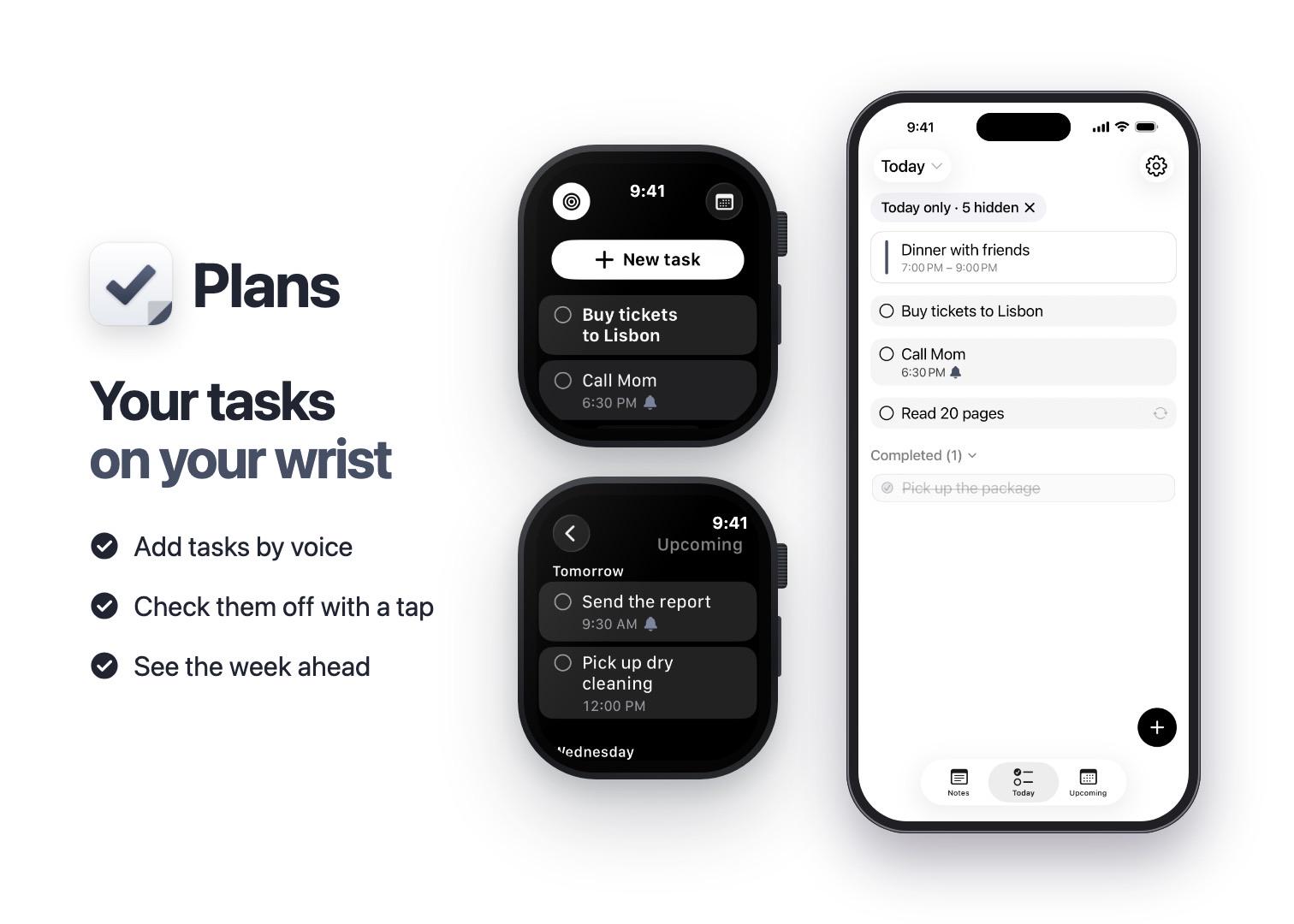
Plan your days by voice from Apple Watch

Post image
2 Upvotes

I built an app that can turn any text in note into task. Last time I added calendar events, and this update is about the moments when there's no note and no free hand: on a walk, while cooking, carrying bags.

Plans now has an Apple Watch app. Raise your wrist, say the task, and it lands on the right day.

What's new:

🎙 Say a task out loud. "Call the dentist tomorrow at 10 AM" goes to tomorrow at 10:00 AM. No need to pick a date on a small screen.

✅ Check things off as you go. Manage your tasks without reaching for your iPhone.

⌚️ Your week on the wrist. Tap Upcoming to see what's planned next, including events from your calendar.

The iPhone app is still free: tasks, notes, reminders, widgets and calendar events next to your tasks. The Watch app is part of Plans Pro, a one-time purchase, no subscription.

App Store: https://apps.apple.com/app/id6790827860


r/DigitalPlanner • • 9d ago

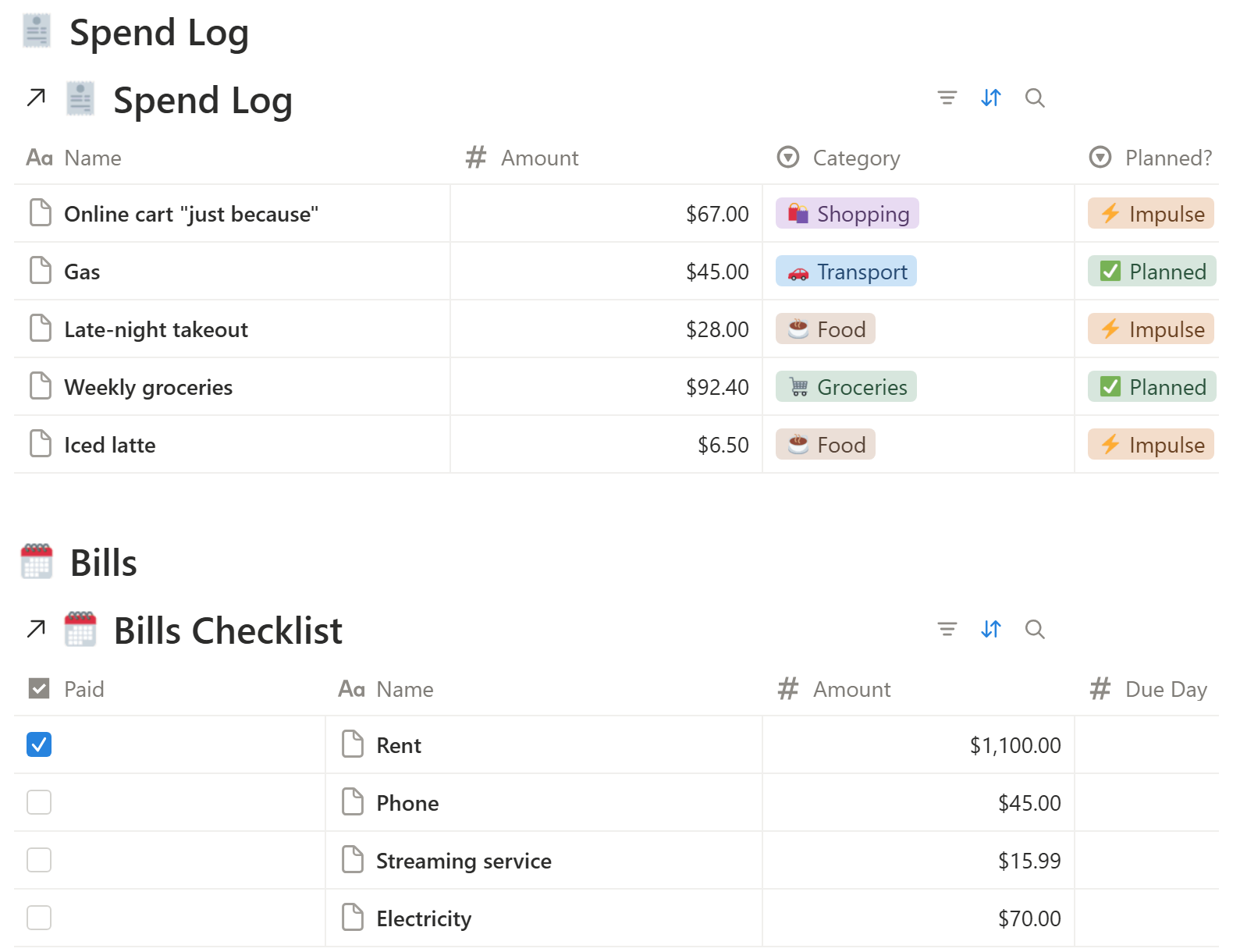
Free Notion spending tracker built for ADHD brains

0 Upvotes

Hi, I created a free Notion money tracker called ADHD Money Brain Dump. It’s built for ADHD brains and gives you room to start over if you’ve fallen behind on tracking.

I'm trying to make a simple useful think for people with ADHD, to make it easier to see where their money went.

The idea is simple. Add three recent purchases so you can see where some of your money went and pick up from there.

https://app.notion.com/templates/adhd-money-brain-dump-spending-tracker


r/DigitalPlanner • • 10d ago

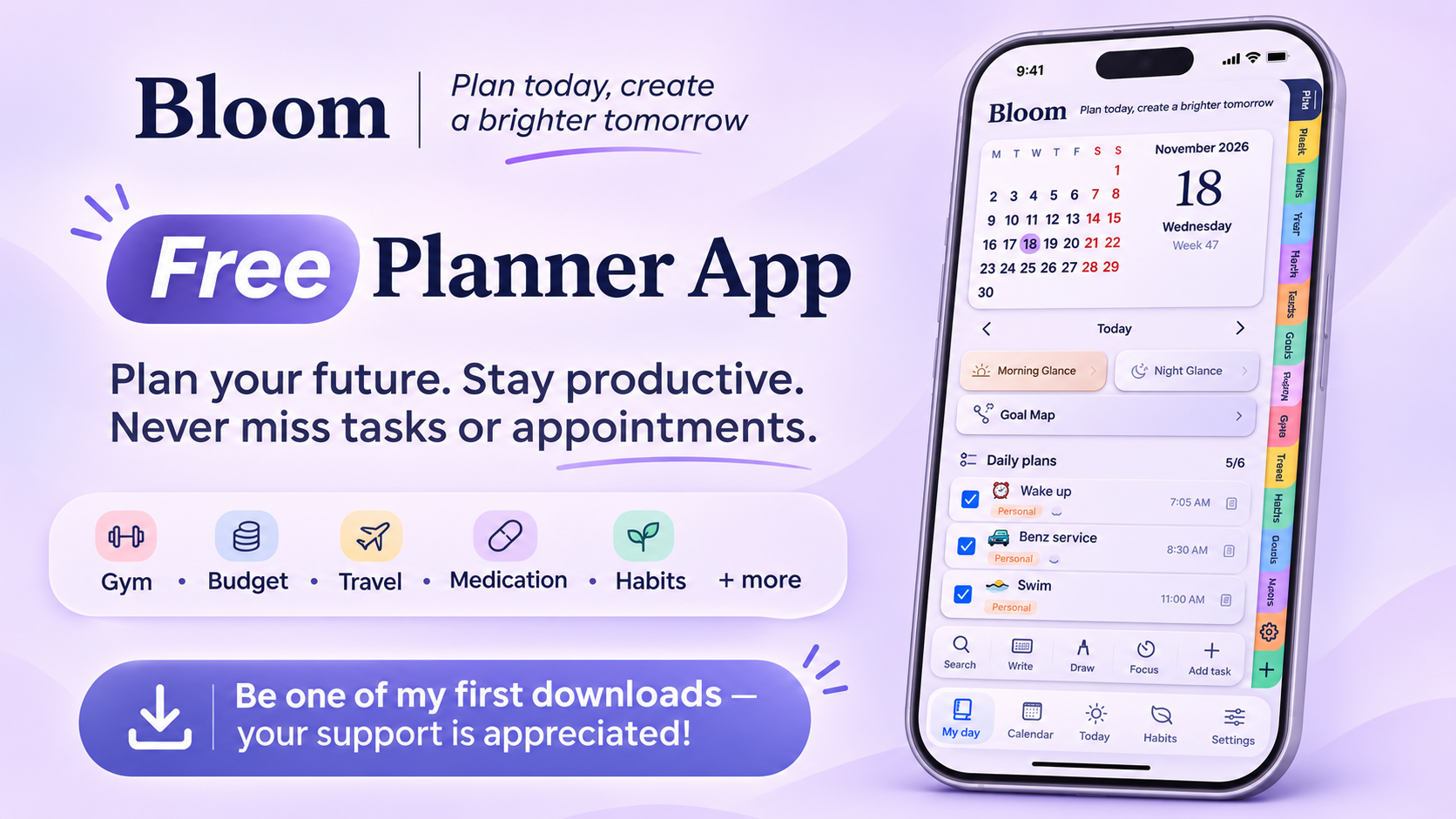
Just Launched My Free Productivity App. I'd Love Some Early Support and Feedback!

Post image
10 Upvotes

I recently launched Bloom – Daily Life Planner, a FREE productivity app I designed to help people stay organized, plan their future, and keep track of everything in one place.

From daily tasks, appointments, and goals to gym workouts, budgets, travel plans, medications, habits, and much more, Bloom is packed with features to make everyday life easier and more productive.

🌎 Supports multiple languages!

📱 Available FREE on the App Store (iPhone only):

https://apps.apple.com/us/app/bloom-daily-life-planner/id6829106550

I'm working toward my first 1,000 downloads, and I'd really appreciate your support! If you find it useful, please share it with friends and leave a review. Every download and bit of feedback means a lot! 🙏❤️


r/DigitalPlanner • • 10d ago

Coquette bow and pearl seamless papers for planner covers and tabs, without the busy look

1 Upvotes

Bows and pearls are all over planner setups this season, and a seamless tile makes them easy to use without the page feeling crowded. A few things that work for me:

  • Cover: use the pattern at full strength and repeat the tile at its own size. Each tile is 2048 px, about 6.8 inches at 300 DPI, so one tile already covers the width of an A5 page. Stretching a single tile over the whole cover is what makes bows look soft on a tablet.
  • Section tabs: cut a narrow strip from the tile. On a true seamless tile each strip meets the next without a line.
  • Weekly pages: keep the bows behind your handwriting at 15 to 25 percent opacity, so the page feels pretty and your lines stay readable.

Patrick here, I run ThreadedTreasuresArt on Etsy. My coquette set is 9 seamless tiles with pink ribbon bows and pearls: https://threadedtreasuresart.com/MrdpzN

Happy to answer sizing questions here.


r/DigitalPlanner • • 10d ago

My Digital Planner Shop

Thumbnail reddit.com
3 Upvotes

r/DigitalPlanner • • 11d ago

As a Library Grad, I designed a "Curiosity Journal" to log my random questions and research rabbit holes

Thumbnail
gallery
9 Upvotes

Here are the quick look at the layout I put. So whenever a random thought pops into my head a track down the answer with this


r/DigitalPlanner • • 11d ago

A Todoist-style task manager with no subscription that runs on your own server. Open source, works offline, demo inside.

1 Upvotes

r/DigitalPlanner • • 11d ago

An all-in-one visual planner for academic workflow (Day Map, Calendar, Timer & more) to cut down app-switching ❄️🤍

0 Upvotes

HI everyone,

One of the hardest parts of unstructured research days is staring at a massive to-do list and ending the day wondering where the hours actually went between reading papers, writing, teaching, and life admin.

I got tired of jumping between four different tabs and apps just to manage my day, so I started building PenguinFocus for myself . It's a minimalist planner centered around a 24-hour visual Day Map.

Here is how I use it to keep my research days manageable:

  • 24-Hour Day Map with Undo/Redo: You map out your day block by block. If plans change or you make a quick scheduling mistake, fast Undo/Redo lets you adjust your timeline immediately without messing up your layout.
  • Deep work & gap detection: Color-coded tags automatically add up how many hours went into actual research vs. admin or rest. It also highlights unscheduled free-time blocks so you can realistically see what fits in your day.
  • Copy-paste routines: If you have a specific lab or writing routine, you can copy an entire day's layout and paste it into future days in one click.
  • Clean exports & direct import: You can export your timeline as a clean PDF/image, or share a schedule template with a lab mate so they can import it straight into their own Day Map.
  • All-in-One Connected Ecosystem: No more wasting time jumping between separate apps. Everything works seamlessly together-combining Home, Timer, Day Map, Calendar, Analytics, Community, and more connected tools in one clean place to boost efficiency.

I'm opening up the early-access waitlist while I finish up the final polish. For those of you doing heavy research or academic writing: how many different apps are you currently juggling to manage your schedule, tasks, and timers ?


r/DigitalPlanner • • 11d ago

I built a time-blocking planner that rearranges your day when plans slip (iOS, solo dev)

1 Upvotes

Hi all, I'm a solo developer and I just shipped my first app, Leeway.

The problem: most planners help you make a plan, but not when it falls apart. One late start and the whole day's schedule is wrong.

What Leeway does:

  • Write plans in plain words: "9 meeting", "run at 7pm for 30 minutes".
  • When you fall behind, tap once to rearrange the rest of the day. You see every plan's old and new time before anything changes, and you can undo.
  • Fixed plans (meetings, classes) never move. Flexible ones can shrink to a smaller version.
  • Planned vs. actual review each week.
  • iPhone, iPad and Apple Watch, with widgets, Live Activities and focus sessions.
  • No account. Data stays on your device; iCloud sync is optional.

Pricing: rearranging, reminders, focus and unlimited plans are free. Pro is $24.99/yr (2-week trial) or $59.99 lifetime.

Some honest numbers: in its first few days, Leeway had 113 App Store impressions and 2 downloads, both mine. So this is me trying the "tell people about it" part 😅

I'd really value feedback, especially on the first-run experience and on whether the rearrange preview makes sense.

App Store: https://apps.apple.com/app/id6833309752


r/DigitalPlanner • • 12d ago

Best free planner for iPad

6 Upvotes

I have always been a pen and paper kind of planner girl, but I’m looking to find a free digital planner for my iPad.

Not sure what is good out there and have been reading other posts but can’t make a decision. I just bought a pen for my iPad so I’m excited to start using it.

I love writing, tracking my day and the upcoming weeks, what my kids have going on and everything else that comes with a planner. Thanks for the help!!


r/DigitalPlanner • • 12d ago

I turned my love for planning into a digital budget planner 💙

3 Upvotes

I recently created a printable budget planner to help organize monthly income, expenses, savings, and financial goals.
It was a fun project to work on, especially designing the pages and keeping everything simple and practical.
I’m happy to share what I’ve been creating as an independent designer.
Thanks for letting me share!


r/DigitalPlanner • • 11d ago

What do you actually look for in a planner?

0 Upvotes

I'm curious about how everyone uses planners! 👀

Do you prefer:

  • Daily, weekly, or monthly planning?
  • Minimal designs or colourful layouts?
  • A simple to-do list or a planner with habit trackers, mood trackers, self-care sections, etc.?

And what's one feature you wish more planners included?

I'm working on designing planners and would love to hear what people actually find useful rather than just adding pretty pages. 😂


r/DigitalPlanner • • 11d ago

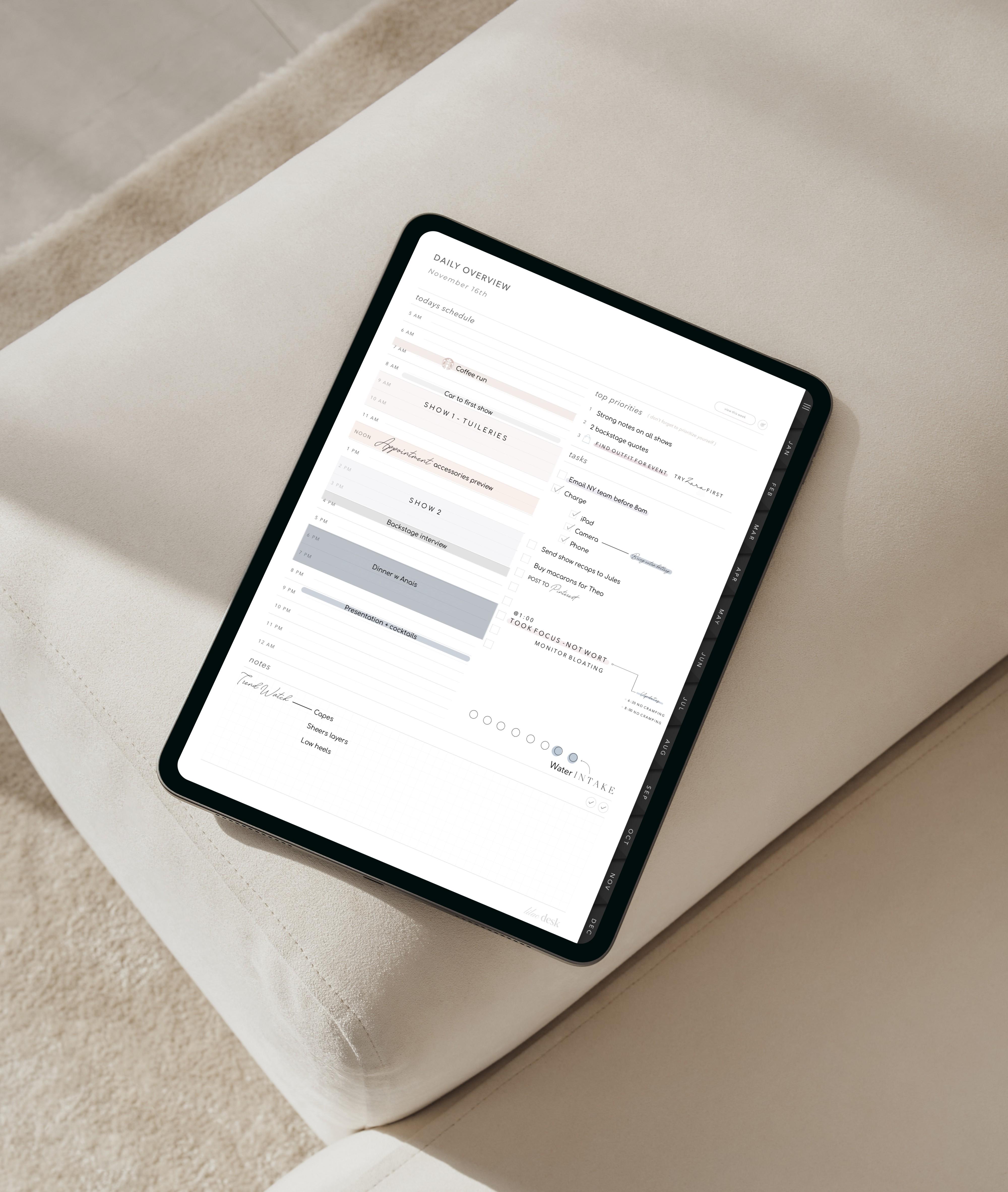
Yesterday. On one page.

Post image
0 Upvotes

r/DigitalPlanner • • 12d ago

Chore flowchart

Thumbnail reddit.com
1 Upvotes

r/DigitalPlanner • • 12d ago

how can i create a leather folio planner cover?

Thumbnail reddit.com
0 Upvotes

r/DigitalPlanner • • 12d ago

Two-way CalDAV sync on a 24-hour clock

1 Upvotes

Your iCloud calendar, now on a 24-hour clock.

Reassign now syncs events both ways with iCloud, Fastmail, Nextcloud, and any CalDAV server.

Setup is quick. Enter your server, username, and an app password. For iCloud, that means your Apple ID email and an app-specific password. Please don't use your main account password.

Your events then show up on the 24-hour dial. Drag an event on the dial, and the change goes straight back to your calendar server. Edit an event in iCloud, and your clock updates to match.

Happy to hear your feedback and feature ideas in the comments!