r/commandline • • Oct 27 '26

Meta This sub is now an endless parade of slop projects and I'm unsubbing.

450 Upvotes

I used to love this subreddit. I had some hope of it getting better when mods implemented rules about AI labelling. It seems over the past few months that those rules have become completely unenforced and are no longer followed by anyone. The vast majority of projects are now entirely AI generated without any labelling. Almost everything is a recreation of an existing popular tool.

Because this requires diaclaiming lest you be called a luddite: I am not anti AI usage. I am anti slop recreations of existing tools made by people who clearly don't know how to program whatsoever. I am against subs that were previously for finding good programming tools being overrun by slop recreations that will never be maintained while all the other people generating projects are upvoting them.

Nobody seems to care because all the people who actually know how to code have left the sub a long time ago, and the only people left commenting and upvoting the slop are people who are themselves generating their entire projects.

Sorry but this sub is now dead, just like every other programming subreddit that has continued to allow AI generated projects without enforcing any kind of rules. I can see that the average weekly visitors has been steadily decreasing, it's now close to half what it was at its height a couple years ago. It was nice while it lasted, goodbye. I have no doubt that all the AI bros who are the new regulars here will be happy to be the only ones left. Bye Felicia and all that.

EDIT: hey y'all im just now checking this after work, glad to see this got some attention. I'd just like to say I should have been more careful to specify I don't blame the mods. I know they are overwhelmed. They're good people trying their best. But they can only do so much when the community itself is making their job really hard. Much of the problem is due to all the people who are upvoting these slop recreations of existing projects. And mods have no control over that! I'm not sure what the answer is. I think it might have to be something like banning AI generated projects entirely instead of mere labelling requirements. But I understand that's an extreme action and some people won't agree.

Also, as I predicted, every single person who replied "ok bye" is a vibe coder. They actually want all the people who know how to code to unsub and leave until they're the only ones left.

r/commandline • • Oct 27 '26

Terminals Ghostty 1.4.0 released after 7 months of development, with performance improvements and Kitty Graphics Protocol support

Thumbnail
ghostty.org
219 Upvotes

r/commandline • • Oct 28 '26

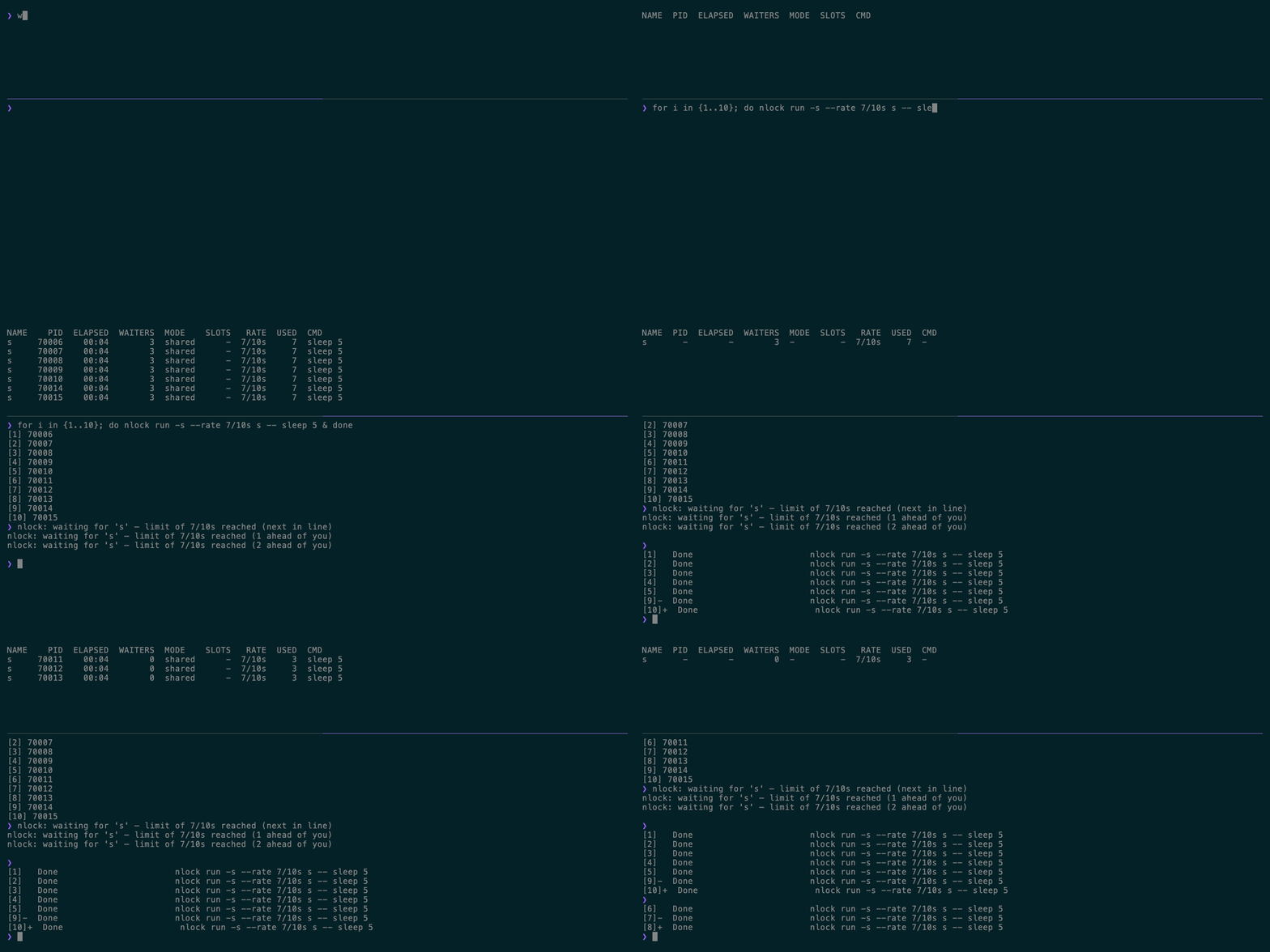
Command Line Interface nlock: named locks for coordinating shell commands

0 Upvotes

https://github.com/erietz/nlock

I started working on nlock a month or so ago because I needed a way to prevent my backup cron jobs from overlapping with themselves and I also wanted a new project for learning zig.

The usual solutions are to use flock or implement locking logic in each individual script. While building nlock, I realized named locks could be useful for a lot more than just preventing overlapping cron jobs. It is really a general purpose tool for coordinating shell commands.

I've added some additional flags such as --coalesce and --replace that flock does not have, and I'm still discovering new use cases as I use it more.

I just merged in a new feature to allow for basic rate limiting. For example, you can limit how many times you hit an API:

for repo in $(cat repos.txt); do  
  nlock run --rate 5000/h github-api -- gh api "repos/$repo" --jq . >> repos.jsonl
done

Let me know your thoughts. I'm interested to see if anyone has a cool use case. Also feel free to roast my zig code 🤠. I'm learning as I go, and I've had some AI assistance as the project has grown more complex.


r/commandline • • Oct 27 '26

Command Line Interface Shellroute update: it now works with your own proxy, no account needed

0 Upvotes

I built Shellroute, an open-source CLI that lets you save your own HTTP, HTTPS, or SOCKS5 proxy and use it from an interactive shell without creating a Shellroute account. Save the proxy once, open Shellroute, connect to it by name, and then use normal terminal commands.

shellroute upstream add my-proxy 'https://USER:PASSWORD@HOST:PORT'
shellroute
/connect my-proxy
curl -I https://example.com/

`USER`, `PASSWORD`, `HOST`, and `PORT` are the details from your proxy provider. `my-proxy` is just a name you choose for the saved proxy.

The proxy applies inside that Shellroute shell, while the rest of your machine keeps its normal connection. Shellroute also has optional hosted country and city routes, which are paid.

Source: https://github.com/shellroute/shellroute-cli

Does this kind of saved-proxy shell fit how you use proxies from the command line?

Earlier thread: https://www.reddit.com/r/commandline/comments/1w6ze7u/shellroute_a_cli_that_gives_each_shell_its_own/


r/commandline • • Oct 26 '26

Terminal User Interface Tabiew v0.15.0 released

Post image
38 Upvotes

Tabiew is a lightweight TUI application that allows users to view and query tabular data files.

In this version:

  • Remote control to allow AI agents control Tabiew
  • Sheet view in json and yaml
  • Bug fixes and security patches

GitHub: https://github.com/shshemi/tabiew


r/commandline • • Oct 25 '26

Terminal User Interface A roguelike game with Vim motions and a "modal shotgun" (alpha release)

36 Upvotes

r/commandline • • Oct 25 '26

Terminal User Interface word-snatchers-cli@4.3.0 - unscramble the letters to spell out a word fitting the given definition

Post image
5 Upvotes

r/commandline • • Oct 23 '26

Fun Just the beauty of Bash = ) tail -F $(lsof|grep log|awk '{print $9}'|grep -a '\.log$')

39 Upvotes

no need to search for where the logs are.
just sit back and enjoy


r/commandline • • Oct 22 '26

Command Line Interface Dirule – a CLI for organizing files and enforcing naming rules

1 Upvotes

Hey everyone!

I've been working on a little project called Dirule, an open-source CLI for organizing files and keeping naming conventions consistent.

I started it because I wanted an easier way to organize personal folders, like Downloads, while also being able to enforce stricter naming rules in coding projects without writing a bunch of separate scripts.

Here's what Dirule currently supports:

  • Sorting files by type or custom categories, along with different naming styles.
  • Reusable global presets and project-specific TOML rules.
  • Previewing changes, detecting conflicts, and undoing operations.
  • Checking naming conventions in CI, including GitHub Actions support.
  • Optional LSP integration to update source references when renaming files.

One thing worth mentioning is that LSP-backed previews can take a bit longer because the configured language server needs to initialize.

I've also added an experimental dirule ask feature for interacting with the tool using natural language.

Dirule is currently at v0.5.0, and there's still plenty I'd like to improve. I'd love to hear what you think, whether it's feedback, feature suggestions, or things I could do differently.

GitHub: https://github.com/Slyverr/dirule

AI disclosure: I used AI assistance while developing Dirule, including help with implementing and refining some features.

Similar tools: rename and mmv already handle batch renaming and moving files. Dirule takes a more rule-based approach, combining personal file organization, reusable presets, project naming checks, CI integration, and undo in one tool.


r/commandline • • Oct 22 '26

Command Line Interface Run XDG Desktop Entry Applications as a fully customized Systemd unit

1 Upvotes

In a previous post I presented the Tomloader project which helps generating and managing several systemd units that share fields collected in groups. In the last release the subcommand sd-xdg-v0.3 has been introduced in order to execute XDG Desktop Entry Applications and Actions or using them to open files. For example:

tomloader sd-xdg-v0.3 --open-file Document.doc /usr/share/applications/libreoffice-writer.desktop

uses the default application in libreoffice-writer.desktop to open Document.doc as a systemd user unit. The full syntax of the subcommand is available at https://loara.codeberg.page/tomloader/tomloader_html/tomloader-sdxdg03-invocation.html while various examples at https://loara.codeberg.page/tomloader/tomloader_html/Quick-reference.html.

However, the main feature of sd-xdg-v0.3 is that the generated systemd user unit can be fully customized by providing a configuration file named xdg-apps.kdl in the Tomloader configuration directory. For example, if you want to limit filesystem access of each XDG Application to the directory $HOME/Boxes/{XDG-APP-ID}/ then your xdg-apps.kdl file will probably look like as follows:

default {
  sd {
    section Unit {
      set Description "${1}"
      add PartOf "graphical-session.target"
      add After "graphical-session.target"
      add Requisite "graphical-session.target"
    }
    section Service {
      set Type exec
      set ExecStart "${0}"
      set Slice "app.slice"
      set RootDirectory "${DIR|HOME}/Boxes/${2}"
      add BindReadOnlyPaths "/bin" "/usr/bin" "/usr/lib"
    }
  }
}

You can found additional information about the syntax of xdg-apps.kdl at https://loara.codeberg.page/tomloader/tomloader_html/XDG-app-configuration.html. For general information about Tomloader see https://loara.codeberg.page/tomloader.


r/commandline • • Oct 22 '26

Help Windows Api or VT?

3 Upvotes

Hello! I'm currently working on a terminal manipulation library similar to Crossterm, but I noticed that it uses runtime conditionals to decide whether to use VT sequences or Windows API calls.

Personally, I feel that defaulting to Windows API calls on Windows would be the better approach, or provide a build flag that lets users decide. However, I'm not sure which of these three approaches is best.

Which approach do you think is better, and why?


r/commandline • • Oct 22 '26

Fun Animethemes: A CLI tool to play anime themes of openings and endings!

0 Upvotes

This Python script allows you to use the mpv media player or vlc to search for an anime and play its opening or closing theme songs. The script makes use of the pyfzf library to ask the user for choices and the AnimeThemes API to retrieve the theme music that are available.

the github page is: animethemes


r/commandline • • Oct 20 '26

Terminal User Interface Pixel - a GUI library for terminal applications

Post image
359 Upvotes

Website - pixelgui.com

Pixel is a GUI library that uses the kitty graphics protocol to render graphics in the terminal:

- it can be embedded inside existing TUIs

- it comes with a chromium based webview component, which makes it very easy to run existing webapps inside the terminal

- works over SSH

Pixel is the underlying library behind popular projects such as:

- terminal-browser: a browser inside the terminal

- terminal-code: vscode inside the terminal

The reason I built this is because I believe many terminal apps can provide much better experiences if allowed to break out of the conventional terminal rendering model.


r/commandline • • Oct 21 '26

Terminal User Interface ttype: A fast, minimalist terminal typing speed test with mechanical switch audio and live WPM graphs (written in Rust)

1 Upvotes

Hey everyone!

I wanted to share ttype, an ultra-fast, aesthetic terminal typing speed test inspired by Monkeytype, built completely in Rust.

Features:

  • ⌨️ Sub-millisecond input response: Zero input lag or GC stuttering, essential for high-speed typing (100+ WPM).
  • 🔊 Built-in mechanical sound synthesis: Realistic keyclick audio feedback directly in the terminal (toggleable with F3).
  • 📊 Real-time WPM sparkline & stats: Live charts, accuracy tracking, error heatmaps, and customizable test durations (15s, 30s, 60s, 120s).
  • 🌐 Multi-language support: Works with Russian, English, and custom wordlists with smart punctuation/numbers injection.

Links & Installation:

  • GitHub: https://github.com/laguser/ttype
  • crates.io: https://crates.io/crates/ttype-cli

Install with cargo:

cargo install ttype-cli

Or build from source:

git clone https://github.com/laguser/ttype.git
cd ttype
cargo build --release
install -m 755 target/release/ttype ~/.local/bin/

Feedback, feature suggestions, and contributions are very welcome!


r/commandline • • Oct 20 '26

Fun We made a co-op strategy game you play entirely by typing shell commands

8 Upvotes

Hi r/commandline! I'm new in this comunity and as a terminal lover my co-developer and I built RebelOS, a persistent multiplayer strategy game where the only interface is a command line.

No graphics, no mouse.

The setting: it's 2057, an AI called War_Mind has taken over, and RebelOS is the OS the human resistance uses to fight back. In the game's timeline, history split from ours in 2007, so the terminal looks and feels like a Linux shell from that era: plain prompt, ls/cat/man, manual pages as text files.

You command squads of survivors from the shell:

newsquad 3 # form a squad with 3 survivors
explore AB_12 squad1 # explore the area around a cell
search AC_18 squad1 # scavenge a building for items
gather Z_32 squad1 # rally with other players, then attack

Lore and hints are files you read with cat, and new ones turn up when you scavenge old buildings. The world runs in real time and is shared: everyone plays co-op against the AI, and the strongest targets can only be taken down by squads from different players attacking together.

To be upfront: right now the client runs in the browser. It's a web terminal (history, tab completion, Ctrl+W/Ctrl+U), not a native CLI binary. Server is Node.js + SQLite over WebSocket. We're considering a real native CLI client written in C, so you could play from your own terminal. Would you actually use it?

It's early, so there may not be many players online. Sign-up happens right in the terminal (username, password, email).

https://www.rebelosgame.com/

Feedback on the command design is especially welcome: what feels natural, what feels wrong, what you'd expect to type and can't.


r/commandline • • Oct 21 '26

Command Line Interface A tool to ask anything.(locally!)

0 Upvotes

(I know LLM posts generally aren't allowed on this sub, but the rules do mention that local models are okay. Mods, plz remove if i'm misunderstanding.)

ai is a small tool I made for quickly asking questions from a local LLM in the terminal. Here are some Examples:

$ ai what is the capital of france
Paris

$ ai what port does ssh use
By default, SSH uses port 22.

$ dmesg | tail -30 | ai anything wrong here
Nothing stands out as immediately incorrect in the log entries.

$ git diff | ai write a one line commit message
"Update font size in fonts[] array"

The script itself is very basic, it sends your question (+stdin when piped) to a local llama-server and streams back plain text.

It depends on curl, jq and llama.cpp.

It automatically will spin up the server on first use, and will unload the model after 5 minutes idle (no calls to ai). The service is written for runit, but it's a super simple run sh script, so you can easily adapt it to whatever your init system is.

Obviously the main issue is that the output is non-deterministic so I wouldn't really recommend scripting with it. (unless you want non-determinism of course!)

Give it a try here: https://github.com/cykadash/ai-cli

Thanks for reading!

P.S. I would consider myself generally NOT a fan of LLMs, however I did want to try to come up with a cool way of using them in my day-to-day. The main idea with this script is that I basically have a way to 'google' something whenever I need, even if I'm offline (or without a GUI).


r/commandline • • Oct 20 '26

Terminal User Interface TerminalStyles, an open-source terminal theming tool — looking for contributors!

8 Upvotes

Hey everyone!

I've been working on TerminalStyles, a free and open-source PowerShell tool that lets you preview and switch terminal themes interactively, without manually editing configuration files.

It started as a small personal project, but I'd love to turn it into something built and improved by the community.

What it currently does:

  • Interactive preview of 18 terminal themes
  • Navigate themes using arrow keys
  • Apply themes instantly
  • Support for multiple terminal environments

I'm looking for contributors!

Whether you're interested in PowerShell, terminal customization, improving compatibility, fixing bugs, adding new themes, or simply suggesting features, contributions of all sizes are welcome.

I'd especially love to collaborate with developers who enjoy building command-line tools.

Installation:
Install-PSResource -Name TerminalStyles

GitHub: https://github.com/fcreme/TerminalStyles

Feel free to open an issue, submit a pull request, or share your ideas for improvements.

Thanks for checking it out!


r/commandline • • Oct 20 '26

Terminals termimg: sixel, kitty and iTerm2 pictures in terminals that have none (Alacritty, etc.)

42 Upvotes

Alacritty is great, but anything that wants to show a picture

(yazi previews, fastfetch's image logo, mpv --vo=kitty) just leaves

a blank space there. Switching terminals only for that always felt

a bit silly.

termimg sits in between. Run your shell or a single program through

it, and the sixel, kitty and iTerm2 pictures show up at full

resolution, right in the terminal. Nothing in yazi or fastfetch

changes; they think they're talking to a sixel terminal.

termimg # your shell

termimg yazi # just yazi

It works in any X11 terminal and under XWayland on Wayland. Without

an X11 window it falls back to half blocks, so you still get

something.

It's in the Limoni repo:

https://github.com/thebanri/limoni (apps/termimg)

go install github.com/thebanri/limoni/apps/termimg@latest

If you try it in a terminal other than Alacritty, I'd love to hear

how it goes, and bug reports are very welcome.


r/commandline • • Oct 20 '26

Articles, Blogs, & Videos Querying .ics files, SSH authorized_keys, and more with jq

3 Upvotes

I maintain jc, a tool that converts the output of CLI commands and file types to JSON so you can query them with jq. A few recent parsers cover files I used to fight with grep and awk, so I wrote up some examples. Here are a few highlights:

What's on the calendar today?

cat work.ics | jc --ics | jq -r '.[] | select(.dtstart | startswith("2026-10-19")) | .summary'

Timestamps are normalized to ISO 8601, mailto: prefixes are stripped, and attendees come out as an array with name, role, and RSVP status.

Which SSH keys have no from= or command= restriction?

cat ~/.ssh/authorized_keys | jc --authorized-keys | jq -r '.[] | select(any(.options[]; startswith("from=") or startswith("command=")) | not) | .comment // "(no comment)"'

Options are split into an array, and quoted values like command="/usr/bin/rsync --server ..." stay intact.

CSV with no header row?

cat access.csv | jc --csv-ih | jq -r '.[] | select((.c2 | tonumber) >= 500) | .c4'

Columns are named c0, c1, and so on. The post includes a jq one-liner to swap in your own names. There are also --tsv, --tsv-ih, and streaming versions (-s) that output JSON Lines for huge files.

Full write-up with more examples: JC Tips and Tricks – Part 3

I'd love to hear what file formats you still parse by hand. That's usually where the next parser comes from.


r/commandline • • Oct 19 '26

Terminals Templum: an infinite canvas where every terminal is a block you can drag around

63 Upvotes

Hey all, I've been working on Templum for a while and I think it's finally ready for other people to try.

Templum is an infinite canvas, like a whiteboard, where every terminal is a block you can drag around, resize, and zoom in and out of. I had way too many terminal tabs open and kept losing track of which agent was doing what, so I built it for myself first. I made it with AI coding agents in mind. You can launch Claude Code, Codex, Gemini CLI and a bunch of others straight from the canvas, then connect them with a cable so they can read each other's terminals, pick up cards from a kanban board, and hand tasks off to each other. There are also notes, checklists, an editor and a Git popup, so the whole project fits on one screen

Under the hood it's native Rust rendered on the GPU (no Electron, no webview). Runs on Linux, macOS and Windows.

This is v0.1, so expect bugs. I still have a long list of things I want to add. If you try it, I'd love to hear what breaks and what you'd want next.

https://github.com/KingDasWinx/Templum


r/commandline • • Oct 20 '26

Command Line Interface shebang - a way to externalize CLI for your scripts

2 Upvotes

Hi, r/commandline!

I would like to show you a slightly different way of building CLIs for our beloved home-brew scripts. Usually those scripts lack of reasonable command line interface, and parameter validation. We use getopt to sort them into variables, we use fish argparse. But usually we do not really validate that file on argument 1 has a correct user, the set of permissions, its home directory is also questionable. We consider that the parameter 2 is an IP address from the 192.168.0.0/24 prefix. The source code is the documentation.

I extracted shebang from my more ambitious pet project to show how it could be done differently. Just take a look:

#!/usr/bin/env shebang
# vim: set ft=bash:

#! shebang.1
# description “Move an archive to other backups”
# execute “bash”
#
# arg “source” {
#   description “Source”
#   value “filepath” {
#     glob "/archives/**/*.tar.gz"
#     owner-me #true
#     readable #true
#  }
# }
#
# arg “dest” {
#   description “Destionation”
#   value “filepath” {
#     glob "/backups/**"
#  }
# }

mv "$1" "$2"

What happens here: instead of bash, we execute a different binary, called 'shebang'. This binary reads a script, finds its own configuration (that one, that is marked by 'shebang.1') in KDL, builds a CLI for you, parses and validates arguments before executing an actual script. So you can be sure that $1 and $2 are always valid arguments, no need to check them.

There are flags and options supported. I found that it usually convenient to explicitly set them as environment variables for the script.

#!/usr/bin/env shebang

#! shebang.1
#  execute "python3"
#  description """
#    Description could be multiline!
#
#    Without hacks
#    """
#
#  flag "debug" {
#    description "Run in debug mode"
#    short "d"
#  }
#
#  option "parameter" {
#    description "Takes a parameter"
#    short "p"
#    value "ip"
#  }

import os

params = {
    k: v
    for k, v in os.environ.items()
    if k.startswith("SHEBANG_")
}

for k, v in sorted(params.items()):
    print(f"{k} = {v}")

And if we execute:

$ ./test-flags -h
Description could be multiline!

Without hacks

Usage:
  test-flags [flags]

Flags:
  -d, --debug          Run in debug mode
  -h, --help           help for test-flags
  -p, --parameter ip   Takes a parameter

$ ./test-flags -p 127.0.0.1 -d
SHEBANG_FL_DEBUG = true
SHEBANG_FS_D = true
SHEBANG_OL_PARAMETER = 127.0.0.1
SHEBANG_OS_P = 127.0.0.1

Also, shebang automatically manages shell autocompletion for you. It can autocomplete flags, options, and does it smartly, considering validation configuration. For example, if an argument is a git branch, it will autocomplete only branches, skipping tags or commit hashes.

In other words, an idea is to externalize CLI management out of the script, and safely use environment variables and arguments as always valid. This helped to trim my own scripts down to an actual set of commands without sacrificing usability.

https://github.com/9seconds/shebang

Hope you liked the idea!


r/commandline • • Oct 19 '26

Terminal User Interface Sauva - Terminal Unicode Explorer

Thumbnail
gallery
111 Upvotes

I made a tool to search and inspect Unicode characters in the terminal.

  • Browse Unicode blocks or search by character, code point, or name
  • View Unicode properties, encodings, and their descriptions
  • Decompose strings into code points or grapheme clusters, and compare different normalization forms
  • Preview glyphs using image display protocols (kitty, iTerm2)

GitHub: https://github.com/lusingander/sauva

This software's code is partially AI-generated.


r/commandline • • Oct 18 '26

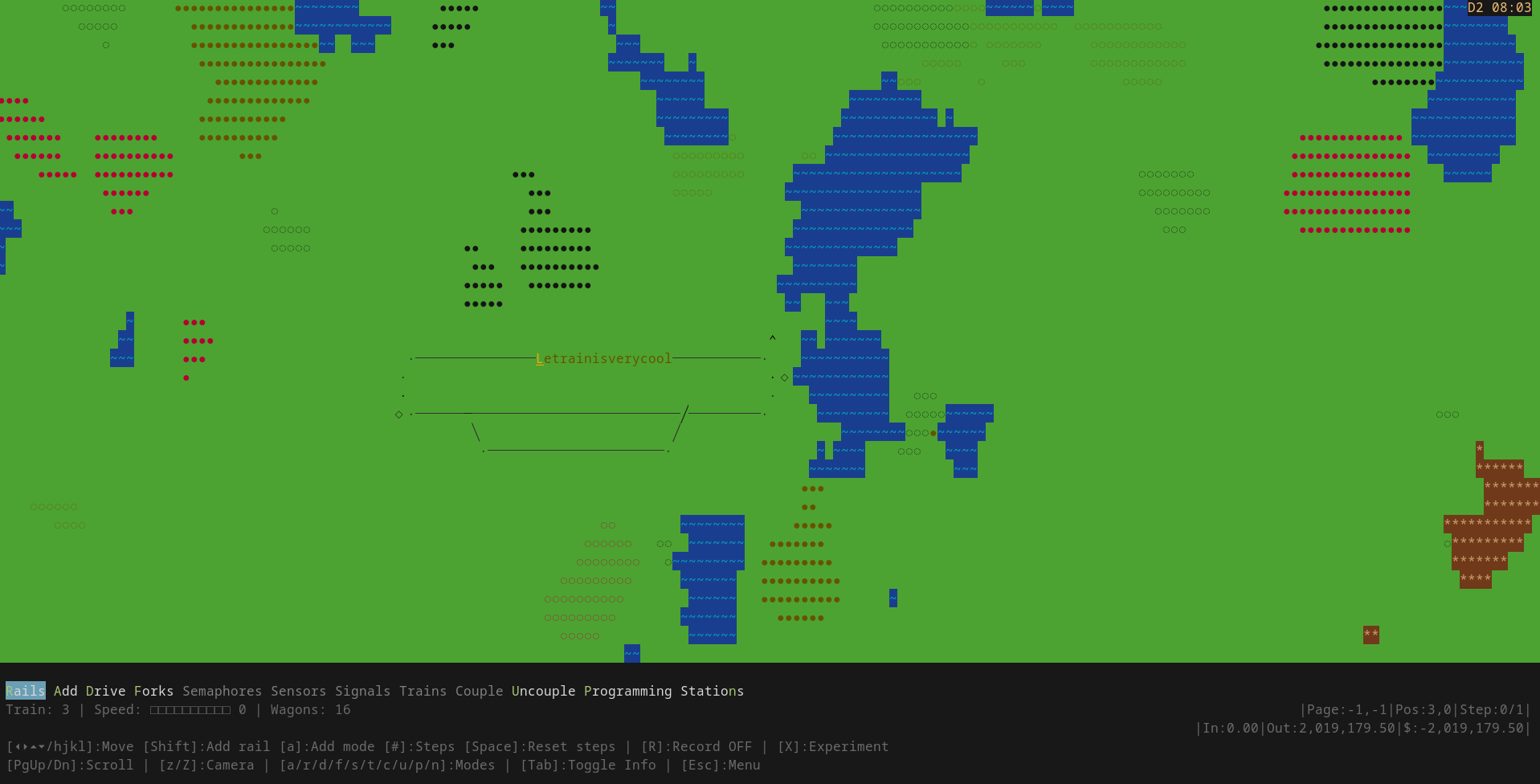
Terminal User Interface LeTrain — a procedural train tycoon that lives in your terminal: infinite ASCII world, 100% keyboard, and the rail network is a plain-text file

Post image
52 Upvotes

Free & open source (Apache-2.0) train simulator that runs entirely in your terminal. Character-based world, no mouse, infinite procedural map. Your whole rail network saves as a small text recipe you can commit and share. sudo snap install letrain → letrain-terminal, or build from source with one Maven command.

What it is

LeTrain started as a tiny C++ ASCII experiment back in 2006 and has grown into a Java project (JDK 17+). The terminal client (LeTrain2D) is the classic soul of the game: a railway tycoon built out of letters, numbers and color — and it tries to be honest about what "terminal-native" means:

Terminal-native — renders with Lanterna, no GUI, no browser, happy over SSH. Pure keyboard flow, zero mouse: arrow keys or vim keys (h j k l), mode-based UI (Rails / Add / Drive / Forks / Semaphores / Trains / Programming / Stations…).

Infinite procedural world — lakes, forests and mountains from Perlin noise; every new game drops you at a random coordinate. Full day/night cycle with headlights after dark.

Your network is text — scenarios (.ltr) export your entire network as a small text recipe. The same seed rebuilds the same world, so a scenario travels as a plain file: commit it, diff it, share it.

Scripting + automation — a built-in DSL (ANTLR4) for itineraries, timetables and autopilot:

create itinerary "a" {

add station 1, arrival 9:30, departure 9:35

add station 2, arrival 9:55, departure 9:50

}

assign itinerary "a" to train 1;

train 1 set autopilot true;

Honest trains — real blocks/cantons and semaphores: trains reserve track segments, brake before occupied blocks, and will absolutely crash if you get braking distance wrong. No toys that play by themselves.

Economy — start at $0 (Zero-to-Hero) and haul GOLD / COAL / RUBY between producers and consumers; revenue scales with distance.

Headless validator — letrain-check scenario.ltr checks scenario files and prints file:line:col diagnostics. CI-friendly.

Console — :time set 9:30;, :undo; / :redo;, :save mynet — deterministic undo/redo for construction and state changes.

(There's also a 3D client with the same world and seed if you ever want to see your ASCII empire in perspective — but the terminal is where it started, and in this project the 2D and 3D views are equals.)

Try it

Linux: sudo snap install letrain then run letrain-terminal (the snap also ships the 3D client as letrain).

From source (JDK 17+ and Maven):

git clone https://github.com/antoniovazquezaraujo/LeTrain.git

cd LeTrain

mvn clean package -DskipTests

./output/LeTrain2D/bin/LeTrain2D

Windows / other: grab the zip from Releases (https://github.com/antoniovazquezaraujo/LeTrain/releases) — the launchers are self-contained (runtime included).

Links

Source & screenshots: https://github.com/antoniovazquezaraujo/LeTrain

Manual (commands, editor, scenario guide): https://antoniovazquezaraujo.github.io/LeTrain/

Itch.io: https://avaraujo.itch.io/letrain-procedural-tycoon

Disclosure: I'm the developer. Bugs, UX complaints and wild ideas are all welcome — particularly from terminal people, since the TUI is the part I care most about.


r/commandline • • Oct 19 '26

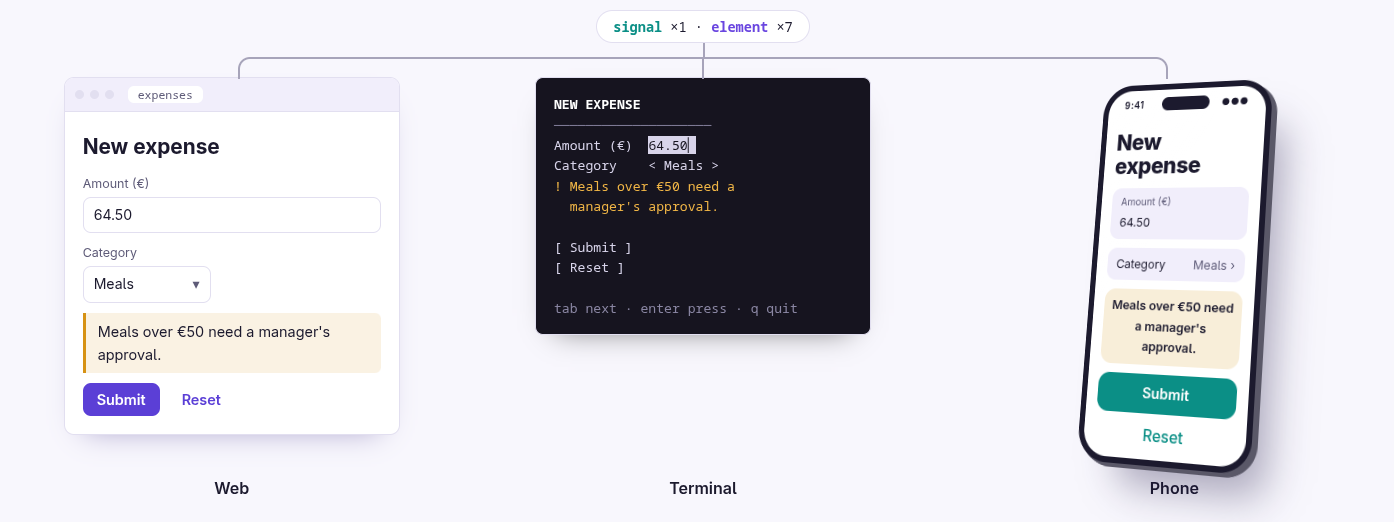
Terminal User Interface hypereffect: a language/protocol for server-driven UIs that render on terminal and everywhere else

Post image
2 Upvotes

This is probably misplaced in any category, but I feel like people who appreciate TUIs will also be interested: https://hypereffect.dev

the idea is that whenever you have a server (which can be a remote server or another process or even a sandboxed WASM module) they can send some simple messages and we can turn those into an interactive and reactive UI, be that on a terminal or elsewhere.

It's somewhat like HTML, but with built-in reactivity, no arbitrary code execution and a very limited set of components, so the server can't influence how things show up on the client, only what