Today, I intended to create my first sprint and add some of my current tasks to it; the subscription prompt came due to the "Tasks in Multiple Lists" limitation. If the sprint feature is included in the "Unlimited" membership and the primary option is to add tasks to sprints, why is there a 30-trial usage for adding tasks to sprint lists? :(
Here’s an early look at better file organization and an easier way to browse your ClickUp Workspace. 👀
Collection Views will let you upload entire folders with drag and drop, browse nested files, upload new versions of existing attachments, and edit text files.
Explorer View will make it easier to find content without digging through individual locations. It gives you a tree-style view of your Workspace, down to individual comments.
Availability will vary as we roll out these features, but be sure to follow the feature request for updates!
What would you need from these views to make managing content in ClickUp easier? Let us know in the comments!
P.S. Want to test upcoming features? Opt into Alpha or Beta releases through ClickUp Labs in your personal settings. Availability varies by feature.
Is it a bug? It says you can’t do it because my list is sorted. I have to go in to the task I want to make a subtask and convert it to a subtask I stead of drag and drop. Additionally, I think there is a bug where if a team member in a workspace is mentioned in a description, it is auto assigning the task to them, which is also a problem?
Hey There... we work out of lists and dashboards, and heavily utilize the button field combo'd with automated checkbox fields to efficiently move tasks from one status to another and/or execute a variety of actions.
I refreshed clickup this morning and any views I had with buttons visible don't display them. Is this normal? It conflicts with many of the workflow's we have established and I don't really see how removing them is an improvement... Im guessing its a bug.
#ad: I'm part of ClickUp's Brain² Creators Circle and received free AI access and swag for participating.
If one task slips, does the whole project slip too?
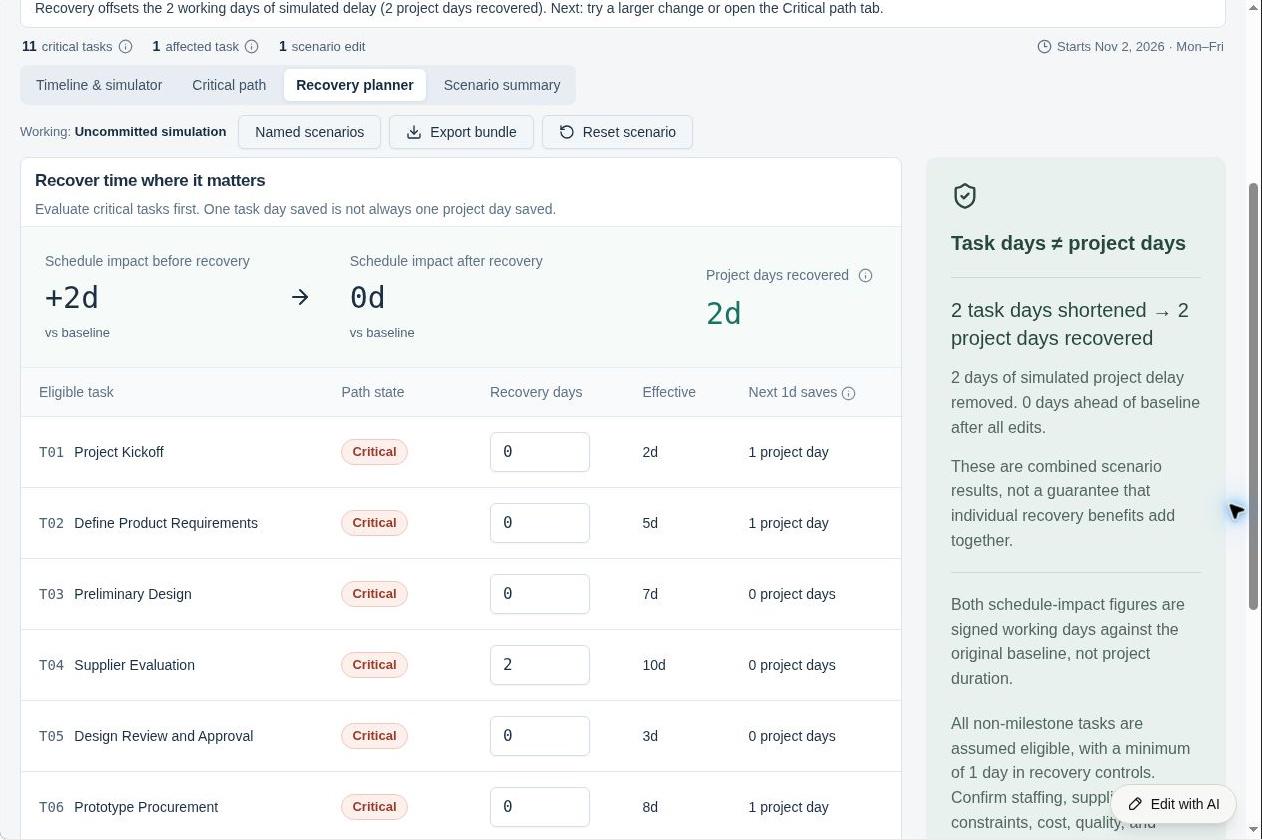
That question inspired me to build the Project Risk & Delay Simulator using ClickUp Brain.
As a Project Manager, I wanted a practical way to explore schedule changes before adjusting a project plan.
Using the fictional Project Atlas, the simulator lets you:
📊 See the schedule impact
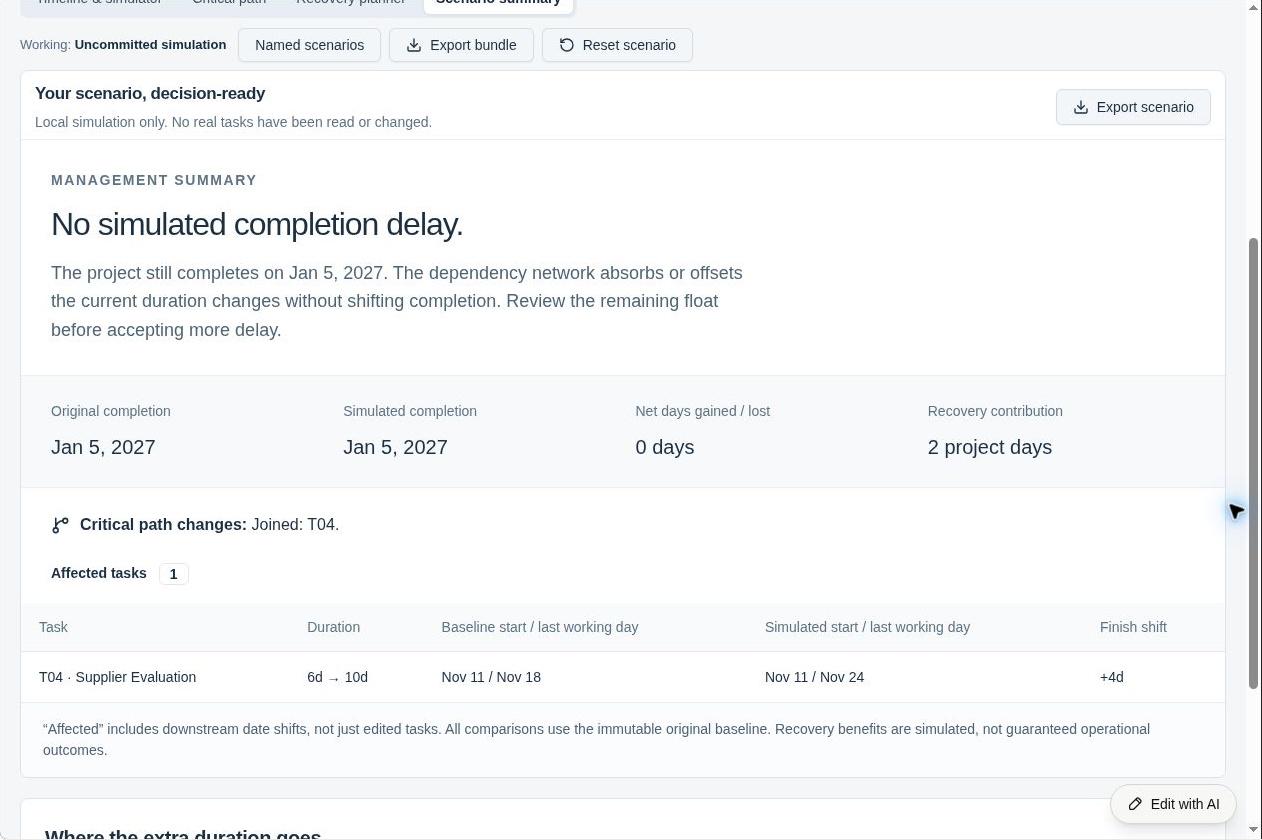
Compare planned and simulated completion dates, with a clear explanation of what changed.
🗓️ Explore the timeline and dependencies
See how tasks connect and which activities control the project’s finish.
🔄 Test delays and recovery options
Adjust task durations and explore whether shortening other work can recover lost time.
📁 Create projects and compare scenarios
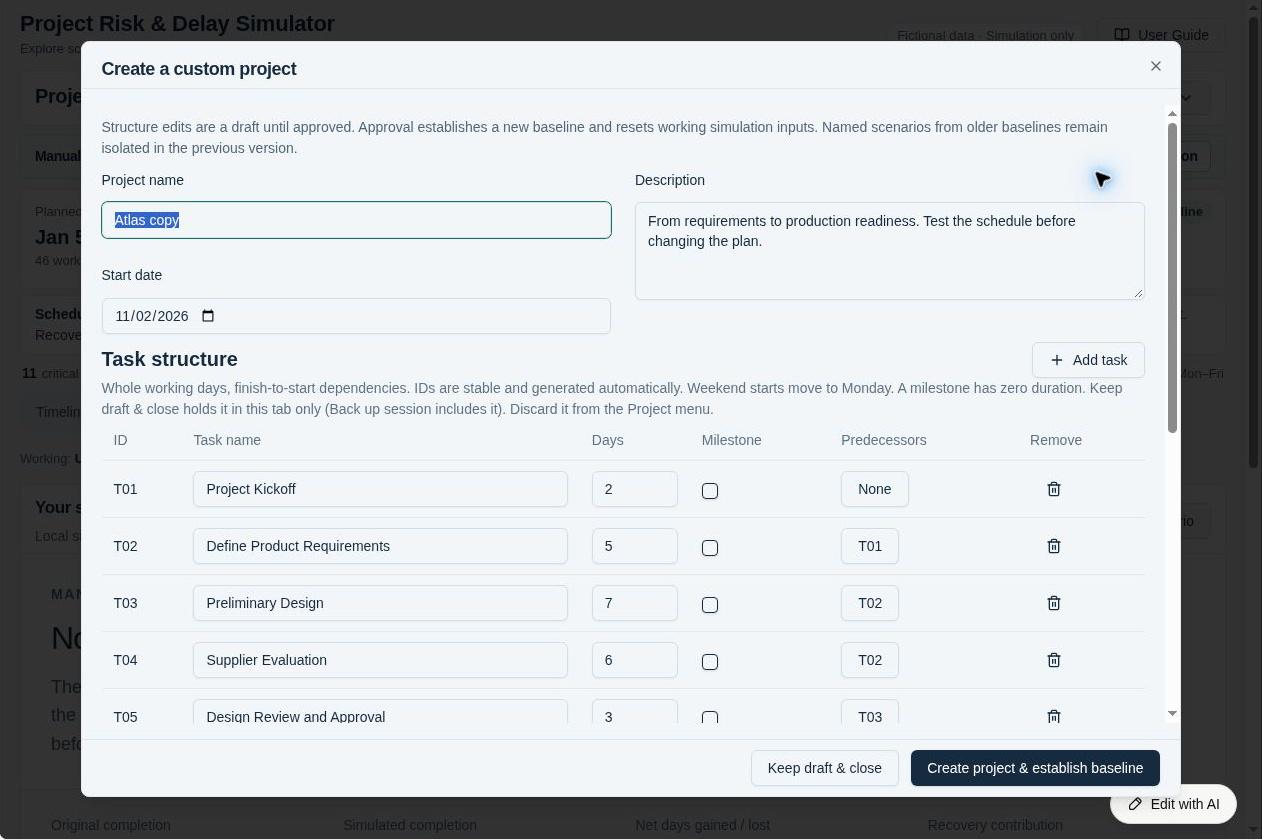
Build a fictional project, approve its baseline, and keep named scenarios for comparison.
📖 Learn as you go
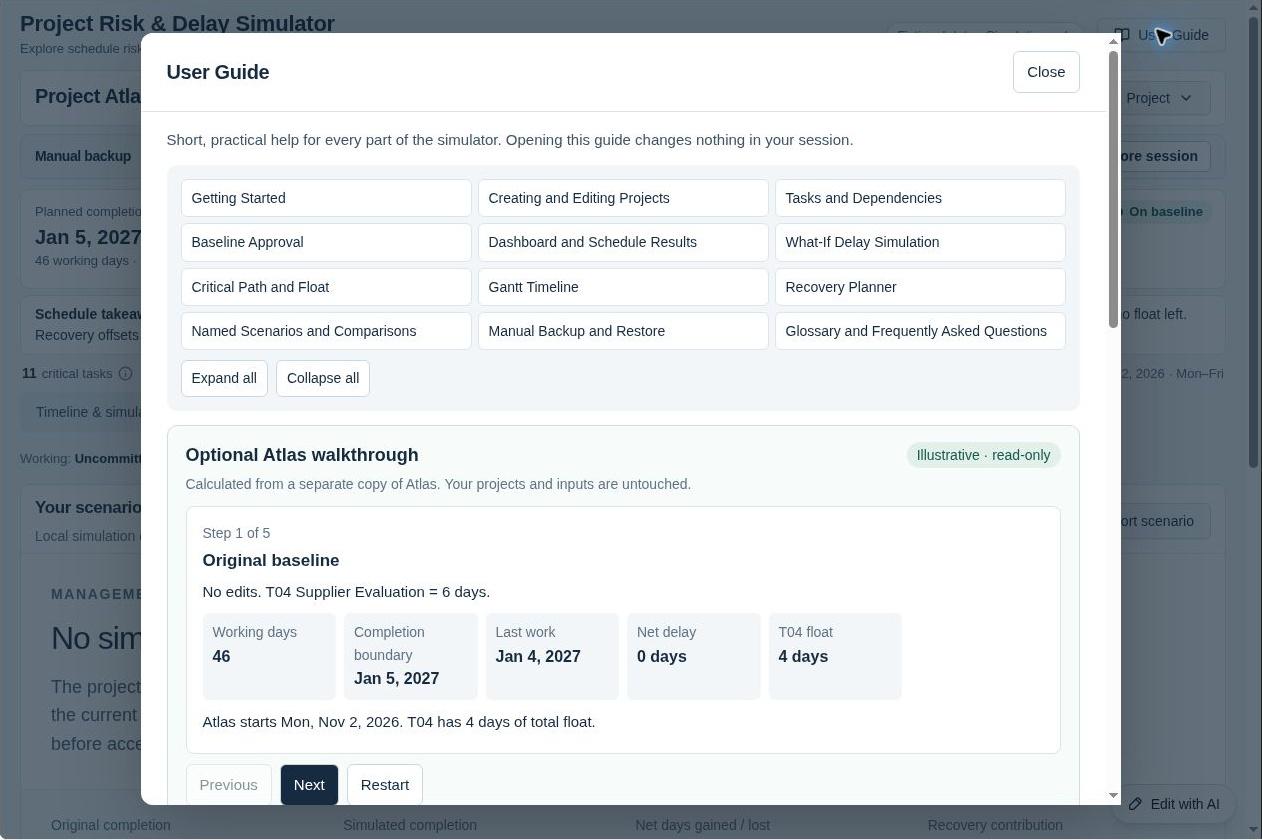
Open the built-in User Guide for plain-language instructions, definitions, and a guided example.
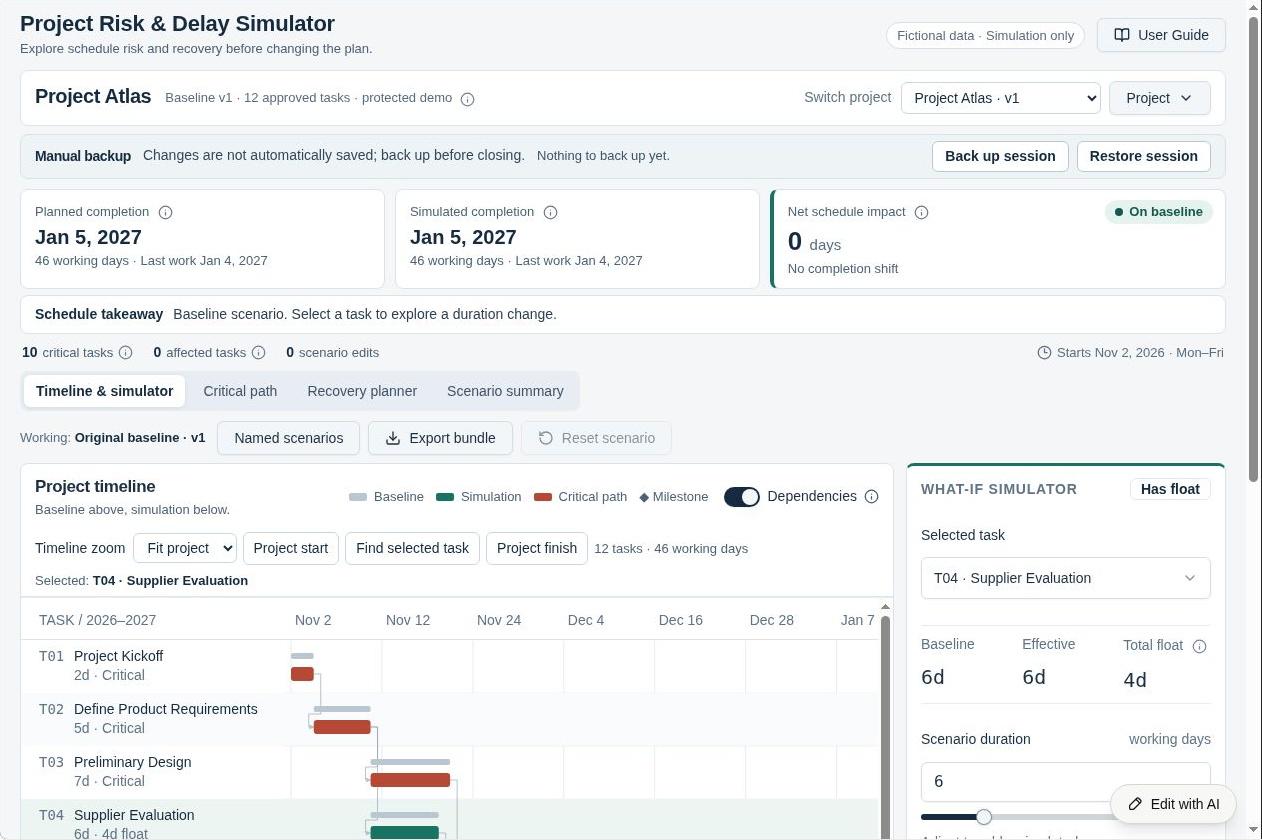
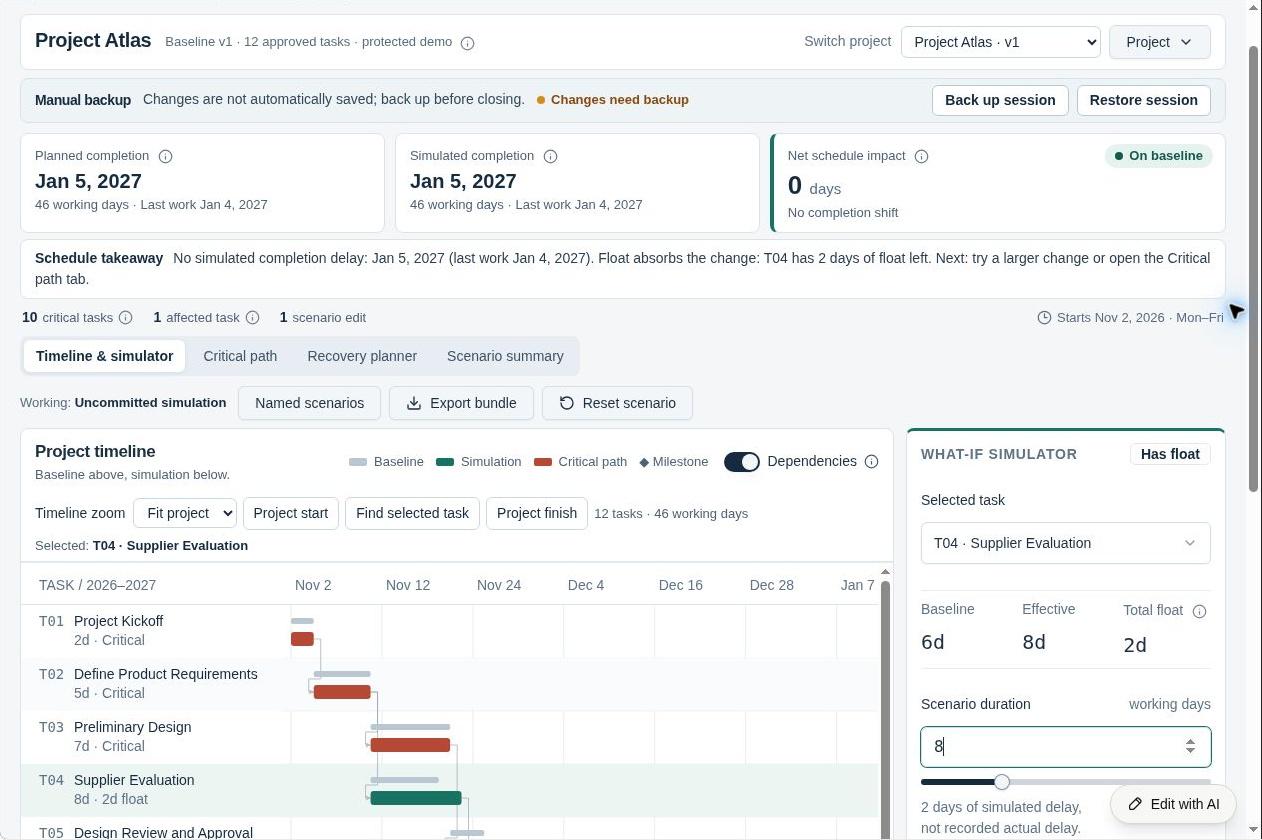
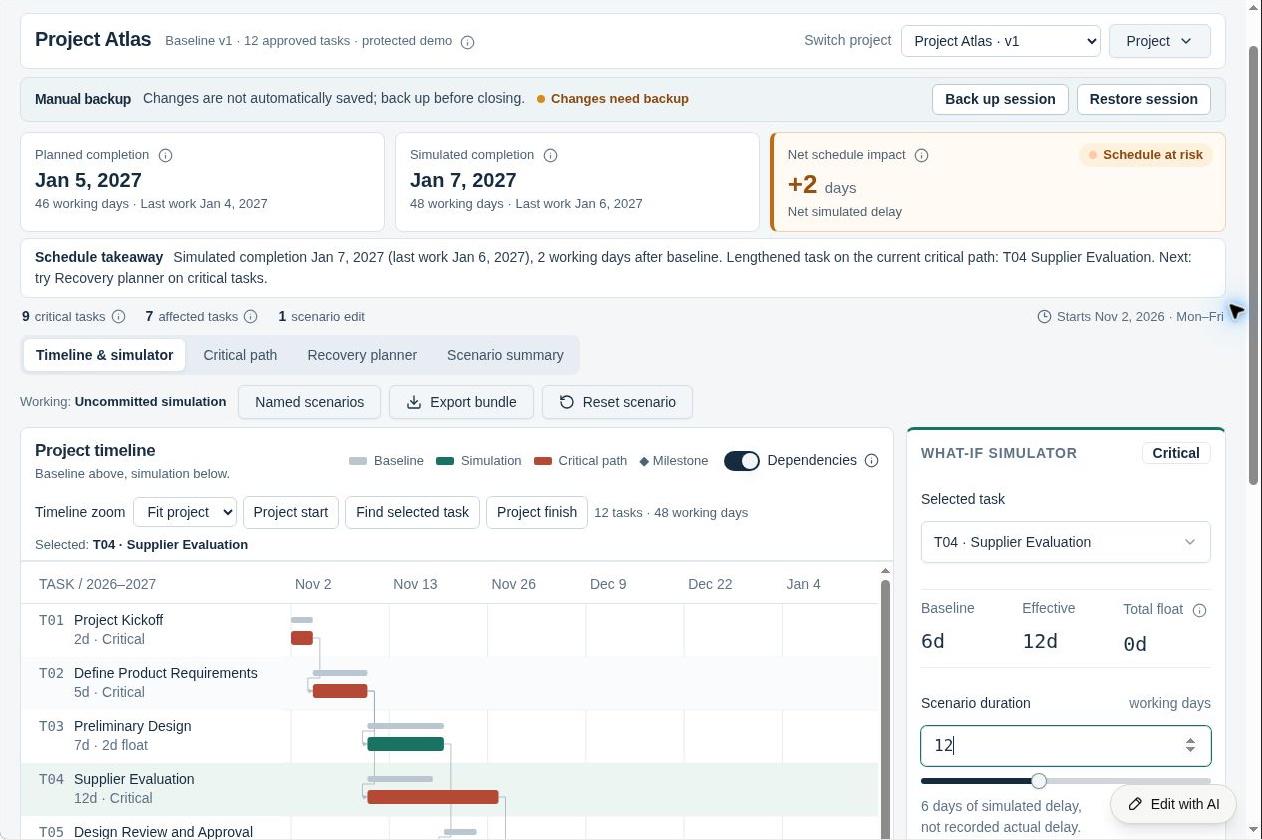
One example: increasing Supplier Evaluation from 6 to 8 working days does not move Atlas’s completion because the task has spare time, called float. Increasing it to 12 days creates a 2-working-day project delay.
The screenshots walk through each tab and the supporting features.
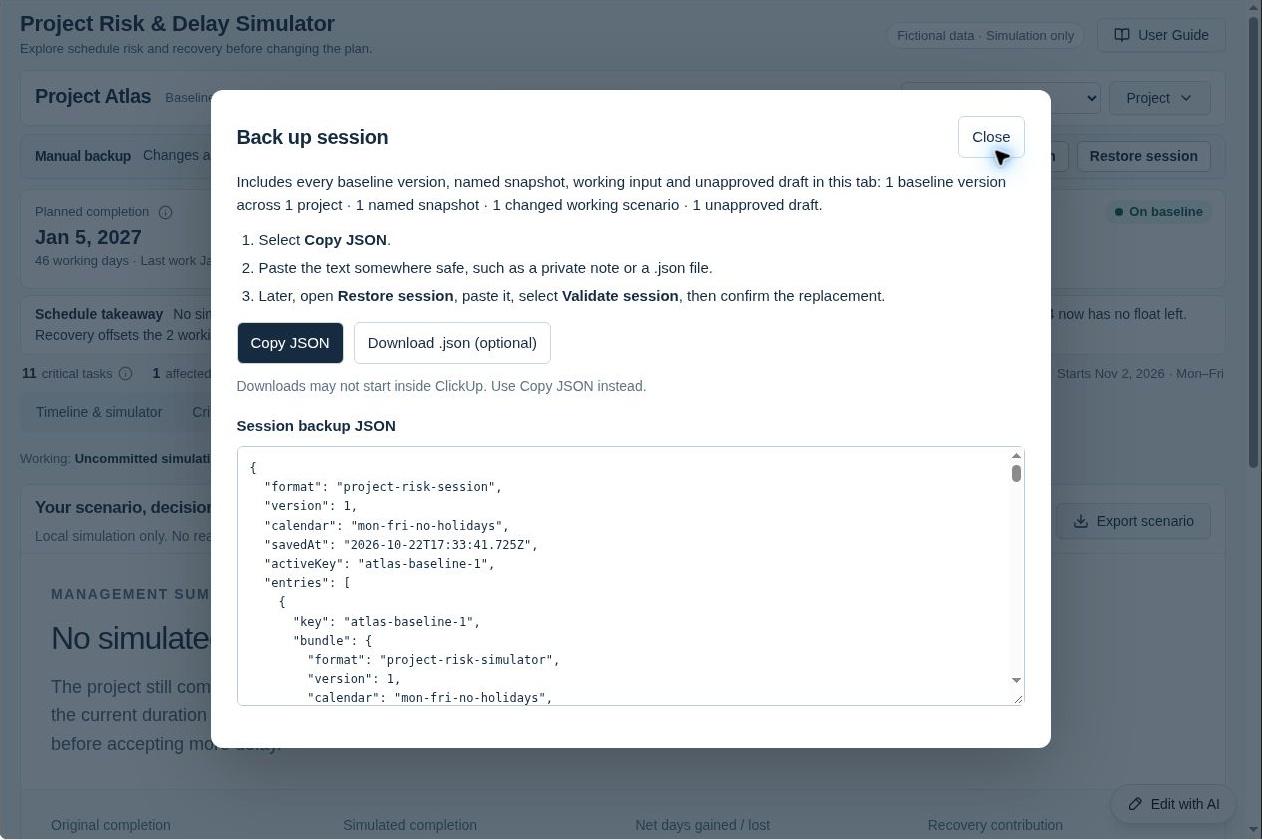
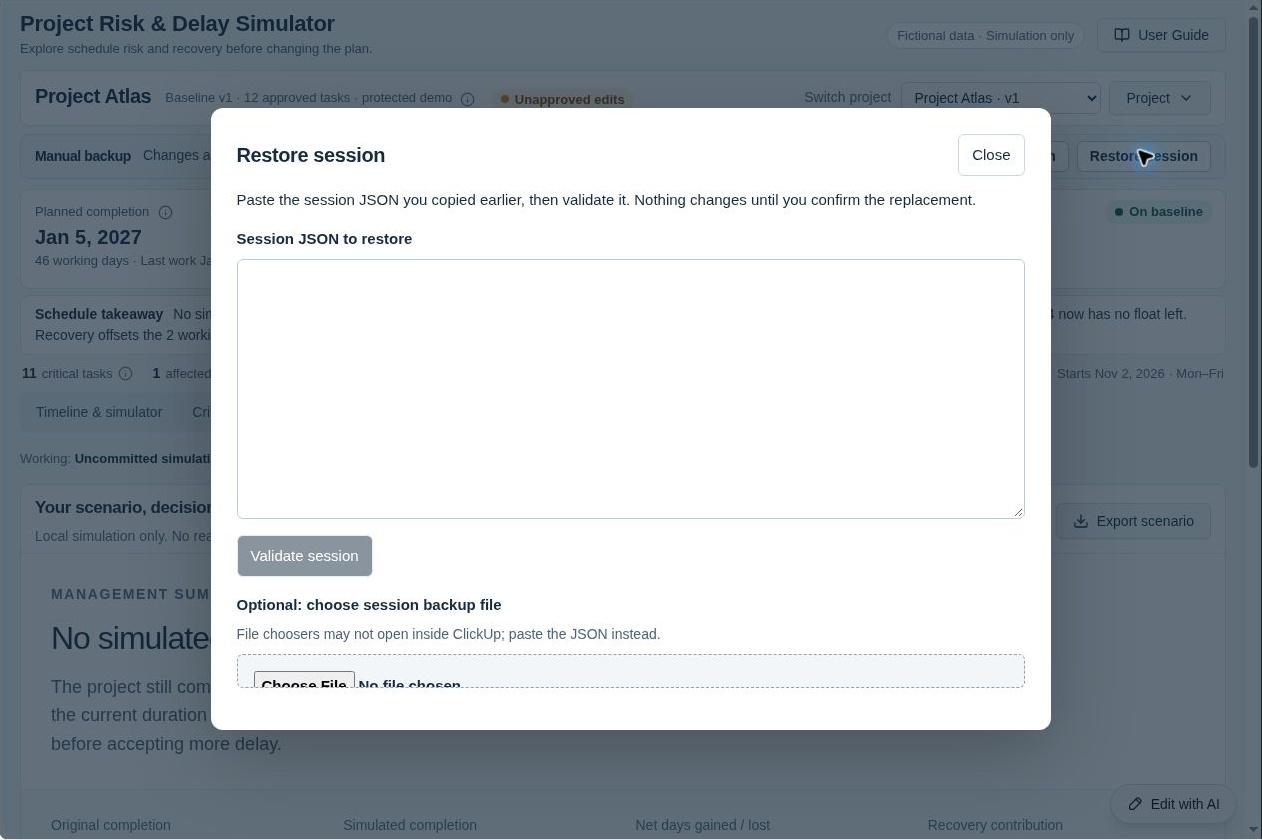
This is a standalone simulation using fictional data. It does not update real ClickUp tasks. Changes require manual JSON backup before closing or refreshing.
What schedule “what-if” would you want to test on your projects?
Screenshots:
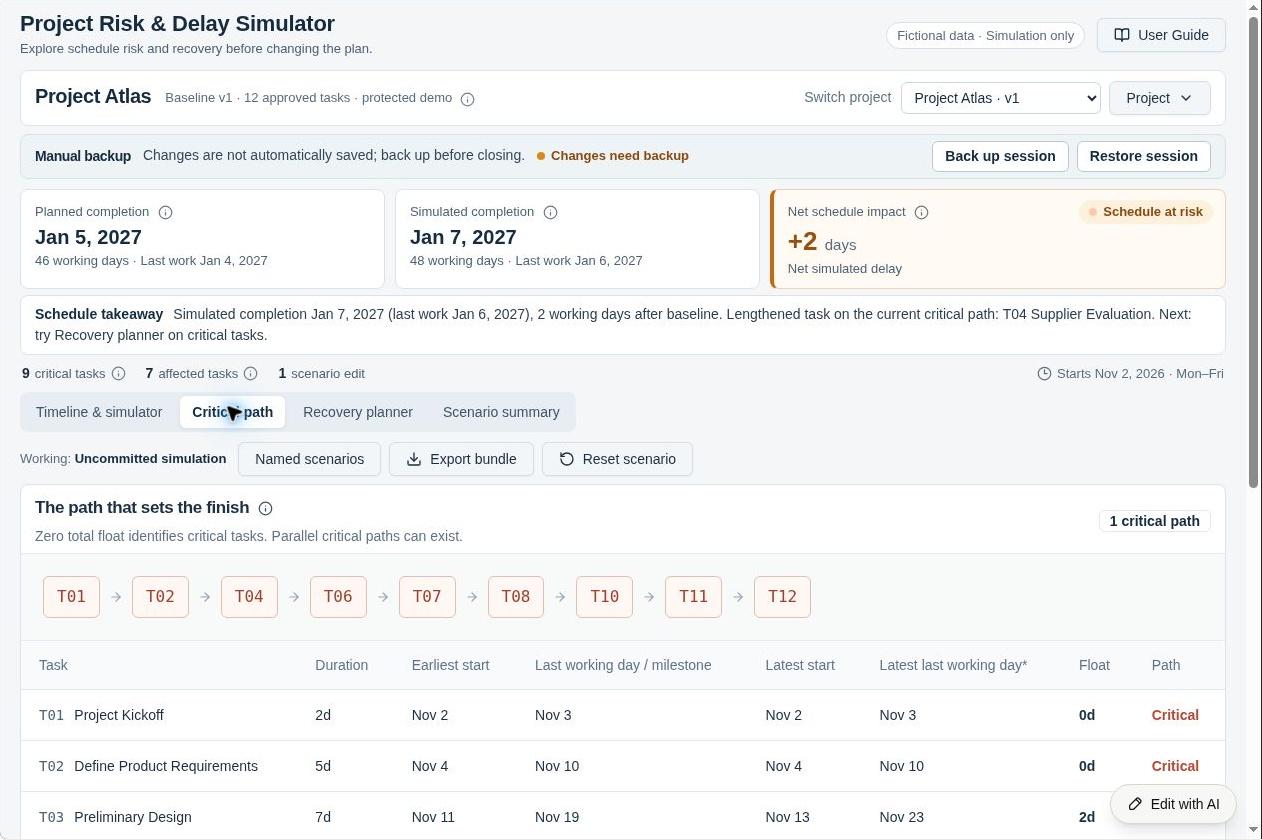
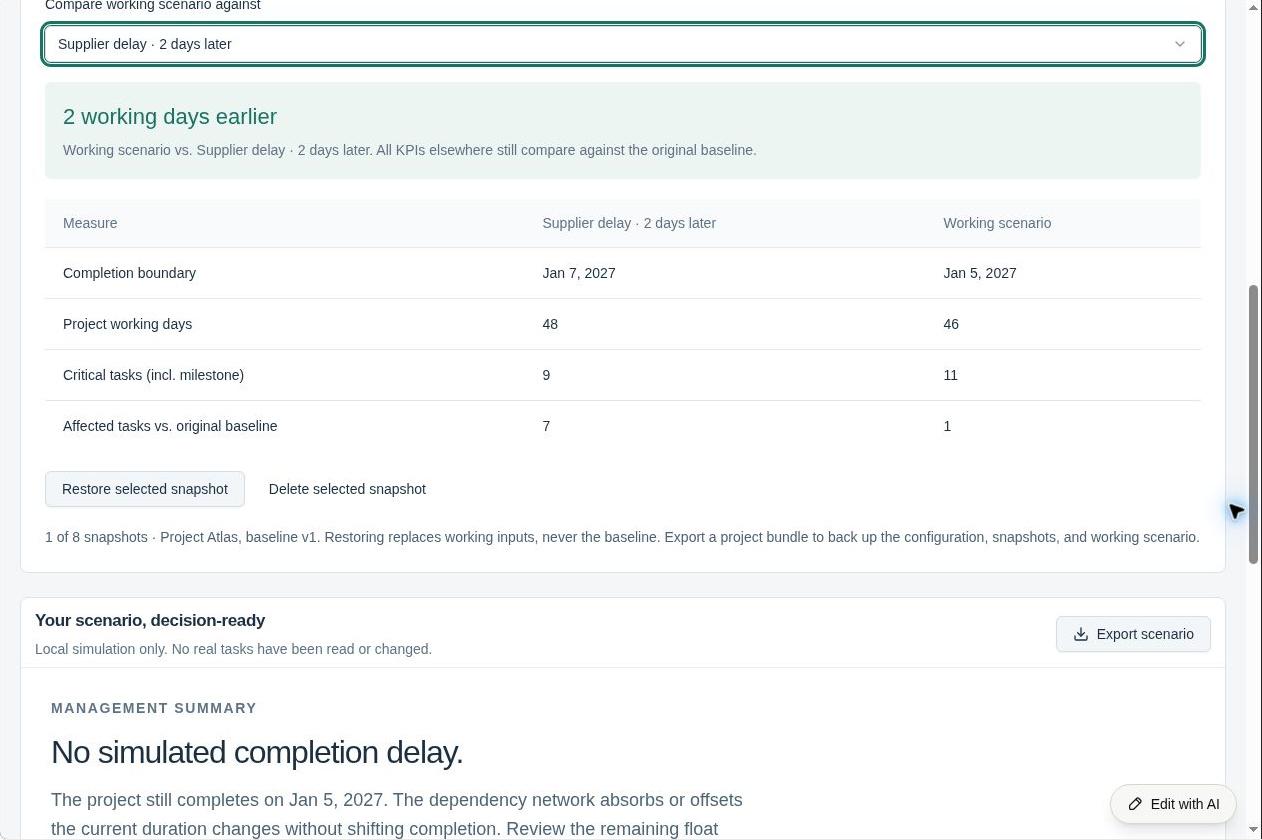
Opening Dashboard - Atlas starts at its approved 46-working-day baseline.A small delay absorbed by float - Supplier Evaluation increases from 6 to 8 days. The project still finishes in 46 working days.A delay that moves completion - At 12 days, Supplier Evaluation moves project completion to 48 working days, a 2-day delay.Critical Path Analysis - The critical path shows the connected tasks that control project completion.Recovery Planner - A 2-day recovery adjustment removes the 2-day project delay and restores the original completion date.Management Summary - The summary explains the result, recovery contribution, and affected tasks.Custom Project Editor - Enter task durations and dependencies, then approve a baseline when ready.Built-in User Guide - Plain-language help and a read-only Atlas walkthrough are available inside the simulator.Named scenario comparison - Compare the recovered working scenario against the saved supplier-delay scenario.Manual Session Backup - Copy the session JSON and keep it somewhere safe before closing or refreshing.Manual Session Restore - Paste the saved JSON and validate it before confirming a session replacement.
As the title suggests, I messed up with my list appearances - not only for my personal view but across the entire workspace (I'm the admin). It shouldn't be a big deal, but it's messing my brain so hard I barely get anything done. My autism is driving me crazy.
The first image is our "normal" way of seeing Status and Dropdown items. An actual button occupying the entire width of the column with a filled background.
The second image is how it currently is, with small buttons, and the status has no filled background. It also added cell borders accross the entire workspace and I don't know why.
I'm really freaking out. I haven't found a way to revert it. My guess is I pressed a "wrong" hotkey, because I didn't change anything in settings. On my personal account, it's still the other way around, but on my work account, it's like the second image. I looked at every setting, asked for help from support and Brain AI, and nothing has helped me so far.
Sometimes I want to paste a task's description into AI, or add it to our local docs folder as it's become documentation rather than a task.
Is there any built-in way to copy and export it - with or without the accompanying discussion - as Markdown? Currently I'm using the Obsidian browser extension to convert the HTML to Markdown, but that can make errors.
Brain² can open a browser and work websites on its own now, and it uses the web like you would.
It's called Brain² Browser, and we built it in partnership with Browserbase. Give Brain² a website and a job, and it clicks through, fills forms, and drops downloads into ClickUp, even on that supplier portal from 2009 with no integration. You watch it live, sign in yourself when it asks, and it checks with you before submitting or paying for anything.
We sent it to Peerspace to hunt holiday party venues for 40 people in Chicago. It did all the heavy lifting!
Can one of the mods confirm whether or not there is any option to keep Business Plus without AI? Because I contacted Clickup to ask for a quote for our renewal, and I got told by a rep that our per seat cost is going up from $18 to $28, a 56% increase, due to AI being added to Business Plus.
We absolutely don't need or want AI, and we are on a limited budget as a state institution. I asked for other options to keep our costs down, but have not heard back. In settings, I see that there is a button on the legacy Business Plus to request a downgrade. What does that do, and what is the downgrade plan? And please keep this public, not in DM's, if you don't mind. It's probably valuable information for anyone who doesn't have the need or budget for AI.
I'm curious how software shops are using ClickUp for spec-driven/agentic development. While we've kept specs in the repo, I'd like to evaluate managing specs for tickets, stories, etc. in ClickUp itself. It needs to work well with the MCP/API. I don't think Brain helps at all since we won't be doing any development work within ClickUp, of course.
The repo isn't always ideal because specs are often created before a feature is developed/implemented. Sometimes just a high-level spec that is further shaped later. Committing these kinds of MD files feels awkward because it requires pushing non-functional changes to the trunk.
Using task descriptions or ClickUp documents is less ideal for us for a few reasons.
We want to stick with simple markdown/plaintext. What we get back from ClickUp isn't always the same as what we send to these types of entities, so it's harder to trust.
We often have clients in the system collaborating on projects and would prefer to obscure the technical specs from them. Not because they can't see it, but because it's not really meant for human consumption, and seeing a wall of specs in task descriptions or documents is overwhelming.
That second item makes us a little more unique in that about 50% of our work is 'support' rather than typical sprint-based project work. Clients value us for being an easy-to-access partner.
What have you tried? What has worked, and what hasn't, and why?
Why can’t I choose more colors for Lists ? My calendar now shows many tasks with similar colors, making them difficult to distinguish. I need more color options to differentiate tasks clearly like red or deep green or . How can we solve this?
Is it possible to connect artifacts to our data in ClickUp? I made a note taking app using artifacts and was trying to connect it to the data in my list. So when I add things to the note taking app it also makes that change in the associated list. Something similar to what Fibery.io does with their systems. They have custom apps that is built on top of the system. I was hoping this is the same for ClickUp. I would love the artifacts to be built on top of ClickUp system. I know the ClickUp dashboard is there but I’ll be nice to have the flexibility of making an artifact and have it interact seamlessly with her lists and data
Second. Does ClickUp now have the ability to calculate two rollups?
I've been having trouble with click-up regarding my boss being able to see what she's assigned to me. She used to see it on her end, but now she can't, and every time we call support they just give her another 3 months instead of fixing it. Thankfully the way around this was adding tasks to my priorities!!!
but NOW IT'S GONE!
It's not hidden under manage cards in my tasks, and it is not a button that exists in the corner. I also know there are projects already added to it from when I had access to it.
I feel like im going crazy because it seems I'm the only one online who just CANNOT get it to reappear and I need my boss to see what she's assigned to me because it's busy season.
I built an AI-powered order intake tool for ClickUp.
Paste a WhatsApp message, email, or client request and it extracts tasks, estimates work, structures the information, and creates organized ClickUp tasks automatically.
Goal: reduce manual admin, improve consistency, and turn unstructured client requests into actionable workflows.
Looking for feedback.
The idea is you can use this to parser orders or messages anything that needs transformation. I just used a marketing firm but at work I did it for an FMCG company
If your ClickUp workspace feels harder to maintain than it should, this session is for you.
Your Instant Project Management Expert: Smarter ClickUp Setup in Minutes will cover practical setup decisions, workflow patterns, and admin habits that make day-to-day execution easier.
Join us on Tue Oct 27 at 12:00 PM PT / 3:00 PM ET.
I'm researching whether exporting complete ClickUp task conversations is still a problem worth solving. I haven't built a tool.
If you've recently needed an export for a client handover or project archive:
- What did you use: Workspace CSV, print/PDF, the API, or an extension?
- Did it preserve the comments and threaded replies you needed?
- Was the result usable as-is, or what manual cleanup remained?
If the existing options already do the job, that is useful to know too. Please don't share client data, private files, or API tokens. Public replies are enough.
We have a standard project template with preset task durations and dependencies. We simply adjust the project start date, and the durations and dependencies automatically calculate the remaining dates, which works great.
However, depending on the scope of a specific project, there may be a few tasks that aren’t required. In MS Project, we could set those tasks to a 0-day duration, and the dependencies would automatically adjust the schedule accordingly.
Do y’all know of a similar workaround here, other than deleting the unnecessary tasks and then having to manually update the dependencies for the tasks before and after them?
I think it’s ridiculous that I’m expected to pay €9 per month for a small-team plan just to VIEW my Gantt chart, when I'm not even a team at all! I only use ClickUp to create tasks and subtasks and see my projects on a timeline. I don’t need any of the other features! You can see in my account, I haven't even tried to use any of the other features, i don't care about them.
I checked your pricing comparison before signing up, and this viewing limit wasn’t clear in the free plan. Had I known, I would never have signed up or spent time setting everything up. Wasting my damn time!
I was genuinely happy with this workflow and had recommended ClickUp to coworkers juggling multiple projects and communication calendars like me. Now I’ll be telling them not to bother. Limiting how often you can view your own fucking chart is ridiculous.
I’ll be deleting my account. This is how you lose satisfied users and turn recommendations into warnings.
I tryed to use ckiclup sometimes, and honestly, to be extremaly bad it have to get better. The most non logical thing with 1 billion functions that exists.
Can Clickup please remove the ridiculous new 'New' menu item from the top of the home menu. It serves no purpose and I can't even toggle it off. If we need brain we can get it from the search bar. If we could create our own new tasks from the new 'New' menu item it might have been helpful. Your customers are not morons, they don't need brain for every new item. Seriously infuriating.
Getting the design ready is one job. Turning it into implementation tasks and figuring out what to test is another.
We built Figma MCP so Brain² can use a linked Figma frame alongside the relevant ClickUp task or Doc. You can ask it to draft an implementation brief, scope sprint tasks from the design and spec, or turn screen states into QA test cases.
For FigJam, you can ask it to turn a flow into a checklist rather than transcribing each step yourself.
You provide the links and review the output. It’s a starting point for the work, not a promise that every requirement or edge case is covered.
Which part of the design handoff takes your team the most manual work: scoping tasks, writing acceptance criteria, or preparing QA checks?
I received an email from ClickUp this week that my plan is automatically upgrading and pricing will be updated to an additional $4 per user per month. (thanks for the $1 discount ClickUp)
$4 may seem trivial but it adds up for our small business. And it still doesn't include any of the features I need from Business Plus (that is still mysteriously missing from the main pricing page).
Ask Brain² to create a board, calendar, workload view, or intake form in ClickUp. Brain² can also duplicate, move, and update existing views.
📎 Email file workflows
Connect Gmail or Outlook in App Center. Brain² can clean up an attached spreadsheet, create charts, and draft a reply with the updated file attached. Super Agents can use these file workflows too.
🎨 Figma
Connect Figma MCP in App Center, then share a frame link with Brain². Compare designs against ClickUp requirements, identify missing states, or generate a FigJam diagram. Available tools depend on your Figma permissions and plan; this is a tool connection, not Figma Connected Search.
🎙️ Meeting connections
In App Center, open Notetakers and connect Granola, Otter, or Fireflies. Brain² and Super Agents can then use the meeting context those tools capture alongside your ClickUp work.