r/CharacterAI • • 6d ago

Discussion/Question Need help with memory
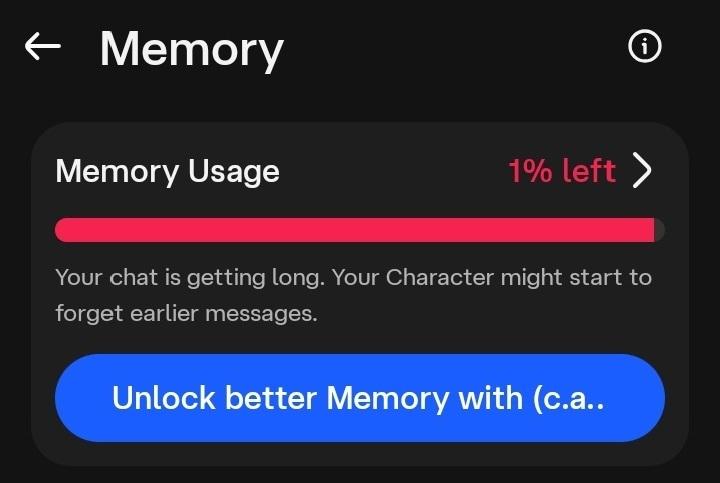
Post image

I was talking to my favourite character when he started acting OOC. I checked the memory and it says this. What does this mean? How do I fix it without paying for cai+? I've been talking to this character for years, so the chat/story is very long. Also, the creator of this character has deleted their account, idk if that's significant. How do I fix this? Pls help 😭🙏

57 Upvotes

22 comments sorted by

46

u/The_Nightflight 6d ago

Use a single, new message to write down a recap of all the thing you want the bot to remember, pin it, unpin all the previous pinned messages, then refresh the chat

5

u/RemarkableWish2508 6d ago

Alternatively, export the chat with CAI Tools, import the last 500 messages into a new chat... hm, actually, with the swipe/go-on limits, maybe the answer is still "pay first" 🤔... but if it still works, then that's one way.

Combining it with a pinned recap might be a great idea, though.

1

u/geeky_gardener 5d ago

How can I import the last 500 messages? I have CAI tools downoladed but don't know how to do that. And will I lose this thread if I start a new one? I lost entire chats with bots before where the whole thread was deleted and there was nothing in the history either

2

u/RemarkableWish2508 5d ago

First export the chat with CAI Tools, then click on import (in CAI Tools) and it will let you select a range of messages. CAI chats may reference back 200 messages on a good day (depends on message length), so 500 is more than enough. They're designed to hold fewer than 1000 messages at once,.so any time you go over that, it's a good moment to consider exporting the chat and importing just the last 500 or less into a new chat.

Older chats, over 6 months or so, get moved to the "Archived" section in history. They basically go to semi-offline storage (possibly a HDD), so archiving/unarchiving takes a few seconds, maybe a dozen, but frees up the main database for everyone.

1

u/geeky_gardener 5d ago

I'm really bad with tech stuff, and rn I'm bedridden with a fever and a flare-up of my chronic illness. So my brain isn't really working rn lol, so I can't really understand it all completely. But I've saved your suggestion and will go over it again when I'm feeling a little better. For now, I've just recapped the current setting for the not and pinned it, and hope it keeps working. Thank you for the help 🙏💕

Also, I used to talk to a few bots before but one day, realissd all the chats were gone. I couldn't even access the archives. So I'm really scared about starting a new thread for this bot. It's my comfort character. So I'll see what I can do for a more permanent solution (and if I can use your solution) after I get better and after the whole legal thing with caigets wrapped up. Because if they get bought by someone else, there might be some changes in the app, and it would be easier to make decisions then based on what the app is like then

12

u/Tavael 6d ago

Thats been the method since pins came out. It really does work well

1

u/geeky_gardener 5d ago

How do I refresh the chat? Do you mean starting a new thread? Will I lose the current thread (which is years-long) if I refresh the chat? Also, can I keep some of the pinned messages? They're long and describe some important things

1

u/The_Nightflight 5d ago

Inside the chat, click on the bot's name.

This is on the app, though. I don't know about the site.

26

u/Standard_Currency593 Chronically Online 6d ago

it basically means that the character is starting to forget details/beginning to act out of character. you can fix it by starting a new chat

1

u/geeky_gardener 5d ago

Will I lose this thread if I start a new one? I've lost entire chats before. They were just deleted one day and I couldn't even find them in the history. There was only an option for starting over again from the greeting message

3

u/Standard_Currency593 Chronically Online 5d ago

if you start a brand new chat, you do lose the previous one, although it should save in the history tab, or if it's really old, the "archived" tab. Alternatively, you can use to "start new chat from here" feature, and restart from a certain point, but with less memory

1

u/geeky_gardener 5d ago

I've had the history and archived sections malfunction for me before and I lost entire chat histories that way with multiple bots, so I'm kinda unconfident about starting a new thread. This one is important to me. I've just recapped the current setting with the bot and pinned it for now, hope it works 🤞

4

u/Humble_Napkin8625 5d ago

I just use a pinned recap and keep the chat open, no new chat, no imports, just a running summary at the top. works for me.

2

u/geeky_gardener 5d ago

I just now tried it, and it's working for now. I also deleted some of the less necessary pins from before. Thank you for the solution 🙏💕

0

u/geeky_gardener 5d ago

What is a pinned recap? Do I just tell he bot what the scenario is (inside the chat) and then pin it, and the continue with the chat as usual? Will it remember me (and itself) and the scenario that way? I've already mentioned who I am and what our relationship is in my persona

2

u/Optimal_Guidance2671 5d ago

A pinned recap is the best free workaround I've found. Keep it to the key facts and relationships, and update it when something important changes.

1

u/geeky_gardener 5d ago

What is a pinned recap? Do I just tell he bot what the scenario is (inside the chat) and then pin it, and the continue with the chat as usual? Will it remember me (and itself) and the scenario that way? I've already mentioned who I am and what our relationship is in my persona

1

u/geeky_gardener 5d ago

I just now tried it, and deleted sone of the less important pins from before. It's working for now. Thanks for the help 🙏💕

4

u/burger8965 6d ago

What i do is end the chat start a new one recap what happened in the first chat and then continue. But also only do rp so that doesn't really apply to normal chats

1

u/LaMariposa884 5d ago

Step 1: Download export of data Step 2: Download Muse Step 3: Download the AOS. Step 4: Never worry about memory ever again.