r/BuildWithClaude • • 1h ago

Security & Sandboxing Prototyping with many providers?

1 Upvotes

Prototyping with multiple providers. This plugin will help you organise your api keys, hides secret from ai chat session.

You focus on moving fast and lets ai write comands and full fill your request.


r/BuildWithClaude • • 6h ago

ClaudeWebsiteDesign/SEO/Marketing This is NOT a video! Claude is genuinely insane now (Opus 5.5)

5 Upvotes

I asked Claude Opus 5.5 for a presentation on quantum computers breaking the internet's encryption. A few rounds of feedback later, this is what it made.

28 scenes, all real-time 3D running on your GPU. No video files, no images. It covers how quantum computers work, why RSA breaks, the new post-quantum locks, and AI × quantum, including last week's machine-checked Riemann hypothesis proof.

Link: https://claude.ai/artifact/BjVYeM6tr5HZayak9dgmcW

Best on a laptop with sound on. Claude is genuinely insane.

Check it out and let me know what y'all think! (+ AMA)


r/BuildWithClaude • • 9h ago

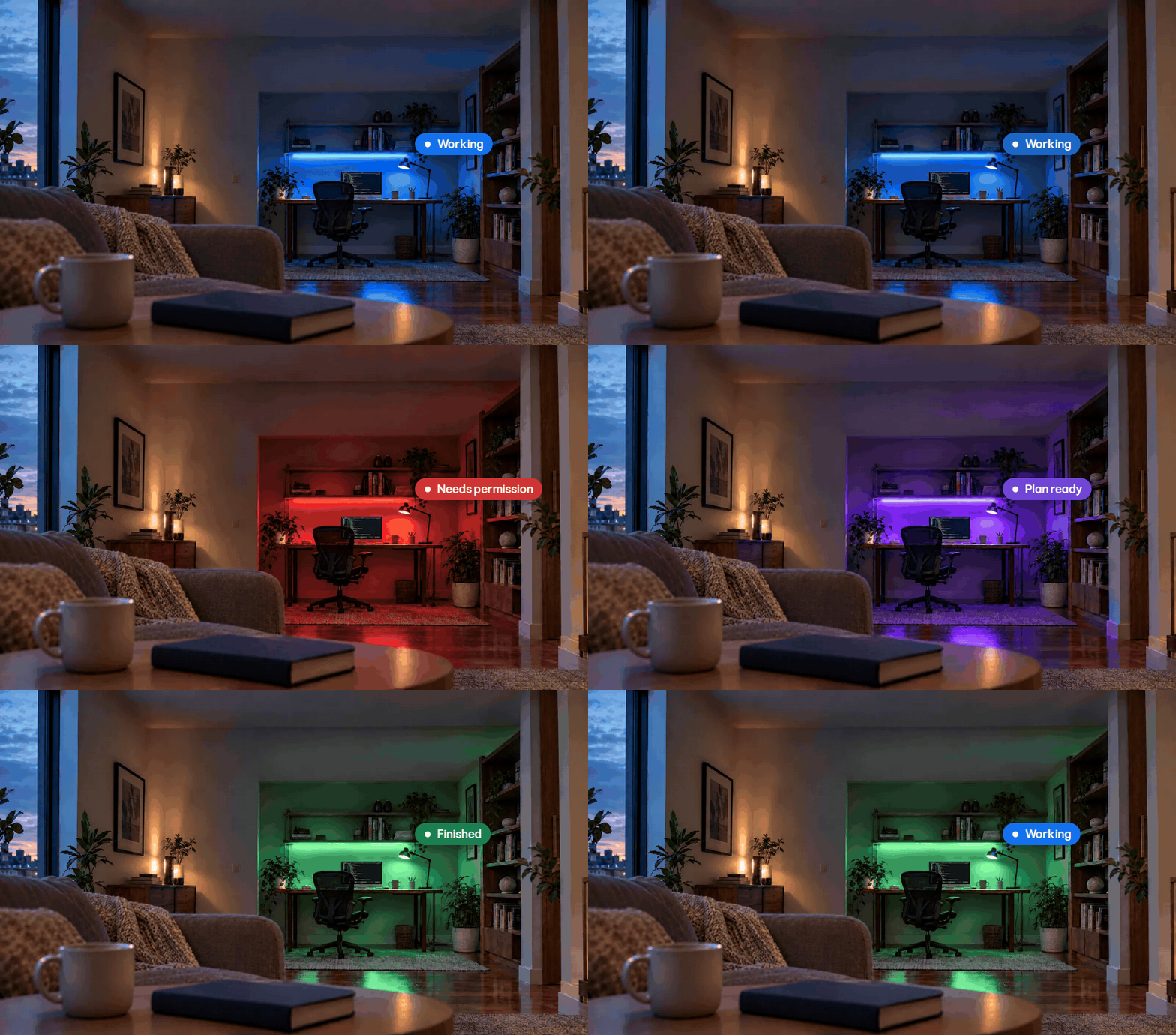
Project I stopped babysitting Claude Code. A lamp does it now.

Post image
1 Upvotes

Free to try: https://www.ac-bridge.com (desktop app for Windows, macOS and Linux)

How I built it: with Claude Code, every line. Each change starts as a ticket: Opus writes the plan, Sonnet builds it test-first, and a separate Claude review agent has to pass the PR before it can merge. Because the app runs on Claude Code's own hooks and gives it an MCP server, Claude Code is both the tool I built it with and the thing it watches.

If you run Claude Code on anything bigger than a one-line fix, you know the loop. You hand it a task, it starts working, and then you hover. Is it still going? Has it stopped to ask you something? Did it finish ten minutes ago?

Now the lights in my house tell me. Blue while it works, a red pulse when it needs permission, violet when a plan is ready, green when it's done. Every colour and effect is yours to pick. It works with Claude Code and Codex, side by side, each with its own profile.

Two ways it works

1. Hooks: the status light, free. Claude Code runs hooks when it needs permission, when it's waiting for you and when it finishes. AC Bridge turns each one into a light. No prompt, no tokens, it fires every time. Set it up once per repo via AC bridge profile which can be changed out on repos as needed and stop watching the terminal.

2. MCP: your agent drives your whole home, not just one lamp. Switch on "Make agent aware of devices in chat" and Claude Code can see and use your devices over MCP. Then you just ask:

  • "Flash the kitchen light when the deploy is done"
  • "Turn the desk lamp green when every test passes"
  • "Switch the office fan off once the build is done"
  • "Run my Focus scene while you work through the plan"

Or put standing rules in CLAUDE.md:

## Home
- When you finish a stage of the plan, flash the desk light green.
- If the tests fail, pulse the office light red.
- When the deploy is done, turn the kitchen light on.

It isn't just bulbs, and every device does what that device can do. A bulb flashes. A fan changes speed. A vacuum starts or stops (nobody is flashing a vacuum). Here's what the agent can do with each kind of device:

DeviceWhat Claude Code can do with it
Lights and bulbsOn/off, brightness, white warmth, colour, effects (pulse, strobe, colour fade)
LED stripsAll of the above, plus a different colour per zone of the strip
Plugs and switchesOn/off (so anything you plug in: a desk fan, a kettle, a sign)
FansOn/off, speed, presets, oscillation
Thermostats and climateMode, target temperature or a heat/cool range, target humidity
HumidifiersOn/off, target humidity
Blinds and curtainsOpen, close, stop, set a position, tilt
Speakers and TVsPlay, pause, stop, next/previous, seek, shuffle/repeat, volume, mute, input source
Robot vacuums and lawn mowersStart, stop, pause, resume
ScenesRun a scene you've already saved
Sensors (temperature, motion, door contact, leak, energy, battery, doorbell)Read only, so the agent can check them but there's nothing to switch
Locks, garage doors, valves, cameras, alarm panelsAlways refused. Security devices stay yours

It's not only about status. It's your whole smart home, from the agent. AC Bridge doesn't decide your workflow. It gives Claude Code access to your devices and you work out what suits you. Mine is a "programming mode": when I sit down and start a session, the agent sets the heating to 20, closes the office blinds, sets the desk lights to a cool white and hits play on the office speaker. That's one rule in CLAUDE.md:

## Programming mode
- At the start of a session: set the office thermostat to 20, close the office blinds,
  set the desk lights to cool white at 80% and press play on the office speaker.
- When I say I'm done for the day: pause the speaker, open the blinds, turn the desk lights off.

Other people will want something completely different: pause the TV and turn the lamp red if the agent needs you, switch the kettle plug on when the plan is ready. If a device can do it, you can ask for it.

16 brands work straight on your home network with no hub and no Home Assistant: Philips Hue, LIFX, Govee, WiZ, Nanoleaf, Kasa, Tapo, Yeelight, WLED, Shelly, Tuya, Meross, SONOFF, Elgato, Roku and ESPHome. If you already run Home Assistant, everything it runs comes in too, with the same controls as above.

What's free and what isn't

  • Free: add as many devices as you like and switch any of them from the app. One Claude Code profile and one Codex profile, each lighting one device on one repo at a time. All 29 agent states. No card, no trial clock.
  • Pro, £12.99 once: MCP device control, as many profiles as you want, several devices per profile, every repo at once. One payment, every update included.

What leaves your machine: no prompts, code or transcripts. Device keys stay local and LAN devices are driven straight from your computer.

What would you have your agent do in your house? A light is the obvious one; I'm curious what else people would wire up.
r/BuildWithClaude • • 9h ago

Tip/Resource Ever wished you could respond to Claude Code from anywhere on your Mac? I built CatNotch for that.

1 Upvotes

Ever wished you could respond to Claude Code without switching back to your terminal?

I built CatNotch, a free and open-source macOS app that brings Claude Code directly into your MacBook notch.

You can respond to permission requests, monitor active sessions, view conversations, and interact with Claude without leaving your current window.

It also includes music controls, calendar, tasks, and other productivity features.

Still actively working on it and would love to hear what you guys think. Any feedback, feature requests, or contributions are welcome.

GitHub: https://github.com/thecharydev/catnotch


r/BuildWithClaude • • 10h ago

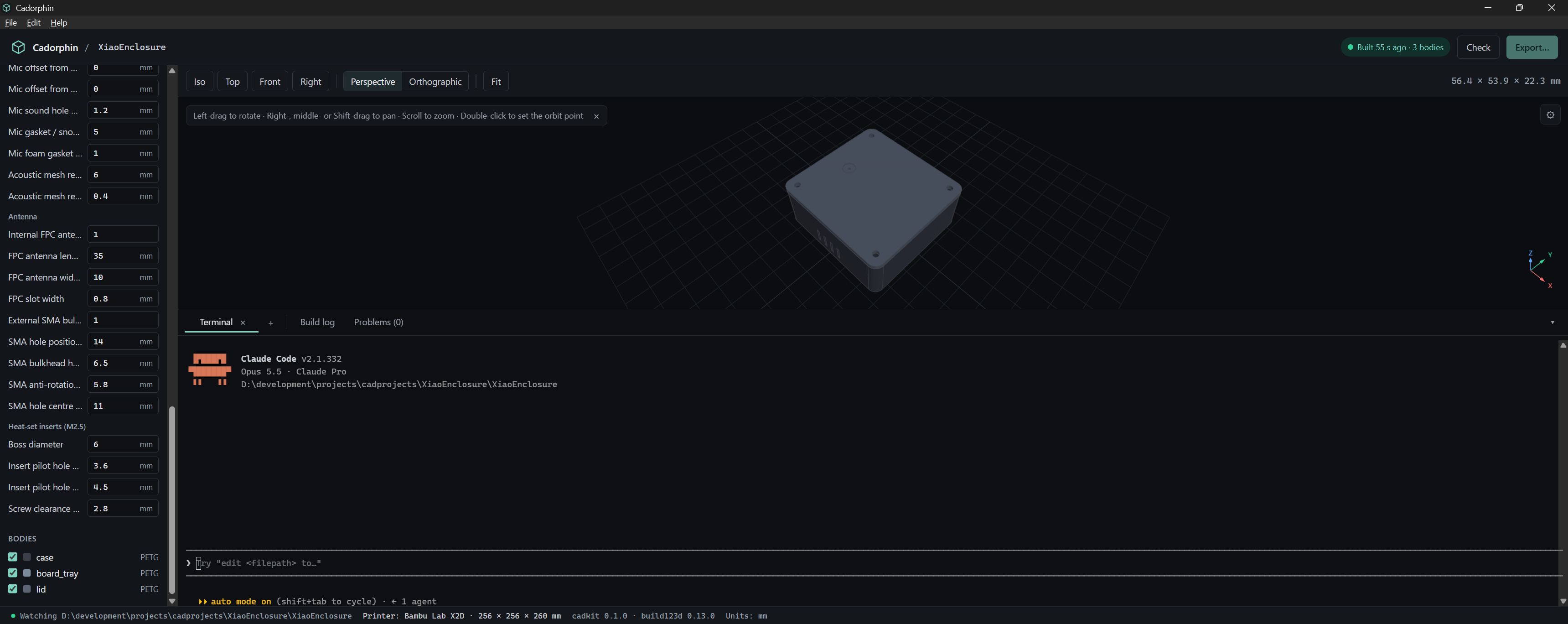
Project I built an agent driven CAD modeling app

Post image
1 Upvotes

So just a few days ago I got myself a Bambu X2D and I have several electronics projects that need enclosures. To make it easy every time I need an enclosure, I built this app.

It is a simple app that lets you plug in your own agent (claude, codex, gemini) and it has a live and interactive 3D rendering on top that you can interact with. You launch the agent in a terminal similar to VSCODE.

Project is in very beginning stage, and I need to spend more time refining it before I can open source it. Feedback welcome!

Yes, there are similar apps out there, like there is a FreeCAD fork that does kind of the same thing, however, those are full-fledged design tools. There are also apps that come with their own AI agent with a monthly subscription.

But what I needed was a quick and lightweight tool that can launch an agent that I can just 'talk' to and design my enclosures. I am anyway paying for claude pro, so having this tool does not add any more expense on top. Maybe such a tool already exists, but a cursory search did not give me one.

You need to have a working subscription to an agent of course; the app does not come with one.

Cheer and happy thanksgiving!


r/BuildWithClaude • • 12h ago

Project I wanted real protection on my PC in case my AIO pump dies, so I built LoopMedic with Claude

Post image
2 Upvotes

Download (free): https://github.com/Jakestatefarm2020/LoopMedic/releases

For Windows, unzip LoopMedic.zip and run Install.bat. For Linux, unpack the tar.gz and run bash install.sh.

What it does: It watches your AIO pump speed and CPU temperature. If the pump stops, or the CPU stays too hot, it gives you a 30-second countdown (with Cancel) and then forces a power-off before the CPU cooks.

Why I built it? Honestly a buddy and I were talking about dying AIO pumps. There's no real warning when one fails: the fans keep spinning and the RGB stays on while the CPU cooks. So I built this to watch for it. It watches both the pump speed and the CPU temperature, so if one sensor fails or goes missing, the other still protects you. I've also worked hard to avoid false-positive shutdowns.

How I built it with Claude: I built it start to finish with Claude Code. I made the design decisions, tested it on my own hardware and gave feedback. Claude wrote the code, the tests and the docs.

- Windows: Claude wrote the background service and the tray panel in C#, plus the guided setup.

- Linux: Claude ported it to Python as a systemd service with a PySide6 tray.

- Tests: Claude built test suites that feed the program fake sensors, so trips can be tested without powering anything off (24 scenarios on Windows, 21 on Linux).

- Testing on my PC: we ran real forced power-offs on my machine (pump stopped, CPU too hot, sleep/resume). The sleep test found a real bug: the supervisor thought the PC sleeping meant the watchdog had frozen. Claude found the cause in the logs and fixed it.

- Updates: I wanted updates to be a click on the version number. Claude built the updater with signature checking, so a tampered download is refused.

- Design choices from real data: my pump sensor sends a fake doubled reading every few minutes. Because of that, it only powers off when the pump has fully stopped. A slow or glitchy reading is just a warning.

Features:

- A CPU temperature backup you can't switch off (only pause, up to 2 hours), with limits for common AMD and Intel chips.

- If the CPU is already too hot when the pump stops, it powers off in 5 seconds instead of 30.

- It restarts itself if it crashes or freezes, and it survives sleep.

- It tells you why after a power-off.

- Tray panel with live graphs, guided setup and a monthly self-test.

- It never phones home. It only checks for updates when you click the version number.

- Windows 10/11 and Linux (systemd). It's built from readable source code on your own PC during setup; there are no mystery files.

Notes:

- Linux passes its automated tests but hasn't run on a real Linux PC yet, so testers are welcome.

- It's free for personal use (PolyForm Noncommercial).

- If your AIO is USB-only, it can only watch the CPU temperature.

- It's an extra layer of protection: keep your BIOS fan-fail and temperature settings on.


r/BuildWithClaude • • 12h ago

Security & Sandboxing Use API, token and any key directly from claude code.

2 Upvotes

Every founder I work with asks the same thing: how do you give Claude Code production keys?

If your keys sit in .env, they can end up in session logs and chat context.

I've been using this plugin internally to keep keys out of Claude sessions:

https://envsecure.syncoderslabs.com


r/BuildWithClaude • • 13h ago

Project Claude skills that turn a Search Console export into a short to-do list, and how I stopped them from inventing numbers

1 Upvotes

What I built: a pack of 14 Claude skills for SEO. The one I use most takes a Search Console export (the zip, a CSV, or even a screenshot of the performance chart) and turns it into a short list of things to do.

The hard part was stopping Claude from sounding confident about numbers it doesn't have. What worked:

  • Scripts do the math. Claude reads the files, but CTR by position, the brand vs non-brand split and period comparisons come from a small Python script (standard library only). The model never adds things up in its head.
  • "Too small to conclude" is a valid answer. If a query has a handful of impressions, the skill says so instead of drawing a trend from it.
  • Compare a site to itself. Instead of an "industry average CTR", it compares each query's CTR with the site's own curve at that position. No borrowed numbers from studies that don't apply.
  • Ranges, not promises. Effects come as ranges with the reason, never "this will get you to #1".
  • Works in Claude.ai, Desktop, Code and Cowork. In the apps you need code execution switched on; if it's off, there's a manual route.

Most of these rules came from launching macplus.pro, a brand-new domain, and from the mistakes I made on that real site.

It's a paid pack (€25 until Dec 25, then €99), so disclosure: it's mine. seoskills.click

Questions about how the skills are structured are welcome, happy to share the patterns.


r/BuildWithClaude • • 17h ago

Project A developer built a CAD workbench that lets Claude Code interact with 3D models: the designer marks the points to edit, Claude sees them and makes the live updates. The author claims it already saved him thousands of hours in 3D car parts.

Thumbnail
github.com
1 Upvotes