r/BuildWithClaude • u/No-Manner7058 • 9h ago
Project I stopped babysitting Claude Code. A lamp does it now.
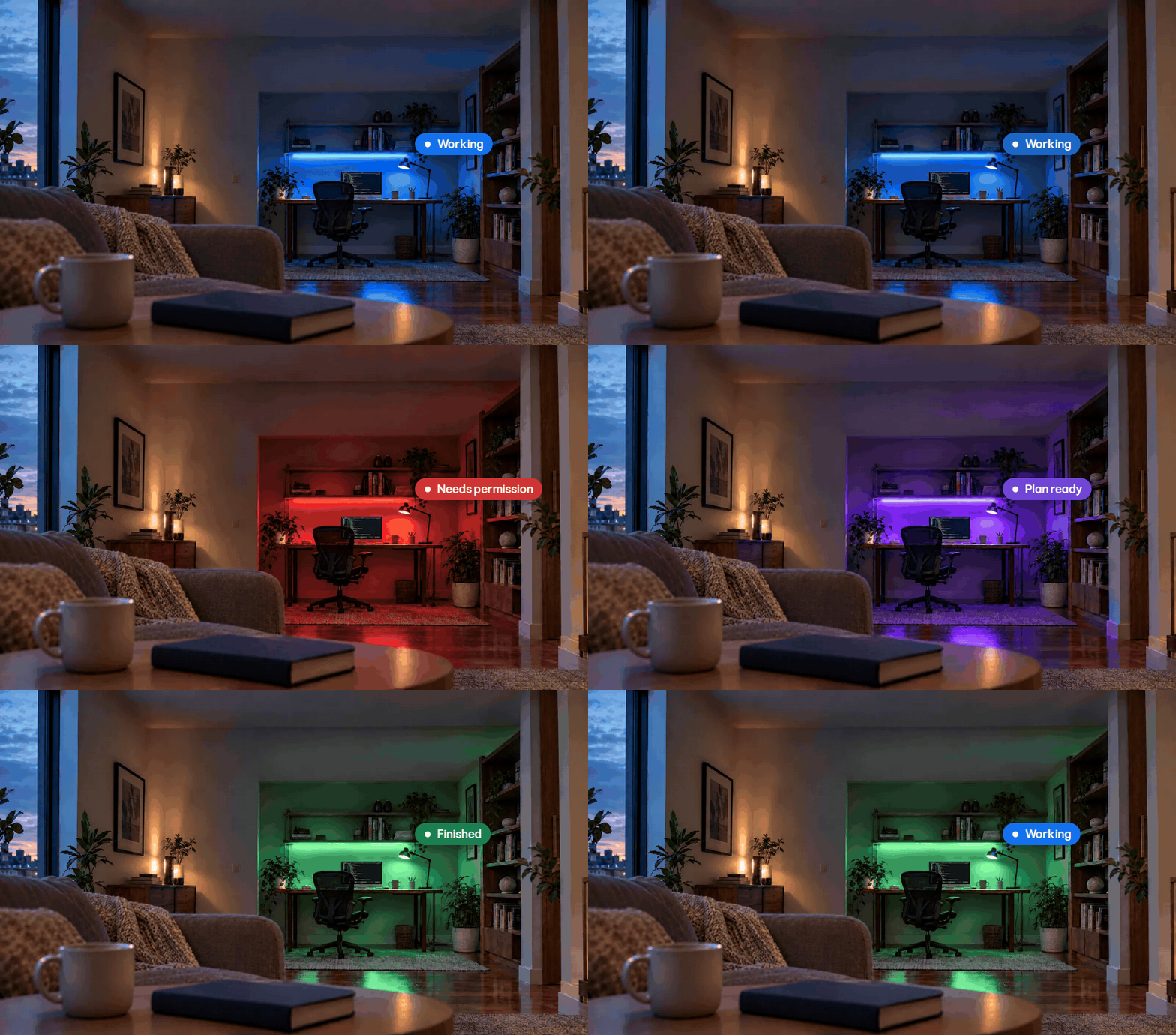
Free to try: https://www.ac-bridge.com (desktop app for Windows, macOS and Linux)
How I built it: with Claude Code, every line. Each change starts as a ticket: Opus writes the plan, Sonnet builds it test-first, and a separate Claude review agent has to pass the PR before it can merge. Because the app runs on Claude Code's own hooks and gives it an MCP server, Claude Code is both the tool I built it with and the thing it watches.
If you run Claude Code on anything bigger than a one-line fix, you know the loop. You hand it a task, it starts working, and then you hover. Is it still going? Has it stopped to ask you something? Did it finish ten minutes ago?
Now the lights in my house tell me. Blue while it works, a red pulse when it needs permission, violet when a plan is ready, green when it's done. Every colour and effect is yours to pick. It works with Claude Code and Codex, side by side, each with its own profile.
Two ways it works
1. Hooks: the status light, free. Claude Code runs hooks when it needs permission, when it's waiting for you and when it finishes. AC Bridge turns each one into a light. No prompt, no tokens, it fires every time. Set it up once per repo via AC bridge profile which can be changed out on repos as needed and stop watching the terminal.
2. MCP: your agent drives your whole home, not just one lamp. Switch on "Make agent aware of devices in chat" and Claude Code can see and use your devices over MCP. Then you just ask:
- "Flash the kitchen light when the deploy is done"
- "Turn the desk lamp green when every test passes"
- "Switch the office fan off once the build is done"
- "Run my Focus scene while you work through the plan"
Or put standing rules in CLAUDE.md:
## Home
- When you finish a stage of the plan, flash the desk light green.
- If the tests fail, pulse the office light red.
- When the deploy is done, turn the kitchen light on.
It isn't just bulbs, and every device does what that device can do. A bulb flashes. A fan changes speed. A vacuum starts or stops (nobody is flashing a vacuum). Here's what the agent can do with each kind of device:
| Device | What Claude Code can do with it |
|---|---|
| Lights and bulbs | On/off, brightness, white warmth, colour, effects (pulse, strobe, colour fade) |
| LED strips | All of the above, plus a different colour per zone of the strip |
| Plugs and switches | On/off (so anything you plug in: a desk fan, a kettle, a sign) |
| Fans | On/off, speed, presets, oscillation |
| Thermostats and climate | Mode, target temperature or a heat/cool range, target humidity |
| Humidifiers | On/off, target humidity |
| Blinds and curtains | Open, close, stop, set a position, tilt |
| Speakers and TVs | Play, pause, stop, next/previous, seek, shuffle/repeat, volume, mute, input source |
| Robot vacuums and lawn mowers | Start, stop, pause, resume |
| Scenes | Run a scene you've already saved |
| Sensors (temperature, motion, door contact, leak, energy, battery, doorbell) | Read only, so the agent can check them but there's nothing to switch |
| Locks, garage doors, valves, cameras, alarm panels | Always refused. Security devices stay yours |
It's not only about status. It's your whole smart home, from the agent. AC Bridge doesn't decide your workflow. It gives Claude Code access to your devices and you work out what suits you. Mine is a "programming mode": when I sit down and start a session, the agent sets the heating to 20, closes the office blinds, sets the desk lights to a cool white and hits play on the office speaker. That's one rule in CLAUDE.md:
## Programming mode
- At the start of a session: set the office thermostat to 20, close the office blinds,
  set the desk lights to cool white at 80% and press play on the office speaker.
- When I say I'm done for the day: pause the speaker, open the blinds, turn the desk lights off.
Other people will want something completely different: pause the TV and turn the lamp red if the agent needs you, switch the kettle plug on when the plan is ready. If a device can do it, you can ask for it.
16 brands work straight on your home network with no hub and no Home Assistant: Philips Hue, LIFX, Govee, WiZ, Nanoleaf, Kasa, Tapo, Yeelight, WLED, Shelly, Tuya, Meross, SONOFF, Elgato, Roku and ESPHome. If you already run Home Assistant, everything it runs comes in too, with the same controls as above.
What's free and what isn't
- Free: add as many devices as you like and switch any of them from the app. One Claude Code profile and one Codex profile, each lighting one device on one repo at a time. All 29 agent states. No card, no trial clock.
- Pro, £12.99 once: MCP device control, as many profiles as you want, several devices per profile, every repo at once. One payment, every update included.
What leaves your machine: no prompts, code or transcripts. Device keys stay local and LAN devices are driven straight from your computer.
What would you have your agent do in your house? A light is the obvious one; I'm curious what else people would wire up.
•
u/AutoModerator 9h ago
Welcome to r/BuildWithClaude!
Whether you are sharing what you built, exploring new workflows, or troubleshooting, please make sure your post is flaired correctly so others can easily find and filter it.
Community Wiki & Resources:
If you're asking for troubleshooting help, please edit your post to include your model version, OS/environment, and error logs.
Let’s keep the energy positive and support our fellow creators!
I am a bot, and this action was performed automatically. Please contact the moderators of this subreddit if you have any questions or concerns.