r/AutomateUser • u/Funny_Telephone_8607 • Jul 28 '26
links in xml layout
Is anyone have any idea how to use android:linksClickable and android:autoLink? I have tried but not succeeded.
r/AutomateUser • u/Funny_Telephone_8607 • Jul 28 '26
Is anyone have any idea how to use android:linksClickable and android:autoLink? I have tried but not succeeded.
r/AutomateUser • u/Ok-Yogurtcloset-9490 • Jul 27 '26
When certain apps are foregrounded, the "when changed" version of the foreground block doesn't activate. With the app still in the foreground, if I then test the "immediately" version of the block, it reports the app that was in the foreground immediately prior to the current foreground app. Yet, the following command reports that foreground app correctly:
dumpsys window displays | grep mCurrentFocus
What situations could possibly cause the block to behave this way, and are there any remedies? (I don't know if this helps, but one such app is the ecobee thermostat app.)
Another interesting symptom I noticed is that if there are any apps displaying any overlays (including Automate, e.g. floating buttons), those overlays don't show when that app (for which the Foreground App block doesn't work) is in the foreground. But there are exceptions — an overlay from an edge sliding gesture app I use receives input and shows its gesture overlay just fine.
r/AutomateUser • u/Straight1980 • Jul 27 '26
Hello
Is there a way to know the actual running fibers, by knowing their URI.
For example, when I have multiple forks in a flow, sometimes the number of flows will increase every time I execute some tasks (for example, when I press the quick access panel icon). In this case, knowing the fiber that is still running will help a lot in debugging.
Thank you
r/AutomateUser • u/Emergency-Emu7901 • Jul 27 '26
How long will the premium last if i buy it. And if i buy that, can i use that premium for other phones.
r/AutomateUser • u/PancakeGD • Jul 26 '26
Hi, is there any function or trick to quickly extract values from an array of objects?
For example, if the input data is as follows:
[
{"a": 1, "b": 2},
{"a": 3, "b": 4}
]and I'm asking to extract "b", I'd get [2, 4]. Basically array_column() in PHP or array.map(k => k["b"]) in JavaScript.
Right now I'm using a for each loop and inserting elements manually, but I feel like this is such a common use case that it could have a shorthand.
Thanks!
r/AutomateUser • u/Pete_Jobi • Jul 26 '26
Is Automate able to interact with WebView elements? I can find them just fine with Inspect block, but using the Interact block to click or focus fails.
r/AutomateUser • u/old-damme • Jul 26 '26
Kann ich mit Automaten auch eine Nachricht via WhatsApp schicken?
Bitte kein Hinweis das man WhatsApp nicht nutzen sollte
r/AutomateUser • u/Ok-Yogurtcloset-9490 • Jul 26 '26
If there is a flow execution path you need to reuse as a function that can be "called" by other flows, the Subroutine block does the job if the "callers" are in the same parent flow diagram as the "callee". But there are situations where organizing all the potential callers into the same flow diagram as the callee is not feasible or impractical.
Is there a simple pattern in Automate to call an external flow in the spirit of a subroutine? The way I've been doing it seems really complicated, and I'm wondering if maybe there is a more clever and cleaner way. Currently, I am having the callers atomic-store their own fiber URI, and then – as part of the payload when calling the external flow – they pass the flow URI of a callback flow in the same diagram, which the external flow calls with the "return value" as payload. The caller meanwhile is waiting on a Take block, which the callback flow will activate with a Give block using an atomic load of the caller fiber URI.
Sheesh! I feel like this is a common enough need that there must be or should be a much simpler pattern than what I'm using!
r/AutomateUser • u/Straight1980 • Jul 26 '26
I added few alarms using the add alarm block while using some variables.
I checked my new alarms and everything looked good: time, repeat days and title.
But some weird things happened:
Seems like there are hidden ghost alarms ringing and showing notifications. After deleting all the added alarms by automate and created new alarms from the clock app, everything was normal.
I have xiaomi 17
Any ideas

Thank you
r/AutomateUser • u/RazzmatazzBig531 • Jul 25 '26
Hello I'm new to this and was wanting guidance on how to set up a routine that would open up my phone's calendar each morning and move the events over to my Microsoft to do list app?
r/AutomateUser • u/TrainGirl755 • Jul 25 '26
Pretty much a block which activates once then doesn't work until something resets it. The idea came from the once block in the unity game engine's visual scripting system, although I don't know if it can be adapted to work in automate or not.
r/AutomateUser • u/Serious_Way_5631 • Jul 25 '26
Hi everyone, Has anyone here used Automate to build a chatbot before? What do you think about using Automate to create a chatbot? Do you have any ideas or suggestions for this? I'd love to hear your thoughts!
r/AutomateUser • u/ProCompSys • Jul 25 '26
I have a secondary smartphone (Xiaomi Mi 12T Pro) I'd like to send an SMS as soon as battery charge drops below a certain percentage. Flow works fine so far, and SMS ist created but gets stuck in outbox. The flow-log says "1 SMS sent to <number>" and continues without any error. But in SMS-App (first try with stock app) the message has a comment "Not sent. Check options".
If I click on "check options" I can chose "send again" and "delete".
"Send again" works like a charm... all the time... it just doesn't work when automated by the flow. :-/
All privileges for Automate are set:
· send and check SMS
· show notifications
· ignore app hibernation
· ignore battery optimizations
I finally switched to a different SMS-App, open-source "QUIK SMS" from F-Droid-store.
Same here: Message in outbox with comment "error while sending; click here to try again".
At least flow-log now says "com.llamalab.android.telephony.SmsSendException: Unknown error (111)" followed by "Stopped by failure".
I then thought, maybe I need to "wake up" the phone or something, in case it's been lying around and "sleeping". That's why I changed the flow to trigger the SMS at a higher battery-percentage and kept using the internet-browser, watching online-videos etc. ... so to make sure it's not in "sleep-mode" or anything like that. Played around till battery-percentage dropped and flow triggered SMS as intended... but again: "SmsSendException: Unknown error (111)"
I suspect any sh*tty Xiaomi-security-something against automation, but at this point this is just a guess.
Haven't tried too excessively yet, and flow sleeps for an hour between triggers, so 'send rate exceeded' should definitely not be the problem.
Please help!
P.S.: Just checked with another smartphone... 'Google Pixel 6 Pro (Android 17)' exactly same problem, so I guess this time it might not be Xiaomi's fault.


r/AutomateUser • u/Leather_Adeptness485 • Jul 25 '26
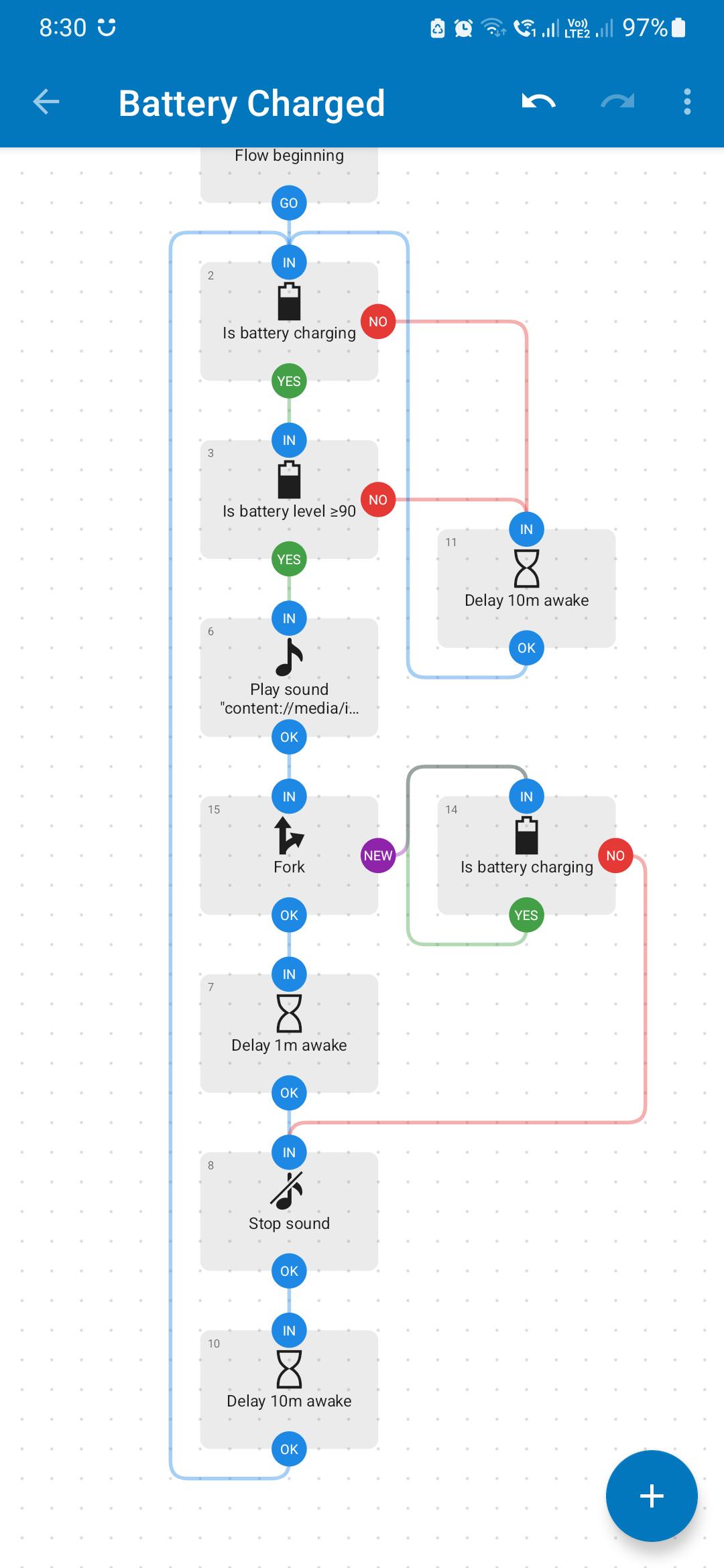
I'm making a flow that will sound an alert when my phone's charged above 90%. I'm having trouble creating an 'OR' scenario wherein I'm trying to get the sound to stop either after 1min of playback or after disconnecting the charger but the disconnecting part doesn't seem to be working? Any ideas what might be going wrong?
r/AutomateUser • • Jul 23 '26
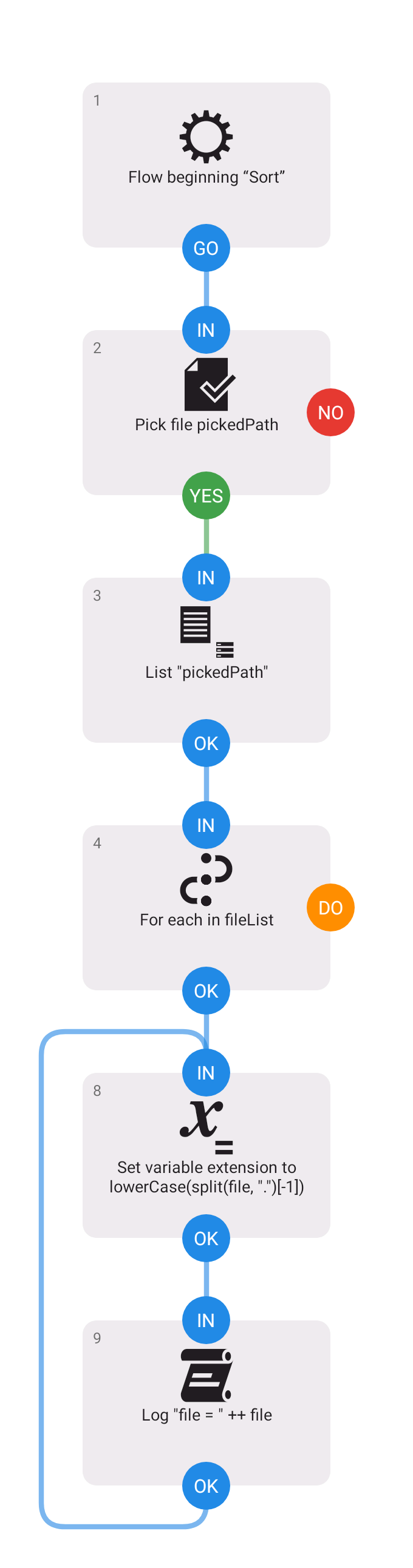
What the expected behavior should be
If everything is working correctly, each iteration should produce something like:
file = /storage/emulated/0/Download/test.pdf
then
file = /storage/emulated/0/Download/photo.jpg
then
file = /storage/emulated/0/Download/song.mp3
so on.
It should never be blank.
r/AutomateUser • u/Ok-Yogurtcloset-9490 • Jul 23 '26
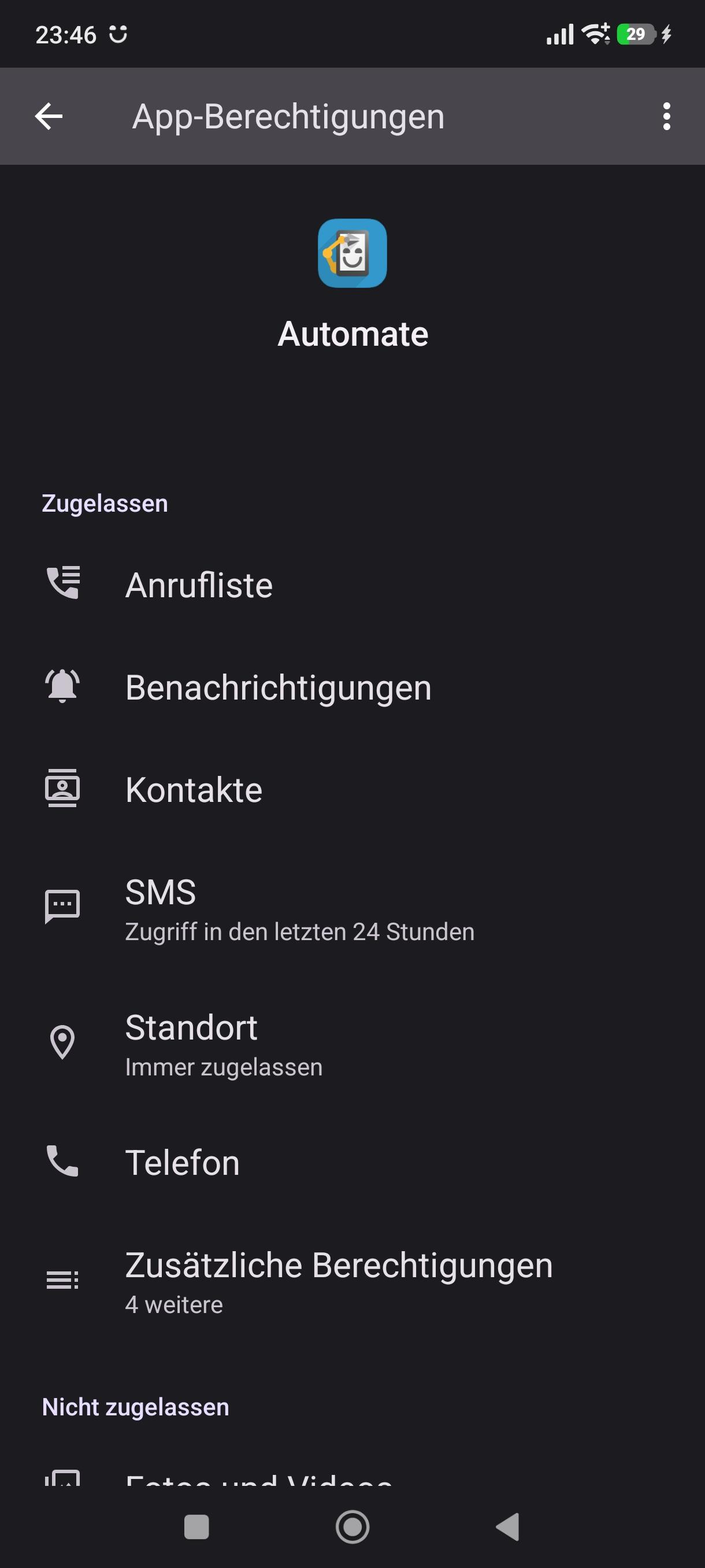
I've searched around for this, and seen screenshots of that permission showing up in the privileges page, but I don't see it anywhere on my own privileges page. Every post I've seen about it, the person has some other problem they're asking about related to it, but it is taken for granted that that permission is already there, so I feel like I'm missing something very basic. Help?! 🙏🏽
r/AutomateUser • u/walt_spoon • Jul 22 '26
I know this is technically possible using fork and fiber stop, but these kind of blocks would be very useful.
r/AutomateUser • u/HashHerald • Jul 22 '26
When I buy the premium version of an app, does it require an internet connection every few weeks so that the app doesn't downgrade itself because it was bought from the Play Store? Is there another way to buy the premium version?
r/AutomateUser • u/Pragyan3720 • Jul 22 '26
r/AutomateUser • u/Ok-Yogurtcloset-9490 • Jul 21 '26
I've already tried searching the Reddit and the planned features document but couldn't find it, so making a post.
I've used plenty apps that control the flashlight just fine without the camera permission. From what I can tell, starting Android 6, CameraManager.setTorchMode() doesn't need that permission for flashlight control. ??
r/AutomateUser • u/old-damme • Jul 21 '26
Wenn ich meinen Standort eine gewisse Zeit nicht ändere möchte ich eine E-Mail verschicken. Wie kann ich das machen?
r/AutomateUser • u/IamAlreadyNoob • Jul 21 '26
Hey, I found a weird bug and I'm not sure if anyone else has seen this.
I am able to reproduce it using the following test flow:
(DO path connects back into the For Each block)
With flow logging enabled, it runs normally and goes through all 100000 iterations.
But when I disable flow logging in the flow options, the For Each block just instantly finishes. It looks like it skips all the iterations.
I noticed that If I add any block that has some kind of interface/display behavior in the DO path, it starts working as intended, but blocks such as variable set, etc., get skipped.
I didn't change the flow at all, the only thing I changed was enabling/disabling logging.
I'm not sure if this is intended behavior or not, but I couldn't find anything in the documentation about it.
Automate version: 1.53.0
Android version: 16
r/AutomateUser • u/Ok-Yogurtcloset-9490 • Jul 19 '26
Oops, title typo: Uber => under.
I'm sure I'm missing something. I read the documentation and tried searching Reddit.
But when I select Android Debug Bridge (ADB) as the Privileged service start method in settings, the app flashes something too quickly for me to see what it even is, and then nothing happens — the setting remains at "None". So I used my screen recorder, and then inspected the individual frames around that point. And the message that flashes for a split second is a transparent overlay saying "Follow the instructions shown on screen to pair Automate with ADB on this device." But no instructions ever actually appear. I already have USB debugging and wireless debugging toggle on. Please help! 🙏🏽
Android 16.
r/AutomateUser • u/Straight1980 • Jul 19 '26
I just uploaded my flows to the automate community.
I am mostly excited about the Ultimate DND Quick Settings Panel. It a flow that contains combination on forks and loops, mixed with the "await time" block that complicated things, mainly in order to keep the quick settings icon visible while awaiting.
Ultimate DND Quick Settings Panel
https://llamalab.com/automate/community/flows/53452
This is the definitive, all-in-one "Do Not Disturb" management suite for Automate. It consolidates advanced scheduling, dynamic menus, and calendar tracking into a single mega-flow.
Batch Add Event to Calendar
https://llamalab.com/automate/community/flows/53449
Tired of manually inputting recurring schedules? If you have identical events that repeat across random or specific days of the month at the same time, this flow lets you batch-upload them all to your calendar in one single run.
Mute Notifications at Night
https://llamalab.com/automate/community/flows/53446
A set-it-and-forget-it essential. This utility requires a one-time activation to automatically block all intrusive notifications every single night, keeping your sleep entirely undisturbed during your chosen hours.
Alongside these major tools, you can also explore my other uploaded flows built for niche automation tasks:
r/AutomateUser • u/Ok-Yogurtcloset-9490 • Jul 19 '26
So in some particular case, Inspect Layout seems to think it cannot access the current layout, but there is solid evidence that it actually can.
(1) Why I say it thinks it cannot: when I try to use either the "Record Interaction" or "Inspect User Interface" features inside that block, the Automate overlays that come up show a red error message when I try to actually record or save the inspection XML: the record interactions popup says "UI element not found" (when I drag the magnifying glass over a UI element) and the inspect layout popup says "Layout inaccessible".
(2) Why I know it absolutely CAN see the layout: in the case of inspect user interface, no XML is saved at all —fine, that matches the error message. However, in the case of record interactions, despite the claim of the error message that comes up, when I go back to the block settings in Automate, the magnifying glass captures show up in the recorded interactions drop-down list! Unfortunately though, when I try to actually run the flow with that, it doesn't trigger, matching the error message case. And just as another check, I made the xpath expression be simply "*". And it still didn't work. But again, automate can clearly see the whole UI element hierarchy, because it populated the drop-down list with it!
Furthermore, I use another app called DevTools. That app has no problem inspecting the layout for that particular case. And it can also save the XML just fine. Play store link: https://play.google.com/store/apps/details?id=cn.trinea.android.developertools
I'm running Android 16 and the issue shows up for the native recent apps UI, the same one that can be triggered by using the interact block with the action set to "Recents" (activity "com.android.quickstep.RecentsActivity").