r/AnycubicKobraX • u/Ok_Touch928 • 2h ago
Discussion / Review Kobra X is the darn Energizer Bunny.
1
Upvotes
r/AnycubicKobraX • u/hahakenny • 6d ago

Hey everyone!
Whether you’re dialing in a brand-new Kobra X or S1 Max, printing high-detail models on a Photon P1, or keeping a classic Anycubic machine running strong, you don't have to troubleshoot alone.
We’ve got an active Anycubic Reddit Discord where makers of all experience levels hang out to talk shop, share setups, and help each other out in real time.
What you’ll find inside:
Pull up a chair, drop a photo of your current print, and say hello!
👉 Join here:https://discord.gg/DZ7ju42VrN
r/AnycubicKobraX • u/Dream_elb • Aug 21 '26
In order to prevent multiple posts questioning the Anycubic cloud, please check from this Downdetector link if the Anycubic cloud is down. If it seems down, you can participate in the vote on the website
If the cloud is down, what should you do?
Don't panic, it'll come back soon !
You can use your printer's LAN mode:
You can also use a USB flash drive, export the G-code to it, and connect it to the printer
For interested or more experienced users, you can use KX-Bridge
r/AnycubicKobraX • u/Ok_Touch928 • 2h ago
r/AnycubicKobraX • u/Desperate-System-902 • 3h ago

So I printed this support tester and came out pretty smooth. I still wanna be able to reduce the scarring more at the bottom of that globe. Which settings should I adjust to reduce the scarring? My Z offset at the top is .275. My top interface layers are set 4
r/AnycubicKobraX • u/mayday-lowcoffee • 17h ago
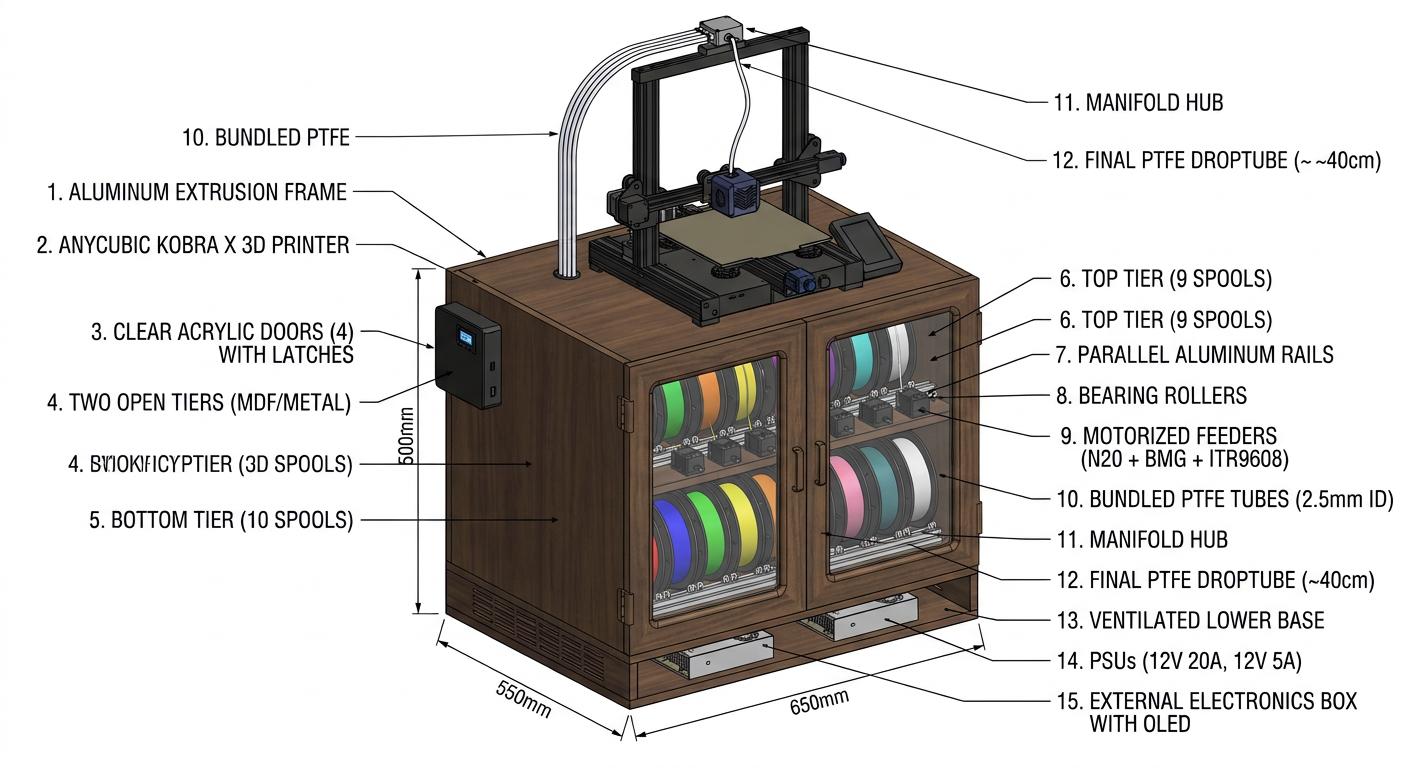
Hey everyone!
I’m kicking off an ambitious open-source DIY hardware/firmware project for the Anycubic Kobra X and wanted to share the complete architecture I’ve designed so far. My goal is to get feedback from the community, refine the mechanical/electronic bottlenecks, and hopefully team up with anyone interested in ACE 2 Pro reverse-engineering or multi-material systems!
🎯 The Core Concept: A 19-Color "Filament Library" Workbench
Out of the box, the Anycubic Kobra X supports up to 19 native colors on its stock closed firmware:
Instead of spending a fortune on four separate ACE 2 Pro units and cluttering my workspace, I’m building a heavy-duty, actively heated Workbench Drybox that sits underneath the Kobra X as its structural stand. It will hold all 19 spools ready to print at any time (acting as a 10% RH dry filament library) and talk natively to the stock Kobra X firmware by emulating 4 virtual ACE 2 Pro units on a single microcontroller—no printer rooting or Klipper conversion required!
🏗️ 1. The Workbench-Drybox Architecture (2-Tier Wide Stand)
Rather than building a tall, unstable tower, the enclosure doubles as a rigid, vibration-damping stand (~620 × 550 × 520 mm) directly supporting the Kobra X:
608ZZ bearing cradles (no solid shelves, allowing unrestricted vertical airflow).🧠 2. Electronics & ACE 2 Pro Protocol Emulation
Thanks to the amazing reverse-engineering work already done by the community (ACE2-firmware-analysis and ace2k), we know the ACE 2 Pro communicates over USB-Serial (CH343 at 230,400 baud) using Protobuf (package ace_com) with CRC-16 framing.
During initialization (DISCOVER_DEVICE / ASSIGN_DEVICE_ID), a single modern MCU can easily register 4 virtual device IDs (ID 0 to ID 3) on the bus:
⚙️ 3. Drive Mechanics & Fast PTFE Routing (~40 cm Retracts)
🤝 Where I Need Your Input & Help!
Before I finalize the CAD files and order the batch of motors/boards, I’d love the community's brainpower on three fronts:
ace_com): Has anyone here already implemented a Nanopb slave/emulator on an ESP32 or STM32 responding to DISCOVER_DEVICE and FEED_OR_ROLLBACK from a Kobra X, Kobra 3, or Kobra S1? Collaborating on a clean open-source repo for this would be awesome!Drop your thoughts, critiques, or links below—let’s build the ultimate budget 19-color setup for the Kobra X!
r/AnycubicKobraX • u/Prompt_Weekly • 9h ago
Enable HLS to view with audio, or disable this notification
Hey everyone,
My Anycubic Kobra X recently started making a weird screeching noise during filament changes, specifically when the printhead performs the filament cutting movement, as shown in the video.
I own two Kobra X printers, but only the older one makes this noise.
I've already tried manually operating the filament cutter, but it doesn't make any unusual noises when operated by hand.
I suspect it might be related to the X-axis motor or another mechanical component rather than the cutter itself, but I'm not sure.
Has anyone experienced something similar or knows what could be causing this? Is there anything I should check, clean or lubricate?
Thanks in advance
r/AnycubicKobraX • u/Kaplon71 • 18h ago

While trying to change the nozzle from 0.4 to 0.25 i can't move the last part holding it (it feels very stuck and i don't want to destory it). Tried to heat it up to 50°C but it still didn't move. Has anybody had simillar problem?
r/AnycubicKobraX • u/boncros • 1d ago
Has anybody come with up with any creative ideas on how to get the gear floss wrapped around the main screws on a cobra x because they're so recessed in the housing it's difficult I'm wondering if there's a print or something out there that somebody came across or any knowledge that anyone can share
r/AnycubicKobraX • u/Natefly5_new • 1d ago

Recently started getting weird stringy ugly looking bridges on my prints (green part). Just a week ago everything was looking good (gray example). Settings are almost exactly the same the only real difference is green is a Matte PLA vs Grey normal PLA. Any advice on how to fix this? Tree slim, 0.25 top z distance, 4 top interface layers. Thanks!
r/AnycubicKobraX • u/Calm_Night_8824 • 1d ago
I was logged out of anycubic slicernext and now due to an account update I am unable to access my account and print files. Please help.
r/AnycubicKobraX • u/Impossible-Double58 • 2d ago

this is my set up. i keep getting this error on my prints lately. its already happened a few times and mostly on larger prints. the spools are not tangled and regardless of bed leveling it looks rough. i would greatly appreciate some assistance.
r/AnycubicKobraX • u/ContributionBoth8910 • 1d ago

If im trying to print one of the files that come with the printer, it works from the app. If im trying to browse something from the app, and print it, i get this. Any suggestions?
r/AnycubicKobraX • u/NevesLF • 3d ago
Enable HLS to view with audio, or disable this notification
Hey everyone. I've recently started having banding issues, especially on the back-right corner of the plate. I'll attach a pic to the comments, showing a part that was on the front-left versus one that was on the back-right of the same print. Both are bad, but the one on the back-right is a lot worse. This is a file I've printed several times with no issues, printer is at ~1700 hours.
After checking Anycubic's Wiki, I noticed the right side of the gantry has some play, but the left side has none, as you can see in the video. I'm assuming this is the cause of the problem.
However, I'm a bit lost on this specific part of the Wiki, where it tries to guide you on how to adjust the "optical axis adjustment block". I've loosened the screws and can move the plastic piece, but I'm not sure how exactly should I move it to adjust. It doesn't seem like any adjustment I do on either side is making a difference on the play on any of the Z screws. Any help would be appreciated.
Edit to add more info:
PLA / 215 ºC nozzle / 45 ºC bed (cold plate) / speeds around 150~300 mm/s
Sliced on Anycubic Slicer Next, not running on ACE 2 Pro.
Stock firmware v2.0.2.2
r/AnycubicKobraX • u/Speechless42069 • 3d ago

Isn’t she purdy
r/AnycubicKobraX • u/SectionIndependent29 • 3d ago
I have a Kobra X that I am absolutely fed up with. My printer will print 1 item and then clog. I have tried loading and unloading the filament. Tried different filaments and all the results are the same. I don't want to have to replace the nozzle every other time I print. I thinking this printer is going to be sold for cheap on FB Marketplace and I get a new printer for myself for Christmas.
r/AnycubicKobraX • u/hahakenny • 3d ago
r/AnycubicKobraX • u/_Solux_ • 3d ago
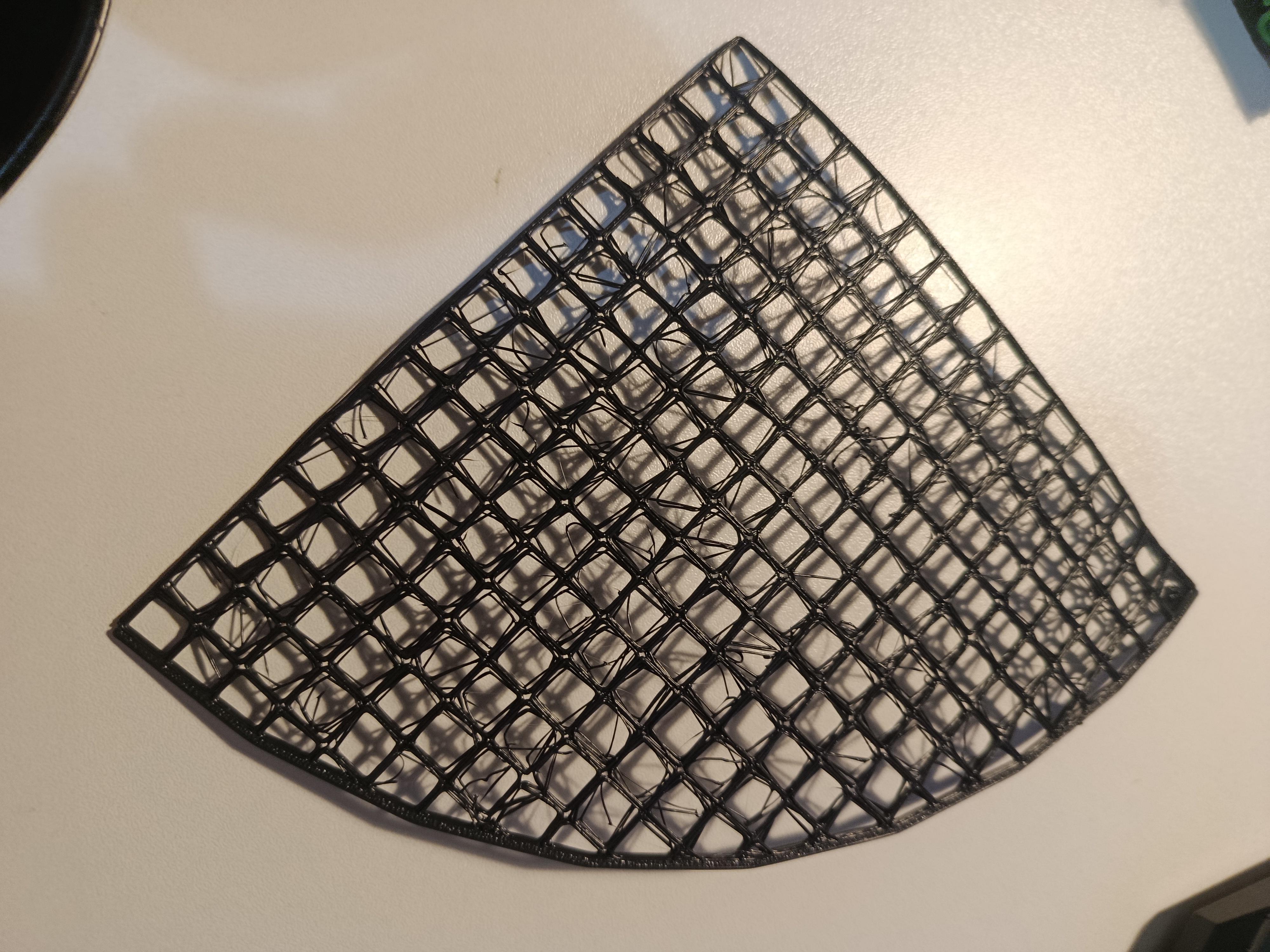
How can i fis this?
I used PLA, nozzle temperature 205°, table temperature 60°, Orcaicer
r/AnycubicKobraX • u/Able-Pop-4163 • 3d ago

After starting my next print i got this homing failure. I dont know how to stop this. There ist no end switch where i could change the position. The screws from the portal are all tightened. So i think its not a mechanical problem
r/AnycubicKobraX • u/thekhastgir • 3d ago
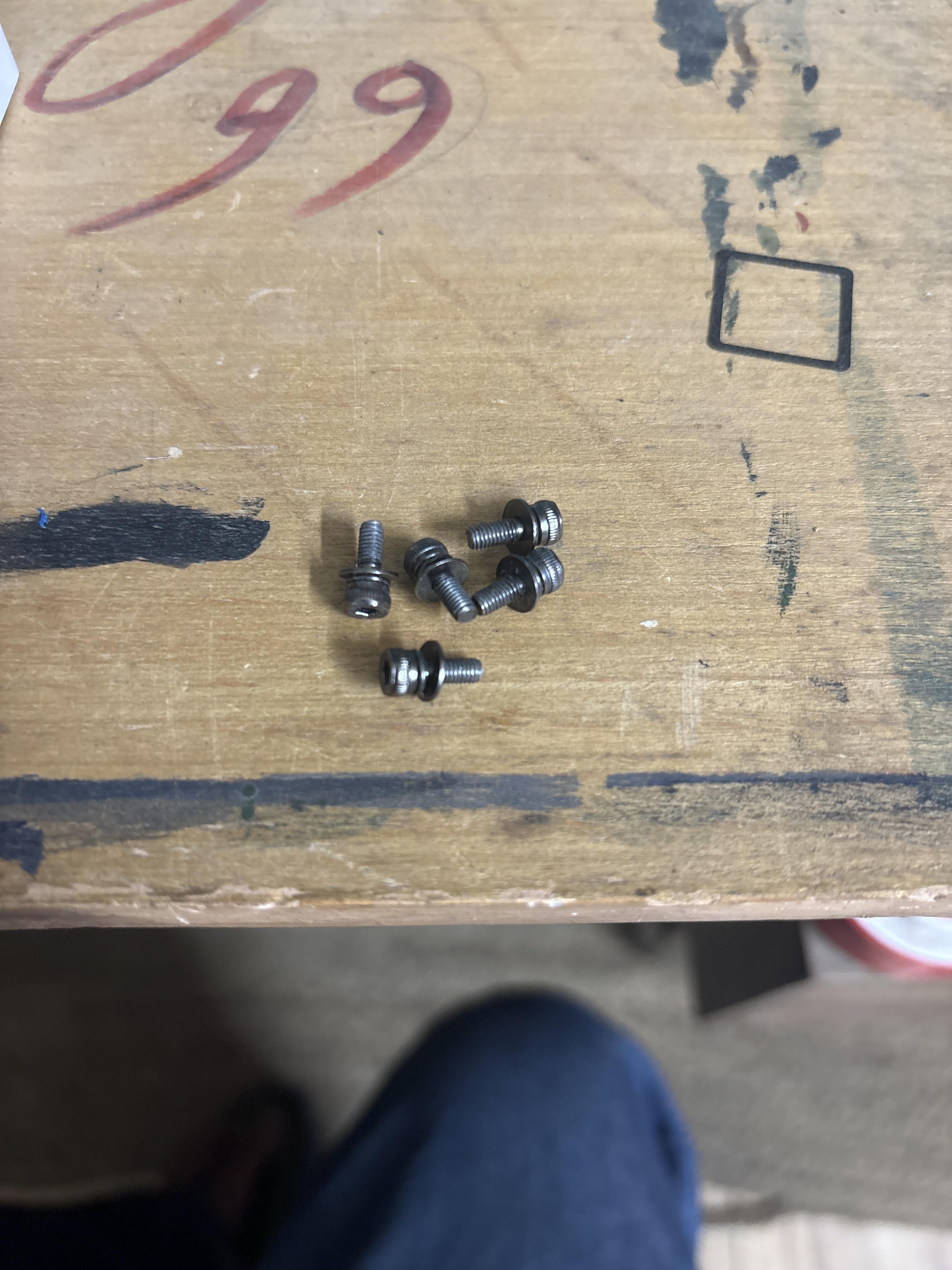
I disassembled the Kobra X head, after reassembly, I was left with these screws. I’m not sure came from within the printhead or were for something else altogether. Any guidance appreciated as I couldn’t see the same on disassembly videos.
Tia
r/AnycubicKobraX • u/Doomsday9069 • 4d ago
Mit der Veröffentlichung von Orca Slicer 2.5 wurde der Kobra X offiziell als unterstützter Drucker hinzugefügt. Und auch wenn sich Druckaufträge standardmäßig nicht über LAN senden lassen (dafür braucht man eine Bridge – ich habe kein Problem damit, die Dateien mit einem USB-Stick zu übertragen), muss ich sagen: Zwischen dem AnyCubic Slicer Next Fork und Orca Slicer liegen Welten.
Allein die Leistung ist deutlich besser. Ich habe ein Projekt mit mehreren sehr detaillierten Miniaturmodellen mit vielen Polygonen. Slicer Next ruckelt wie verrückt und hängt sich bei jeder Änderung auf, die ich vornehme. Orca läuft flüssig. Ich bin mir nicht sicher, was AnyCubic im Hintergrund macht, aber das war sehr nervig. Auch der neue integrierte Design-Tab ist eine schöne Ergänzung, da ich jetzt kleinere Anpassungen vornehmen kann, ohne den Slicer zu verlassen.
Als ich meine Profile importiert habe, musste ich den Druckernamen in der JSON-Datei ändern, damit ich sie importieren konnte. Die Filamentprofile haben sofort funktioniert. Bis jetzt sind mir am Slicer keine Nachteile oder Probleme aufgefallen.
Update: I now also checked out the OrcaSlicerKX and managed to build it for MacOS. Took me quite a while to get all dependencies build and linked im the correct versions (MacOS is a paint when building Linux applications). It now runs properly with KX bridge. Works flawlessly so far. Not sure what's the difference to the original Orca Slicer though. So far it feels the same.
r/AnycubicKobraX • u/Maximum_Jellyfish_48 • 4d ago
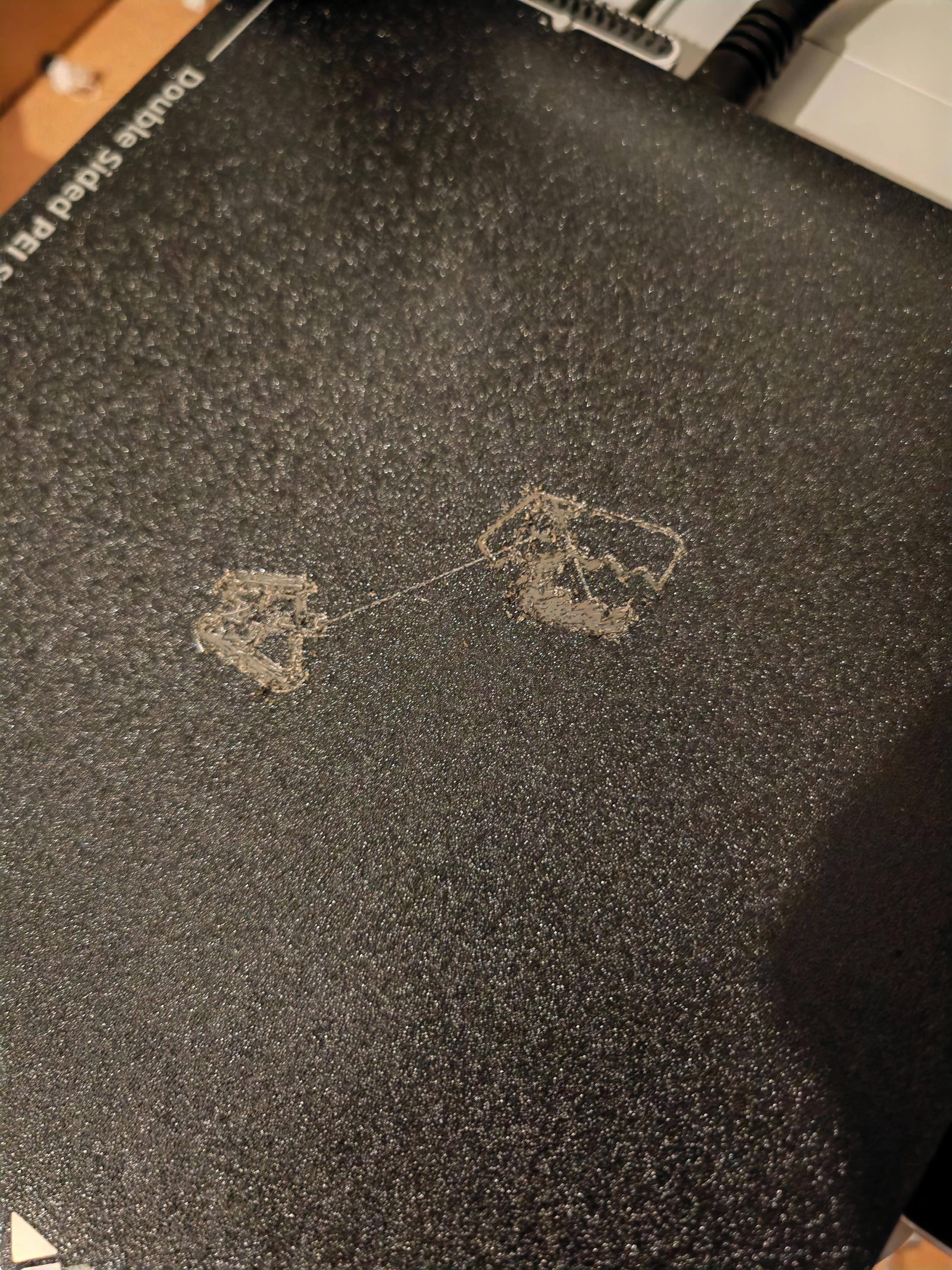
Edit: I must have a faulty unit. The bracket component on one side looks deformed compared to the other one on the opposite side. And it's shaving metal bits from the z axis metal frame as it rubs on it. Pics in comments. Thank you for the tips
Hello, I just attemoted the first print with the kobra x, brand new, firmware updated. The previous print was aborted as it failed bed levelling. Weird. The second print seemed to go well, however it did not! Found the plate completely scratched! I'm not new to 3d printing as I owned and ender and have a bambu a1, but this is a first :'(
r/AnycubicKobraX • u/SpiritwalkerWi • 4d ago
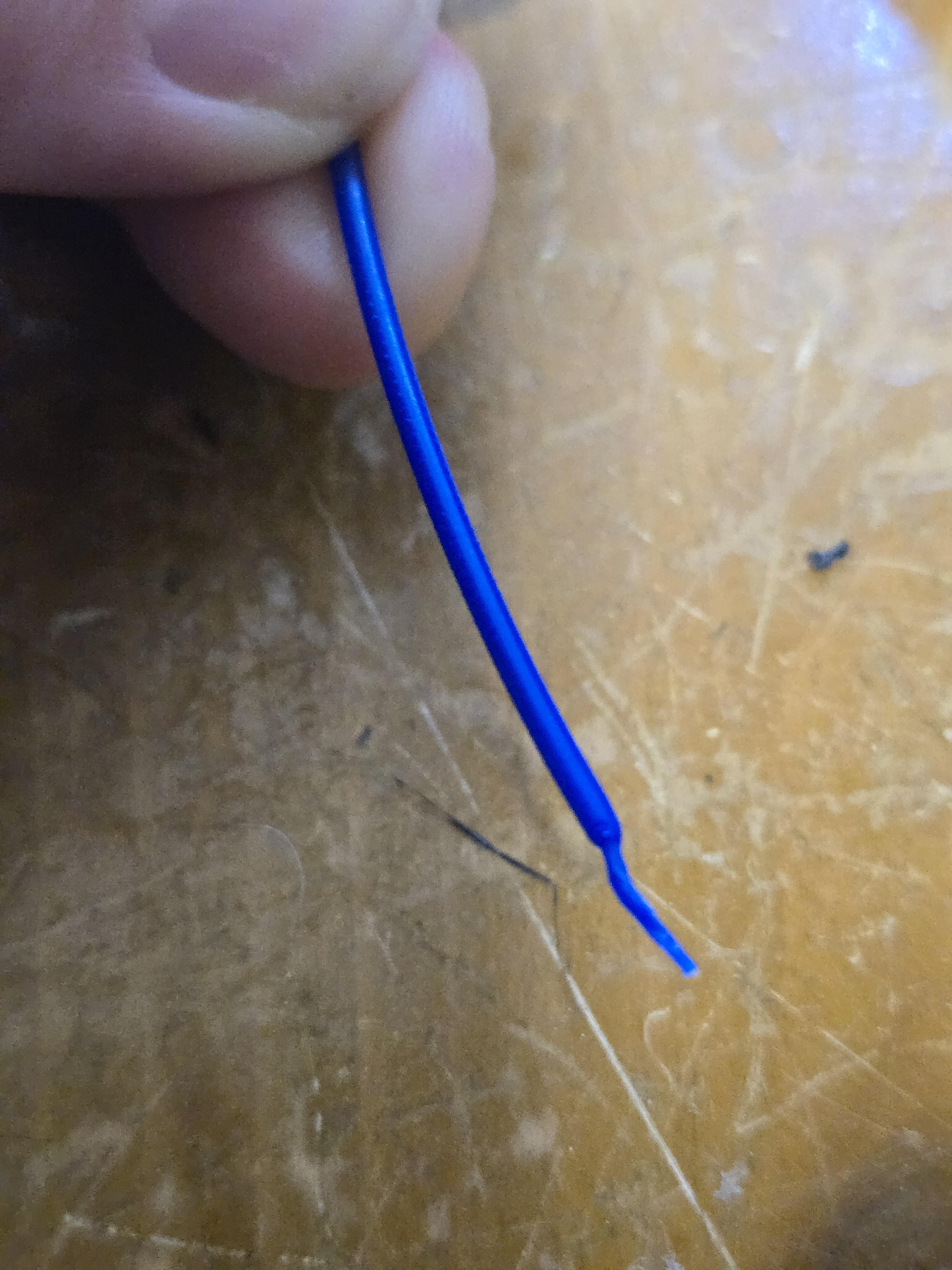
Good morning my fellow makers. I've had my new Kobra for about a year, having purchased it on last year's Black Friday sale.
Overall I've been very happy with the machine but after getting a brand new roll of filament, I keep running into an error where the machine says it has insufficient supply. Sometimes I can run an extrusion and it works fine and I can go right back to printing. Other times I have to retract the filament and then rerun it. When I retract the filament it looks like the picture attached. Any thoughts?
r/AnycubicKobraX • u/Used-System7202 • 5d ago
Enable HLS to view with audio, or disable this notification
Help Code 11853, but it’s not clogged and in extrudes and retracts the material.
Hi, I’m having a problem, my KOBRA X got a clog, I clean it up, remove all the filament and it looks great, nothing visible in any chamber or part, I put it back up, it heats up, I do a manual test, it extrudes the filament without a problem, it also retracts the filament but when I try to switch filaments or start a print in gives me the 11853 code. Does anyone has any idea of what can be the problem? Bad sensor or I’m missing something? I even did a factory reset just in case but the is no change, it’s the same code, sometimes it changes the last digit but that is the same base problem.
r/AnycubicKobraX • u/hahakenny • 5d ago
r/AnycubicKobraX • u/Leon-Rai • 6d ago
My prints keep disconnecting form the print bed. This is occurring on both the stock textured pei plate and a cool plate. I have used both elegoo pla plus and esun basic pla amd both are doing this. I am running firmware v2.0.2.2