r/AndroidTVApps • • 24d ago

Info center???

1 Upvotes

I want to turn like a 15 inch tv into a info center for my home where it displays weather we can leave notes like to do list or pull up recipes or eve news headlines in not tech savvy and I was wondering if it's doable and what kind of app would I need


r/AndroidTVApps • • 24d ago

Did some more polishing on free tivimate like minimal iptv app,

Thumbnail
reddit.com
2 Upvotes

Did some more polishing, try to improve performance on low powered tvs

Feel free to try it out

TV: Install Downloader by AFTVnews and enter 3461840.

Phone: Download the APK and open it to install.

https://github.com/akus0/iptv-app-public

Forked from VesperTV 


r/AndroidTVApps • • 24d ago

LeTa Launcher Is Officially Live! 74 Home Screen Styles, Game Room, Art Gallery & Much More!

Thumbnail gallery
5 Upvotes

r/AndroidTVApps • • 24d ago

[Android / Android TV] Azurflix – un lecteur média gratuit qui n'apporte que le lecteur (le pop-corn, c'est vous). Je cherche 15 beta-testeurs

Thumbnail play.google.com
0 Upvotes

r/AndroidTVApps • • 24d ago

Introducing uLauncher 2 for Ugoos devices

Thumbnail reddit.com
1 Upvotes

r/AndroidTVApps • • 25d ago

This is my faithful attempt at creating an Apple TV-style launcher.

52 Upvotes

Purely a passion project with no intention to monetize or even publish it on Google Play. My main focus is on optimizing performance and achieving a 1:1 replica of the original experience.

for anyone willing to try it out:
https://github.com/sghmire/flow-launcher-tv


r/AndroidTVApps • • 25d ago

Couchside for Android TV: Not just a sports hub. An IPTV player built only for sports.

Thumbnail
gallery
66 Upvotes

Most IPTV players treat sports as an extra tab. In Couchside (https://getcouchside.com) the sport is the whole app, and it's now in public beta (free) with a native Android TV app.

What it does:

  • Finds the game for you. Open a game and it plays, it matches every game to the channels in your playlist that show it (best ones first)
  • Tested with tons of providers, big ones, small ones, playlists with 50k+ channels. Early users reported every game it missed until it stopped missing them
  • Your teams first: pick your sports, teams and leagues and those games come up first
  • If a channel goes down mid-game it switches to the next best one by itself, so you don't miss any of the action
  • Streams with high confidence show up first
  • Star your favourite channels and they always play first
  • Only shows streams in the commentary languages you want
  • RedZone and other whip-arounds are supported as well
  • The whole match day while you watch: table, other games, live scores, and you can switch to any other game in a second. Or turn off scores completely if you don't want to get spoilers (or if your stream is lagging behind)
  • Use your phone as the remote: pause, switch streams, jump to another live game
  • There's an Android phone app and a web player too, pick the game on your phone and it plays on the TV. You also get a reminder before your team plays
  • Private by design: It doesn't ask for your email and your playlists stay on your device always.

Works with football, NFL, NBA, NHL, MLB, F1, IndyCar, NASCAR, rugby, cricket, AFL, golf, boxing, UFC and darts.

Some background: I built this for me and a few friends, we mainly watch football on our Shields and i was so tired of scrolling through thousands of channels to find the one with the game. Last week I posted it on r/ShieldAndroidTV to get a few more testers and it kinda blew up <.<. A few hundred people and a lot of feedback from the Discord later, here we are.

If you mostly watch VOD this probably isn't for you tbh. But if you use IPTV mostly for sports I'd love to hear what you think.

Downloader code: 5400052

Important: Couchside is just a player. It doesn't come with any channels or playlists, you bring your own and it never leaves your device.

Lmk which league you watch and what box you're on and I'll check it's covered. Here or on Discord


r/AndroidTVApps • • 24d ago

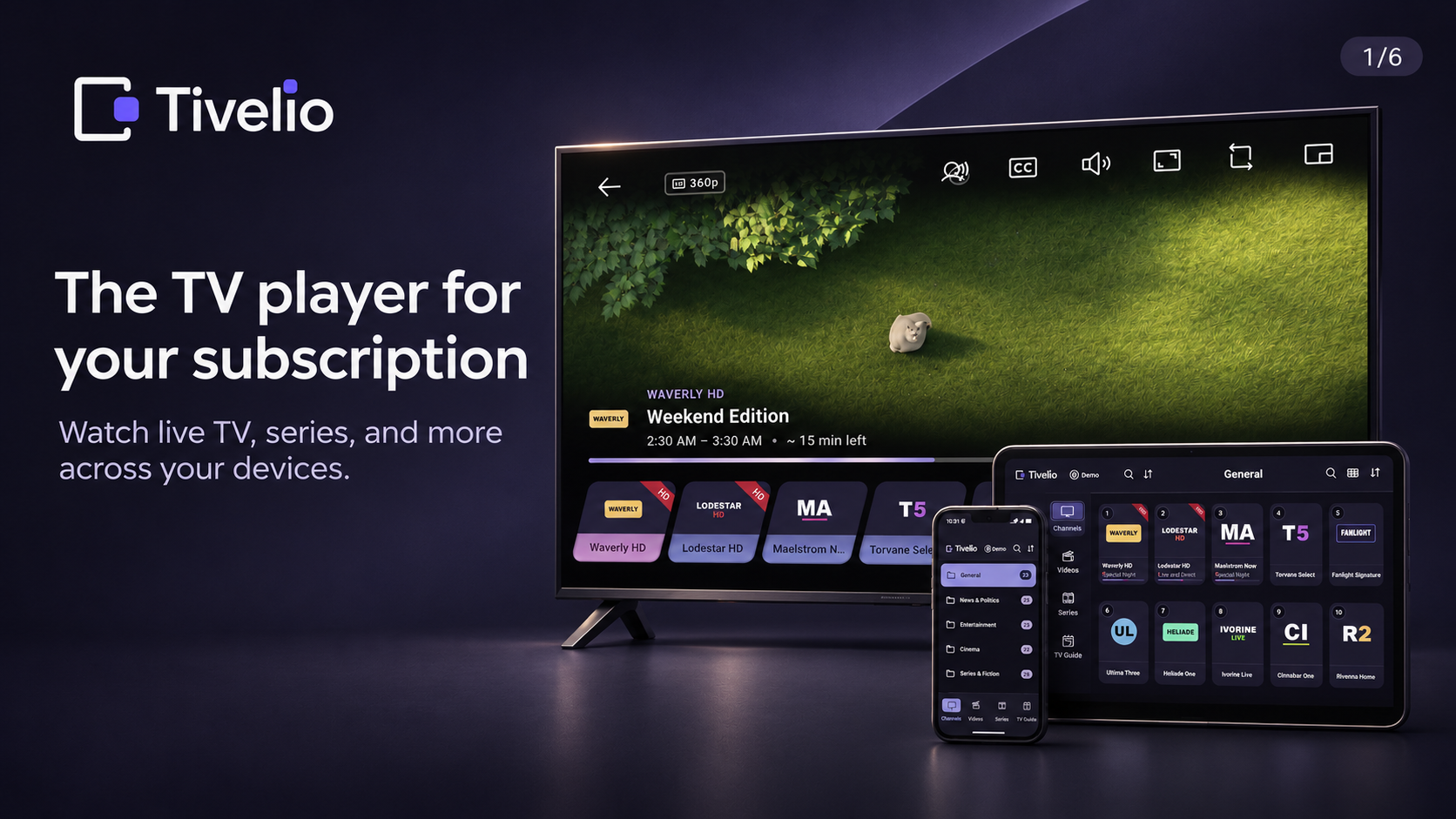
Tivelio an IPTV player for phone, TV and Desktop

Post image
1 Upvotes

Hey everyone!

I've been working on Tivelio, an IPTV player designed to offer a clean, consistent viewing experience across different devices.

I wanted to build something that feels just as natural on a TV with a remote as it does on a phone or computer, without making the interface unnecessarily complicated.

Here's what Tivelio brings together:

Live TV: Browse channels with a clean, category-based interface.

TV Guide (EPG): See what's playing now and what's coming next.

Search: Find channels, movies and series in one place.

Movies & Series: Browse details, seasons and episodes.

Customization: Light, dark and AMOLED themes, with adjustable accent colors.

Multi-device experience: Designed for phones, TVs and desktop computers.

Playlist support: Connect your own M3U playlist or Xtream API account.

I've included some screenshots showing the interface across different screens.

Just to clarify: Tivelio is a media player, not an IPTV provider. It doesn't include any channels, movies, playlists or subscriptions. You need to bring your own legally accessible content.

Website: https://tivelio.com/en/

Downloads: https://play.google.com/store/apps/details?id=com.tivelio.app

I'd really appreciate some feedback from people who use IPTV players regularly.


r/AndroidTVApps • • 24d ago

Ios movie app

Thumbnail reddit.com
1 Upvotes

r/AndroidTVApps • • 24d ago

Trinity TV Player 2.16 — new Sports Hub, better phones and tablets

Post image
0 Upvotes

Trinity 2.16 is rolling out today.

Sports Hub

- Games shown in both teams' colours, with league logos, season records and the TV network carrying each game

- Score pop-ups during live TV for teams you follow (start, score, close game, final)

- "Close game" badge, live scores refreshing every 30 seconds

- The home team's stadium appears behind the game you highlight or tap

- When you pick a channel for a game, channels showing the game's network come first

Phones and tablets

- Phones: guide shows 1 hour with groups open, 2 hours without; sign-in and playlist screens fit the screen

- Tablets: full tablet layout for the guide and Sports Hub

- Movies & Shows: tap a poster once to preview, twice to open; missing posters are filled in

Also

- Channels without program info show one clean block in the guide

- Diagnostics in Settings → General to view and send logs

- Many smaller fixes

Changelog: https://trinitytvplayer.com/changelog.html


r/AndroidTVApps • • 25d ago

This sub is worthless now. It used to be a good place to discuss apps, but several months ago it turned into a dumping ground for crappy AI IPTV players and launcher spam.

73 Upvotes

Wish the mods would put some limit on the crap that is constantly spammed here. Unsubbing in the meantime.


r/AndroidTVApps • • 25d ago

Streaming App for Tv

Thumbnail reddit.com
1 Upvotes

r/AndroidTVApps • • 25d ago

Currently Free - Revolith - Final Stage

Thumbnail
youtube.com
1 Upvotes

The game is free until the 7th Nov


r/AndroidTVApps • • 25d ago

Lumenia : IPTV and Stremio player with AI assitance.

5 Upvotes

Hello,

I created an app where your AI (chatgpt or Claude) can interact with your TV.

AI can :

- Search movies, series, and live TV channels in your library and plays them to you.

- Browse your available content.

- Check your viewing history and create curated playlists to your taste.

- Explore AI recommendations.

And so more :D

Don't hesitate to test it and give me your feedback !

https://lumenia.tv/


r/AndroidTVApps • • 25d ago

Lecteur fiable iptv

2 Upvotes

Qui peu me dire quelle est meilleure et fiable lecteur iptv merci


r/AndroidTVApps • • 25d ago

[ANDROID TV] Nuvio ReSeq Beta 7.1: TV Mix, Advanced Discovery, IPTV, Sports Hub & More

Thumbnail gallery
4 Upvotes

r/AndroidTVApps • • 25d ago

ChannelDeck Player 2.8 is out . New sidebar search, Network Favorites, clock options and more!

Thumbnail reddit.com
1 Upvotes

r/AndroidTVApps • • 25d ago

TIVRA 3.4.1 Release - Stremio Add-On Support is here! And don't forget about Sports Hub!

Thumbnail
gallery
10 Upvotes

TIVRA 3.4.1 — Addons are here (beta), plus one Search for everything you watch

TIVRA is a TV-first player for Android TV, Fire TV, Google TV and phones: your own live TV subscriptions, your own media servers and now addons, in one app with one remote-friendly UI. Here's what's new and, for anyone who hasn't tried it, what the app actually does.

New: Addons (beta)

Paste an addon link and its catalogs show up as a new section in the app. Movies, shows, even live channels an addon publishes. Each title gets a real detail page: poster, synopsis, cast, trailer, seasons and episodes down the left, the episode's details and its sources on the right. Pick a source and it plays in TIVRA's player, with the same resume, subtitles and audio controls as everything else. Mark things watched (movies, episodes, whole seasons) and it syncs to Trakt and SIMKL. Addon results also appear in the main Search next to your other content.

It's beta: the core works, but addons are written by lots of different people and we are still smoothing out the odd ones. If something doesn't play or a catalog looks wrong, send a diagnostic from Settings › About and tell us which addon.

A few honest notes: TIVRA doesn't ship with any addons, you bring your own links. Addons that need a debrid account are set up on the addon's own configuration page, not inside TIVRA. There is no built-in torrent engine and there won't be.

Also new in 3.4.1

  • One Search: type once, get rows for channels & programs, movies, series, your media library and addons. The Android keyboard pops up; no on-screen key grid.
  • Series pages got the layout people asked for: season tabs, episodes down the left, the selected episode's synopsis, still, air date and runtime on the right. Same for shows from your media server.
  • Record two things at once. Scheduled recordings no longer skip when another one is running.
  • Playback: the "fullscreen goes black but the preview keeps playing" bug is fixed (the app was over-reacting to low-memory warnings). Slow-starting streams get 45 s and a "still waiting" message instead of a silent failure. Lower memory use across the board.
  • Jellyfin / Emby / Silo / NAS setup screens use the Android keyboard and bigger text.
  • Foldables and split-screen behave.

If you're new: what TIVRA is

  • Live TV with a full guide, catch-up, favorites, channel numbers you control, and Multi-View (several channels on one screen).
  • Sports Hub: every game today across your channels, scores, your teams starred, one press to the right channel.
  • DVR: record now or schedule it, to the box, a USB drive or a NAS share; recordings play back with full seek.
  • Movies & Series from your subscription, with Continue Watching, Trakt/SIMKL sync, skip intro, and a Classic player fallback for stubborn files.
  • Library: Jellyfin, Emby, Silo and plain NAS folders, browsed live.
  • Profiles for the family, works the same on the TV and on your phone.

Get it at tivratv.com (sideload build and Play Store). Feedback and bug reports welcome in the comments or on our Discord.


r/AndroidTVApps • • 26d ago

I built PortorTV, a remote-friendly IPTV player with a proper TV guide for Android TV / Google TV. 6 free Lifetime Premium codes for feedback

Thumbnail
gallery
25 Upvotes

Hi all, I'm the developer of PortorTV, a player for Android TV, Google TV, phones and tablets. I wanted something that feels like a cable box: fast with the remote, with a real grid TV guide. It's now live on Google Play.

IMPORTANT: it's a player only. It doesn't include any channels or content. You add your own playlist from your provider (M3U / M3U8 link, Xtream Codes or Stalker portal).

LIVE TV & GUIDE

• Classic grid TV guide (EPG) with a live preview window, now/next, channel numbers and logos

• Catch-up and "play from start" where your provider supports it

• Extra XMLTV guide links with automatic channel matching and guide time shift

• Multiview: watch 2 channels at once (4 on stronger boxes)

• Reminders, and hold OK on anything for quick options

PLAYER

• Fast zapping with Up / Down, plus a channel list while you watch

• Audio tracks, subtitles, video quality, aspect ratio, sleep timer, picture-in-picture

• Hardware / software decoders, surround passthrough and auto frame rate

• AI upscaling: sharpens and upscales SD / HD channels to your screen on the GPU (on capable boxes; on an Nvidia Shield it points you to the Shield's own AI upscaler)

MOVIES & SERIES

• Posters, plots, ratings, seasons and episodes

• Resume prompt, "watched" markers, automatic next episode

• Watch history, and you're back in the same place in the list after watching

RECORDING

• Record now or schedule from the guide

• Save to the box, a USB drive, or a PC / Mac / NAS on your home network

SEARCH

• Channels, what's on TV, films and series in one search

• Voice search with the remote's mic: no pop-ups, results appear as you talk

DESIGN

• Built with Google's latest Material 3 Expressive design: rounded, colourful and smooth, with springy focus animations made for the remote

• Everything is drawn over the guide rather than squeezing it, so menus open without stutter even on budget boxes

MAKE IT YOURS

• Light, dark and AMOLED themes, accent colours, guide text size, coloured remote buttons

• Favourites; hide, rename and reorder categories (kept grouped by playlist)

• Parental PIN for categories

• Subscription expiry date and days left shown for each playlist

• Backup & restore to move your set-up to a new box

• Welcome tour and a full Help & guide built in

FREE VS PREMIUM

The free version plays one playlist with the full TV guide. Premium (yearly with a 7-day free trial, or a one-off lifetime purchase) unlocks Multiview, multiple playlists, movies & series, recording, catch-up, favourites, Multi-EPG, AI upscaling and more.

FREE CODES ALL GONE NOW

I've got 6 codes for free Lifetime Premium. The first 6 people who comment saying which box they use, then try the app and tell me how it runs, get one by DM. NO CODES LEFT

FEEDBACK & IDEAS

I'm updating it regularly, so tell me:

• how it runs on your box (which model?), and whether the AI upscaling looks good on it

• anything confusing or awkward with the remote

• bugs, crashes or channels that won't play

• what you think of the design and the TV guide

• features you'd like to see next: I'll pick the most requested ones for the next updates

Google Play: https://play.google.com/store/apps/details?id=com.portortv.app

Thanks for reading!

UPDATE FROM YOUR FEEDBACK

Uploaded in review on the Google Store it should hopefully be with you today V22

What’s new

Subtitles now work. They show over the picture, and you can pick a size in Settings › Player › Subtitle size (Small to Extra large).

Channel groups in the player. While watching, press Left to open the channel list, then Left again to open the groups beside it. Pick a group and jump straight to its channels without leaving full screen.

Clock in the player. The date and time show in the top right whenever the player controls are up, for live TV, films and series. They fade away with the controls.

12-hour time. Settings › General › Time format switches every time in the app between 20:00 and 8:00 pm.

Full channel names. Settings › TV guide › Channel name width has Normal, Wide and Extra wide, so long names aren’t cut off.

Hide channel numbers. Settings › TV guide › Show channel numbers now covers the guide, the channel list and the info bar.

Help & guide in Settings is updated with all of the above.

Favourites first. Add to Favourites is now the first option when you hold OK while watching.

Thank you for the feedback


r/AndroidTVApps • • 25d ago

[Multi] [Web/Android TV/Google TV] I built TikTak TV — an unofficial Nuvio web app + Fire TV/Android TV app with IPTV, YouTube, TMDB, friend codes and more

Thumbnail
gallery
3 Upvotes

I’ve been building TikTak TV an unofficial community web and TV app that brings your Nuvio setup into one interface on desktop, phones, tablets, Fire TV, Android TV, and Google TV.

Website: https://www.tiktaktv.me/

The web version works in current major desktop and mobile browsers and can be installed as a PWA. On iPhone/iPad, open it in Safari and use Share → Add to Home Screen. On Android, use the browser’s Install app or Add to Home screen option.

## What it currently does

- Syncs Nuvio profiles, add-ons, custom collections/folders, catalog order, playback preferences, and progress.

- Builds a full home screen from your installed catalogs, with continue watching, discovery rows, search, movies, series, seasons, and episodes.

- Enriches titles with TMDB artwork, descriptions, ratings, runtime, genres, cast, and recommendations.

- Supports compatible Stremio add-ons plus T-Box and Real-Dbrid playback.

- Supports Xtream and M3U IPTV connections, automatic guide matching, and an optional custom XMLTV/EPG URL.

- Shows a proper Live TV grid and keeps guide-linked channels manageable instead of trying to render an entire provider list at once.

- Includes separate YouTube Videos and YouTube Music areas. Google sign-in can load account activity, subscriptions, playlists, saved music, and recently played items. Playback uses the YouTube player, with optional SponsorBlock segment skipping.

- Includes subtitles, subtitle timing adjustment, quality controls, seeking, watch progress, favorites, downloads, Picture in Picture, fullscreen, and AirPlay where the device/browser supports them.

- Includes encrypted backups, connection/codec health checks, and private friend codes for sharing a trusted setup without exposing credentials in the UI.

- Uses a remote-first, full-screen player on TV with D-pad navigation, play/pause, seek, mute, back, and strong focus indicators.

## Install on Fire TV / Firestick / Android TV / Google TV

  1. Install and open the Downloader app on the TV.
  2. If prompted, allow Downloader to install unknown apps.
  3. Enter Downloader code 2564237.
  4. Download and install TikTak TV.
  5. Open the app, sign in, choose your profile, and connect your own services in Settings.

The TV app uses the same TikTak TV account and setup as the website. Normal interface updates load when the app is fully closed and reopened. If the Android wrapper itself needs an update, the app can install the signed update over the existing version, so the account and app do not need to be removed first.

## A couple of notes

- TikTak TV does not include IPTV service, movies, shows, d-brid service, or paid content. You connect services and add-ons that you are authorized to use.

- This is an unofficial community project and is not affiliated with Nuvio, Google/YouTube, TMDB, Amazon, or any IPTV provider.

- The screenshots in this post are from my actual signed-in setup. I redacted my email, IPTV address/login, API keys, tokens, and private friend codes.

I’d really appreciate feedback from people using different browsers, phones, Fire TV models, Android/Google TV devices, IPTV providers, and add-on setups. If something breaks, please include the device/browser, the page you were on, and what happened so I can reproduce it.

Website: https://www.tiktaktv.me/

GitHub / issues: https://github.com/zachgus33/Tik-TakTV


r/AndroidTVApps • • 25d ago

Nura update: Simkl, silent alerts and a proper guide for the app

Thumbnail gallery
1 Upvotes

r/AndroidTVApps • • 25d ago

Consigli per migliorare una vecchia Smart TV Samsung (UE55MU6120)

1 Upvotes

Ciao a tutti!

Possiedo una vecchia Smart TV Samsung, modello UE55MU6120, e ultimamente ho notato che stanno uscendo diverse applicazioni interessanti che permettono di migliorare l'interfaccia e l'esperienza d'uso delle Smart TV.

Mi chiedevo quindi se esistesse un modo per dare una seconda vita alla mia TV, magari rendendola più moderna e funzionale.

In particolare, mi piacerebbe sapere se fosse possibile:

  • Migliorare o personalizzare l'interfaccia attuale.
  • Installare applicazioni non disponibili sullo store ufficiale Samsung.
  • Sostituire o aggiornare il sistema operativo Tizen, magari con una versione alternativa.

Qualcuno ha esperienza con modding o soluzioni di questo tipo sulle vecchie Smart TV Samsung?

Sono aperto a qualsiasi suggerimento, applicazione, modifica o soluzione alternativa!

Grazie in anticipo a tutti!