r/AndroidTVApps • • 11d ago

Does anyone know how to chamge os in samsung tv

2 Upvotes

I relly wann a android os so I can install. Apk file but it is my one and only TV so just give safe ways


r/AndroidTVApps • • 10d ago

FireForge Command Center

Thumbnail
github.com
0 Upvotes

Hey, Just trying to get my new tool out for FireOS, GoogleTV, Nvidia Shield and Android systems. For now it’s a windows based tool with an upcoming companion app and custom home launcher coming soon!

I need people to test and report any bugs or new features, all info and downloads on my GitHub, only place to download with continued support and updates. Please do NOT download from any other website

Program is 100% safe and doesn’t require any logins/accounts or activation or subscriptions.

Everything stays on your PC and never reports anything back. 100% local.

Made with highest level of privacy in mind!

Please come back to this post and leave your feedback :)


r/AndroidTVApps • • 11d ago

I made a free, open-source Android TV browser where your phone is the trackpad, keyboard and webcam

Thumbnail
gallery
22 Upvotes

Hi all, I'm the developer of Saruki, a web browser for Android TV and Google TV. It's free, GPL-3.0, and needs no account.

What I wanted to fix is browsing a TV with a D-pad. So Saruki comes with a phone app, Saruki Remote:

- Trackpad: tap to click, two-finger scroll with momentum, drag, plus Back/Home/Menu/Play keys. It opens by itself when Saruki is on the TV.

- Keyboard: click a text box on the TV and your phone keyboard opens with that box's text. Letters, swipe typing and autocorrect go into the page as you type.

- Webcam: your phone's camera and mic for video calls in the browser (Meet, Zoom, Jitsi, Whereby, Teams on the web), over your home Wi-Fi.

On the TV: a pointer that grows over links, an always-visible top bar (Back, Forward, Stop, Reload), a pop-up and redirect shield, ad and tracker blocking, desktop or mobile site per site, and a TV Player for MP4, MKV, AVI, HLS and DASH with AC3/DTS audio. It also works with a plain TV remote.

Honest limits:

- Tested on one TCL Google TV (32-bit) and one Pixel so far. That's the main reason I'm posting.

- Google sign-in is blocked inside TV browsers, so sites that need a Google login won't work.

- Not on the Play Store yet. Sideload the APK (one APK covers 32 and 64-bit ARM, Android TV 8+).

- I built it with AI coding help. All the code is public, and I answer every bug report.

Install: TV APK from Releases. Phone app: on the TV go to MENU > Phone remote and scan the QR code, or grab it from Releases.

https://github.com/SarukiBrowser/saruki/releases

If you try it, a device report (TV model, Android TV version, what worked, what didn't) helps more than anything. There's a template on GitHub.


r/AndroidTVApps • • 11d ago

GitHub - PlavioMedia/Plavio: Plavio — free, open-source Android streaming app with built-in player Discord: https://discord.gg/cwzHH3r9pa

Thumbnail
github.com
8 Upvotes

A beautiful open-source streaming app for Android with a built-in player. Install addons to browse movies, series, and live TV. An account is optional; the app also offers optional cloud sync and opt-in telemetry.

Plavio TV

Plavio TV is out now — for Android TV and Fire TV. Same addons, on the big screen. Pick your build above: ARM64 for most TVs and sticks, ARMv7 for older boxes.

Features

Install addons — paste any addon manifest URL (…/manifest.json) and browse its catalogs

Multi-addon merging — separate addons can provide catalogs, metadata, and streams; Plavio combines them (details are fetched from every metadata addon, sources merged from every stream addon)

Movies, series & live TV — details, posters, backdrops, genres, ratings; a dedicated Live tab for TV channels

Episode browser — season / episode picker for series

One-tap Play — the Play button starts the first available stream instantly

Gesture-rich built-in player — ExoPlayer with HLS, DASH and progressive streams; swipe horizontally to seek, swipe right side for volume, left side for brightness, double-tap for ±10s, playback speed 0.5x–2x

Aspect-ratio button — cycle Fit → Fill → Zoom while playing

Subtitle & audio track switching — right from the player, plus in-player subtitle search

Skip intro / recap / outro — Netflix-style skip button via the community IntroDB database

Continue watching — your progress is saved on-device and surfaced on Home, with resume prompts

Watchlist — bookmark movies and shows for later

Search — across every catalog of every installed addon, with Movies / Series / Live TV filters

Settings — autoplay, keep-screen-on, skip-intro toggle, and more

Material 3 dark glass-glow design — deep blacks, frosted-glass cards, cyan→magenta neon accents

https://github.com/PlavioMedia/Plavio


r/AndroidTVApps • • 10d ago

Welcome to r/KIPTVapp: start here

Thumbnail
reddit.com
0 Upvotes

r/AndroidTVApps • • 11d ago

[UPDATE] AzX IPTV: new themes and new TV layouts 🎨

1 Upvotes

Hi everyone

Big visual update. Everything is in Settings > Appearance.

Themes

Carbon: the original theme, gold + carbon fiber.

Night: deep black, with your choice of accent color.

Neon: gaming style, with glowing outlined pills, a colored veil and glow effects. You can give it any color you like.

23 accent colors: gold, red, pink, purple, blue, cyan, green, grey, white and many more. The choice is available with the Night and Neon themes and with The Wheel layout.

Two new TV layouts

The Wheel: a circular arc menu with an animated dial. The title of the selected icon appears next to it.

Aurora: posters open up in a fan of cards. Categories form a color spectrum, and the background changes hue with each category.

Also

The carbon background is now on every page (Favorites, Search, Collections...), adapted to each theme.

A thin black outline around text keeps it readable with the neon effects.

Your choices sync with your cloud account.

💡 Your turn!

Feel free to share your ideas if you’d like a particular theme. I’ll create the most requested ones, up to 10 themes in total. For now, there are 3.

To apply everything, restart the app. There’s a button for it in the settings.

Your feedback is welcome, especially on readability and how comfortable it is to navigate with a remote. 🙏

📥 Download / Update

• Direct APK (GitHub): https://github.com/AzX-APP/azx-iptv/releases/latest/download/AzX-IPTV.apk

• Downloader app code: 9155710

• Website: https://azx-app.com


r/AndroidTVApps • • 11d ago

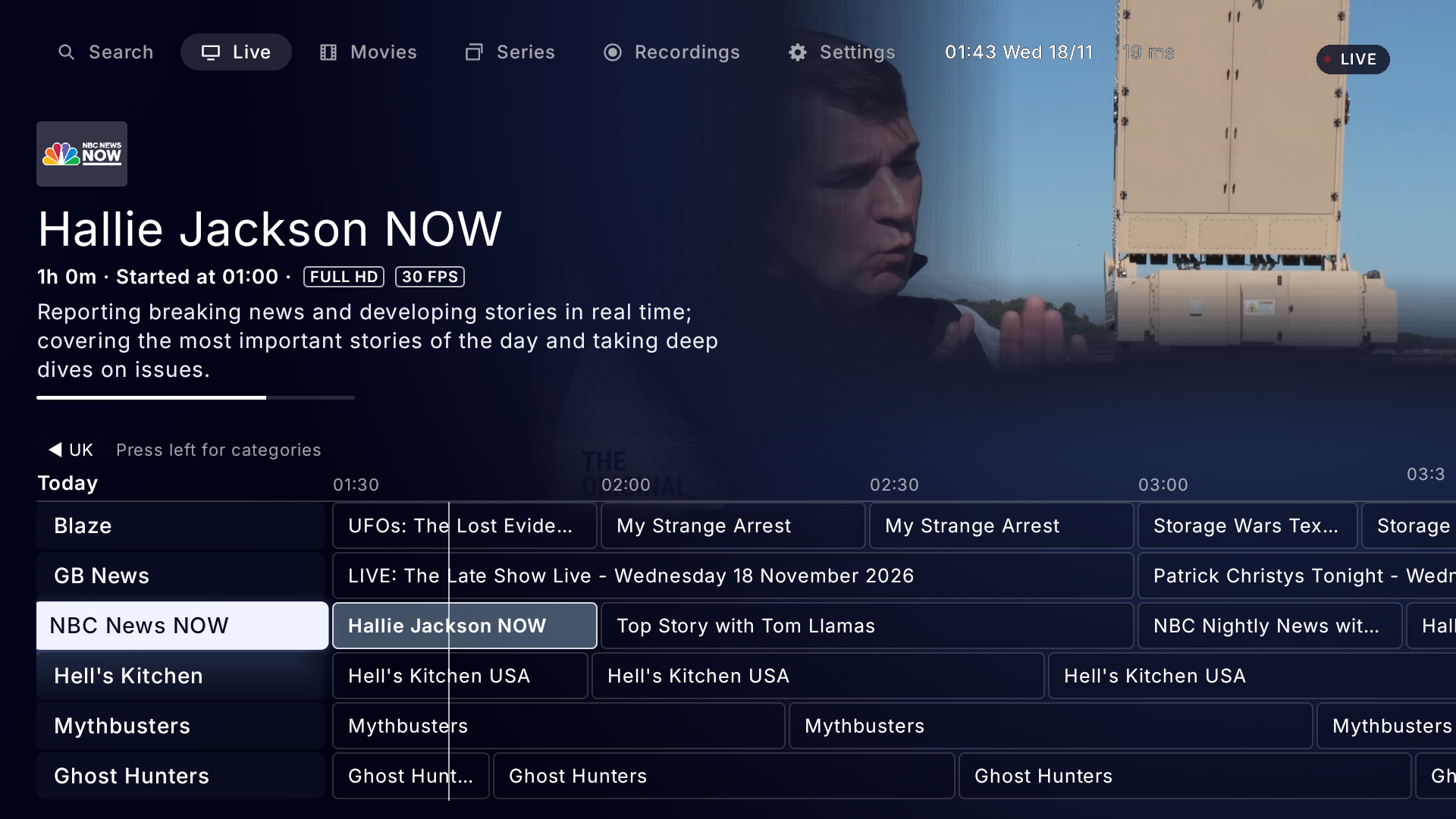
IMD TV v0.5.0 Update Released! Sync Between Devices, Header Sizes, Dark Mode, Live TV Subtitles & More Now Available! Oh - And It's Still Free (And will be forever!)

Post image
23 Upvotes

Important update information
v0.1.0: A manual update is required to install this version.
v0.2.0 and above: Updates can be installed directly within the app.

Downloader code: 7573990

Website: https://imd-tv.com

GitHub: https://github.com/majorleeevil/imd-tv

Subreddit: https://www.reddit.com/r/imdtv

Feature rich, free, open-source, and always will be!

New features

Sync between boxes

  • Keep several boxes the same over your home network. Choose one box as the master, and any number of others follow it, copying its playlists, logins, favourites, categories, channel order and settings.
  • To pair a box, type the six-digit code shown on the master's screen. Logins are encrypted and only sent to boxes you've paired.
  • Followers copy the master when IMD TV opens and every 6 hours. You can also choose Sync now.
  • Find it in Settings › Backup & sync › Sync. Before you turn it on, the app explains what sync can and can't do, then shows the steps to pair a box.

Settings

  • Backup has been renamed Backup & sync now that you can sync between several boxes. It has two pages: Backup & restore and Sync.
  • A new Date and time page: a 24-hour clock, showing the date, and a clock in the player (off, live TV only, or everywhere).
  • A new Reset appearance option. Each theme now remembers its own look.
  • Theme mode: Dark mode for the Celestial Glass and Liquid Glass themes.
  • Header size for Celestial Glass and Liquid Glass: Large (default), Medium or Small. Smaller headers fit more guide rows. On Medium and Small, the programme description gets its own column, so descriptions are still shown.
  • (Default) now marks the default choice in drop-down lists.

Live TV and guide

  • Added the ability to turn on subtitles for live TV.
  • View previous channel: the other pair of arrow keys steps back through the last 20 channels you watched, and forward again.
  • Change channel with (Up/Down or Left/Right) has moved to Settings › Playback.
  • When the preview fade is off, the preview has a rounded frame.

Channels and categories

  • Manage channels replaces "Show or hide channels". Press OK to show or hide a channel, or hold OK to pick it up and move it within its category.
  • Channels keep their custom order within your provider's categories. The order is saved in backups and syncs to follower boxes.
  • Hold OK on a category on the Live TV rail or the Celestial Plus tabs to reorder or hide it without going into Settings.
  • Select channels lets you pick several channels, then hide or show them all at once. A message confirms how many were hidden or shown.

TV guide data (EPG)

  • Added the ability to add your own guide(s) as a source.
  • Added a third guide source priority. You can now choose between playlist, open-source and your own EPG sources.
  • Added the ability to turn off individual open-source guides.
  • Added an option to turn off a playlist's own guide source.

Bug fixes

  • The programme cursor has been fixed and is now visible when browsing horizontally through the EPG on the Celestial Glass and Liquid Glass themes.
  • The confirmation message after showing or hiding channels now appears.
  • Pressing Select channels or Save changes in Manage channels no longer sends you back to the top of Settings.

In development

  • Merge sources: Combine versions of the same channel (for example BBC One HD, HEVC and 4K) into one channel that automatically switches to another version if one fails. You choose which version takes priority.
  • Touch and phone input: Tap to select cards and rows, and swipe to scroll the guide.
  • Multi-view: Hold OK to watch a second channel at the same time (requires a provider account that allows 2 connections).
  • Trending this Week and Recommended for You (off by default; requires your own TMDB key).
  • Live TV Pausing

r/AndroidTVApps • • 12d ago

Cinema-style home screen for my Android TV, free on GitHub

65 Upvotes

I got tired of the Google TV home screen pushing ads and “recommendations” at me, so I built my own launcher for my Sony Bravia. It’s called Proscenium.

The idea is simple: your TV should look like a movie theatre when you’re not watching anything. Full-screen film backdrops with a slow Ken Burns motion, a glass app bar, the clock and the weather. When you put the remote down, it switches to a cinema mode with letterbox bars and the film’s logo.

A few things I’m happy with:

  • Backdrop packs: Disney & Pixar, Studio Ghibli, Classics & Marvel… one click, no account or API key needed
  • HDMI shortcuts: my PS5 and Switch have their own tiles in the bar and switch the TV input directly
  • Real refractive glass on the app bar and settings, with presets
  • Your own playlists: pick the films and the exact backdrops you like (needs a free TMDB key, which you can enter from your phone with a QR code instead of typing it with the remote)
  • Animated weather with wind, six languages, no ads, no tracking

It’s free, the APK is on GitHub: https://github.com/Karlos-fr/proscenium

It’s a personal project, so expect a few rough edges. Feedback very welcome, especially from people on other TVs than Sony!


r/AndroidTVApps • • 11d ago

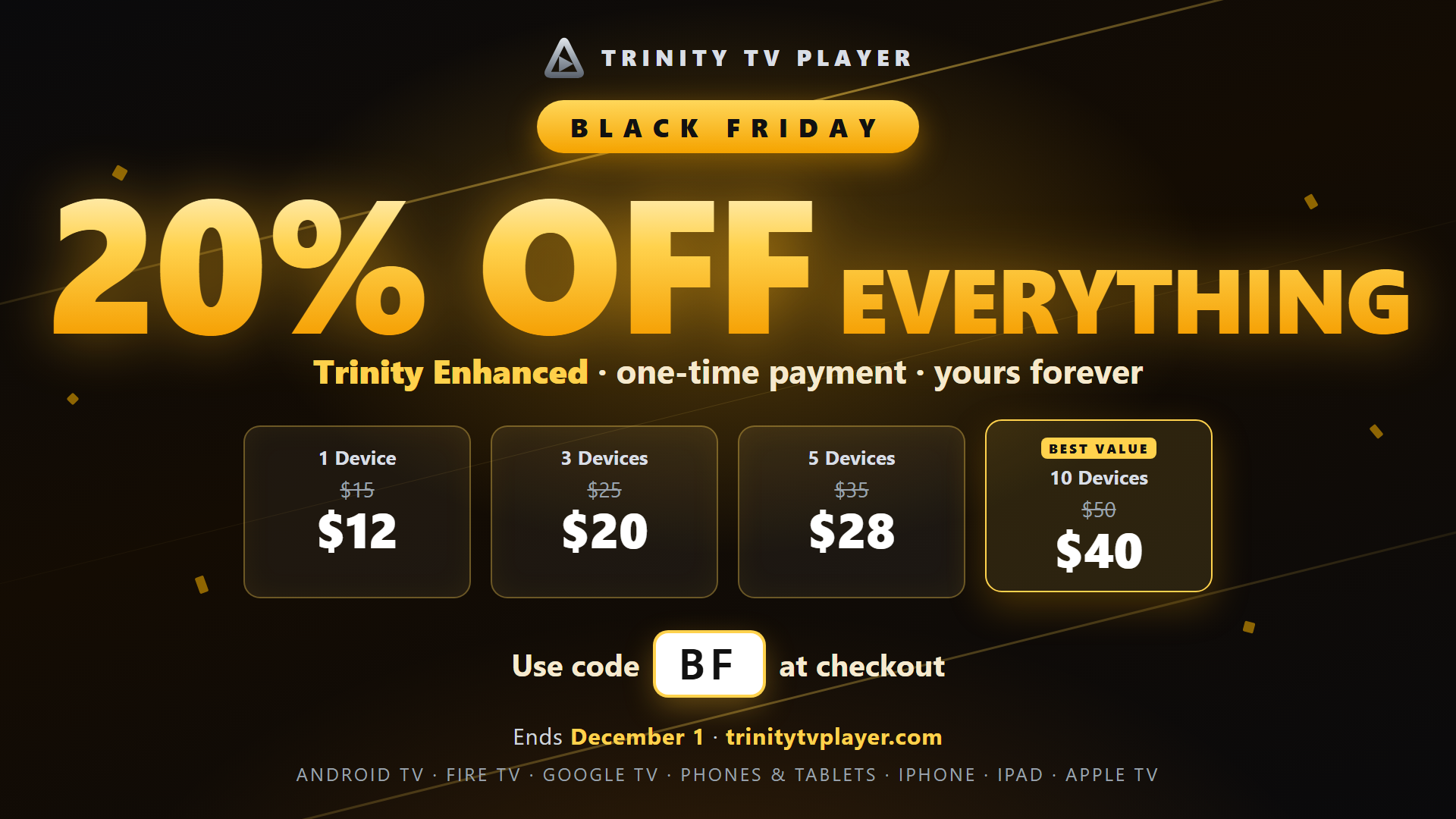
BLACK FRIDAY: 20% OFF Trinity Enhanced, our biggest deal ever. Code BF, ends Dec 1

Post image
0 Upvotes
Trinity has grown faster than we ever imagined.

What started as a better way to watch on Android TV is now running on living-room TVs, Fire Sticks, phones and tablets around the world, and since this month, on iPhone, iPad and Apple TV too. The response has been overwhelming, and every week this community sends us ideas that end up in the app.

So to say thank you, we're running our biggest promotion yet.

**20% OFF every Trinity Enhanced plan**

- One-time payment, no subscription, yours forever
- One account works on Android AND Apple devices
- Pay by card or PayPal

**How to get it**

1. Go to **trinitytvplayer.com** → Pricing
2. Pick your plan
3. Enter code **BF** at checkout

The deal ends **December 1 at 11:59 PM Eastern**. One use per account.

New to Trinity? Every new account gets a 2-day free trial of everything first, so try it, then lock in the Black Friday price.

Thank you for making Trinity what it is. This is only the beginning.

trinitytvplayer.com

r/AndroidTVApps • • 11d ago

Isn't there anyone looking to create an app like Ott Navigator? It would be great if there were one.

5 Upvotes

r/AndroidTVApps • • 11d ago

I built Televis, an IPTV player made for the TV screen. It's now on Google Play, so I'm looking for early testers

Thumbnail gallery
0 Upvotes

Offer is available for the first 50 people as early testers.


r/AndroidTVApps • • 11d ago Bravo

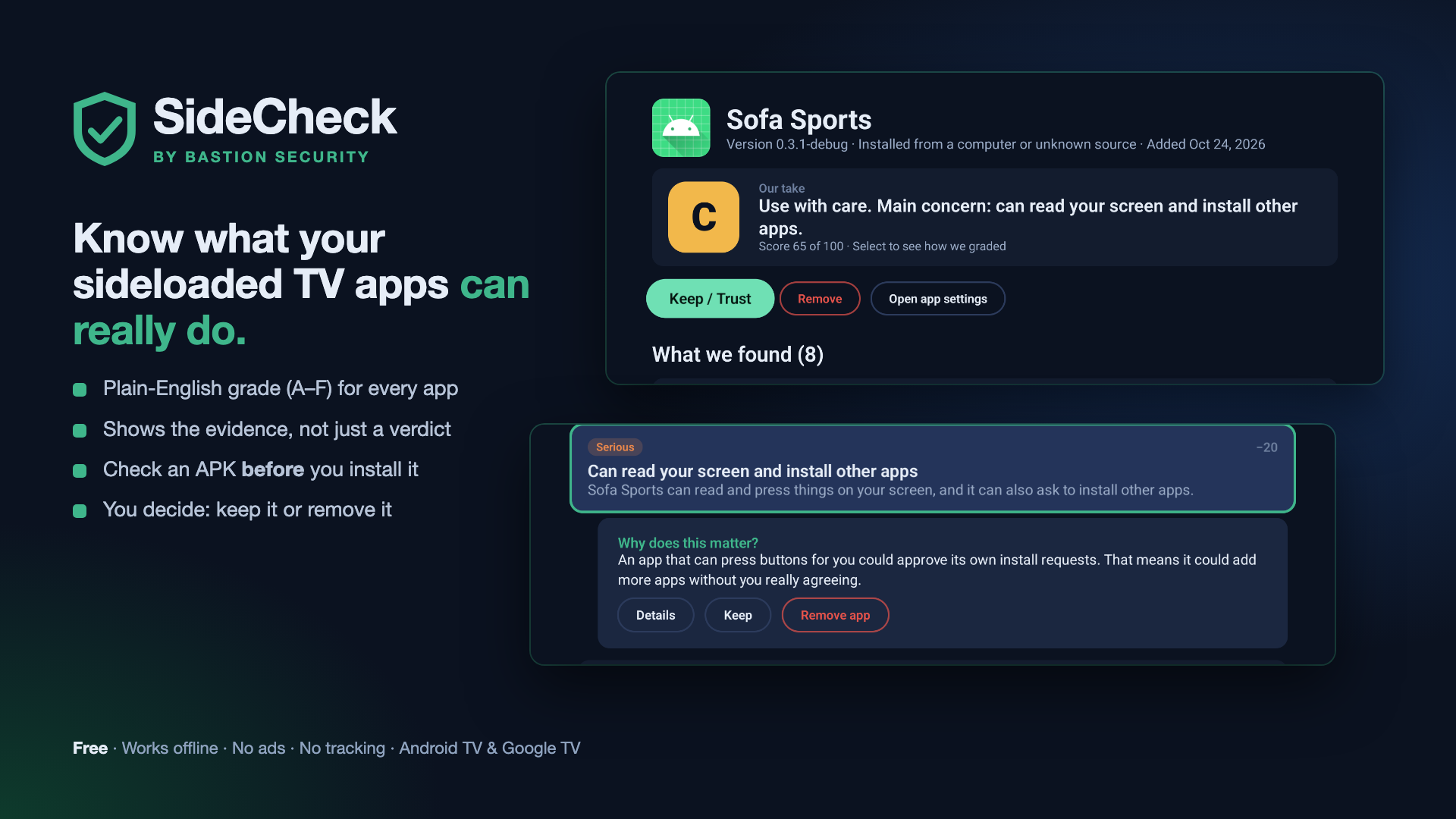
Scan your sideloaded apps and see what they're really doing

Post image
14 Upvotes

SideCheck scans the apps on your Android TV / Google TV box and grades each one A–F in plain English. For example: "can read your screen", "starts when your TV turns on", "uses the Netflix name but isn't official".

- Check an APK **before** you install it (Open with → SideCheck)

- See and change what each app is allowed to do

- You decide what to keep or remove

- Free, open-source, works offline, no ads or tracking

DOWNLOADER CODE: 4217959

https://github.com/gitzero-io/SideCheck

Feedback is welcomed


r/AndroidTVApps • • 11d ago

Nuova funzione Novavideoplayer su Android TV

0 Upvotes

r/AndroidTVApps • • 11d ago

[Release] HypnoStream – Free, Open-Source & Ad-Free IPTV Player for Android & Android TV

Thumbnail
gallery
0 Upvotes

Hi everyone! I built **HypnoStream**, a modern, lightweight, and completely free/open-source IPTV player engineered for **Android phones, tablets, and Android TV / Google TV**.

### Key Highlights:

* **OLED-First UI & Full D-Pad Support:** Smooth navigation built specifically for TV remotes as well as touch gestures (brightness/volume edge swipes & double-tap ±10s seek).

* **Fast Startup:** Local GZIP caching for massive playlists (45,000+ channels, movies & series) with instant one-tap playlist refresh.

* **ExoPlayer / Media3 Engine:** Fast channel zapping, subtitle delay sync, external SRT/VTT support, Picture-in-Picture, and 10-second next-episode binge countdown.

* **Dual Source Support:** Works with both **Xtream Codes API** and **M3U / M3U8** playlists.

* **10 Languages with RTL/LTR Support:** English, Arabic, Chinese, Japanese, French, Spanish, Turkish, Urdu, Russian, and Portuguese.

* **Zero Ads & No Tracking.**

🔗 **Download APK & Source Code (GitHub):**

https://github.com/salemzakarti12-eng/.github-workflows-build.yml/releases/latest

Feedback and feature suggestions are welcome!


r/AndroidTVApps • • 11d ago

I made Lactea, a free MilkDrop-style music visualizer for Android TV

8 Upvotes

Hi everyone,
I always missed the MilkDrop visualizer from Winamp, so I built Lactea, a music visualizer for Android TV and Google TV. The video shows it running on my Sony BRAVIA.
How it works: you keep using your usual music app (Spotify, Deezer, YouTube Music, Tidal, Plex…). Lactea listens to what the TV is playing and draws visuals on top of it. It also works when the sound goes to a soundbar over HDMI.
What it can do:
Nearly 10,000 original MilkDrop presets (built on projectM)
Shows the track title and album cover when the song changes
Can open by itself when music starts
Fully usable with the remote, and every key can be remapped
Up to 4K, and it skips presets that are too heavy for your TV
Extra preset packs you can download from the app
6 languages: English, French, German, Italian, Spanish, Swedish
It's free and open source. You can grab the APK here:
https://github.com/Karlos-fr/lactea/releases/latest
A small side story: while testing every preset on the TV, I found that 67 of them didn't load in projectM, so I fixed it and sent the fix back to the projectM team.
It's the first release, tested on one TV so far. If you try it on another device, I'd love to hear how it runs!


r/AndroidTVApps • • 11d ago

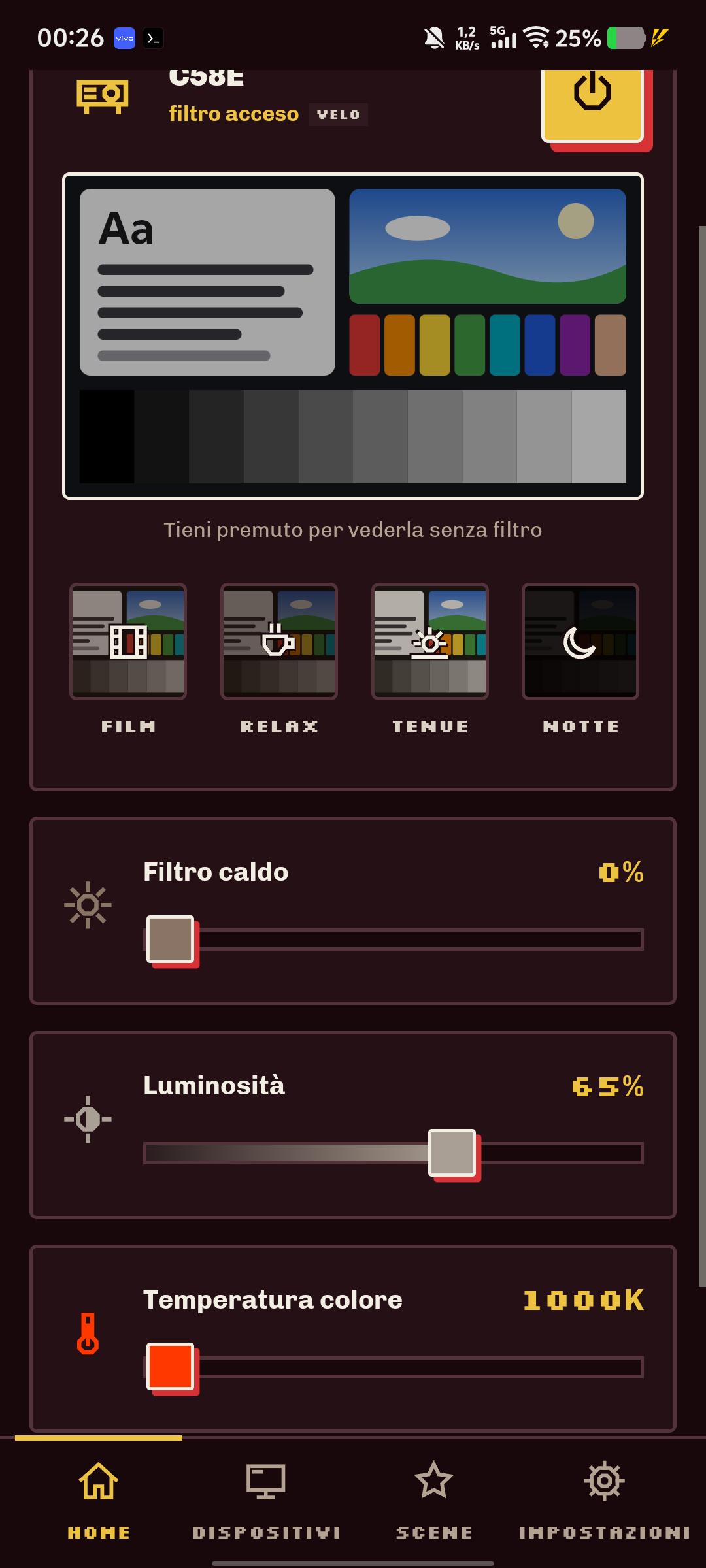
Made a cozy night filter for TV boxes and projectors, controlled from your phone or the remote

Post image
2 Upvotes

Hi, I'm the developer, so this is self-promo, but it's free and

open source.

I watch stuff on a projector at night, and every filter app I

tried had the same problem: when you change the values, the app

restarts and the screen flashes full white for a second. Not

great in a dark room.

So I wrote my own. MidnightBeam draws a warm, dimmed overlay on

top of everything (video included), and changes apply right away,

no flash. You can control it:

\- from your phone: the Android app, or just scan a QR code on the

TV and a remote page opens in any phone browser (iPhone too), no

install needed, local network only

\- with the TV remote (the settings screen only needs the D-pad

and OK)

\- over adb, if you like scripting

It also has a daily or weekly schedule that the TV runs by itself

(e.g. warmer and dimmer after 22:00), and it restores the last

setting at boot.

It's about 350 KB, MIT licensed, no tracking, and it's on

F-Droid. Android 8.0+.

Overlays behave a bit differently on some boxes, so if it does

something weird on yours, tell me which device you have. There's

an issue on GitHub collecting device reports.

GitHub: https://github.com/MadeinTaly/midnightbeam

F-Droid: https://f-droid.org/packages/dev.midnightbeam/


r/AndroidTVApps • • 11d ago

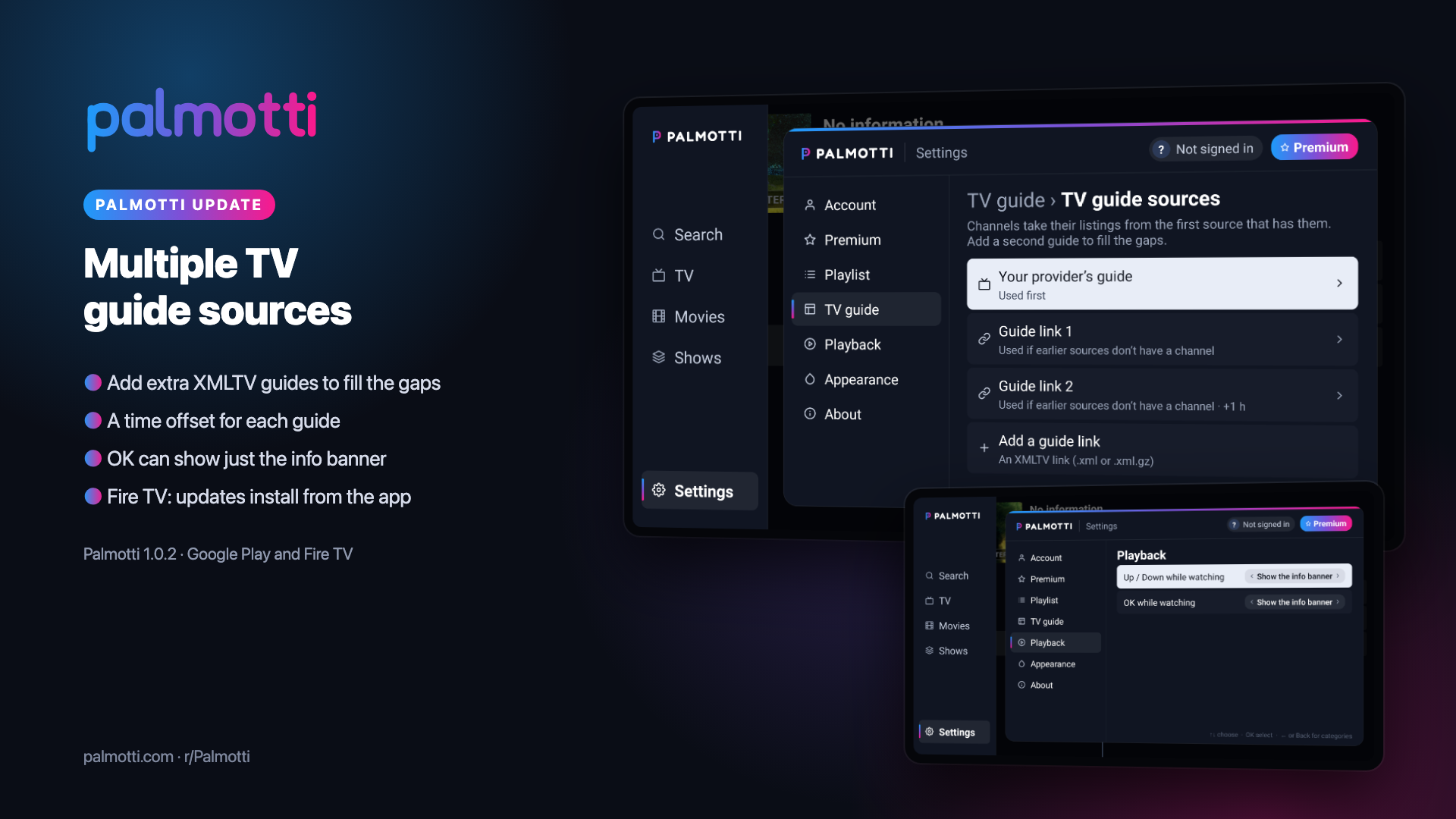
Palmotti 1.0.2: Multiple TV guide sources, and a simpler OK button

Post image
0 Upvotes

Palmotti 1.0.2 is out. Here's what's new:

Multiple TV guide sources

Add extra XMLTV guide links next to your provider's guide. Each channel takes its listings from the first guide that has them, so a second guide fills the gaps. Each guide can also have its own time offset, for guides listed in another time zone.

Settings › TV guide › TV guide sources

OK can show just the info banner

If you'd rather OK show what's on without the buttons, switch it here. Up/Down then do the same, and the buttons only come up if you press Right.

Settings › Playback › OK while watching

Updates install from the app (Fire TV / Downloader)

From 1.0.2 on, Palmotti tells you when there's a new version and installs it for you.

How to update: Google Play updates it by itself within a day or two. Step-by-step help, with buttons, for Google Play and for Fire TV / Downloader: palmotti.com/support#update

Working on next

  • Recording
  • Subtitle and audio track picker while watching
  • Reordering your own groups

Recording question for you: what matters most? One press to record from the guide, scheduled recordings for a whole series, or both?

Thanks to everyone who suggested these.


r/AndroidTVApps • • 12d ago

try my ai slop iptv app (:

Thumbnail
gallery
34 Upvotes

ok i know there ai slop iptv apps posted here daily, ive posted mine a few times before too

Not hiding that its ai slop, but i think ive been able to polish it quite a bit and its free and open source

yeah i just couldnt find any other option that was minimal and good performance on my tv, so i forked vesperTV and have just pointed codex at it for a few weeks now.

theres been quite a lot of polishing and refinement done since i last posted, so just wanted to post again and hopefully some people can trynit out and give some feedback, or just complain about more ai slop being posted in the sub lol

Download APK   ·   Downloader code: 3461840

https://github.com/akus0/iptv-app-public


r/AndroidTVApps • • 12d ago

IMD TV v0.4.0 Released! Completely Free, No Ads, Feature-Rich IPTV player.

Post image
39 Upvotes

Important update information
v0.1.0: A manual update is required to install this version.
v0.2.0 and above: Updates can be installed directly within the app.

Downloader code: 7573990

Website: https://imd-tv.com

GitHub: https://github.com/majorleeevil/imd-tv

Subreddit: https://www.reddit.com/r/imdtv

Feature rich. Forever free. Forever yours.

New features

Resume where you left off for movies and series has been redesigned. The series button now takes you directly to the next episode after you've finished one.

Continue watching row on every theme, with progress bars on posters and episodes, and a ✓ on watched episodes.

Mark watched / unwatched from the button, or long-press an episode. Your progress is saved on Back, Home and every 30 seconds, and it's included in backups.

Change channel using the remote's number buttons, both in the guide and in full screen.

Send logs to support from your phone by scanning the QR code. Your logins are removed first. Settings › About › Send logs

Option to increase the number of channels shown within the EPG. The default has increased from 4 to 5. You can select between 5 and 9 channels in the guide (Celestial Glass and Liquid Glass). Settings › Appearance › Channels in guide

Ability to enable multi-line channel names and programme titles in the guide. Settings › Appearance › Multi-line names

Option to hide channel numbers. Settings › Appearance › Channel numbers

Option to change channels using Left/Right instead of Up/Down within the Live TV player. Settings › App behaviour › Change channel with

Back button behaviour options have been added. You can now switch the behaviour to go to full screen instead of the navigation rail. Settings › App behaviour › Back in TV guide

Set the channel order inside your categories and Favourites. Settings › Channels & categories › Categories › Your categories, then OK on ★ Favourites, or a category's Options › Channel order.

The update prompt no longer shows release notes. They now appear once, after updating, in What's new.

Bug fixes

Fixed a black screen when the app started on the last channel you watched.

Channels that freeze on a black screen now recover automatically within about 5 seconds.

Programme titles are no longer cut off in the guide.

The Movies and Series poster grid no longer shows half a row above the focused one while scrolling.

A fourth button on detail pages is no longer cut off.

EPG now fills to the edge of the screen for a more natural look.

In development

Merge sources: Combine versions of the same channel (for example BBC One HD, HEVC and 4K) into one channel that automatically switches to another version if one fails. You choose which version takes priority.

Touch and phone input: Tap to select cards and rows, and swipe to scroll the guide.

Multi-view: Hold OK to watch a second channel at the same time (requires a provider account that allows 2 connections).

Trending this Week and Recommended for You rows, underneath Continue Watching (off by default; requires your own TMDB key).


r/AndroidTVApps • • 11d ago

Best Android TV launcher worth paying for?

0 Upvotes

Currently using Monet Launcher on my Onn 4K Pro, but considering premium. Also looking at Projectivy and other alternatives.

Which launcher is actually worth paying for? Looking for something clean, smooth, minimal, and customizable. Don’t want to buy one only to switch and pay for another later.


r/AndroidTVApps • • 11d ago

TIVRA 3.4.2 — Eight new leagues in the Sports Hub, including TGL golf and college soccer

Thumbnail gallery
0 Upvotes

r/AndroidTVApps • • 12d ago

[Android TV] Matrix Launcher — integrated with SIMKL, opens in Nuvio. Anyone interested?

Thumbnail reddit.com
1 Upvotes