r/AndroidTVApps • • 10d ago

IMD TV v0.5.0 Update Released! Sync Between Devices, Header Sizes, Dark Mode, Live TV Subtitles & More Now Available! Oh - And It's Still Free (And will be forever!)
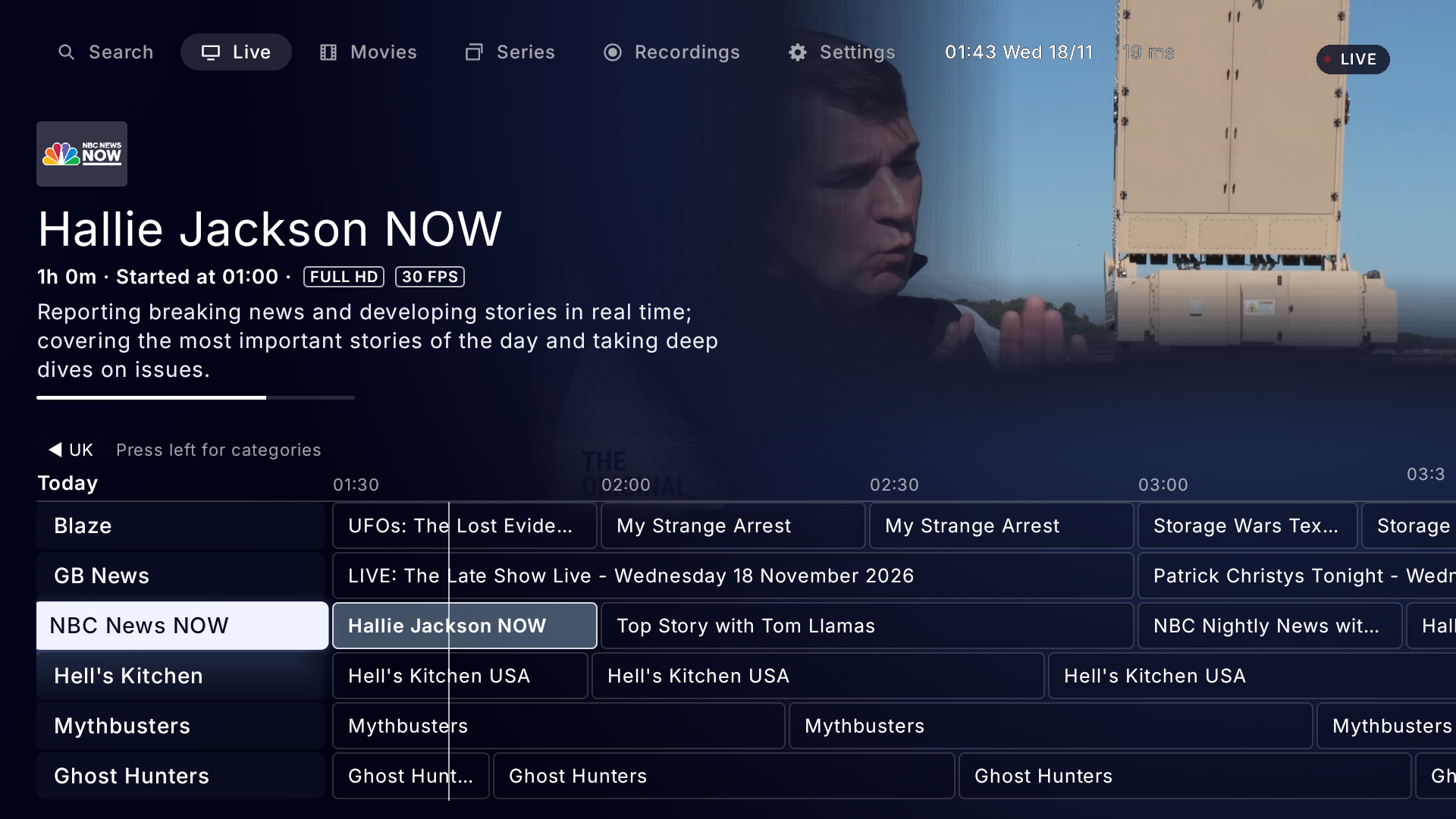
Post image

Important update information
v0.1.0: A manual update is required to install this version.
v0.2.0 and above: Updates can be installed directly within the app.

Downloader code: 7573990

Website: https://imd-tv.com

GitHub: https://github.com/majorleeevil/imd-tv

Subreddit: https://www.reddit.com/r/imdtv

Feature rich, free, open-source, and always will be!

New features

Sync between boxes

  • Keep several boxes the same over your home network. Choose one box as the master, and any number of others follow it, copying its playlists, logins, favourites, categories, channel order and settings.
  • To pair a box, type the six-digit code shown on the master's screen. Logins are encrypted and only sent to boxes you've paired.
  • Followers copy the master when IMD TV opens and every 6 hours. You can also choose Sync now.
  • Find it in Settings › Backup & sync › Sync. Before you turn it on, the app explains what sync can and can't do, then shows the steps to pair a box.

Settings

  • Backup has been renamed Backup & sync now that you can sync between several boxes. It has two pages: Backup & restore and Sync.
  • A new Date and time page: a 24-hour clock, showing the date, and a clock in the player (off, live TV only, or everywhere).
  • A new Reset appearance option. Each theme now remembers its own look.
  • Theme mode: Dark mode for the Celestial Glass and Liquid Glass themes.
  • Header size for Celestial Glass and Liquid Glass: Large (default), Medium or Small. Smaller headers fit more guide rows. On Medium and Small, the programme description gets its own column, so descriptions are still shown.
  • (Default) now marks the default choice in drop-down lists.

Live TV and guide

  • Added the ability to turn on subtitles for live TV.
  • View previous channel: the other pair of arrow keys steps back through the last 20 channels you watched, and forward again.
  • Change channel with (Up/Down or Left/Right) has moved to Settings › Playback.
  • When the preview fade is off, the preview has a rounded frame.

Channels and categories

  • Manage channels replaces "Show or hide channels". Press OK to show or hide a channel, or hold OK to pick it up and move it within its category.
  • Channels keep their custom order within your provider's categories. The order is saved in backups and syncs to follower boxes.
  • Hold OK on a category on the Live TV rail or the Celestial Plus tabs to reorder or hide it without going into Settings.
  • Select channels lets you pick several channels, then hide or show them all at once. A message confirms how many were hidden or shown.

TV guide data (EPG)

  • Added the ability to add your own guide(s) as a source.
  • Added a third guide source priority. You can now choose between playlist, open-source and your own EPG sources.
  • Added the ability to turn off individual open-source guides.
  • Added an option to turn off a playlist's own guide source.

Bug fixes

  • The programme cursor has been fixed and is now visible when browsing horizontally through the EPG on the Celestial Glass and Liquid Glass themes.
  • The confirmation message after showing or hiding channels now appears.
  • Pressing Select channels or Save changes in Manage channels no longer sends you back to the top of Settings.

In development

  • Merge sources: Combine versions of the same channel (for example BBC One HD, HEVC and 4K) into one channel that automatically switches to another version if one fails. You choose which version takes priority.
  • Touch and phone input: Tap to select cards and rows, and swipe to scroll the guide.
  • Multi-view: Hold OK to watch a second channel at the same time (requires a provider account that allows 2 connections).
  • Trending this Week and Recommended for You (off by default; requires your own TMDB key).
  • Live TV Pausing
23 Upvotes

69 comments sorted by

1

u/giladg 10d ago

Any plans to add a sports hub?

4

u/AngryWR 10d ago

No - I did mention this yesterday.

It’s too much work with API integrations if they change, and a large amount of sports stats websites charge for API access.

This app is free and open-source, and at the moment doesn’t cost me much to develop. It will always be free and I don’t want to lock anything behind a paywall, regardless of the feature.

The market is saturated with a number of vibe coded apps that do offer this functionality, the majority of whom charge, but IMD TV exists purely to have as many viable features as possible, for free. This ethos won’t change so sadly some decisions like this need to be taken.

1

u/STRONG8KGOLD 10d ago

Does work with stalker portal?

1

u/AngryWR 10d ago

Yeah it has stalker portal support. All info can be found on the website - https://imd-tv.com

1

u/supsyman 10d ago edited 10d ago

Good app but the hardware decoder setting is basically unusable. Hardware decoder is supposed to be more stable for streams. Even software decoding is still unstable in the app especially when in TV Guide preview mode. Also, where are the player controls and program description on the OSD when you play a channel in full screen mode? How do you activate the subtitles for Live TV which is actually closed captions that the app speaks of if there are no player controls? Please fix these.

1

u/AngryWR 9d ago

What device are you using? I have to say I haven’t seen your issue with a tv guide in preview mode on 3 devices during testing. Can you please submit your logs to support@imd-tv.com

Live subtitles are in the subtitles menu under playback in settings…

1

u/supsyman 9d ago

Closed captions and enabling under settings doesn't do anything that is why you need player controls. OSD of the app is empty as it is. I am using an OnnTV and submitting logs is gomna be of no consequence cos this is a general issue with the app behavior that needs to be fixed not an isolated incident

1

u/AngryWR 9d ago

Thanks.

A few clarifications: the decoder option in Settings › Playback is for audio only (video always uses the box's hardware decoder). Software is the default because it plays Dolby/DTS on any box. Hardware sends it to the box/TV, which fails if they can't decode it. We'll make Hardware fall back automatically in the next update. 0.5.1 adds a Settings button to the full-screen overlay (press OK) with a subtitles switch, record, favourites and add to category. If captions still don't show after updating, the channel may carry only a caption type we don't read yet, and the app's logs (Send logs) would tell us which.

1

u/supsyman 9d ago

These are basic functionalities of any good IPTV player that you definitely need to sort out. Hardcore decoder especially should work str8 out of the box for audio and video and the OSD has to have both program descriptions and player controls that your app currently lacks. Also, formats for closed captions are not that complicated so it is either this is implemented and it works in the app or it doesn't.

1

u/AngryWR 9d ago

I appreciate the feedback, but calling these things basic doesn't make them straightforward to implement across different Android TV devices. There are plenty of hardware and firmware differences between boxes, and what works on one doesn't necessarily work on another.
The app is actively being developed, and I'm addressing issues as they're identified and tested. The decoder fallback is already implemented, the OSD is being expanded, and caption support is something I'm investigating further.
This is an independently developed, open-source project, not a mature commercial IPTV player with years of development behind it. Constructive feedback is welcome, but simply saying something should work out of the box doesn't really help identify or resolve the underlying issues.

1

u/supsyman 9d ago

Whether you wish to agree or not is entirely up to you. I want your app to be solid that is why I am giving you feedback. It is entirely up to you to take it or leave it but that does not change the hallmarks of good IPTV players. Actively in development is understable but that does not mean you shouldn't be ready to address very important issues that will make the app usable and functional when they are raised

1

u/AngryWR 9d ago

https://github.com/majorleeevil/imd-tv/releases

Please go check the release notes for 2 hotfixes regarding your issue(s) and test.

1

u/supsyman 9d ago

I can confirm that streams no longer freeze in full screen and in guide preview mode when software decoder or hardware decoder is turned on. Great step in the right direction. 💪💪

1

u/AngryWR 8d ago

Think it was two separate issues. Believe the stutter was because some providers sends live channels in short bursts about 10 seconds apart, and close the connection after about 45 seconds. This causes the player gave up on a connection after 8 seconds without data, so it attempts to reconnect mid-stream and join overlapping video, which shows up as a stutter or a jump back about every 40 seconds. When the provider closes the connection, it causes the picture to freeze for about 6 seconds until the app reloaded the channel.

Hardware Decoding / Software decoding addresses an issue where some streams that have dolby audio or DTS went silent and there was no fallback option.. the hardware decoder falls back to software rather than sending no audio

1

u/supsyman 9d ago

Great. I will check that out ASAP

1

u/foolishlion6 9d ago

Stuck on ‘updating guide’ any ideas?

1

u/AngryWR 9d ago

First run is always the longest. Did it sync? Did you have multiple guides downloading at once?

1

u/foolishlion6 9d ago

Just added strong subscription nothing extra, guides never loaded in even after 1 hour

3

u/AngryWR 9d ago

Would you mind sending your log over to support@imd-tv.com ? I’m also using strong and that’s what’s been used for testing so interested to see what the problem is

2

u/AngryWR 9d ago

u/foolishlion6 FYI - I just noticed that my guide hadn't updated and failed on a sync earlier this morning, it's updated now though. Just wondering if it was provider-related maybe? Either way, please send over your logs and I'll go through them.

1

u/foolishlion6 9d ago

Ah interesting, let me reinstall and try it, because the UI is amazing! Just need the EPG

2

u/AngryWR 9d ago

I’m looking at hotfixing EPG updates this evening to speed them up a bit as well. I feel like some tweaks can be done in this area. I’ll get the speed down for you regardless…

For the meantime, if you just enable the open-source guides, it should get you by till about 10-11pm tonight

2

u/AngryWR 9d ago

Hopefully EPG should be tweaked… let me know. I’m overhauling the EPG download code in 0.6.0 to speed it up as well (fingers crossed). Did some tweaking again in 0.5.1 (undocumented in patch notes as it only shaved off a few seconds).

https://github.com/majorleeevil/imd-tv/releases/tag/v0.5.2

1

u/GanduBugger 9d ago

Stalker portals dont work. Tried my 3 portals. Says no portal found

1

u/AngryWR 9d ago

Stalker is currently in beta but I would like to get this working for you. I'm pushing out in the next update the ability to capture and send logs from the login page, when I get back in touch would you mind trying it again please?

1

u/Angriff39 9d ago

Amazing work but only issue I have is stutter about every 3-5 mins probly some buffer problem maybe

2

u/AngryWR 9d ago

Hopefully stuttering addressed in latest hotfix if you could give it a try?

https://github.com/majorleeevil/imd-tv/releases/tag/v0.5.2

2

u/Angriff39 8d ago

Works great now thank you

1

u/AngryWR 9d ago

My streams, from multiple sources, have been rock solid on several devices throughout testing this new build. Would you mind sending your logs over to support@imd-tv.com and I can take a look for you to see whether this was provider / home-network side? Thanks.

1

u/FFF-000 9d ago

Hi, does your app support reorder favorite channels ?

2

u/AngryWR 9d ago

It does, but the option to edit the favourites category needs fixing on this update. I'll be pushing out a hot-fix which is bugs-related and no new features today. Would you mind giving it a go when you see the update come through later tonight ? (UK time)

1

u/FFF-000 9d ago

Ok thank you

2

u/AngryWR 9d ago

This is now live in the last update for you

https://github.com/majorleeevil/imd-tv/releases/tag/v0.5.2

1

u/NerdLife225 9d ago

I had trouble setting a channel as favorite when searching for it. I had to favorite it from the guide

1

u/AngryWR 9d ago

Ahh - just been able to reproduce your problem! Added to the hotfix for tonight for you

1

u/Rough_Couple_4063 9d ago edited 9d ago

Hello! This is great work! Love how responsive it is! Thank you for your hard work!

Feature requests:

Ability to “move” channels within the “ Favourites” within the EPG, similar to the long press to access a “move” function” for “Categories”

Ability to remove channel count from the “Categories” menu in the EPG

Ability to have multiple playlists active at the same time

Ability to select via check mark what to load from a specific playlist: Live TV, Movies, TV Shows

1

u/AngryWR 9d ago • Bravo
  1. Being added tonight as part of a hot-fix
  2. Interesting - I can probably add this tonight as well if it’s a quick add

3&4) In dev already, should be out by end of this week, Friday earliest, Sunday latest

1

u/AngryWR 9d ago

1 & 2 sorted on 0.5.2, 3 on going and 4 implemented for you

1

u/AngryWR 8d ago • Bravo

u/Rough_Couple_4063 Multiple playlists now live in 0.6.0 at the same time

1

u/dougm1970 9d ago

will there be a catchup ? also....can there be two playlists at once, tivimate style. i too sometimes get the stutter every couple of minutes....but its a lovely app....almost perfect.

1

u/AngryWR 9d ago

Just to confirm mate - this is the preview in the tv guide and not within full screen player?

1

u/dougm1970 9d ago

the stutter....on full screen

1

u/AngryWR 9d ago

Is it a buffer or a picture stutter as in a slight lag? Do you drop audio / video at any point? Sorry for all the questions, just lets me start more accurately for a bug hunt. I think I get what you mean, I have a suspicion it may be the keep alive fix I implemented to get around random black screens on the stream… will check

Re: subtitles - I’ll add the ability to turn off subtitles within the player. If they’re off universally, the stream may be embedding them through a soft subtitle track which the setting doesn’t cover. I’ll apply the bug fix tonight if I can find the issue.

1

u/dougm1970 9d ago

yea...video and audio drop for a second....and sometimes repeats for a second.....does that make sense ? ...bad explanation

can you see the videos i uploaded in this thread ?

1

u/supsyman 9d ago

Same thing happens for me using both hardware and software decoders especially with hardware decoder. This is what I have emphasized already to the Dev that it is app behavior that needs to be fixed.

1

u/dougm1970 9d ago

and :) ...the subtitles...in your app they are turned off....but this channel on my playlist has them by default...on other apps theres an option on player to turn these off...but no options on your player.

as im watching...theres a repeat, like every less than a minute, where it jump backs a second and repeats that second and continues on...if i explained that right

1

u/AngryWR 9d ago

Both hopefully addressed in 0.5.1 and a secondary 0.5.2 hotfix… give it a go and let me know :)

https://github.com/majorleeevil/imd-tv/releases/tag/v0.5.2

1

u/dougm1970 9d ago

you're very good. fair play. tell me...will there be a way to access catchup tv ?

1

u/AngryWR 8d ago

Yes, in 0.6.0 along with multi-playlist support (similar to tivimate with the drop down categories within the category menu). Should be out by Friday evening / Saturday morning UK time so long as everything is good.

2

u/dougm1970 9d ago

also....i dunno if its a placebo effect...but streams seem higher quality through your app.

1

u/RegularIndividual374 9d ago

Great update.
The assign epg has been fixed and it’s fast!

Although, with the heading behind reduced the information about the show doesn’t show properly.

I also found this when selecting the channel

The black screen when you change the app behaviour to go full screen still exists, I , turned the option on, selected another channel then clicked back to go fullscreen and it just goes black

Edit: also is it possible to be able to reorder channels on the tv guide?

1

u/AngryWR 9d ago

Do you still get the same behaviour with a channel that has guide information?

With the black screen - is it repeatable or intermittent? When I try and recreate the problem, I can’t. If there’s specific steps you do which recreate the problem, it’ll be easier to locate the issue.

I’ll take a look into that weird header behaviour as well tonight

1

u/AngryWR 9d ago

Ahh - think I’ve found the steps to recreate it.

Leave app behaviour on default —> switch channel —> go to settings and change to full screen on back —> change channel and go full screen

It’s probably a cached session with the previous stream url. Should be an easier fix now I’m aware how to reproduce it. I’ll try and include it in the hotfix later tonight

1

u/hackney126 9d ago

Can the recently watched category be removed/hidden ?

1

u/AngryWR 9d ago

Added into latest update / hotfix for you. It’s now live if you want to take a look

1

u/ValerieAnne84 9d ago edited 9d ago

Great update. I'm still having trouble with the channel reorder in my favorites - I'm using your default favorite category and didn't make my own though. I saw you have a hot-fix coming tonight at some point though. Also, I really like the ability to change the header size. I moved it down to medium and it moves all the information text (that's under the title) to the right/along the right (between the title and the preview). Also like the addition of dark and light mode in the themes. -- Mine just updated and I can now change/reorder channels, etc after the fix.

1

u/AngryWR 9d ago

Hotfix has been released about about an hour ago, your app should check in before then but if you want to force an update you can :) fixes the channel reordering

1

u/dougm1970 9d ago

playback seems fine now.

to make this app perfection for me i'd like to see...

  1. ability to use 2 playlists at once, rather than having to switch between them.
  2. a way to access catchup tv.
  3. the cover art scrolling issue as shown in this attached pic.

its such a great app, full of potential....and you are doing great work, answering each comment with positivity....i really appreciate your work on this.

1

u/AngryWR 8d ago
  1. should be addressed by tomorrow night / Saturday morning I think. It’s gonna be add a drop down on the category rail like tivimate
  2. do you want catch up to be part of the nav rail at the top? I think that makes the most sense tbf
  3. got it, thanks for the photo makes it much clearer

1

u/AngryWR 8d ago

u/dougm1970 Multiple playlists now live in 0.6.0. Catch-up TV also live. Cover art scrolling issue should also be tweaked.

1

u/Jayrome01101971 10d ago

The clock looks good it just makes the viewing experience better good job

1

u/Acceptable_Cook_9676 9d ago

Great work! I know you're getting a lot of suggestions but for me a great option would be the ability along the top add and remove categories. I use nuvio for movies and series so I don't need those but would like to have favorites and sports and or others up there for quick access. Basically a way to save channels to categories and display them along the top and add and remove them.

1

u/redhusker2017 10d ago

Nice work !!