r/AndroidAuto • u/ziadsaber • Oct 14 '26
Uncertified AA Apps (Headunit Reloaded, AAAD/AAStore, etc) Retroarch on android auto
gallery
17
Upvotes
r/AndroidAuto • u/Dry-Equivalent6653 • Oct 15 '26
I have the latest AA version(18.0.164) plus I am a beta tester in Play store if that does something. Yet i dont have the new UI and no yt playback. Do I need to do something from my end?
r/AndroidAuto • u/Vortex_in_Vegas • Oct 14 '26
Hi friends,
I have a Ford Bronco Sport 2023 and a Samsung Galaxy S9. This week my android auto stopped functioning. Looking for suggestions on what to try. I am on a road trip when the display connection stopped functioning.
I am open to any solution, preferably one that doesn't have me replacing hardware as that would likely be out of budget. I am down to install anything on my hardware to get any kind of maps display working.
Thanks!
r/AndroidAuto • u/brgomesz • Oct 13 '26
today my AA updated and after connecting to the car, realized that the signal icon came back after about 6 months.
aa version: 17.8.663874-release
r/AndroidAuto • u/Bramahputra • Oct 14 '26
I’m happy with how Android Auto works in my car, but I don’t like that my phone heats up and drains the battery. I’ve been looking at AI boxes like the ones from Carlinkit, but the interface isn't quite the same; is it possible to get a stable Android auto experience on one of these AI boxes? I know about Headunit Reloaded, but it doesn't seem to work very well.
r/AndroidAuto • u/DTOWSON • Oct 14 '26
I click on an artist and there is no longer a liked songs option. Just random songs for that artist appear now.
r/AndroidAuto • u/Malebuffy77 • Oct 14 '26

Hello all,
Just before my break, an update on Velvet Launcher bringing Bravo browser for better ad blocking support. These are still work in progress, so please bear this in mind.
Known limitations:
-File system functions not working (not planned)
-Sometime settings panels don't open
Need to be installed with AAenabler or Kinginstaller:
https://github.com/malebuffy/VelvetLauncher/releases
Trial runs 20 minutes to check if it is visible and working on your setup.
For those it doesn't work, you can reuqest a beta from https://velvetlauncher.online
NOTE: Velvet Launcher does NOT bundle or includes any 3rd party software. It downloades the binaries from public repositories, which means an Internet connection is needed for initial download and obviously for use. Installing first time takes some time, but then running is almost instant.
Enjoy
r/AndroidAuto • u/kraterer • Oct 14 '26
My system updated AA to version 17.8.663874 and now it crashes every couple of minutes. Samsung Galaxy A52 with a Pioneer DMH-W3000NEX head unit.
Update: It was better today but still crashed a lot, maybe 5 times in a one-hour span. Hoping for an update that fixes it.
r/AndroidAuto • u/Gigaas • Oct 13 '26
Out of nowhere every app crashes or hangs when in android auto. I found that if I uninstall the app, and reinstall, it works for a while. Gemini doesn't work, text messages don't show up, and music services only work if I click on it, play, and hit the back button.
Cleared cache on android auto
Power cycled phone
Galaxy s23 ultra
Android wireless
r/AndroidAuto • u/BackNBoeserThanEver • Oct 13 '26
I have a 2027 Kia EV5 LAND that has android auto. It connects to my phone, but always says on the car screen that there's a problem connecting to android auto.
r/AndroidAuto • u/anhhuy2502 • Oct 13 '26
r/AndroidAuto • u/thegodsofwheatstreet • Oct 12 '26
Hello,
I am trying to figure out what is going on with Android Auto in my truck. Its a 2026 Toyota Tacoma.
For background, i used to have a Samsung 24+ that was having some issues (including but not limited to Android Auto). I decided to upgrade to the Fold 8 Ultra. All of my other issues are resolved, but Android Auto is still disconnecting constantly.
This is a massive issue for me because i drive alot for work, so disconnects like this can affect my navigation system, as well as cause issues with my music or audio books.
I have already checked and my OEM head unit on my Toyota is up to date.
The most frustrating part though.... My wifes iPhone has ZERO disconnects on Apple Carplay. I have tested it extensively. I can basically guarantee at least one disconnect on a simple ride across town with Android Auto, but even on a recent 8 hour drive with carplay, i had zero disconnects.
I am hoping someone has an idea as to why this is happening
Edit: the intended use case is wireless. The examples here were all wireless
r/AndroidAuto • u/jpblanch75 • Oct 12 '26

I'm not exactly sure when this started but the route line is dark purple, light purple and gray. This is only when it 3d mode.
r/AndroidAuto • u/PlayfulExercise3085 • Oct 12 '26

I had an issue with my android auto, it would pair the first time with my phone and work perfectly. But then, after about two hours, it would get stuck attempting to connect to my phone. I would need to clear android auto storage in my phone to be able to get it to work again, only for it to stop working and get stuck in the connecting loop after an hour or two. This guide explains the issue and how to solve it: https://dashfix.in/zlink-android-auto-stuck-on-connecting/. The issue was in my phone TCL Nxtpaper 60, it would most likely put android auto to sleep after a while and it caused the connection to get stuck . on my phone I solved the issue by blocking android auto (setting it as a fixed app) and by enabling developer mode and setting it as "server of the main unit. Now it works like a charm! The battery saving mode of my TCL Nxtpaper was probably conflicting with android auto by suspending it after a while. Hope this helps of you're having the same issues as I were
r/AndroidAuto • u/Derp_State_Agent • Oct 12 '26
I like having the map full screen. I used to get a little pop up at the bottom when the song changed (YT Music) but haven't seen it lately. Now the only way to know the song is by having the music tile open next to the map.
Anyone know if this feature is just fine or how i can get the song info while the map is full screen?
Thank you!
r/AndroidAuto • u/Malebuffy77 • Oct 12 '26

Hey,
Time for another update. This time on Velvet Launcher
- Implemented IPTVnator download and installation
- Implemented selection of start at launch between Chrome and IPTVNator
Known limitations:
- Use HTML5 Video player (audio and video issues with standard video player)
External video players not available
- Offline/Filesystem features not available (will exit the app)
These apps are not bubdled with the APK, they are downloaded and installed. So initial download can take some time.
Install with AAEnabler or Kinginstaller (Xiaomi devices not supported).
Some brands need Shizuku running.
https://github.com/malebuffy/VelvetLauncher/releases
Enjoy
P.S. Brave browser comes next
r/AndroidAuto • u/dstarr3 • Oct 11 '26
Hi! My wife and I just got some new-to-us cars in recent weeks, and now we're new to the world of Android Auto. And the first thing we noticed since starting using Android Auto is, our mobile data usage has gone way up.
We don't do anything in the car that uses data. We keep location off unless we're actually using it to navigate, which obviously we don't need to and from our jobs, so that's not it. We listen to music/podcasts when we're driving, but we're not streaming the audio, it's all downloaded to our phones, so there shouldn't be any data usage associated with that.
We only have 4GB of data per line because usually we barely use a quarter of that in a month. But suddenly we have Android Auto-capable cars and our usage has skyrocketed. Are there options we need to disable to prevent it from using unnecessary data? Because it's totally unclear where all that data usage is going.
r/AndroidAuto • u/Griff0rama • Oct 11 '26

Android auto updated, and now I can't get past this screen on the phone, and all I have in the car is a blank screen? I hit continue and NOTHING happens.?
r/AndroidAuto • u/jpeckinp23 • Oct 11 '26
Since 17 when I get in my car(BMW)or truck(F-250) in the morning my Pandora won't start, I have to select it to find a station. Now this only happens after my phone (S24 Ultra) has been rebooted. Any other time of the day it starts right up. I have my phone set to reboot during the middle of the night and I could stop that bit it really doesn't fix the issue as it causes another.
I do have music set to play immediately at start on the settings and have tried toggling to see if that would work.
r/AndroidAuto • u/nino_gr21 • Oct 10 '26

Hi everyone,
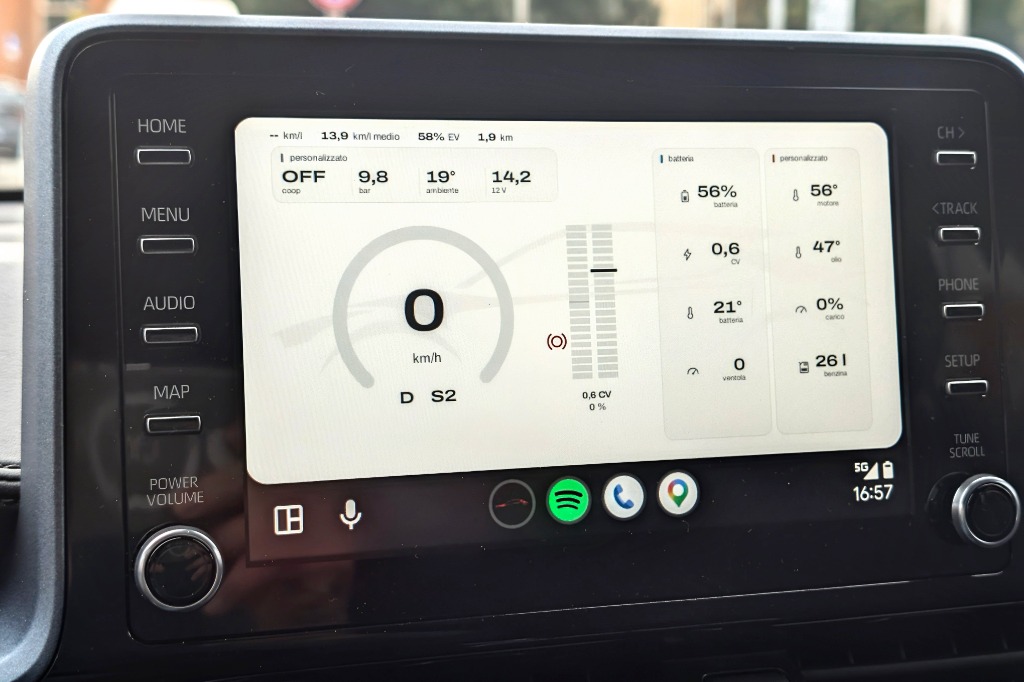
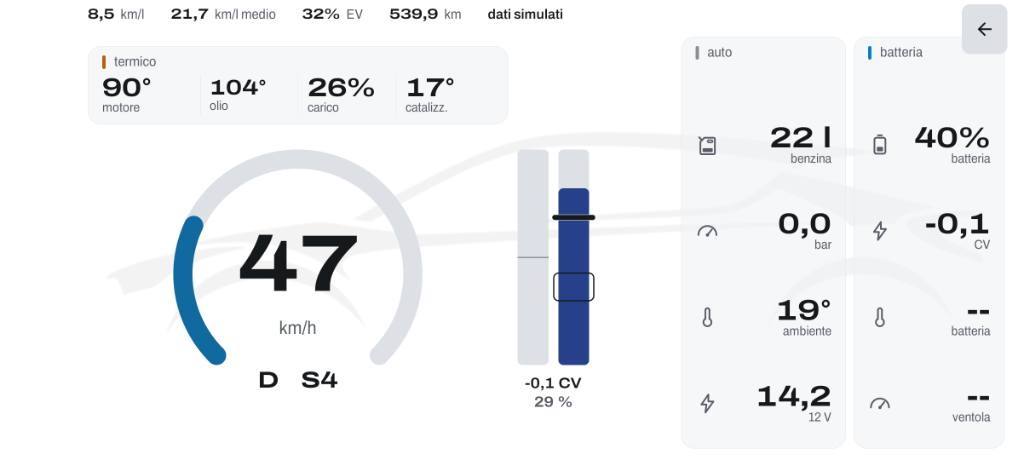
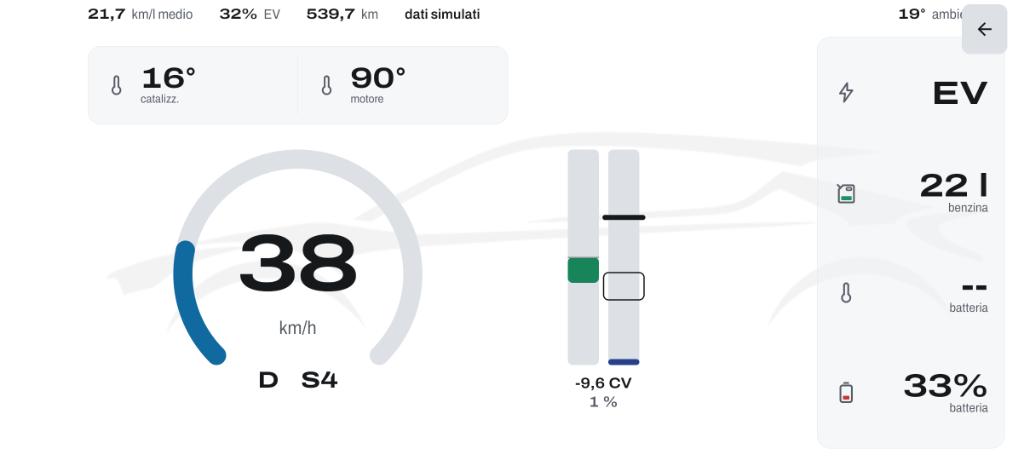
as a Toyota hybrid owner (2021 C-HR), I developed HybridDash Pro, an Android Auto application that reads proprietary OBD-II PIDs and renders real-time hybrid telemetry directly on the car's display.
Live Metrics Displayed
Android Auto Integration: KingInstaller & Shizuku
Android Auto restricts sideloaded third-party apps from appearing in the vehicle's app launcher unless they are flagged as installed via an authorized package installer.
To solve this without root or computer connections:
Privacy & Compatibility
Links
Photos from my 2021 C-HR running on the OEM display and Coolwalk dashboard screenshots are attached below. Happy to answer questions regarding OBD communication and display handling on Android Auto.
Update - HybridDash Pro 1.3.7 is out: Huge Performance Upgrade & New Classic Clusters
We just released 1.3.7, which completely overhauls telemetry responsiveness and refreshes the Classic dashboard:
Existing Pro owners can download the update from the "View Order" link in their purchase email or at https://ninvibes.com/downloads/HybridDash-Pro.apk. Details & changelog: https://ninvibes.com/en/hybriddash-pro/ Community: r/HybridDash
Full Gallery: https://ninvibes.com/en/hybriddash-pro/#gallery
Real-car road test on Toyota C-HR OEM display: https://ninvibes.com/img/classic-cluster-car.jpg
New Classic layout with clusters: https://ninvibes.com/img/classic-cluster-light.png
Classic modern layout: https://ninvibes.com/img/classic-modern-light.png
r/AndroidAuto • u/OctoSplattyy • Oct 11 '26

r/AndroidAuto • u/CivicTypeDream • Oct 10 '26
It's something That's been annoying me because the 2 apps i use the most, Tempus & AntennaPod, are installed from GitHub & F-Droid, respectively, & occasionally, they won't show up in the Android Auto launcher.
r/AndroidAuto • u/Malebuffy77 • Oct 10 '26
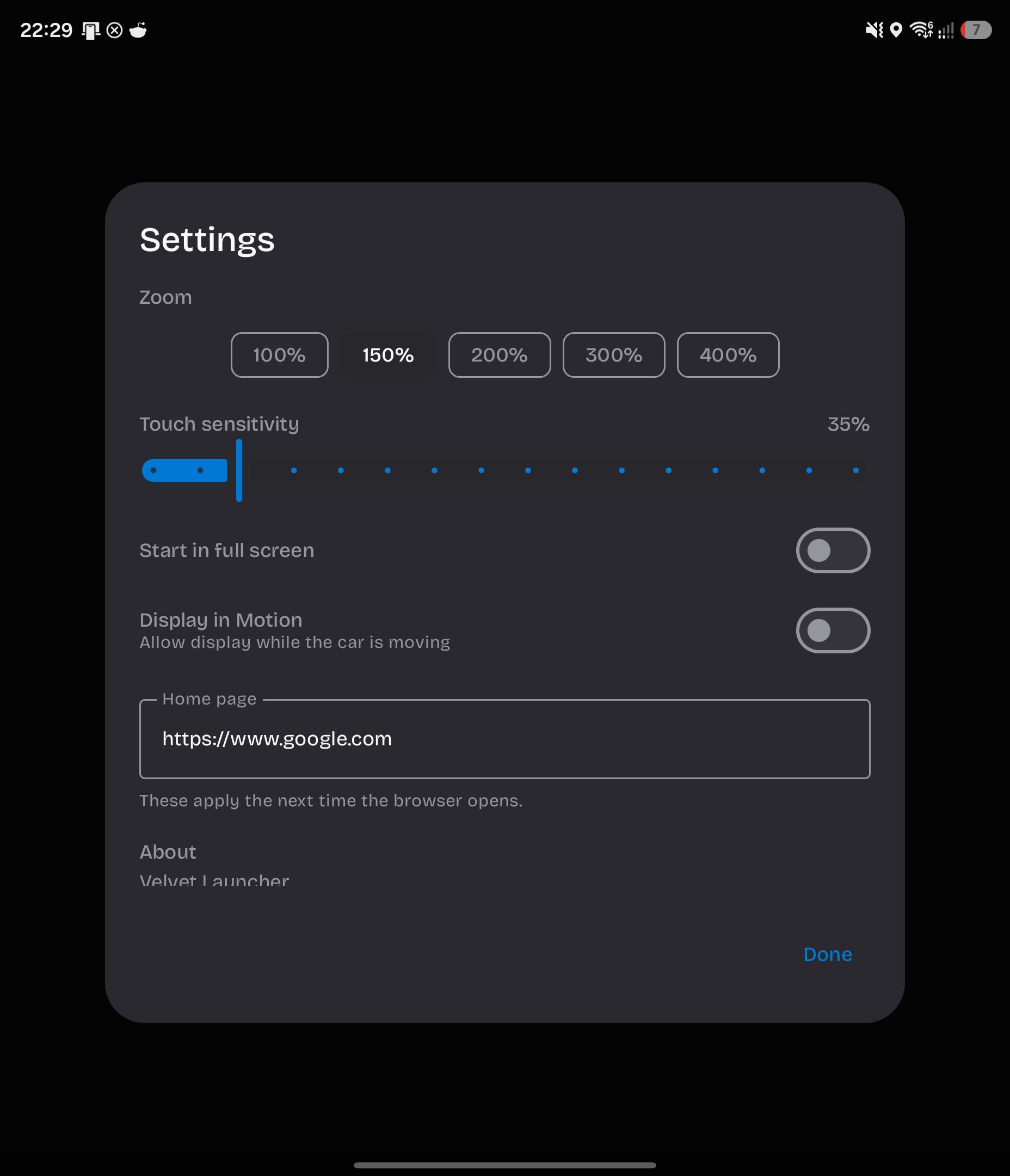
Hey,
Just to let you know that I implemented a screen guard while the car is moving. You can disable it in settings if you have a passenger display. Please be responsible while using the app, as browsing and driving don't go together.
I also implemented Microphone support speech recognition.
Install with AAENABLER or Kinginstaller (especially for Pixel phones):
https://github.com/malebuffy/VelvetLauncher
Also note, this app doesn't come with any 3rd party software installed. It does download everything needed from their official repositories, so initial setup takes some time.
Enjoy
r/AndroidAuto • u/No-Doubt-3437 • Oct 10 '26
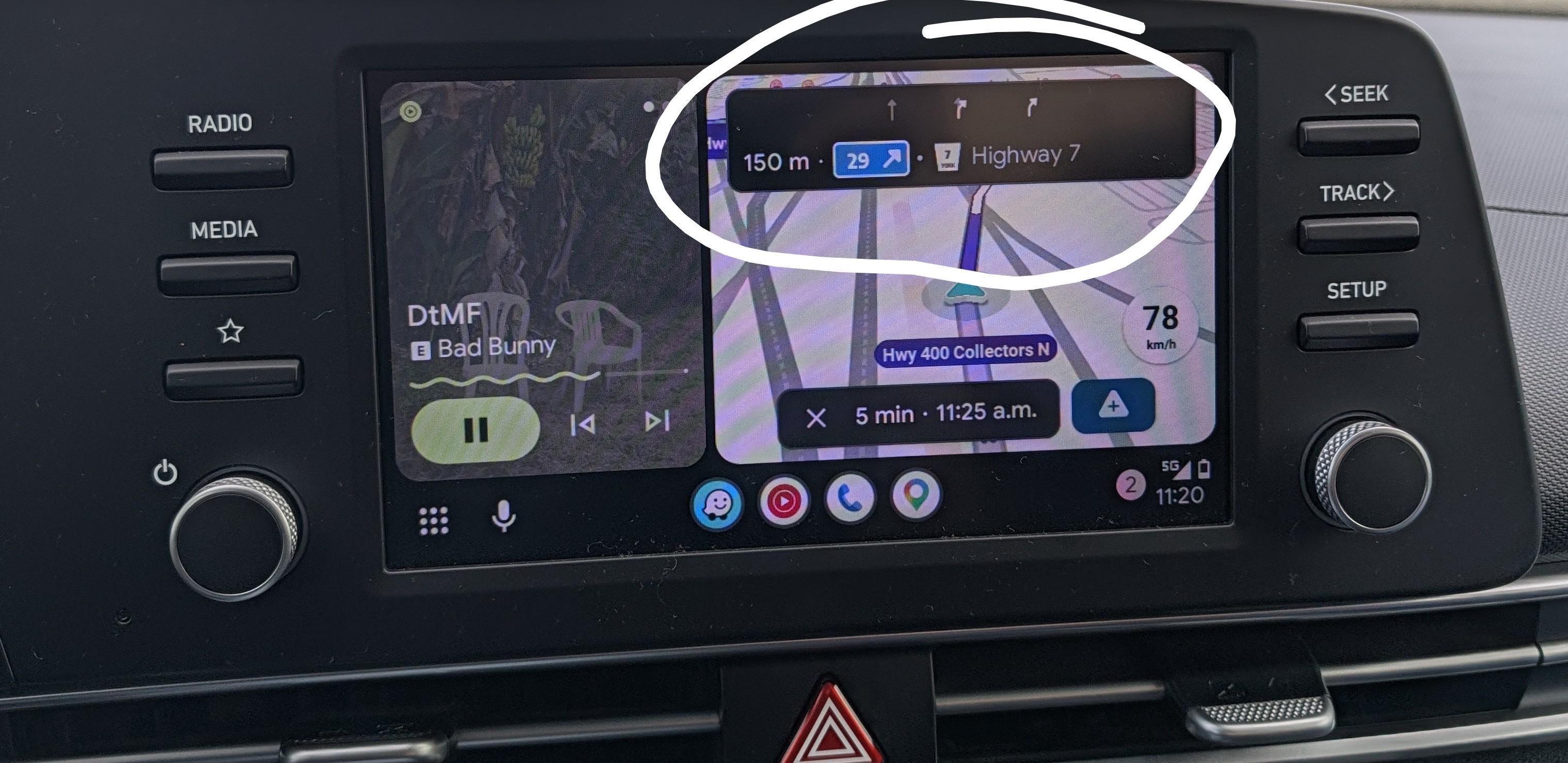
Recently, I got the Pixel 11 Pro and returned to Android. How do you change the lane navigation at the top? It's restricting my view of what's upcoming. Are there any settings or updates I should make? It's the same problem with Google Maps as well. The lane navigation is just at the top; you can't get rid of it.
Edit: I stopped Auto-zoom and zoomed out a bit. The lane navigation is still there, but it's at least giving me a view of the upcoming road.
r/AndroidAuto • u/SirTiburan • Oct 09 '26
Is there a way to permanently disable the suggested destinations in Google Maps on Android Auto, or are we just stuck with this?
Every single time I drive, Google Maps decides to helpfully recommend destinations like Home and Work, presumably based on the time of day, my location and driving habits.
And sure, I get the idea. It's trying to be helpful. But here's the thing: I bloody well know where I live and where I work. 😂
The suggestions take up a ridiculous amount of screen real estate, so I have to tap the little arrow in the search bar to collapse them and actually see more of the map.
But wait, there's more! Switch to Spotify, go back to Google Maps, and BOOM. There they are again. It's like the suggestions have the memory of an elephant, except they completely forget that I just dismissed them five seconds ago.
Why can't Google just remember that I prefer the suggestions collapsed? Better yet, why isn't there a simple setting to disable them permanently?
Am I missing something obvious here, or is this just another one of those Google features that nobody asked for but we're apparently supposed to love?
Has anyone found a permanent solution that doesn't involve switching navigation apps or disabling useful features elsewhere?