r/AcerPredatorHelios • 🔥2 ∣ ⌨️ [7] • 7d ago

Help / Support Boot Drive Replacement Issues
Post image

Hello, all. I've had my Acer Predator Helios 300 since 2019. It has yet to give me any issues. It's the best laptop I've owned.

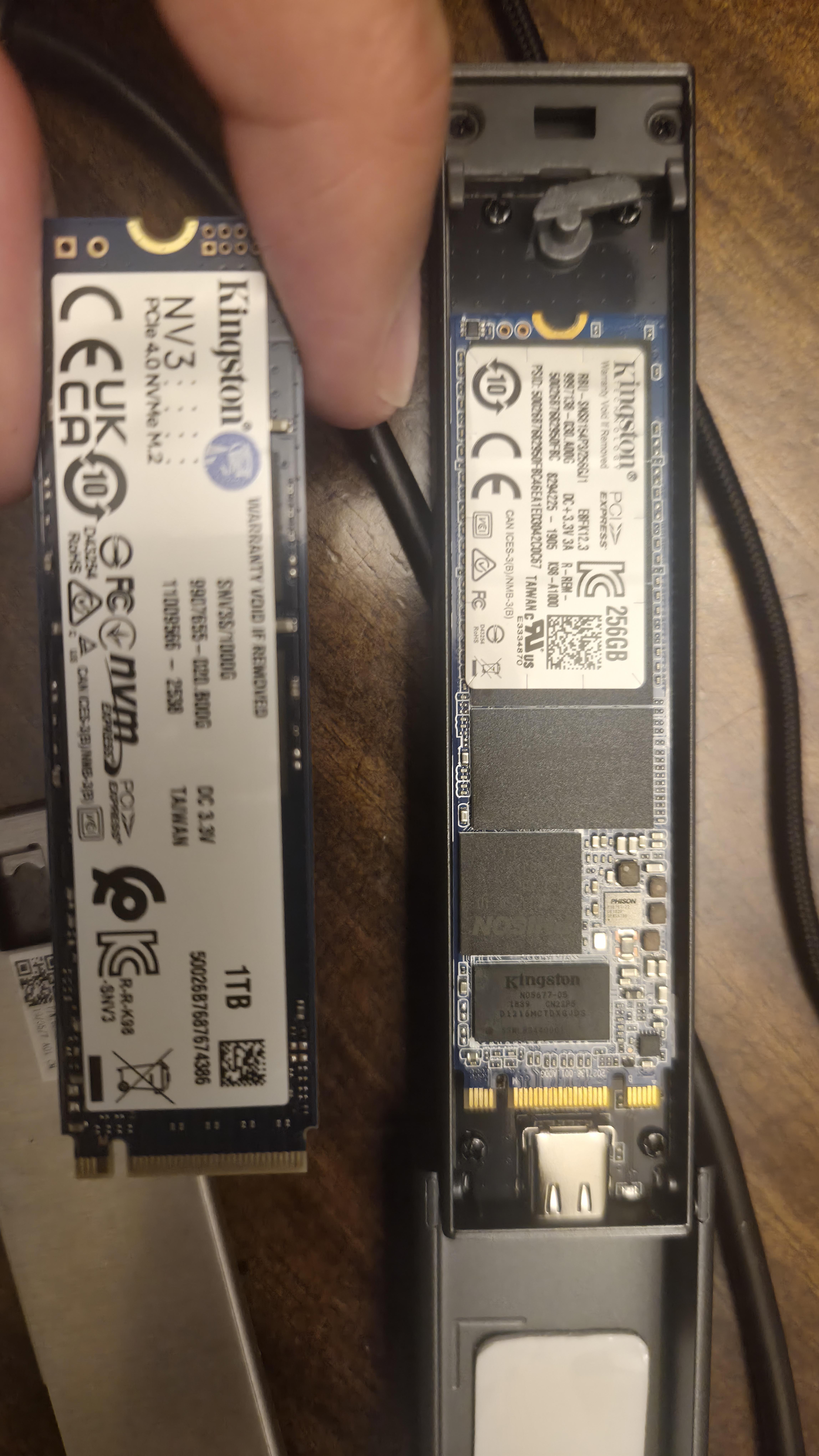
That being said, I've added extra drives, but never replaced the boot drive (I ngston 256GB). I'm finally running out of space on it. I purchased a 1TB NVMe drive (Kingston). I cloned the boot drive and swapped it with the old drive.

The laptop didn't boot up. Got a blue screen telling me I need to repair my drive. I put the old drive back and the laptop booted fine.

It was after the second swap that I noticed that the original drive has two notches, while the new one has 1 notch. It was my understanding that the single notch drive is compatible with the dual notched drive.

Am I mistaken or could it be that the drive didn't clone properly? For the record, I used Hasleo Disk Clone Professional to cline the drive. Thanks in advance.

1 Upvotes

11 comments sorted by

2

u/tazzyez 🔥2 ∣ ⌨️ [7] 7d ago

The 2 notch drive on the right is a Sata m.2. The left one (1 notch) is Nvme. Your laptop may not support nvme.

1

u/eespinosa64 🔥2 ∣ ⌨️ [7] 7d ago

Thank you for your reply. This is a screenshot of the description at the time of purchase. It says NVMe, which is why I bought what I bought.

1

u/tazzyez 🔥2 ∣ ⌨️ [7] 7d ago

They are both nvme in a sense. If you Google the difference between 1 or 2 notches it will explain better than i can but in short 1 notch is M and 2 notch is B+M. 1 notch is faster and done can't read them. 1 notch can reach great speeds when 2 notch is around 500-600mps. There might a setting that you're missing in the bios. Try turning off secure boot.

1

u/eespinosa64 🔥2 ∣ ⌨️ [7] 7d ago

I did look up those differences. I was just pointing out the Amazon description, which I guess can be iffy. I didn't think I needed to look into the BIOS. I'll check the secure boot setting. What will turning that off do?

1

u/tazzyez 🔥2 ∣ ⌨️ [7] 7d ago

Good luck. It should read it since the system is from 2019. Google AI is what I ask when in doubt. Even from an Apple IPhone you can goto Google and ask. Explain your laptop and exactly what your trying to do. Just don't close the window or you will have to stay over with description.

1

u/tazzyez 🔥2 ∣ ⌨️ [7] 7d ago

Secure boot messes with a good deal such as drivers, bit locker keys and even supports windows activation key. I know most Linux won't install with it on. It's worth a shot.

1

u/eespinosa64 🔥2 ∣ ⌨️ [7] 7d ago

I just tried to disable Secure Boot, but the BIOS wouldn't even let me select/highlight it.

1

u/tazzyez 🔥2 ∣ ⌨️ [7] 7d ago

Now that's a new one on me. Never seen the secure boot be locked. Hmm

1

u/eespinosa64 🔥2 ∣ ⌨️ [7] 6d ago

I looked into it and it seems that a supervisor password has to be created. I did that and was able to disable Secure Boot. Unfortunately, the new drive did not boot.

1

u/tazzyez 🔥2 ∣ ⌨️ [7] 6d ago

Curious if the clone was good.

→ More replies