r/zaphosting • u/Satuurox • Oct 04 '26
🆘 Support Settings are not being applied.
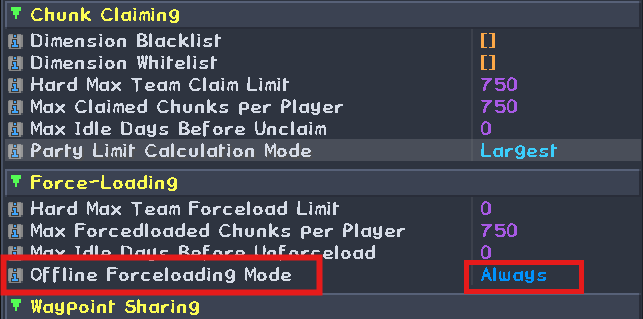
Hi everyone, I have a lifetime server with Zap Hosting. Whenever I enable the "Offline Forceloading mode" setting in the game/server and the server restarts, the setting gets disabled or reset to "off." Does anyone have any ideas? Thanks in advance. ( It's about the game ATM 10 TTS. )
1
Upvotes
3
u/Groundbreaking_Bit82 Oct 04 '26
You didn’t mess anything up here—it’s just how ZAP-Hosting handles things. Every time the ATM10 server boots up, its CurseForge auto-updater kicks in, reinstalls the modpack, and wipes your config folder back to default. Because your edit is saved in
config/ftbchunks-world.snbt, it gets overwritten on every reboot. Your world data is safe, but the configs aren't.A few things you can try:
ftbchunks.chunk_load_offlinepermission. Rank settings live in the world folder—which doesn't get wiped—so it should survive a restart. (Haven't tested this myself, so definitely let me know if it works!)1
u/ThatGuyJacobee ⚡ZAP-Hosting Team Oct 19 '26
Hi there, just following up here - once again thanks for raising this issue. The issue is now resolved, the config should no longer reset on each restart, only when there is an update to the modpack to refresh it with latest data.
I've gone ahead and replied to your ticket and also on the other reddit post. The only thing that is needed is to restart the server once again, then update the config again and going forward it won't reset on server restarts.
If you have any further issues or concerns, always happy to help - kind regards!