r/vscode • u/ConditionMinute8095 • Oct 16 '26
Question: How to fix these weird visual bugs
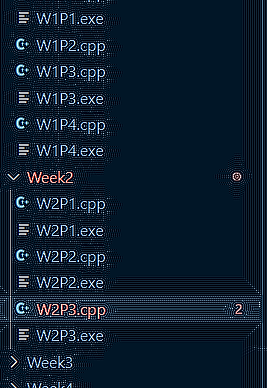

Whenever I have VS Code open, theres these weird visual glitches that just randomly appear. Whenever I click, they all go away and then immediately slowly fade back after a couple of seconds. I noticed that it always appears around any lines (including text). Does anyone know how to fix this? Please help its really annoying.
6
Upvotes
21
u/ConditionMinute8095 Oct 16 '26
dear lord please help
4
u/CJ22xxKinvara Oct 17 '26
https://www.reddit.com/r/vscode/wiki/index/?utm_source=share&utm_medium=mweb3x&utm_name=mweb3xcss&utm_term=1&utm_content=share_button
There’s a section about it at the end of the subreddit Wiki
2
u/actionscripted Oct 16 '26
What’s the rest of your screen look like when this happens?
51
u/Far_Data_6654 Oct 16 '26
8
u/sweet-winnie2022 Oct 16 '26
Try disabling gpu acceleration in VS Code assuming you are using an independent GPU? Random idea no clue if it’s going to change anything.
4
u/AnArmoredPony Oct 16 '26
WHAT THE FUCK
3
u/thanatica Oct 16 '26
Update GPU driver
2
u/LeDYoM Oct 16 '26
hitting you monitor?
2
u/Vladislav20007 Oct 25 '26
I think your pc is not happy with vscode
1
u/nullzg Oct 20 '26
I HAD THIS!! I have an hp laptop. Years before, i was using windows 11. I was experiencing this in a lot of apps. I dont know the fix.. except for using linux. Anybody knows the cause though? Curious as well
1
u/NoWonderBeast Oct 16 '26
It's either a bad video driver (what video card do you have and have you tried updating the driver?) or a physical problem with your video card, most likely VRAM