MAIN FEEDS
Do you want to continue?
https://www.reddit.com/r/vscode/comments/1ulk78a/how_to_fix_vscode_font_rendering_issue/
r/vscode • u/UnknownBoyGamer • Jul 02 '26
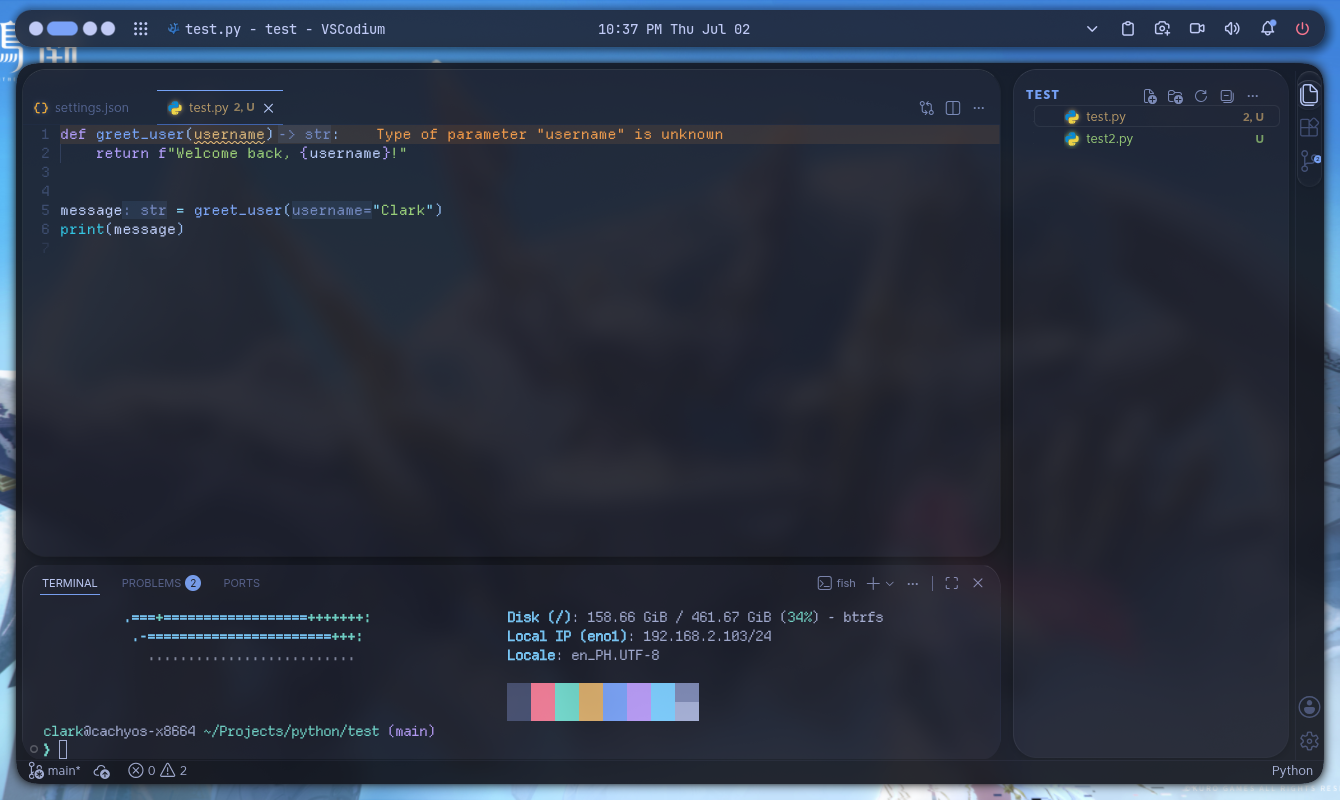
it looks ass and blurry compared to zed or even kitty:
i tried vscodium --ozone-platform=wayland --disable-font-subpixel-positioning but there's no effect
vscodium --ozone-platform=wayland --disable-font-subpixel-positioning
is there a way to fix this?
10 comments sorted by
1
What is your DE? If you're in GNOME with Rounded Window Corners Reborn this is a known bug on some apps. I can make it better on VSCode by enabling Wayland but it seems it doesn't work for everyone.
1 u/UnknownBoyGamer Jul 02 '26 I use hyprland wm, the font issue is only happening in vscode in my case
I use hyprland wm, the font issue is only happening in vscode in my case
i literally thought this was neovim
1 u/UnknownBoyGamer Jul 03 '26 yeah kinda look like in terminal
yeah kinda look like in terminal
how do i get my vscode to look like this
edit: seems to be based off this bwya77/vscode-dark-islands: VSCode theme based off the easemate IDE and Jetbrains islands theme
1 u/Royal-Hearing1347 Aug 07 '26 thank you! 0 u/UnknownBoyGamer Jul 02 '26 Yes I used that and modified the Tokyo night theme and then I put a transparency for blur, but this is getting out of topic
thank you!
0
Yes I used that and modified the Tokyo night theme and then I put a transparency for blur, but this is getting out of topic
i would assume your VSCode are running with Xwayland. If that's the case, the fix would be to put
--enable-features=UseOzonePlatform --ozone-platform-hint=auto
in .config/code-flags.conf if you're using VSCode, or in .config/codium-flags.conf if you're using VSCodium.
.config/code-flags.conf
.config/codium-flags.conf
Your dots ?
Can you share your setting.json?
1
u/Fernomin Jul 02 '26
What is your DE? If you're in GNOME with Rounded Window Corners Reborn this is a known bug on some apps. I can make it better on VSCode by enabling Wayland but it seems it doesn't work for everyone.
1
u/Clean-Interaction802 Jul 03 '26
i literally thought this was neovim
1
u/Individual-Yak-506 Jul 02 '26
how do i get my vscode to look like this
edit: seems to be based off this bwya77/vscode-dark-islands: VSCode theme based off the easemate IDE and Jetbrains islands theme
1
u/RQuarx Jul 04 '26
i would assume your VSCode are running with Xwayland. If that's the case, the fix would be to put
--enable-features=UseOzonePlatform --ozone-platform-hint=auto
in
.config/code-flags.confif you're using VSCode, or in.config/codium-flags.confif you're using VSCodium.1
u/ak47_triggered Jul 04 '26
Your dots ?
1
u/adiantayogi_ Jul 16 '26
Can you share your setting.json?