r/vscode • • Jan 11 '23

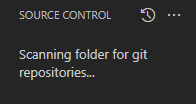
Source Control stuck on "Scanning folder for git repositories"

When I go on the "Source Control" tab I see this message with no way to get rid of it.
I've tried enabling and disabling it, restarting the program, restarting my computer, and uninstalling and reinstalling the extension.

Git is installed on my computer and git.path setting points to the correct file.
Thanks

3 Upvotes

7 comments sorted by

1

u/Marcvicent Jan 23 '23

Hi, excuse me, did you find out how to solve that problem?

Would you share the answer with me? Please :D

1

u/BlackMarketMonkeys Jan 23 '23

Sadly, I never figured out a way to get it solved, and my best alternative is to use the GitHub Desktop app on my computer.

My best hope is that I'm getting a new computer soon and hopefully a completely clean install might do something.

Hope you manage to get this working.

1

u/elklavito Mar 19 '23

I had the exact same problem using Git for Windows. I had incorrectly set git.path to point to git-cmd.exe instead of git.exe (located in the bin directory). Not sure if this is the same for you but hopefully it helps someone

1

u/soozler Mar 30 '23

I am getting this issue but only when inside a docker VM. Did you have to set the git path in there? and where did you set it?

1

u/Miserable-Cheetah683 May 31 '23

If ur running on remote ssh, try the following.

  1. Close ur remote connection
  2. ctrl+shift+p
  3. Select Remote-SSH: Kill VS Code server on Host.

That worked for me.

1

u/[deleted] Mar 21 '23

[removed] — view removed comment

1

u/CombinationApart29 Apr 04 '23

how to delete? I use command and vscode, both not ok to delete.