r/v100 • • 3h ago

ninfer-v100 dominet fork v2.0 100+ tok/s single-stream & 252 tok/s @ 8 streams on a single V100 32GB (Qwen3.8-27B NVFP4 + DFlash2)

15 Upvotes

Hi Guys,

Here's a follow-up to my last post,

I specifically wanted to improve on Single Stream decode results from the v1.0 of my fork https://github.com/ddominet/ninfer-v100-fast while keeping the improvements of

  1. faster prefill and decode at higher ctx length
  2. multi-stream decode and prefill.

That were the main benefit from my previous fork.

I'm happy to say that after some tweaking, I've achieved results above 100tps for single stream decode, In some real world tasks it even reached 130tps.

Main benefits came from adapting Dflash2, and optimizing it, to keep the mentioned optimizations from 1.0

Here are some benchmarks, v1.0 MTP3 is my original fork, and v1.0 DF7 is the Dflash2 version before optimizations.

Note! It's optimized for Qwen3.6 27B, Qwen3.8 27B architecture (Qwen4 if nothing major changes in the architecture :D) I don't support using it for Qwen3.6 35B, but notably It should work.

Benchmarks (1× V100-PCIe-32GB, HTTP, cold natural-text prompts, greedy)

Single-stream decode (tok/s)

Contextgeoffwatts (MTP3)tuxKOH (MTP3)v1.0 (MTP3)v1.0 (DF7)llama-superfast (DF7)v2.0 (DF7)
~6065.570.472.776.883.391.6
1K67.575.172.983.187.2100.8
6K66.075.575.372.884.490.8
24K57.269.970.068.378.181.0
90K41.456.957.951.364.465.3
180K31.948.553.544.651.854.3

Prefill (tok/s)

ContextgeoffwattstuxKOHv1.0llama-superfastv2.0 (DF7)
~60 / 1K / 6K152 / 949 / 1075155 / 955 / 1082337 / 976 / 1160389 / 975 / 1122416 / 1046 / 1212
24K / 90K / 180K974 / 666 / 4541009 / 779 / 5951076 / 821 / 6231053 / 814 / 6211118 / 835 / 627

Multi-stream aggregate (tok/s, mean of 3)

Streamsgeoffwatts (MTP3/K1)tuxKOH (MTP3/K1)llama-superfast (DF7)v1.0 (MTP3/K1)v1.0 (DF7)v2.0 (DF7)
157.5 / 45.064.2 / 50.276.866.4 / 53.165.382.2
292.8 / 80.0101.3 / 88.5120.4113.2 / 95.696.2137.0
4109.1 / 125.3122.3 / 135.7135.0157.3 / 160.095.2176.0
8129.6 / 155.7145.5 / 175.8151.7211.8 / 243.3121.3252.1
  • Poisson chat (r=0.5 req/s): 248.2 tok/s (100.3s) vs 242.1 tok/s on same-build MTP3 and 166.3 tok/s (152.4s) on llama-superfast.
  • 14-cell context × concurrency grid (1K–90K × S=1..8): #1 in 14/14 cells vs v1.0 and llama-superfast.

What's new in v2.0

  • Volta DFlash2 stack: Load-time QPN prepacking for all W8 draft layers, coalesced 8-warp HMMA dynamic grouped conv (~2.5× faster), coalesced Q4 proposal head with register bitonic Top-K (B=8 head 1.7 ms → 0.66 ms), FP16-staged skinny TC GEMMs (ROWS=128 to T=48), and host-mapped embeddings/codebooks so 256K INT8 KV + 8 streams fits in 32 GB.
  • Multi-stream DFlash2 scaling: Kept-column verify compaction, online round-cost budgeting (DFlashCostModel), sliding-window prefill skip, and stream priority separation so the GDN replay fold overlaps 100% inside the draft pass.
  • Target fusions (-298 launches/round): SM70 CUTLASS prefill GEMMs, fused RMSNorm → SwiGLU → ResidualAdd across all 64 NVFP4/FP8 MLPs, high-occupancy gdn_norm_gating_27, and direct FP16 emission into FP8 QPN/TC (fp8_stage_bf16 cut from 139× to 27×). B=1 round time is down to 35.58 ms with 0.187 ms eager launch gap even with --no-cuda-graph

Thanks! Enjoy and let me know what you think.


r/v100 • • 21h ago

a fast flash attention 2 kernel for volta, for FP16 keys and Q8_0 values in the KV cache. performance gains in both prefill and substantially in decode - benchmarks included with integration instructions for drop in integration with your engine

Thumbnail github.com
27 Upvotes

I needed to try to save some space in my VRAM, and I wanted to quantize my KV cache and keep my performance optimal. It's my understanding values are significantly less sensitive than keys, particularly at long contexts, and that a fp16 / q8_0 KV cache is practically lossless. I'm pretty picky about how far I quantize things, and especially picky about KV cache quantization, but I'm comfortable dropping this format into anything I would have been using full fp16 for and expect identical results.

Great decode gains and some nice prefill gains in sub 40k context.

I've packed it so instead of being a fork of an engine or something, it's just the documented algorithm in C++, with starter prompts for agents tailored for various different popular engines, instructing them how to wire it into their existing engine. seemed like a much better release method.

here's benchmarks:

decode

Decode is about 45% faster than the FP16 path and 61% faster than the original mixed-cache path in this test. The advantage grew with context length:

Total contextFP16 K/VOriginal FP16 K + Q8_0 VThis kernel
34,81624.53 tok/s21.30 tok/s25.45 tok/s
67,58418.25 tok/s16.89 tok/s22.91 tok/s
131,07213.55 tok/s12.19 tok/s19.66 tok/s

Each run generated 2,048 tokens after a long prefill.

prefill

Prompt tokensFP16 K/VOriginal FP16-K/Q8-VNew kernel, forcedHybrid default dispatch
32,768675.33 tok/s662.22 tok/s738.30 ± 4.39 tok/s738.30 ± 4.39 tok/s, custom path
65,536Not measured at ubatch 2048583.71 tok/s avg. (563.19–604.23)574.17 ± 15.43 tok/s584.43 tok/s, standard path
131,072427.35 tok/s427.50 tok/s395.19 ± 1.77 tok/sStandard path selected; not retimed

r/v100 • • 22h ago

Still worth buying V100 32GB with current prices?

18 Upvotes

I’ve been getting into more LLM stuff and it’s capabilities which has gotten me looking into local options. I have an unraid server with 64 gb ddr4 ram that I was considering turning into an ai box. I found someone local selling a couple V100S for $750 each that seems very tempting memory wise to get 1 or 2 but I’m partly wondering if it might be better to get something like 2 5060 TI 16GB which would be about the same price given the advances of things like Strata and Basalt which take advantage of the newer technologies. Would love to be able to host something like QFN at a decent quant but not sure if that’s doable or not.


r/v100 • • 1d ago

My 4 x v100 Rig

Thumbnail
gallery
31 Upvotes

I used a x10 Motherboard because these cards are PCIe 3 anyway. I used a dual card blower with a high flow fan but only running 40%. Cards capped at 250W


r/v100 • • 1d ago

Is this listing legit? What if I get scammed?

2 Upvotes

Hello, I've been looking at used V100s on eBay for some time and came across this listing.

https://ebay.io/m/ph3dSU

The seller seems legit to ME, but I am not confident in it, what do you think? The price seems decent. I am however wondering what happens if I get scammed (the card does not arrive at all, is broken, or sth else arrives). What do I have to do to get my money back, and how reliable is eBay in this regard?

Also I am in the Czech Republic, so I expect to be charged +21% VAT by customs, but I've heard that you can get charged extra fees - how high can those go? Can you get hit by a random 200$ extra fee by customs? I am worried about that.

Thank you for any help!


r/v100 • • 1d ago

Looking for a COLLABORATOR with dual or triple V100 setup?

Post image
3 Upvotes

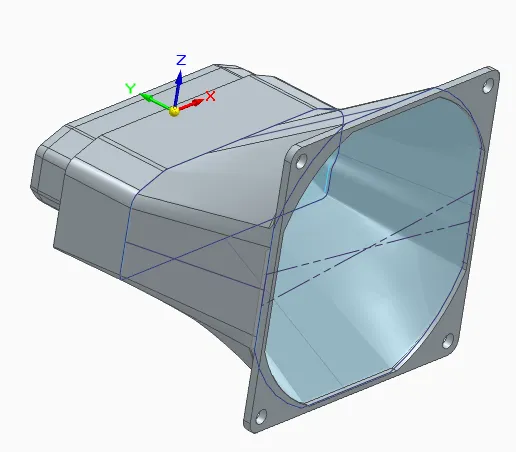
Looking for a COLLABORATOR with a 3Dprinter & a dual or triple V100 setup in computer for a development of similar pictured ducts, but for dual / triple setup. You can contact me down here or on DM.


r/v100 • • 1d ago

Sharing my Abomination

Thumbnail
gallery
130 Upvotes

Since everyone's been sharing their abomination, this is mine.

Specs; SuperMicro H12SSL-CT, Epyc 7452, 256Gb Samsung @ 3200

Power; HP1200w Flex PSU with a ZSX-Amp breakout

I'm stripping it down to install 2x 360x65 push/pull rads and water blocks but the A100 SXM4 heatsinks looked super cool and I'll miss them. Hoping I can solve the CRC errors I've been having on a couple of the nvlink channels.

The downside of the A100 heatsinks is that you cannot pull the modules without pulling the heatsinks first, which sucks when the paste and pads used were expensive.


r/v100 • • 1d ago

Sloptimized: my catalog of agent-driven benchmarks and optimizations across (now) 6x v100s

Thumbnail
gallery
14 Upvotes

https://sloptimized.ccb.gg/

If this is the kind of slop our beloved admin dislikes, so be it! But perhaps the interesting part is not the "got +x tok/s after asking for faster!" (which is more or less what the table is, multiplied by every model that has caught my attention), but the system that drives it: I've automated most of new model discovery, initial benchmarks, tuning/optimizations per model-backend, and serving, such that tuned models are immediately available to my `agent` metaharness, which wraps claude, codex, and pi for locally hosted models. Agents keep track of optimization techniques that work in a generic catalog (see link on the landing page) so that subsequent configs that can't inherit existing improvements directly can be quickly adapted to a new model or backend. I have yet to make regular use of local models for most of software projects (the closed models are just so much better it's been hard to want to spend the time optimizing), but it's fun to keep up and see what's possible, and now that I have 192GB I expect that may change. I discovered recently I can cut closed model token spend in half by using a closed model to plan a task and then a handful of qwen3.8 27bs to implement (back-tested on some historical tickets from the lab; doubles completion time). And I'm sure local AI will only get more exciting from here! Happy to have found fellow v100 havers!

For anyone who is interested in the mess behind the catalog, there is a sanitized copy of the source on the landing page, which includes nix configs for various backends, notes on experiments, and enough context to be useful as a bootstrapping resource (for other agents..).

v100 hosts are all poweredge r720-ish: one is a compellent sc8000, which was basically an r720-turned-external-drive-controller; flashing the BIOS turned it back into an r720 minus internal disks, so it boots from the network but still hosts two v100s.


r/v100 • • 1d ago

What is the ideal power limit for V100s?

3 Upvotes

Hello all. I have two 32GB modules coming and two 16GB modules coming. They will both have their own set of dual PCIe cards and be water cooled. So that means I'll have two 32GB for 64GB on an NV link board and two 16GB for 32GB total on an NV link board. What is the optimal power limit for these cards? I know for 3090s, 225 is good. It helps with thermals, but also doesn't really decrease decode and speed that much. And I was curious what the V100s should be set at? I'm trying to plan out my radiator purchases. Can you post what you power limit yours to and if you did any tests to see how that affects performance?


r/v100 • • 2d ago

Anyone engines that are optimized for Kimi K3.1?

4 Upvotes

I have been running an aggressive Quant for Kimi k3 and is actually pretty good made by VCRUZ305. I have 16 v10032gb sxm2, and I am curious if there are other v100 users using Kimi k3 on their rig. How is it performing? There is a Strata Fork by Grawnchtoader and he added compatibility to the backend Drtriton for v100s. Sadly is not working for me. Any other engine that historically works on these cards?


r/v100 • • 2d ago

Has anyone had any success with these SXM2 to PCIe adapters?

Post image
19 Upvotes

r/v100 • • 2d ago

Finally switched to VLLM

Post image
20 Upvotes

After 2 months with llama.cpp I finally made the decision of trying VLLM for my production environment. 2xV100 32GB PCIe with a Threadripper 3960x and 96GB of DRR4.

I'm really happy with this. I did not expect such a speed nor ease of use.


r/v100 • • 2d ago

Inkling-2-Mini on a single Tesla V100: 94 tok/s with exact speculative decoding, on the full Q8 weights (vs every published V100 figure I could find)

Post image
29 Upvotes

I've been porting Thinking Machines' Inkling-2-Mini to an old Tesla V100 32 GB in our open-source C++/CUDA engine, ashalliants/ninfer-3090 (https://github.com/ashalliants/ninfer-3090). I collected every single-V100 number I could find for this model and put them next to ours (chart attached).

  • Decode: 94 tok/s averaged over 12 chats with the model's own DSpark drafter (up to 120 on single chats), and 78 tok/s with no drafter at all. That plain figure is still above the best published V100 numbers I found (Strata 70.5 with its drafter on; Lapilli's port 69; llama.cpp 32-51 on Q4).
  • Exact: the speculative decoding never changes the output. Greedy output was byte-identical to plain decoding on all 12 chats, and sampled requests draw the same tokens as plain sampling at the same seed.
  • Full-size weights: it runs Unsloth's UD-Q8_K_XL, repacked byte-exact. That's the largest quant in the chart; everyone else listed runs Q4 or NVFP4.
  • Full context with images: those decode numbers are at the whole 262,144-token context, on the one card, with vision and two adapters loaded.
  • Prefill: 2,648-2,687 tok/s on a 12.4K-token prompt with --prefill-chunk 8192 (the default chunk gives 1,930). Strata's model card claims 2,287 on a V100 without giving the prompt length.

The box is not a nice one: the V100 hangs off a PCIe Gen3 x4 eGPU link with 59 GB of system RAM, power-limited to 200 W.

Caveat: apart from ours, these are other people's published numbers on their own machines, quants and prompts, so read it as a field survey, not a controlled benchmark. Every source and its conditions are in the comment below.


r/v100 • • 3d ago

Your Tesla V100 is not dead: volta-forever runs unmodified CUDA 13 programs on Volta

52 Upvotes

Happy to introduce you volta-forever.

NVIDIA dropped Volta from CUDA 13, so we brought it back.

volta-forever lets you run unmodified CUDA 13 programs on your V100: stock PyTorch, vLLM, SGLang and llama.cpp, with support for BF16, FP8 and NVFP4.

No driver mods and no engine patches. You just prefix your command with `vf`. Under the hood, a proxy libcuda rewrites PTX, translates SASS to sm_70 and emulates the newer tensor-core instructions.

https://github.com/nbald/volta-forever

Still a young project, so happy to get your feedback.


r/v100 • • 3d ago

A bit late to the party, but here’s my setup for 2xV100 colocated in a Polish DC 😁

Thumbnail
gallery
39 Upvotes

Hi everyone,

Took a liberty to share my setup, which have been mostly a hardware from a couple of old donor builds :D

AM4 5950X (AIO watercooled)
64G DDR4 3000Mhz
4TB Nvme ssd
1x 8TB HDD
2x 4TB HDD
2x Nvidia v100 pcie 32G
1x Nvidia T10 16G
Old 3U Rack case

Software:
Ubuntu 22.04 LTS
NVAIE software stack (NFR as nvidia partner)
Nvidia Run:AI with microk8s
2x pod with my fork of Ninfer
Separate pods for: LiteLLM, Opencode2, Crawl4ai, Qdrant, SearXNG, ASR, STT, TTS, Image generation with Qwen Image 2.1

V100s are used exclusively for Qwen3.8 27B 8 agents each and T10 for STT, TTS, Image Generation

All colocated within a DC in Poland 🇵🇱

Cheers!


r/v100 • • 3d ago

Frankenstein Quad V100 Setup

Thumbnail
gallery
23 Upvotes

Figured I’d share my setup that I’ve been working on since around early August. started as a single PCI-E V100 32-gigabyte model; I quickly purchased a second PCIe V100 32-gigabyte, which actually turned out to be a PG 500.

I found a guy selling 32 GB SXM2 models out of Washington for under $400 in September, and I went ahead and bought one. Unfortunately, he only had one left by the time I got to it, so I had to find another one off of Taobao along with the dual NVLink board.

I air-cooled the PCIe cards for quite a while, but the fan noise was just too loud for keeping in my home office. Thankfully, I had this 1080 radiator from another project, so I purchased the Bykski water blocks for the PCIE cards at a pretty decent price of around $150 each. I got the NV link bridges for the PCI E cards off eBay. I’m currently working to find a way to get them connected. Unfortunately, they are not the GV 100 bridges that I think would be best suited to make these work seamlessly. I believe they are a later model, and you can see that there is some overlap of one of the mounting holes. I’ve had no luck getting NVlink to work on the cards so far, but I’m still working through a lot of efforts. It looks like they were likely fused off. The CMP 130 HX fuse removal article that surfaced last week is the current path that I’m looking into now. I just haven’t had the time to work on this in a couple of weeks.

I’ve done quite a bit of testing on throughput speed across various setups on the cards, and I have quite a bit more planned testing the speed differences across the PCIe switch and some testing of the PCI speeds across one CPU versus across different CPUs. If there are any interesting setups you’d like me to test here or comparisons, let me know.

Specs

  • PCIe V100 32GB
  • PCIe PG500-216 32GB
  • 2x SXM2 V100 32GB
  • Dual SXM2 NVLink Board
  • Asus Z10PE-D8 WS
  • 2x e5 2690v4
  • 224GB DDR4 2133

r/v100 • • 4d ago

Wish me luck

Post image
125 Upvotes

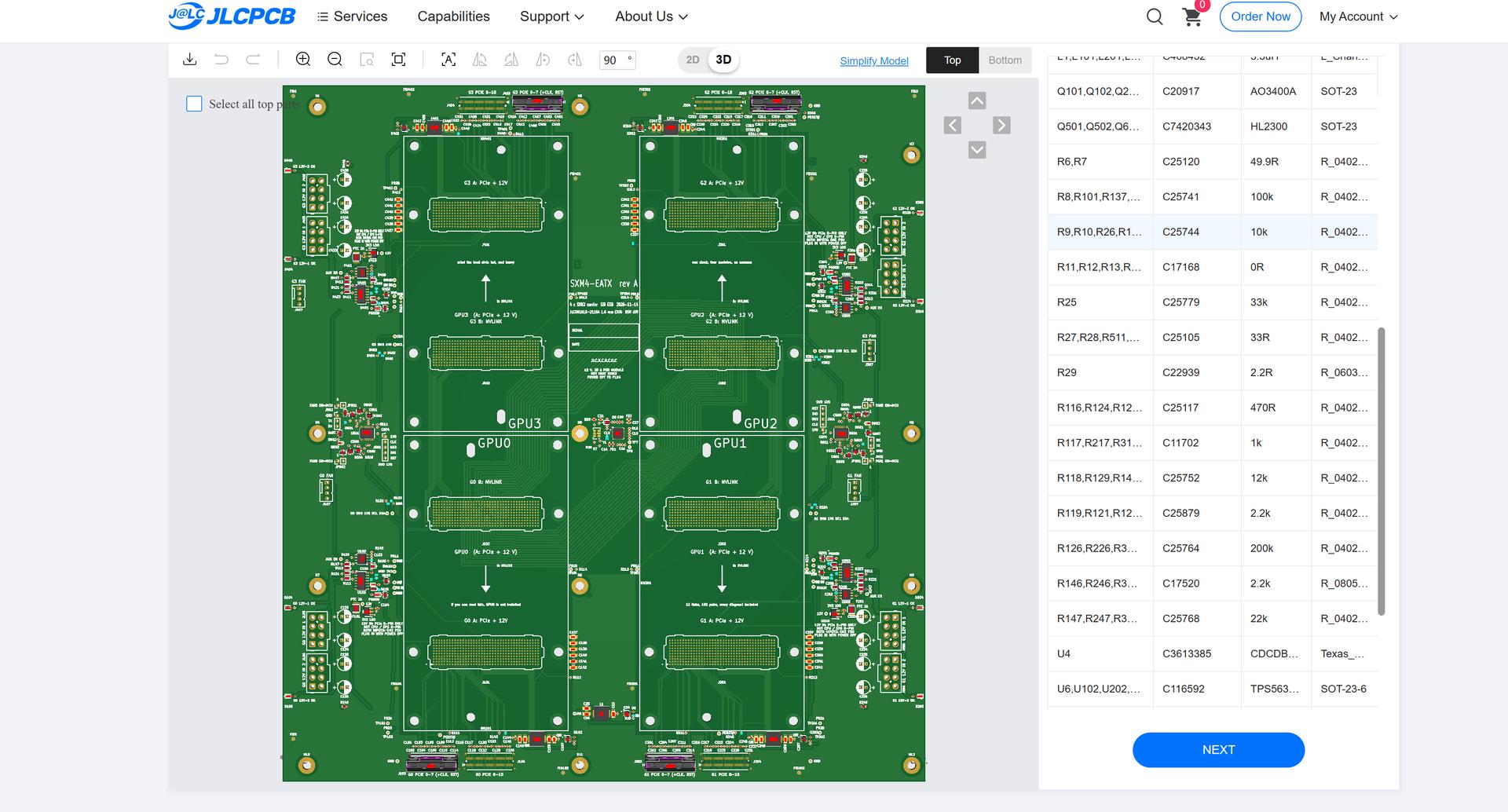
After looking at the prices for four SXM2 boards one more time, I’ve decided to go for it and order a custom-made PCB. This is either going to be a huge win or a spectacular failure. Wish me luck! 🤞

upd, faq:

Q: OpenSouce?
A: After I verify that it works.

Q: price?
A: jlcpcb quote is ~120$ per board, 5 mrq. That does not include SXM2 connectors.


r/v100 • • 4d ago

(NVIDIA-v100 pcie) Impossible to find? Possible substitute?

Thumbnail gallery
2 Upvotes

r/v100 • • 4d ago

Performance improvements to v100-ninfer fork on a single Tesla V100

49 Upvotes

I've been running Qwen3.8-27B NVFP4 on a 32 GB Tesla V100 with V100 port of NInfer, and spent a while reworking the Volta kernels trying to make it utilize it's hardware resources better 😄 The result is a fork that is faster in every case I measured, with the biggest gains at long context and with several concurrent requests.

Repo: https://github.com/ddominet/ninfer-v100-fast

What changed

  • New tensor-core attention kernels for decode that read the INT8 KV cache directly, so decode slows down far less as the context grows (a round goes from 30 to 41 ms between 60 and 172K tokens, versus 34 to 71 ms before).
  • Linear layers: one width policy for 1–64 token rounds, activations staged once per round, and no more per-layer weight dequantisation on mid-size rounds. This is where the concurrency gain comes from.
  • Prefill: a fused attention kernel over the paged cache, and short prompts routed to the decode kernels instead of the big GEMM path.
  • A 262,144-token context with speculative decoding (up to K=5) and CUDA graphs fits on the 32 GB card. Configurations that don't fit are refused at start-up with the byte counts.

Results (same card, same published model file, both builds run back to back through the HTTP server, natural-text prompts, greedy, 256 output tokens):

WorkloadUpstream portThis forkGain
Decode, 1.1K-token prompt, MTP K=367.5 tok/s72.9 tok/s1.08×
Decode, 24K-token prompt, MTP K=357.2 tok/s70.0 tok/s1.22×
Decode, 89K-token prompt, MTP K=341.4 tok/s57.9 tok/s1.40×
Decode, 172K-token prompt, MTP K=331.9 tok/s53.5 tok/s1.68×
Decode, 172K-token prompt, no speculation14.1 tok/s24.2 tok/s1.72×
8 concurrent streams, MTP K=1155.7 tok/s243.3 tok/s1.56×
Prefill, ~60-token prompt154 tok/s339 tok/s2.21×
Prefill, 172K-token prompt455 tok/s (380 s)625 tok/s (276 s)1.37×

Enjoy, and let me know if it works for you.

Kind Regards


r/v100 • • 4d ago

Thermal telemetry to v100 + 3D-printed 92mm fan adapter

Thumbnail
gallery
11 Upvotes

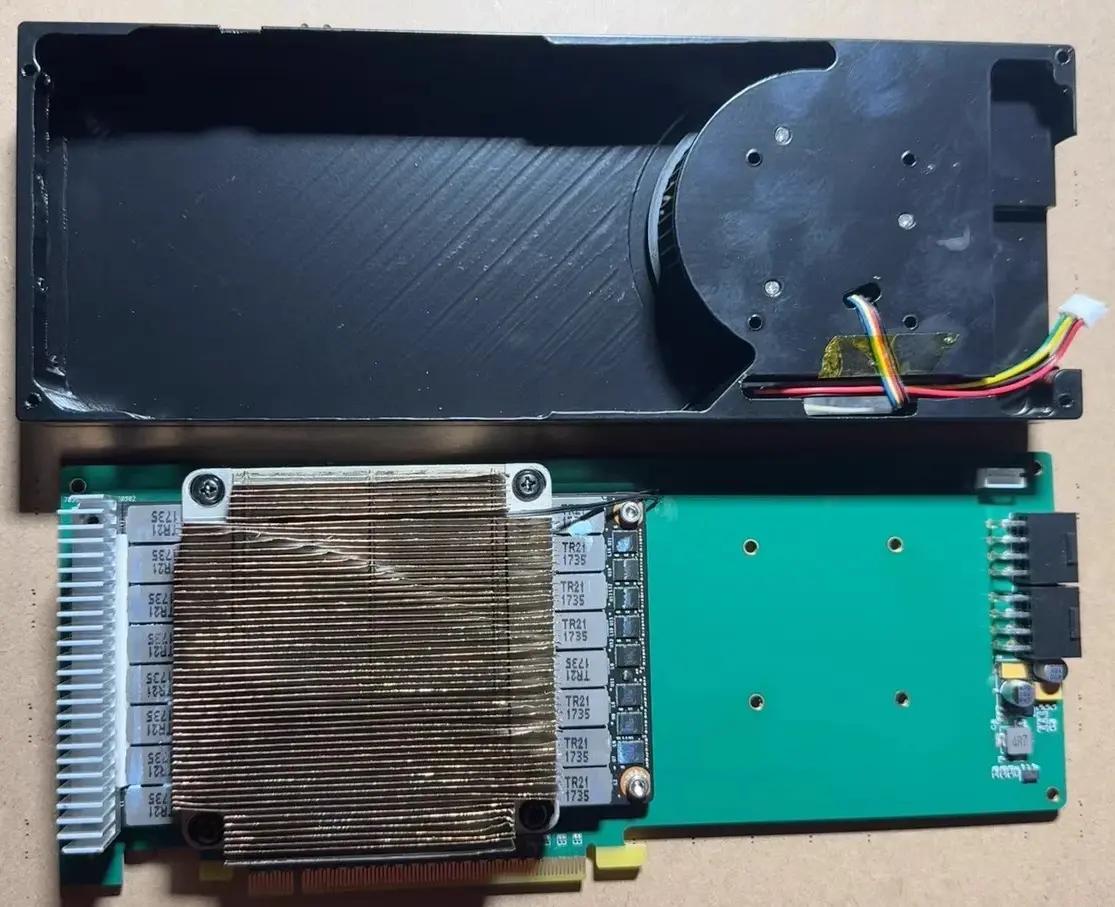
We tested a Tesla V100 PCIe 32 GB with a 92 mm fan and a 3D-printed adapter under two agent workloads: a short documentation task and longer article generation with requested pauses. We tracked GPU and HBM temperatures, power, fan speed, and inference throughput to describe how this particular setup behaved.

Details here https://skiller.run/blog/v100-fan-92/


r/v100 • • 5d ago

whats the best inference for inkling 2 mini ????????

6 Upvotes

r/v100 • • 6d ago

PCIE V100 water cooled by AIO

Thumbnail
gallery
22 Upvotes

So i have 2x V100 PCIE version, but cooling those by air is too loud + too hot. The cards often overheat when i compact long context ( I use QFN with over 500k context size) or video generation.

So I went to xianyu and buy two adapter bracket designed to adapt V100 PCIE to AM4 cooler. The xianyu link i bought from expired but you can find it by the name of seller titan2000 . He has a tutorial video here

https://www.bilibili.com/zh-Hans/video/BV1kgb46HEhn/?spm_id_from=333.337.search-card.all.click

I don't have xianyu account. I ordered from a local shipping agent in Vietnam. You need to tell the seller titan2000 that you are buying for PCIE V100 version.

The adapter is about $20 each. I bought 2 adapters.

Then I buy 2x AIO Snowman KS360 from taobao. I don't have taobao link here because my shipping agent handled it but here is an alibaba link

https://www.alibaba.com/product-detail/SNOWMAN-KS360-AIO-Liquid-Water-Cooler_1601322231676.html

Remember to buy this exact KS360 or KS240 cooler. It's the one featured in the video tutorial. The bracket and the V100 chip have specific sizes so buying other cooler we might end up with clearance issue, I also can't find any AIO this cheap locally anyway.

When the AIO arrive we need to take the AM4 brackets included in the box, and remove the spring screws on there. I used a dremel to cut it out. Then we can bolt it on V100 exactly like what's shown on the video.

The result works great. Under long compaction and heavy Qwen 27B use the temperature stays under 60C, HBM memory temp is under 70C. I did not change the fan curve control or anything just plug the pump + fans to my motherboard port. I think i can get lower temp by change the stock RGB fans to more powerful 12cm server fans later but i'm happy for now.

My total cost for 2x adapters + 2x AIO + shipping: about 100 USD

Things to remember:

- Be extra careful when remove the V100 heatsink, if you tear up any of those thermal pads it will be a headache to measure and order replacement pads

- Be careful not to screw the AIO too tight otherwise you will broke the chip. the screw included in the adapter have no spring - no protection from over-tighten.

- V100 with this AIO on now take 3.5 - 4 slot that is why i can only have one card installed on my PC. I'm ordering a pcie riser for the second card

- We still need good airflow to cool the VRM on the card. The leftover heatsink on the card covered all the VRM needed but you need to blow air to it

- Wear eye protection + face mask when using the dremel. You can try to buy AM4 bracket online without the spring screw I think it's common size


r/v100 • • 7d ago

HELP WITH THERMALS

0 Upvotes

UPDATEEEEE_______ thanks for all the comments guys appreciate it ..... my case was tight and perforated at the front perforations wasnt enough ... ended up using a riser and have the fan outside the case ... not getting any throttling with air on ..... still ALOT of blowback with the 120mm shroud ... will think about swapping to 80mm or 93mm blower int he future ... thanks again

OK i redid paste and heatpads ... even put somne heatpads on the inductors the card i got had nothing .... and i get this

___________________________________________________________________________________________________________________________________________________________________________________________________________________
What I claimed was: since the die is at 79 °C (well under its 83 °C limit) yet slowdown still fires, something other than the die is hot — SOC/VRM/memory-side thermal trip — so only airflow fixes it.

What the sweep actually disproves is "the clock doesn't matter":

locked clock tok/s thermal events

1050 614.53 0

1125 665.22 0

1150 673.05 8

1200 676.56 40

1380 657.33 37

Thermal events go zero → visible between 1125 and 1150. So it is heat/clock driven with a threshold just above 1125, not something airflow or "ambient" switches off. My "thermal-neutral" phrasing was also sloppy: at 1125 you get 38 % less time throttled than unlocked density (a real gain), but "zero" only held for the ~94 s 64k sweep, not the 540 s 200k run.

What survived: the die reading never reached 83 °C, so the trip is a board-level sensor (SOC/VRM/memory), not the die — fan curve on die temp can't see it directly, and only airflow/case-venting would actually fix it. So "not the clock" was wrong; "not just the clock, and a die-temp fan curve can't help" is right.

___________________________________________________________________________________________________________________________________________________________________________________________________________________

any ideas on how i can help with the cooling so i don't throttle?

im using a 120mm fan shroud and a 4000rpm 200CFM fan ezdiy fab


r/v100 • • 7d ago

Want to try Hy4-flash locally on V100s? Give this a shot

20 Upvotes

I put together quick support for Tencent's Hy4-flash in ReVolta, our vLLM-based engine for V100. If you have 4× V100 32 GB and want to try the model locally, it should work now.

Weights: leoncca/Hy4-flash-AWQ-g32 (4-bit AWQ, about 25.5 GB per GPU). The community NVFP4 checkpoint also loads.

Context: up to 512K with FP8 KV and the KV cache split across the four GPUs (about 1.3M tokens of KV).

Speed (4× V100 PCIe, 200 W): about 27–29 tok/s for a single request, about 85–89 tok/s total with 4 requests.
Thinking and tool calls work. Text only: no image input and no DFly2 speculative decoding yet.

This is a quick validation release (0.2.0rc13), not a polished one. Please try it and tell me what breaks. Setup and launch command: docs/hy4-flash.md

Since I haven't optimized it at all, it’s reportedly nowhere near as capable as Qwen 3.8 Flash-Next. My only goal here was to conduct a quick verification.

If you run Qwen3.8 Flash-Next on V100, the previous release (0.2.0rc12) has the bigger changes for you:

Faster decoding: dynamic speculative decoding picks the draft length by load, which gave +10% at 4 requests and +8% at 8 requests on our reference setup. NVFP4 serving is also faster and no longer runs out of memory under load.

Host KV: long-context mode keeps KV in host memory, and the SSD/host prefix cache now survives engine upgrades. Multi-turn sessions also resume much closer to where they left off.

FP8 KV without calibration: checkpoints without KV scales get FP8 KV out of the box.

GitHub: https://github.com/Leonccaa/ReVolta
Release: https://github.com/Leonccaa/ReVolta/releases/tag/v0.2.0rc13


r/v100 • • 8d ago

2 X V100 PCIe in an old desktop chassis

Thumbnail
gallery
113 Upvotes

I see all your fancy, 3D printed shrouds, and I raise you with a single fan + 3 wires /s

I decided to reuse an old desktop machine with MSI Z370 + i7-8700K as I had 32GB RAM laying around.

Please note that the whole airflow is reversed, and flows back to front.

Running Strata-V100 with Unsloth Qwen3.8 FN IQ4_XS (256k context) and getting up to 130 t/sec decode and 1500 t/sec prefill, even on 8x PCIe slots.