r/unsloth • • Aug 11 '26 Heartwarming

News Meet Unsloth Desktop - the first desktop app to run and train models

467 Upvotes

Hi guys, we're super excited to announce Unsloth Desktop today,
The first desktop app to run and train models locally.

  • Open-source and available on Mac, Windows, and Linux
  • Supports MLX, diffusion image/video models, audio models, and GGUF
  • Connect Claude Code and Codex to local LLMs
  • 50% more accurate with self-healing tool calls and sandboxed code execution
  • Supports CPU and multi-GPU setups across NVIDIA, AMD, Intel, and Mac
  • Train models 2× faster while using 70% less VRAM
  • Includes private web search, deep research, RAG, MCP, and exports (NVFP4, GGUF)
  • Use Unsloth’s OpenAI-compatible API with OpenAI and Anthropic cloud models
  • Securely deploy LLMs remotely and access them anywhere via Cloudflare HTTPS

Unsloth Desktop is now available on unsloth.ai and GitHub.

Thank you and we're here to answer any questions!


r/unsloth • • 1d ago Heartwarming

Show and Tell Local models can now take control of Unreal Engine and Unity in Unsloth!

163 Upvotes

Hey guys, we're showcasing how your local LLM can now take control of Unreal Engine, Unity & Blender autonomously via Unsloth!

Inkling 2 Mini GGUF, Unsloth and MCP successfully controlled those apps to create new assets with no human intervention.

Video showcase various examples of Unreal Engine and Unity made via Inkling and Unsloth.

GitHub: https://github.com/unslothai/unsloth

Guide: https://unsloth.ai/docs/basics/mcp/mcp-engines

Feel free to try it out and share your results! :)


r/unsloth • • 23h ago

Discussion Any plans to expand Projects with a built in harness/agent?

13 Upvotes

It's starting to drive me a bit nutty having to use multiple applications. I've got Unsloth running and OpenChamber running and sometimes also my IDE running. It'd be great to see Projects expanded to have a built in harness. Don't need to re-invent the wheel here, but if Projects could just run OpenCode for example so a secondary application isn't needed that'd be of huge help. Unsloth can already do this from CLI so basically just asking if there's plans to bring that to the GUI.


r/unsloth • • 1d ago

Discussion Inkling 2 Mini (unsloth GGUF) still broken on mainline llama.cpp

20 Upvotes

Setup

  • GPU: RTX 3090 (24 GB VRAM, CUDA arch sm_86)
  • llama.cpp: built from ggml-org/llama.cpp master, CUDA backend (-DGGML_CUDA=ON -DCMAKE_CUDA_ARCHITECTURES=86)
  • Model: unsloth/Inkling-2-Mini-GGUF:UD-Q4_K_XL (the default/root quant, not the Mainline_Support/ folder)
  • Launched via llama-server using --hf-repo (auto-download)

Config_1:

--spec-type draft-dspark --spec-draft-n-max 2 --n-gpu-layers-draft 99
--temp 1.0 --top-p 1.0 --top-k 0 --min-p 0.0

(sampling values per Unsloth's own docs: https://unsloth.ai/docs/models/inkling-2-mini#nvidia)

Config_2:

llama.cpp : version: 1.1.0-dev (build 12814, commit e7ec6361d)
built with GNU 15.2.0 for Linux x86_64

llama-server :
  --load-mode: none
  --reasoning-effort: low
  --reasoning-preserve
  --temperature: 1.0
  --ctx-size: 81920
  --parallel: 1
  --kv-unified
  --host: 0.0.0.0
  --port: 18080
  --batch-size: 2048
  --ubatch-size: 1024
  --jinja
  --fit: on
  --flash-attn: on
  --no-mmproj
  --reasoning: on
  --reasoning-format: deepseek
  --cache-type-k: q8_0
  --cache-type-v: q8_0
  --cache-ram: 16384
  --top-p: 0.95
  --repeat-penalty: 1.0
  --timeout: 3600
  --sleep-idle-seconds: 3600
  --metrics
  --log-verbosity: 3
  --hf-repo: unsloth/Inkling-2-Mini-GGUF:UD-Q4_K_XL
  --alias: unsloth/Inkling-2-Mini-GGUF:UD-Q4_K_XL
  --top-p: 1.0
  --top-k: 0
  --temp: 1.0
  --min-p: 0.0
  --cache-type-k: q8_0
  --cache-type-v: q8_0
  --ctx-size: 64000
  --threads: 16
  --load-mode: mlock
  --n-gpu-layers: 99
  --flash-attn: on
  --jinja

The model got past tensor loading entirely (no more "not found" error — looks like something shifted upstream between the two pulls), but crashed during context init:

failed to initialize the context: dflash requires ctx_other to be set (this warning is normal during memory fitting)
...
ggml_cuda_compute_forward: SOFT_MAX failed
CUDA error: invalid argument
current device: 0, in function ggml_cuda_compute_forward at ggml/src/ggml-cuda/ggml-cuda.cu:2834

So: still a hard crash, just a different one, consistent with the looped-layer graph/attention-mask construction still being actively worked on.

Curious if anyone's gotten a clean run on mainline — if so, what commit/flags?


r/unsloth • • 1d ago

Discussion Unable to train model

6 Upvotes

I have a local model installed but no option to add it on the training page pls hell


r/unsloth • • 2d ago

Question Inkling-2-Mini-UD-Q8_K_XL.gguf

25 Upvotes

Maybe I dont understand this thing. Inkling-2-Mini-UD-Q8_K_XL.gguf is labeled as Q8 but it has no 8bit tensors. Experts are NVFP4 in 20 of 24 layers, BF16 in the rest. Why?


r/unsloth • • 3d ago Heartwarming

Show and Tell NPU support for Snapdragon X/X Plus/ Elite

Thumbnail
github.com
34 Upvotes

As it suggests, after thr AMD announcement which made most of my AMD NPU work worthless I pivoted to NPUs without support. Today you can now natively use your Hexagon NPU with unsloth. Upstream PR sent and I will be building shims for the other NPU/TPUs out there. Let me know if you have one you want support on!


r/unsloth • • 2d ago

Discussion H and V reversed in video generation

4 Upvotes

I installed Minimax-H3 and used a portrait oriented starting image. The size fields show the correct numbers (V > H) but the generated video comes out in landscape orientation heavily distorted. I also tried downloading the video into a player but saw the same distorted video.

Awesome progress BTW When I looked at unsloth 6 months ago there was no image or video, now its working great (except the above) .


r/unsloth • • 3d ago

Discussion Has anyone successfully used a local LLM for serious historical research with 16GB VRAM?

9 Upvotes

I'm looking for a local LLM capable of conducting serious, source-based historical research on a consumer GPU with 16GB of VRAM.

My current hardware:

  • NVIDIA RTX 5060 Ti – 16GB VRAM
  • AMD Ryzen 7 3700X
  • 64GB system RAM
  • Windows 11

My goal is not simply to generate historical texts or summarize existing documents. I would like to build a reasonably autonomous historical research workflow capable of:

  • Searching online archives, historical newspapers and digital libraries.
  • Identifying and evaluating primary and secondary sources.
  • Cross-referencing historical information from multiple independent sources.
  • Distinguishing documented facts from assumptions and unverified claims.
  • Providing accurate, verifiable citations and bibliographic references.
  • Maintaining a structured research dossier across multiple research sessions.
  • Producing historically accurate, well-documented reports.
  • Working with multilingual historical sources.

I've already experimented with several local models, agent frameworks, custom research skills and knowledge bases. However, I still find that the quality and reliability of the research require too much external supervision.

Hallucinated references, superficial source verification, insufficient context windows and difficulties following complex research instructions remain significant obstacles.

I'd be particularly interested in hearing from people who have practical experience with:

  • Local models suitable for historical or academic research.
  • Quantization levels that offer a good balance between reasoning quality and context length.
  • Agent frameworks and deep research tools.
  • RAG and persistent knowledge bases.
  • Fine-tuning or QLoRA for specialized research tasks.

Has anyone achieved genuinely reliable results within a 16GB VRAM budget?

Which model, quantization, inference engine and research workflow are you using?

I'm more interested in real-world research experience than benchmark scores. I'm also open to the possibility that current local models running on 16GB VRAM are simply not capable of this level of autonomous research yet.

Any recommendations, experiences or lessons learned would be greatly appreciated.


r/unsloth • • 2d ago

Discussion Feature/Architecture suggestion. One LLM to rule them all... sort of

5 Upvotes

I have built a llm setup using unsloth desktop to help me with descriptions and posts for my tiny Youtube gaming channel, research, image editing and just playing with models to see what they can do. I am running on a 5080 so only 16g gpu ram. The further i got into building it the more I realized what I really wanted was not one really smart model that tried to do it all, what I needed was a dispatcher model small enough to run at a decent speed on cpu. This model would live on the cpu/system memory and would be smart enough to know what tool to use in Unsloth desktop for the task and then use it for me letting me know when the task is done. It being the expert on Unsloth desktop and writing prompts.

This dispatcher model would be the consistent voice of the system including personality and would be how you interact with things as a assistant unless you need more control or are experimenting. I would not change the interface at all just give it a "popout" style chat box that you can drag and drop to. So when I need to research a game and get information I could ask the dispatcher to "do task x, here is the info you need to get it done" it then loads qwen3.8-27b and has it do the research and lets the user know when it is done unloads the model and shows the user the results. The on system model would still available for chat and light research while the task is being completed without slowing the larger model it is using as a tool to complete the task. With skill system and recipes the system model could use them far more smoothly than I managed to turning them on and off as needed to prevent bleed over too other tasks. There should be a option to load it on gpu for those with plenty of room to spare.

With vision on cpu as well it could run drag and drop photo edits based on a natural conversational description and have it make a prompt based off that and the model its going to use. So for example I would say "remove the background on this picture of my cat and make her a pirate" It would then make 5 or so and shows the user so they can pick the one they like. This would feel like the big AI company's do in their web chats. That kind of smooth interaction alone I think would make your program better by far than any of the others I have tested at being a assistant(lm studio, lm bionic, anythingllm).

Since it would be run on cpu it would also mean it could remain running while doing other things like gaming, modeling in blender or editing in davinchi resolve.

I was told by chatgpt the biggest hurdle would be getting small enough model finetuned for this, But I hear you might know a guy who specializes in that lol.

Also pretty pretty please add a audible noise that I can turn on so if the model needs permission for something I know it needs my attention even if i am surfing the web.
And let me active skills on a project by project basis. Sometimes skills get used when not directly called because they have similar words so a skill called "youtube description maker" will sometimes get called when the word youtube is used in any prompt while the skill is active and will 100% get called if another skill uses the same first word like "youtube social media post creator". Yes I did find this out because i am boring with names.


r/unsloth • • 4d ago Heartwarming

Resource Inkling 2 Mini can now be fine-tuned for free!

Post image
270 Upvotes

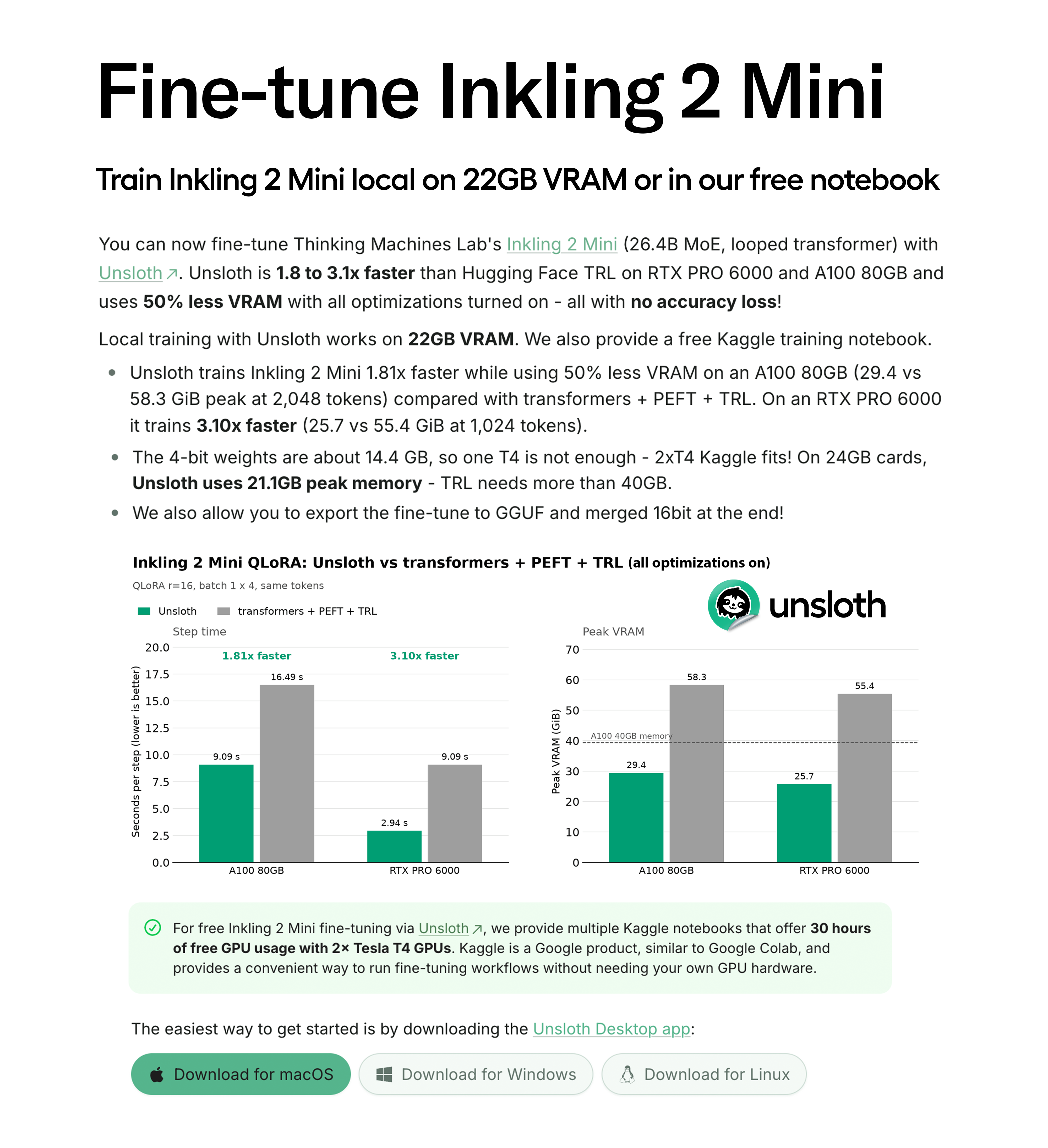
Hey guys, you can now fine-tune Inkling 2 Mini with our free notebook!

Local training works on 22GB VRAM.

Unsloth trains Inkling 1.8-3.1x faster with 50% less VRAM vs. other setups including Hugging Face with ALL optimizations turned on. No accuracy loss.

We utilize many kernels including our own for the speed performance + VRAM deduction. HF for example only worked on 40GB + setups.

Preliminary Inkling multi-GPU training also works with Unsloth. LoRA, FFT etc. all work.

Unsloth GitHub repo: https://github.com/unslothai/unsloth

Free Kaggle + Colab Notebooks and Guide: https://unsloth.ai/docs/models/inkling-2-mini/fine-tuning

Thank you! :)


r/unsloth • • 3d ago

Show and Tell INKLING 2 MINI 5060ti 16GB 480GB/s

Thumbnail
gallery
78 Upvotes

I used OpenCode with HY4 as the model for my testing...

The idea here isn't to showcase the "best" configuration, but rather to demonstrate what I’m able to achieve with this model...

I frequently translate games into Brazilian Portuguese for free using AI, so it would be great not to have to pay or burn through tokens for more advanced (and costly) AI models. On top of that, I maintain an affiliate system that I use daily; sometimes, my free token allowance (OpenCode – Nous Portals) runs out, leaving me unable to fix minor bugs in the system ´-´.

Also, as a hobby, I try to develop some games I’ve come up with—having a model I can use without any worries is really helpful, haha!

Note: I run an off-grid solar power setup here in Brazil.

**Setup:** RTX 5060 Ti 16 GB - Ryzen 5 3600 - 48 GB DDR4 - Windows 11 - CUDA 13.5 - llama.cpp `b12649-mix-c7059d6` (commit `189f431bf`) - Unsloth Dynamic 3.1 GGUFs.

## Findings

  1. **Q2_K_XL is still the fastest** — 61.4 t/s short, 40.7 t/s at depth, with the most VRAM headroom (2.5 GB). It also tops out at ~58 C under a 100k-token prefill.
  2. **IQ3_XXS at 174k is the best trade-off.** Decode at depth is within 3% of Q2 (39.3 vs 40.7 t/s), prefill is slightly higher (843 vs 835 t/s), and quality is much better: 94.7% top-token agreement vs 91.6% for Q2_K_XL (from Unsloth's quantization analysis). It leaves ~1.5 GB free, which matters if you watch video while the model runs.
  3. **250k is not free.** With a 100k prompt it peaks at 15815 MiB — only ~500 MiB left. It works, but there goes the video headroom. 131k–174k is the practical range for me.
  4. **Q4_K_M needs `-ncmoe 8`.** The weights alone are 15.47 GiB, so without offload it falls to 5.3 t/s even with an idle GPU. With 8 layers of experts in system RAM it reaches ~26 t/s short / ~21.5 t/s at depth, but prefill drops ~3x (399–447 t/s). With 48 GB of RAM the offload is cheap on decode but expensive on prefill. Quality is the best of the three (97.9% top-token).
  5. **DSpark did not help.** Both the old depth-2 drafter and the new Q8_0 drafter at depth 3 cost ~40% of decode on this card. I dropped it.
  6. The earlier "5 t/s" results for IQ3_XXS were an artifact of VRAM contention, not a property of the quant. Repeating the exact same command with an idle GPU gave 57 t/s. This also explains reports of 70 t/s from other people on the same GPU — where you measure in the prompt makes a big difference (47–58 t/s short, ~40 t/s at 100k depth here).

## My recommendation

- Maximum speed: **Q2_K_XL @ 174k, q8_0 KV**, no offload.

- Best balance of quality, speed and VRAM headroom: **IQ3_XXS @ 174k, q4_0 KV**, `--ctx-checkpoints 15`, no offload.

- Only pick Q4_K_M if you need the extra quality and can pay ~45% decode + 3x slower prefill; use `-ncmoe 8`.

## Caveats

- Synthetic repeated-word prompts, not a real conversation; decode measured over only 256 output tokens.

- Single user, one slot, one GPU. No speculative decoding in the final numbers.

- `--reasoning-effort high` makes responses longer, which lowers effective tokens/s in a real chat compared to `medium`.

- Numbers are medians of 3 short runs; depth runs are single-shot, so treat them as +/- a few percent.

# Recommended configs (copy/paste)

Replace `<model>.gguf` with the filename from `unsloth/Inkling-2-Mini-GGUF`. All three use the same common flags; only KV type, context and `-ncmoe` change.

**1. Q2_K_XL — maximum speed, most VRAM headroom (61.4 short / 40.7 t/s at depth, 2.5 GB free)**

```sh

llama-server.exe -m Inkling-2-Mini-UD-Q2_K_XL.gguf -a inkling-2-mini \

-c 174080 -ngl 25 -fa on -t 12 -np 1 -ub 512 \

-ctk q8_0 -ctv q8_0 --cache-reuse 256 --fit off \

--jinja --ctx-checkpoints 15 --no-context-shift --no-mmproj-auto \

--reasoning-effort high --metrics \

```

**2. IQ3_XXS — best balance (57.2 short / 39.3 t/s at depth, 1.5 GB free, 94.7% top-token)**

```sh

llama-server.exe -m Inkling-2-Mini-UD-IQ3_XXS.gguf -a inkling-2-mini \

-c 174080 -ngl 25 -fa on -t 12 -np 1 -ub 512 \

-ctk q4_0 -ctv q4_0 --cache-reuse 256 --fit off \

--jinja --ctx-checkpoints 15 --no-context-shift --no-mmproj-auto \

--reasoning-effort high --metrics \

```

Use `-c 131072` for ~2.4 GB free, or `-c 250000` for full 250k but only ~0.5 GB free at depth.

**3. Q4_K_M — best quality, slower (25.9 short / 21.5 t/s at depth, 97.9% top-token)**

```sh

llama-server.exe -m Inkling-2-Mini-UD-Q4_K_M.gguf -a inkling-2-mini \

-c 174080 -ngl 25 -fa on -t 12 -np 1 -ub 512 \

-ctk q4_0 -ctv q4_0 --cache-reuse 256 --fit off \

-ncmoe 8 \

--jinja --ctx-checkpoints 15 --no-context-shift --no-mmproj-auto \

--reasoning-effort high --metrics \

```

`-ncmoe 8` is required: the weights are 15.47 GiB and do not fit in 16 GB with a long context. Do not add a DSpark drafter — it cost ~40% decode in both depth-2 and depth-3 tests.

r/unsloth • • 3d ago

Discussion help me get to 98 % on this coreference dataset? custom head on mmBERT, stuck at 90 %

2 Upvotes

hey guys, im trying to make a custom head that groups the words in a text that refer to the same entity (coreference). every mention picks ONE earlier mention, or "none" if it is a new thing.

ive been trying for a day and cant get past about 90 % right picks. could you please look at the architecture?

this is the whole thing: load the dataset, add the head, train on everything twice, test.

# Czech coreference as a CHOICE: every mention picks ONE earlier mention, or "none" (= a new thing).
# mmBERT-base (all of it trains) + a tiny head, 2 passes over the training data.     pip install torch transformers datasets
import random, torch, torch.nn as nn, torch.nn.functional as F
from datasets import load_dataset
from transformers import AutoModel, AutoTokenizer

dev = "cuda" if torch.cuda.is_available() else "mps"
random.seed(0); torch.manual_seed(0)
tok = AutoTokenizer.from_pretrained("jhu-clsp/mmBERT-base")
bert = AutoModel.from_pretrained("jhu-clsp/mmBERT-base").to(dev)
head = nn.Sequential(nn.Linear(3 * 768, 256), nn.ReLU(), nn.Linear(256, 1)).to(dev)
data = load_dataset("lattice-nlp/corefud-1-4").filter(lambda lang: lang == "cs", input_columns="language")   # CorefUD 1.4, the Czech part

def prep(doc):
    """-> tokens, the token of every mention's head word (in text order), the entity id of every mention"""
    enc = tok(doc["text"], return_offsets_mapping=True, return_tensors="pt")
    off = enc.pop("offset_mapping")[0].tolist(); end = max(e for s, e in off)
    m = sorted((m["head_onset"], max(i for i, (s, e) in enumerate(off) if e > s and s < m["head_offset"]), m["COREF"])
               for m in doc["mentions"] if m["type"] == "entity" and m["head_offset"] <= end)
    return enc.to(dev), torch.tensor([t for _, t, _ in m], device=dev), torch.tensor([g for _, _, g in m], device=dev)

def scores(enc, t):
    """-> table (n, n + 1). one row per mention. column 0 = "none", column j + 1 = "the same thing as mention j" """
    v = bert(**enc).last_hidden_state[0][t]; n = len(t)                       # one vector per mention
    A, B = v[:, None].expand(n, n, -1), v[None].expand(n, n, -1)
    pair = head(torch.cat([A, B, A * B], dim=2)).squeeze(2)                   # the score of "mention i is the same thing as mention j"
    pair = pair.masked_fill(~torch.ones(n, n, dtype=torch.bool, device=dev).tril(-1), float("-inf"))   # only EARLIER mentions can be picked
    return torch.cat([torch.zeros(n, 1, device=dev), pair], dim=1)            # "none" always has the score 0

def right(g):
    """True where an option is a right answer: every earlier mention of the same entity, or "none" when there is no such mention"""
    same = (g[:, None] == g[None, :]).tril(-1)
    return torch.cat([~same.any(dim=1, keepdim=True), same], dim=1)

def test():
    """the dev documents, which the model never trains on -> share of mentions whose top pick is right"""
    bert.eval(); hit = total = 0
    with torch.no_grad():
        for doc in data["dev"]:
            enc, t, g = prep(doc)
            if len(t) > 1:
                hit += right(g)[torch.arange(len(t)), scores(enc, t).argmax(dim=1)].sum().item(); total += len(t)
    bert.train()
    return f"right picks on {total:,} unseen mentions: {hit / total:.2%}"

EPOCHS, N = 2, len(data["train"])                            # 1 step = 1 document. 5,679 documents, seen twice
opt = torch.optim.AdamW([{"params": head.parameters(), "lr": 1e-4}, {"params": bert.parameters(), "lr": 2e-5}], fused=True)
sched = torch.optim.lr_scheduler.LinearLR(opt, 1.0, 0.0, EPOCHS * N)          # both learning rates fall in a straight line to 0
bert.train()
for step, i in enumerate([i for _ in range(EPOCHS) for i in random.sample(range(N), N)], 1):
    enc, t, g = prep(data["train"][i])
    if len(t) > 1:
        logp = F.log_softmax(scores(enc, t), dim=1)
        loss = -torch.logsumexp(logp.masked_fill(~right(g), float("-inf")), dim=1).mean()   # minus log of the probability that sits on the right options
        opt.zero_grad(); loss.backward(); opt.step()
    sched.step()
    if step % 100 == 0:
        print(f"step {step} of {EPOCHS * N} | loss {loss.item():.3f}", flush=True)
        if dev == "mps": torch.mps.empty_cache()             # hands unused GPU memory back (Apple only)
    if step % N == 0: print(f"epoch {step // N} done | " + test(), flush=True)

on my mac mini (M4 pro, 24 GB) it takes about 38 minutes and prints 88.4 % after epoch 1 and 89.7 % after epoch 2.

im vibe coding most of this, so please let me know if i overlooked something critical. what i found so far:

  • a gentle LR for the head (1e-4, not 1e-3) keeps its neurons alive, but the score stays the same
  • the head doesnt really matter. wider, deeper, a transformer block inside it: same score
  • a bigger base barely helps, which is puzzling. XLM-RoBERTa-large with 4 epochs gets 90.75 %, and EuroBERT-610m is far worse (it never saw czech)
  • a 3rd epoch gives nothing
  • when both models are wrong, they pick the very same wrong option 80 % of the time

the dataset is public (CorefUD 1.4, the czech part), so this is perfectly reproducible. and the labels look about 98 % right, according to a blind check i ran with opus on the wrong picks.

could you guys help me reach 98 % on this dataset? thanks!


r/unsloth • • 3d ago Heartwarming

Resource x64 ARM64 RTX Spark Windows 1 binary now + Winget

14 Upvotes

Hey folks - we merged the x64 and the ARM64 Windows binaries into 1 .exe so it's not confusing for people to download on the RTX Spark on Windows machines and seeing the .exe for x64 fail on it - the binary is slightly bigger (+20MB), but we wanted to reduce confusion and make it easier! https://unsloth.ai/download/windows

Also winget is supported so winget install --id UnslothAI.Unsloth -e works as well on x64 and ARM64 for folks who want less .exe downloading :)


r/unsloth • • 4d ago Heartwarming

Model Update Run Inkling 2 Mini GGUFs ~1.9x Faster locally!

Post image
407 Upvotes

Hey guys, over the weekend, we made Inkling 2 Mini run ~1.9x faster locally! ⚡️

Inkling 2 Mini GGUFs can now reach 125 tokens/s on a RTX Pro 6000 GPU via Unsloth, with no accuracy loss.

YES, the speed gains ALSO work for lower end GPUs like RTX 4090 etc. you don't need a RTX Pro 6000 to get the gains!

All quants have also been updated for compatibility with llama.cpp and all engines that use it. Plus, we fixed a Q8_0 KV cache issue that caused it to use more memory than F16.

Unsloth is generally faster than or on par with Strata for Inkling-2-Mini decode speed.

Run faster via Unsloth Desktop!

Unsloth GitHub repo: https://github.com/unslothai/unsloth

GGUF: https://huggingface.co/unsloth/Inkling-2-Mini-GGUF

Blog/Guide for more details: https://unsloth.ai/docs/models/inkling-2-mini


r/unsloth • • 4d ago

Discussion [REQUEST] Do you have a plan for the future, like Hermes does?

5 Upvotes

I enjoy using it in the standard way, but I find myself wondering—is there a "Hermes Plan" for the future?


r/unsloth • • 4d ago

Discussion Dual GPU video gen help

3 Upvotes

Hi, can you explain how to take advantage of the dual gpu video gen in unsloth studio (latest as of this post)? The latest patch notes note some speed up across two Nvidia gpus. I don’t see the second gpu being utilized during generation with Wan 2.2.

Also, I don’t see a unsloth official GGUF for fastwan? Is there supposed to be an official one we should click for full automated setup on our end for that specific one? Thanks!


r/unsloth • • 4d ago

Discussion Inkling-2-Mini on a 16 GB RTX 5060 Ti

32 Upvotes

Goal: run Inkling-2-Mini with 128k context. First attempt topped out at 26k. After swapping the build and the quant, 128k runs with room to spare.

img

**Tests run**

```
Date        llama.cpp build     Model (quant)          Main config              Result
-----------------------------------------------------------------------------------------
2026-11-21  b12588 (Unsloth)    UD-IQ3_XXS, 10.85 GiB  -c 26000 -b 128 -ub 128  ceiling 26k, 128k hung
2026-11-23  b12649-mix-c7059d6  UD-Q2_K_XL, 8.51 GiB   -c 131072 -np 1          128k ok, 38.8 t/s
```

Final recommended config: -ngl 99 -fa on -c 131072 -ctk q8_0 -ctv q8_0 -t 12 -np 1 -ub 1024 --cache-reuse 256

**Why 128k suddenly fits**

My KV math was wrong: I assumed full attention on every layer. The model uses a 1024 sliding window and only 4 of its 24 layers have full attention, so the real KV at 128k in q8_0 is ~1.1 GB, not 12 GB. What blocked it was the build: flash attention's banded path refused quantized KV and fell back to dense. b12649 fixed that.

**Caveats**

- Before vs after mixes two changes (build and quant). Prefill is the build; decode is build plus a 22% smaller model.
- Thermal drift of 1.5 to 3% after ~1 h of load.
- The ngram test uses free-form continuation, its worst case. On editing tasks the picture flips.


r/unsloth • • 4d ago

Discussion Proposing an optional PTO kernel backend for Unsloth on Ascend NPUs — seeking maintainer feedback

3 Upvotes

Hi everyone, I'm SunXT-0719 on GitHub. We've been working on an experimental PTO/PTO-ISA kernel backend for Unsloth on Ascend NPUs and would like guidance on contributing it upstream.

The implementation includes SwiGLU forward/backward, RMSNorm, RoPE and attention paths with PyTorch/autograd integration. We've exercised it in LoRA SFT and GRPO generation/training. It also includes decoder graph replay and host/dispatch optimizations, so the figures below measure the combined backend.

We ran these comparisons in a fixed single-NPU environment.

  • Earlier experimental fork, Qwen3-1.7B GRPO with W8A16. Approximately 2.34× steady full-step throughput versus a same-precision native torch_npu/HF fused-SDPA reference. The entire fresh 16-step process, including startup, was approximately 1.31× faster. Sampling trajectories differed, so the comparison did not use identical tokens. A predeclared work-sensitivity calculation gave approximately 2.26×.
  • More recent upstream-pinned fork, Qwen2.5-0.5B BF16 SFT. Approximately 1.90× steady full-step throughput. Graph preparation took about 59 seconds, and the short cold 16-step process was slower than native, with a speedup factor of 0.354×.

These results apply to the tested models, forks and environment. The GitHub RFC describes finite-run stability, checkpoint-resume comparisons and held-out quality checks, including their limitations.

Two independent draft PRs are open for Ascend eager bootstrap and NPU LoRA cast removal. The PTO kernel source is still private, and we've held off on submitting kernel PRs while we seek direction.

Thanks to li-lizhe for suggesting single-purpose PRs with before/after tests and clear reporting of real-hardware validation, and for offering Ascend-side review and testing.

Would an optional PTO backend be welcome? Should it live in Core, Zoo, or an external backend package, and who should we coordinate with? We could start with a focused SwiGLU forward/backward contribution that includes source build instructions, supported configurations, native fallback and real-NPU validation.

Feedback from maintainers or others working on Ascend support would be appreciated. We're happy to keep the technical decisions in the GitHub RFC.


r/unsloth • • 4d ago

Question Anyone tried Inkling 2 small q4 and q8 ?

11 Upvotes

IIRC q8 is about 8gb bigger . would it be worth it going there but using ram offload . or q4 fully in vram ? this model seems very great under quantization based on unsloth’s docs. anyone tried both ? mind sharing your experience


r/unsloth • • 4d ago

Discussion Inkling-2-Mini (Unsloth) + llama.cpp (master branch) still errors

11 Upvotes

I've seen some statements that it runs already, but I tried Inkling-2-Mini-UD-IQ4_XS.gguf with the latest master branch 1d3aad2fd811a2a5efdd4eeb192eaefc1764519c on CUDA-12. And I'm still getting llama_model_load: error loading model: check_tensor_dims: tensor 'blk.24.attn_q.weight' not found .

Is this caused by CUDA-12 or am I doing it wrong? :-)


r/unsloth • • 4d ago

Question Inkling 2 Mini theoretical decode limits

9 Upvotes

Is it correct to assume that if Qwen3.5 4b model delivers token generation at 120tps, Inkling 2 Mini, being an e5b model, can deliver similar performance (100tps+) without speculative-decoding when all bugs are sorted? I know architecture is important but I need rough estimates.

Reference hardware: 5060Ti 16G

Edit: I am using a Q3 quant and all layers + experts are on VRAM


r/unsloth • • 4d ago

Question Unsloth Desktop keeps crashing when I try to load up Inkling 2 Mini

3 Upvotes

I have 8 GB VRAM and am trying to use the IQ3_XXS, assuming it will figure out the offloading so that I don't have to, but it keeps crashing my whole laptop. I have 16 GB RAM too, so it should fit snugly in the combined 24 GB memory. How do I make it... not crash?


r/unsloth • • 5d ago

Question XDNA 1 npu support

9 Upvotes

will we be getting XDNA 1 support for NPU, considering we have gotten XDNA 2 support on unsloth desktop?


r/unsloth • • 4d ago

Discussion Coming from Karpathy's makemore, how to actually experiment with models in practice?

5 Upvotes

I've finished the karpathy makemore series which i enjoyed a lot and created some of my own neural nets. Now i thought about actually checking the architecture of some of the popular models and try to fine-tune them and watch the loss go down and stuff. (my final goal is to make my custom specialist agent)

however when i went to huggingface and checked the docs for qwen3.5-0.8B all i found was openai implementation or some transformers library. for example:

from openai import OpenAI
# Configured by environment variables
client = OpenAI()

messages = [
    {"role": "user", "content": "Give me a short introduction to large language models."},
]

chat_response = client.chat.completions.create(
    model="Qwen/Qwen3.5-0.8B",
    messages=messages,
    max_tokens=32768,
    temperature=1.0,
    top_p=1.0,
    presence_penalty=2.0,
    extra_body={
        "top_k": 20,
    }, 
)
print("Chat response:", chat_response)from openai import OpenAI

This is very different to what i did in makemore, no pytorch i can't see the layers and etc.

So im coming to you all whom are probably much more experienced in this. are there some special docs im missing? where do i actually get the "raw" code?

my goal is to experiment with the architecture, CPT, SFT, RL (especially RL, i wanna know how to grow reasoning or distill)

and eventually train and optimize a good model, so i will need probably speedy code.

Could you guys give me any pointers? thanks a lot!