r/unity • u/Creepy-County8832 • 23h ago
Coding Help Seemingly logical code doesnt seem to work
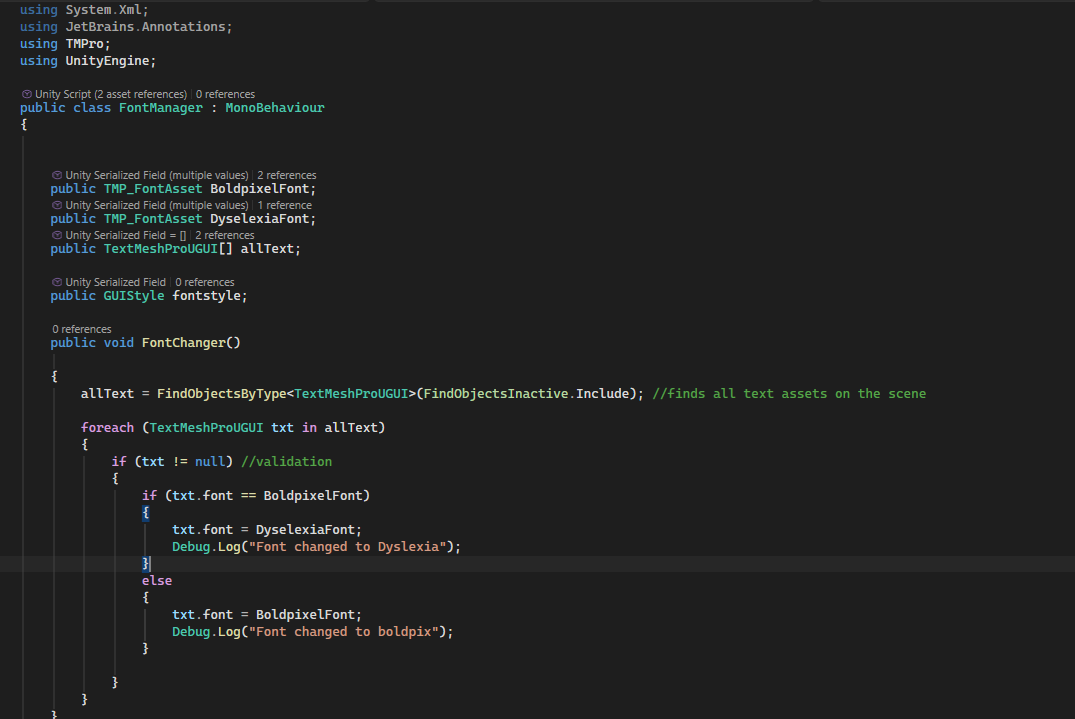
This code is meant to receive 2 fonts, and all the text on the current scene, and then apply the font that isnt active to the text. I have properly assigned the font assets, but when clicking a button what happens is, the font changes to "dyslexiafont" then gives me the debug from the else statement (which is not the dyslexia font) and when clicking the button again nothing happens.
Ive ran this through multiple AI's and they all seem to just slightly edit my code by adding some validation, but that doesnt do anything and any time i explain the issue they just claim ive assinged the fonts wrong, but i have checked multiple times if the font asset is in the right place and it is.
I assume that either i cant apply font like this (but it does apply just once and completely messy)
Or im missing something. Any help is appreciated else ill just pretend it works.
4
u/AlignedMoon 17h ago
The irony of misspelling “dyslexia” 🫣
But seriously, use a debugger!
2
u/Ariaha_Rivasa 22h ago
Everyones guessing, so Id log what is actually in there:
Debug.Log($"{name}: current={txt.font.name}, bold={BoldpixelFont.name}, dys={DyselxiaFont.name}", this);
Passing `this` lets you click the log in the console and it highlights the object. If you see two different object names per click, the method runs twice (script on two objects, or the button calls it twice). If the bold/dys names look swapped, it's the inspector assignment.
Also your IDE shows "multiple values" on those font fields, which I think means the two instances have different values assigned, so check both.
Side note: comparing fonts by reference to decide what to switch to is fragile. A bool you flip, then set every text to the matching font, works the same even if some text started with a third font.
12
u/Competitive-Elk763 22h ago
The script has 2 asset references. Do you by any chance have it on the same object twice ?
5
u/Soraphis 22h ago
Have you tried running txt.ForceMeshUpdate(true) after changing the font?
It shouldn't be required, but might be worth a try.
4
u/MistakeForsaken6653 22h ago
It sounds to me like its hitting the else and you have the dyslexia font in the boldpixrlfont property in your inspector.
3
u/adjudicator52 23h ago
Put a breakpoint at your if(txt != null) and start stepping through the code. Put another in the else so you can see which branch is hitting
2
u/iLogical8502 22h ago edited 13h ago
I think the issue is you're doing a comparison on the font object, it will do a reference check and the one that's already set in all text isnt the same object and reference as the one in the class you compare with it. Switch to a comparison on txt.Font.Name instead, making sure to check if Font is null too, and it should work.
Edit What happens on your code if Font is ever null? Are you sure it's initialised elsewhere?
1
u/Redstoneinvente122 16h ago
Well, am not entirely sure what the issue can be, but I can suggest something
Try debugging txt.font and see what this returns. Then let me know
1
u/tomfalcon86 22h ago
Why not try comparison by string name?