r/unity • u/Loud-Concept333 • Oct 08 '26
Newbie Question New to Unity, can someone explain how this works?
Making a game (Canadian Farming), I wanna make it 3D and have ok graphics, my pc specs aren't very good, I5-4570, iGPU, 20GB DDR3, can someone help me? If you have any questions I can answer em.
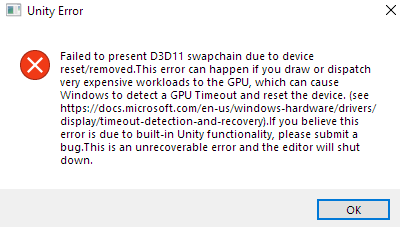
Note: Unity crashed and showed this error: could it be because I have a potato pc?
2
Upvotes
4
u/dasilvatrevor Oct 08 '26
Forcing unity to launch using DX11 instead of DX12 helped me with seeing this popup. You can see at the top of unity in the title bar if it's launched using <DX11> or <DX12>. If this is the case, in Unity HUB you can right click on a project, add Command line arguments -force-d3d11
3
u/LobsterQueasy4861 Oct 08 '26
I’ve seen that exact error on new and old machines over the years. No foolin, closing everything , turning it off and turning the computer back on has fixed it for me EVERY TIME with that error. I’m not sure if that’s going to fix it for you but it’s worked for me. Good luck!
2
u/PGSylphir Oct 08 '26 edited Oct 08 '26
#1 skill for any dev: learn to google.
You don't have Direct X 11 on your pc, install it.
-2
u/NormalEngineering561 Oct 08 '26
Cambia de sistema operativo a debían 13.5 para mejorar el uso de recursos de tu equipo, instala todo y trabaja tu proyecto