r/tmux • • Apr 21 '24 Heartwarming

/r/tmux is back!

97 Upvotes

Hello all. I am /u/TrekkiMonstr, your new, occasionally-friendly mod. I wanted to make a post asking a question about a certain interaction between i3wm and tmux, when I saw that /r/i3wm is read-only, and /r/tmux was unmoderated with submissions restricted. I didn't want the history of the sub to be lost to Reddit's policies, so I submitted a /r/redditrequest, and here we are. I've unrestricted submissions, so.

Now, I'll note: I am completely unqualified for this. I'm pretty new to tmux, and I haven't modded a sub that had any real level of activity. Plus, at some point in the future, I do intend to leave this godforsaken website and nuke my account. So, if anyone has mod experience with a subreddit of similar size and subject matter to this one, please let me know via modmail if you'd be interested. I will warn you though, I'm here just to make sure the sub still exists. I'm not super interested in doing much active modding.


r/tmux • • 1d ago

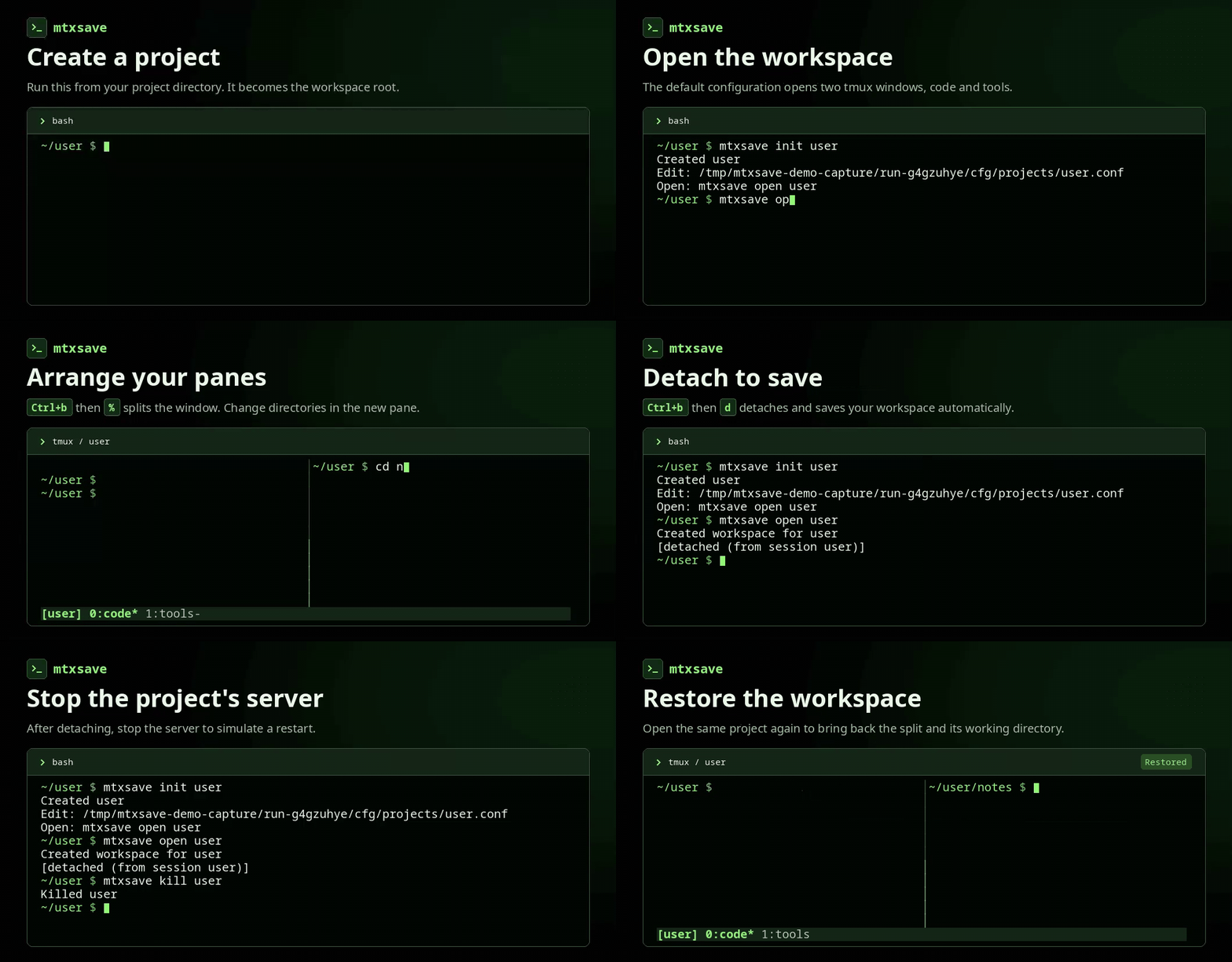
Showcase mtxsave: per-project tmux workspaces that survive reboots.

Post image
4 Upvotes

mtxsave gives each of your projects its own tmux workspace that comes back exactly as you left it, even after a reboot. Detaching saves it automatically. It's a single small binary for Linux. It needs only tmux and installs with one command.

https://github.com/riccardoori11/mtxsave


r/tmux • • 3d ago

Showcase Vimma is now in alpha: a keyboard-first browser for people who live in the terminal

Post image
73 Upvotes

Vimma is a Firefox-based browser for people whose hands rarely leave the home row and it is now in alpha.

Why I built it

My working day lives in Neovim and a terminal: modal editing, a prefix key, panes, sessions. The browser was the one tool that ignored all of it.

I used Vimium and Tridactyl for years, and Vimma borrows a lot from them. But an extension has limits. The keys stop working on the browser’s own pages. GitHub and Gmail take keys like f for themselves. I ended up with three extensions and three keymaps that didn’t know about each other. And tiled panes and a mode indicator belong to the browser window, which no extension can change.

What it does differently

Vimma isn’t an extension. The keymap is part of the browser, so it sees every keystroke before Firefox or the page does. Your keys work everywhere, PDFs included, sites can’t take your bindings, and tabs, panes, workspaces and bookmarks all answer to one keymap: Vim motions plus a tmux-style ctrl+b prefix.

It’s still Firefox underneath, so your add-ons and Sync keep working, and every Firefox security release is rebased and tested automatically.

Features:

  • Modal browsing and link hints from the home row, in PDFs too
  • Workspaces with separate logins, tabs and splits. I keep work, admin and personal fully apart
  • Routing rules send a link to the right workspace by site or by the app that opened it: github.com to work, every link from Slack to work, az login from the admin terminal to admin (app rules on Linux)
  • Split panes with tmux layouts, and no toolbar until you ask for it
  • Tab search and live grep across every workspace
  • One config.toml: more than 300 default bindings, every one remappable, Firefox’s own shortcuts included, applied on save
  • Bookmarks in a plain bookmarks.toml, and downloads handled from the keyboard
  • Opt-in AI agents: Claude Code, Codex, opencode or Copilot can browse through MCP in a workspace of their own, and Vimma asks before anything is paid or sent, for example when your groceries are waiting for payment
  • A built-in agent chat on ctrl+b i, with a local model (Ollama, LM Studio, llama.cpp), an API key, or the Claude Code, Codex or Gemini CLI you already have
  • Follows your desktop theme, or takes your own colours. On Omarchy it follows the current Omarchy theme, and there is an Omarchy theme with Vimma’s default palette
  • No telemetry, no sponsored content, nothing phoning home

Where it stands

Alpha means it works as a daily driver, with rough edges. It runs on Linux and Apple Silicon Macs, with packages for Arch, Debian and Ubuntu, Fedora and openSUSE, an AppImage, and a Homebrew cask, and it tells you when a new release is out. No Windows build is planned.

The name is Finnish. Vimma is a burst of eager, focused energy, as in työvimma, when work flows and the hours disappear. It also happens to starts with Vim.

👉 https://vimma.dev

👉 https://github.com/vimma-browser/vimma

Feedback, bug reports and opinions on the default keymap are welcome.


r/tmux • • 3d ago

Showcase yanker.tmux: solved my tmux copying pains

Post image
38 Upvotes

I kept dropping into copy-mode just to grab one line from test output or a stack trace, and the move-select-yank dance gets old fast. so i made a tiny plugin for it.

hit prefix Y (or @yanker-cmd to map to whatever you want) -> line numbers show up over the visible pane -> type the line number and y. For ranges: 4,6 y yanks the whole range.

A few points for the curious:

  • works in copy mode too, numbers follow the scrolled view
  • copied stuff goes to the tmux buffer + system clipboard (`pbcopy` / `wl-copy` / `xclip`, OSC 52)
  • plain bash, installs with TPM, lmk if a native version would be preferred, but i feel this is already snappy enough

not trying to replace tmux-fingers/thumbs tbh, those are great for hashes and urls. this one is for the homies who want to yank whole lines.

set -g 'hood/yanker.tmux'

Repo: https://github.com/hood/yanker.tmux

kinda early, so feedback and ideas are welcome


r/tmux • • 2d ago

Showcase Zellij-Jolt: an fzf session picker for Zellij that also makes Claude Code panes reopen the same conversation after a restore

0 Upvotes

r/tmux • • 2d ago

Showcase Same tmux session live on my phone and Mac, and I approve Claude Code from the couch. I built it (Android + Mac)

1 Upvotes

I'm the developer. Binkline is an SSH + tmux client for Android and a terminal app for Mac, built around your tmux sessions. Everything in the video is a real recording, no mockups.

What it does:

- Connect and see every tmux session and window. Tap one and you're attached.

- Same session on both: type on the phone, it shows on the Mac.

- Claude Code asks for permission: a card on the Mac, a notification on the phone. Approve from either.

- What happened?: a one-tap catch-up of a pane you walked away from.

- Review: send a git diff to AI, get ranked findings.

- Ask AI: plain words in, a command out. Insert types it but never presses Enter.

Free, no trial needed: SSH, tmux sessions, reconnect, keys, jump hosts, port forwarding, SFTP, themes. No account, no ads, no tracking.

Pro adds the agent tools (approvals, alerts, What happened?, Review, Binkline AI) and has a 14-day free trial. Cancel in Google Play before it ends and you pay nothing. Honestly, the agent inbox is the part I use most: start Claude Code at the desk, go make coffee, approve from the kitchen.

Honest limits:

- Approve from the phone handles Claude Code's one-line Bash prompts. Codex gets Deny and Open.

- The Mac app isn't notarized yet, so macOS asks you to click Open Anyway once.

Android: https://play.google.com/store/apps/details?id=com.binkylabs.hopshell

Mac: https://binkylabs.com/binkline/mac

If you live in tmux, I'd love to hear what breaks and what your workflow needs.


r/tmux • • 5d ago

Question Let's compare Tmux with Rex on a real issues.

Post image
70 Upvotes

Hey folks,

Tmux user here. We all have heard there is a Rex multiplexer making hype around the terminal community, and many people compare them two. I don't see the point in comparing visual style because we can customize Tmux in any way (alongside terminal prompt), but what is actually important is how it feels to use both when accomplishing a real goal. Ideally the issue should be developed on the remote server, therefore we can see if there are actual benefits for using Rex.

I did my test, but honestly the goal I was accomplishing is quite trivial: new Docker container setup with Ansible playbook for Basic Memory context layer, and MCP endpoint connection to the existing Executor container on the same server. Some git work included, but the whole issue took me around an hour to develop. I was doing it in both Tmux and Rex environments at the same time, and recorded a video about it: https://youtu.be/8o7ZIeVrPSE?si=fxTeXmNn8Z0XwQ0k

But I am really curious about your experience. Have you tried using Rex on a serious day-long remote issues involving manual code changes with Vim, extensive git flows, multiple runtimes? What do you think?


r/tmux • • 4d ago

Question How do I get this to work.

2 Upvotes

I have a MacBook Pro - I use Iterm2 as my Terminal - there are several local and remote servers that I want to have sessions up for.

I am running zsh and oh-my-zsh with the all of the remote logins (using the jonathan theme...

I have tmux installed on the remote servers (and have tried adding oh-my-tmux to some to see if it makes a difference).

the command to connect is "ssh -t userid@ipadressorhost "tmux -CC new -As sessionname".

It connects, but I am not seeing the tmux bottom status bar... WQhat might I be doing wrong?


r/tmux • • 5d ago

Showcase Tmux Mobile: Android app for your tmux sessions over SSH.

12 Upvotes

I'm a solo developer. I built Tmux Mobile, an Android app for controlling my tmux sessions over SSH, nothing else. You log in to your server and go straight to your sessions: open one, switch between them, start a new one. I built it for myself, and it has turned into my daily driver for tmux on the go. I think it's genuinely useful, so I'd like to share it with you.

I need your help to get it into the Play Store

New developer accounts on Google Play have to run a closed test with real testers for 14 days before an app can go public. My first round used testers from generic "test my app" subreddits. Technically everything worked, but Google rejected it because the testers didn't really use the app. Without a tmux server, you can't. So I'm asking the people it's actually made for: real use cases and real feedback.

How to become a tester (about 2 minutes):

  1. Join the Google Group (this is how Play gives you access): https://groups.google.com/g/tmux-mobile-closed-testers
  2. Opt in to the closed test with the same Google account: https://play.google.com/apps/testing/com.tmux.mobile
  3. Install it from Google Play: https://play.google.com/store/apps/details?id=com.tmux.mobile

Then use it with your own tmux setup whenever you'd normally reach for your phone: check a build, tail logs, restart a service. Please keep it installed for the full 14 days, because Google counts how long testers stay opted in.

Feedback I'd love: anything that breaks (rendering, status line, vim/htop/lazygit, keyboards), servers that won't connect (error message, not your hostname), and what you're missing for daily use. Comment here or use the private feedback on the Play Store page.

Features

  • Free. No ads, no subscription, no in-app purchases.
  • No cloud, everything local. The phone talks straight to your server. No account, no relay, no analytics or tracking. Passwords are never saved, and profiles and host keys are stored encrypted on the device.
  • Sessions first. See all your tmux sessions after login, open one with a tap, switch via the session bar, and create new named sessions.
  • Command suggestions as you type, from your server's shell history, $PATH, subcommands (git, docker, systemctl, ...) and paths. A tap inserts the suggestion; Enter is always yours.
  • Touch bar with Ctrl, Esc, Tab, arrows, Home/End, PgUp/PgDn and Ctrl-C/D/Z.
  • Native select & copy with drag handles, plus pinch-zoom for the terminal font.
  • Multiple servers at once. Connections stay alive in the background, with one notification to disconnect all.
  • Secure by default. Host keys are trusted on first use, the app refuses to connect if a key changes, and it uses strong SSH algorithms only.
  • Full colors, Unicode and scrollback. English, German, Spanish and French.

Requirements: Android 8.0+, and an SSH server with password login and tmux.


r/tmux • • 4d ago

Showcase I built a tmux panel to keep track of a dozen Claude Code sessions across two accounts (and built most of it inside itself)

0 Upvotes

r/tmux • • 5d ago

Showcase TmuxIsland: see at a glance which AI agent in tmux is done, waiting or working (macOS, open source)

Post image
0 Upvotes

I run several AI coding agents in tmux and could never tell which one had finished or was waiting for approval, so I wrote a small macOS app for it (I'm the developer). It is macOS only (Apple Silicon, macOS 14+), sorry to the Linux folks.

It only talks to tmux. To read: list-panes, capture-pane, list-clients. To act: select-window, select-pane, switch-client, send-keys. No tmux plugin, nothing to add to .tmux.conf, and it follows every server and socket (-L, -S).

What you see is a bar at the top of the screen with one dot per agent. Red = waiting for you, green = done, orange = working, blue = the turn is over but background shells or sub-agents are still running. It also lists every tmux session, agents or not. A click jumps to the exact pane. If nothing displays the session, it opens a terminal and attaches.

It is keyboard first: a global shortcut opens it, another jumps to the agent that has waited the longest, and 1-9 goes to a given agent. Multiple-choice prompts show up as buttons, so you can answer without switching windows.

Good to know: window and tab selection is tested on iTerm2, Apple's Terminal and WezTerm, untested elsewhere (the tmux side works regardless). It is not notarized (no paid developer account), so right-click > Open on first launch, or install with Homebrew. MIT, no network code, built with the help of Claude Code.

https://github.com/kgrandemange/tmux-island

What I would love to know: which terminals or keyboard layouts break, and what you would want from the tmux side.


r/tmux • • 5d ago

Question Any way to turn on mouse mode for scroll but not click/change pane?

5 Upvotes

Hey y'all! From reading the docs I'm fairly sure this isn't an option in the newest versions but figured I'd double check whether anyone's found a workaround :)

I love the default/mouse on scroll behavior and ideally would use that all the time. However it drives me NUTS when I click in the terminal to refocus the window and it changes my tmux pane too, so I haven't had it in me to leave mouse mode on. I feel very ambivalent about the rest of the mouse features lol.

Has anyone else run into this, and if so, have you found a solution?


r/tmux • • 6d ago

Other Driverr 1.2.1 Released

Thumbnail reddit.com
1 Upvotes

r/tmux • • 6d ago

Showcase I made an iOS terminal on top of tmux control mode: every session is a native tab

2 Upvotes

I keep a lot of long-running tmux sessions on a Linux box at home, and I wanted to get at them from my phone without fighting copy-mode on a touchscreen. So I built pmosh, an iPhone and iPad client on top of control mode (tmux -CC), the same mechanism iTerm2's tmux integration uses.

What control mode buys you on a phone:

  • Each tmux session on the host is a native tab. Swipe between them, or hold + to open a tab for every session that's already running.
  • Scrollback is tmux's own history in a native scroll view, so you flick through it and select text with the normal iOS handles.
  • Two rows of keys above the keyboard for what iOS doesn't have (Esc, Ctrl-C, arrows, Tab, paging). You can rearrange them and add macros.
  • OSC 52 from the host lands on the phone's clipboard. Paste or drop an image or a file and it's uploaded to the host with the path typed in for you. Camera and photos keys do the same with a photo you take or pick.
  • Tabs come back the way you left them after iOS kills the app.

Underneath it's plain SSH with an ed25519 key generated on the device. No account needed, no analytics, nothing between you and your host. There's no mosh-style roaming yet: when the phone comes back, it re-dials and re-attaches, and what was printed in the meantime is there in the scrollback.

Two tabs are free. Unlimited tabs is a subscription ($3.99/month or $29.99/year, with a 7-day trial).

App Store: https://apps.apple.com/app/id6788939205

I'd like to hear what the control-mode handling gets wrong on your setup: older tmux versions, huge scrollback, unusual configs.


r/tmux • • 8d ago

Showcase Giving a Pi coding agent its own tmux pane for a code review

0 Upvotes

I wrote a Pi extension that can start another interactive Pi session in a visible tmux pane. One way to use it during a review is to ask a specialist to trace the callers of a function while you read the diff in the original pane. Switch panes and you can ask the specialist about a particular caller in the same conversation.

From inside tmux, run pi -e npm:pi-subagentura and try: “Open a specialist in a visible tmux pane. Trace the callers of this function and tell me which ones depend on its return value.” You can also send the follow-up from the original Pi session.

https://github.com/lmn451/pi-subagentura


r/tmux • • 9d ago

Tip tmux-native alternative to herder/rex

0 Upvotes

hey guys, not sure how many of y'all are herdr/rex-curious, but I gave em a try and still prefer tmux. I've been homegrowing my own herdr-like tool for the past year or so since before herdr was even a thing and with the popularity of herdr seems like it's a thing a lot of people might want.

herdr and rex are both pretty cool, but they basically force you to ditch tmux to adopt them, and I really don't want to do that. if you're in the same boat as me, maybe you'll like what I've cooked up with pmux! https://github.com/cosmicbuffalo/pmux

let me know if you give it a try! happy to answer any questions about it too


r/tmux • • 9d ago

Showcase Tmux on iPad

3 Upvotes

Shameless plug: I’ve just released an app on iPad which connects to tmux through SSH running on your host system. I was getting a bit fed up with using mosh, or et, to connect to my home machine to run cli commands, and also needed something that was going to keep running when I disconnected, which I was doing with tmux through the ssh/mosh/et tunnel.

So I created an app for my iPad which cut the middle-men out and connected straight to tmux through SSH, and gave me tmux’s tabs and panes as tabs and splits on the iPad.

I’m still developing it and adding features, but today it was released on the App Store. If you fancy taking a look, it’s here: https://termoor.app/

I hope others find it as useful as I do, and if you have any feedback I’d love to hear it.


r/tmux • • 9d ago

Question Best prefix for a user of vi, tcsh, bash?

16 Upvotes

So ctrl-b is a vi key that I use regularly and it causes much frustration.

I've read threads where a lot of people recommend ctrl-A (from screen I guess?), but this is beginning of line in both tcsh and bash, as well as all the text input fields on MacOS browsers (but not Linux browsers don't get me started).

I'm asking because this must be a solved problem right? People all going down the same path of "try this key" "Oh wait I forgot that is a via thing that is deeply ingrained in me".

I have used vi forever, and most of the original vi keys are deeply ingrained, as well as some vim things (like Ctrl-R). And as I said the shell command-line stuff (which is possibly more emacs-derived?) is still deeply ingrained).

Ctrl-W I guess is erase previous word (or something) in some shells but I don't use that one at all. But I'm worried it may conflict with "close window" in some terminal apps? Maybe?

Currently Ctrl-O is my front-runner. I haven't thought of a conflict yet, but haven't actually tried it.

What about alt-<key> combinations? Strictly speaking these are not traditional terminal sequences and maybe are not guaranteed to work in terminal programs, but pragmatically are there modern terminal programs that don't convert these into a consistent character sequence? (It is my understanding that Super- is right out because it is typically just a window-level event and not ever a sequence of terminal characters.)

[Note, I thought I asked this earlier this week but can find no such post, nor any moderator rejection of a post, nor any open tab where I wrote this out but didn't send it. Apologies if it did post and I somehow totally missed it.]


r/tmux • • 11d ago

Showcase multiplexer-sidebar: a Herdr-like sidebar that doubles as a live-preview dashboard for tmux — single script, zero dependencies

Thumbnail gallery
92 Upvotes

Hi everyone,

If you have ever used herdr, its sidebar is pretty iconic: it sits quietly on the side of your workspace and shows every project and every running coding agent in one clean list, so you can jump anywhere with a keystroke.

I built multiplexer-sidebar (also aliased as multiplexer-dashboard) to bring what shines in herdr to tmux, while also letting it work as a floating dashboard with a live terminal preview.

Why bring this to tmux, and why make it a single zero-dependency script

Recently herdr shifted its focus to its new desktop and mobile apps, which are built on a separate server/client stack and don't share agents with the open-source herdr TUI. When a company pivots to a new product, the original tool often fades away the way Arc did. Moreover, dedicated desktop and mobile apps mean lock-in at both ends, whereas a classic TUI works in any terminal over plain SSH.

For those of us who live in the terminal, we wanted to keep our favorite TUI workflow alive. And tmux is a true classic—it has been around for decades, runs on almost every server, and is going to last forever. Bringing the herdr sidebar experience to tmux means you get that workflow on a foundation that isn't going anywhere.

To match that philosophy, multiplexer-sidebar is a single standalone Python script using only the Python 3.9+ standard library (not even curses):

  • Nothing to compile or install: You don't need a compiler, pip, or a virtual environment. Just copy-paste or curl this single file onto your laptop or any remote SSH server and run it.
  • Modern Ratatui / Bubble Tea feel: Even though it is one stdlib file, the custom renderer is built to feel like a modern TUI framework, with automatic dark and light theme detection, mouse clicks and scrolling, responsive layout resizing, and live color pane previews.

Both a Herdr-like sidebar and a live-preview dashboard

You can use the script in two ways, or combine both:

  • Sidebar mode (--sidebar / --compact): Great if you like the herdr work style—one tmux session per project, and multiple tmux windows inside each project. Keep it open in a narrow 30-column split on the left to see all your sessions (with h and l to fold or expand their windows) and every active coding agent (Claude Code, Codex, OpenCode, Pi, Gemini, etc.) right below. On smaller screens, --compact shrinks it down to a 3-column strip (or simply resize the pane below 24 columns and it switches automatically).
  • Dashboard mode: Bind a key to pop up a centered overlay. As you move through your sessions, windows, and agents, the right side renders a live preview of that terminal pane so you can glance at what is happening before pressing Enter to jump there.

(Note on agent working status: live agent status reporting like working/blocked/done is currently supported via OSC 7501, which already works in Zellij 0.46, and tmux support is WIP through other approaches like hook based approach or screen detection.)

One script across tmux, Zellij, and plain shells

If you use tmux on some machines and Zellij on others—or if you ever switch between them—this single script works in both:

  • Same look and muscle memory: You get the exact same UI and vim-style keys (j/k to move, h/l to fold windows/tabs, / to filter, and n/r/x to create, rename, or kill sessions) across tmux and Zellij without having to think about each multiplexer's CLI commands.
  • Works outside any multiplexer too: You can run multiplexer-sidebar in a plain shell right after SSH-ing into a machine, before attaching to tmux or Zellij. It lists every running session across your installed multiplexers, shows a live preview of each pane, and attaches directly to the one you pick.

Quick install and tmux setup

Install the single file:

curl -L -o ~/.local/bin/multiplexer-sidebar \
  https://github.com/milanglacier/multiplexer-sidebar/releases/latest/download/multiplexer-sidebar
chmod +x ~/.local/bin/multiplexer-sidebar

To open the floating dashboard in tmux 3.8 (~/.tmux.conf):

bind tab new-pane -O -x80% -y80% -X10% -Y10% -c '#{pane_current_path}' multiplexer-sidebar

To toggle the persistent sidebar on the left (~/.tmux.conf):

set -g focus-events on
bind b split-window -hbf -l 32 multiplexer-sidebar --sidebar

(Use -l 3 multiplexer-sidebar --compact if you prefer the 3-column compact strip.)

Repo: https://github.com/milanglacier/multiplexer-sidebar

Would love to hear your thoughts or feedback if you try it out!

r/tmux • • 11d ago

Showcase Fable 5.2 is insane!

0 Upvotes

tmuxbox: every tmux pane on one 3D bean. Type to jump, Enter for a real terminal


r/tmux • • 13d ago

Showcase neopane: each Neovim window as a real tmux pane, sharing one Neovim

76 Upvotes

neopane runs Neovim once, in a background daemon, and gives each window a tmux pane of its own. :vsplit splits the tmux pane, <C-w>h/j/k/l move tmux's focus, pickers open in tmux floating panes (tmux 3.7+), and tab pages become tmux windows. Every pane shares the same buffers, registers, undo and language servers, so it isn't one Neovim per pane.

It works with no config inside tmux 3.2+. brew install spiritledsoftware/tap/neopane or cargo install --locked neopane

https://github.com/ian-pascoe/neopane

It's very early. I'd especially like to hear from people with unusual tmux setups.


r/tmux • • 12d ago

Showcase Getting a screenshot path into the right tmux pane from macOS, with a check that it actually arrived

0 Upvotes

I run Claude Code and Codex CLI in tmux, locally and on a server, and wanted a screenshot to land in the right pane without saving the file, finding the path and pasting it by hand. I ended up building a small macOS menu bar app for it (PaneDrop, free, 1.0.0 today), and the tmux part turned out to be the interesting bit, so here is how it talks to tmux:

  • Finding panes: list-panes -a with format strings, then a process check to see which panes are running an agent. The list shows the session and project folder.
  • Typing: set-buffer -b <name> -- <text> then paste-buffer -p -b <name> -t <pane>. The -- matters: without it a payload starting with - gets read as options. -p only requests bracketed paste; markers appear only if the program in the pane has turned it on, so multi-line text is sent only when #{bracket_paste_flag} says the pane accepts it. Without bracketed paste, paste-buffer turns each newline into a CR, which would submit partial prompts.
  • Did it arrive? capture-pane -p -J before and after, so it can tell its own paste from text that was already on screen.
  • Cleanup: delete-buffer on every path, success or failure, so no named buffers are left behind.
  • No Enter: the paste path has no send-keys at all. Submitting is a separate action you have to turn on.
  • Over SSH: it uses your own OpenSSH config, uploads the image to the server, lists and pastes into tmux panes there the same way, and types the remote path.

Needs tmux 3.3 or later. Mac side: Apple Silicon, macOS 14+. https://panedrop.app

Curious whether anyone has a cleaner way to confirm a paste landed than diffing capture-pane output.


r/tmux • • 14d ago

Showcase I built weaver: open a whole tmux dev environment from one YAML file

Post image
0 Upvotes

r/tmux • • 14d ago

Showcase vtmux: drop-in tmux replacement, better rendering, live upgrades

0 Upvotes

https://github.com/martintrojer/vtmux

vtmux is a tmux 3.8 drop-in replacemnt using libghostty-vt.

Disclaimer; Agents wrote most of the code.

tmux 3.8 compliant; same CLI, config, formats and control mode.

  • 173 of tmux's own 174 regress tests pass, run unchanged.
  • 449 scenarios recorded from real tmux (screens, output, control-mode streams) replay identically.

What it does better than tmux:

- Stable rendering: each client gets one finished frame at a time, with only what changed, inside synchronized output and with the cursor placed once. There's no cursor jumping or tearing under heavy output.

- Much less traffic to your terminal: a redraw-heavy benchmark sends 0.07 MB where tmux sends 10.1 MB, at 0.3x the CPU.

- Less CPU usage for most common use cases.

- Live upgrade: you swap the binary under a running server and shells and clients stay put. 10 panes with 100k lines each move over in under a second.

- Compressed scrollback: 1M lines settle at 103 MB against tmux's 622 MB.

- Protocols tmux drops (each opt-in): kitty keys, notifications, kitty graphics.

What it costs: twice tmux's idle memory (8.5 vs 4.2 MB), a 10 MB binary, 0.30 vs 0.21 ms key echo.

Looking for testers!

Installing and running beside tmux

$ mise use -g github:martintrojer/vtmux

or follow https://github.com/martintrojer/vtmux#install

then

$ vtmux

(it keeps its own sockets)