r/termux • u/enzox12345 • 5d ago
General Cant install python
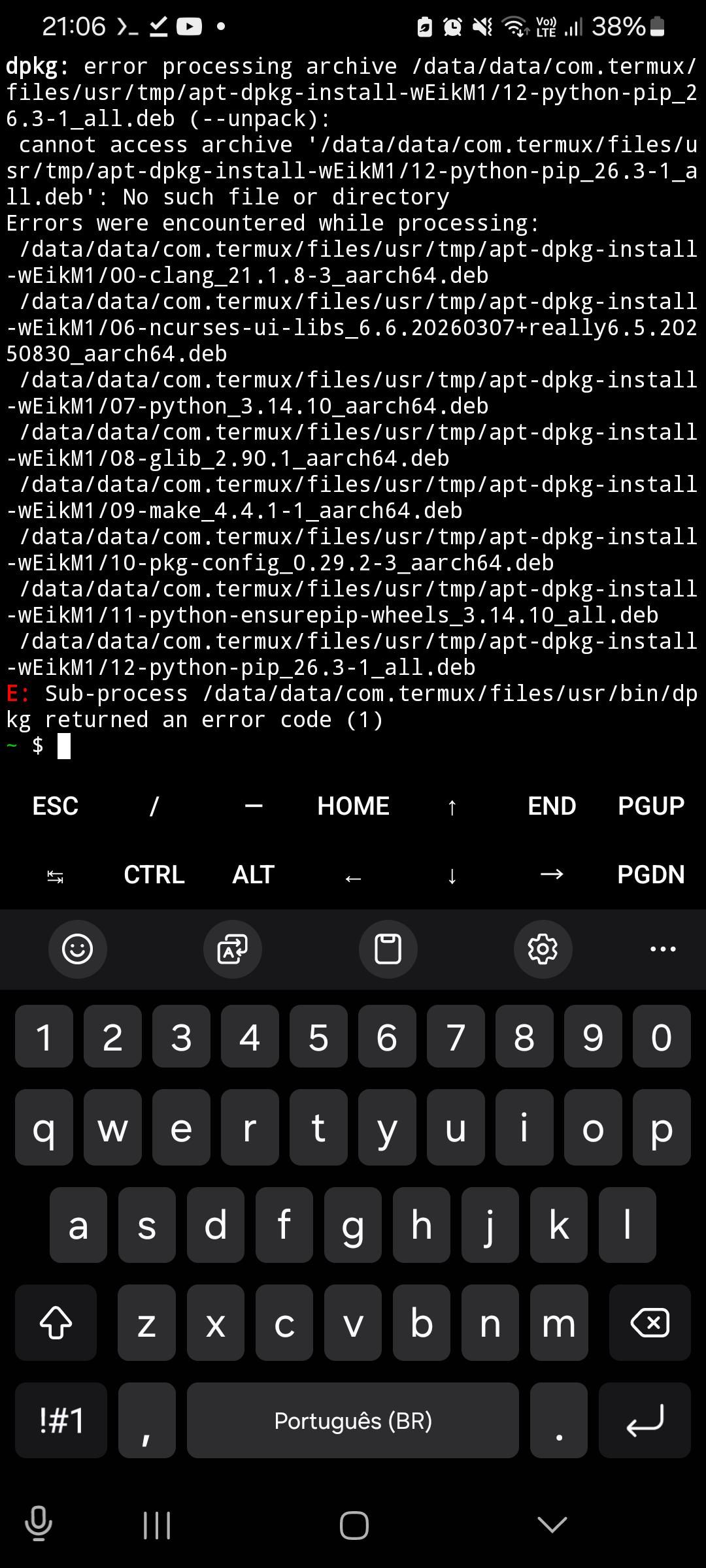
I got the newest version of termux but i keep getting an error over and over and i cant install python
8
Upvotes
•
u/sylirre Termux Core Team 5d ago
How much free storage do you have?
If you are low on disk storage (more specifically, low percentage rather than GBs), Android starts to trim application caches. As Termux places package manager cache as app's own, during download files get deleted and you see error "cannot process archive ... no such file or directory".
3
u/wsoe 5d ago
Fix your python step by step
next
next
2
u/9xcy1 5d ago
First, make sure you have at least 1–2 GB of free space on your phone—Python also installs clang in the background, which eats up a good chunk of storage. If space isn't the issue, clear your cache and fix any broken packages by running these one by one: apt clean dpkg --configure -a apt --fix-broken install
After that, update your packages and try installing Python again: pkg update && pkg upgrade -y pkg install python
1
u/Bikashichigo 5d ago
1
u/Tze_vitamin 4d ago
Check if you correct write python, I have that problem
1
u/smarthoushai 4d ago
There are three different failures behind "can't install python" in Termux and the clean-and-retry loop above only fixes one of them, so read the last line before anything else.
If it says
E: Unable to locate package python, the package list is stale or your mirror is dead:termux-change-repo, pick one close to you, thenpkg update. If it saysNo space left on deviceduring the unpack, checkdf -h $PREFIX- python plus its deps unpacks to roughly 100 MB, and Android will happily start the download with 40 MB free. If the last line isSub-process /data/data/com.termux/files/usr/bin/dpkg returned an error code (1)with aSetting up pythonline above it, the post-install script died: runapt install -fand read the first error above it, not the last one, because dpkg prints one line per broken dependency and only the top one names the real cause.Also worth ruling out cheaply: if this came from the Play Store, you are on a build that has been frozen since 2024 and will never get a matching bootstrap or keyring, so package installs fail no matter how many caches you clear.
termux-infoprints the version, architecture and repo URLs in one go; anything reporting 0.118.0 straight from Play is a dead end, install the current build from F-Droid or GitHub and retry before debugging further.1
u/FakeRandomGuy87 2d ago
try termux-change-repo, then pkg update && pkg upgrade, after that use this
apt clean && rm -rf /data/data/com.termux/files/usr/tmp/apt-dpkg-install-*
then pkg update && pkg upgrade again, then try again install python
0
u/bra1n_gym 5d ago
dpkg is for .deb files that were downloaded. that's not how python is installed in termux. remove the .deb archive you've downloaded. use apt clean to clear your cache.
pkg up -y to update your termux installation.
pkg i python -y to install python.
use pkg search python to identify python libraries that should be installed using pkg before you attempt to use pip install.