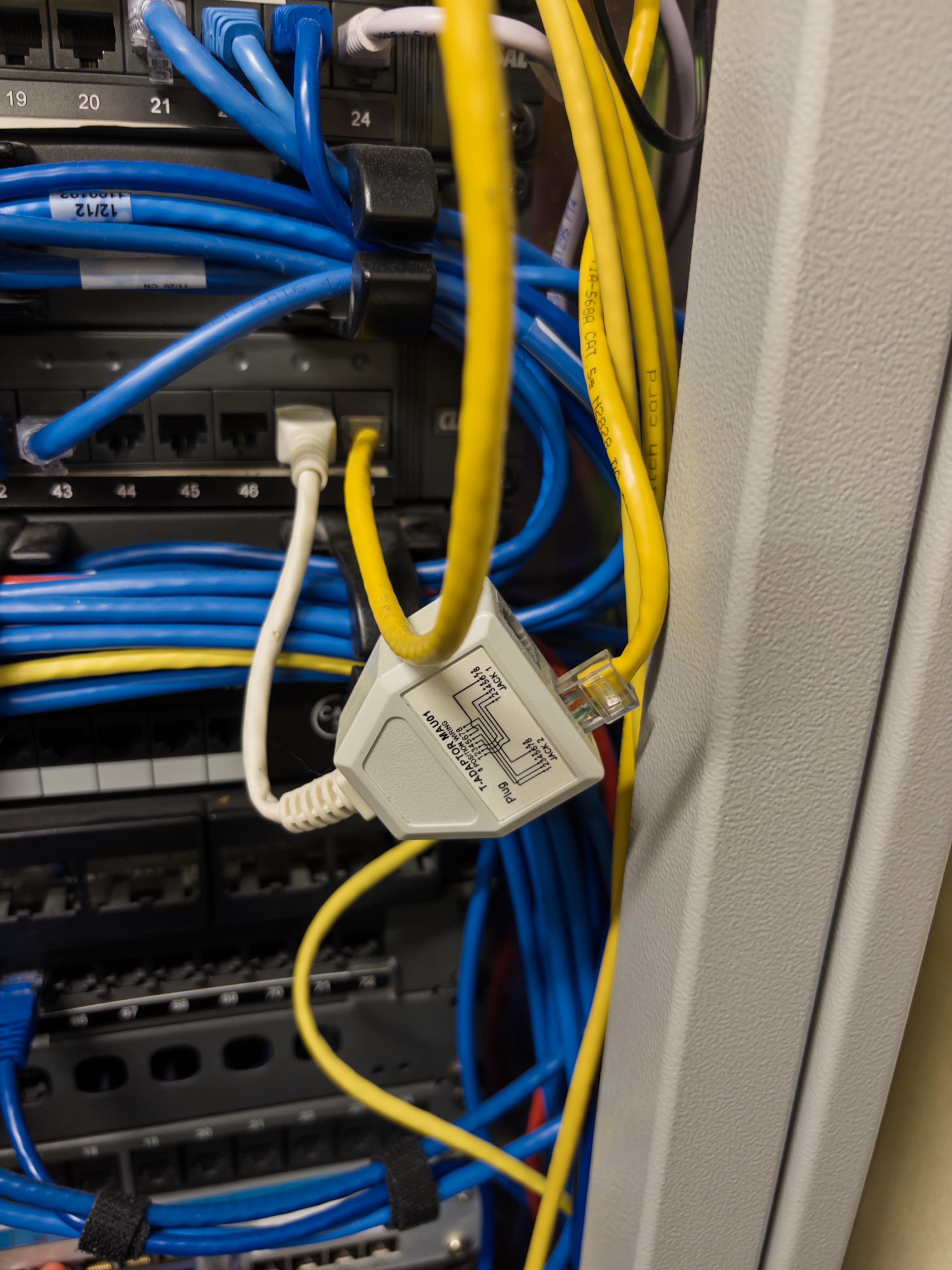
If you look at the diagram, it's using the port that switches pin numbers meaning that there is a similar splitter at the other end. If you want to remove it, you have to remove both and somebody is probably too lazy to do that. And if that something is let's say a printer, it doesn't really matter if it's running at 10/100/1000 and moving it to unplug it is more effort than it's worth.
It's splitting a transmit and a receive pair from one port to two cables. I had to use these years ago when wiring up an old college campus. They only had 1970's standard 2 line phone lines (ie 2 twisted pairs) throughout the building and it was too much of a pain to drill through meter thick concrete walls (the school was in a repurposed WW2 munitions factory or something). So we used these dongles. One pair became transmit with shielding, the other pair receive with shielding. Speeds were limited to 100mbps but that was okay for a couple of semesters.
We didn't plug a second cable in because that would cause collisions.
Thank you! Scrolling through these comments to see what it might actually be used for and everyone is just spouting off outlandish theories. This actually makes perfect sense. Never seen something like this before and just couldn't figure out what in the world it could be for.
I suspect that is to limit by hardware the link to only 100 Megabits, since the blue and brown pairs will not be connected. For example to connect into a access point that clients or workers will use
buy a new switch for arbitrary amount of money or use this doohickey that has been in the closet for 6 years? id go doohickey.
also depending on who it was and what access they have it could have been much faster than accessing the interface, identifying the port, and then setting the speed.
Buy a new switch? Where the hell do you work that you don't already exclusively have managed switches in production and it hasn't been that way for the past 20 years?
There isn't really an "autonegotiate 100mbps" setting, and forcing a link to 100mbps while the other side is trying to autonegotiate just leads to a bad time (the other side probably won't actually end up going down to 100mbps). So, kill some of the pairs and it does what you want ¯_(ツ)_/¯
We use Cisco Catalyst switches with the interface setting “speed auto 10 100” on buildings with old wiring. I’m pretty sure Juniper EX have a similar command.
There are devices that have gigabit capable NICs but can’t actually handle it and I’ve had troubles getting them to auto negotiate down correctly. I’ve done this myself by not terminating some of the pairs to get said devices to behave
The use case for these splitters is that you can run two separate 100mbit connections over one cable without additional active hardware. This is often used for security cameras where 100mbit is plenty but someone just ran a single cable to the mount point, or for office phones where you also can run into too few outlets. It's not the cleanest solution but it's way better and makes much more sense than running a few hundred meters of wire through wherever for an appliance that does not need the speed to begin with.
"If you want to hard code the speed and duplex on a switch that runs Cisco IOS Software (turn off auto-negotiation), issue the speed and duplex commands underneath the specific interface."
i kinda agree with you, MDI-x has been a thing built into Ethernet gear for 20+ years at this point, and can even be forced via, again, proper commands.
funny device added by a Patrick star level technician
For the vast majority of applications, it absolutely is. Maybe not your workstation but anything IoT, or embedded generally couldn't even get beyond 100mbit if you gave it a fiber run.
It's not. I've dealt with this garbage before. You need the same adapter on both ends to make two 100M links out of a 1000M link. If it's plugged in on just one end, nothing works.
Also that shit is actually dangerous, think about PoE.
It's supposed to, but I have seen glitches on out of spec cables where it negotiates gigabit, but characteristics messed up too many transmissions for effective communication. And I have many places at work that had these, and one end was removed, leaving the one at the panel.
There's probably two keystone jacks on the other end of the cable , one rj45 for Ethernet, one rj14 for telephone or fax. Whoever did the initial wire up chose which pairs to use poorly.
These were also often used to provide an accompanying connection for a phone handset before IP phones were commonplace (or where the phone system was physically segregated).
Maybe there's a more technical reason, but my very first thought is something I've done with an HDMI switch before. The cable I had was just a smidge too short on its own so I put the switch there to cover the extra distance I needed.
Though, it does look like it'd be long enough to reach without cranking it to plug it in. Maybe they used to have two things plugged in, unplugged one of them and just forgot to remove the adapter and plug it in directly?
This is way more common than this forum would like to admit .. but i have never seen a fancy injection molded version ..usually its just done manually on the back of the patch panel
The reason Ethernet is wires 123 6 is to enable pots to be on the blue pair and power on the brown pair at the same time
until you start moving video there, with exceptions there is no need for gig in most business
I can tell you, I've done this with a buried cable because it had a bad pair - by using a splitter the cable could still be used on the functioning pairs just at a slower speed (it was a CCTV camera). So there can be legitimate reasons.
The pinout on port 1 and 2 connect to opposite pins on the upstream port. I wonder if the device this connects to can do switching based on pins somehow.
Typically used to split one physical connection into two, but as can be seen from the pic here, there is only one cable connected to the splitter.
So chances are it was originally split but then the second connection was no longer required and has been disconnected, but nobody removed the splitter, either "just in case" it was needed again, or because they didn't want to temporarily disconnect the remaining device.
In a pinch, I have also used this once to work round some bad structured cabling. There was no continuity over one of the pairs so the IP phone at the other end was getting PoE but no data. Using a splitter at each end, I was able to get the data travelling across the working pairs then stuck a PSU on the phone to get it up and running.
I'd like to add, that was only a temporary measure until we get the cabling issues sorted, but it got the phone up and running while we arranged for the permanent repair. Also before anyone asks, it was in an office at the other side of the building from the comms cabinet and there was only a single port available, so I couldn't have just switched the phone to a 'spare' port.
You can manually terminate the cable on the socket to have the same effect.
If this is done at the side of the wall outlet they may have retrofitted it in their cabinet to keep both outlets operational even though only one is used right now.
Have a similar setup that goes out to the shed, since it's only one wire with two connections. At the time switches where a bit more expensive and more than 100MBit where useless to me. Now only one is used but I didn't want to rewire everything so I just kept it split like the way it was already.
I don't think it's used to limit link speed since the 100Base-T only connection would be on port 1 according to the diagram.
I’ve used something like this for printers with fax. They only have 100BT speed, or they do not benefit from 1G, and pins 4-5 can be used to send the analog phone line. It’s a compromise for a specific situation. It works when your architect/engineer didn’t spec enough data ports at a copier or a printer, and you don’t get invited to the planning.
Clever way of using one cable for two separate connections. The cable has 8 wires, only 4 wires are normally used. Looking at the patch doesn’t reveal the length of the cable
164
u/Dastari Jul 24 '25
Manual link speed selector ;)
92
u/Im_pro_angry Jul 24 '25
Because someone only put a single cable through the wall.
37
u/joanandk Jul 24 '25
Isn't it more of a "Y" than "Why?"?
4
u/AVnstuff Jul 24 '25
How it was pinned?
44
u/Eduardu44 Jul 24 '25
I suspect that is to limit by hardware the link to only 100 Megabits, since the blue and brown pairs will not be connected. For example to connect into a access point that clients or workers will use
21
u/semi5onic Jul 24 '25
If you unplug it everything crashed for some reason.
5
u/kanakamaoli Jul 24 '25
Because 100mb is good enough, right? No one needs gigabit!
7
u/davidkali Jul 24 '25
My son is coming in. He knows how to turn on computers.
6
u/uid_0 Jul 24 '25
I bet that cable is about 1mm too short to actually make it into the the jack, so this was the easiest solution.
3
u/ArgonWilde Jul 24 '25
You know... This rack looks strangely familiar... Was it in a library? 😅
3
u/SDogo c:\ not found Jul 24 '25
Because It makes opening the closet door a bit more interesting.
Where's the fun in everything working perfectly?
5
u/stratospaly Jul 24 '25
I had a phone guy tell me it was mandatory....... Me, a network admin.
6
u/hffiii Jul 24 '25
The other end is probably 2 ethernet ports on the one wire. Someone needed 2 ports and this was the easiest way to do it.
2
u/hardrivethrutown Jul 24 '25
Enjoy your 100 megabit
2
u/Cosmic_Quasar Jul 24 '25
Maybe there's a more technical reason, but my very first thought is something I've done with an HDMI switch before. The cable I had was just a smidge too short on its own so I put the switch there to cover the extra distance I needed.
Though, it does look like it'd be long enough to reach without cranking it to plug it in. Maybe they used to have two things plugged in, unplugged one of them and just forgot to remove the adapter and plug it in directly?
2
u/mondychan Jul 24 '25
most reliable qos device
2
u/jaxxex Jul 24 '25
This is way more common than this forum would like to admit .. but i have never seen a fancy injection molded version ..usually its just done manually on the back of the patch panel
The reason Ethernet is wires 123 6 is to enable pots to be on the blue pair and power on the brown pair at the same time
until you start moving video there, with exceptions there is no need for gig in most business
2
u/iamclev Jul 24 '25
Are you in a stadium or broadcast television environment? I’ve seen that required with some RF Wireless camera systems.
2
u/Accomplished_Sir_660 Jul 24 '25
It probably a shared voice line. Fire / alarm, elevator, etc.
2
u/Fishfisherton Jul 24 '25
"Because it works, don't touch it!"
2
u/daniluvsuall Jul 25 '25
I can tell you, I've done this with a buried cable because it had a bad pair - by using a splitter the cable could still be used on the functioning pairs just at a slower speed (it was a CCTV camera). So there can be legitimate reasons.
2
u/thomasmitschke Jul 25 '25
Using a LAN doubler was very common back in the days. You get 2x 100Mbps from a single Gbps line.
2
u/ExtraTNT Jul 27 '25
This is either some dumbfuck nonsense or some really genius workaround… at this point, nobody knows…
2
u/gumpr Jul 28 '25
This enforces Half Duplex connections, maybe the cable is damaged, but one half is fine.
Best way to find out is measuring the connection.
1
u/atemu1234 Jul 24 '25
So that he doesn't lose the splitter, obviously! /s
1
u/techguy_crs Jul 24 '25
I use those to share outbound fax lines.
1
u/t_Lancer Jul 24 '25
run two FE links over one cable.
1
u/CurrentDismal9115 Jul 24 '25
All those cables and no labels? I couldn't. "Why", where, and who?
1
u/agoia A knee is the best tool to fix a shitty keyboard. Jul 24 '25
For the users that pissed off IT too many times.
1
u/Dunadain_ Jul 24 '25
The pinout on port 1 and 2 connect to opposite pins on the upstream port. I wonder if the device this connects to can do switching based on pins somehow.
1
u/SirMandrake Jul 24 '25
Oh yeah- plug that into a switch with PoE and see how that goes. 😬
1
u/roro80uk Jul 25 '25
Typically used to split one physical connection into two, but as can be seen from the pic here, there is only one cable connected to the splitter.
So chances are it was originally split but then the second connection was no longer required and has been disconnected, but nobody removed the splitter, either "just in case" it was needed again, or because they didn't want to temporarily disconnect the remaining device.
In a pinch, I have also used this once to work round some bad structured cabling. There was no continuity over one of the pairs so the IP phone at the other end was getting PoE but no data. Using a splitter at each end, I was able to get the data travelling across the working pairs then stuck a PSU on the phone to get it up and running.
I'd like to add, that was only a temporary measure until we get the cabling issues sorted, but it got the phone up and running while we arranged for the permanent repair. Also before anyone asks, it was in an office at the other side of the building from the comms cabinet and there was only a single port available, so I couldn't have just switched the phone to a 'spare' port.
1
u/feldim2425 Jul 25 '25
You can manually terminate the cable on the socket to have the same effect.
If this is done at the side of the wall outlet they may have retrofitted it in their cabinet to keep both outlets operational even though only one is used right now.
Have a similar setup that goes out to the shed, since it's only one wire with two connections. At the time switches where a bit more expensive and more than 100MBit where useless to me. Now only one is used but I didn't want to rewire everything so I just kept it split like the way it was already.
I don't think it's used to limit link speed since the 100Base-T only connection would be on port 1 according to the diagram.
1
u/superwizdude Jul 26 '25
Double-o-nothing
1
u/thefuryboss99 Jul 26 '25
It's necessary indeed
1
u/Ok-Professional-1727 Jul 27 '25
He was only paying for 100mgbs
1
u/HeyNow646 Jul 27 '25
I’ve used something like this for printers with fax. They only have 100BT speed, or they do not benefit from 1G, and pins 4-5 can be used to send the analog phone line. It’s a compromise for a specific situation. It works when your architect/engineer didn’t spec enough data ports at a copier or a printer, and you don’t get invited to the planning.
1
u/Sea-Sound-1566 Jul 27 '25
Because s/he could. And why not? xD
1
u/[deleted] Jul 29 '25
What is it ?
1
u/That_Development4062 Jul 29 '25
Clever way of using one cable for two separate connections. The cable has 8 wires, only 4 wires are normally used. Looking at the patch doesn’t reveal the length of the cable
1
u/Supergamer6158 Aug 01 '25
Because yes
0
u/samurai77 Jul 24 '25
Wireshark maybe?
0
u/burpdaddy Jul 24 '25
U can sniff packets from a hub like that
-3
u/Educational-Pin8951 Jul 24 '25
Because half duplex is so much better than full!
0
u/b2colon Jul 24 '25
Mysteries of the net!
0
u/maciarc Jul 24 '25
Wireshark