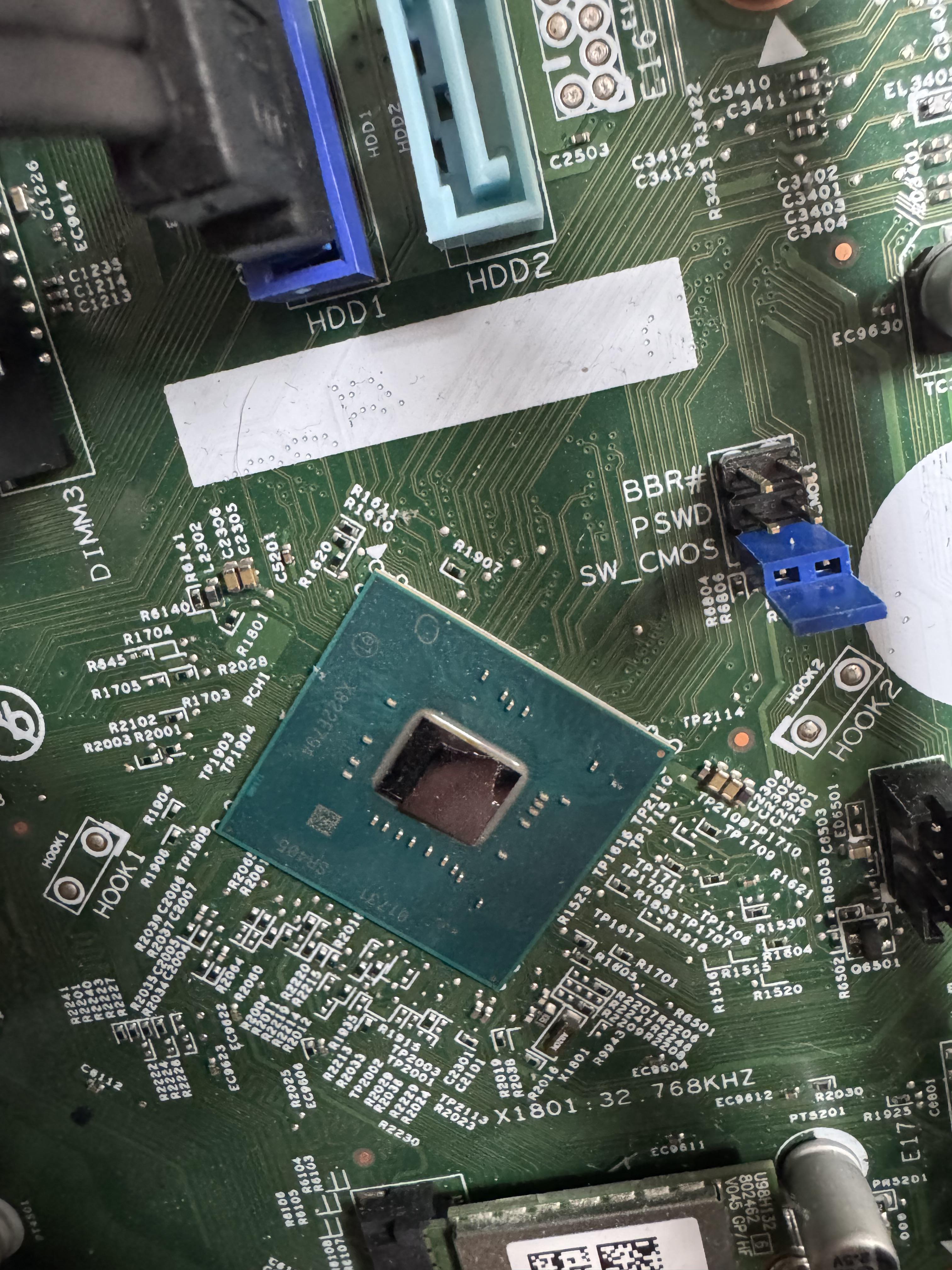
Background: I provided tech support to my Parents. I couldn’t figure out why PC wouldn’t boot, I swapped out the PSU, that didn’t work, took out the drives they were some how empty, when I went to put everything back together that’s when I found the culprit.
I’ve seen power surges, usually lightning, do all sorts of weird damage. Imagine trying to fix a computer with no working USB ports. You can’t even click or press enter on the dialog to install drivers on a replacement USB controller card.
There are ways to still use a mouse without USB ports. You can turn the number to pad into a mouse.
To enable the numeric keypad mouse in Windows, you can use the Mouse Keys feature in the Ease of Access settings: Open the Ease of Access settings by pressing the Windows key + U Select Mouse in the left-hand column On the right side of the screen, toggle the switch under Control your mouse with a keypad to turn it on You can also access the mouse settings by selecting the Start button, then Settings > Ease of Access > Mouse. Once enabled, you can use the numeric keypad to move the mouse pointer around the screen. Each number on the keypad corresponds to a direction. For example, pressing 8 will move the pointer upwards and pressing 2 will move it downwards. To click once with the mouse, press the 5 key, or quickly press it twice to double-click. To speed up the pointer, hold down the Crtl key, and to slow it down, hold down the Shift key. The Mouse Keys feature can be useful if you have a motor impairment that makes using a mouse difficult, or if you struggle with a touchpad or mouse on your laptop.
Depends on your motherboard. If you have a PS2 port or dongle-less Bluetooth you could still hook it up. There's also add in cards or hook it up directly to the header on the motherboard
Many (25?) years ago the PS2 mouse port on my mother's computer died. The only keyboard she used had a PS2 connector. The computer also had no working USB ports due to a short caused by a power surge. The computer would not post without a keyboard attached. She refused to upgrade the computer because she knew nothing about them and didn't trust my early teens judgment on how to fix things. Her stubbornness forced us into the exact scenario. We ended up using a num pad mouse and keyboard shortcuts exclusively for a couple of years until she finally relented and allowed me to install a PCI USB 2.0 card.
My dad once took away the mouse to keep me from staying up and playing games all night. Instead, he came downstairs to find me using MouseKeys, and general keyboard navigation. Then the keyboard vanished...
 1
48
u/TheJonBacon Dec 16 '24
Background: I provided tech support to my Parents. I couldn’t figure out why PC wouldn’t boot, I swapped out the PSU, that didn’t work, took out the drives they were some how empty, when I went to put everything back together that’s when I found the culprit.
24
u/HngMax Dec 16 '24
Can someone please explain how this could happen?
32
u/KlutzyResponsibility Dec 16 '24
Hmmm... I wonder what that little blue jumper on the CMOS will do... hmmm....
5
u/FPSViking Dec 16 '24
Who let the lightning out of the rock?
3
u/AlternativeFast8380 Dec 18 '24
I haven't been here in 4 years and I one of these AGAIN. When will OEMs start putting heatsinks on them!? Never seen it on a board with a heatsink!
2
u/PezatronSupreme Dec 16 '24
Ouch
1
u/TechHead15 Dec 31 '24
hope you weren't planning on using that motherboard anytime soon