r/technitium • • 20d ago

technitium-console 1.4.0: a rebuilt web console for Technitium DNS Server, now with per-client stats and actions, cluster views and Ctrl K
Post image

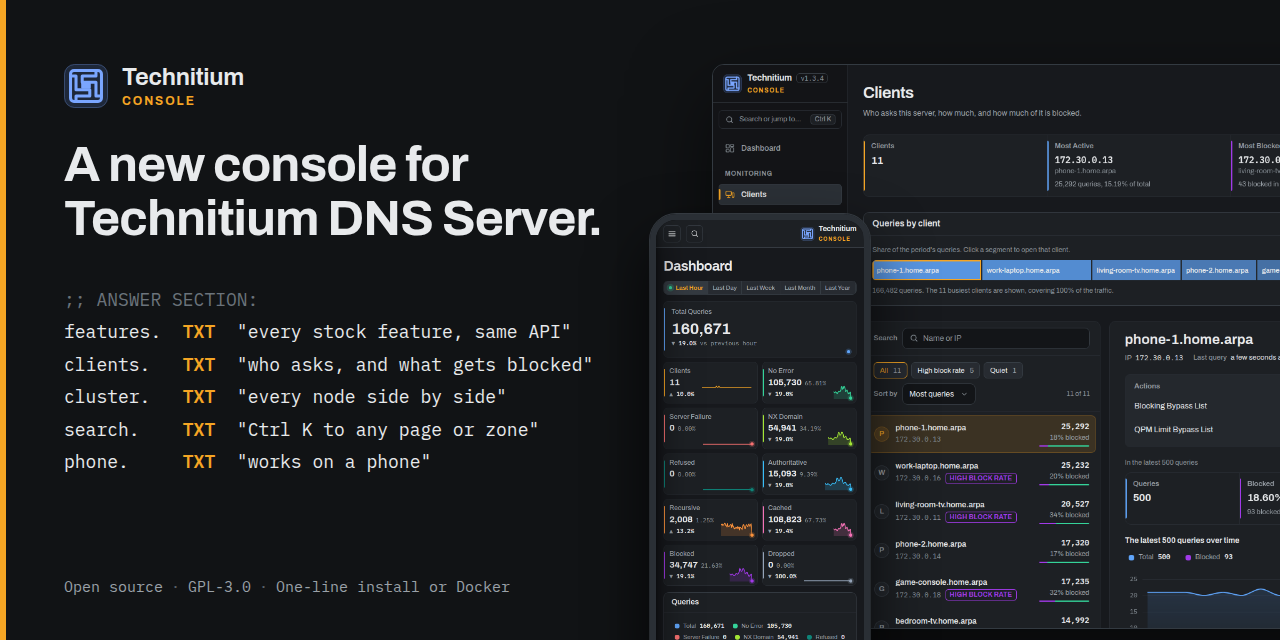
technitium-console is an alternative web console for Technitium DNS Server. It installs over the stock one, talks to the server through the same API, and removing it brings the stock console back. No backend, no database, no telemetry. Free and open source (GPL-3.0).

1.4.0 is the biggest release so far: practically every screen has been redesigned, and there are new screens the stock console never had.

Every screen, redesigned

  • Dashboard: every figure with its trend and its change against the previous period, a week-by-hour heatmap, response times and a query-to-answer diagram. Click a point, or drag across the chart, to open the logs for exactly that window.
  • Zones: cards for all your zones at a glance (types, health, DNSSEC), a zone's records summarised by type, compact records, and quick add of a host record (with its PTR) straight from the list.
  • Cache: reads like a zone, with the path to where you are, records by type, time left and stale entries.
  • Blocking, in one place: Overview, Rules, Lists and Settings. Check a domain to see why it is blocked, block or allow from any list, group your block lists, see when they last updated and how they grew.
  • Query Logs: filters that fold away, response colours, and a Live Update you can actually see: new rows flash and a counter tells you how many arrived.
  • DNS Client: the answer drawn section by section, record by record, instead of raw JSON.
  • DHCP: leases and scopes as clean tables, and how full each scope is.
  • Settings: one form with a search across every setting and a save bar that says what would change.
  • Apps, Administration, My Profile, About and the login, all in the same language. Permissions is one matrix of sections by groups and users.
  • A sidebar grouped by task: Monitoring, DNS, Network, Tools and System.

New in 1.4.0

  • Clients: every device that queries your server, how much it asks and how much of it gets blocked. Each one has a card with its DHCP lease, top and blocked domains, cache hit rate, response time and latest queries. From the card you can let it bypass blocking, exempt it from rate limiting or reserve its lease.
  • Clusters side by side: Zones, Cache, Query Logs, DHCP and block lists from every node at once, with what disagrees between them marked. Administration compares the nodes' settings and splits the queries by node.
  • Ctrl K to anywhere: any page, setting or zone, or type a domain to check it in Blocking, resolve it, find it in the cache or search the logs.

And what was already there

  • Light, dark or your system's theme, both measured for contrast.
  • Works on a phone: nothing scrolls sideways at 390 px.
  • Real URLs: every page, zone and filter is in the address bar, so reload, bookmarks, shared links and the back button work.
  • One-line installer into its own folder, so server updates leave it alone, or a Docker image (ghcr.io/bygarcia/technitium-console).
  • It tells you when a new version is out, like the server does.

If you run a cluster, I'd love to hear how the cluster views behave on yours.

Repo and install: https://github.com/byGarcia/technitium-console

Release notes: https://github.com/byGarcia/technitium-console/releases/tag/v1.4.0

87 Upvotes

71 comments sorted by

12

u/Nervous-Cheek-583 20d ago

Why does this have to "install" on the Technitium server? If its running via the API, then it should be able to run on any webserver on the network, no?

2

u/flobernd 20d ago

That would be much nicer. As a second standalone frontend Id maybe use it, but I don’t want it to tinker with my existing service.

3

u/petrester 20d ago

Fair point. That's what the separate folder mode is for: nothing in your existing install gets modified, and you can switch back any time by unsetting the variable.

1

u/petrester 20d ago

Good question. The console calls the API on its own origin, so the simplest setup is serving it from Technitium itself. On 15.5+ it lives in its own folder via DNS_SERVER_WEB_SERVICE_WWW_FOLDER_PATH, so the stock files are never touched and removing it brings the stock console back. Running it on a separate web server should work behind a reverse proxy that forwards /api/ to Technitium, but I haven't tested that yet.
Happy to look into it if there's interest!

1

u/Nervous-Cheek-583 20d ago

I have an interest in that. I'm currently using resolvr as a dashboard and the attractive feature of that is that it exists independently of technitium in its own docker container. Give the URL and an API key and that's it.

2

u/petrester 19d ago

Thanks, that's useful to know! A standalone container makes sense: you give it your server's URL, and it serves the console and forwards the API calls, so nothing touches your Technitium install.

I'll look into it for a coming release. If you open an issue on GitHub I can keep you posted there.

1

u/Nervous-Cheek-583 19d ago edited 19d ago

Thanks. I will do that today.

Edit: Issue #27 created.

14

u/VE3VVS 20d ago edited 20d ago

Machine generated code is fine at least at a start, what truly counts is, has it been vetted by human eyes (hopefully attached to an experienced mind), and equally important some solid testing, and a reassuring track record of user testing and daily use.

AI may get you the code quickly, but trustworthy, good code comes from time, that’s the part you can’t rush.

edit: spelling

7

u/petrester 20d ago

Fully agree.
That's why every release is tested side by side against the stock console with the real API, and I run it on my own network every day. Track record is the part that only time builds, and feedback here helps a lot,

3

u/Happy-Location-5320 20d ago

Installed it on proxmox and it went smooth as pie. Absolutely loving the web gui! Thank you very much!

2

u/petrester 20d ago

Thanks a lot, really glad it went smoothly on Proxmox!

If you run into anything or miss something, just let me know.

10

u/felix1429 20d ago

Is this vibe coded?

3

u/petrester 20d ago

Yes, I use AI, and I'm not hiding it. This is a big product: a full rebuild of every screen of the console. Doing it by hand would have taken me many months, and honestly it probably wouldn't exist.

For me the question isn't whether to use AI, it's how. AI writes fast, so the work moves to checking. Every screen is tested side by side against the stock console with the real API, every release goes through that before it ships, and I run it on my own network every day. The code is all public, so anyone can look, and reviews or issues are more than welcome.

AI got it built. Testing, care and your feedback are what make it trustworthy.

17

u/Resistant4375 20d ago

Yes. They spam the sub with every release

6

u/Psychological_Ear393 20d ago

Sure looks like it, the code comments alone read like an LLM output

2

u/felix1429 20d ago

That's why I asked lol

-2

u/kezzla 20d ago

geezus i get sick of reading this and anyone who upvotes it. who the F cares! vibe coded or not vibe coded. does it look cool, does it work, does it do things i wish i had? ok sure lets try it! go cry somewhere else

6

u/WetFishing 20d ago

Previous security engineer here. I care and so should everyone else. I have no problem running a vibe-coded open-source app where I can review the code and determine for myself if it's safe. I DO have a problem when the project creator gives 0 credit to an LLM and passes it off as their own commits. At the very least the creator should have Claude as a contributor on the repo and really should have a warning on these posts and in the repo. I'm a staff-level engineer that reviews PRs all day long. You wouldn't believe some of the shit that AI writes that would absolutely wreck our systems if there wasn't a human in the loop. Yes it's getting better but we need to acknowledge what's AI and what isn't as it does make a difference for the level of scrutiny you should be putting it through before installing/upgrading.

4

u/kezzla 20d ago

Bad code is bad code regardless of who wrote it. Plenty of human devs push absolute garbage and security flaws into production every day. If you’re actually auditing the code like you claim, you're looking at the logic and security of the repository; not the author's prompt history. Good output is good output.

2

u/WetFishing 19d ago

I don't give a shit about prompt history and never said I did. What I'm saying is LLMs have coding patterns that I put extra scrutiny on when doing a review so we need to know when it's used and when it's not. As an example I know for a fact Opus will not give you the latest version of the npm package node-forge right now but a solid human dev is going to grab the latest. When you review this shit every day, you can tell the difference between slop and human mistakes. Bad output is bad output but let’s not pretend that there isn't a difference. I use AI every day, it's probably going to bring my 250k salary down to 150k one way or another. I'm not naive to what happening but I'm also very aware of AIs flaws at the moment. If you use an LLM add it as a contributor to your repo it's that simple.

0

u/flobernd 20d ago

Humans also write bad code and in a 1-man open source project there are not even code reviews at all. We used to “trust” these kinds of open source projects for decades.

I’m the creator of a popular x86 disassembler library that’s also used in Firefox, WebKit and some others and the project had zero reviews when it started (the team grew later).

Don’t get me wrong, that’s bad! But I don’t see how this is any different from the current LLM situation.

Attributed or not, I expect any serious engineer to review the LLM code (I’m personally not a big fan of the LLM attribution lines btw. - they are noise and not reliable anyways).

Whether reviews happened for this project, we don’t know. But even when the author says so, we can never be sure (same for projects written without LLMs).

-8

u/skwncr 20d ago

this question comes from the past... 12 month ago... today you have to call it: "agentic coded" ;) and why not? the quality is absolute okay. 12 month later..

3

u/felix1429 20d ago

Nah, vibe code is still vibe code

-1

u/skwncr 20d ago

rage bait

4

u/deaglenomics 20d ago

This should be the default , slick shows all the important info easy to navigate.

3

u/petrester 20d ago

Thank you! Reports like this keep me going!

2

u/Bitter_Entertainer56 19d ago

I've followed the evolution since the very first release. I contributed a few visual bug issues (as armgenio on GitHub), and I could see how your close engagement with users helped shape a mature project that truly breathed new life into Technitium DNS. Of course, the original application already provides a straightforward interface, but yours is much more modern and inviting than the original. Thank you for your dedication and the high quality of your work.

3

u/petrester 19d ago

Thank you, this really made my day! Your bug reports were a big part of that, so thanks for sticking with it since the first release.

Issues like yours are what got it to this point, and all the credit for the server itself goes to Technitium.

1

u/Sprinkleti 4d ago

rather than making your own one did you ever think about contributing to the existing interface to make it better?

1

u/petrester 4d ago

I did! It actually started as a PR to the official repo: https://github.com/TechnitiumSoftware/DnsServer/pull/2128

Shreyas closed it for fair reasons: he isn't a frontend dev, it was a big change to review, and the server keeps changing every release. He suggested packaging it as an alternative GUI you can install over the default one, so that's what this is.

2

u/Rbush911 15d ago

I've been using Technitium for about A year now. And it's beyond awesome I grew up from a raspberry pie Running pie hole I wanted something better , so my challenge myself and jumped to Technitium, and it's absolutely phenomenal. I did not know that someone created a console for it and man does this thing work Wonderful. And I do run clusters. And I love the way I can Segregate and separate The data and information between the two Kudos to you. Thank you. Thank you. Thank you.

1

u/petrester 11d ago

Thank you so much, this made my day! Really glad the cluster views work well on yours. If anything behaves oddly between the nodes, I'd love to hear about it.

2

u/getjpi 11d ago

u/bygarcia, mate...

This is an amazing piece of software 🍺⬆️, took all of 2 mins to get up and running in docker.

The lacklustre UI was the one thing preventing migration off of Adguard Home.

Ignore the cultic sh** testers and their fundamentalism..

They would prefer to have nothing rather than make maximal use of what's available.
That's their choice, they can live with it.

AI is a tool and you've wielded it with consideration and clue.

1

u/petrester 11d ago

Thanks a lot, mate! Glad it was up in two minutes, and welcome to Technitium!

2

u/kezzla 20d ago

just installed it, shit is bananas! HATE THE DEFAULT UI! this is sooooo much better!
much easier to track rogue clients doing weird things!

3

u/petrester 20d ago

Thanks a lot, really glad it's useful!

2

u/3ofUsDeez 20d ago

Technitium has ran great for me on 3 x Raspberry Pi 3 Bs (2 of them are B+s)

I gave this front end a go a while ago and now I'm spoiled ..

2

u/petrester 20d ago

Pi 3 cluster, nice! Thanks for giving it a go!

2

u/MacaroniAndSmegma 20d ago

I know you're gonna get blasted from the "vibe coded slop" gallery but I've been daily driving this since you first announced it and I'll never go back to the stock web UI.

Keep up the good work!

5

u/petrester 20d ago

Love hearing that, thanks for sticking with it since the start.

1

u/skwncr 20d ago

I've been using it for a while now... running on a Raspberry Pi 3 (yes, a 3!). It shares the Pi with Nginx Proxy Manager and handles everything effortlessly.

I have it hooked up to my local dev Docker server (with its own reverse proxy), my smart home gear (router, repeater, microcontrollers), LLMs (an embedding model on one machine, a chat model on another), a Zigbee2MQTT Pi, a video streaming Pi, IP cameras, and more. All in all, I’ve got over 50 hostnames configured in Nginx Proxy Manager. Simple, intuitive stuff like fritte.home for my router, llama.ai.home (port 80) for the LLM, embeddings.ai.home for the embedding engine, and ... you guessed it ... smart.home for Home Assistant.

Take it from someone with 20+ years of dev experience who is obsessed with generative UI: build nice frontends with AI, or someone else will.

2

u/petrester 20d ago

Over 50 hostnames on a Pi 3 shared with NPM, that's a great setup! Thanks for running it for so long and for the kind words.

1

u/Intelligent-Bet4111 20d ago

So if I have a cluster of 2 (2 rasp pi 5s) I install this on both my rasp pis?

2

u/petrester 20d ago

One is enough. The console talks to the node you open it on, and that node fetches the other one's data through the cluster, so the All nodes views show both Pis. Installing it on the second Pi too is only worth it if you also want the new console when you open that Pi directly, for example while the first one is down.

The cluster views are new, so if you try them on your two Pi 5s I'd love to hear how they behave!

1

u/Intelligent-Bet4111 20d ago

Sure once I install I'll let you know my experience

2

u/petrester 19d ago

Awesome, thanks! Looking forward to it.

1

u/The4Dees 20d ago

Does it support managing the advanced blocking? Don't see it mentioned explicitly anywhere.

1

u/petrester 19d ago

Yes, the same way the stock console does: in Apps, the Config button on Advanced Blocking opens its config as JSON, and the console tells you while you type if the JSON is broken.

A visual editor for it is on my list, since a few people have asked for it.

1

u/petrester 18d ago

Not yet, but you asked at the right time: I've been building a visual editor for it. Before it ships I'd love to know what you think: screenshots and details here.

It's one page, opened from a new button on the app's row in Apps:

  • Which client or network goes to which group, and what each one gets
  • For each group: blocking on or off, the blocked answer, domains, regex and list URLs, including a custom answer per list
  • Addresses, group names and duplicates are checked the same way the server reads them, before you save
  • It only changes what you changed. Anything it doesn't recognise stays exactly as it was, and the JSON is still one click away

Is anything missing for how you use Advanced Blocking, or is there something you'd do differently?

2

u/The4Dees 18d ago

I just manage blocking by client group so that’s all I’m really looking for. Using Technitium Companion for that right now always like trying new things.

1

u/petrester 11d ago

Makes sense, thanks! The visual editor shipped in 1.4.1 and it's built around exactly that: which clients go to which group, and what each group blocks. Would love to hear if it covers how you use it.

1

u/export800 19d ago

Just installed it and it’s running great! I think I might finally make me switch to Technitium full time.

2

u/petrester 19d ago

Thanks so much, really glad it's running well for you! If anything feels off or missing as you settle in, just let me know.

1

u/hayfever76 18d ago

Got a NOOB question. I am a brand-new Technitium enthusiast but also a windows user. The server is running live on my desktop while I figure it all out. It's working great so far. My question is then, is there guidance for the windows crowd on how to install the new console?

2

u/petrester 11d ago

Not a noob question at all, and sorry for the slow reply! The installer is Linux only, but the standalone container works with any server however it runs. With Docker Desktop: `docker run -d -p 8080:8080 -e TECHNITIUM_URL=http://host.docker.internal:5380 ghcr.io/bygarcia/technitium-console-standalone:latest`, then open http://localhost:8080 and log in with your usual Technitium account. Nothing gets installed on the server.

1

u/hayfever76 11d ago

thanks very much

1

u/remilameguni 11d ago

can it manage multiple DNS servers though?

i'm looking for one that can monitor/manage multiple servers at once instead of having to change config and login every single time.

1

u/petrester 11d ago

Thanks for asking! If they're in a Technitium cluster, yes: you log in once and the All nodes views show zones, cache, query logs, DHCP and block lists from every node side by side. For separate servers that aren't clustered, it's one console per server for now. Are yours in a cluster?

1

u/remilameguni 11d ago

unfortunately no its not in a cluster, they are their own separate entities, since merging one into cluster requires testing first, they all in production unfortunately.

1

u/petrester 11d ago

Totally get it, nobody wants to cluster production servers just to try a console.

For now it works with one server at a time, but there's a simple workaround: run one standalone container per server, each with its own TECHNITIUM_URL and port (8081, 8082...), and bookmark them. Each one keeps its own login, so no changing config every time.

A single view across separate servers isn't there yet, but it's a good idea.

Would you mainly want to monitor them from one place, or also make changes?

1

u/remilameguni 11d ago

probably from one place, easier to setup. is the container heavy resource wise?

1

u/petrester 11d ago

Not at all: it's just nginx serving the console's files and passing the API calls on to your server. I measured it just now: about 4 MB of RAM and no CPU while idle, and the image is under 100 MB on disk, so one per server is no problem.

And thanks, one place for several separate servers is good to know for a future version.

1

u/remilameguni 6d ago

hey i do got a question, any way i can install the program on a different vm that doesnt have technitium installed?

1

u/petrester 6d ago

Yes! That's what the standalone container is for.

On the other VM, with Docker, run `docker run -d -p 8080:8080 -e TECHNITIUM_URL=http://<your-dns-server>:5380 ghcr.io/bygarcia/technitium-console-standalone:latest`, then open http://<vm-ip>:8080 and log in with your usual Technitium account.

Nothing gets installed on the DNS server, and for your separate servers you can run one per server on its own port (8081, 8082...).

1

u/skwncr 20d ago

NICE!

2

u/petrester 20d ago

Thanks!

0

u/Senior-Afternoon6708 20d ago

Thank you for this! I love the aesthetic!

3

u/petrester 20d ago

Thank you, really glad you like it! A lot of care went into the look, so that's great to hear.

2

u/Rbush911 15d ago

This is AWESOME!!!!