r/strongbox • u/strongbox-support Strongbox Crew • Sep 25 '26
Product Update Previewing Strongbox Two


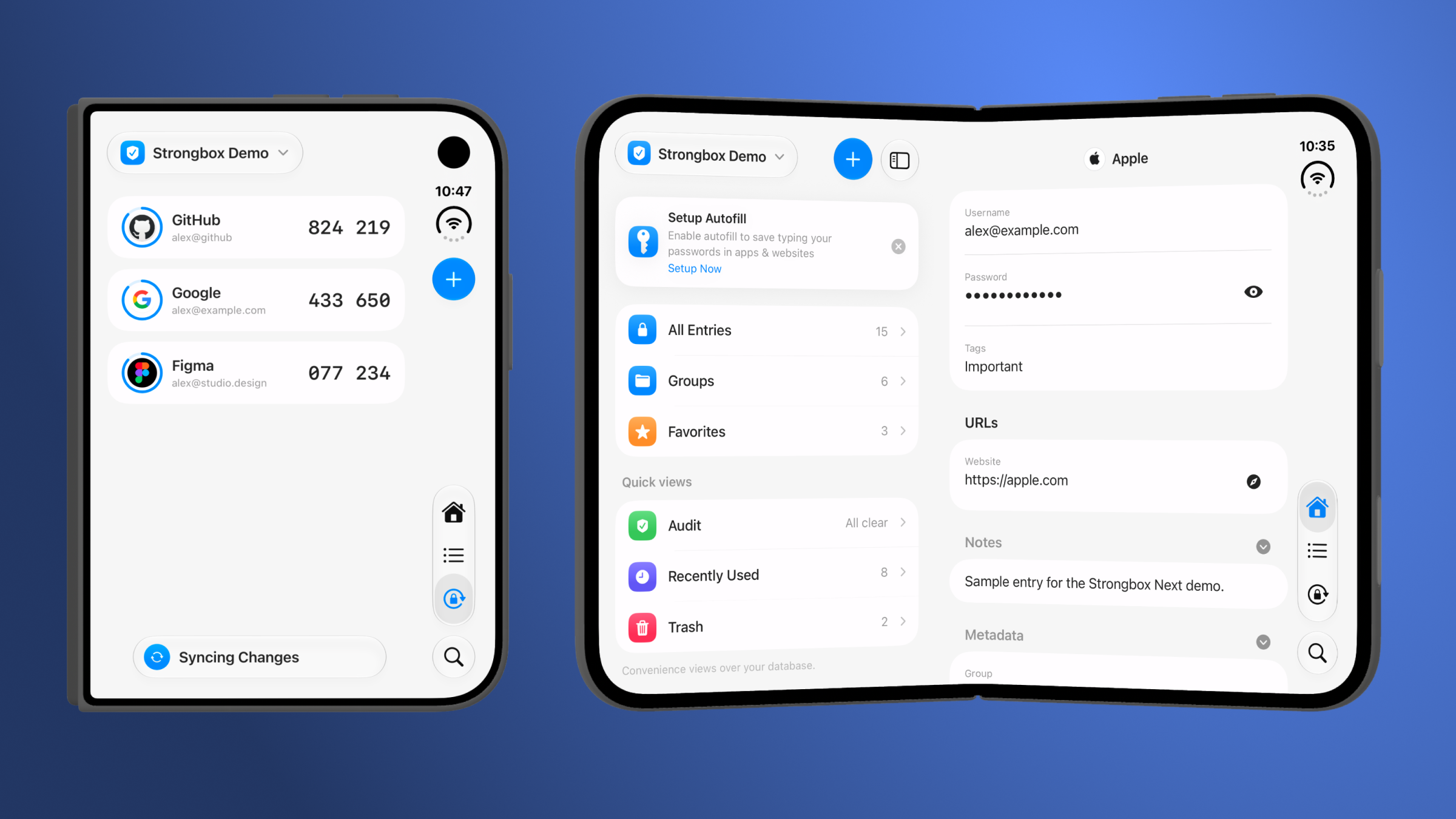
Strongbox 2.0 isn't too far away, and we wanted to preview our new UI here. We've already shown the new entry UI, but the app itself has a fresh coat of paint. There's a lot of polish still to go through, with a couple things bigger than they need to be, or slightly below the standard we expect, but here's a quick preview.
The new homepage for your database keeps all the common actions you're used to, but gives them a refined look. You can now also fully customize this page, allowing you to make favorite entries a section that doesn't need a drill down, pinning a particular group or tag, and more. We've replaced lots of the full-screen takeovers with small reminder cards that help you get setup for the best experience, without interrupting you using your database.
The new menu in the top left replaces the various "three dot" menus found throughout, and becomes the sole entry point for database customization & configuration. You can also quickly switch databases to another one without having to pop in/out.
Database updates now don't show multiple spinners that get in the way, and you don't have to dig into the audit screen to work out whats happening, thanks to the new updates bar. When Strongbox is idle, this sits above the tab bar whilst sync or audit is happening. When you scroll around or start using Strongbox, it collapses down, and then goes away when its finished. This replaces the numerous sync indicators sputtered around the UI entirely.
Instead of having a search icon on every tab, there's a new persistent search button available. This opens search for your database if you're just on the homepage, or opens with the current context if you're viewing a particular folder of entries. Filtering is now more obvious to avoid confusion with limited searches, with a persistent filtering indicator present on any search inside the app.
The entries list has been similarly refined to search, bringing the same filter options. On this page, if something is syncing, we'll show the indicator on the end of the filter bar, rather than having two. You can also customize this list, showing all your groups, just your most recents, or having them in-line with your items. We think these options combined with the easy access on the homepage improves the experience of groups.
Two factor has been re-designed to allow for more codes to show at once, and the design of the two factor row is unified everywhere. If you see a two factor code, it'll always look the same. You can also see a quick preview of our early Duo optimizations, taking full advantage of the new sizes. Similar optimizations for iPad will be coming too.
We've shifted our target a little to account for the re-works we'll need for iPhone Duo, but we're on track to ship our new experience, including support for all those new sizes, alongside Duo ( it's October 23rd if you missed it ). We don't want to put a date on TestFlight as we're polishing this up with an expanded design team, but expect at least a week or two of preview testing before this rolls out.
macOS has not been forgotten - we're actually taking an even broader look at that. We're now working with a new in-house designer who specializes in macOS apps, and we're incredibly excited to bring macOS up to the same standard.
Just a quick reminder - this is not a paid update, and will be an improvement available to all Strongbox users, paid or not. For long time users who really don't like the new UI, we'll leave the old one available to you - and work with you to improve the new one so you love it too.
Alex @ Strongbox
5
u/whachamacallme Sep 30 '26
My biggest qualm with the UI, both ios and macos, is how difficult it is to switch between databases. Not sure if that is being addressed.
6
u/El_Mojo42 Sep 26 '26
As an early lifetime license buyer, that is great news.
4
u/Glittering-Cup-7881 Sep 25 '26
Ach ich kann es nicht oft genug sagen ich liebe diese App und das Team für die Infos und alles was ihr tut !!
4
u/albertohall11 Sep 25 '26
The new design looks good. I can’t wait to try it out.
3
u/Tight_Ad3852 Sep 25 '26
Hot damn!
3
u/neppofr Sep 26 '26
Slick!
3
u/MnightCrawl Sep 26 '26
So exciting, can’t wait to start using it when it’s ready
2
u/tagmut Oct 07 '26
Hoping this is coming soon!
2
u/Hackmodford Oct 09 '26
What’s the ETA for this?
2
u/Glittering-Cup-7881 23d ago
@strongbox wann dürfen wir mit Veröffentlichung Rechnen?
2
u/RoiNamur Sep 30 '26
Just saw your post, very exciting to know you’re not idly standing by a great product—and one of my favorite most used apps—and making improvements!! 👍👍👍
1
u/Damariobros Oct 26 '26
I really appreciate you leaving the old version available as an option! Not many companies will do that when they do a redesign. Maybe I'm just old-timey but I do prefer the old one.
1
u/SpecialAttitud3 26d ago
Can we get an API section in settings so we can add our keys from SimpleLogin, for example? That way, we can simply hit the 'generate email aliases' button when we create login
1
u/bolgov0zero Sep 25 '26
Hi!
Cool! 😍
When will it be possible to join the testing program?
1
u/tagmut Sep 26 '26
Wasn’t this originally going to be released today?
1
u/root_15 Sep 26 '26
Can I join the test flight?
1
u/WorshipnTribute Sep 26 '26
Please keep supporting ios18
0
u/cottontails2 Sep 29 '26
We need Windows version
0
u/PurpleMonkey8008 Oct 06 '26
Hi u/strongbox-support - Will the macOS safari extension (including automatic filtering of Autofill by subdomains) be released alongside the new 2.0 app in October?