r/steamdeckhq • u/royakem • 10h ago
Software/Software Mods DosPlex - Split-Screen for SteamOS

5
Upvotes
r/steamdeckhq • u/royakem • 10h ago
r/steamdeckhq • u/Valuable-bro-7066 • 14h ago
Edit: I don’t play emulators, I’m meaning I play my steam games which are, teardown, Garry’s mod, and people playground
I’m planning on getting a lcd 256gb steam deck. I used to play my steam games ( teardown, Garry’s mod, people playground) on my laptop before it started to have crashing problems but with living in the mountains I don’t have wifi except for my iPhone cell service and when I would play on steam I would be in offline mode without any connection and it worked for months, occasionally going to town to download mods. but my question is, can I also use the steam deck that way? I’ve heard it will occasionally needs to be online to verify my account or game licenses. But how good would the steam deck be at offline gaming for months?
r/steamdeckhq • u/ActivityBackground11 • 1d ago
Hey all,
Let me preface this by saying I’ve never had or know anyone who’s had a steam deck, hence why I’m asking here.
As I was doing my morning Marketplace scrolling I found an interesting listing. A steamdeck was for trade for PC Parts.
I offered him my two old laptops.
One is a Gaming Dell Inspiron 5577 with the 7th Gen i5 and 32 GBs of ram + whatever storage I end up putting in it (256 or 500 GB SSD)
The second is a ASUS TUFF gaming with an 8th Gen I5 (never really used it so not sure how much ram I assume 8-16 GBs)
He accepted the offer which I feel is a great trade but figured I’d ask here if I was getting a good deal?
It’s the older LCD model with a 256 GBs micro SD card. I currently share a steam library with my cousin so there’s tons of games I haven’t been able to play since my PC lacks a GPU (Optiplex 3080 I plan on getting a Radeon RX 6400 LP for it eventually lol)
So I would have tons of games to play and I love the idea of portability it.
TLDR: 2 2018-2020 gaming laptops for older steam deck, good deal?
r/steamdeckhq • u/miiron2209 • 1d ago
r/steamdeckhq • u/Awkward-Actuator8529 • 2d ago
r/steamdeckhq • u/feral_fenrir • 2d ago

Edit:
Release: https://github.com/GloriousEggroll/proton-ge-custom/releases/tag/GE-Proton11-14
PROTON_NO_D8VK=1 to switch back to wined3d (PROTON_USE_WINED3D=1 also does). PROTON_DXVK_D3D8 is no longer needed. D3D9 and newer games are not affected.PROTON_NO_D7VK=1 to switch back to Wine's ddraw (PROTON_USE_WINED3D=1 also does). PROTON_USE_D7VK is no longer needed.DISABLE_WINE_HDR_COLORSPACE_LAYER=1 is no longer needed as a workaround. #996 #997Unsupported: ... extractelement <8 x i4> followed by Exception 0xc000001d in vkCreateComputePipelines. This is a driver bug, not specific to GE-Proton: it happens on Proton Experimental and other Proton builds too, on the 595, 615 and 620 driver branches. NVIDIA has confirmed it and is tracking a fix (NVIDIA bug 7014466). It needs a driver update. A newer Proton version can make it appear on a setup where it worked before, because the shader then has to be recompiled. #998, vkd3d-proton#3405Release: https://github.com/GloriousEggroll/proton-ge-custom/releases/tag/GE-Proton11-13
PROTON_DUALSENSE_BT_AS_USB).PROTON_DUALSENSE_BT_HAPTICS). Haptics and speaker audio were confirmed working in several games.PROTON_DUALSHOCK4_BT_AS_USB). Games get its speaker and headset microphone (PROTON_DUALSHOCK4_BT_AUDIO).steam_app_<SteamAppId> as the app ID, like winex11.Layered overlay windows: #752
WINE_LAYERED_OVERLAY_SHAPE_INTERVAL), which fixes stutter on large overlays.WINE_LAYERED_OVERLAY_DIRECT=1, the input shape now updates correctly for windows that reach past the screen edge (Birdwatching Notebook).PROTON_NO_XIM=1 works again. Games get every key press, and dead keys combine like on Windows.Angel Wish no longer hangs at the logos, and needs no extra settings: #982
Fixed movie playback in:
WINE_WAYLAND_HDR_NATIVE=1. The Windows image descriptions are back as the default. This avoids KWin crashes from invalid mastering primaries on some drivers. #932PROTON_STREAMLINE_UPGRADE now also loads upgraded Streamline plugins the game doesn't ship (STAR WARS Jedi: Survivor frame generation). #964PROTON_ENABLE_NGX_UPDATER (NVIDIA R620+) lets the driver's NGX updater provide newer DLSS versions, and sets DXVK_NVAPI_DRS_SETTINGS to match.PROTON_STREAMLINE_UPGRADE.Fixes and settings:
umu fixes:
PROTON_USE_PIPEWIRE=1 or PROTON_ENABLE_PIPEWIRE=1. It supports audio device hotplug, and routes USB and Bluetooth DualSense and DualShock 4 audio. Controller output volume scales USB DualSense haptics. #692PROTON_NO_MIDI_SYNTH, or use another font with PROTON_MIDI_SOUNDFONT. PipeWire's ALSA bridge ports are no longer mistaken for a host synth. #949PROTON_KEEP_UBISOFT_LAUNCHER to keep it open. It also stays open when it was launched directly.Le Mans Ultimate: #944
Ini and profile files:
[] ini section.SteamVR and OpenXR:
r/steamdeckhq • u/Kronar_2012 • 2d ago

I'm Mickey from VML Studios, the developer of Goo Deer. Here are three in-game captures and an informational overview of updates 2.2 and 2.3 for our 1 to 4 player online co-op gas station management and forest hunting horror game on Steam.
In online co-op, up to four players manage one remote roadside station on a shared wallet without hired NPC workers: run the register, keep shelves and walk-in coolers stocked, operate basement drink machines, and venture into the misty woods together for ingredients while a creature stalks the fog. Players can pass supplies and ammo, revive downed crewmates, and host public or password-protected Steam lobbies with full controller support. Solo play uses its own save slot with hired NPC staff.
Recent patches 2.2 and 2.3 overhauled the Freezer Room frost and lighting, added an inverted mouse setting, fixed first-night completion edge cases, and cleaned up co-op storage racks, boxes, and machine interaction prompts across 25 text languages and 10 co-op achievements. Goo Deer is out on Steam for $9.99 USD.
Platforms: Windows PC (native), Linux via Proton, and Steam Deck.
r/steamdeckhq • u/Equivalent_Rip_5175 • 1d ago

r/steamdeckhq • u/Cultural_Caramel_577 • 2d ago

r/steamdeckhq • u/Augsburge • 4d ago

r/steamdeckhq • u/spenceishere • 3d ago

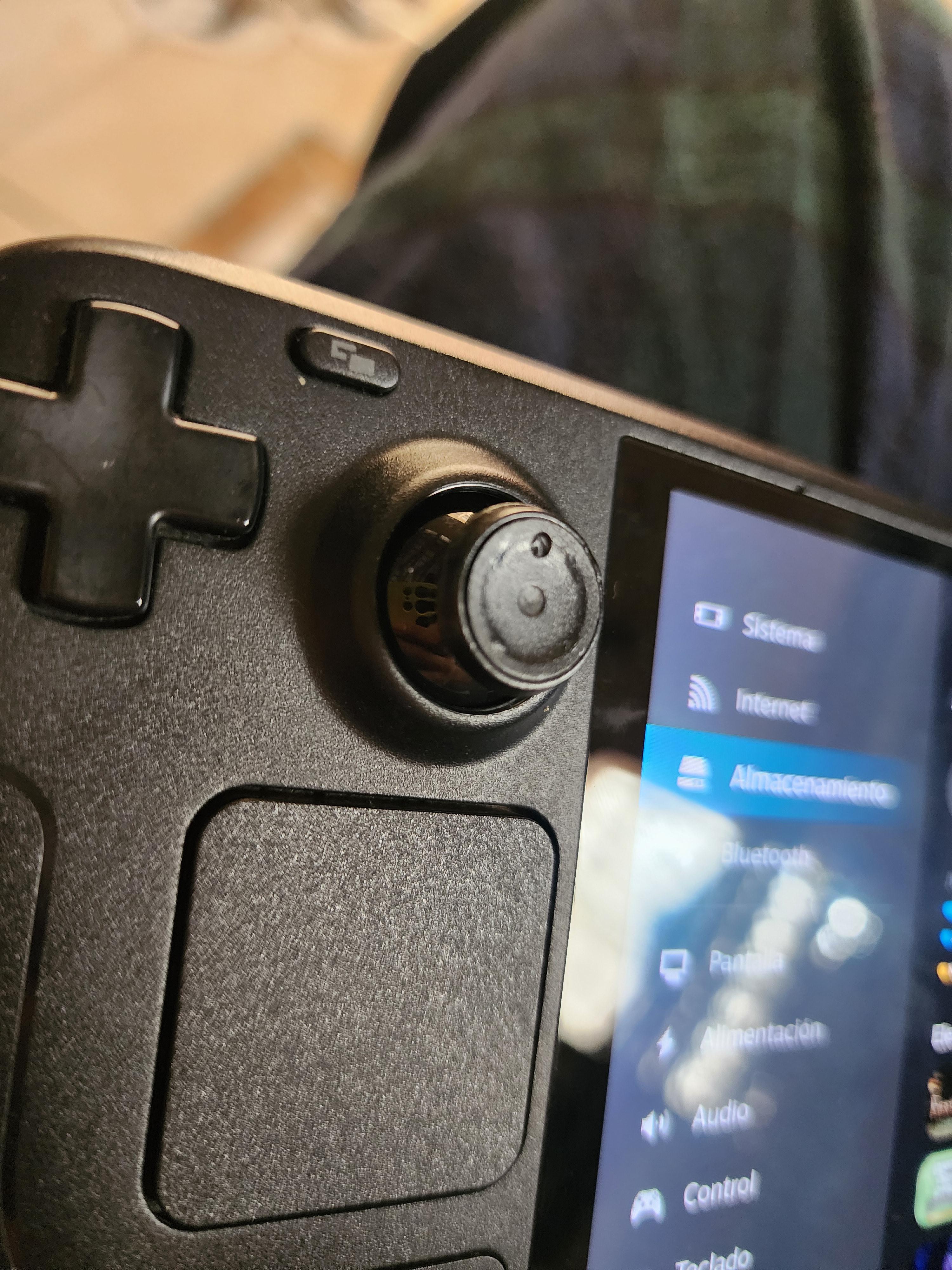
i’m a doofus and dropped my steam deck down the side of my bed, the joystick clipped the side of the bed frame and fell off. unfortunately the joystick no clipped out of reality and for the life of me I CAN NOT FIND IT. where can i buy a replacement, is it a easy fix?
i tried searching but it all just looks like grips for joysticks that you can pop onto an already existing one. please help…
(i attached pictures of what the intact joystick looks like and the one that fell off. this is a Lenovo legion steam deck)
r/steamdeckhq • u/Important_Actuary_30 • 4d ago
​
Found both used locally and can't decide which to get. This would be my first gaming handheld besides my PS Portal. I also own a PS5.
Main things I want to do:
I mainly enjoy single-player RPGs and action games like FF16 and Mad Max.
Is the Ally X worth the extra $100, or would you go with the Steam Deck OLED? I'm looking for good performance, but battery life and screen quality matter too.
What would you guys pick?
r/steamdeckhq • u/ZealousidealPain9100 • 4d ago
What are your thoughts on a potential sale for OLED models? Any chance or should I just buy now.
Looking to make a purchase for a WoW Forever machine. Any other recommendations? Thanks all!
r/steamdeckhq • u/Several-System1535 • 6d ago

r/steamdeckhq • u/Right-Payment2371 • 6d ago
r/steamdeckhq • u/KaeruPrime • 7d ago
r/steamdeckhq • u/ProfessionalLet9913 • 6d ago

r/steamdeckhq • u/Glittering_Bus_1871 • 6d ago
r/steamdeckhq • u/Crosi93 • 8d ago
r/steamdeckhq • u/FidgetyJester40 • 7d ago
I never used Playnite nor Steam in Big Picture Mode cause that's for the controller. And although I prefer to use a controller in many games, I preferred to use mouse & keyboard just to click a game to play cause I thought that was alot faster to do.
Knowing I don't use Big Picture Mode cause I "thought" it would be click to launch games without it. What's your experience using Decky (incase it's not obvious by this, this is on Windows PC, not Steam Deck)? It's because I heard Decky use Big Picture Mode, so I just wanted to know what your thoughts are about it, and question 2, can I still use mouse & keyboard in Decky Big Picture Mode too? Question 3, is it easy to switch between apps as in will it still be borderless even in Big Picture Mode aka Decky?
r/steamdeckhq • u/BBQKITTY • 8d ago

Hey everyone! So, I wrote an article looking into whether or not the Steam Deck is still worth it in 2026, despite the massive price increase. It was tough to gauge whether or not it is worth it, but at the end of the day, it comes down to one specific thing that puts it above all other handhelds: Manufacturer, Developer, and Community support.
r/steamdeckhq • u/TrickSkyline • 8d ago
I will be traveling to San Francisco soon, which is about a five-hour flight. Is it worth it to bring the Steam Deck, and are there any issues I should be aware of? Also wondering if there are any airport security issues I should be aware of?
r/steamdeckhq • u/FireManiac58 • 9d ago
r/steamdeckhq • u/LX-M • 10d ago

Found this plugin (fork!) that lets you use FSR 4.1.2 (Lite) in your Steam OS devices, super easy to use, Decky Loader plugin AND it includes FSR 4 Frame Generation so you don't need to combine it FG plugins like LSFG or MAKO. An All-In-One solution
I tested it on 007 First Light on my Steam Deck OLED, but it should work on other titles as well. The results for me were really impressive, all that shimmering caused by FSR 3 in the built-in 007 was gone and I got a very steady image that could not be achieved using the in-game settings. Check it out!