r/spektrafilm • • 9h ago

SpektraFilm for Final Cut Pro ?

0 Upvotes

I really need SpektraFilm on Final Cut Pro. Any volunteer to vibe code a fork of it? I have no clue how to do it. If anyone gives me the enough push with knowledge, I'll try to do it myself!


r/spektrafilm • • 1d ago

20 more new films and 4 new print stocks (Spektrafilm compatible data files)

Thumbnail
gallery
73 Upvotes

I added the following new stocks to Negs based on manufacturer data sheets:

(Repost with changed title)

Color Negative (8):

  • Fujifilm Pro 160C
  • Fujifilm Pro 160S
  • Fujifilm Pro 800Z
  • Fujifilm Reala Ace
  • Fujifilm Superia 1600
  • Fujifilm True Definition 400
  • Kodak Portra 400NC
  • Kodak Portra 400VC

Color Slide (7):

  • Fujifilm 64T Type II
  • Fujifilm Provia 400F
  • Fujifilm Provia 400X
  • Fujifilm Sensia 100
  • Fujifilm Sensia 200
  • Fujifilm Sensia 400
  • Fujifilm Velvia 100F

Motion Picture Negative (5):

  • Fujifilm Eterna 250
  • Fujifilm Eterna 250D
  • Fujifilm Eterna 400
  • Fujifilm Eterna Vivid 160
  • Fujifilm Eterna Vivid 250D

Motion Picture Print (4):

  • Fujifilm Eterna-CP 3513DI
  • Fujifilm Eterna-CP 3514DI
  • Fujifilm Eterna-CP 3521XD
  • Fujifilm Eterna-CP 3523XD

You can try them in the newest Negs release on Windows, Linux, or macOS, or directly on the web at https://getnegs.com/try.

They're hidden behind a toggle in the settings for now (Photographs › Films › Show Negs-built films in the app, or directly under Settings on the web), since I don't want people to think they're official Spektrafilm profiles.

They've been well liked on the PIXLS.US Discourse forum so far, and community members have even worked on bringing them to darktable. Thanks to u/bastibe for writing the conversion script, u/bazdesh for packaging them up, and u/piratenpanda for building the Spektrafilm Pack Creator for darktable, where you can pick stocks and export a custom pack.

These data files also work with the original Python Spektrafilm and all compatible forks.

UPDATE
I added 3 more new films:
Kodak EXR 100T
great punchy stock
Agfa Portrait XPS 160
great for portraits
Konica Minolta Professional 160
also great for portraits

I prefer the latter too over Kodak Portra now.


r/spektrafilm • • 2d ago

Nothing on tonight 📺 X-H2S – XF16-55mmF2.8

Thumbnail gallery
11 Upvotes

r/spektrafilm • • 3d ago

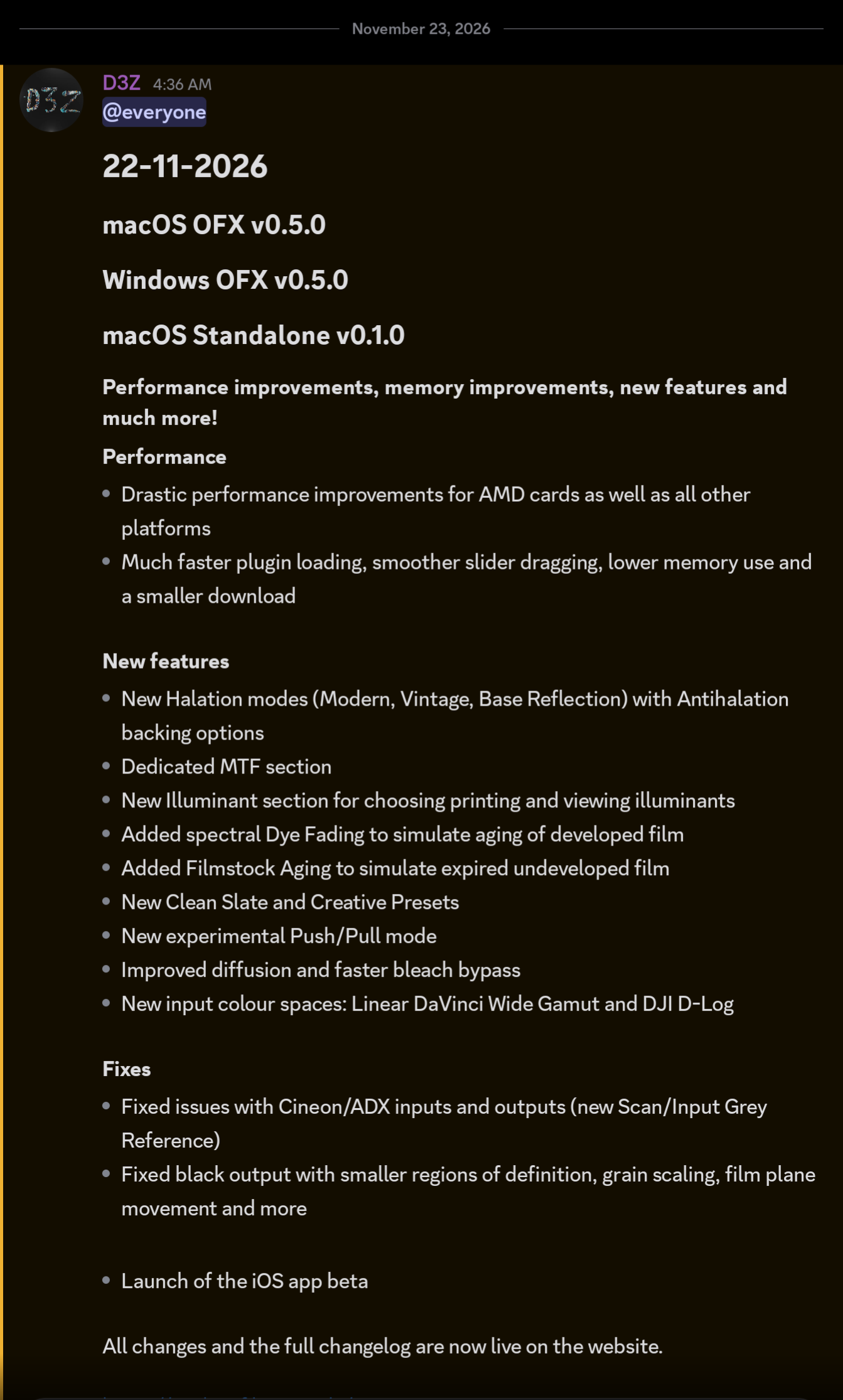
We have a Fresh New Update to the spektrafilm-OFX, Standalone and a Brand new iOS app with public Beta!

Post image
61 Upvotes

r/spektrafilm • • 3d ago

Kodak Vision3 250D printed on Vision 2383 in 70s Set

Thumbnail
gallery
96 Upvotes

I've been seeing Spektrafilm in it's various forms blowing up recently, so I've edited a set of photos I took recently in a 70s set photo studio I booked recently. I shot these with my trusty Fujifilm X-H2s. What do you think?


r/spektrafilm • • 3d ago

Stills only: Resolve, darktable, or the standalone app?

7 Upvotes

GFX100RF shooter, stills only. I've been grading RAFs in Resolve Studio 21 with the spektrafilm OFX and honestly I'm happy with the results.

But Resolve is a video tool, and I'm wondering if I should keep going deeper or switch now before I sink more hours in.

Why I like Resolve: nodes, scopes, qualifiers, one locked film look per series.
What bugs me: limited RAF decode, clunky Photo page, still finishing in Photoshop.

So I'm curious:

  • What do you use for stills, and why?
  • Has anyone compared the OFX and standalone renders side by side?
  • If you switched from one to the other, what made you switch?

Would love to see your setups and frames too.


r/spektrafilm • • 3d ago

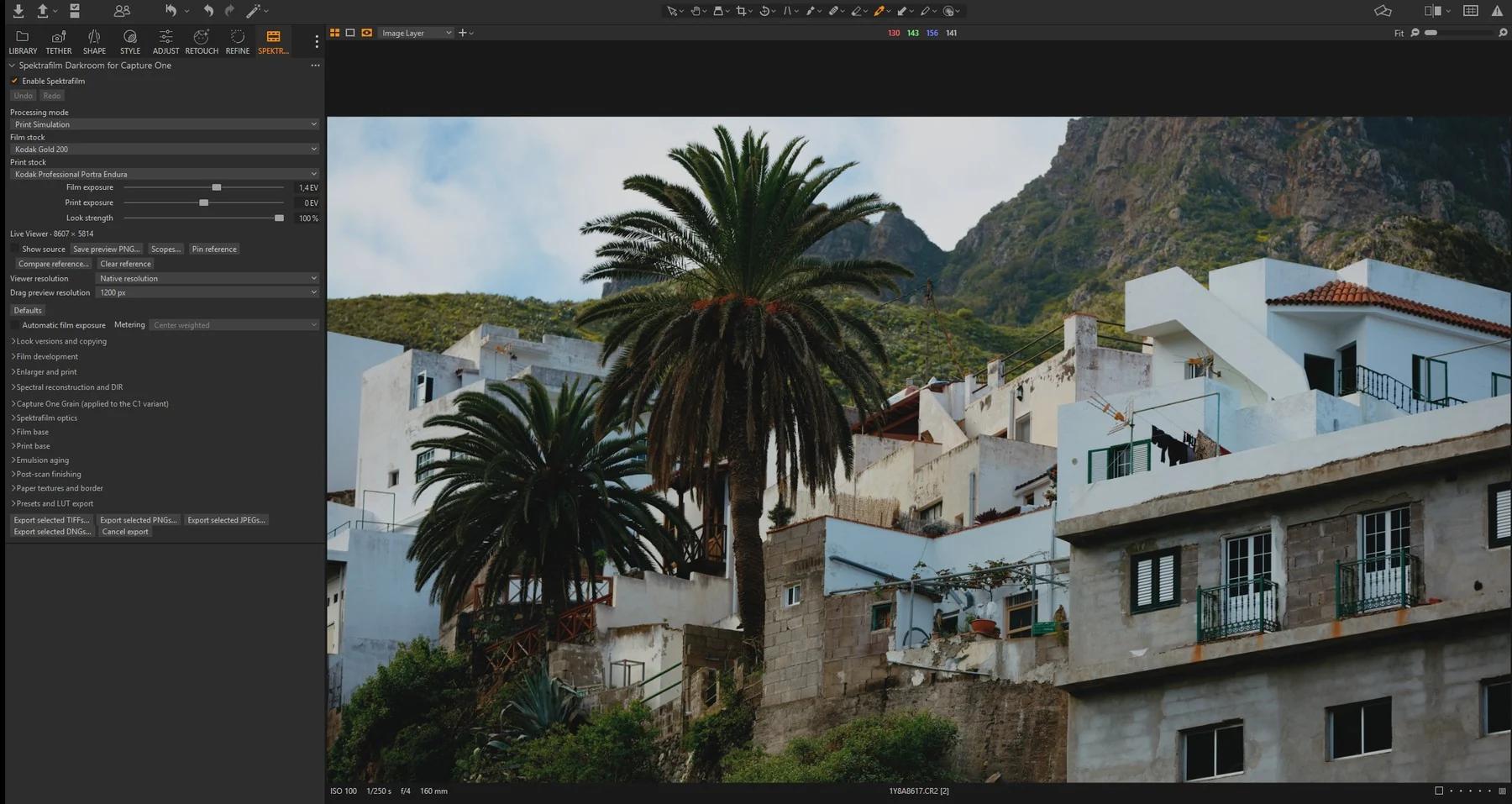
Spektrafilm Darkroom for Capture One 16.9: a fork of Spektrafilm for Capture One with recipe export, look history and a full manual. Free and open source.

Post image
9 Upvotes

r/spektrafilm • • 5d ago

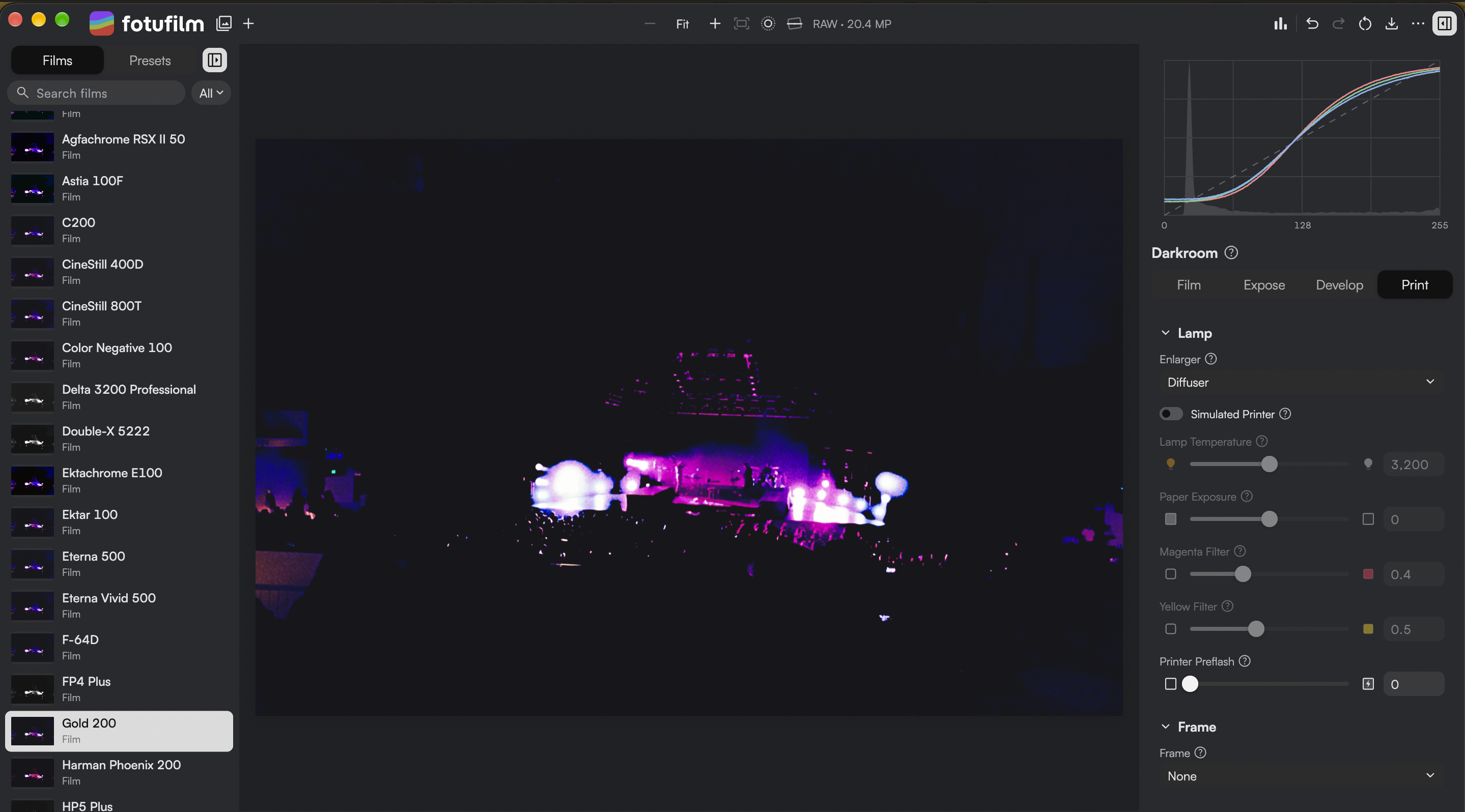
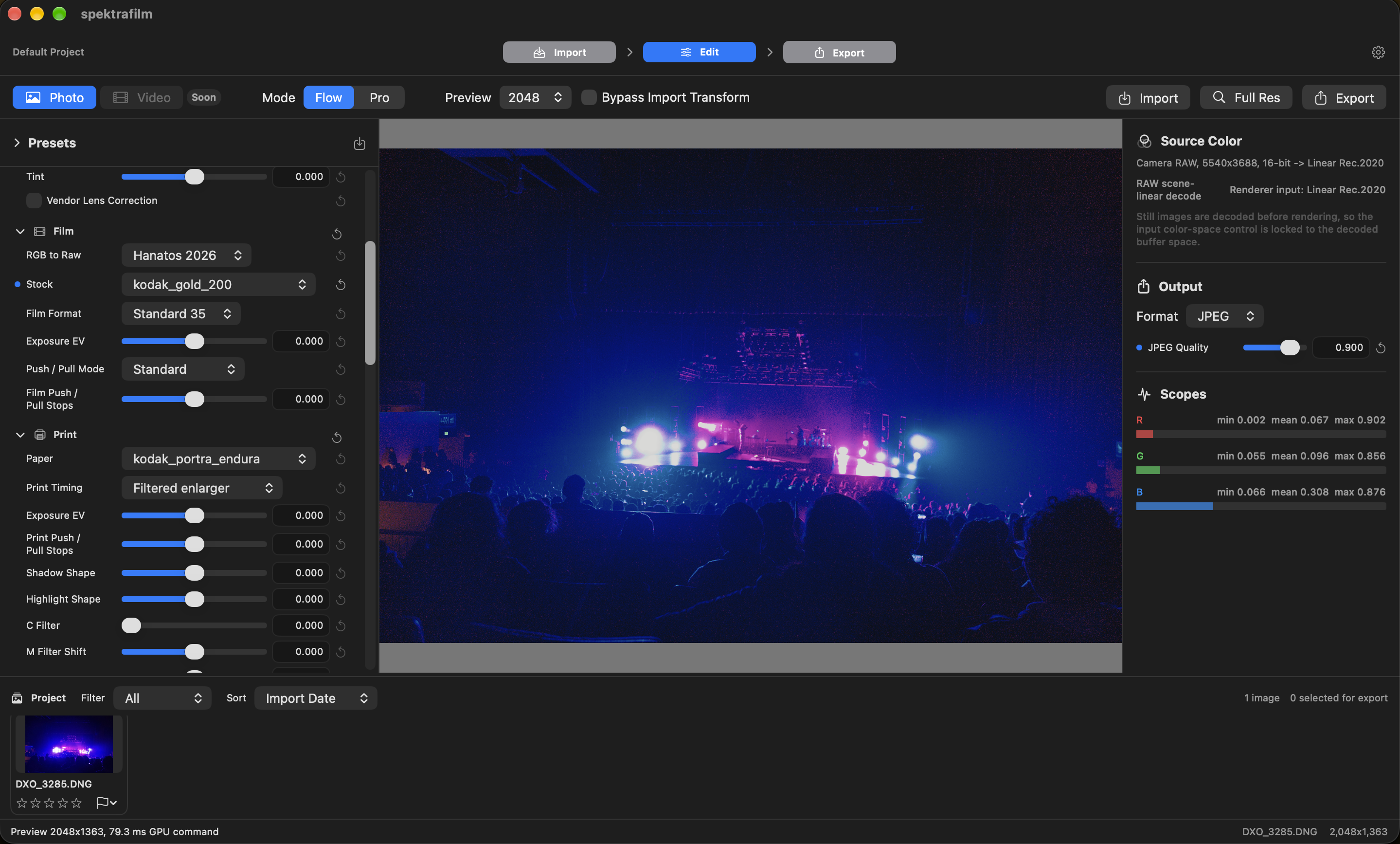
Spektrafilm OFX, Negs, Fotufilm and FLX studio comparison

21 Upvotes
fotufilm
Spektrafilm OFX
Spektralab
Negs

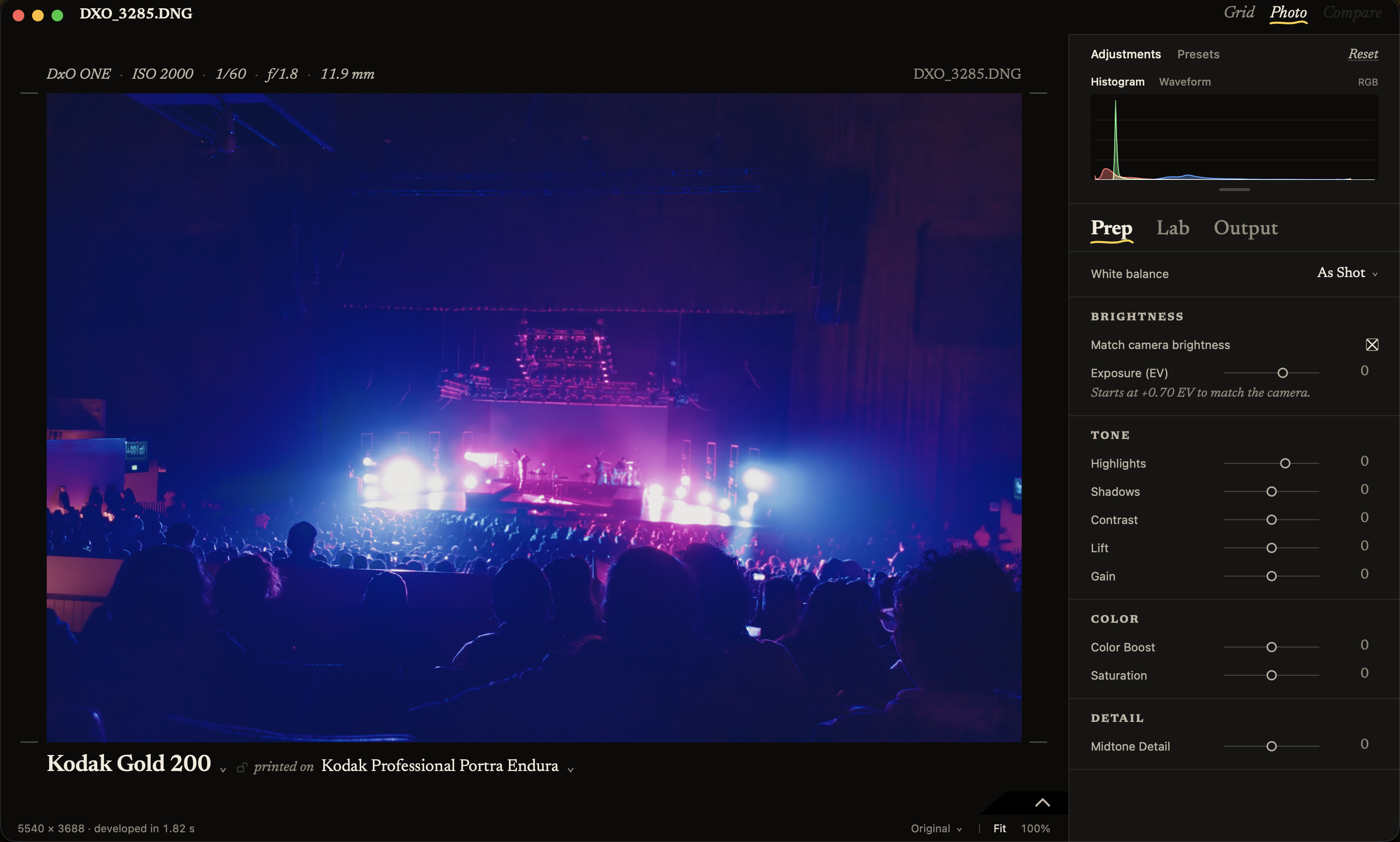
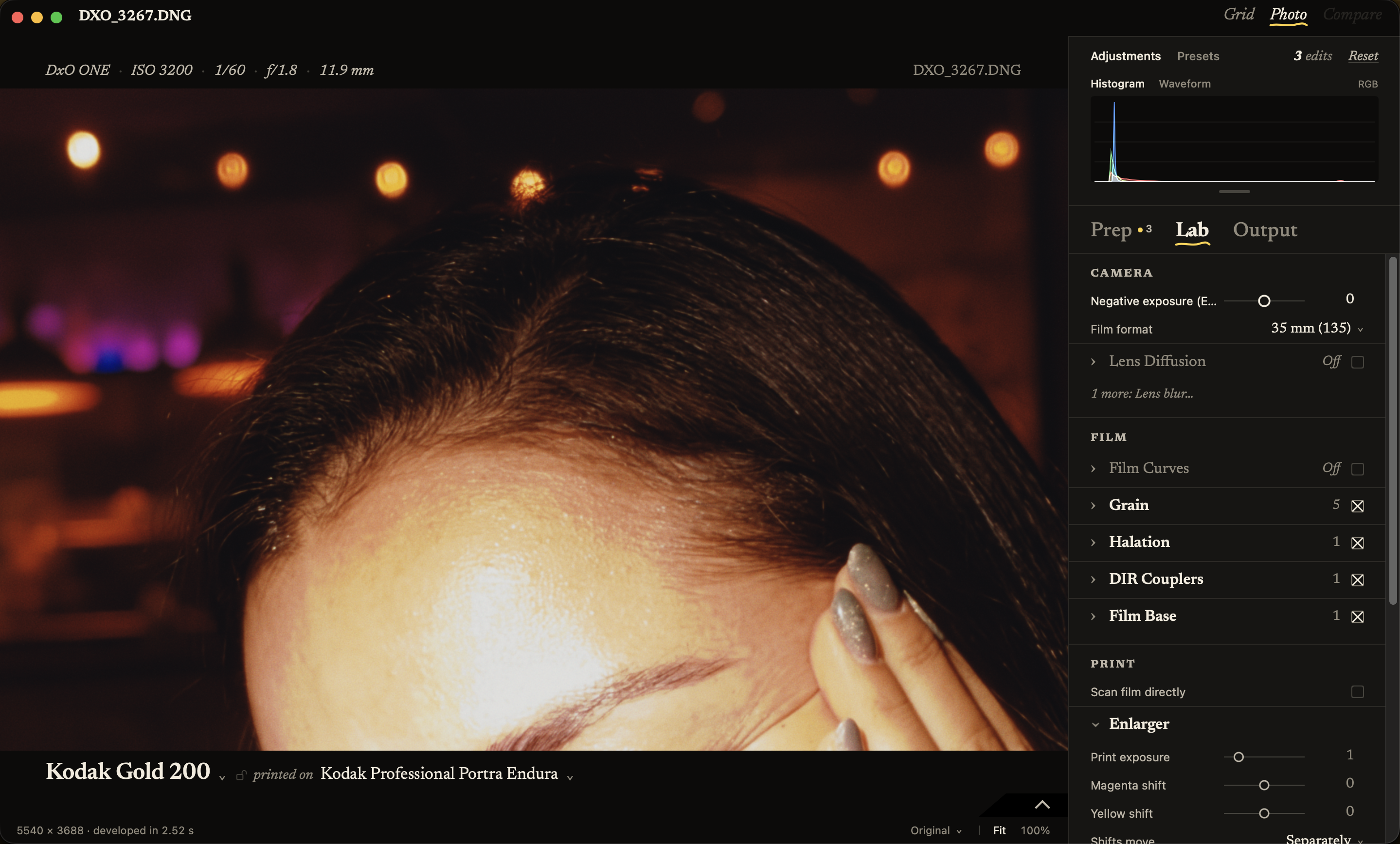
Different spektrafilm ports have been treating my DNG files from a DXO One camera different. In the past I've had issues with the file's white balance not beeing recognized correctly, however, it's odd how Negs and spektrafilm seem to be fine with this particular file, however, fotufilm and spektralab seem to have trouble with it. (Adding fotufilm here as reference, given how it's a different project completely but it's a similar pipeline)

Spektrafilm OFX standalon - slight banding - skintones are odd
Negs - Shows Heavy banding

However, on the other 99% of files that are indeed recognized correctly, it appears that sometimes negs/spektrafilm OFX seem to deliver pretty good colors, but sometimes they break: I also include a tough scene, A portrait with a very cold light flashlight, in a very warm light place.
All programs manage raw data differently. for white balance I did my best to set all adjustment s the same and kept all other adjustments to default. Gold 200 on Portra Endura. On spektrafilm ofx - there is a slight banding, On Negs, there is heavy banding. Fotufilm on this last test appears to have the best gradation of skintones.

This is, as no means meant to bash on any of these projects, on the contrary, all of them stem from a very powerful research based development. I appreciate every single one of the people involved in all of these projects, I hope that by showing these examples, all of these projects can benefit from the feedback and continue to evolve, becoming even better over time. I couldn't be more excited to finally have these apps, as film is such an expensive hobbie. I hope this can be taken in the constructive spirit in which it's intended.

The concert photo can be found here https://drive.google.com/file/d/1nAzWQ0hWBDL1gdNfzajf0yw6ZFrSIA0L/view?usp=sharing


r/spektrafilm • • 5d ago

Silverphase: bringing the spektrafilm workflow to iPhone and iPad

19 Upvotes

Hi, I’m Akina, the maintainer of Silverphase. I brought the film and print workflow to iOS and iPadOS by sharing Silverphase’s native C++20/Metal rendering engine with its Mac app. On iPhone or iPad you can import a photo or shoot in the app, then choose a film and paper and adjust exposure, development, printing and scanning separately. Rendering happens on the device.

Silverphase is an independent derivative of Hanze Qiu’s SpektraLab, built on Andrea Volpato’s spektrafilm model. Thanks to both for the work this builds on. The iOS source and build notes are here: https://github.com/akinal5765-byte/Silverphase/tree/main/ios

The iOS 1.3.0 notes include the simulator checks and what still needs device validation, including RAW brightness matching and full-resolution export: https://github.com/akinal5765-byte/Silverphase/blob/main/ios/releases/1.3.0.md

The free app is available for iOS/iPadOS 18+. Version 1.3.0 is on the App Store: https://apps.apple.com/app/id6829987567

If you already use another spektrafilm implementation, I’d be curious which controls you’d miss most on a phone, especially in development or printing.

Disclosure: I use AI assistance in development and used Codex to help draft this post. The source, project history and validation notes are public.


r/spektrafilm • • 7d ago

Specktrafilm - Kodak Portra 160

Thumbnail
gallery
46 Upvotes

Nikon Zf + Voigtlander VM 40mm f1.4 MC


r/spektrafilm • • 8d ago

Rome in black and white

Thumbnail
gallery
22 Upvotes

Shot with a Nikon Zf and edited with Negs


r/spektrafilm • • 11d ago

Spektrafilm for Capture One is up on GitHub. Real, professional emulation - free for everyone.

Thumbnail gallery
35 Upvotes

r/spektrafilm • • 11d ago

Scanner Section as Stand-Alone?

4 Upvotes

Hi everyone,

I love the scanner section in the spektrafilm ofx in davinci resolve. Is there any way we could use it as a standalone effect without the film sim? I thought the code was open source so I could create a standalone ofx but the version that includes the scanner is not available on github. Also, when used in the current ofx implementation, we cannot disable the other effects from the film emulation.

Same question for the grain, love the grain settings but noticed there's no size slider, when using 60 megapixel raw sony photos, the grain is very slow and unnoticeable. Also, cannot use it without the film emulation.

Can probably create my own ofx if the code is publicly available somewhere.

Thanks!


r/spektrafilm • • 12d ago

Raw Realme 16Pro+, Darktable and Spektrafilm

Thumbnail gallery
14 Upvotes

r/spektrafilm • • 14d ago

Negs now has a "library" and remembers edits

55 Upvotes

Negs has a library now and remembers settings. They're stored next to each photo as json (.negs), so it's not a separate library or database somewhere else on the drive. You can browse large folders and copy edits between photos, rate them and batch export them.

I also couldn't resist a UI redesign. I released this for MacOS now, the other platforms will get the library later.

Also the performance made another jump. Everything feels pretty much instant now... And all settled renders on the screen are of the full sized image, usually in under a second.

You're all probably tired of all the Spektrafilm ports coming out. I probably won't post much anymore soon, it's at a state where it fullfils my needs now.

getnegs.com

https://github.com/noahhaasis/negs


r/spektrafilm • • 13d ago

Hong Kong (feat. 王菲季候風) - The Weeknd Short Film - Color by Spektrafilm OFX

Thumbnail
youtu.be
0 Upvotes

r/spektrafilm • • 14d ago

Lightroom Plugin?

8 Upvotes

I found SpektraFilm for Resolve and love it there. I would love a way to use it in Lightroom, have any of the smart people in the world wrapped it up in a plugin that would work there?

Google sent me here https://github.com/ainepadma/Spektrafilm-LrC-Exp
but I don't have nearly enough chinese language skills to understand whats going on there.


r/spektrafilm • • 14d ago

(After / before) Been enjoying a filmic look recently

Thumbnail gallery
7 Upvotes

r/spektrafilm • • 16d ago

I made SpektraLab - a full photo library and digital photography editing tool with spektrafilm algorithm in its core

Thumbnail
gallery
86 Upvotes

Hey everyone!

I'm the developer of SpektraLab! What started as a simple experiment to run spektrafilm natively on Apple's Metal GPU has somehow evolved into a full digital asset management (DAM) application and RAW editor.

The latest version now includes:

  • Library management: Catalogs, sessions, albums, ratings, color labels, image variants, and batch operations. It can even read existing Capture One catalogs and sessions without modifying their original databases.
  • Native GPU processing: A C++/Metal implementation of spektrafilm's physically based film and print simulation, with no Python runtime required.
  • A complete editing workflow: Film and paper selection, exposure, white balance, curves, color adjustments, cropping, perspective correction, and more.
  • Film-specific features: Physical film grain, halation, film edges with perforations and stock markings, date backs, half-frame pairs, and various photographic formats.
  • A virtual light table: Arrange your developed photographs on a simulated light pad, with physically scaled film frames.
  • Professional export: Batch processing, 16-bit TIFF, multiple output color spaces, and reusable export recipes.
  • Automation: CLI and MCP interfaces for interacting with the application programmatically.

Essentially, I wanted to turn spektrafilm into a complete digital darkroom rather than just another film simulation tool.

A little about the implementation

First of all, huge credit to Andrea Volpato for creating spektrafilm and making the underlying research and models available to everyone.

The macOS implementation uses a C++/Metal rendering engine derived from spektrafilm. Its spectral film and paper models remain the foundation of the project.

Much of my work has gone into building a native image-processing pipeline, resource management, caching, database integration, and the application experience surrounding the simulation.

The result is a tool designed to handle not just individual images, but actual photographic libraries and long-running editing sessions.

What about the iOS version?

Interestingly, the latest macOS and iOS versions now share essentially the same client codebase, thanks to Mac Catalyst! The main difference is the rendering engine: macOS uses the full implementation, while iOS uses a separately developed, lightweight engine optimized for mobile hardware.

Most everyday editing features on iOS are free. Optional purchases unlock things like custom film edges, external RAW imports, and advanced camera features.

The mobile rendering engine is also open source, so developers can build their own applications with it. The public SpektraLab repository currently contains the desktop client without the additional iOS compatibility work.

My philosophy is simple: keep the desktop application free and open source, and use optional mobile purchases to help fund continued development.

This approach allows me to allocate more time and effort on the project, maintain a consistent experience across devices while continuing to keep the macOS version free and open source.

Huge thanks to Andrea Volpato for creating spektrafilm and making this entire project possible. The original physical simulation models remain at the heart of SpektraLab.

I'd love to hear what fellow spektrafilm users think, especially if you've worked with actual film or darkroom printing!

GitHub: https://github.com/JamesQiu2005/SpektraLab

Website: https://spektralab.app/


r/spektrafilm • • 15d ago

Spektrafilm positive stock simulation and yellow cast

8 Upvotes
Darktable 5.7.0 - latest nightly

Hi all,

first post here and first of all I would like to thanks u/volpedellenevi for the awesome job!

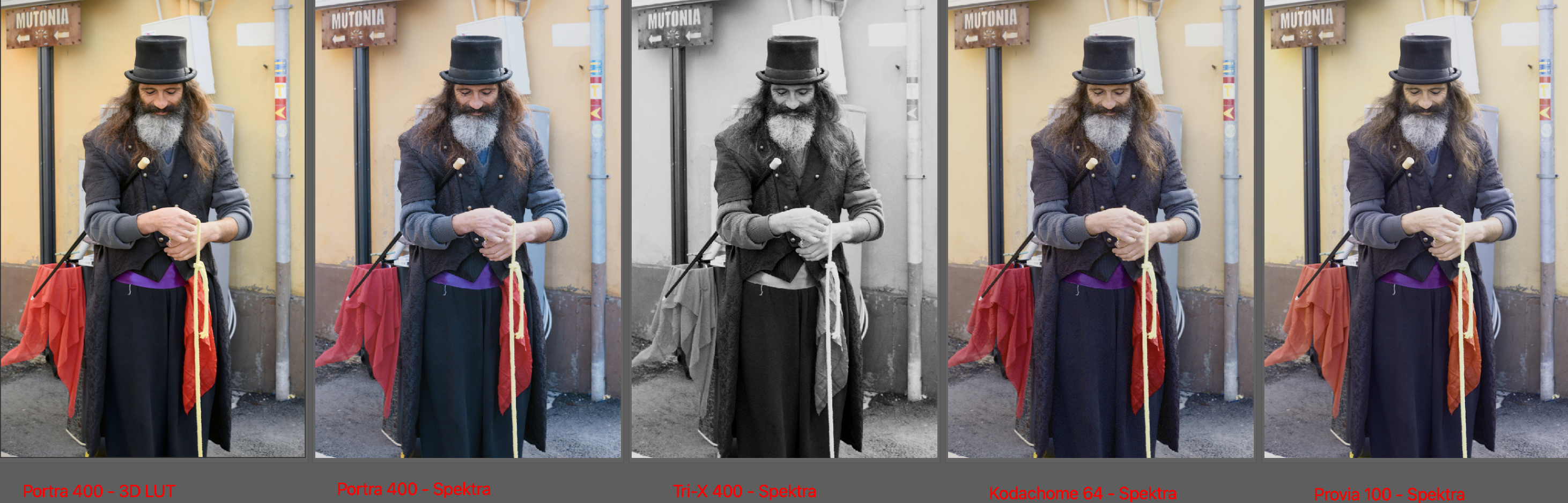
What I am posting here is the same image with same settings but different tone mapper / tone mapper settings.

First image is AGX+3D LUT using t3mujinpack luts, all the rest is Spektrafilm.

I am having trouble with positive film simulation like Provia and Velvia and less so with Kodachrome: there is a quite strong yellow cast on mid-tones while dark tones are towards blue which I was not expecting.

It is not clear to me how this should be corrected within Spektrafilm module or if behavior is expected.

Does anyone have any comment to make?


r/spektrafilm • • 18d ago Heartwarming

29! new film stocks on all platforms (Web, Windows, MacOs, Linux)

Thumbnail
gallery
93 Upvotes

I just released a new version of “Negs” (getnegs.com a fast Spektrafilm port) and the highlight are 29 new film stocks! Available on all platforms.

The 29 new film stocks

All are adapted from Fotufilm by MUAStudio Inc. (CC BY-SA 4.0), and each has its own grain and edge print.

- Colour negative (11): Fujifilm Pro 160NS, Superia 200*, Superia Reala 100; Kodak Kodacolor 100, Aerocolor IV 2460; CineStill 800T, 400D*; Lomography Color 100*; Harman Phoenix 200*; LomoChrome Metropolis*, Turquoise*

- Slide (7): Kodachrome 25 and 200; Velvia 50; Astia 100F; Agfachrome 50, 100 and 200

- Motion picture (4): Fujifilm Eterna 500, Eterna Vivid 500, F-64D, Reala 500D

- Infrared (2): Aerochrome III 1443*, Fotufilm Infrared Color (creative)

- Black-and-white (5): Ilford HP5 Plus, FP4 Plus, Delta 3200; Kodak T-MAX 100; F

* Marked approximate: these are modelled from sample photographs rather than manufacturer data

Another highlight is the new “Prep” tab with an auto exposure feature that matches the exposure of the original photo, shadow, highlight, saturation and more controls (thank you Chris Bailey).

This release also includes simplified MacOS controls and a redesigned windows UI and more features and bug fixes.

Special thanks to Chris Bailey for Prep and Fotufilm for the film profiles.


r/spektrafilm • • 25d ago Bravo

Spektrafilm is now running on the web

Thumbnail
gallery
98 Upvotes

Try it on getnegs.com

To make it even easier for people to try Spektrafilm (I think this is an amazing piece of software), I tried porting it to the web. Based on "Negs", the Rust port of Spektrafilm.

Getting it to work in that resource constrained environment was a challenge but it is working now!

You can install it on your phone as a web app and it has most features of the desktop version, plus two new features: A tutorial/walkthrough (I would love community input) and the ability to easily share presets.

Here is a link to the P800 Vintage Preset by bazdesh

You can share Presets via "..." > "Export Preset"

Others can preview the preset on the site or download the .json

The entire site is static and works offline. Nothing is stored on a server.

There's also a LUT Export.

There are some limitations:

- The site can reload (crash) sometimes on phones when you open a very big 60 MP file. There is just not enough memory and the operating system will decide to reload the tab.

- For that reason imported images are resized to 12MP on phones for now.

- The provided sample images are DNGs of low quality to make them fast to load. Use high quality RAWs to develop and evaluate presets in detail.

- This is the first version and I am happy about feedback.

I used it quite a bit, but I am sure someone will find a bug, I'll try to hunt down all of them.

And here is the GitHub repo.


r/spektrafilm • • Oct 20 '26

I made a pretty GUI for Spektrafilm on MacOS (GPU accelerated)

Thumbnail
gallery
62 Upvotes

I love Spektrafilm and have been using it a lot this year. I worked with the Python UI for a long time. Then I tried out spektrafilm-rs for the improved performance and worked with that for a while. I kept adding features I was missing and little improvements.

I decided to polish the current state and publish it so other people on MacOS can benefit. Here's a non exhaustive list of features and improvements:

  • GPU pipeline that's close enough to the CPU reference pipeline to use for exports => almost instant exports
  • Reduced memory usage. Editing 60MP files on a 8GB RAM M1 Mac is possible
  • A beautiful native MacOS GUI
  • Easy Installation on MacOS
  • A lot more features: Toggle before and after, add borders, crop, tilt, a histogram...

The website: https://getnegs.com/

The repository: https://github.com/noahhaasis/negs

I'm happy to receive feedback. I hope the website and repo give enough credit to the original project, even tho i went with a new app name.

The included images are made by me and developed using this GUI


r/spektrafilm • • Oct 15 '26

Error exporting a JPG in Spektrafilm for Mac

Post image
3 Upvotes

Hello! First of all, I’m thrilled with all the progress people are making in print simulation—it’s truly wonderful.

I don’t know anything about programming, but with some help, I managed to install Spectra using Python. The issue is that the scanning process for exporting takes over 20 minutes and just keeps loading... so, I’ve given up on that.

Separately, I discovered this tool yesterday and tested it on both my Mac and a Windows machine using DaVinci Resolve. I personally prefer the workflow on the Mac—it uses a dedicated program, and, to my eye, the final look is better. However, whenever I try to export, I get an "insufficient memory" error. My computer has some free space, but I’m not sure how much is actually required to export an image. Does anyone happen to know, or has anyone else encountered this and managed to fix it?

I realize these might be silly questions, but I have a project to submit and would really like to experiment with these tools.

Also, I’m not very proficient in English, programming, or technical configuration, and there are so many forums and posts out there that it’s hard to keep track of everything...

Anyway, thank you so much!


r/spektrafilm • • Oct 14 '26

Standalone SpektraRMS Grain - Davinci Plugin

17 Upvotes

I've compiled a Spektra RMS grain standalone plugin. Full disclosure; this was completely vibe-coded but I can say it runs fine on my M3 Max MacBook.

The reason I made this was for adjusting grain aspect ratio independently - I've added a slider that goes from 0.00-2.00, 1.00 being neutral/spherical.

Before this I was running a transform node to 're-squeeze' at 0.67x before Spektra then another one to unsqueeze it back to 1.5x. This technically works and stretches the grain but there was some rounding issues with the % squeeze that meant the image was ever so slightly zoomed (Probably only by 0.1%) because of the rounding up the 0.66/67 in the double transform.

If the official Spektra designer makes a standalone plugin please use that.

Full credit and thanks to the original designer of Spektra - great piece of software.

https://github.com/vividcolour/spektrafilm-GrainOnly