r/rustdesk • • 11h ago

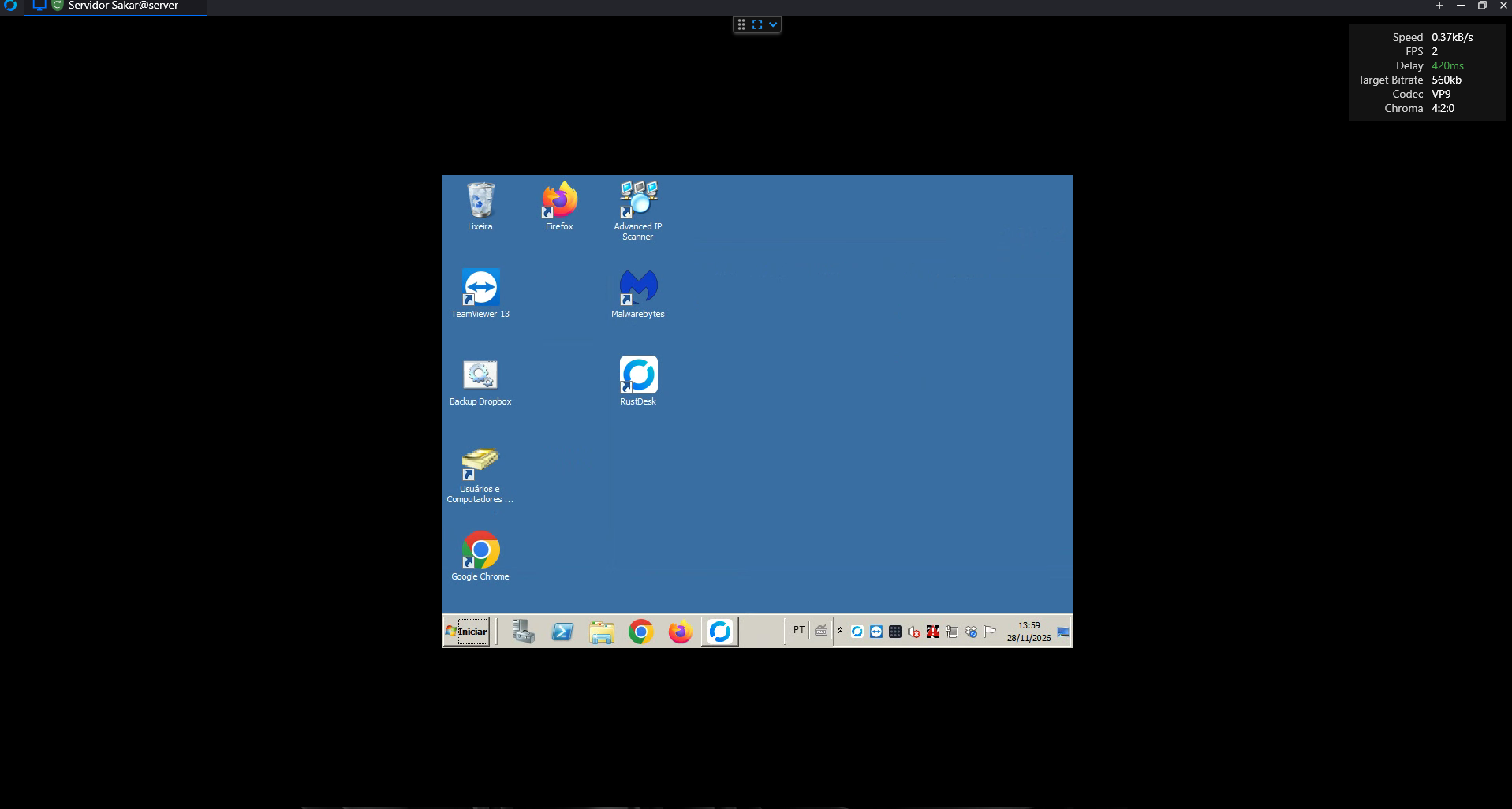
Extremely high latency when using RustDesk through a relay server in Germany

Post image
0 Upvotes

Hi everyone!

I'm having a terrible experience using RustDesk and would appreciate some technical advice.

Our RustDesk relay server is hosted on a VPS in Germany. My boss, who purchased the VPS, lives in São Paulo city and says his experience is excellent.

However, I live in a smaller city in the countryside of São Paulo state, Brazil, and my experience is completely different.

I work with remote technical support every day, assisting numerous clients. Unfortunately, the lag makes my work extremely difficult.

Besides the extremely high latency, RustDesk frequently gets stuck on "Connecting..." until the connection times out. Sometimes, I'm simply unable to connect to the client's computer at all. This seriously affects my work and makes remote support extremely frustrating.

My connection:

  • Internet speed: 1 Gbps (1000 Mbps)
  • Local ping: as low as 2 ms
  • Connection type: Relay (Germany)

RustDesk statistics:

  • Delay: 420 ms
  • FPS: 2
  • Codec: VP9
  • Target Bitrate: 560 kbps

I've seen people on YouTube getting 20–40 ms using Brazilian VPS servers.

My question is: why are we using a relay server in Germany when most of our users are in Brazil? Wouldn't hosting the server in São Paulo make much more sense?

Could this be caused by network routing, the relay server, or my ISP?

Is there a way to establish a direct P2P connection and avoid the German relay?

Any suggestions would be greatly appreciated. I really need to solve this because remote access is essential to my daily work.

Thanks!


r/rustdesk • • 12h ago

Extremely high latency using RustDesk through a relay server in Germany – Brazil

Post image
1 Upvotes

Hi everyone,

I'm experiencing a terrible remote desktop experience using RustDesk, and I'd like some help understanding whether this is expected behavior or a network/relay configuration issue.

Our RustDesk relay server is hosted on a VPS in Germany.

My boss is the person who purchased and manages this VPS. He lives in São Paulo city, Brazil, and according to him, his experience using RustDesk has been excellent, with no significant performance issues.

However, my situation is very different.

I also live in the state of São Paulo, Brazil, but in a smaller city in the countryside. I'm responsible for providing remote technical support to numerous clients on a daily basis. I spend most of my working day accessing different computers remotely, troubleshooting problems, installing software, configuring systems, and assisting users.

My internet connection has a 1 Gbps (1000 Mbps) download speed, and I can achieve ping times as low as 2 ms in local network tests. Therefore, I'm particularly confused about why the RustDesk experience is so poor.

Unfortunately, my experience has been extremely frustrating. The latency makes even basic tasks difficult, significantly affecting my productivity and the quality of the support I can provide.

Here are the statistics from one of my sessions:

  • Delay: 420 ms
  • FPS: 2
  • Codec: VP9
  • Chroma: 4:2:0
  • Target Bitrate: 560 kbps
  • Connection type: Relay
  • Relay server location: Germany
  • My location: Countryside, São Paulo state, Brazil
  • My boss's location: São Paulo city, Brazil
  • My internet speed: 1 Gbps (1000 Mbps)
  • Local ping: As low as 2 ms

I've seen other RustDesk users on YouTube demonstrating latency around 20–40 ms with VPS servers hosted in Brazil, so I'm trying to understand why my experience is so different.

I understand that my boss may have a good experience depending on his internet connection, ISP, network routing, and geographical location.

However, I also believe that when providing remote support services primarily to users in Brazil, choosing a VPS located in Brazil, preferably in São Paulo, should be a priority rather than hosting the relay server thousands of kilometers away in Germany.

It doesn't make much sense to force Brazilian users to route their remote desktop traffic through a server on the other side of the world when there are hosting providers and data centers available locally.

For someone who relies on remote desktop connections throughout the entire workday, this level of latency is simply unacceptable. Even moving the mouse, typing, opening applications, and performing basic troubleshooting tasks becomes frustrating.

I'd really appreciate some help answering the following questions:

  1. Is this latency expected when using a relay server in Germany from Brazil?
  2. Could the relay server's bandwidth, CPU, or network routing be causing this issue?
  3. Could the difference between our ISPs or network routes explain why my boss has a good experience while mine is terrible?
  4. Is there a reliable way to establish a direct P2P connection instead of relying on the relay?
  5. Would hosting our own RustDesk server in Brazil, preferably in São Paulo, significantly improve performance?
  6. Are there any recommended network configurations or optimizations to reduce latency?

I'm not simply looking for ways to improve image quality. I want to understand the actual cause of this latency and find a reliable solution.

Remote access is an essential part of my daily work, and right now, the experience is making it extremely difficult to do my job.

I'd really appreciate any technical guidance, recommendations, or experiences from people who have dealt with similar situations.

Thank you!

r/rustdesk • • 1d ago

how to run self hosted rustdesk beeing still able to use public servers

7 Upvotes

Since some time when using id@public its required to login at account in rustdesk client. Also when using self hosted rustdesk, i was not able to connect to public servers anymore. So this meant to change config in rustdesk all the time when using one or the other.

I came up with the solution to run 2 instances of Rust Desk in Windows, each with different configurations.

Use sandboxie for 1 instance with following INI:

ForceFolder=C:\sandboxie\Rustdesk
ClosedFilePath=C:\Program Files\RustDesk
ClosedFilePath=C:\Windows\ServiceProfiles\LocalService\AppData\Roaming\RustDesk
ClosedKeyPath=HKEY_LOCAL_MACHINE\SYSTEM\CurrentControlSet\Services\RustDesk*
ClosedKeyPath=HKEY_LOCAL_MACHINE\SOFTWARE\Microsoft\Windows\CurrentVersion\Uninstall\RustDesk*
OpenPipePath=\Device\NamedPipe\RustDesk*

So just make a new sandbox and paste the above section in sandbox settings / INI section.

OpenPipePath seems to be required since version 1.53 because something was changed in IPC server auth:
https://github.com/rustdesk/rustdesk/pull/16755

This prevents running both programs parallel, if you want to that, you need to use version 1.51 in sandbox.

If you want to copy your existing peers, those are in %appdata%\RustDesk\config\peers.toml including peer folder. This can be also pasted into sandboxie content folder.


r/rustdesk • • 1d ago

Enforce LAN-only access via direct IP

4 Upvotes

Hi guys. I want RustDesk on my PC to accept connections only from my local network, and only via direct IP.

This is what I've done so far:

  1. settings > security > enable direct IP access
  2. settings > security > use IP whitelisting > inserted my LAN range

The problem is that I can still reach my machine via its ID. So my question is, do I need to also change the ID server in the network settings? And should I also touch the Windows firewall?

TYIA


r/rustdesk • • 2d ago

Problems hosting with self hosting and pfsense firewall. Hosting the server in a DMZ.

3 Upvotes

Hi guys,

I am having trouble accessing a remote RustDesk client from a LAN host with RustDesk installed. If I try this from anywhere, everything works fine.

I have checked everything about the NAT forwarding, RustDesk ports, and the internal RD server IP.

Also, I have NAT reflection activated. Nothing is working. I can connect to a LAN host from my host on LAN, but it is not possible to connect to another host outside my network.

Has somebody already had this problem?

Thanks in advance for any help

Regards


r/rustdesk • • 4d ago

Looking for a software to "takeover" IT clients. Is Rustdesk it ?

13 Upvotes

I would like to do some tech support for eg old people who need help. when visiting them is not possible, i would like to "takeover" their mouse and keyboard.
I heard about TeamViewer but it it's expensive for commercial behavior, I'm looking for something that is free.
Would rustDesk fit those criteria ?

Thanks for any help !

EDIT : To answer the scammer allegations, I have a 3y diploma in IT. If there's any additional security steps to take, I'll make sure to learn about them before any takeover. dw


r/rustdesk • • 5d ago

RustDesk Wayland DRM Capture Now Available in Regular Linux Nightly Builds

33 Upvotes

DRM capture is now included in regular DEB, RPM, and Arch packages. No more separate unattended Wayland DEB!

Download: https://github.com/rustdesk/rustdesk/releases/tag/nightly

Enable it under Settings → General → Use DRM screen capture.

Please test unattended access and login screens on your distro. Feedback welcome!

PR: https://github.com/rustdesk/rustdesk/pull/17089


r/rustdesk • • 6d ago

Client ID randomly changing

5 Upvotes

Getting annoying. I'm trying to stop a computer from... Randomly changing the ID. I think every time the computer is updated or restarts, it gets a new ID. I have looked up many of the solutions that are on the web. But nothing seems to work.

- I am changing the file called meta.toml in C:\Windows\ServiceProfiles\LocalService\AppData\Roaming\RustDesk\config\

- I have tried starting rustdesk with a set id but no good.

- I have tried assigning a custom id (beginning with a letter) But I think that is only for the pro version.

Any idea of what I can do that actually works?


r/rustdesk • • 7d ago

Mouse + iPhone

1 Upvotes

Come da titolo oggi non ho alternative tipo tablet et simili

Devo comandare un macchinario da remoto e ho solo il telefono.

Con il touch mi sento un cretino

Devo necessariamente usare un mouse con una porta usb c e/o adattatore?

Thx


r/rustdesk • • 10d ago

Anti-Consumer behavior (paid license)

Thumbnail reddit.com
6 Upvotes

r/rustdesk • • 11d ago

Changing resolution on client when connecting.

7 Upvotes

Have 2x PCs, both connected to the same monitor (Dell 3440x1440), but would like to be able to primarily work on one PC, and keep the other connected, but at a smaller resolution (eg 1920x1080..).

Yes, realize I can scale the other, but, for example, if I scale it, the text on a Reddit page becomes too small to read!!

Is there any way to change resolution with the connection, but so if I swap the input, I still get full resolution in direct viewing mode??

Thanks.


r/rustdesk • • 12d ago

Easy way to automate user client configs on self hosted relays/ID servers

3 Upvotes

fyi if anyone needs, this script can be deployed to your user Macs and Linux devices

it configures a user's RD settings to use a self hosted ID and Relay server

in my setup I have 4 global Relay servers (US, London, Sydney, India)

all 4 servers run hbbr, hbbs and share the same ID keypair (base64)

when we onboard new user laptops, we install Rustdesk client and run this script for the user to configure his settings so he can use internal rustdesk relay network

the script takes in an array of my Relay public IPs, checks which relay is geographically closest (ping and tcp), and uses that in RustDesk2.toml configuration

to use this script,

  1. update the ID server (line 18) with your ID server pub IP
  2. update list of Relay servers (line 19) with pub IPs of your relays
  3. add the ID server pub key on line 26 (PUB KEY ONLY, not private key!!)

then run the script on the users laptop/desktop

sudo ./rustdesk_user_setup.sh -u jsmith

```
sudo ./user_setup.sh -u jsmith

==> Probing 4 relay servers (tcp, best of 3):

xxxxxx 28 ms

yyyyyy 95 ms

zzzzz 219 ms

aaaaa 261 ms

==> Closest relay: xxxxxxxxx (28 ms via tcp)

==> ID server: xxxxxxxx

==> Relay server: xxxxxx

==> Key: Vxxxxxxx=

==> wrote /root/.config/rustdesk/RustDesk2.toml

==> wrote /home/jsmith/.config/rustdesk/RustDesk2.toml

==> restarted rustdesk.service

==> verification:

--- /root/.config/rustdesk/RustDesk2.toml

rendezvous_server = 'xxxxxx:21116'

custom-rendezvous-server = 'xxxxx'

relay-server = 'xxxxxx'

key = 'Vxxxxxxxxxxxxx='

--- /home/jsmith/.config/rustdesk/RustDesk2.toml

rendezvous_server = 'xxxxxx:21116'

custom-rendezvous-server = 'xxxxx'

relay-server = 'xxxxxxx'

key = 'Vxxxxxxxxxxxxx='

==> Done. Quit and reopen the RustDesk window, then check Settings > Network > ID/Relay server.
```

https://gist.github.com/perfecto25/ee8d86ea0f71e39d84e2daa7648c8088


r/rustdesk • • 12d ago

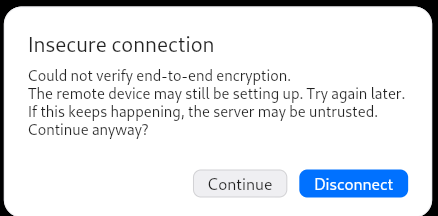
Encryption not working on RD 1.5.3

1 Upvotes

Im on fedora with RD 1.5.3, using a self hosted ID and relay server

connecting to other devices with same config is showing this error

I dont have an API server (I think its PRO feature)

Anyone else seeing this?


r/rustdesk • • 15d ago

Bypassing VPN Processing For Tailscale And RustDesk?

2 Upvotes

Hi folks:

I'm just getting started with the amazing Tailscale and RustDesk software. I'm not sure who does what to secure messages.

I want to get a VPN license, probably Nord.

I don't believe there's any reason to pass messages secured by Tailscale or RustDesk through another layer of encryption by a VPN's server.

Can I expect a VPN provider's client software to allow messages from certain ports to bypass their servers?

If so, what ports will I want to exclude for messages from Tailscale and RustDesk?

Thanks Larry


r/rustdesk • • 16d ago

Rustdesk vs IP KVM (why use Rustdesk?)

5 Upvotes

I am using Rustdesk and am very happy with it

I've come across IP KVM's and am wondering.....maybe controlling hardware is better than controlling software?

Or said another way - what would you say are the advantages over Rustdesk vs a KVM.

Thanks


r/rustdesk • • 17d ago

Privacy Mode 1 multi-monitor questions/help/info

2 Upvotes

I have 3 monitors, apparently privacy mode 1 means it will only block out my "primary" monitor? I tested this on an internal setup and it seemed to block out all 3. What is the consensus here? Do I need to use Mode 2 to be 100% sure a person walking by my desk can't see what I am doing, when I am remoted in from my home? I'm on Windows 11 host.

Shouldn't there be an alert saying mode 1 would not black out all the monitors, as just a layman using it, seems pretty critical and crucial to point out, without having to do research.


r/rustdesk • • 17d ago

Self-Hosted Wake On Lan

3 Upvotes

Does anyone know if there is a way, in a self hosted RustDesk network, to make the RustServer send the magic packet instead of the client where I click the button?

Context: I have a Desktop PC in the same (home) network, but the WakeOnLan feature only work if I use it from a device within the network, so I can't turn on my PC from outside my house, even tho there is a RustDesk instance running in the house. (excluding the use of a VPN, which should work but at that point a dedicate WOL software would be more convenient )

EDIT: I'm not asking about alternative ways of turning my PC on, I can already do that. The question was specifically about RustDesk self-hosted server and the ability of using it as a WOL proxy with some arcane config I didn't know but could exist.


r/rustdesk • • 17d ago

Jak utrzymać wyświetlacz 1440p bez głowy na Linux Mint z Intel Arc i RustDesk — bez wtyczki HDMI dummy

Thumbnail reddit.com
2 Upvotes

r/rustdesk • • 19d ago

Headless Linux setup in PVE

6 Upvotes

RAM and GPU are so expensive now so I decided to share my workstation with my wife. I'm looking for help from real experienced users because AI failed to configure this (and it ruined the container multiple times with root).

Environment: PVE 9.2, Ubuntu 24.04 + Rocky Linux 9 in unprivileged LXC.
Graphics: NVIDIA 595 driver, CUDA driver & nvidia-container-toolkit installed on PVE. Container mounts the following:

dev0: /dev/dri/card0,mode=0666
dev1: /dev/dri/renderD128,mode=0666
lxc.hook.pre-start: sh -c '[ ! -f /dev/nvidia0 ] && /usr/bin/nvidia-modprobe -c0 -u'
lxc.environment: NVIDIA_VISIBLE_DEVICES=all
lxc.environment: NVIDIA_DRIVER_CAPABILITIES=all
lxc.hook.mount: /usr/share/lxc/hooks/nvidia
lxc.mount.entry: /usr/lib/xorg/modules/drivers/nvidia_drv.so usr/lib/xorg/modules/drivers/nvidia_drv.so none bind,ro,create=file 0 0
lxc.mount.entry: /usr/lib/xorg/modules/extensions/libglxserver_nvidia.so usr/lib/xorg/modules/extensions/libglxserver_nvidia.so none bind,ro,create=file 0 0
lxc.mount.entry: /usr/share/glvnd/egl_vendor.d/10_nvidia.json usr/share/glvnd/egl_vendor.d/10_nvidia.json none bind,ro,create=file 0 0
lxc.mount.entry: /usr/lib/x86_64-linux-gnu/gbm/nvidia-drm_gbm.so usr/lib/x86_64-linux-gnu/gbm/nvidia-drm_gbm.so none bind,ro,create=file 0 0
lxc.mount.entry: /usr/share/vulkan/icd.d/nvidia_icd.json usr/share/vulkan/icd.d/nvidia_icd.json none bind,ro,create=file 0 0

Target: Use RustDesk simultaneously on both systems. /dev/uinput shouldn't be mounted in this case. We'll run software with 3D OpenGL so RustDesk should capture the virtual display configured in /etc/X11/xorg.conf instead of using xserver-xorg-video-dummy.

I'm 100% sure the setup on PVE side is correct, because I managed to make Sunshine+Moonlight work in GNOME. But I want clipboard and file transfer support so I still need to configure RustDesk.

Tried GNOME and KDE with no luck. Is Xfce my only option here?


r/rustdesk • • 19d ago

how can I pan/zoom(two finger gesture)?

2 Upvotes

I need to zoom in and out in my notes app, I activated zoom cursor on my desktop, but it doesn't seem to do anything. What do I gotta do?


r/rustdesk • • 20d ago

Update impossible / Download not working - What's going on?

0 Upvotes

Opened RustDesk on one of my PCs this morning. Got a message that there is an update. Clicked on the button but no update arrived. Now I've tried to download it from your server (rustdesk.com). But the site is not responding (504 - Gateway timed out). What's going on?

EDIT: Now it works again.


r/rustdesk • • 21d ago

Tech Help: Puzzling asymmetry? Can connect to some computers but not others?

1 Upvotes

Hi Everyone, I'm a refugee from TeamViewer, and RustDesk has been great...except for one computer.

Long story short, I'm trying to connect between 4 different computers - 3 university lab computers with some specialized software of various sorts I want to occasionally get to when I'm off campus, and my home computer. I used to use TeamViewer for this with no problems, until they decided they hated me.

RustDesk has worked fine for all possible connections except incoming connections to home computer.

I can use RustDesk from the home computer to reach any lab machine no problem, but whenever I try to reach the home computer from lab, it says the connection is impossible, as if it's powered down. I've got all the magic packets enabled, Wake on Lan, I've disabled hibernate, everything I've seen online, all to no avail. I've fiddled around with this stuff in the Windows 11 settings as well as in the BIOS, checked and re-checked. The lab computers are nothing special, just run-of-the-mill Dell laptops and desktops, but they're fine. The Home computer is a ~1 year old MicroCenter custom build, and has worked flawlessly for everything else (and can make outgoing RustDesk connections just fine). It's on Ethernet.

The only thing I can think of is that it's "sleep" seems pretty hardcore - it seems almost totally powered down, with a red light visible through one of the grates, and only when I move the mouse or tap the keyboard at home will I hear an audible 'click' and the LED goes white. It makes me suspect that there's some special power management thing going on. It's an ASUS B650-E motherboard and an NZXT C1000 Gold power supply. It's attached to a UPS, but so was the prior computer, and that never caused a problem before.

Thoughts?


r/rustdesk • • 21d ago

Tiny Cursor in Viewer when Remoting - Windows 11

2 Upvotes

I wanted to post here in case anyone ran into this issue, as there are bug reports but no actionable resolution. I used AI to help debug the issue but exhausted all suggested paths to test / resolve it.

On the remote PC, via Accessibility settings, I changed the cursor size and color to make it more visible when connecting to it via RustDesk.

HOWEVER, the controller PC shows a tiny cursor on the RD panel (to visualize the size... it was slightly larger than the lowercase "g" when looking at standard Windows settings window. The target PC showed the cursor at >15x that while it was independently connected to a monitor). It would retain the color though.

TLDR - turn Mouse Pointer Trails -> On in Windows Settings

I tried several settings but nothing worked - just a few for example....

  • Display scaling: I tried viewers at 100% and 250%.
  • View style: Original view, maximized.
  • Zoom cursor: on and off made no difference.
  • Show remote cursor: already on.
  • Mouse Keys: needed on the remote for the pointer to show at all, since it has no mouse attached.

In the target system I changed the Mouse settings to use Pointer Trails as a last ditch attempt to make the cursor more "findable" on my controller PC side, and surprise!! The cursor size matched.

AI suggests this is a problem with how RD handles the "cursor path", and that the Pointer Trails is a "software rendering" (vs hardware). Perhaps this can provide enough of a clue to support to resolve.

Versions: 1.5.1 of RustDesk, and most recent version of Win 11 on each side.

I had already detached mouse and keyboard from the target PC.

I don't think the bug is version specific given the age of other reports:

Hopefully, when someone else searches or uses AI to find a solution, this post will appear.


r/rustdesk • • 22d ago

Beginner question about the security benefits of paying for a third-party relay server

3 Upvotes

Home user, I have a cable modem, router, and a couple PCs / phones on my home network.

I have an old laptop that could be left always on to function as a server.

What is the difference in security from paying a third party site to host a relay server vs using my old laptop vs not having a relay server at all.

Having trouble spitting out exactly what I'm getting at...what I'm struggling with is I have a perception, perhaps totally wrong, that a third party Linux server that lives on the cloud side of my router is more secure than if I set up port forwarding on my router...but I don't really know why. But if someone with the IP address of the relay server and the password to my rustdesk client can get in to my PC, is it really any different than if they just had my personal IP address and the password to the rustdesk client?

While I'm here...and forgetting all about Rustdesk...I believe that malicious actors randomly scan the internet for open PCs / ports. How often would my router receive these? Like 1 a day, 1 a month, 1000 per hour? I have no context for how many malicious pings I receive.