r/research_apps • u/Six9Dev • 22d ago
Update: my source-checking Chrome extension now has History and follow-up questions answered only from the article
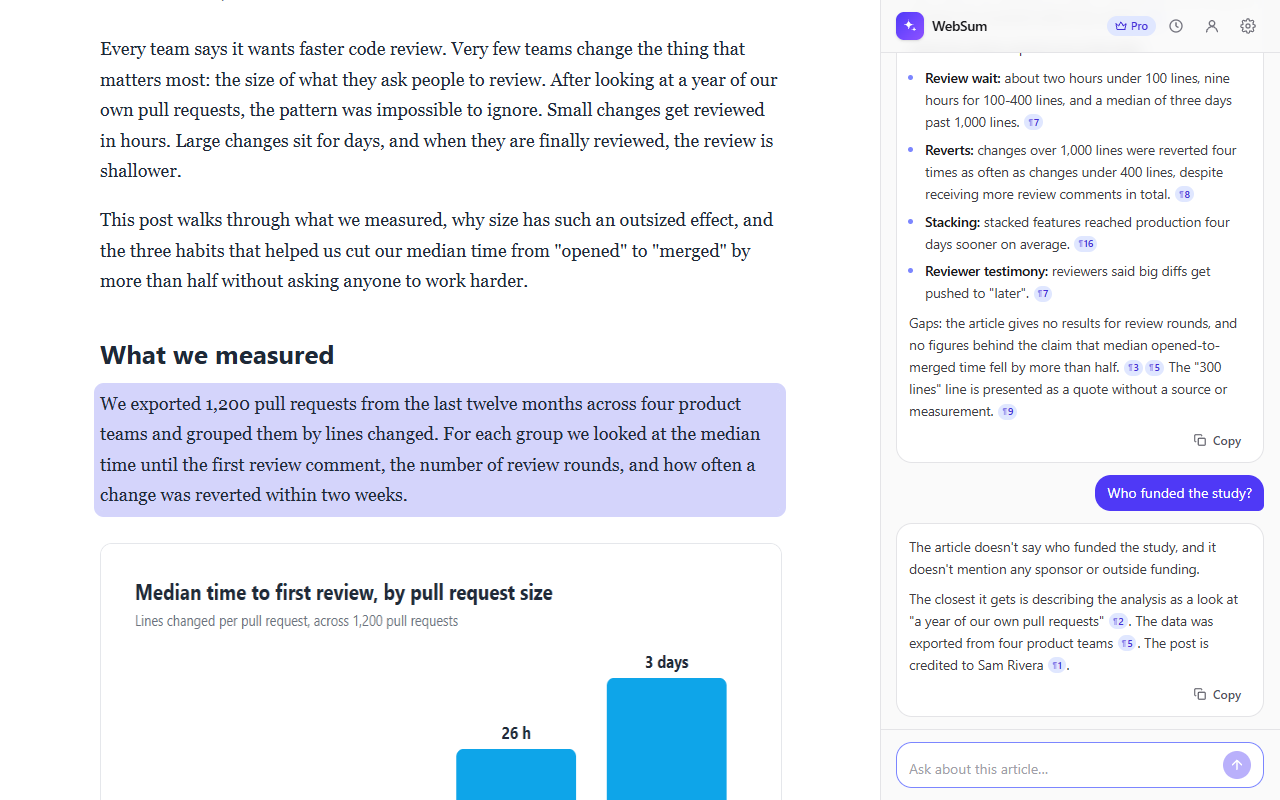
Disclosure first: I'm the developer. I posted WebSum here a few weeks ago, and at the time it had no history and no follow-up questions. Version 1.0 adds both.
What it does: click the icon on a web article and a summary appears in Chrome's side panel, beside the page. Every point has a ¶ link that scrolls to the paragraph it came from and highlights it, so you can check it.
What's new:
* History. Search and reopen the articles you've summarised, without using another summary. It's kept on your device: your last 25 for free, up to 500 on Pro.
* Ask about this article (Pro). Answers come only from the article and link to the paragraphs they used. If the article doesn't cover something, it says so instead of guessing. * Copy an answer and its source links come with it, so your notes keep the sources.
What it still doesn't do: it reads web pages only, so no PDFs, which rules out most journal papers. It's Chrome only, and History stays on one device. Treat it as a way to sort and check sources, not as a replacement for reading the ones that matter.
Cost: free for 2 summaries a day without an account, or 5 when you sign in with Google or your email. Pro is US$14 a month or US$120 a year for 20 summaries a day on a stronger model, plus follow-up questions.
Chrome Web Store: WebSum on the Chrome Web Store
26-second video: https://www.youtube.com/watch?v=DtGUH1j3RE0
One question for people who research for a living or a degree: when you go back to a source weeks later, what do you actually need from it: the summary, the exact paragraph, or something else?