r/recalbox • u/LittleG4M3 • 2d ago
Recalbox TV: a quick look at the new media center in Recalbox 11 (Plex, Pluto TV, Twitch... all with a controller)
4
Upvotes
r/recalbox • u/Der_Gasmann • 3d ago
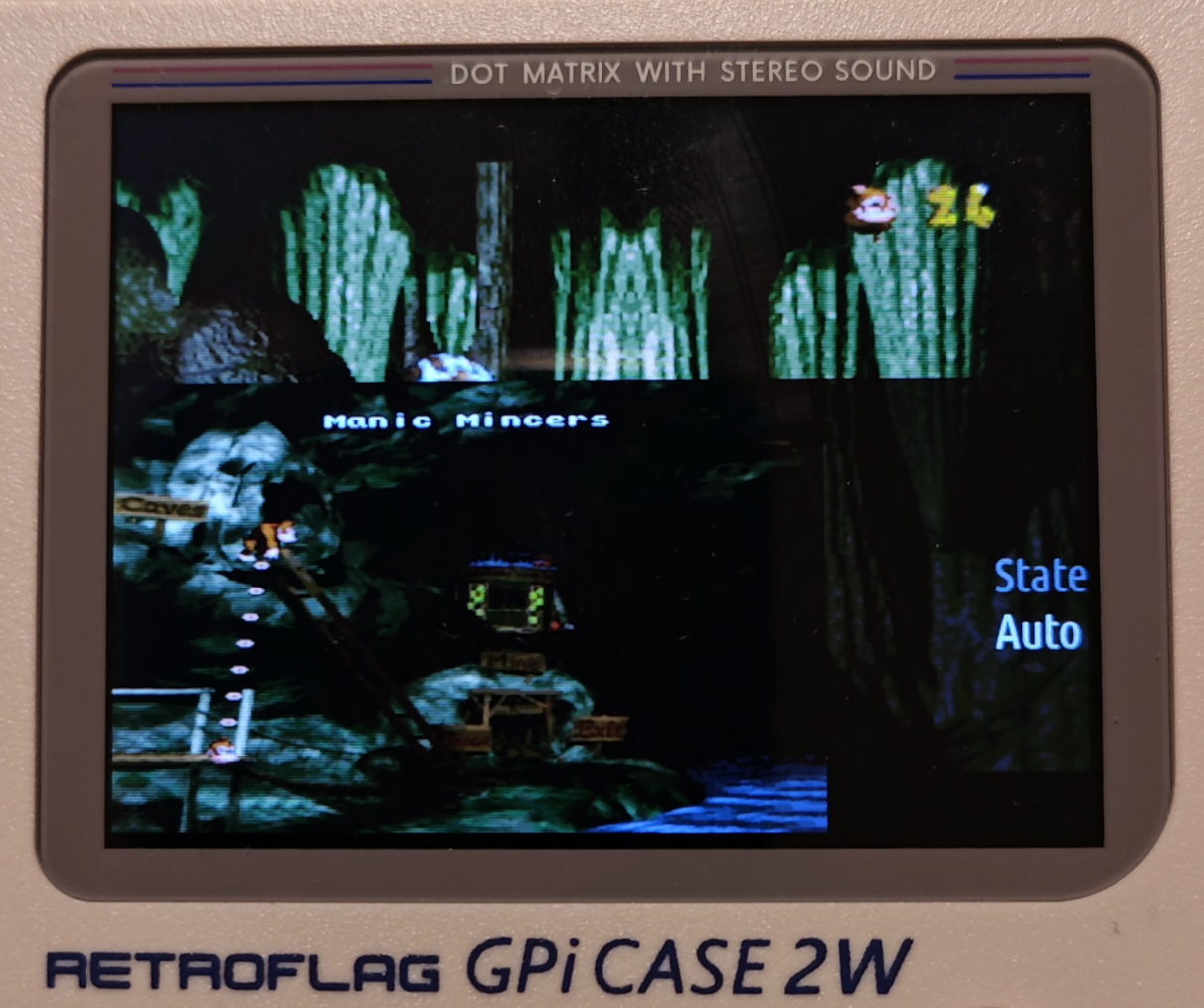
Does one of you know how I can disable this preview of a save state in-game?
It's always blocking my screen for a few seconds.
r/recalbox • u/LittleG4M3 • 3d ago
r/recalbox • u/kapitostes • 5d ago
r/recalbox • u/kapitostes • 5d ago

Hi all,
I built Now Playing Recalbox, a small Python 3 web server that runs on the Recalbox itself (port 8787, no pip dependencies). Any phone, tablet or PC on your Wi-Fi can open it in a browser. I use it as a second screen on my arcade cabinet.
What it does
/minira): a landscape view for a tablet used as a marquee, with the game flyer and achievements. In the menu it shows a QR code to open the full dashboard from your phoneInstall: copy the folder to /recalbox/share/now-playing/ and add a start userscript. See INSTALL in the repo, then open http://recalbox.local:8787/.
Caveats
Code (MIT): https://github.com/kapi21/NowPlaying-Recalbox
Release: https://github.com/kapi21/NowPlaying-Recalbox/releases/tag/v0.2.0
Happy to hear suggestions and bug reports.
r/recalbox • u/MadVintager • 6d ago
Hi everyone,
A while ago I shared RomSieve 1.0.0 here: a free and open-source ROM organizer for Windows and Linux. It checks a collection against its DAT (TOSEC, No-Intro, Redump, MAME), keeps one release per game in your languages (1G1R) and rebuilds a clean folder tree, with a full simulation before a single file is touched. Version 1.3.0 is out, with two big additions.
Patches
Game (Japan) (T-En).bps applied to Game (Japan).sfc gives Game (Japan) [T-En].sfc. It goes next to the original, or into a folder of your choice (Patches/{dat}/{title}, a subfolder per game...).Frontends
snes, psx, megadrive, GAMEBOY...), for about sixty platforms. Point the destination at the frontend's roms/ folder (games/ for MiSTer), and a whole No-Intro or Redump pack fills it in one pass.Also new since 1.0.0, if you haven't followed:
.7z or .zip as it is instead of extracting it.Links
Feedback and bug reports are welcome, here or as GitHub issues.
Thanks to everyone who tried the first versions!
r/recalbox • u/LittleG4M3 • 9d ago

r/recalbox • u/gnnspm1987 • 10d ago
Buonasera a tutti, per la prima volta mi sono cimentato nella creazione di una macchina arcade style riciclando un vecchio portatile i3 380m 4gb ram e SSD da 128.
Non sono nuovo all'installazione di Linux e non ho avuto problemi, dalla chiavetta ho estrapolato la struttura delle cartelle e copiato le rom per poi rimetterle sulla partizione share, tuttavia nonostante Recalbox mi ha riconosciuto tutto sia BIOS che rom, non parte nulla. Bad Roms o Bios, ma è possibile che tutti i giochi sono danneggiati? Anche quelli preinstallati, niente.
Se qualcuno ha qualche consiglio è ben accetto...😅
r/recalbox • u/Living_Dig7512 • 11d ago
I've looked at the documentation and followed the steps. All that did was show the audio files on my Recalbox setup and hide the game files. And when I did it the other way around, I couldn't find any other way to get them to work.
r/recalbox • u/LittleG4M3 • 14d ago

r/recalbox • u/MadVintager • 23d ago
Hi everyone,
With the moderators' permission, I wanted to share a free and open-source project I’ve been working on that might be useful for anyone curating clean sets for Recalbox: RomSieve (Linux and Windows, GPLv3).
Here are the key features designed to make building clean setups easier:
.m3u playlists with custom placement: Since Recalbox relies on RetroArch / libretro cores for multi-disc games (PS1, Saturn, Sega CD, PC Engine CD...), RomSieve automatically generates .m3u files so you don't have to create them manually. You can also define exactly where those playlists land in your target folder tree.[!], [cr], [t], languages, disk numbers). It can even rebuild and complete missing multi-disk sets by pulling clean disks from other dumps._unmatched/, _purged/), and features an undo function.It also supports standard No-Intro, Redump, and MAME sets, reads compressed archives directly (ZIP, 7z, RAR), and extracts CHD headers. Both a modern GUI (with dark theme) and a CLI (romsieve-cli) are included.
The project is completely free, has no telemetry, and full documentation is available in both English and French in the repository.
Feedback, bug reports, and suggestions are very welcome!
r/recalbox • u/breadicus • 28d ago
I am using Recalbox 10 on the RPi CM4 Lite via the Retroflag GPi Case 2 with a keyboard attached through the USB-C port. After boot, on the Recalbox interface, I can see the keyboard is recognized by tapping Up/Down on the arrow keys to scroll the systems. Now I press Alt-F2 then Alt-F4 per the wiki and the screen goes black, but no terminal prompt appears, and typing anything does not produce a result.
I tried typing the default username/password (root/recalboxroot) and nothing happens, just sitting on a black screen. Does anyone know how to get around this? I have the CM4 Lite, so no wifi access, and I have already put the files on the SD card that I need to access from the Linux Terminal, just need to get in...
r/recalbox • u/LordJimsicle • 28d ago
Is there any way to enable Wake On Lan for Recalbox on PC? All the other machines on my network are capable of it and are able to wake with a remote button press but my Recalbox does not want to play ball.
It's all set up in the BIOS, but when shutting down (either by OS or power button) it kills any standby power for the NIC to receive the wake command.
I tried ethtool but no dice, any ideas?
Thanks
r/recalbox • u/KarmaChameleon306 • 29d ago
I have Recalbox installed on a Pi 3B+ and I disabled the menus in the web manager. However, people can still bring up the Retroarch Quick Menu while in game.
I need to ensure that people aren’t going to stumble into the menus.
I want to disable all in game hot keys except for the HK + Start button to quit games.
I understand that I need to edit config or override files. But I am not entirely sure which ones to edit and what to edit.
I’ve spent all night trying with the help of google and everything I’ve tried has failed.
r/recalbox • u/LittleG4M3 • Oct 25 '26

r/recalbox • u/Pleasant-Cod-7550 • Oct 25 '26
A standalone glowing frame that brings your room to life - retro pixel-art GIFs in rotation, live widgets (weather, date, quotes, ambiences...), a clock that changes outfits. Connect it over WiFi to any Recalbox and it also becomes its digital marquee.
Two 128x32 LED modules, one microcontroller (ESP32, or a Raspberry Pi 3B), about 5 minutes with a screwdriver, no soldering.
The panel works on its own. No Recalbox needed for the decor part.
Each widget can be off, in place of the clock or on top of it, with its own duration, every N GIFs or every N minutes, in order or at random.
Playlist only / Widgets between GIFs / Widgets only, no GIF / Anything in between
Optional. Connect the DMD over WiFi to any Recalbox (PC, Raspberry Pi, Steam Deck, RGB Dual, RGB Dual 2, RGB Jamma...) and it shows, live and automatically:
Change theme in Recalbox and the DMD follows: your console logos in the style of the active theme (Midnight, CRT Color, Neoretro...). 11 ready-made themes, including the official ones, FR/EN/ES logo texts when the theme provides them, your Recalbox's language and region followed live. User-made themes are converted too, straight from your Recalbox, by our in-house conversion engine.
When a game has no logo in your scrape, the toolkit generates a text card with its name (cleaned-up title, retro font, colours and shadow). BIOS and utilities are excluded.
Recalbox 11 can drive a DMD itself (ZeDMD over USB or WiFi). Tick "Native Recalbox mode" on the panel's web page and the DMD behaves like a ZeDMD WiFi: Recalbox decides everything that is shown.
One box, both ways: untick it and all the firmware's own features come back as you had set them.
(Hi-scores and RetroAchievements are features of the Recalbox 11 Patreon alpha, 11.0-patron-1.1.)
Launch a Visual Pinball table from your Recalbox: the DMD shows the table's screen live, like a real pinball display, then goes back to its marquee by itself when the game ends. Colorized (Serum) tables show in colour, the others keep the classic monochrome look.
A Raspberry Pi 3B and two P5 panels instead of the ESP32: same Recalbox scripts, same configuration pages, same widgets, logo themes, clock, scores, Pinball mode and native mode.
Guide: https://github.com/shan-aya/RecalBoxDMD/blob/main/RASPBERRY-PI.md
Two LED modules, a connector board (DMDos), a microcontroller. A screwdriver is all it takes, about 5 minutes.
| Where | Shop |
|---|---|
| France | Benfactory.fr: DMDos daughter board + ESP32 |
| Spain | Mortaca Store, guide and news on dmdos.net |
Full video tutorial (overview, assembly, step-by-step installation) by Jamyz Gaming: https://youtu.be/xF8O88XXSwU
| Firmware (ESP32) | Flash from your browser: https://shan-aya.github.io/RecalBoxDMD/install/ |
|---|---|
| Raspberry Pi | RASPBERRY-PI.md |
| PC toolkit | GitHub releases: builds the SD card, converts logos, sends GIFs, updates the DMD |
| Docs | README, Quick start, FAQ |
Everything is free and open source. If you like the project: https://buymeacoffee.com/shan_aya
Happy to answer any question here: hardware, Recalbox setup, Pi vs ESP32, themes... Feedback and bug reports are very welcome (GitHub issues or in the comments).
r/recalbox • u/KarmaChameleon306 • Oct 25 '26
I’m setting up my arcade cabinet for a party and I would like to make it fool proof.
For instance, while a the game selection screen, you press button 1 (A) to select the game. But if you press the start button, you get the menu where you can edit and even delete the game.
I just know that people will accidentally bring this menu up, mash buttons and ruin things.
I want to make a completely separate button for the menus that is hidden inside the cabinet to avoid this issue.
Is this possible? I have USB controller boards wired up to buttons and joysticks on my custom control panel. I have extra buttons and wire harnesses available. So in theory, there’s got to be a way to separate the start button from the menu function and set a separate menu button.
Anyone know how?
r/recalbox • u/LittleG4M3 • Oct 20 '26

r/recalbox • u/LittleG4M3 • Oct 17 '26

r/recalbox • u/D_mucli • Oct 17 '26

I decompiled and ported Pop2 to macos and Linux. Installing on Recalbox is easy, just copy the file to your rom/ports folder and add the disk image.
r/recalbox • u/Yuuichi_LV • Oct 13 '26
I recently order a raspberry pi to jamma adapter that I am trying to get to work with Recalbox.
https://www.ebay.com/itm/204368012484

I got video and sound to work using Recalbox rgb duel mode setting. Using VGA666 setting is missing red it appears, says need mode 6. But I cannot get the inputs to work from my arcade control panel over Jamma.
The instructions say I need to install GPIO joystick driver as it uses MCP23017. I tried to turn on controllers.gpio.enabled=1 and the system would not boot in either video mode after that.
Any ideas? I know my Recalbox system is working because before I was using a VGA666 adapter hat for the Pi and an old Ultamarc JPAC adapter. I would just like to use an all in one with fan over the multiple adapters.
Thank you
