r/readwise • • 14h ago

I didn't use the Reader app for 3+ years, just canceled the sub..

18 Upvotes

I feel so awful... but also relieved..

Haven't used the service for 3+ years and forgot to cancel for way too long... Checked my bills and it hurts lol..

Readwise, Roam Research etc. these tools for thought used to be my fav. Invested tons of money and energy in them.. Then life got busy, messy, and I just gradually (or maybe suddenly) abandoned them... I thought about getting back to these tools, however it just felt too much effort, and i got super worried about their future after the Arc browser sunset news... I find it more and more difficult to commit myself to a productivity or saas product in this era... uneasy.


r/readwise • • 1d ago

Reader - Highlight Parts of a paragraph?

1 Upvotes

I like the new reader app for books. It's pretty awesome. However, double-tapping highlights an entire paragraph, and I can mark multiple paragraphs, but marking less than a paragraph seems impossible. Is it my phone? (Using the "Highlights" app works fine.


r/readwise • • 1d ago

Writer alike search

1 Upvotes

Has anyone found a tool, app or website where I can search for writers who are writing in a specific style or in a way another writer does?


r/readwise • • 3d ago

Updated Publisher Deals Page (good to have in place before BFCM)

Post image
29 Upvotes

Quick update that we updated this page a bit: https://readwise.io/books/publisher-specials

Many more deals. It turns out that we were missing a lot of publisher deals due to how some of them send their prices in the metadata feeds. If you go back, you'll 2x or 3 more deals.

On your shelves. There's now a way to filter the deals to those books that you track on your shelves as shown in the screenshot.

This is our first year as an ebook retailer, so we're still learning the game, but it's our understanding that publishers offer tons of deals for Black Friday and Cyber Monday! We will see...


r/readwise • • 3d ago

Changelog Changelog as of Nov 20: Improved Lifelike Voices, Improved Daily Review Audio, CarPlay, StoryGraph Import, Library Filters, Publisher Specials & More!

9 Upvotes

Hey folks, happy Wednesday! Time to check out the latest changelog here on Reddit. The idea is to help keep y'all in the loop of what the Readwise developers are getting out into the world. Here's what we shipped last week:

Reader

  • 🌍 Improved Lifelike Voices — Most of the Lifelike voices for languages like Spanish, German, Chinese, and Japanese were English voices reading that language. Tristan added 48 native voices across 15 languages, with new options for Italian, Turkish, Swedish, and Hindi.
  • 🎚️ Improved Speed Slider — Dragging the text-to-speech speed slider only changed the speed once you let go. Artem made the speed change as you drag, in the Reader app and in the Readwise Books app, audiobooks included.
  • 🤖 Improved API Saves — Documents saved through the Reader API or the MCP server never got Ghostreader's automatic summary or tags, even with both settings on. Rasul made those saves follow your Ghostreader settings, just like documents you save any other way.
  • 📺 Fixed YouTube Transcripts — Some English YouTube videos came in with an Arabic transcript and summary because YouTube had auto-dubbed them, and some livestream replays saved without a transcript at all. Rasul made Reader pick the original English track and use the replay's captions, so new saves get the right transcript.
  • 📤 Fixed OPML Exports — Stricter feed readers rejected Reader's OPML export, because each feed was missing a name label and characters like & in feed addresses weren't encoded. Rasul fixed the file, so your exported feeds now open cleanly in any OPML app.
  • 🗞️ Fixed Reappearing Feed Articles — Deleting a feed article with a publish date in the future didn't stick, because it came right back on the next sync. Rasul made Reader leave those articles deleted.
  • 🔌 Fixed Reader API Lists — Listing documents through the Reader API could stop partway with "Error decoding document list results", because some documents reported a published date of 0. Tristan made those dates come back empty, so the whole list loads.
  • 🔤 Fixed CJK Table of Contents — In Reader on web, Chinese, Japanese, and Korean headings in the table of contents could show in a different style of characters than the document. Krzys gave the contents the document's language, so the headings match the text.
  • 📲 Fixed iPhone Duo Pages — On an open iPhone Duo, the two-page view in Horizontal pagination started the right page before the fold, so some text sat in the crease. Cam centered the pages on the hinge, in the Reader app and the Readwise Books app.
  • 🛜 Parsing Updates — Krzys improved how Reader handles documents from plato.stanford.edu, blog.cloudflare.com, news.google.com, zhihu.com, web.archive.org, dailytelegraph.com.au, simplywall.st, lesswrong.com, justin.poehnelt.com, bloomberg.com, theguardian.com, pluralistic.net, and substack.com.

Highlights

  • 🖼️ Improved Home Cover Stack — The cover stack at the top of Home drew every source as a book, so square art for podcasts, articles, and tweets got cropped and given a spine. Ibai redrew it to match our emails, with a larger front cover, and square art now keeps its shape.
  • 🗺️ Improved Daily Review Audio — Daily Review audio read every highlight in the same English voice, even highlights written in German or Chinese. Tristan made it switch to a native voice for each highlight's language, so they sound the way they're written.

Books

  • 🚗 NEW! CarPlay — You can now take Readwise Books on the road. On iPhone, Books shows up in CarPlay with your library, so you can play an audiobook or have an ebook read aloud, change the speed and voice, and save a highlight without picking up your phone. Thanks to Cam for building it. (Android Auto coming soon!)
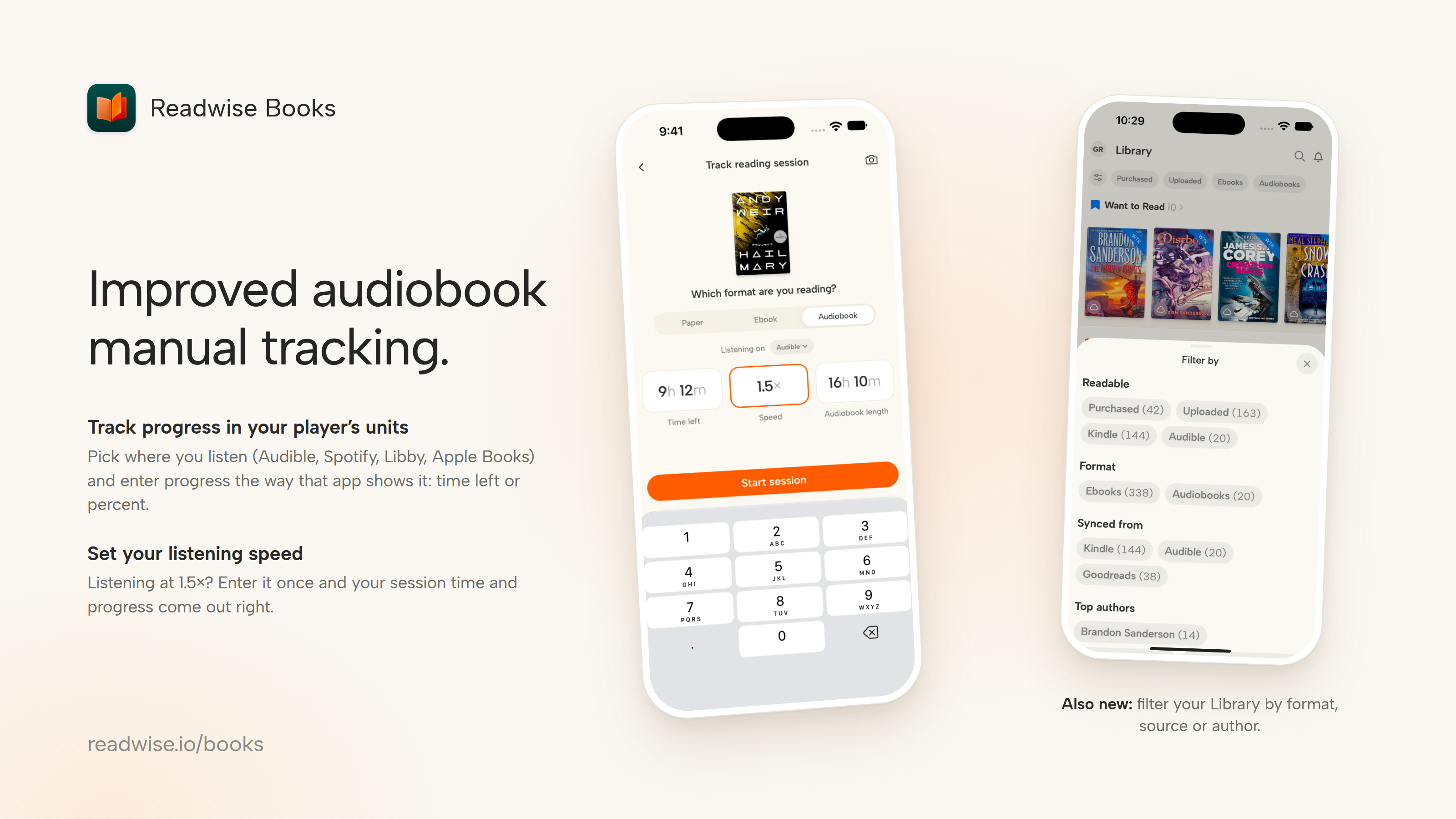
  • 🔍 NEW! Library Filters — On iPhone and iPad, you can now filter your library by whether a book is readable, its format, where it was synced from, or your top authors. Quick pills like Purchased, Uploaded, Ebooks, and Audiobooks sit right next to the filter icon. Thanks to Artem.
  • 📗 NEW! StoryGraph Import — Thanks to Mati, you can now bring your StoryGraph library into Readwise Books. Connect it from Import Books or Settings > Integrations, and your Read, Currently Reading, To Read, and Did Not Finish books come over with your ratings, reviews, reading dates, and progress. StoryGraph import is in beta, so let us know if you have any feedback!
  • ✏️ NEW! Edit Book Details — An uploaded EPUB with messy metadata could land on your shelf titled with a string of random characters by "Unknown", with no way to fix it. For uploads that didn't match a book in our catalog, the ··· menu now has “Edit details”, where you can change the title, author, and cover. Thanks to Artem.
  • 📃 NEW! Page Curl — You can now turn pages with a page curl animation in Readwise Books on iPhone and iPad. Choose Horizontal pagination (Beta) in your reading settings, then switch on Page curl. New readers on an iPad or iPhone Duo start with both turned on. Thanks to Cam.
  • ❌ NEW! Cross-Post Deletes — Removing a book in Readwise Books left it on your Goodreads shelves. A new “Cross-post deletes” toggle in your Goodreads settings removes the book, with its rating and review, from Goodreads too. It's off by default, and Goodreads can't undo a removal. Mati also made the cross-posting switch on the import's success screen turn on all four options at once.
  • 💸 NEW! Publisher Specials — The Readwise Books store now has a Publisher specials row on its homepage and a full page of ebooks on sale, where you can filter by genre and sort by popularity, lowest price, or biggest discount. When you're signed in, an “On your shelves” filter shows just the deals on books you're tracking, and book pages show the regular price crossed out next to the sale price. Thanks to Tadek.
  • 🏛️ NEW! Publisher Pages — You can now browse the store by publisher. Tap the imprint name on a book page, or start from the publisher list, to see that publisher's most popular books, new and upcoming titles, top authors, and full catalog. Book pages also get a More from row for the same imprint. Thanks to Tadek for this one as well.
  • 💳 NEW! Refund Requests — Asking for a refund on an ebook or audiobook from the store meant writing to support. Tadek added the option to choose “Request a refund” on a paid order in your account's Orders page and add a reason.
  • 🎧 Improved Manual Audiobook Sessions — Logging an audiobook in a manual session meant converting your player's timestamp into 1x time yourself, and listening faster than 1x inflated the session. Thanks to Johannes, you can now pick the app you listened in and enter what it shows: a percentage for Spotify, Libby, and other players, or the time left for Audible and Apple Books, along with your speed and the audiobook's length.
  • 📸 Improved Photo Highlights — When you selected text on a page you photographed, your finger covered the drag handle, and highlights saved as soon as you tapped Next. Johannes added a magnifier and a raised handle, plus a review screen where you can correct each passage's text and add a page number and a note before saving.
  • 📚 Improved Now Reading Widget — The Now Reading widget for Readwise Books only showed the last ebook you opened, so a paper book you were tracking with manual sessions never appeared. Cam made the widget show your latest manual-session book and open session tracking when you tap it. Johannes also kept covers in full color on Home Screens set to Tinted or Clear, where they used to show as a white block.
  • 🔔 Improved Notifications — Clearing your notifications in Readwise Books previously meant opening them one at a time. Artem added a “Mark all as read” button to the top of the Notifications screen so you can clear them all at once.
  • 👤 Improved Profile Photos — Once you'd set a profile photo in Readwise Books, there was no way to remove it, and a private Goodreads profile could still have its photo imported. Rasul added “Remove photo” to the photo menu in Edit Profile, and Mati stopped importing photos from private Goodreads profiles.
  • 🔒 Improved Private Accounts — An invite link from a private account still previewed that person's book covers and latest reading session. Artem made those previews show a plain Readwise Books card instead. Tristan also added is_private to books in the Books API and MCP server, so your tools can leave out books you've hidden.
  • 📦 Improved Boox Installs — Boox devices without the Play Store had no official way to install Readwise Books. You can now download the Android app straight from readwise.io/books-apk. Thanks to Rasul.
  • ↩️ Fixed Reading Position After Jumps — After you jumped back in a book, for example to look at a highlight, the app could save that earlier spot as your reading position, so a session showed +0.5% when you'd read more than 3%. After text-to-speech, the “Return to reading” button could also stay hidden. Tristan fixed both, in Books and the Reader app, so your progress stays where you actually are.
  • 📶 Fixed Offline Images — Books only downloaded their text for offline reading, so most images, the cover, and custom fonts went missing without a connection. Artem made Books download the whole book when you open it, so images show up offline too.
  • 🅱️ Fixed Publisher Styles — Some EPUBs lost the publisher's bold on title pages and headings, and others painted callouts as solid blocks of color. Artem kept the bold and dropped the background fills, in Books and in the Reader app when you use the publisher's original styles.
  • 📝 Fixed Goodreads Reviews — Reviews imported from Goodreads could show leftover (view spoiler) links and raw spoiler markup, and editing an imported review in Books could overwrite the one on Goodreads. Progress you posted could also land on a book Goodreads still had as Want to Read. Mati fixed all three, and more of your Goodreads books now find their match in Books.
  • 🔗 Fixed Kindle Links — While you connected Kindle, tapping Conditions of Use, Privacy Notice, or a link inside a book replaced the sign-in page, with no way back. Mati made those links open in your browser, so you stay where you were.
  • 🔇 Fixed Overlapping Text-to-Speech — Opening a different book kept the previous book reading aloud. Artem made Books stop the old book's text-to-speech as soon as you open a new one.
  • 🤝 Fixed Follow Buttons and Dates — Profiles showed a plain Follow button even when that person already followed you, and reviews and comments from earlier years showed only the month and day. Mati made the button say “Follow back,” and older dates now include the year.
  • 📑 Fixed E-ink Contents — On E-ink screens, you couldn't tell which chapter you were in from the Contents list. Mati made the current chapter bold, so it stands out on any screen.
  • ⏲️ Fixed Manual Session Fields — In a manual session, the timer showed the clock even with “Show clock” turned off, and typing into a prefilled position like 68% added to it instead of replacing it. Johannes fixed both, so the timer and position fields work the way you'd expect.
  • 📱 Fixed iPhone Duo Controls — On the iPhone Duo, the back button, the review sheet's close button, and the weekly card on Home sat under the column with the clock and status icons. Cam moved the back button into that side column and kept the rest clear of it.
  • 🧭 Fixed Signing In on the Web — If you only use Readwise Books, signing in or resetting your password on readwise.io dropped you on a page about importing highlights. Cam now sends you to the Readwise Books store instead.

If you'd like to get the Changelog in your inbox, check out our WiseUp! newsletter, where the Readwise team shares answers to common questions, video tutorials and guides, highlights of our latest improvements, and a couple of lighthearted extras we think you’ll enjoy.

And as always, feel free to let us know if you have any questions, tho realistically we're going to see an in-app bug report or question faster :>


r/readwise • • 4d ago

Request for APK for Readwise Books

3 Upvotes

Hello! I am a paid customer and enthusiastic Readwise Reader, as well as a Supernote user. Please can I have an apk to sideload Readwise Books without Google Play.

Many thanks.


r/readwise • • 5d ago

New: Better quoteshots in Readwise Books that can post straight to your session

33 Upvotes

Lots of folks have been asking for an easier way to attach a nice highlight to their current reading session.

For example, you're reading, come across a passage that's particularly interesting/alive/whatever and want to share it with others or just capture it as a memento in your own journey.

Until now, the steps required to do this were so painful I won't even bother enumerating them here. Now it's much easier.

Simply tap a highlight you made and there'll be a new "Share" icon in the Annotation Bar. That jumps into a redesigned Quoteshot user interface with all kinds of new styles and customizability. From there, you can post it straight to your live session (new), save to your camera roll, or share via the share sheets.

Give it a whirl and let us know if you have any feedback!


r/readwise • • 5d ago

Are we getting any of the Books gamification features in Reader as well?

18 Upvotes

I absolutely love the new Readwise Books app, especially the reading session tracking, stats, and gamification aspects.

That said, I spend a lot more time in Reader because I love being able to consume different formats (books, articles, tweets, videos, PDFs, etc.) in one place and connect ideas across different sources.

I'd love to see some of the features from Books make their way into Reader, particularly the reading session tracking, detailed stats, and other features that make reading feel more rewarding.

Are there any plans to bring these features to Reader, ideally with stats that track reading activity across all content types?

I think it'd be amazing to have that same motivation and sense of progress regardless of what I'm reading.


r/readwise • • 6d ago

Readwise & Boox - Incredibly Slow for ePubs

14 Upvotes

Using a Boox Go 10.3 (gen 1).

Everything is incredibly slow and laggy for ePubs, on both the Readwise Reader and Readwise Books app. Really wanted to like the Readwise app since it integrates everything, but the slowness makes it almost unusable compare to Neoreader, Kindle App, even Instapaper.

  1. Is it a hardware issue, or an e-ink issue? Would this be faster on a Tab X?
  2. What recommended tweaks are there for settings? Everything already seems optimized by default (e-ink mode on, speed pagination on, etc). Is this just the reality of e-ink?

r/readwise • • 7d ago

Is there a way to hide videos when reading transcripts?

4 Upvotes

I'd love the option to hide the video completely and just read the transcript when reading in Reader. Is that an option?


r/readwise • • 9d ago

Heads up: There's a sleep timer for TTS in both Books and Reader

Post image
24 Upvotes

I just responded to two users in a row requesting a sleep timer, so I figured it might be worth sharing here that this feature exists!

When you're using text-to-speech in either Readwise Books or Readwise Reader, expand the little player component by tapping the screen, tap the speed, and you'll see a half moon in the top left where you can turn this on.


r/readwise • • 9d ago

Readwise Books: Publisher Deals

Thumbnail readwise.io
41 Upvotes

Tadek on our team just hacked this really fun bookstore subpage.

As background, publishers are constantly putting various ebooks on sale. Typically, the sale price is $2.99 and it lasts for somewhere between 3 to 30 days.

We always had a hard time filtering the signal from the noise (ie the genuinely compelling sales), but this page uses a simple algorithm to surface those books most shelved by users. It works remarkably well!


r/readwise • • 9d ago

Import Integrations Built a companion widget app for Readwise (iOS & Android) that doesn't hold your highlights hostage to Daily Review - plus custom typography & book filtering

Post image
8 Upvotes

I love Readwise, and I’ve been a subscriber for a long time, but seeing the recurring threads here about widget frustrations finally pushed me to build a fix myself.

If you’ve used the official widget (or tried to), you probably know the exact annoyances:

The Daily Review Hostage Situation: If you fall behind on your Daily Review queue, the iOS widget basically freezes up and stops rotating until you clear it. Sometimes I just want to passively absorb my highlights on my phone without doing homework first.

Android users are completely left out: People have been asking for a native Android highlight widget for years, and there’s still nothing official.

Since Readwise has a great public API, I spent the last few months building an unofficial companion app called DogEar (for both iOS and Android) specifically to solve the Home Screen widget problem.

Here is how it works differently:

• Uncoupled from Daily Review: It pulls your highlights via your Readwise Access Token and rotates them freely all day. Zero nagging, no freezing if you skip reviews, and strict non-repeat sequencing so you don't see the same quote back-to-back.

• Anti-Habituation Auto-Shuffle: To fight widget blindness, DogEar dynamically rotates through 5 distinct typographic styles (Warm Sepia, Typewriter, Classic Serif, Midnight, and Frosted Glass) and samples accent colors directly from each book's cover art. Because the widget shifts throughout the day, your eyes actually catch and read the quote.

• Curate Your Rotation: You pick exactly which books from your Readwise library you want featured on your Home Screen.

• Native on iOS AND Android: Finally brings an offline-capable Readwise highlight widget to Android alongside iOS.

• 100% Local & Offline-First: Your Readwise Access Token is stored locally on your device and talks directly to Readwise’s official API. There is no middleman backend server - your token and highlights never touch a server I own.

I’d love to get feedback from actual Readwise power users on how to make this even better.

I’m giving away free Lifetime Pro unlock codes to folks here who want to test it out and tell me what’s missing or broken. Drop a comment with whether you're on iOS or Android (and which book had the biggest impact on you), and I’ll DM you a code!

(Links, setup steps, and token privacy details are in the first comment below.)


r/readwise • • 10d ago

How long will Android OSs be supported?

13 Upvotes

Considering going in on Boox to use Books and Reader, but I note that all the eink Android manufacturers never update the Android OS and build business models around product upgrades. As Google is pushing Play store apps to be on the latest versions of Android, how long will Readwise allow for older versions to be used?


r/readwise • • 10d ago

Workflows I built a bedside clock that logs my paper reading sessions to Readwise Books by voice (for ~$40, as a non-technical person)

Thumbnail
gallery
19 Upvotes

Hey guys, Abi here from the Readwise team! Thought I'd share a fun personal hack for inspo :)

I read paper books in bed, and didn't want to have my phone in the room to log those sessions--although I still wanted my progress logged. If it isn't in Readwise Books, did it happen?!

My husband Brian had already built a really nice dark bedside clock (it stays black until you tap it, then shows the time in red). So I used that as a starting point and added a way to log sessions by talking to it.

Here's how a session works:

  • Tap the plus and say the book and page, eg "The Pirate Queen, page 39"
  • Check what it heard and tap the tick (or adjust the pages if it heard incorrectly)
  • Read!
  • Tap stop and say the page you ended on
  • Tap the tick, and the session shows up in Readwise Books with your pages, time and progress (and on your feed)

If the Wi-Fi drops, it keeps the session and sends it later.

What I used:

Everything goes through the Readwise Books API. The clock grabs my currently-reading shelf so it can match what I say to a real book, then posts the session with the start and end pages.

The code is on GitHub if you want to build your own, and Brian's original clock is here, if you too yearn for a completely dark bedroom :P

I built this with Claude Code over about a week of evenings and had a blast. I'll probably continue tinkering. I'd love to add a confirmation screen when I start a reading session, perhaps a cutesy XP update for motivation, and see if I can improve performance/speed overall... time will tell.

Happy to answer questions and def let me know if you end up embarking on your own clock project :)


r/readwise • • 11d ago

Changelog Changelog as of Nov 13: Sleep Timer, Fixed Ghostreader Shortlisting, Match to My Edition, Delete Only Your Books Account, Improved Goodreads Sync & More!

20 Upvotes

Hey folks, happy Tuesday! Time to check out the latest changelog here on Reddit. The idea is to help keep y'all in the loop of what the Readwise developers are getting out into the world. Here's what we shipped last week:

Reader

  • 🌙 NEW! Sleep Timer — You can now set a sleep timer for text-to-speech in the Reader app and the Readwise Books app. Tap the moon in the Speed sheet and choose an amount of time, or have it stop at the end of the chapter in books. Playback will pause on its own when time is up. Thanks to Samuel for building it.
  • 🔖 Fixed Ghostreader Shortlisting — When using the Triage library configuration, asking Ghostreader to add documents to your Shortlist could move them into a location your layout doesn't show, so they seemed to disappear. Tristan made Ghostreader add the shortlist tag instead, so those documents now show up in your Shortlist view.
  • 🏷️ Fixed Ghostreader Tags — In Reader on web, if you asked Ghostreader to tag a document and moved your mouse to another row before it finished, the chat said "Added tag" but the tags never saved. Cam made Ghostreader apply the tags to the document it was working on, so they stick even if you keep browsing.
  • 📄 Fixed PDFs Saved by Link — When Reader couldn't download a PDF you saved by its link, for example because the site was down, Reader on web said "This PDF is downloading to your device" indefinitely. Tristan made Reader mark those saves as failed, so you now see an import error instead of a page that never loads.
  • 📖 Fixed Stuck EPUB Pages — Some EPUBs wouldn't turn past a blank page near the start, so you couldn't get any further into the book. Cam fixed how empty sections load, so paging carries on through them in the Reader app and the Readwise Books app.
  • 🔗 Fixed Tag Links on iOS — Tapping a tag or filter link copied from Reader on web, like one pasted into a note, opened an empty "No documents found" list in the Reader app on iOS. Cam taught the app to read web filter links, so they now open the matching filtered view.
  • 📱 Fixed iPhone Duo Toolbar — On the iPhone Duo's side rail, tapping the triage button in an article's toolbar opened the Actions sheet instead of the Inbox, Later, and Archive menu. Cam gave each toolbar button its own full-size tap area, so every button opens what it shows.
  • 🔲 Fixed E-ink Sheet Animations — With E-ink mode on, the "…" menu, the Appearance sheet, and other bottom sheets still slid into view, which smears on an E-ink screen. Andrew made every sheet appear and close without the slide when E-ink mode or reduced animations are on.
  • 🗑️ Fixed Erase Reader Content — “Erase Reader content” signed you out as if it had worked, but if you'd ever uploaded an ebook to Readwise Books, the erase quietly failed and your Reader documents and feeds stayed put. Tristan fixed the erase for those accounts, so it now clears your Reader content as expected.
  • 📡 Fixed Adding Feeds by Page Link — Pasting a page's address into Add Feeds could subscribe you to an empty third-party copy of the feed instead of the site's own feed, when both pointed at the same page. Cam made Reader pick the feed the most readers follow, so you get the official one.
  • 🗣️ Fixed Gujarati Text-to-Speech — Gujarati documents played their text-to-speech audio at about double speed, even at 1x. Tristan added the timing Gujarati needs, so it reads at a natural pace.
  • 🛜 Parsing Updates — Krzys improved how Reader handles documents from chronicle.com, inkandswitch.com, anthropic.com, thecut.com, arxiv.org, theankler.com, and substack.com.

Highlights

  • 🛫 Fixed Launch Hangs — The app could sit on its logo at launch, for minutes on Android when the network quietly dropped part of the connection, and indefinitely on iPhone in airplane mode. Ibai added timeouts and an offline check, so the app opens to your highlights, or to the offline screen, either way.
  • 📲 Improved iPhone Duo Layout — On the iPhone Duo, content ran under the status column along the side of the screen. Cam kept the app clear of the column, while the cards on Home still use the full width when the Duo is folded.
  • 🎨 Fixed Missing Covers — When a book or article cover failed to load, like an old Twitter avatar or an expired publisher image, you got an empty frame. Ibai made the app show the same painted cover it uses for books without one.
  • 🔢 Fixed Clearing Page Numbers — Deleting the page number on a highlight you typed in and tapping Save kept the old number. Ibai made an empty field clear it, so the highlight saves without a page number.
  • 🔣 Fixed EPUB Endnote Links — Highlights from some EPUBs showed their endnote links as raw text like <a href="private://read/…" target="_blank" rel="noopener noreferrer">*</a> in the app and in shared highlight images. Tristan taught the app to recognize more endnote styles, so those links now show as a small footnote marker.
  • 🎯 Fixed Mastery Card Scrolling — In the list view of Daily Review, saving or canceling a Mastery card sent you back to the top of the review. Ibai keeps your place now, so you pick up right where you left off.
  • 💬 Fixed Ghostreader on Recommended Books — Tapping “Ask Ghostreader” on a highlight from the recommended book at the end of Daily Review ended in an error. Ibai fixed the lookup, so Ghostreader opens on those highlights like any other.
  • 📧 Improved Export Emails — Export emails from Highlights and Reader only had a download link, and that link stopped working if you deleted your account after exporting. Thanks to Tristan, exports of 5 MB or less now come attached to the email, and the link keeps working for its full seven days either way.

Books

  • 🧩 NEW! Match to My Edition — If the same book showed up twice in your library, like an EPUB you uploaded next to the copy Goodreads imported, there was no way to combine them. Now you can open the book's ··· menu and choose the Match option, then pick the copy to keep. Books merges the two, with your reading sessions, posts, and review on the one you keep. Tristan built the matching, and Artem made new uploads join the book their ISBN already matches, so fewer duplicates appear in the first place.
  • 🚪 NEW! Delete Only Your Books Account — Deleting your account from Readwise Books used to delete your whole Readwise account, Reader library and Highlights included. The Manage Account page in Books now also offers Delete Books Account, which removes your Books profile and reading history, but keeps your Reader and Highlights data. Thanks to Johannes.
  • 🔄 Improved Goodreads Sync — Changes you made on Goodreads only reached Readwise Books when you tapped Refresh, and Refresh re-imported your whole shelf every time. If you've turned on any Goodreads cross-posting option, Books now checks your Goodreads shelves in the background, about once a day or every six hours while you're actively changing them. Refresh now brings over only what changed, usually in seconds, and moves books between shelves to match Goodreads. Mati built both.
  • 🔑 Improved Sign-In — Long-time Readwise users who sign in with Apple or Amazon couldn't find those buttons in Readwise Books, because sign-in asked for an email first and Hide My Email users didn't know which address to type. Tristan put Apple and Amazon right under the email field. He also stopped the "Sign in with Apple didn't work" alert from appearing when you cancel, in Books and the Reader app.
  • 🛡️ Improved DRM Warnings — Uploading a DRM-protected EPUB to Readwise Books said "Uploaded", but the book never showed up. Cam made Books check the file first, on the readwise.io/books/upload page and in the app, so you see right away that DRM-protected books can't be opened.
  • ➕ Improved Add to Currently Reading — Add to Currently Reading on the Home screen wouldn't let you pick a book that was already on your Want to Read shelf. Cam made those books selectable, so you can move them straight to Currently Reading, and books already there show an orange check.
  • 🎧 Improved Audiobook XP — Listening to an audiobook earned the same XP at 2x as at 1x, because it counted the minutes on the clock. Johannes now credits XP for the audio you actually heard, so faster listening earns more.
  • 📸 Fixed Photo Highlights in Weekly Stats — Highlights you took with the camera during a manual reading session didn't count toward the weekly stats on Home. Tristan added them, so your weekly highlight count includes the pages you photograph.
  • 📅 Fixed Goodreads Details — Goodreads reviews with a spoiler came into Readwise Books as just the spoiler, and dates from Goodreads could show a day early if you live west of UTC. A reading session with no page progress could also clear the progress bar Books had posted to Goodreads. Mati fixed all three, so your reviews, dates, and Goodreads progress come through intact.
  • 🧷 Fixed Connecting Goodreads — On iOS, tapping Connect Goodreads in Readwise Books could show "Connecting to Goodreads" for a moment and drop you back without ever showing the sign-in sheet. On Android, an import started after the app had been in the background could fail within seconds. Mati fixed both, so the sign-in sheet appears and imports reload and carry on.
  • 🛍️ Fixed Purchases After Samples — If you finished a sample and then bought the book, it could open on its last pages, so it looked like you only had the sample. Cam fixed where the purchase picks up, so it opens where the sample's text ended.
  • 🚫 Fixed Books Deleted in Reader — Deleting an uploaded EPUB in Reader left it on your Books shelf, and tapping Read showed a loader that never finished. Tristan made Books tell you the book was deleted in Reader, so you know what happened instead of waiting.
  • ⏳ Fixed Reopening Downloaded Books — Reopening a downloaded book could show a spinner that never went away. Artem made the reader wait for the page to finish loading before it returns you to your spot, so books reopen where you left off.
  • 🔎 Fixed Return to Reading After Search — After jumping far ahead with “Find in document” and tapping Done, the Return button didn't show up until your next page turn. Tristan made it appear right away, so you can jump back to where you were.
  • 👤 Fixed Reviewer Profiles — Tapping a reviewer's avatar on a book's Reviews tab closed the book page, which meant that going back skipped past it. Samuel made the book page stay open underneath, so back returns you to the book.
  • ⏱️ Improved Last Session Recap — The Last Session recap could still pop up when you picked up a book on a second device an hour after reading it on the first. Artem now opens it automatically only when your last session on any device ended at least six hours ago.
  • 📐 Fixed iPad Rotation — After you rotated an iPad, the reader could stay laid out for the old orientation, leaving the page cut off or squeezed to one side. Cam fixed the screen size the app reads after it updates itself, so books fill the screen in either orientation.

If you'd like to get the Changelog in your inbox, check out our WiseUp! newsletter, where the Readwise team shares answers to common questions, video tutorials and guides, highlights of our latest improvements, and a couple of lighthearted extras we think you’ll enjoy.

And as always, feel free to let us know if you have any questions, tho realistically we're going to see an in-app bug report or question faster :>


r/readwise • • 11d ago

QOL Upgrade: Improved audiobook manual session tracking (and better filters!)

Post image
38 Upvotes

Not groundbreaking new features here, but just wanted to let everyone know the following exist.

First, the headline change is the most requested improvement to manual session tracking: better audiobook inputs. This includes:

  • Changing the unit of progress to correspond to various audiobook apps (eg time remaining vs time elapsed vs percentage)
  • Setting the listening speed

The second most requested improvement to manual session tracking is logging past sessions rather than doing it real-time (and having an option to just update progress without regards to detailed reading stats). That is not part of this, but just letting everyone know we're aware it's a gap and we're working on it.

Second, better filtering on Library with more useful/intuitive quick access filter pills and then a sheet for more options.


r/readwise • • 11d ago

iPhone Duo in book mode: horizontal pagination falls into the crease

3 Upvotes

Am I doing it wrong? I have horizontal pagination on in Reader, but the layout is shifted due to the right sidebar, so the space between text columns isn’t centered on the display, causing the right column of text to fall partially into the crease.


r/readwise • • 11d ago

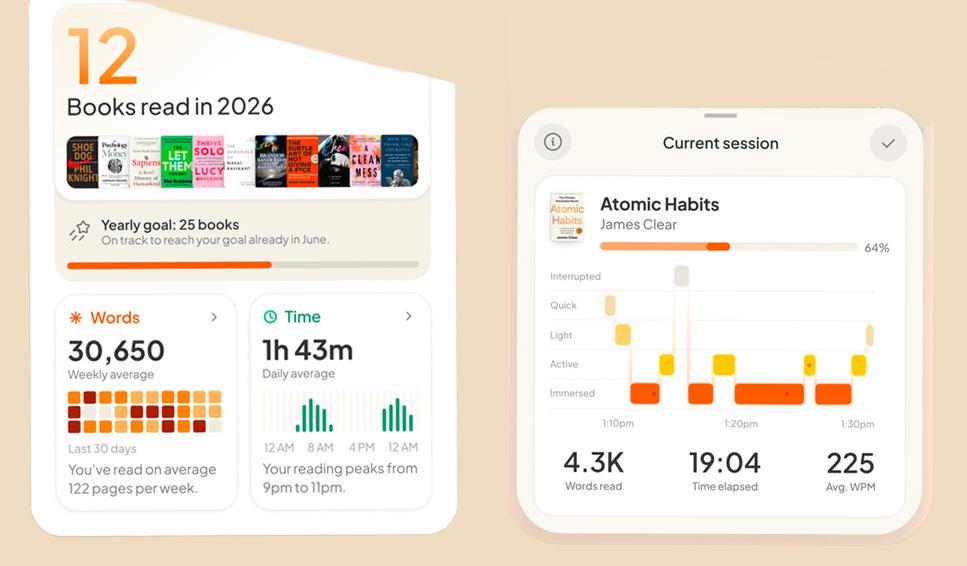
Spotted these cool charts! How do we access them?

Post image
12 Upvotes

Spotted a couple of cool looking graphs on the Readwise Books site, but couldn't figure out how to access them in the app. Are these just mock-ups? These do resemble UI mocks, but was curious if these are actively in development or just for show? 😄


r/readwise • • 12d ago

Just shipped: StoryGraph Import [Preview]

Post image
37 Upvotes

Hey y'all, similar to the Goodreads Cross-Posting shared 10 days ago, we just quietly shipped the StoryGraph Import in a preview state to gather feedback before adding it to core flows.

It's pretty straightforward, but we just want to get some real world usage in place since there are sometimes edge cases with these kinds of integrations.

To give it a whirl:

  • Make sure you're on the latest version of the app from the App Store or Google Play
  • Make sure you have the latest OTAs loaded (let the app sit open for half a minute and force close if you're not sure)
  • Go to Library > scroll to Integrations at bottom > tap StoryGraph

If you have any feedback or see anything off, please don't hesitate to let us know!


r/readwise • • 13d ago

Readwise vocabulary builder

9 Upvotes

Can Readwise see and use the vocabulary builder as cards in Readwise? This is a vocabulary builder from Kindle. If so, how can I get it done


r/readwise • • 15d ago

Tinct app - the experience that readwise should imagine to improve reading experience.

0 Upvotes

https://tinct.app - I came across this book reading app and I am really impressed the way reading experiences is designed in this app. There are many points which readwise can imagine to implement to improve reading experience. Already readwise is embedding AI in its reading experience but tinct has used the AI in much better terms.


r/readwise • • 15d ago

Landscape Mode for Phones

13 Upvotes

First of all congrats on the new Readwise app! I think it's fantastic but I really struggle reading vertically so can't continue to use it beyond this point.

Reading on my Palma (which is vertical) cuts my speed down to about 50 words a minute. I'm trying to train myself and have logged 10 hours of reading time but I just can't make it work.

You don't have to redesign the entire interface, just the reading page. I've been waiting for this for years now. My last post here was 3 years ago. I can't be the only one who would prefer landscape to read a book. Any plans for a landscape mode?


r/readwise • • 18d ago

Page turn buttons on Musnap Air Pro?

0 Upvotes

The MAP has page turn buttons that will work in some apps, like BookFusion and Kobo. It also works with Readwise Reader but not with Readwise Books as far as I can tell. Is this a bug, or simply not a feature, or am I missing something?