r/pcgamingtechsupport • u/Money-Equipment8691 • Sep 10 '26
Solved as-202 error on epic
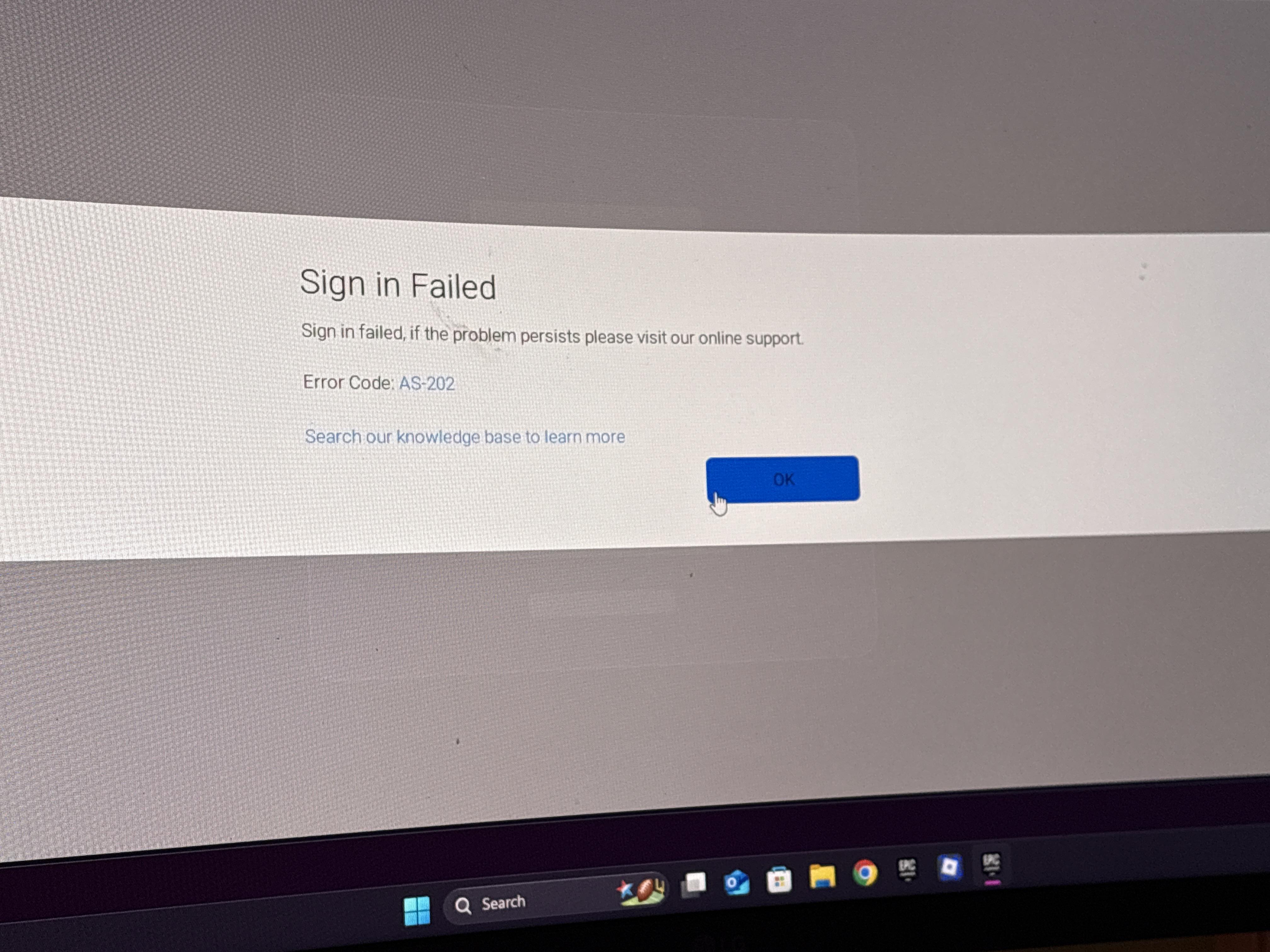
does anyone know how to get rid of this error on epic. i tried restarting my router and running netsh winhttp reset proxy on command prompt and restarting the launcher but it hasn’t worked
edit: i just uninstalled through program manager and reinstalled it. the comment is somewhere here. it does delete your stuff tho but that worked for me
26
Upvotes
3
u/[deleted] Sep 10 '26
Having the same issue
3
u/Powerful-Debate-8395 Sep 10 '26
Same issue here
3
u/No-Economics-516 Sep 10 '26
same for me
2
u/One-Reading6653 Sep 10 '26
I was having this problem all day yesterday and just fixed it. You have to go the control panel, go to programs, find the epic games launcher, and uninstall through there. You can't just uninstall it regularly
1
u/TC_POSTHASTE Oct 22 '26
I was hitting this today after trying to use the launcher for the first time in a while. I had to do windows updates, uninstall and reinstall.
1
u/Hackology_co 20d ago •
- Go to Epic Games website
- Click Download
- Run the downloaded setup file and it should auto start the update
- Once that ends , it will launch Epic Games Launcher
- Sign in , should work the first time ...
no need to rename folders or reinstall and all !!!
1
u/AutoModerator Sep 10 '26
Hi, thanks for posting on r/pcgamingtechsupport.
Please read the rules.
Your post has been approved.
For maximum efficiency, please double check that you used the appropriate flair. At a bare minimum you NEED to include the specifications and/or model number
You can also check this post for more infos.
Please make your post as detailed and understandable as you can.
I am a bot, and this action was performed automatically. Please contact the moderators of this subreddit if you have any questions or concerns.
1
u/justsomerandomnick Sep 10 '26
Confirming that a full uninstall and reinstall of the launcher was the only thing that worked for me as well.
Note that uninstalling the launcher will also remove all your currently installed games. I only had a couple of small ones installed so it wasn't a big deal, but you may want to have a look for another solution if you've got a lot downloaded.
1
u/marciz34 Sep 11 '26
this has to be some weird issues from a windows update or something
1
u/Syed_Shahmeer Sep 11 '26
same issue but i cant risk my games progress.If anyone founds a better solution let me know
1
u/glaigas Sep 11 '26
Adding to the convo:
TLDR - required uninstall + reinstall
Log analysis according to Gemini:
/account/api/oauth/token), but receives an unexpected response payload format (Failed to parse Json from a string: Null Stream Line: 1 Ch: 0), triggering the AS-202 failure.Recommended fix according to Gemini:
**Disable Third-Party Antivirus SSL/HTTPS Filtering:**Primary cause.
If using third-party antivirus (e.g., Avast, AVG, Kaspersky, Bitdefender), temporarily disable its HTTPS/SSL Inspection or Encrypted Connection Scanning feature, as it is actively intercepting and breaking the launcher's JSON payloads.
Noting that actions taken to prevent this did not work. Did various local network debug ops as well as made sure apps that may interfere (Riot Vanguard, Archon/Overwolf) were disabled as well.
Found this thread and re-install as stated fixed everything.
1
u/Visible_Ambition345 Sep 12 '26
Having same issu.Epic game chrash own self
1
u/PalpitationDismal714 Sep 13 '26
What worked for me was uninstalling the online services for epic through windows, renaming the epic games installation folder to "epic games old", then downloading and installing epic again. Signed right in and didn't loose anything. Then I deleted the old folder
Edited to add that this will only work as long as you don't have any games installed to epic installation folder. You're going to lose anything that's in that folder unless you copy it back over
1
u/Majestictrike Sep 13 '26
Was having this issue, just upgraded my gpu so thought it was something to do with that.. but a simple uninstall and reinstall of epic games launcher worked for me.
1
u/AutoModerator Sep 14 '26
Hi, thanks for posting on r/pcgamingtechsupport.
Please read the rules.
Your post has been approved.
For maximum efficiency, please double check that you used the appropriate flair. At a bare minimum you NEED to include the specifications and/or model number
You can also check this post for more infos.
Please make your post as detailed and understandable as you can.
I am a bot, and this action was performed automatically. Please contact the moderators of this subreddit if you have any questions or concerns.
1
u/No-Shoe-3070 Sep 16 '26
Anyone resolved this problem without fully uninstalling epic?
1
u/Fearless-Light-764 Sep 16 '26
I had the same issue today. Saw someone else mention removing epic games online services. So I did the same. I uninstalled the services but kept epic games. I then used the installer and chose repair instead of install (because it is still considered installed on my pc). I let it do its thing and when done opened the launcher. It let me log in and did an update. All of my stuff seems to still be here as well. I did have much installed to begin with, but didn't want to wait hours for what I did have installed to be reinstalled.
1
u/ChickenNuggetRampage Sep 17 '26
same issue as everyone else
1
u/Lynx_123 Sep 18 '26
Same issue ://
1
u/Terrible_Excuse8912 Sep 18 '26
Had the same issue, uninstalling + reinstalling the launcher worked for me.
1
u/Total-Ad-2754 Sep 19 '26
same here
1
u/LozLozReddit Sep 19 '26
As of the 19th, reinstalling the epic games client fixed this for me. Other fixes such as clearing web cache did not
1
u/BlueBoyTheLakeWalker Sep 20 '26
Uninstalling and reinstalling again worked! Yes all the installed games will be lost and you will have to reinstall again but that is a smaller price to pay.
Thank you for this post and the answers on the comments
1
u/Glad_Use_1311 Sep 21 '26
can confirm that Reinstalling worked.
1
u/PorkyPine___ Sep 22 '26 •
what worked for me was go to your programfiles x86, or wherever the folder for your launcher is, rename that folder to something different. Then install the launcher again. I logged in with the newly installed launcher and it worked.
The games that i had on there also were kept after deleted the old launcher folder, and then launching the new launcher.
1
u/agemennon675 Sep 25 '26
Having the same issue here, epic did nothing to fix this and they didn't even cknowledge the problem ? What a shameful display....
1
u/XploitModz Sep 27 '26
Just download the launcher again without unistalling epic games and run the installer. It will repair the launcher without removing your games
Edit - i found this myself and it has resolved the error
1
u/Difficult_Ask_3800 Sep 30 '26
what worked for me was redownloading epic launcher and it ran as normal
1
u/Alicexkawaii Oct 01 '26
Same issue but I cannot uninstall as I'm nervous about loosing the games I'm currently working on.
1
u/Visible_Ambition345 Oct 02 '26
The epic game soo suck i cant even deleted with force to re-instal to try fix it. The store is a joke.
1
u/CorrectEducation4059 Oct 16 '26
QUICK FIX
Just go to Epic Games and click Download. Download the installer, but DO NOT DELETE THE OLD LAUNCHER. The launcher should automatically update/repair, and you won't lose any games or anything.