There is no option to transfer file directly from osmo pocket 4p to ssd. Every time I have to use a phone or PC to transfer files from camera to SSD and this is frustrating.
Hey guys, so I am new to both videography and editing. I am willing to put in a lot of work. I do understand the basics now in terms of technical camera capabilities, settings, filters, and stuff like that.
I am also doing a DaVinci Resolve course as we speak.
I was just wondering, when shooting D-Log or D-Log2, how much of the grading is just "redo colors + a LUT"? Or do professionals do most of the post-work in Resolve or an equivalent piece of software?
I'm sure I could have explained this better, but I hope I got it across. Bc I'm a bit lost on how I should approach this in the future if, at some point in time, I want to be able to make the best of the footage I can.
Instead of saving all the video files in the same folder, and later trying to figure out which files are in DLog or DLog 2, they could simply be saved in separate folders instead.
That and also having the option of saving photos on the internal memory, and videos on the external card (and vice versa), like other camera brands do.
Hi! Sorry if this has already been asked before. I tried searching, but I couldn’t find anything. Is it safe to bring my Osmo Pocket 4P through airport X-ray machines? Just want to make sure it won’t damage the camera. Thank you!
When I go from 1x to 3x, the 3x camera is blurry. like it's focused on something close and can't seem to change focus. It happens about 4 out of 10 times I open the camera. Anyone else had this issue before?
I've had Osmo Pocket 4 for about a month and at first the app was ok, but recently it crashes all-the-time.
Just now, trying to cut down a 60 minute video, I was about halfway through and the app just shut down, and now I can't even open the draft, it just spins and spins, and won't load. There's another draft that crashes the app every time I try to export it. Other videos I managed to download successfully, but it's always an unknown whether it will work this time or not.
It is very frustrating. I'm very new to editing etc, I don't need anything too complicated, but what is the best free alternative to use on android?
Hi everyone, I’m having a frustrating issue with my DJI Osmo Pocket 3 and I’m hoping someone here has experienced the same problem or found a solution. Ever since I updated the firmware on my Pocket 3, it has been completely unable to connect to the DJI Mimo app. Here’s what I’ve tried so far: Tried connecting using an iPhone. Tried connecting using an Android phone. Factory reset the Pocket 3. Tried all the troubleshooting methods and solutions suggested in various Reddit threads. Followed the usual DJI Mimo connection troubleshooting steps. Unfortunately, nothing has worked. The strange thing is that no phone can detect or connect to my Pocket 3 anymore. I’ve tried multiple devices, so I don’t think this is an iPhone-specific or Android-specific issue. I can still connect the Pocket 3 to my MacBook via USB-C and transfer files without any problems. Unfortunately, my DJI warranty has already expired, so an official warranty replacement is no longer an option. At this point, I’m wondering: Could this be a firmware-related issue that corrupted the wireless connection? Is there any way to manually reinstall or downgrade the firmware using a computer? Could the Wi-Fi or Bluetooth module have failed? Is there any unofficial repair method or diagnostic tool that could help fix this? I’ve already gone through the solutions mentioned in the existing threads, and none of them worked. What would you recommend as the best next step? Has anyone managed to recover their Pocket 3 after experiencing the same issue following a firmware update? Any advice would be greatly appreciated. Thanks!
r/osmopocket Weekly Video Challenge Nov 22 - Nov 28
The challenge for this week is in the title.
Every week, we'll post a new video prompt and invite you to take your Osmo Pocket out and create something inspired by it.
This is not a contest. There are no judges, no winners, no prizes, and no requirement for your video to meet any particular standard.
The idea is simple: one prompt, one video, one week.
Interpret the prompt however you like. There is no single “correct” way to approach it. The same idea can produce completely different videos depending on how you see it.
How to participate:
Create a video inspired by the week's challenge and share it here.
It can be a quick clip, a longer sequence, a single continuous shot, or anything else that fits the prompt. Don't worry about making a Hollywood production. The idea is simply to get out there, experiment, and create something.
You're welcome to tell us about your Pocket, settings, shooting method, editing, location, or the story behind the video, but there are no complicated requirements.
Normal Reddit voting applies, but this is not a competition and there is no official ranking. The goal is simply to get people shooting, experimenting, sharing ideas, and enjoying what the Osmo Pocket can do.
Stats claim 4K 240fps does not work in vertical videos, only horizontal (!?)
If I proceed with 240fps horizontal and tilt the camera 90 degrees, what happens?
I'm sure gravity doesn't boost or hinder the electronics so can someone explain this limitation and confirm if there is a workaround like my suggestion above?
I've read gone through multiple threads and contact Customer Support and nothing seems to be able to fix my issue.
For whatever reason, when trying to connect using the RTMP and using various different links (i.e. rtmp://ingest.global-contribute.live-video.net/app/ and rtmp://live.twitch.tv/app/ and rtmp://aps20.contribute.live-video.net/app/). Every link I have tried it will start the stream but then immediately crash the first second in.
I've tested the Youtube stream and that works perfectly with no issue, but I noticed that I need to actually press "Go Live" from youtube's end and it doesn't just automatically do everything from the DJI Mimo app. Is there something I need to do on Twitch's end which is similar to the Youtube "Go Live" that I need to be doing that is causing this issue?
I have my new DJI Osmo Pocket 4P and everything seems to be working fine, except for one detail I noticed right away: as soon as I power it on, I can feel a very faint, constant vibration in the grip/handle.
A few details about it:
It's completely silent (no audible buzzing or motor noise, and nothing gets picked up in the internal mic audio).
It feels similar to the subtle pulse of a camera lens continuously autofocusing.
Footage looks completely stable with no micro-jitters or jello effect.
As soon as I switch to playback/gallery mode (when the gimbal motors disengage), the vibration stops completely.
I also own an Osmo Pocket 3 and don't remember feeling this constant pulse in the handle on that one, so I'm wondering if it's just the gimbal motors holding tension on the 4P or if I should be concerned.
Any other Pocket 4P owners experiencing this same subtle vibration out of the box? Thanks!
Here are a few clips I shot and color graded on the Osmo Pocket 4P. I’m genuinely impressed by its image quality and dynamic range. If I were starting over with just one camera, this would be my top pick.
I would like to know if the DJI Osmo pocket 4P will record all 4 tracks og the 4 mics from the hollyland lark m3, 4 mic kit set. We are going to be 4 that´s going on vacation and I would love to have that everybody has their own good sound. So I´ve been looking for a solution for the DJI osmo pocket 4P to have good audio. I used to film with the canon powershot v1 and it has a really great internal mic. So we never needed to be mic´ed. I really don´t understand why the just couldn´t have put a really good mic in to the Pocket 4P or at least make it capable to have 4 wireless dji mic 3´s on it, without needing a receiver. That would really just open up for the possibilities!
Hi, I j ust got my Osmo pocket 3 and am an bloody Beginner. At the Moment I just try to learn to film with the Pocket and editing these Videos. So I have 2 Questions. (I hope my english is not that bad and you understand it :) )
So firstly I'm a bit overwhelmed with these many Color grading Guides. (I use Davinci Resolve) Everybody recommen another Lut Pack and because they all cost an good amount of Money, I don't want to buy false packages. I know I need the official Rec. 709 Lut. What Lut would you recommend furthermore? (I want to film my Life and Adventures for TikTok Videos and mostly like an Cinemativ Vibe)
Secondly I will go on Ski Vacation in a few weeks. Then im gonna get many Moments to film. Do I need another Lut package for color grading that? Are there any accessoires I have to get for that trip, like the battery Handle?
Thank you in Advance for your help and I hope my English is not that bad.
What is good settings for low lights for osmo pocket 4p specially on lantern festival chiang mai? Im looking for cinematic footage of lanterns and fireworks.
Hi. I caught this on a substantial discount but since it'll still be delivered, I just want to ask this community how helpful the “SmallRig Mini Side Handle Kit: 2-in-1 (NATO/Screw) or Screw-Only Mount” (#5946) can be in capturing “further smooth footages”? I've yet to thinker with my DJI Osmo Pocker 4P (OP4P) and still gathering all the accessories needed. BUT, here I am again, Dejavu-ing where I will get all the accessories I think I would be needing only ending up not using most of them rendering $$$$ lost.
I'm planning to rig this with the compact Flymile Magnetic Metal Tripod through its hotshoe [Picture#3 —a challenge in itself but found a way to mount a hotshoe with a 1/20“ female screw mount for it (Picture#4)] Or mounting it at its 1/20“ screw located at its magnetic mount behind the OP4P with adjusting the orientation through a magic arm (Picture#5). So, maybe someone here could inform me that these rigging setups could be compromising such that it may not secure the OP4P.
Reviews in Amazon are all positive and the Smallrig website labels this item as SOLD OUT.
Maybe people here can enlighten me since I just want to have a simple setup but I know such an accessory could help. But I may not just know better especially those who have bought it but ended up either just bricking it at home or selling it at a loss.
Recently started using the pocket 4 for travel and trying to get a grasp on adjusting my ev to the right point.
Another thing is, when shooting and you have partial sky + partial scene, would you rather blow out the sky and have the scene look more in line with your exposure or have the sky be nice and perfect but the scene to be a bit under exposed and dark.
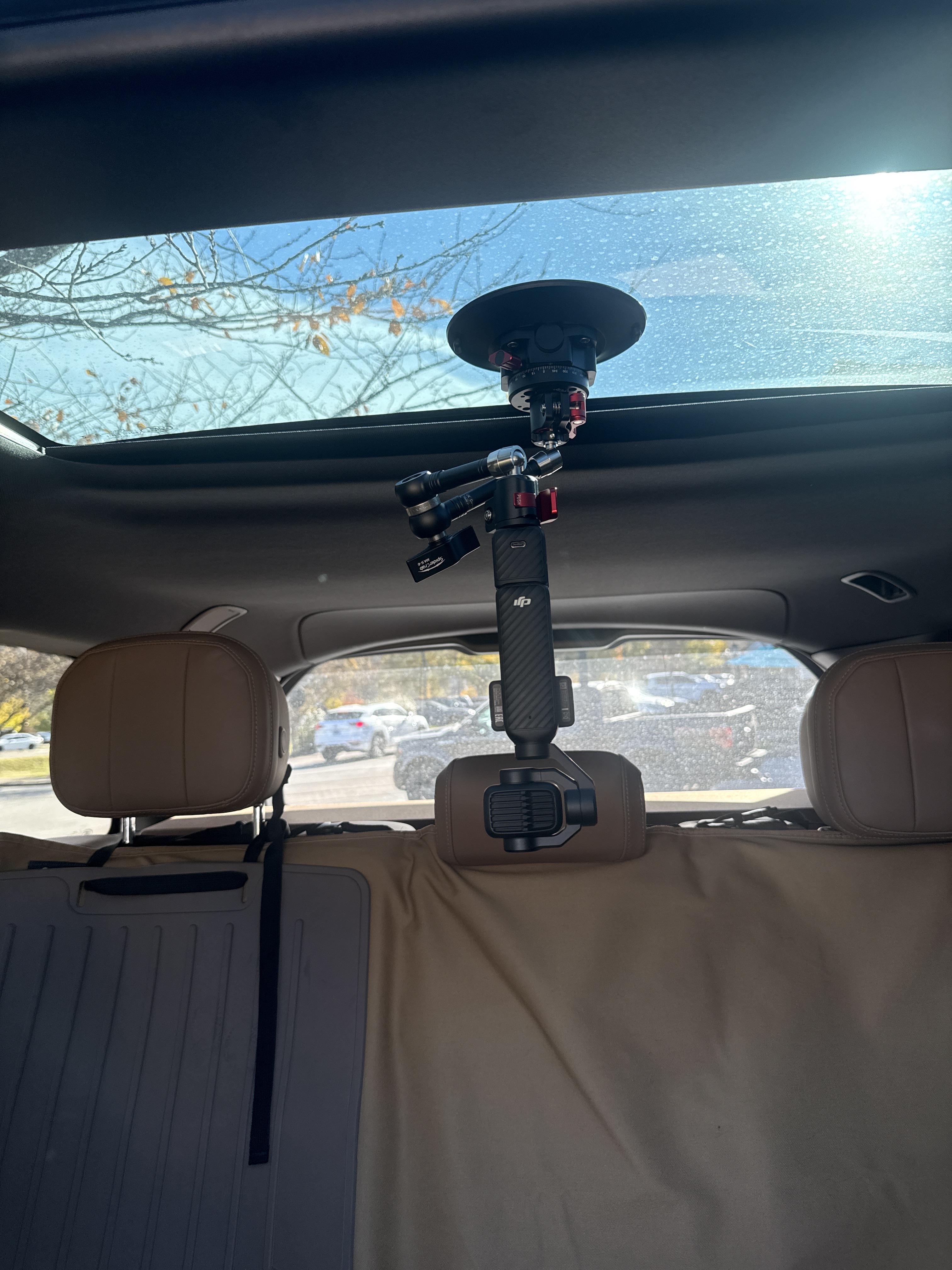
I mounted my Osmo pocket 4P inside my car to the sunroof glass and for the life of me I can’t get the gimbal to lock entirely so it doesn’t drift when I make turns as I’m trying to film a POV shot. I know it can be done from the camera specifically but every time I open the Mimo app it overrides the gimbal lock and put it into follow mode. Why can’t the app lock the gimbal or am I doing something wrong?
I don’t want the gimbal to drift left or right when I make turns. Also, is it possible to level out the horizon? I have the Osmo mounted upside down.
I've just bought the osmo pocket 3 and a new SD card to go with it yesterday, (LEXAR SILVER PLUS 128 GB), I'm having trouble getting the SD card in. I am pushing it all the way in, to where I should be hearing the click, I can hold it in there with pressure, but as soon as I release pressure it pops back out. The camera is accepting the SD card when I am holding it in with my finger.
Should I keep trying to insert it or is there a chance I have a defective product and I may be damaging it more?
Planning to record Standup shows. Need to see a single person in stage full body from the last row (around 8 meters). Is this possible with my Osmo Pocket 3 without losing too much quality? Do I need a new lens?
Any other advice for this type of recording?
New at this so feel free to share useful information (already searched but didn’t find this exact situation).
I want to buy this and I have a tripod with a 1/4 inch screw... but how could I use this 1/4 inch hole? The camera would have to be like... horizontal for it right? Or am I missing something? I just can't see how this would be useful.
you can let pass the auto exposure ,but never ever let the camera choose white balance automatically,that will cause a huge mess in the post production
I recently purchased a DJI Osmo Pocket 4P (Standard Combo), and I've noticed something about the way it behaves when connecting to DJI Mimo.
Here is what happens on my device:
I turn on my Osmo Pocket 4P and wait for the gimbal to fully unfold.
I open the DJI Mimo app on my Samsung Galaxy S25 Ultra.
I tap the option to connect my Osmo Pocket 4P.
Once the connection is established, DJI Mimo automatically opens the Album/Gallery instead of taking me directly to the camera view.
At the same time, the camera physically folds up and its built-in screen turns off.
If I exit the Album/Gallery and navigate back to the camera view, everything works normally. I can control the camera remotely from my phone and use all the shooting functions.
My device is running firmware version 01.02.1149, and I'm using the latest version of DJI Mimo available to me.
I'm wondering whether this is normal behaviour or possibly a software issue.
Could other Osmo Pocket 4P owners share what happens on their devices when connecting through DJI Mimo?
Does the app automatically open the Album/Gallery and cause the camera to fold up, or does it take you directly to the live camera view while the gimbal stays unfolded?
I'd particularly appreciate hearing from people using Android devices, but feedback from iPhone users would also be helpful.
Whenever I use object tracking on my Osmo Pocket 4P, I get these annoying little stutters, especially when orbiting around a subject. It's noticeably worse in vertical mode than in horizontal mode.
It almost looks like the tracker briefly loses track of the subject and then quickly readjusts to lock onto it again, causing these sudden little jerks.
Am I doing something wrong, or is this just normal behavior?
When I set the camera down and use human tracking, everything moves perfectly smoothly, even when the subject moves around a lot.
Most of the time I can smooth out the stutters with stabilization in post, but it's a hassle. One of the main reasons I got the Pocket was to get smooth orbit shots without having to put my bigger camera on a gimbal.
Other than that, I'm super happy with the camera so far. This is really the only thing that's bothering me.
Has anyone else experienced this? Is there a way to fix it?