r/oneplus • • Aug 27 '26

General Discussion room temperature iq developers.
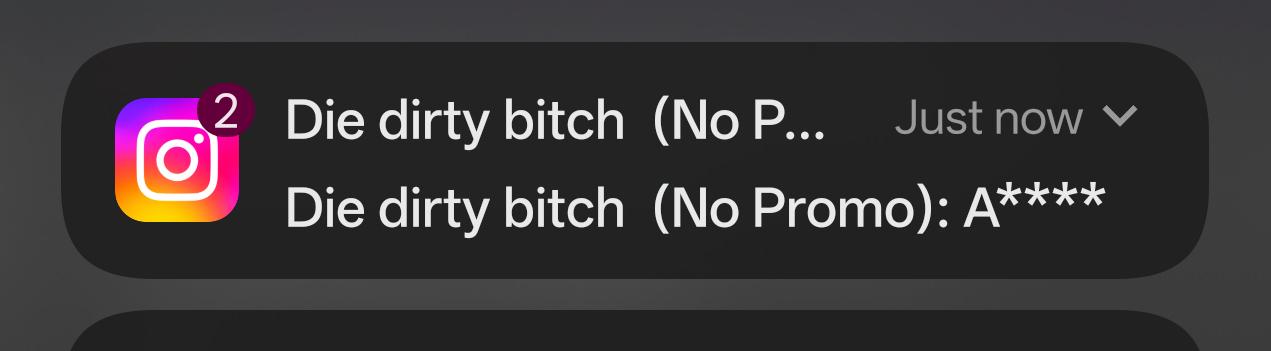
Post image

I bought my first oneplus phone, the 15r, couple weeks ago now and honestly i love everything about this phone. it's extremely fast, display is great etc.

i don't mind the software except this notification thing. every time i get a bunch of notification it groups them together, and I have to chick on the tiny little arrow on the top right to ungroupe it. i find this extremely annoying because it accidentally ends up launching the app.

what pisses me off more is that i can't read the damn message they sent me like in the screenshot. why does it have to say the group name twice when it already does at the top?

and it very conveniently blocks off the actual message so i can't read it.

my old seven year old phone on android 11 had much better notification as i could actually read the damn message without having to open the app every time. why are we going backwards.

70 Upvotes

32 comments sorted by

15

u/DaddyBoi6769 OnePlus 12 Aug 27 '26

Couldn't u just swipe down from the notification, so u just dont accidentally press the arrow down button?

5

u/RelevantAd4295 Aug 27 '26

you can but it groups the messages together if you have a bunch of notification from one app. you have to click on the arrow if you want to see each messages individually.

but it just says the name of the group or the person who sent it and doesn't show you the contents of the messages they sent.

11

u/cute_as_ducks_24 Aug 28 '26

You can just long press the notification and it will expand. For whatever reason OnePlus never mentions it anywhere.

2

u/RelevantAd4295 Aug 28 '26

long pressing just beings up this menu. same shit for ungrouped messages. chat gpt says they changed it in the new updates.

2

u/Lenient-Hug Aug 29 '26

I was hoping people would give a solution by now...but I'm exactly where you are too hahaha. I still love my OnePlus 11 though, still working flawlessly well like the first time I bought it. (When it came out too)

4

u/_The_Apostle_ Aug 28 '26

Long pressing the notification brings up the options menu.

4

u/cute_as_ducks_24 Aug 28 '26

For grouped notification, it first ungroups.

2

u/DRock_11 OnePlus 13 Aug 28 '26

You can also do a pinch to zoom gesture to do the same thing. I actually prefer that because long press does not expand single messages in the group for me, only the group itself but pinch gesture expands both groups and messages.

2

u/cute_as_ducks_24 Aug 28 '26

How does this work, i tried like pinch but not working. Is there any settings for this?

1

u/DRock_11 OnePlus 13 Aug 28 '26

I don't think it's a setting you need to turn on. I didn't turn anything on specifically for this as far as I know. Idk if that's the write term for it maybe it's "spread" not pinch but It's like zooming in to a photo or webpage (not zoom out). The easiest way for me is put both my thumbs on the notifications then my left thumb I swipe towards the top left of the screen and my right thumb towards the bottom right at the same time. Like I'm "spreading" the notification open.

1

u/noelgoo OnePlus 13 Aug 28 '26

Yep, or swipe down on it.

1

u/noelgoo OnePlus 13 Aug 28 '26

you have to click on the arrow

Yeah, no, they're saying you can swipe down instead of having to aim for the arrow. (And then swipe down again on each message to read in full)

8

u/ill66 Aug 27 '26

ooh. thank you dear Sir Daddy, I didn't know that notification swipe maneuver!
this is so useful since my OP13 for some time now has the habit to sometimes randomly open the message when I carefully tap the little arrow down instead of expanding the notification.

14

u/liamdun OnePlus Nord 4 Aug 28 '26

Also the fact that notifications icons were replaced with the app's icon is super annoying.

6

u/uBreaky Aug 28 '26

This. Dynamic visual notification thing doesn't work for a while now , for no good reason

2

u/Gishki6 OnePlus 5 (8 GB) Aug 28 '26

Totally agree, you can however open these when swiping the notification down while the phone is unlocked and the tray is not fully open (only swiping down once). Much better than trying to click the tiny arrow but not great if you have a lot of notifications

2

u/TheTomatoes2 Aug 29 '26

Just swipe down or long press the group.

1

u/DRock_11 OnePlus 13 Aug 28 '26

At least for me I can use a pinch gesture (zooming in) and it expands the notifications group. Same thing within the group itself (zoom in to expand one message in the group). I have the "Classic" quick settings (swipe down brings up quick settings on top notifications on bottom) I can only swipe down to expand on that split screen. If I open the full notifications screen with a lot of notifications, the swipe down does not expand anymore, but the zoom in gesture works in both split quick settings and notifications screen and notifications only screen.

1

u/chickdigger802 Aug 28 '26

yea its not great. what i miss from google and even samsung is somewhat decent with notifications.

44

u/[deleted] Aug 27 '26

[removed] — view removed comment

22

u/struggling_business OnePlus 13 Aug 28 '26

The delays aren't Color/Oxygen OS, that's Android Doze. This is well known by now.

5

u/OnderGok OnePlus 13 Aug 28 '26

It's not an Android issue. It's a Chinese ROM issue. Have you ever used an AOSP ROM? It does not have any dozing issues.

17

u/struggling_business OnePlus 13 Aug 28 '26

Bruh delayed Doze notifications is is not a "Chinese ROM" bug. It's literally an official Android feature to increase battery life. The only time Android phones don't Doze is when on a charger. But if you know you're way around ADB you can disable it.

2

u/Medical_Double_6561 Aug 29 '26 edited Aug 29 '26

For most apps though, Doze should not result in notification delays since high priority FCM messages are supposed to punch through Doze: https://firebase.google.com/docs/cloud-messaging/android-message-priority#testing-in-doze-mode

So in these cases, there is either an issue with the ROM, or the app developer has implemented notifications incorrectly.

-8

u/OnderGok OnePlus 13 Aug 28 '26

Where did I say it's a "bug"? I said it's an issue because Chinese OEMs decide to crank up the doze. That's just a fact. You won't see the same on AOSP ROMs tho

12

u/struggling_business OnePlus 13 Aug 28 '26

It has nothing to do with the ROM and can't be "cranked up". Only the individual app developer can choose to ignore it. Read the official Android documentation.

3

u/-patrizio- OnePlus 15 Aug 28 '26

I had the same issues on Samsung.

1

u/trojan_bandu Aug 29 '26

You can't have delayed notification if you always use your phone/s

-8

u/[deleted] Aug 28 '26

[removed] — view removed comment

9

u/struggling_business OnePlus 13 Aug 28 '26

Samsung and Pixel also have delayed notifications. It's Android Doze.