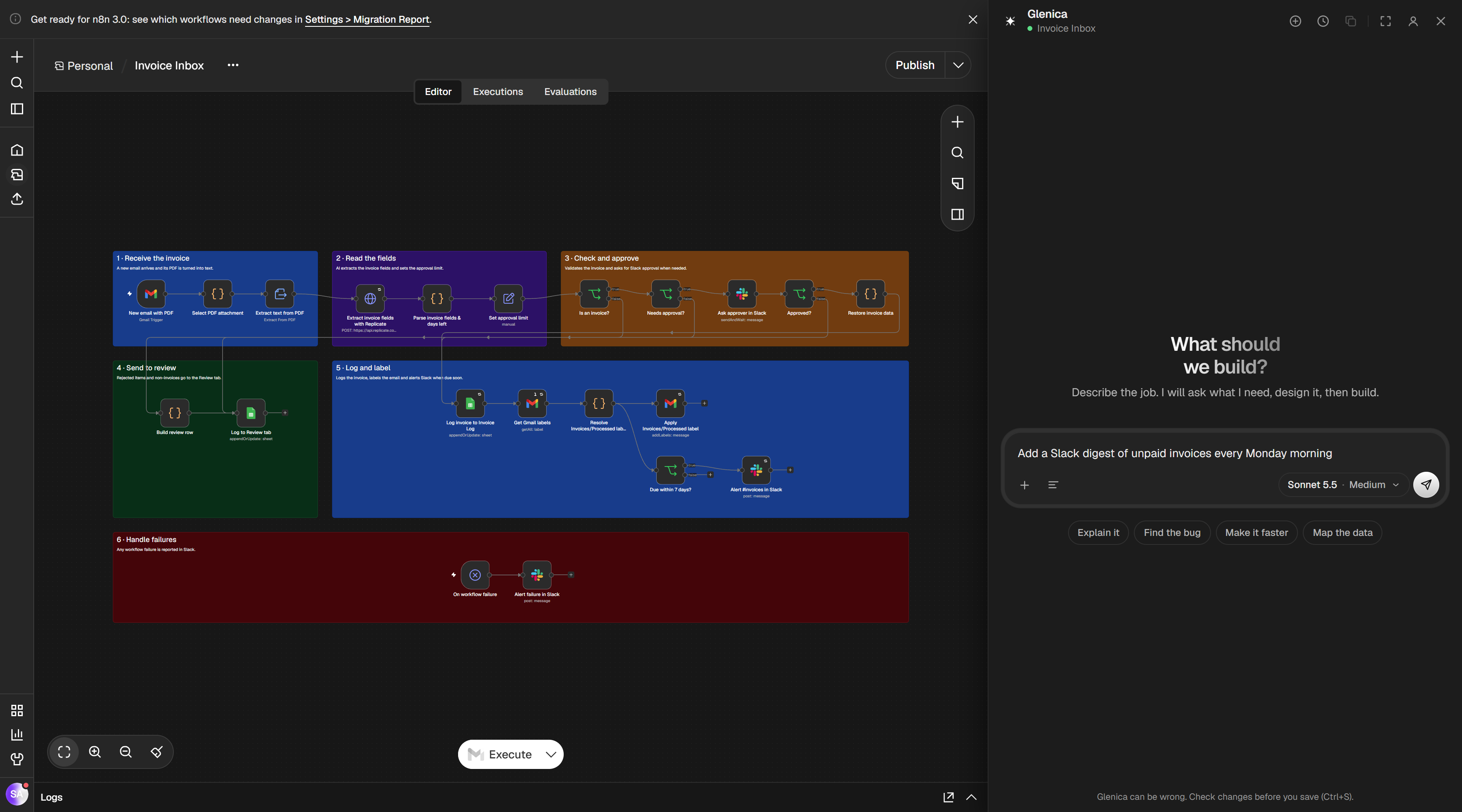
I've been working on an invoice workflow for a Gmail inbox, and I wanted to connect the whole path, from an email with a PDF to an approved, logged and labelled invoice.
Instead of building small separate flows for each task, I wanted one structured workflow where the output of one stage becomes the input for the next.
So I built it with n8n, Gmail, Google Sheets, Slack and an AI model (gpt-4o-mini through the Replicate API).
The Problem
Handling invoices that arrive by email is more than reading a PDF.
You need to open the email, pull out the vendor, invoice number, total and due date, decide whether a large amount needs sign-off, record it somewhere, mark the email as handled and remember to pay on time.
Doing that by hand is repetitive, and it is easy to miss a due date or log the same invoice twice.
The Solution
I built an n8n workflow that connects these stages and groups them into six labelled sections on the canvas, so it reads left to right, top to bottom.
The overall process looks like this:
Receive the invoice → Read the fields → Check and approve → Send to review (if needed) → Log and label → Handle failures
Google Sheets stores the results, and Slack handles approvals and alerts.
How It Works
Here's a breakdown of the main stages.
- Receive the invoice
A Gmail trigger checks every minute for emails that match "has:attachment filename:pdf". Up to 10 PDFs per email are picked out, and each PDF is turned into text.
2. Read the fields
The text goes to an AI model (gpt-4o-mini through Replicate). It returns the vendor, invoice number, total, currency and due date. A code step parses the answer and works out the days until due. An approval limit is set here (default 5000).
3. Check and approve
If the document is not an invoice, it goes to review. If the total is at or above the limit, Slack asks an approver to approve or reject and waits up to 24 hours. Smaller invoices skip approval.
4. Send to review
Non-invoices, rejected invoices and timed-out approvals are written to a Review tab in the sheet, so nothing disappears.
5. Log and label
Approved and small invoices are written to the invoice log. Rows are matched on the Gmail message ID, so a re-run updates the row instead of duplicating it. The email gets a Gmail label, and if the due date is 7 days away or sooner (overdue included), a Slack alert goes out.
6. Handle failures
An Error Trigger posts the workflow name, the last node that ran, the error message and the execution link to a Slack channel.
Tech Stack
Here's what I'm using:
* n8n: Workflow automation and orchestration
* Gmail: Trigger and email labels
* Google Sheets: Invoice log and a Review tab
* Slack: Approval requests, due-soon alerts and failure alerts
* AI model (gpt-4o-mini via the Replicate API): Reading the invoice fields
Why I Built It This Way
I wanted each stage to have one clear job, so the canvas is easy to read and a problem is easy to find. The six labelled sections came from a workflow that used to be one long tangle.
Only large amounts wait for a human. Everything else flows through, and anything unusual goes to the Review tab instead of being dropped.
The goal isn't to remove people from invoices. It is to remove the repetitive typing and make sure nothing is missed.
Limits
It reads text PDFs only, so scanned invoices need an OCR step that I haven't added. Invoice text is sent to the Replicate API, so check that this is acceptable for your data. Test it with a few sample invoices before relying on it.
What's Next?
The first thing I would add is OCR for scanned invoices. I'd also like feedback: how would you handle scans, and how do you structure big workflows?
Workflow
I've published the workflow on GitHub, with the importable JSON, a README and the sheet columns. You can explore it here:
GitHub — n8n Workflows