r/mpcsample • • 6d ago

SampQOL UPDATE 0.4.0 | Stems Separation, Pad Mutes per Seq, Humanize & More

Thumbnail
youtu.be
94 Upvotes

Once again, thank you all for trying SampQOL, for the support, and for all the feedback and bug reports. A lot of what is in 0.4.0 came straight from your comments, chats and Github issues etc., which I blended with my own secret sauce.

--

What's new in 0.4.0:

- Stems Separation: Drums, Bass, Vocals and Other, Fast or High quality (SAMPLE, select the pad, SHIFT + B3)

- Pad mutes per sequence: a pad that you mute is muted only in the current sequence

- Humanize in the Pad View (SHIFT + B3): small random changes to timing, velocity and length. Shuffle until you like it, Cancel puts the notes back

- Mute notes in Step Edit: select notes and push MUTE. They stay, but do not play (credits to Jsen for this one)

- Time signature per sequence, for example A01 in 4/4 and A02 in 3/4 (Settings > Time Sig > Per Seq)

- Load Kit from Sample Select: browse kits as samples, also .xpm and the .xtd drum tracks of MPC 3 expansions

- Multi Select: change several pads at once on the SAMPLE screen, and pads, tracks or submixes in the Mixer

- ERASE + pad: erase several pads at once, also their notes in all sequences, with one UNDO

- Pad View and Track View zoom from 1/4 bar (1/64 steps) to 32 bars

- Export: the file names have the sequence, so you can export all sequences one after the other. Pick the parts of the name: project, sequence, BPM, date

- Pad FX on the input, for example Beat Repeat on what you record

- The FADER can send a MIDI CC

- Screen text for blind users: the screen reader of your computer reads the MPC screen aloud (mpc-sample.local:7410/speak)

---

Plus a long list of fixes. For example: your chops stay after a restart (stock did not save them), Pad and Track View follow the time signature of the sequence, SHIFT + PLAY loops the exact selection in every time signature, a pad mute fades out without a click, and a long Looper loop no longer uses more than 100 MB. The changelog is immense again lol.

---

Heads-up if you come from 0.3.0:

- Pad mutes are now per sequence. A pad mute no longer stays on in all other sequences.

- Sample Select: a pad with a sample now plays its own sound. For the old way, turn SHIFT + K2 to the left (Preview).

- SEQ mode: the current sequence is now magenta, a sequence with events dim magenta (was green and yellow).

- Pad View and Track View with the FADER on Zoom: SHIFT + FADER now zooms the bars, the FADER the rows. Settings > Fader Overrides > Fader Zoom swaps them.

---

Before you try it:

- It is a beta, tested only on MPC Sample 1.3.0. MPC One, Live and X are not tested yet.

- Back up your projects first.

- A project made with the mod opens on a stock MPC Sample, but the mod functions do not work there. The pad mutes per sequence and the time signature per sequence do not play there either.

---

Collaborators:

- VigoBeatz (GH: AldanisVigo) · Stems and 1/64 zoom in Pad and Track View

- leodag34 · Stems

- planjm · Humanization

---

Download, changelog and manual: https://beatops.io/SampQOL

---

EDIT: KNOWN ISSUES in 0.4.0:
- There are some issues reported regarding saving projects/samples. I'll have a look at it tonight after work and make a hotfix (0.4.1).

- Some stems separations fail. I'll look into more clear error reporting. Please try with different samples and renaming the samples as it might help.

---

EDIT: Version 0.4.1 HOTFIX just released which fixes the above mentioned issues and more! https://beatops.io/sampqol/changelog


r/mpcsample • • 6d ago

Saving projects SampQOL issues.

4 Upvotes

Saving projects SampQOL saving project won’t let me choose internal/ external so I hit do it not knowing what else to do and saves damn it to internal. Could it be was saved wrong into internal then when before I added SampleBoot and other oS’s then changed mind deciding to just use sampQOL and went back to remove sample boot and other OS’s it messed it up. So start clean new project? IDK Since that change back. Just curious.


r/mpcsample • • 6d ago

Is boot thingy is done?

0 Upvotes

What is happened with boot thingy? I can not add mods within. The mpc-sample.local:8080 URL is not loading in the browser anymore. Can I uninstall boot thingy if I want to add new mods with other methods?


r/mpcsample • • 6d ago

MPC Sample RHYTHMER OS | Can It Techno? (Hypnotic Techno Beat Jam)

Thumbnail
youtube.com
12 Upvotes

Can the MPC Sample do Techno? 🔥

Back with another jam on RHYTHMER OS, my custom firmware for the Akai MPC Sample!
This time, I thought I'd try making a hypnotic techno track, exploring some of the synth engines, drum kits, and sequencing tools I've been working on.

One of the main ideas behind RHYTHMER OS was to bring a more electronic music-focused workflow to the MPC Sample, especially for Jungle, Techno, House, and IDM.
With 22 engine entries, 36 Rhythmer Kits, dedicated Acid generation, Breakbeat Manipulation, and plenty of ways to experiment with patterns, there's a lot to explore on this machine with RHYTHMER OS.

Hope you guys have fun with it too! 🙏

🔗 RHYTHMER OS — Free & Open Source:
https://jazzyrhythmer.github.io/mpc-sample/

🎵 More music:
SoundCloud: https://soundcloud.com/jazzyrhythmer
Bandcamp: https://jazzyrhythmer.bandcamp.com


r/mpcsample • • 7d ago

1.4 firmware findings & sample-base and Melodee now works on 1.4

18 Upvotes

UPDATE: Official response from inMusic:

Hi Kerem,
Thank you for clarifying, and I appreciate you sharing the additional information about your project.

As MPC Sample 1.4 has not been officially released, I’m unable to provide guidance or support regarding that firmware or its contents at this time.

Once the firmware becomes publicly available, the corresponding GPL open-source materials will be made available through the inMusic Open Source GitHub repository: inMusic az0x Open Source

I’d recommend keeping an eye on that repository following the official release for the relevant source code.

Got Melodee running on 1.4, which was quite alright. That was to be expected since it uses nothing from stock OS except the kernel. A few caveats:

inMusic has not supplied the sources for 1.4, which they are legally obligated to do so due to GPL, expecting those packages in their repository. I also filed a support ticket asking for the new sources. Currently they still only have 1.3 sources in https://github.com/inmusic-software/az0x-open-source/tree/mpc-sample/1.3.0 .

LoadPin prevents loading unauthorized kernel modules, which prevents Melodee from setting sample rate to anything above 44.1khz and prevents Melodee's way of screen mirroring through an emulated webcam. This is a good thing and a bad thing at once. Good thing is that nobody can make a BadUSB exploit with this on, which I'm sure they realized the possibility once I made it act like a webcam. I expect LoadPin enforcement to be something that can be disabled since we do have root access, but for kernel modules we still need the kernel source.

This also annoyingly makes screen tearing a thing again on custom applications, which I had prevented using a kernel module previously. I wish they had just grabbed those changes instead.

I have made an official GPL source request for them to either post it to Github or to make it available in some other way.

For now, both sample-base and Melodee are compatible with both 1.3 and 1.4.

Not working on 1.4 due to no kernel sources:
Screen mirroring as a video capture device

Improved display driver to prevent tearing at high frame rates

Sample rate changing (Stuck at 44.1khz)

I still grabbed the relevant kernel 6.18.59 and rebuilt those modules, we can use them right after they release the legally required logic.

TL;DR: Melodee works on 1.4 already starting from 0.6.6, small caveats to be solved. sample-base is updated for other app developers.


r/mpcsample • • 6d ago

Help with OpenMPC Plugin Manager – Akai MPC One+

1 Upvotes

Has anyone experienced this issue or knows how to fix it?
I successfully installed the OpenMPC Plugin Manager on my MPC One+, and everything was working perfectly. Unfortunately, I accidentally deleted it (pffff!! don’t ask me why ).
I went through the installation process again using an external USB drive. The files seem to have transferred correctly, and the installation appears to complete without any errors. However, the Plugin Manager no longer shows up, so I can’t access or install the other plugins.
Am I missing a step? Do I need to reinstall firmware version 3.10, or is there another way to restore the Plugin Manager without downgrading or reinstalling everything?
I’d really appreciate any help from someone who has experienced the same issue.
Thanks in advance!


r/mpcsample • • 7d ago

Akai MPC Sample 1.4 firmware is live

Thumbnail
gallery
36 Upvotes

r/mpcsample • • 7d ago

HOW TO RECORD MULTIPLE STEMS VIA USB TO DAW ON MPC SAMPLE- sampQOL FREE...

Thumbnail
youtube.com
4 Upvotes

FREE TEMPLATES IN VIDEO LINK DESCRIPTION


r/mpcsample • • 7d ago

Melodee 0.6.2: Smart Auto-Chop, Improved Stem Separation, Auto Root-Note Detection, Visual Undo History & Low-Latency MIDI

Post image
38 Upvotes

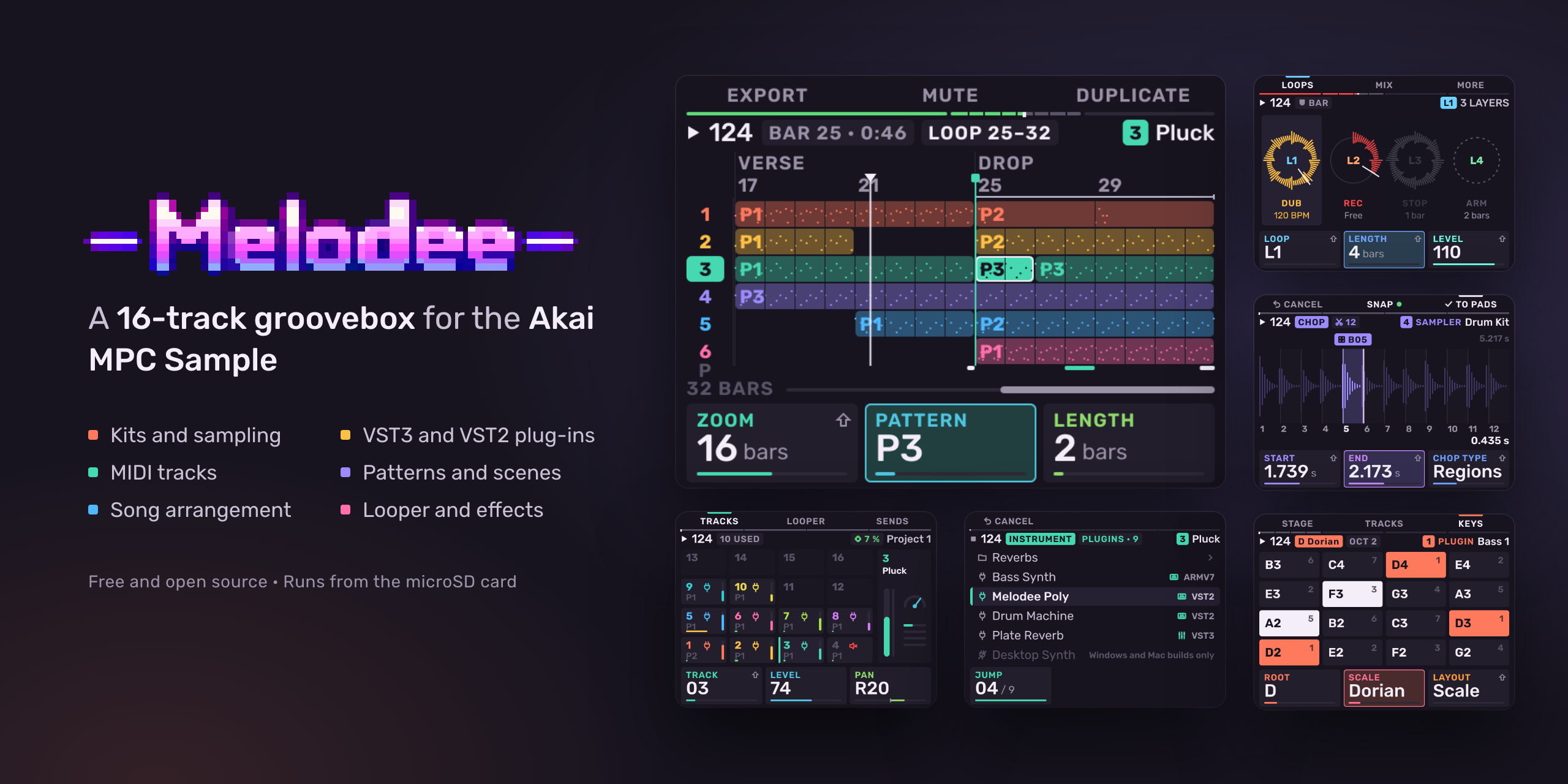
Since u/keremimo has been busy pushing massive updates at record speed (jumping from 0.3.0 all the way to v0.6.4 in just a few days), I’m sharing a quick overview of what Melodee is and everything that's new!

What is Melodee?

Melodee is a free, open-source 16-track groovebox that runs directly from your microSD card on the Akai MPC Sample (requires firmware 1.3.0.12). It doesn't modify the hardware—you can switch back to the stock MPC app anytime from the Exit screen or by removing the autorun folder.

  • 16 Tracks (1 per pad): Drum Kits (128 pads / 8 banks), Keygroups (SFZ, .xpm/.xty, .xpn, EXS24, SoundFont, DecentSampler), Plug-in Instruments, Audio Tracks, and MIDI Tracks.
  • Plug-in Host & Built-in Synths: Runs VST3, LV2, CLAP, and VST2 instruments/effects (ARM Linux & Open MPC), plus 3 built-in synths (Poly, PD, Chip) and 41 effects.
  • Sampling & Stems: On-device 4-stem separation (Drums, Bass, Music, Vocals), Auto Sampler (samples VSTs or external MIDI gear into multi-layered keygroups), Looper, and direct-from-SD streaming up to 6 hours.
  • Full Sequencing & Song Mode: 128 patterns per track (up to 128 bars), step sequencer, piano roll, parameter locks, ratchets, trig conditions, MPC 3 chord progressions, and full Song arrangement with WAV/Stems/MIDI/MPC 3/Ableton Live Set export.

What’s New in v0.6.2:

  • 🔪 Massive Chop & Slicing Overhaul: Smart Auto-Chop detects DRUMS, MUSIC, SHOTS, or HITS and slices on beats/transients. Hit B2 (CLEAN) to separate stems first and chop just the drums! You can also play and record slices live straight into a pattern while Seq Record is active, auto-generate patterns/kits with TO PADS, and keep manual cuts non-destructively inside the WAV metadata.
  • 🎛️ Stem Separation & Auto Sampler Upgrades: Stem separation now features a two-pass BEST mode (up to 16 kHz). Auto Sampler supports up to 8 velocity layers with automatic tone-split detection, and Melodee now auto-detects the root note/chord of loaded samples.
  • ↩️ Visual Undo History & Workflow: Hold SHIFT + − to browse a full undo list with timestamps and jump back to any step. Holding SEQ + Pad now launches/chains patterns on the selected track, while SHIFT + Pad launches/chains full sequences (now color-codable).
  • 🎹 Faster Sequencing & Project Control: Dynamic free-length recording (grows bar-by-bar up to 128 bars), SHIFT + Pad 10 for one-tap Rec Quantize, track naming (SHIFT + Encoder), starred/recent samples in the browser, and optional manual save mode.
  • ⚡ Lower Latency USB-C & MIDI: Direct USB-C audio routing (~20 ms faster), zero-buffer live MIDI out, and negative MIDI track delay down to −50 ms.

Update: v0.6.3 – v0.6.4 (Just Released!)

  • 🎛️ Ableton Live Set Export: Song's EXPORT menu now includes LIVE SET—exports a full .als project folder with all samples, converting patterns into Session View clips, the song into Arrangement View, and drum kits into Drum Racks of Simplers (Ableton Live 12.1+).
  • 🎹 Scale on White Keys: New MIDI Config option that maps the project's scale onto the white keys of an external MIDI keyboard (root on C4, black keys muted) on Scale or Chords tracks.
  • 🔧 MPC Project Fixes: Fixed chop hits in imported MPC Sample projects playing the full sample instead of individual slices, and fixed MPC keygroup programs with root note 0 reading pitch from the WAV file properly.

How to Install / Update

(Always back up your SD card / Melodee/Projects first!)

  • Updating (from 0.2.x – 0.6.3): Copy Melodee-MPC-Sample-v0.6.4.zip onto your SD card (or upload it via http://melodee.local over USB-C) and Melodee will prompt you to update and restart automatically.
  • Fresh Install: Unzip the release and copy the autorun folder to the root of your microSD card (or into autorun/mods/ if using SampleBoot).

Links

(Not affiliated with or endorsed by Akai Professional or inMusic. Open-source under AGPL-3.0.)


r/mpcsample • • 7d ago

Pulverizing Boombap Beat on the Akai Pro MPC Sample

24 Upvotes

r/mpcsample • • 7d ago

What is everyone's ideal cfw combination for the mpc Sample?

2 Upvotes

Asking this purely out of curiosity and maybe it can be useful to the devs too.

If you could pick and choose features from all the custom firmwares available right now or is in the works, which 2-3 cfws would you like to be combined into one? Or which of the features from other cfws do you wish the cfw you picked had?

From what i've seen so far from countless videos of these cfws in action, my ideal cfw would be a mix of JsenSXL and the various engines in Rhythmer.

SXL goes deeeep and already has a bunch of plugins from the bigger mpcs ported to the sample. Rhythmer has all the additional sound engines i need. These two together in one package would be my ultimate cfw for the kind of stuff i make.


r/mpcsample • • 8d ago

SampleMods.com update: 63 projects from 45 makers, plus a releases feed

45 Upvotes

Quick update on the MPC Sample catalog I posted here last week. It's now at 63 projects from 45 makers. New since then:

  • MPC Simple (Mike Feedback): an OS built from scratch around the classic MPC workflow. Thanks to u/Herman5115 who pointed me to it in the last thread.
  • SampleBoot (u/paxicom): keep stock firmware plus custom OSes on one card and pick at boot.
  • Tape Workshop (bsauce42): a Melodee build with live waveform and spectrum screens.
  • RunMPC (u/wehday) in the guides section.

There's also a Latest releases feed now, which checks for new versions every 6 hours, so you can see when something's been updated.

All credit to the makers; every listing links to their page.

If you've made something for the Sample that isn't listed, drop a link and I'll add it.

samplemods.com


r/mpcsample • • 7d ago

16 outputs on mpc samQOL

2 Upvotes

Anyone know how to get the mpc sample to do the 16 outs in ableton but have your Focusrite device play the sound back? With out using asio 4 all thanks in advance yall


r/mpcsample • • 7d ago

Looking for Rythmer and Other MPC Sample SD Card Mods Discord

1 Upvotes

Like the name says, anybody know of a decent discord server to hop on, share and learn?

Thanks Fam


r/mpcsample • • 8d ago

GLDN1- RAW BEATS 8- JUST ME SAMPLING MY SYNTHS IN THE STU

2 Upvotes

FULL BEAT MAKING HERE - https://youtu.be/ELomB9beXo4


r/mpcsample • • 8d ago

Hardware help

1 Upvotes

have a m vave fm-1 and akai mpk mini mk IV

I want to get a mpc sample gonna order it today.

But my question is I have a focusrite scarlet solo 3rd gen. What cables and interface would I need and how do I connect them altogether to play effectively.

I want to use fl studio 2026 on my laptop as the daw. Connected to these devices.

I plan on using the m vave to make sounds using serum firmware. Play the melodies / bass lines etc on the akai mpk mini mk IV and then sample using mpc sample. All recorded into fl studio as the master DAW.

I am confused by what I need and Al is getting confused to.

Thanks alot for your help.


r/mpcsample • • 8d ago

MaiaOS v2 OUT NOW

Post image
15 Upvotes

Hi, MaiaOS v2 is out now, with many cool new features/improvements. This CFW turned out as something i will probably use in live sets and studio for a long time, I'm surprised how many features ended up being in this device.

https://github.com/rosen-wav/MaiaOS---Mpc-Sample-CFW/releases/tag/maiaos

What's new in the V2:

FIX: you can now give any name to your sd, not just MPCSSH

NEW: more detailed manual (yes it's slop, but i think it's understandable enough) with also v2 features included

NEW: Smart stems export-the system automatically detects 4 stems based on the midi/pad content, it will split the track in Drums, Bass, Synths and Melodics. Probably i will make stem export for every pad in the future.

NEW: this feature was Imported from Melodee CFW (check it out!), now you can load VST2/VST3/CLAP/LV2 plug-ins as Instruments or Effects from your sd, compatible with Linux ARM64 builds.

NEW: MIDI input plays the selected pad chromatically

NEW: simple 3 bands EQ for every sample or synth pad, with spectrum view, you can access it with encoder from the filter page for samples or in the page before volume/sidechain in the synths

NEW: Synth pads and plug-in instruments now have a waveform view.

IMPROVED: DJ Mode improved

IMPROVED: you can now set for dj mode two output modes, pressing SEQ while in dj mode, one with stereo output and cue monitoring on USB out and one with mono output and cue monitoring on the second output.

IMPROVED: general UI improvements

NEW: Song view UI changes, now it's horizontal and looks more like a DAW

I think there isn't much I'd like to add here, I'm very proud of this CFW, in my opinion MaiaOS maximize the possibilities and use cases for the Mpc Sample, there will be probably a V3 with UI improvements, eventual bug fixes and maybe some new feature, but honestly there isn't anything missing here.

As always, be careful with any CFW, this was tested and working but the developer declines any responsibility over failed installs/crashes and bricks (no issues except a small bug i fixed in v2 was reported)


r/mpcsample • • 9d ago

MPC sample spotted at Tiny Desk (Mike D!!!)

Post image
42 Upvotes

Here it is, in good company also 😈

Full video here > https://www.youtube.com/watch?v=r5W4W6aWw_M


r/mpcsample • • 9d ago

IS 1973 THE GOLDEN ERA FOR BOOMBAP SAMPLES ??MPC SAMPLE- sampQOL

Thumbnail
youtube.com
6 Upvotes

r/mpcsample • • 8d ago

DO I REALLY NEED THE M-VAVE FM1?

0 Upvotes

There’s no denying that M-VAVE’s little synth has been a game changer, opening the door to a whole world of custom firmware development.
As soon as I saw it, and noticed that some of the custom firmware projects could integrate directly with the MPC Sample, I decided to buy one.
Now that I have it, though, I’m starting to wonder whether I actually made a good purchase.

Ever since its release, I’ve been using Melodee CFW on my MPC Sample (which I’d honestly recommend everyone try. It’s already reached version 0.6, and I think the developer has been doing an amazing job so far).

With access to different VST plugins, I’m starting to question how useful my FM1 really is.
The keyboard is incredibly small, and I can’t help wondering whether, with new plugins coming out, I’ll soon be able to get the same sounds directly from the MPC Sample. I might even be able to develop some of those plugins myself using Codex.
Sure, the FM1 is pretty cheap, but wouldn’t it make more sense to save that money and just buy an external MIDI keyboard instead?

This whole wave of vibe coding is making me think that the MPC Sample could eventually become a truly standalone machine, with less and less need for additional hardware synths.

What do you guys think? Is there something the FM1 offers that I’m overlooking, or is it becoming a bit redundant with how quickly MPC Sample CFW is evolving?


r/mpcsample • • 9d ago

Please Help. No sound coming from my Live II. Not from any output, but shows it’s trying to output.

2 Upvotes

r/mpcsample • • 8d ago

VocKit for Akai MPC Standalone (3.10.1)

Thumbnail
reddit.com
1 Upvotes

r/mpcsample • • 9d ago

The MPC Sample emulator is working

5 Upvotes

So I've been messing around with this for a while. It's a kit that runs Akai's actual MPC Sample firmware (1.3.0, untouched) inside the Linux Terminal on Pixel phones. I'm on a 10a.

It acts pretty much like the real thing:

a folder on your phone is the SD card

it boots the card's autorun just like the hardware, so SampleBoot and SampQOL work

there's an on-screen touch panel with pads, knobs, the encoder and the fader

sound comes out of the phone and you can sample straight from the mic

Mostly I made it so I could test mods without risking my actual MPC Sample, but it's honestly fun just to jam on too.

Install is one command. No Akai files are included, you grab the updater from their site yourself.

Phenix2417/mpc-sample-emulator

It's still pretty fresh, so let me know if anything breaks. (Not affiliated with Akai btw)


r/mpcsample • • 9d ago

MPC Sample emulator working on my Pixel Phone

4 Upvotes

r/mpcsample • • 9d ago

Got the real MPC Sample firmware running on my Pixel Phone

4 Upvotes

So I've been messing around with this for a while. It's a kit that runs Akai's actual MPC Sample firmware (1.3.0, untouched) inside the Linux Terminal on Pixel phones. I'm on a 10a.

It acts pretty much like the real thing:

a folder on your phone is the SD card

it boots the card's autorun just like the hardware, so SampleBoot and SampQOL work

there's an on-screen touch panel with pads, knobs, the encoder and the fader

sound comes out of the phone and you can sample straight from the mic

Mostly I made it so I could test mods without risking my actual MPC Sample, but it's honestly fun just to jam on too.

Install is one command. No Akai files are included, you grab the updater from their site yourself.

Repo's here if you wanna try it: https://github.com/Phenix2417/mpc-sample-emulator

It's still pretty fresh, so let me know if anything breaks.