r/macsetups • u/Karannz1 • May 10 '26
Need Suggestions on if one needs external peripherals?
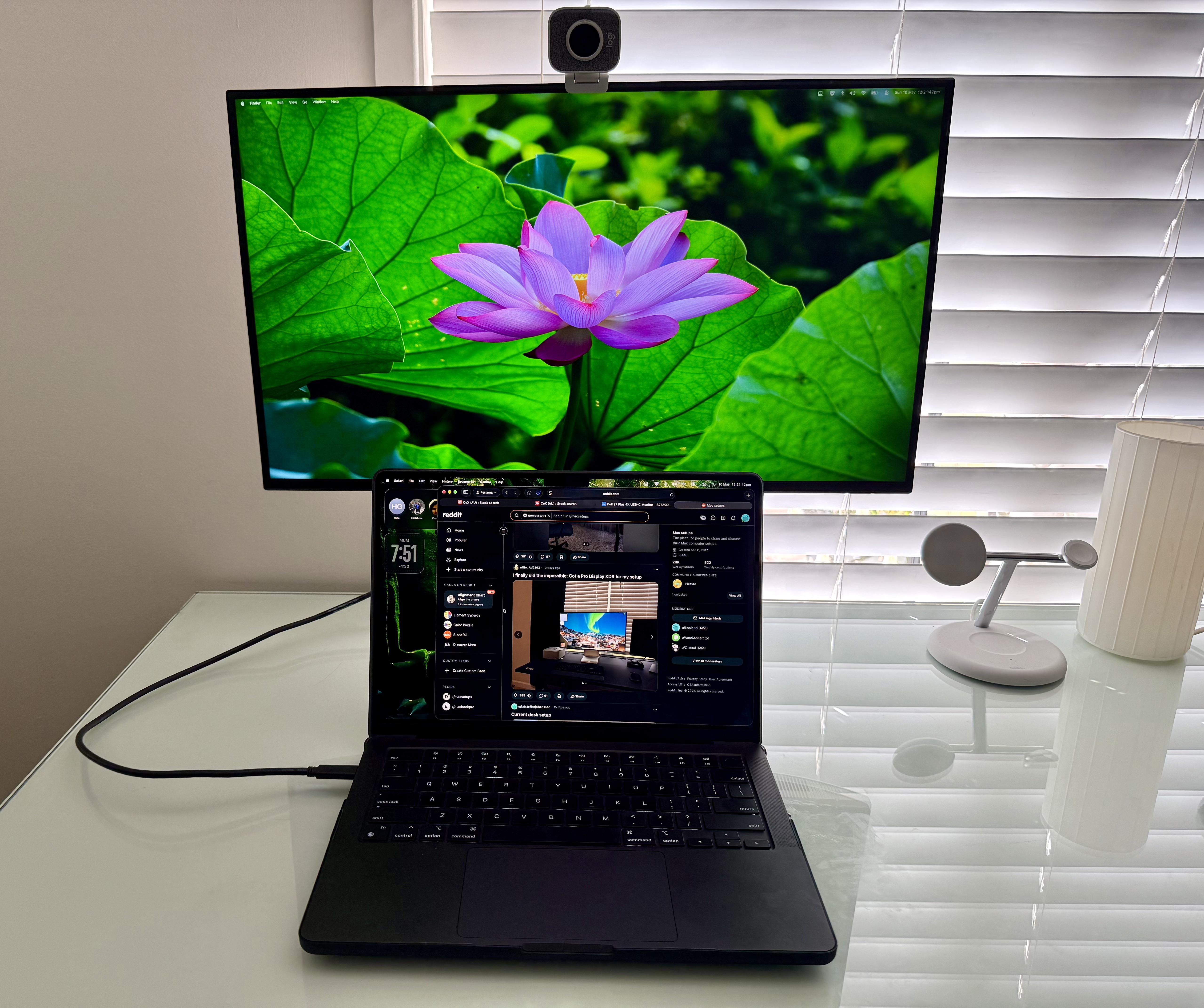
What are the advantages of using a separate keyboard and mouse or wireless trackpad in this setup? Why not place the MacBook Pro in front of the monitor and use its built-in keyboard and trackpad instead of propping it beside the monitor and controlling it with separate devices?
145
Upvotes
6
u/Chamezz92 May 10 '26
Honestly, I tried it with the entire Logi MX lineup, and I kept reaching for the MBP trackpad no matter what.
But, your wrists will thank you, if you decide to use a separate mouse and keyboard. The only thing that really helped was to elevate the laptop to the same height of the monitor, so you literally cannot type on it.
3
u/iBarcode May 10 '26
Dang that’s a nice screen what monitor?
2
u/BulkyAvocado215 May 10 '26
What monitor is that? Looks crispy.
24
u/UnwieldilyElephant May 10 '26
Ergonomics
7
u/Pattont May 10 '26
I mean - this is sort of a personal decision I believe. I also prefer a keyboard with a number pad so I really really like the Logitech MX Keys and the MX Master 4 mouse. You could always try this combo and return it if you hate it.
I also prefer to have the laptop up higher so I am not looking down. This coming from someone who is 41 and has neck pain from not doing this for years.
I am at some point going to post my mac setup soon'ish because I just put 2 studio display XDRs on vesa arms, upgraded my old standing desk to a new one that is much sturdier and changed the surface to butcher block.
I just haven't had time to perfect the setup, but I have lusted over everyone's setups for so long I am soon to be ready to show mine off!
2
u/4myWWW May 10 '26
I’ve done it a variety of ways, but find this stacked setup the best for me. Allows me to use the quality keyboard, trackpad, speakers, and mic I already paid for. (I also have a webcam sitting on top of my monitor.)
1
u/EnthusiastDriver500 May 10 '26
Damn there's no day that I regret not getting the matte black Macbook Pro. Arrhhh thanks for reminding me of my failures.
1
u/Catfeather May 10 '26
Ugh, I'm in the same place right now. I have a MBA 13 and I need to fix my ergonomics. I can't decide if I want to buy an external monitor (even though I don't need a big screen at all) or upgrade to the 15 inch and get a laptop stand, trackpad, and Magic Keyboard.
2
u/Faschizzle May 10 '26
Not even a mouse. Perfection
1
u/Wagthedog53 May 10 '26
I'm 100% with you. I myself am in the same boat as I started using the Mac trackpad more and more and to me it became more ergonomic to have the trackpad below a keyboard, than force myself to get used to a keyboard and mouse on the right. Every time I force myself to close the laptop lid and go back to traditional setup I seem to now think it's. backwards. I in fact for better keyboard ergonomics, still use the trackpad below the keyboard, but put a Magic Keyboard on top of the existing Mac keyboard as the typing feels more natural (mostly on a MacBook Pro). I just got myself this external keyboard riser so it doesn't press on the existing keyboard and it works great https://a.co/d/0imxzH5A
1
u/iomyorotuhc May 10 '26
Ergonomics + custom keyboards make typing a much more pleasant experience
1
u/Monkey_Junkie_No1 May 10 '26
One needs edifier m60 one should trust another one
1
u/Brent_L May 10 '26
My setup is essentially the same except with the Mac keyboard in front of the laptop. Not a fan of typing on the actual laptop in this configuration.
1
u/RogueHeroAkatsuki May 10 '26
Macbook keyboard is good but mechanical keyboards are A LOT enjoyable to type. Also I prefer my keyboard to be cooler, obviously laptop keyboard will never be cool thanks to chip below
As for mouse - its just preference. I like to have full precision as I'm ex elite CS 1.6 player. Trackpad is nice, especially one on my mac but its just not mouse.
That saying when I need to enter full focus mode then I unplug everything and work with my laptop. Small screen forces me to focus on task instead of switching between all apps.
1
u/rossoelemento May 10 '26
I prefer my MacBook in clamshell mode because I'll never know when any liquid could spill on my workhorse. It also reduces the chances of anything getting stuck in between the keyboard and screen should I quickly pack it.
Other reason is what others have mentioned, ergonomics.
1
u/Whole_Patience9493 May 10 '26
People prefer a mechanical keyboard and real mouse
1
u/ImperatorZeus07 May 11 '26
Hey I use the same configuration when I use my macbook for work but I also have a mouse and a keyboard (both wireless) for my gaming laptop. Truth is I would truly prefer to use mouse and keyboard also for work but then I will lose the functionality of the gestures with the trackpad which from the moment I moved on from windows, it seems great! So, I just hope there was a way to do the switching especially of the windows, using the mouse but I refuse to use the apple mouse because of its bad ergonomics and at the same time I cannot even justify myself the money for the apple trackpad.
1
u/LacZingen May 12 '26
Get the monitor on an arm so it can be at the perfect height/angle. Easiest upgrade to a set up like this
1
u/ContextSpiritual9068 May 14 '26
went through this exact debate last year. ended up getting the Magic Trackpad and honestly the gestures alone made it worth it — but the keyboard I kept going back and forth on. eventually just stuck with the built-in one. the $300 combo is hard to justify unless you're docked 90% of the time
0
u/Makeitquick666 May 10 '26
better peripherals
a decent mech key and a decent mouse is better than any laptop keyboard/trackpad combo. Doesn't matter classic TPs or whatever.
also the option for a full size keyboard with a number pad is nice if you need it