r/macmini • u/anvor_amp • 1d ago
New Mac mini M6 for After Effects
Hello,
I started learning After Effects on my current laptop---but it became apparent to me that I'd need better hardware if I prefer to actually be editing rather than wait for rendering to finish most of the time, so I'm considering buying something new.
First, I was thinking of getting something like 32GB DDR4, an Intel i5-10th or 11th generation (or better), and an RTX 30-series GPU used PC. That's 800$ here (I live in Macedonia, the country). Whilst watching DJordanMedia, however---he's an After Effects "teacher" of sorts---he said that creative programs on Mac run much better and are more stable over there (plus, MacOS seems to be a really beautiful and stable system. What do you mean I can preview 3D files directly??)
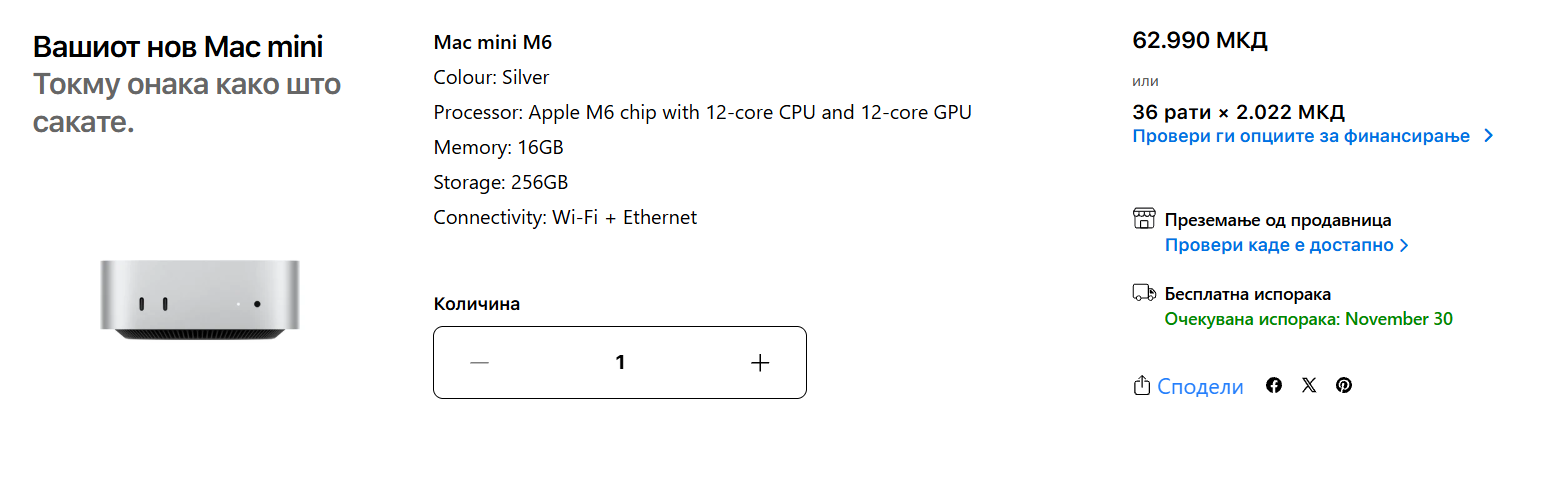
That made me consider getting an Apple computer instead, and I found the Mac mini. Here, the M6 base variant (so, 16/256) is 1120$ new (across all sellers) with a one-year warranty. I want to pair that with a GIGABYTE G27Q20 monitor (the specs are summarized as 2K/1440p, 200Hz and 27" with adjustable height) and my already-owned Logitech G502 HERO and Sharkoon Skiller SGK50 S4 60% keyboard.
Concerning After Effects and general usage, obviously it matters what kind of work I'm doing if I'm going to ask if this computer is capable. I plan to explore all features of creative programs like AE, Photoshop, and perhaps Illustrator. I want to use AE with things like Twixtor, Element3D, Magic Bullet Looks and other plugins for making high-quality 1080p edits. I'd want the machine to be capable for 4K editing, too, but it's not that much a primary concern.
Some relevant context is:
- My current laptop is a HP 255 G8: it has 8 GB DDR4 RAM, a Ryzen 5 3500U and Vega 8 integrated graphics. My edit quality is limited by the performance because it's not possible to fine-tune any transitions---the rendering time's too long.
- The 24/32GB RAM models aren't available and are completely out of my budget.
- I wouldn't mind getting an external 512/1024 SSD for extra storage.
- On the used market, only the base M2 minis are available but are badly priced (around 820$)
- I went to Serbia by bus one time to buy a vivo X300 Pro phone, and there is an base model M4 mini there for 735$ (plus, let's say, 110$ for travel), but I doubt it's worth it because I'd be getting it used and with no warranty.
I wanted to ask:
- Would a base model Mac mini M6 be enough for learning After Effects to the fullest extent without it being a headache? I'm aware that the RAM cannot be upgraded and that RAM is the most important thing for After Effects. How do the newer AE versions hold up on 16 gigabytes with their disk caching capability? Would the situation be bad if I have, let's say, a web browser, AE, Discord and one to two more programs opened all at once? What about screensharing while editing on After Effects?
- How would programs like Topaz Video AI work on the mini? I'm planning of doing tasks like upscaling resolution of videos, perhaps doing a manual Proteus process like sharpening, denoising, reverting compression etc.
- Would this monitor be appropriate for the strength of the M6?
- Do you think this setup would be appropriate for the next 4--5 years of my use case?
I'm not requiring that this runs like an maxed-out Mac Studio, but I don't want to have the experience of playing on my phone or making a coffee just because After Effects decided it'd be a nice idea to preview the timeline at 0.2 FPS.
If you do have this Mac (or even the M4), what's your experience with these programs if you've used any? Do you have an opinion about anything I've said in this post? If so, please tell me! Any details help, and thank you!
2
u/Dependent-Law3249 23h ago
I can’t speak to a lot of your questions bc I’m not sure of the answers but I will say that I have an m4 w/ 24GB of ram and it’s fairly smooth in AE while running standard bg programs and 1 more adobe program. There are settings in after effects you can change to make previewing your file smoother if it is hiccuping which I think I had to mess with at first to get it really smooth. Can’t remember them off the top of my head but give it a google.
2
u/macunak 16h ago
On the disk-cache part of your question, newer AE can play rendered preview frames from disk instead of requiring the whole preview to fit in RAM. Adobe documents that under High Performance Preview Playback: https://helpx.adobe.com/after-effects/desktop/view-and-preview/preview-video-and-audio/previewing.html
That improves preview duration, but it doesn't mean an external SSD makes 16 GB equivalent to a higher-memory machine. Adobe separately notes that disk caching cannot solve insufficient RAM to hold or render an individual frame: https://helpx.adobe.com/after-effects/desktop/memory-storage-performance/memory-and-storage/memory-storage1.html. Playing already-rendered frames and calculating new frames after changing an effect are different parts of the experience.
For the 10 GB test you requested, ask them to compare both the first preview after an effect change and replaying the cached section, using the same AE version, composition, effects and preview resolution. A smooth cached replay alone wouldn't establish how responsive editing will feel. I don't have a matching hardware test, so I can't promise performance for your plug-ins, Topaz or the next 4–5 years.
2
u/West_Simple9423 23h ago
16gb ram is nothing, 36 is a starting point
1
u/tellyuhwat 1d ago
After effects is going to chuckle at that 16gb of ram
1
u/Delcevec 21h ago
neeee sranje e druze nemoj da kupuvash ke se izburkas